virtual events and webinars
8 Topics
Virtual Event Legal Terms
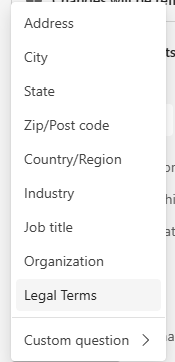
Hello all - I'm currently in the process of attempting to integrate Team webinar registration into my Drupal site, but we discovered an issue where if this Legal Terms field is added to the Event > Registration > Configuration: It doesn't show up when we GET predefined questions, but we can't create a registration without somehow returning a response for this field. We get this error: But we can't find anything in the graph API documentation about how to structure a POST to include an agreement to the terms of use. In the graph api metadata I do see an unknownFutureValue enum which is in the same place in the list as where Legal Terms is in the Teams UI. Is there any current way around this, or is this just a feature that will be added to the API eventually? We'd have no problem just never selecting Legal Terms and including our own checkbox that would have to be checked to submit the registration, but then users who register for the event outside of our Drupal site would not have to agree to our terms to register because the only way to see it here is to add the Legal Terms field to the configuration.192Views1like0Comments
Partner Community Q&A Call - CSP - AMER/APAC - English
We are pleased to invite you to our Microsoft Partner Operations: Community Q&A call for CSP Partners. These sessions are dedicated to assist CSP Direct Bill and Indirect Providers with questions related to CSP launches and upcoming changes. For your convenience, community collections are made available ahead of time in the partner readiness gallery where you can review launch material that will be discussed on the Q&A call. Our goal is to help drive a smoother business relationship with Microsoft. We look forward to having you in one of our upcoming sessions. Register today! Thank you, Microsoft Partner Operations263Views0likes0CommentsPartner Community Q&A Call - CSP - EMEA/APAC - English
We are pleased to invite you to our Microsoft Partner Operations: Community Q&A call for CSP Partners. These sessions are dedicated to assist CSP Direct Bill and Indirect Providers with questions related to CSP launches and upcoming changes. For your convenience, community collections are made available ahead of time in the partner readiness gallery where you can review launch material that will be discussed on the Q&A call. Our goal is to help drive a smoother business relationship with Microsoft. We look forward to having you in one of our upcoming sessions. Register today! Thank you, Microsoft Partner Operations980Views0likes0CommentsEnterprise (LSP) Partner Community Q&A Call - ASIA – Korean
We are pleased to invite you to our Microsoft Partner Operations: Community Q&A call for Enterprise (LSP) Partners. These sessions are dedicated to assist Enterprise Partners with questions related to launches and upcoming changes. For your convenience, community collections are made available ahead of time in the partner readiness gallery where you can review launch material that will be discussed on the Q&A call. Our goal is to help drive a smoother business relationship with Microsoft. We look forward to having you in one of our upcoming sessions. Register today! Thank you, Microsoft Partner Operations435Views0likes0CommentsEnterprise (LSP) Partner Community Q&A Call - ASIA - Chinese
We are pleased to invite you to our Microsoft Partner Operations: Community Q&A call for Enterprise (LSP) Partners. These sessions are dedicated to assist Enterprise Partners with questions related to launches and upcoming changes. For your convenience, community collections are made available ahead of time in the partner readiness gallery where you can review launch material that will be discussed on the Q&A call. Our goal is to help drive a smoother business relationship with Microsoft. We look forward to having you in one of our upcoming sessions. Register today! Thank you, Microsoft Partner Operations315Views0likes0CommentsEnterprise (LSP) Partner Community Q&A Call - EMEA/AMER– English
We are pleased to invite you to our Microsoft Partner Operations: Community Q&A call for Enterprise (LSP) Partners. These sessions are dedicated to assist Enterprise Partners with questions related to launches and upcoming changes. For your convenience, community collections are made available ahead of time in the partner readiness gallery where you can review launch material that will be discussed on the Q&A call. Our goal is to help drive a smoother business relationship with Microsoft. We look forward to having you in one of our upcoming sessions. Register today! Thank you, Microsoft Partner Operations404Views0likes0CommentsEnterprise (LSP) Partner Community Q&A Call - EMEA/APAC - English
We are pleased to invite you to our Microsoft Partner Operations: Community Q&A call for Enterprise (LSP) Partners. These sessions are dedicated to assist Enterprise Partners with questions related to launches and upcoming changes. For your convenience, community collections are made available ahead of time in the partner readiness gallery where you can review launch material that will be discussed on the Q&A call. Our goal is to help drive a smoother business relationship with Microsoft. We look forward to having you in one of our upcoming sessions. Register here! Thank you. Microsoft Business Operations - Partner Community Team754Views0likes0Comments
Teams PowerShell Script to Disable Webinar Registration Notification(s)
Hello Msft TC, Situation: Conducting webinar using Teams on 8/20 but have run into a couple of issues. The main issue of which is that front end registration will actually be managed through a secondary application/program that has already been integrated with our website (Bevy). Through registration at that endpoint they will be provided the direct meeting link to the webinar (vs the Teams registration landing page). Question (ask): Is there a way to disable all email comms to registrants/attendees that are [automatically] generated by interacting/participating with or in the event -- either using the Teams admin center or Teams PowerShell? My thought was disabling all activity notifications at the user level for a specified period of time (in this case perhaps from the creation date of the webinar up to 48 hours after the event) using Teams PS but I don't have a strong knowledge of the syntax to accomplish. Any insights of value are greatly appreciated2.5KViews0likes2Comments