usergroups
5 Topics
add ad users to a ad security group input from msol accountskuid
I am trying this command to first geet the users in Azure who have a standardpack license and then add tthos users to a on-premise AD security group. The users which are retrieved from Azure are corrcect, that part works but then adding them to the aad-adgroupmember does not does the job. It runs but for all users it gives a result: migrate: false. So the script is not faulty but i am giving the wrong input or something like that? The goal is to assign ad users autmatically a office E license based on security group in AD, then when a user leaves the company or is new it will be automatically assigned that license.. The script: $msolUsers= Get-MsolUser -All | Where-Object {$($_.licenses).accountskuid -eq 'company:STANDARDPACK'} ForEach ($user in $msolUsers) { try { $ADUser= Get-ADUser-filter {UserPrincipalName -eq $user.UserPrincipalName}-ErrorAction stop Add-ADGroupMember-Identity O365-E1 -Members $ADUser-ErrorAction stop [PSCustomObject]@{ UserPrincipalName = $user.UserPrincipalName Migrate = $true } } catch { [PSCustomObject]@{ UserPrincipalName = $user.UserPrincipalName Migrate = $false } } }Solved964Views0likes1Comment
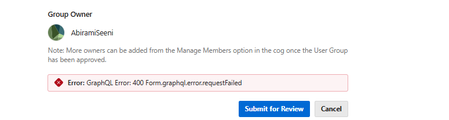
GraphQL Error 400 when submitting a new User Group (GroupHub)
Hi, I’m trying to create a new user group, “India Copilot and AI Agents User Group”, but when I click “Submit for Review” I get: GraphQL Error: 400 Form.graphql.error.requestFailed. I’ve tried shortening the description, removing special characters, and using another browser. Could you please help? Screenshot attached. Thank you!32Views0likes0Comments
1-2-3 Clicks to Better Security: Windows Needs Simpler Security Choices for Everyone
After years of remote work, I've learned that keeping a PC secure is no longer a simple task. Windows offers many powerful security features, but deciding which settings should be enabled, disabled, or left alone can be overwhelming. Many users are asked to make security decisions without understanding the consequences, while other settings are locked or hidden behind multiple menus. The result is that many people either leave everything at default, turn things off out of frustration, or spend hours researching settings that should be easy to understand. My suggestion is simple: Create a "1-2-3 Clicks to Better Security" experience. Analyze My PC - Windows checks my current security posture.Recommend Improvements - Show a clear explanation of what should be changed and why.Apply Recommended Settings - One click to implement Microsoft's best-practice security configuration. Microsoft, please consider creating a guided security optimization wizard that helps everyday users secure their PCs in minutes instead of forcing them to navigate dozens of settings and conflicting recommendations. Security should be accessible, understandable, and achievable in three clicks, not three hours.4Views0likes0Comments