user support
80 Topics
In trouble with "Articles" again...
Hey, everyone! A while ago I had some issues using Engage because the "Article" option wasn't available for me (I spoke about it here). Now, only a few days later, it is happening again. I’ve already checked with my company's IT team, but it doesn't seem to be related to my license (as far as we could tell), anyone knows if is there any temporary service issue going on?149Views0likes0CommentsIn trouble with "Articles"
Hello, everyone! I’ve been using the 'Article' mode in Viva Engage for a while now, and it gets good reach whenever we publish newsletters in this format. However, last week I went onto the platform to schedule an 'Article' post and the option was no longer showing up for me. I’ve already checked with my company's IT team, but it doesn't seem to be related to my license (as far as we could tell). Has anyone experienced this or know what might be causing it? I couldn't find any community articles about this issue.Solved316Views1like2Comments
Issue with notifications in external network
I am having problems with seeing notifications from external network (Microsoft's network to be exact). I can see the notification count all right: However upon clicking the bell, I get this error 90% of the time: What is really weird, is that every now & then it works just fine - it might take 10 times trying the bell icon, or 50, but those notifications will at some point be shown to me all right. I seem to be in tiny minority of people having this issue. Does anyone have any guidance or troubleshooting approach? Is this a setting in my home tenant, or Microsoft tenant? Account permissions? Does a log or telemetry exist anywhere where I could start asking the right questions how to resolve this. If anyone has any insight, that would be greatly appreciated Thanks, MaciejSolved237Views0likes1Comment
Video links becoming attachments rather than embeds
Since 3 weeks ago, whenever I paste a Vimeo link into Viva Engage it becomes an attachment that, when posted, requires the post to be expanded before it can be watched. Previously it's always scraped the vid and embedded to the post, so both the player and copy are immediately viewable by the community. None of my Vimeo settings have changed so I'm unsure why this has occurred. Could someone please assist?Solved253Views1like1Comment
Adding external guest users
Hi, New to Viva and have a question about external/guest users. We are trying to add external users from multiple companies into select communities. A test external user has been created and accepted a B2B invitation, but there is no option to add the user into any communities by the community admin. What is the correct way to go about adding external users in Native mode?175Views0likes0Comments
Inline images still not available for Discussions and Questions
I understand that "Articles" is a new premium feature for Viva Engage that allows inline images when creating an article. However, does anyone know why inline images are still not available in "Discussions" and "Questions" post options? This feature has been missing since day one for those post types. Although it became available last year with "Articles," it has yet to be integrated into the most frequently used post types in Engage, where it is desperately needed. What is the reasoning behind this?632Views0likes1Comment
Power BI integration! IS this an new BUG regarding Viva Power BI integration
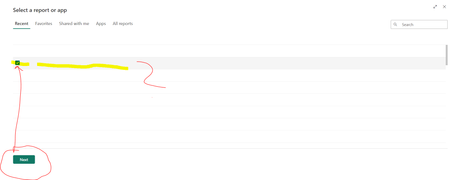
I have previously had integration created between a Key Resolved to Power BI, but when I subsequently needed to change I discovered that the overview is now displayed with either no text, or that the text is in white with a white background. When I choose a random line, I get to move on and only then do I see which report I have a choice. This change has occurred recently. Does anyone know what this is from. Anyone else who has discovered this. The picture below illustrates the problem983Views0likes5Comments
How to download/export usernames in Viva Engage?
Hi, I am trying to find ways to download information who has posted a comment, and other information as shown below. I tried exporting page analytics, but it does not show me the names and also, I need the counts. Who has responded to the discussion? Who has submitted a picture How many likes received on the picture How many comments received on the picture How many likes/loves received on the comments How many responses submitted on a discussion How many likes received on the discussion How many comments received on the response How many likes/loves received on the response Does anyone know how can I get this? Many thanks in advance! Thanks BanashreeSolved490Views1like2CommentsInvite guests to Viva Engage Community
I am looking into using Viva Engage but it is a deal breaker for us that guests with non-microsoft accounts cannot be added. It looks like the old Yammer used to allow external users to join? but the new Viva Engage does not? I have read articles about the new B2B guest framework https://learn.microsoft.com/en-us/viva/engage/work-with-external-users/collaborate-guests-external-viva-engage-community What I am trying to achieve though is allowing personal accounts, gmail, hotmail, etc Our use case is that we have a company community, but would like to invite a small number of guests into our community prior to them joining our team to give them a feel for how the business operates. I would be happy to assign purchase and assign licenses, but there is no easy way for non Office365 admins to do so. It would also cause friction to ask a new person that is not part of our business to use a new MS email account. Ideally this is how I would see it working Just allow guests to join with personal accounts. Community admins can just type in their email and invite them. We could have a pool of available Viva Engage licences. Community admins can invite a guest via their personal email address and assign an available licence.Solved1.1KViews0likes1Comment