user profiles
67 Topics
Support Live Session Migration for Windows 11 Enterprise Multi-Session AVD Hosts
Description Azure Virtual Desktop administrators regularly encounter maintenance scenarios where a Windows 11 Enterprise Multi-Session session host must be removed from service to apply urgent patches, investigate platform issues, replace a host, or perform emergency maintenance. The current approach requires placing the session host into drain mode and waiting for active user sessions to disconnect or forcing user logoff, which can disrupt productivity and user experience. It would be valuable if Azure Virtual Desktop supported live migration of active user sessions between Windows 11 Enterprise Multi-Session hosts within the same host pool, similar to the way virtual machine live migration minimises downtime during infrastructure maintenance. This capability would allow administrators to move active sessions from one session host to another without requiring user disconnection or application interruption. This feature would provide significant operational benefits, including: Reduced user disruption during planned and emergency maintenance. Faster remediation of unhealthy or degraded session hosts. Improved patching and update operations. Reduced dependency on large maintenance windows. Improved service availability for business-critical AVD environments. Better support for future hot patching and rolling maintenance scenarios. While Windows 11 Enterprise Multi-Session differs significantly from Windows Server and traditional VM live migration technologies, the ability to seamlessly relocate active user sessions between healthy hosts in a host pool would be a major enhancement for enterprise Azure Virtual Desktop deployments operating at scale.168Views5likes0Comments
Allow copy and paste directly to local desktop
Hello Microsoft I came across an issue , where the user wanted to copy and paste a file from their AVD session desktop to their local desktop on their computer. However the paste option was not grayed out(not available), due to microsoft not supporting it. I would like to have this option available for them rather than having drive redirection enabled and having them go to the c drive users\desktop and then pasting the file. Please implement the option to copy/paste files DIRECTLY onto their local desktop for future AVD updates/implementations Kind regards331Views1like0CommentsAllow swapping Alt+PageUp / Alt+PageDown direction in Windows App (AVD)
a { text-decoration: none; color: #464feb; } tr th, tr td { border: 1px solid #e6e6e6; } tr th { background-color: #f5f5f5; } Product: Windows App (Azure Virtual Desktop client) Description: When using Azure Virtual Desktop through the Windows App (especially in windowed mode), Alt+PageUp and Alt+PageDown are the only supported shortcuts for switching between remote applications. The direction of these shortcuts is opposite of intuitive and inconsistent with common task‑switching expectations (Alt+Tab, browser tab switching, virtual desktop navigation, etc.). There is currently no way to: remap these shortcuts reverse the navigation direction customize keyboard behavior per user This significantly impacts usability for power users who spend all day inside AVD sessions. Requested enhancement: Add a configurable keyboard mapping option in the Windows App to: swap Alt+PageUp / Alt+PageDown direction or allow user‑defined key mappings for remote app switching Why this matters: Reduces cognitive friction and user error Improves accessibility and ergonomics Brings Windows App closer to parity with legacy mstsc.exe and competing VDI clients (e.g., Citrix) Workarounds today: Users must rely on third‑party tools (AutoHotkey) to fix this locally, which should not be required for a basic UX issue.76Views0likes1Comment
Fslogix. Add a command line to release the profile.
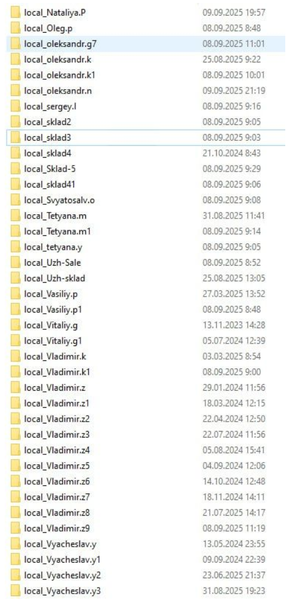
Hello. Add a command line with arguments to be able to release frozen folders in FSlogix. If you don't want to fix the problem, let me automate it myself. In large RDS installations, constant freezes and further duplication of local_%username% folders cause problems.108Views1like0Comments
CCD Locations Syntax
I would recommend changing the information regarding the syntax in the documentation for "CCDLocations" when file shares/SMB is in use from "type=smb,name="WINDOWS SMB PROVIDER",connectionString=\\<server-name>\<share-name>" to "type=smb,connectionString=\\<server-name>\<share-name>." I have had no success using the "WINDOWS SMB PRVIDER" in the syntax for CCDLocations.
Azure AD / Entra ID and Microsoft 365 Basic
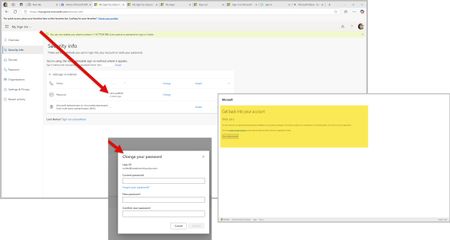
In the last few weeks, I have struggled with new technologies. This encompasses the latest on the market in Android based mobile phones and a new Ryzen 9 mini desktop computer. To eliminate both old phone apps and old laptop applications in the MS Store (Apps) update, I wiped old phone access to accounts via Edge and Google. However, old laptop, which is an HP Ryzen 3 held on to apps and preferences somewhere across systems. So, on both my new mini desktop and the old laptop, I used PowerShell to eliminate remnants of DevHome Pre and CoPilot Pre which kept popping up. Low and behold, I saw new things in my Microsoft and Google Play stores on my devices. Not sure why this would not have happened on installation... Then thinking I was ready to remove XBOX. I did this as well via PowerShell commands. So, now both my machines are work machines with the AMD graphics qualities and XBOX gaming services. Then I removed any old credentials on the old laptop that would use my email address attached to the Work and School account. However, Azure AD and Entra ID will not let me run anything as related to my own accounts. For example, a) I can't change my own password on the Azure AD / Entra ID page. When I attempt to change my password, I get a writeback error: SSPR_0010. However, you need to buy Entra ID Connect to correct this. Entra ID is a trial version to my Azure AD sign-ins so even if I exist in Entra ID and Microsoft is moving to Entra ID, why am I being forced into purchasing things to correct this issue? b) I can't enroll into Microsoft 365 Business Basic using my Work and School Account email address. The enrollment sends me to a blank screen and never enrolls. If I try a second time using my Work and School email address, I get an error that states I have to use a different email address. It seems someone besides me is using my email address here for account access because the Work and School account holds a Visio (web only version) and my Personal account holds a real one that I can't use on my new mini which uses my own email address and not gmail.com or outlook.com. c) Edge creates a blank profile on its own that does not have my profile information in it if I do not use my Work and School account email address to sign-in. I keep losing my profile on first tab load in Edge. d) The Windows 11 Pro license on my new mini request my Work and School account login. The two have nothing to do with each other except that the email address is the same for account purposes. At one point, this CoPilot screen that says "Coming Soon" did not appear and now it is back again. Can you please assist in resolving this issue? I should technically be able to remove my Windows Live account that uses my Work and School email address and recreate it on a new machine without this much of a hassle.FSLogix - 48v35 error at Microsoft login prompt in AVD
I'm resposting from this thread to hopefully create more attention for this problem: https://answers.microsoft.com/en-us/outlook_com/forum/outlk_win-outtop_new-outsub_ofb/outlook-error-message-somehting-went-wrong-48v35/97d7ff71-8a58-40c8-8726-adf3d1f095b8 Me and other admins (from reposted thread) have specific users who experience M365 authentication problems after upgrading to the latest FSLogix version(s) that offers support for New Teams. The error occurs in the Azure Virtual Desktop environment, when a user tries to open a Microsoft application (Outlook, OneDrive etc.). Not all users have the problem that they need to reauthenticate, or can't authenticate at all, with the 48v35 error. The users who do however, repeatedly get the same error after a few days or a week. We tried multiple things, like removing the Microsoft.AADBrokerPlugin directory or creating a completely new FSLogix profile, but the problem stays for these users. In my case I am using the FSLogix setting RoamIdentity=1. Is there any news from FSLogix on this issue? Or does anyone have workarounds to share? I would like to update more customer environments to use the New Teams, but with these issues I would rather wait.30KViews6likes13Comments
Remember blank user password. Remote desktop
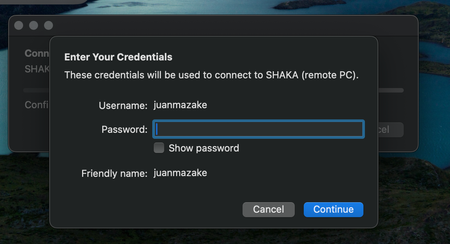
Hello devs! I love the work you're doing with the Windows app. I have one small issue that would be nice to have. I log on the remote PC with a saved user credentials without (blank) password, and every time I want to connect to the PC the popup show's up, then I have to click continue''. With other PC's and password protected users saved credentials work as expected. I understand / assume that the behaviour is if you didn't set a password for the user, ask for it everytime, but blank password user are a thing, specially in safe closed environments. perhaps a flag could be saved after logging the first time with this user without password to not re-prompt in the future. Keep up the good work! Juanma129Views0likes1Comment