usage
12 Topics
I need to speak to a person at Microsoft
Firstly, I don't know if this is the correct place to ask, if not, I apologise, and would be greratful if I could be directed to the correct medium. So..... *** I am writing this on behalf of someone else *** His account has been locked after he had been hacked and infected with a virus, and Microsoft will not unlock it. However, they have decided (today) to take his money for his 365 subscription, that he can't use, and doesn't want. When looking for a way to cancel it, the answer is log-in to his account and cancel it himself. BUT, he can't log in because the account is locked. He has tried looking for a phone number to speak to someone, but cannot find any. He has tried looking for a Live Chat, but, (if it exists) it is only available after he logs in. He just wants to cancel the subscription, and get a refund. Can someone please give me a contact number - preferably in the UK, but any English speaking representitive, in any countrty will do. Thanks,1.6KViews5likes2Comments
Changing Microsoft 365 billing frequency from monthly to yearly unexpectedly increased the price
Hello everyone, I would like to raise an issue with Microsoft 365 Business Standard that I find very difficult to understand and even harder to explain to my customer. I manage two Microsoft 365 Business Standard licenses for a customer. The pricing history was as follows: Until May 2026: €23.40/month total for 2 users From June 2026: €21.66/month total for 2 users This means the annual cost at the latest monthly rate was €259.92/year On September 28, 2026, I changed only the billing frequency from monthly to yearly. During this process, I was not shown any clear warning that the actual subscription price would increase. After the change, Microsoft created a new annual subscription with: €145.56 per user/year €291.12/year for 2 users So simply changing from monthly billing to yearly billing increased the annual subscription price from the equivalent of €259.92 to €291.12. This is particularly confusing because the Microsoft website normally presents annual billing as the cheaper option. I contacted Microsoft Support today. According to the support agent: this behavior is the same worldwide the billing change cannot be reverted the agent cannot revert it it cannot be escalated to a supervisor who could revert it there is apparently no email address or written complaint channel where I can formally dispute the change What concerns me most is not only the price increase itself, but the fact that I was apparently moved to a higher price simply by changing the billing frequency, without a clear indication during the process that the subscription price itself would change. I now also have to explain to my customer why their Microsoft 365 costs suddenly increased, even though no additional licenses or services were requested. From my perspective, changing how often a subscription is billed should not silently result in a different commercial price without a very clear confirmation beforehand. Has anyone else experienced this? I would especially like to know: Is this expected Microsoft behavior? Why does changing the billing frequency trigger a new, higher price? Is there any official escalation or written complaint process for Microsoft 365 billing issues? Is there really no way to revert such a billing-frequency change shortly after it was made? I would appreciate clarification from Microsoft, because at the moment this leaves both the reseller/admin and the customer in a very poor position. Regards95Views0likes0Comments
Obtain Deleted Stats (SharePoint) by Retention Policy
I've scoured: https://learn.microsoft.com/en-us/purview/retention-cmdlets and the Unified Audit Log (https://www.meetingroom365.com/blog/search-unifiedauditlog-powershell/, https://theitbros.com/query-microsoft-365-audit-logs-using-powershell/#penci-Search_the_SharePoint_Online_Audit_Log) to see if I can come up with a method to obtain some statistics regarding how many files and space (storage) has been freed up with the use of retention policies being enabled. I'm drawing a blank. In an ideal world, I'd like know how many files have been deleted by the system (the system enforcing a 5 Year from last modified Date and Delete Policy) for the last year or 6 month intervals. If possible the corresponding volume of storage space recovered from these deletions. Any ideas?310Views0likes2Comments
Archiving Teams channels?
Hi, I found this from MS https://support.microsoft.com/de-de/office/archivieren-oder-wiederherstellen-eines-kanals-53c46491-a265-4391-a2a7-001c5026c9e5 But settings are not available as described in that article. Any ideas how I would be able to archive channels within MS Teams?Solved449Views0likes2CommentsShare Mailbox and Auto Reponder not working as expected.
When you enable the Automatic replies option on the share mailbox. It appears only one auto reply message goes out for each incoming message. No additional auto response email message ever goes out again to those emails address ever again. Unless you disable and reenable the Automatic replies option. Why??? Here is an example of what we are trying to achieve: We have several support groups. We wanted to create share mailboxes for each support group and have the automatic reply send out a message saying the typical response: "We received your message.....". Anybody else experiencing this and is there something I am missing? Is there a powershell command to make it so every incoming message gets a auto reply? Thanks in advance for any help on this matter.1.2KViews0likes1CommentOffice 365 - Username in usage reports is incomprehensible
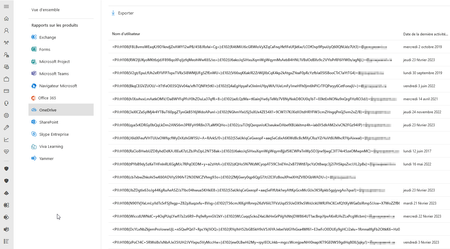
Hello, In many tenant the OneDrive and SharePoint Usage reports on Office 365 Admin Center is displaying the username with uncomprehensible data : The fault persists despite Show hidden user, group, and site names in all reports setting is unchecked Do you have any idea about this error? Regards,1.6KViews1like1CommentCount and volume difference between activity reports and content search
The number of items and volume of the following (Mail items, SharePoint files, Onedrive files, Group mail items) differs between the usage reports and the content search For example, the number of items and volume for a mailbox shows as 1370 and 3.6 GB in the usage report whereas if the content search is run on the same mailbox, the count is shown as 2301 and 4.7 GB. Can you please let me know the reason for this?2.3KViews0likes3Comments
Usage Location Change by Assigning Licence
hi all, I've noticed some odd behaviour when assigning (normally) Power BI License's to users. It seems to change the usage location value in AAD/Office 365. Mailbox and OneDrive seem to stay in original region but not the Usage Location. Situation * AADConnect synced AD Users * Users existing in Office 365 longer than 12 months * Users Always set to AU Usage location * Assign PowerBI Pro Licence (usually using admin.microsoft.com Newer Assign Licences Method from Licencing Screen * Cannot guarantee I haven't used the legacy method of just going into a user in admin.microsoft.com and assigning it directly * Some time later, Usage Location US (Or in 2 users cases GB) It's taken me awhile to figure out it was a PowerBI Change but the 2 GB users never got PowerBI and they changed at some point as well, so I don't think its Power BI Licences exclusively but it seems to be after adding/changing some licences via some method results in a Usage Location Change. AAD Audit log for the two most recent users is doesn't say anything about location change in the log. I'm leaning towards it being the newer admin.microsoft.com assign Licence to Users, vs the more legacy Assign User to Licences but haven't isolated it down to that level. Anyone else experienced this?24KViews1like6Comments