usage
12 Topics
I need to speak to a person at Microsoft
Firstly, I don't know if this is the correct place to ask, if not, I apologise, and would be greratful if I could be directed to the correct medium. So..... *** I am writing this on behalf of someone else *** His account has been locked after he had been hacked and infected with a virus, and Microsoft will not unlock it. However, they have decided (today) to take his money for his 365 subscription, that he can't use, and doesn't want. When looking for a way to cancel it, the answer is log-in to his account and cancel it himself. BUT, he can't log in because the account is locked. He has tried looking for a phone number to speak to someone, but cannot find any. He has tried looking for a Live Chat, but, (if it exists) it is only available after he logs in. He just wants to cancel the subscription, and get a refund. Can someone please give me a contact number - preferably in the UK, but any English speaking representitive, in any countrty will do. Thanks,1.6KViews5likes2Comments
Admin -> Threat Management -> Submissions does not show user submitted emails
I have an O365 E3 sub with ATP 1. I am testing the Report Message plugin with Outlook 2016 for Mac to report junk and phishing emails to the Threat Management analytics in the admin portal. According to the bar graph in the Threat Management -> Submissions -> User Reports tab user submissions are being received. But the emails that are submitted are never appearing in the list below the bar graph. The list only shows either admin submitted emails or no emails at all. Based on researching the expected behaviour is for user submitted emails to also be shown in the User Reports tab for further investigation similar to how admin submitted emails are shown. Isn't that the correct behavior?Solved1.6KViews1like1CommentOffice 365 - Username in usage reports is incomprehensible
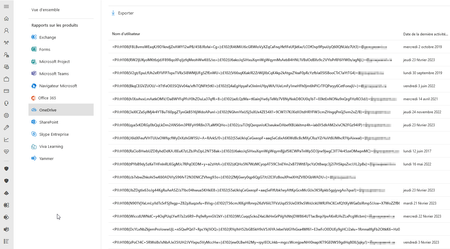
Hello, In many tenant the OneDrive and SharePoint Usage reports on Office 365 Admin Center is displaying the username with uncomprehensible data : The fault persists despite Show hidden user, group, and site names in all reports setting is unchecked Do you have any idea about this error? Regards,1.6KViews1like1Comment
Usage Location Change by Assigning Licence
hi all, I've noticed some odd behaviour when assigning (normally) Power BI License's to users. It seems to change the usage location value in AAD/Office 365. Mailbox and OneDrive seem to stay in original region but not the Usage Location. Situation * AADConnect synced AD Users * Users existing in Office 365 longer than 12 months * Users Always set to AU Usage location * Assign PowerBI Pro Licence (usually using admin.microsoft.com Newer Assign Licences Method from Licencing Screen * Cannot guarantee I haven't used the legacy method of just going into a user in admin.microsoft.com and assigning it directly * Some time later, Usage Location US (Or in 2 users cases GB) It's taken me awhile to figure out it was a PowerBI Change but the 2 GB users never got PowerBI and they changed at some point as well, so I don't think its Power BI Licences exclusively but it seems to be after adding/changing some licences via some method results in a Usage Location Change. AAD Audit log for the two most recent users is doesn't say anything about location change in the log. I'm leaning towards it being the newer admin.microsoft.com assign Licence to Users, vs the more legacy Assign User to Licences but haven't isolated it down to that level. Anyone else experienced this?24KViews1like6Comments