updates
75 TopicsConnect Azure Functions to more services with managed connectors
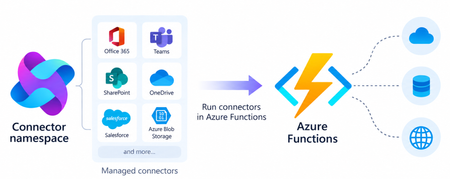
Azure Functions can already connect to many Azure services through triggers and bindings. With managed connectors, your functions can access about 1,700 connectors across services such as Microsoft 365, Microsoft Teams, Dataverse, SharePoint, OneDrive, and third-party systems. Connector triggers deliver events from these services to your function, while typed connector clients let your code take actions against them. You get this broader integration surface without writing the webhook registration code or managing the OAuth tokens required to connect to each service. Focus on your function's business logic and let Azure Connector Namespace handles the connection. Azure Functions integration with Connector Namespace is currently in public preview. It supports .NET isolated, Python, and Node.js. Review the managed connectors overview for current language, hosting plan, and regional availability. To demonstrate how connector triggers and actions work together, this article follows a .NET sample that automates RFP intake across SharePoint, Azure Content Understanding, and Teams. From an uploaded RFP to Teams notification Consider an organization that receives requests for proposals (RFPs) in a shared SharePoint document library. Someone must read each document, identify the requested capabilities, determine which subject-matter experts should respond, and notify the right team. The automated RFP intake sample turns that process into an event-driven workflow: A customer uploads an RFP to a SharePoint document library. A SharePoint connector trigger invokes an Azure Function when the file is created. The function uses a typed SharePoint connector client to retrieve the file contents. Azure Content Understanding extracts the document’s text and layout. The function applies deterministic rules to identify the customer, required capabilities, and recommended subject-matter experts. The function uses a typed Teams connector client to post the results as an Adaptive Card in a channel. Connector Namespace manages the SharePoint and Teams connections. The function controls file processing, document analysis, routing rules, error handling, and notification content How the sample works The .NET sample demonstrates both parts of the connector programming model: a connector trigger receives an event from SharePoint, and typed connector clients provided by the Connector SDKs to perform actions against SharePoint and Teams. The function starts when the SharePoint When a file is created trigger detects a new RFP. It declares the trigger using the ConnectorTrigger attribute and receives a typed payload containing the file’s properties: [Function("OnNewFile")] public async Task OnNewFile( [ConnectorTrigger] SharePointOnlineOnNewFileItemsTriggerPayload payload, CancellationToken cancellationToken) { // Process the newly uploaded file. } Because the trigger provides file properties rather than its contents, the function uses a typed SharePoint client to retrieve the document: byte[] response = await _sharePoint.GetFileContentAsync( Uri.EscapeDataString(siteAddress), fileIdentifier, cancellationToken: cancellationToken); byte[] document = SharePointFileContent.Decode(response); The SharePoint and Teams clients are registered through dependency injection. Each client uses the runtime URL of its Connector Namespace connection and authenticates with DefaultAzureCredential: services.AddSingleton( new SharePointOnlineClient( new Uri(sharePointRuntimeUrl), credential)); services.AddSingleton( new TeamsClient( new Uri(teamsRuntimeUrl), credential)); The function sends the document to Content Understanding’s prebuilt-layout analyzer, which extracts its text and structure. It then applies deterministic C# rules to identify the customer and required capabilities and map those capabilities to predefined subject-matter expert roles. Finally, the function creates an Adaptive Card containing the results and posts it to the configured Teams channel with the typed Teams client: await _teams.PostCardToConversationAsync( postAs, postIn, request, cancellationToken); Connector Namespace handles the SharePoint and Teams connections, while the function controls the document analysis, routing logic, error handling, and notification content. Try the sample The RFP intake sample includes the function code, Bicep infrastructure, Azure Developer CLI configuration, and supporting scripts. Its README explains how to test the workflow locally and deploy it to Azure. Common connector patterns Managed connectors are useful when a function must react to events or perform operations in external systems. Common patterns include: Event to action: React to an event in one service and take an action in another. Event to enrich to action: Retrieve additional information related to an event before acting. Event to document analysis to action: Extract text and structure from a document, apply application rules, and send the result through another connector. Event to AI to action: Analyze event data with an AI service and write the result back through a connector. Extend an existing function app: Add connector-based integrations alongside HTTP, timer, queue, Service Bus, Event Grid, or Durable Functions workloads. The RFP sample combines several of these patterns. A SharePoint event starts the workflow, a SharePoint action retrieves the document, Content Understanding extracts its contents, application code enriches the result, and a Teams action sends the notification. Closing thoughts Managed connectors extend the external systems that can trigger your functions and the services your function code can act on. This brings services such as SharePoint, Teams, Microsoft 365, and many third-party systems into the Azure Functions programming model without requiring you to build the underlying webhook and OAuth infrastructure. Choose Azure Functions with managed connectors when you want this broader integration surface in a code-first application and need custom branching, application libraries and SDKs, other Functions bindings, document or AI processing, or application-specific logic between the trigger and action. If the workload primarily orchestrates connector operations, involves little custom code, and would benefit from a visual designer, Azure Logic Apps is usually the simpler choice. Resources Documentations Overview of managed connectors in Azure Functions Azure Functions connector samples Azure Connector Namespace overview Content Understanding prebuilt-layout analyzer Connector SDK GitHub repos .NET SDK Python SDK Node.js SDK136Views0likes0CommentsIntroducing a Guided Copilot Experience for Building Azure Apps in VS Code
Today we're previewing a new way to build cloud apps with GitHub Copilot in VS Code: a guided Copilot experience that takes you from idea to a deployed Azure app through a structured, predictable workflow instead of a free-form chat session that may or may not land where you need it to. The problem: Copilot is powerful, but unpredictable Ask Copilot to "build me a Node.js API on Azure Functions with a Postgres database" today, and you might get a working project, or you might not. Sometimes Copilot scaffolds the app but skips infrastructure. Sometimes it generates a deployment script that fails halfway through. Sometimes it forgets what you were building three prompts later. The underlying model is capable. The problem is the shape of the experience: an open-ended chat with no checkpoints, no guardrails, and no consistent path from "I have an idea" to "it's running in Azure." How it works The guided Copilot experience adds to that open-ended flow with three clear, explicit stages: 1. Project scaffolding: Describe your app in plain language. Copilot proposes an architecture and asks for anything that is missing (e.g., language, app type, Azure services) through simple forms and pickers, not more back-and-forth chat. You review and approve the plan before any code is written. 2. Local development: Your project is scaffolded then Copilot checks for the runtimes, emulators, and tools you'll need and helps you install what's missing, so the project runs locally from the very first launch. Debug configurations are wired up automatically, so you can test and iterate on your app before it ever touches Azure. 3. Deployment: Copilot shows the tools that will be used for deployment along with a summary of all resources that will be created and a cost estimate so you can be confident in what you're getting. Infrastructure files are created for your app to ensure a consistent and reproducible deployment environment for testing and staging before going to production. Deployment runs through the same reliable tooling used across Azure (az and azd), so if something goes wrong, you get a clear explanation and a concrete next step instead of a wall of CLI output. Once your app is live, the guided experience doesn't disappear, Copilot retains context about your project's architecture, so coming back later to add a service or make a change picks up right where you left off. 🎉 What this means for how you work Determinism over guesswork. The same input reliably produces the same kind of outcome, so no more wondering which "mode" Copilot is going to be in. First try success. Projects are built to run and deploy on the first attempt, not after several rounds of manual repair. Structure over chat walls. Decisions that matter such as architecture choices, missing configuration, and deployment targets are surfaced through real UI, so you're not parsing paragraphs of text to figure out what Copilot needs from you. Stay in VS Code. The entire journey, from planning through deployment, happens without leaving your editor. What's in the initial preview The first version focuses on JavaScript and TypeScript projects, including web apps, Azure Functions, Container Apps, and Static Web Apps, with support for PostgreSQL, Azure Storage, Azure Key Vault, and Azure OpenAI. .NET and Python support are on the roadmap for a future release. Nothing about your existing Copilot workflows changes, the guided experience is an additional, opinionated path alongside the free form chat you already know, for when you want a reliable, structured way to go from zero to deployed. What's next This is an early look at a broader shift in how we think about AI-assisted development on Azure: less "ask and hope," more structured collaboration with clear checkpoints and real UI where it counts. We're continuing to expand language support, refine the deployment experience, and incorporate feedback from developers using it in the wild. Install the Azure Tools extension pack and open an empty folder to try the guided Copilot experience and let us know what you think. File issues or share feedback on the GitHub repo.738Views2likes0CommentsAzure App Service is now a trigger destination for Azure Managed Connectors
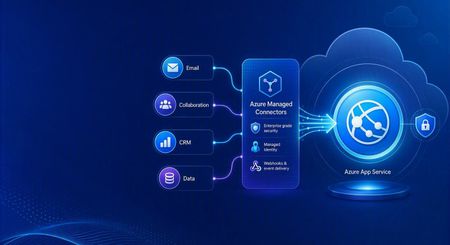
Azure Managed Connectors, currently in public preview, now lets you choose Azure App Service as a trigger destination. Connector events can be delivered directly to applications running on App Service, including ASP.NET Core, Java, Node.js, and Python applications. This is a new capability in the Managed Connectors public preview. It is not the announcement of a separate App Service preview. What's new When you create a trigger in the Managed Connectors portal, App Service now appears as a first-class destination alongside Azure Functions and the generic HTTP endpoint option. After selecting an existing App Service app, you configure: The application route that receives the event. New triggers default to POST /api/webhook , and the route can be edited. The Connector Namespace managed identity used to authenticate the callback. The Microsoft Entra audience expected by the receiving application. Managed Connectors then records the selected App Service resource, route, managed identity, and audience as part of the trigger configuration. You no longer need to select the generic HTTP destination and manually assemble the App Service callback URL. What are managed connectors? Managed connectors provide a consistent way for applications to integrate with services such as Office 365, SharePoint, Teams, Dataverse, and Salesforce. A Connector Namespace manages connections and connector operations so developers do not need to build a separate OAuth flow and service-specific client for every integration. Managed connectors support both directions: Triggers deliver events to your application, such as a new Outlook email or a file added to SharePoint. Actions let your application call operations such as posting a Teams message, flagging an email, or creating a list item. The App Service destination makes the trigger side a first-class option for existing web applications and APIs. How it works In the Managed Connectors portal, create a trigger and select App Service as its destination. Select the web app, callback route, Connector Namespace managed identity, and Microsoft Entra audience. When the source event occurs, Managed Connectors requests a token using the selected managed identity and sends the event to the App Service route. App Service built-in authentication validates the token before the request reaches application code. The application processes the event and can use Managed Connectors actions to continue the workflow. The callback is an ordinary authenticated HTTP request, so the application can use its normal framework, routing, dependency injection, logging, monitoring, and deployment practices. Configure receiving-app authentication The App Service destination configures the Managed Connectors side of the callback. The receiving application must still be configured to trust it. The reference sample uses App Service built-in authentication, also known as Easy Auth, with: A Microsoft Entra application that identifies the receiving application and its audience. A secretless federated credential configuration. The Connector Namespace managed identity pinned as an allowed principal. Authentication required for requests reaching the application. This configuration rejects unauthenticated requests and allows callbacks carrying the expected managed-identity token. The Managed Connectors trigger wizard does not currently create or update the App Service authentication configuration automatically. Try the end-to-end sample The Managed Connectors on Azure App Service email-triage sample demonstrates a complete workflow: An Office 365 Outlook trigger delivers a new email to an ASP.NET Core application on App Service. App Service built-in authentication validates the managed-identity callback. The application classifies the message and enriches the sender through the Office 365 Users connector. Important mail produces a Microsoft Teams triage card. The application flags the source email in Outlook. The repository includes the application, Bicep infrastructure, App Service authentication configuration, Connector Namespace connections, and an Azure Developer CLI deployment flow. We validated the complete workflow end to end: the authenticated callback reached POST /api/webhook , the application processed the event, a Teams card was posted, and the source Outlook message was flagged. Current limitations The capability is configured through the Managed Connectors portal, not the App Service portal. The wizard configures the Managed Connectors trigger but does not configure App Service built-in authentication on the selected web app. The current sample authentication setup requires a Microsoft Entra application, audience configuration, federated credential, and allowed-principal configuration. Depending on the application's Easy Auth configuration, authentication can apply to the whole application rather than only the connector callback route. The reference sample validates one push-trigger scenario; it is not a compatibility statement for every connector and operation. What's next The first-class App Service destination removes the generic callback URL step and provides an App Service-aware trigger experience in Azure Managed Connectors. We are also exploring ways to simplify receiving-side authentication so applications can establish connector-scoped trust without manually assembling the App Service authentication configuration. Try the reference sample and share feedback on the connectors and App Service scenarios you want to use.414Views0likes0CommentsAnnouncing Grafana 13 Support in Azure Managed Grafana
Enhanced Dashboarding and Visualization Experience Grafana 13 introduces a number of improvements that make dashboards easier to build, reuse, and manage at scale. Teams can create richer observability experiences while reducing duplication and improving consistency across environments. These improvements include Dynamic Dashboards, Saved Queries, enhanced filtering and grouping experiences, dashboard templates, and additional usability enhancements that streamline dashboard authoring and discovery. From enhanced dashboard authoring experiences and reusable queries to Git-based dashboard lifecycle management, Grafana 13 helps teams build and operate observability solutions more efficiently at scale. Git Sync: Manage Dashboards as Code One of the most anticipated capabilities associated with Grafana 13 is Git Sync: enabling organizations to manage Grafana dashboards using Git-based workflows. Dashboards can be stored as JSON files in a Git repository, making it easier to version, review, and automate dashboard changes using existing engineering practices. With Git Sync, teams can: Track dashboard changes through source control. Review updates through pull requests. Integrate dashboard deployments into CI/CD pipelines. Collaborate on dashboard development using familiar Git workflows. Git Sync supports bidirectional synchronization. Changes made in Grafana can be committed back to a repository, while changes committed to the repository are automatically synchronized to Grafana. Configuration is managed directly from the Grafana UI, with authentication supported through either a GitHub App or a Personal Access Token. For customers managing large observability estates, Git Sync helps bring dashboards into existing infrastructure-as-code and platform engineering workflows. Visit MSLearn to check out Git Sync on Azure Managed Grafana. Prometheus Authentication Changes in Grafana 13 One of the most important changes in Grafana 13: using Prometheus with Azure authentication. Starting with Grafana 13, Azure authentication is no longer supported in the standard open-source Prometheus data source. Instead, Azure authentication is exclusively available through the Azure Monitor Managed Service for Prometheus plugin. This change aligns with Grafana Labs' updated Prometheus data source strategy and deprecation guidance. Customers do not need to modify existing dashboards as part of this transition. Dashboards remain compatible across both plugin versions, and existing visualizations, imports, exports, and dashboard definitions continue to work as expected. Connectivity and query execution against Azure Monitor Workspaces and Azure Monitor Managed Service for Prometheus endpoints will use the Azure-specific plugin that now owns Azure authentication support. Prometheus data sources configured with non-Azure authentication methods are unaffected by this change and continue to operate without modification. We Recommend: You can start using Grafana 13 today by creating a new Azure Managed Grafana workspace and selecting Grafana 13. We encourage customers to explore the new dashboarding experiences introduced in Grafana 13 and review their Prometheus configurations to understand how Azure-authenticated data sources are transitioned to the Azure Monitor Managed Service for Prometheus plugin. Existing dashboards continue to work without changes. Customers do not need to: Recreate dashboards. Update visualizations. Modify dashboard JSON definitions. Reconfigure imports or exports. For additional guidance, see the Azure Managed Grafana documentation: Configure Bundled Prometheus (preview) in Azure Managed Grafana | Microsoft Learn Add an Azure Monitor workspace to Azure Managed Grafana | Microsoft Learn How to manage data sources for Azure Managed Grafana | Microsoft Learn Connect Grafana to Azure Monitor managed service for Prometheus - Azure Monitor | Microsoft Learn For additional details about Grafana 13, refer to the official Grafana Labs release announcement and release notes.720Views2likes2CommentsBring Your Own Orchestrator to Azure Container Apps Jobs
Azure Container Apps Jobs are a good fit for batch processing, ETL, machine learning, reports, and other tasks that run to completion. But when those tasks have dependencies, retries, or fan-out, you still need an orchestrator. Many teams already have one. The community-maintained Bring Your Own Orchestrator collection provides 13 templates that connect existing workflow engines to Azure Container Apps Jobs. The collection is also listed in the Microsoft Azure Container Apps template index. The idea is simple: Your orchestrator manages schedules, dependencies, retries, and workflow history. Azure Container Apps Jobs runs each containerized task and reports the result. You keep the control plane your team knows while ACA Jobs provides the execution layer. How it works Each integration follows the same flow: The orchestrator authenticates to Azure. It starts an ACA Job execution. It waits for that execution to succeed or fail. It uses the result to continue, retry, or stop the workflow. Your orchestrator ---> Azure Container Apps Job ^ | +---- execution result ---+ The templates package this flow in the native model of each platform: an Airflow operator, a Temporal Activity, an Argo workflow template, a Camunda service task, or visual actions in Logic Apps and n8n. The workload container stays independent of the orchestrator that launched it. Choose the orchestrator that fits the workflow There is no single best orchestrator for every workload. The useful question is which control plane matches the way your team models work. When this describes your team Start with Why You already operate Airflow Airflow on ACA Jobs Adds an ACA Jobs operator without replacing your Airflow deployment You need a complete Airflow environment Airflow hosted on ACA Deploys the Airflow control plane and the ACA Jobs integration Your workflows are Kubernetes-native and run from AKS Argo Workflows Uses Argo workflow templates and AKS workload identity You model long-running business processes in BPMN Camunda 8 Connects Camunda service tasks to ACA Job executions You use JSON-defined microservice workflows Conductor Uses Conductor workers and native FORK_JOIN workflows You need durable replay, heartbeats, and resilient retries Temporal Keeps Temporal as the durable control plane while ACA Jobs runs the workload You build asset-centric Python data pipelines Dagster Uses Dagster resources, ops, and dynamic mapping You build general Python flows and task automation Prefect Uses Prefect tasks, flows, and mapped execution You prefer visual automation and SaaS integrations n8n Provides visual workflows for starting and observing ACA Jobs You use Azure-native data pipelines Azure Data Factory and Fabric Provides pipeline definitions for Azure data integration workflows You need connector-rich application integration Logic Apps Standard Uses stateful workflows, connectors, and native control flow You want Azure-native, code-first durable orchestration Durable Functions Uses durable orchestrations, activities, retries, and fan-out/fan-in You already operate a Dapr-enabled workflow host Dapr Workflow Demonstrates Dapr Workflow directing external ACA Job workloads The Bring Your Own Orchestrator catalog keeps this comparison current and links to deployment instructions for every option. Before production The existing-orchestrator templates are designed around managed identity, scoped Azure RBAC, failure handling, and native fan-out/fan-in examples. Their fan-out samples default to five shards and accept configurations from 1 to 50. Treat higher shard counts as configuration support, not a throughput guarantee. Test them against your Azure quotas, orchestrator limits, and downstream systems. Two template-specific boundaries are worth calling out: Dapr Workflow is a preview architecture Azure Container Apps Jobs do not host Dapr sidecars. The Dapr workflow runtime must run in a separate Dapr-enabled host and start ACA Jobs through Azure Resource Manager. The template is therefore labeled preview architecture. Fabric still needs a native workspace run The Azure Data Factory path has live validation. The included Fabric pipeline is structurally validated but still needs a native run in a Fabric workspace. Each repository README documents its validation scope and limitations. Get started Open the template catalog. Choose the orchestrator your team already uses. Review that template's prerequisites and validation notes. Deploy the sample ACA Job with azd up . Run the single-job example, then test fan-out and failure behavior. For example, if Airflow is already your standard: git clone https://github.com/hetvip2/airflow-on-aca-jobs cd airflow-on-aca-jobs azd up The exact setup differs by orchestrator, but the target remains ACA Jobs. Try the templates Compare all 13 orchestrator templates and choose the control plane that matches your team. Review the Azure Container Apps Jobs documentation for triggers, permissions, and platform limits. Browse the ACA community template collections to find the collection in the Microsoft Azure Container Apps repository. Closing thoughts Using Azure Container Apps Jobs should not require an orchestrator migration. Keep the workflow engine your team already trusts and use ACA Jobs for containerized task execution. Explore all 13 options in the Bring Your Own Orchestrator to Azure Container Apps Jobs collection. References Azure Container Apps Jobs overview Azure Container Apps Jobs management API Managed identities in Azure Container Apps Azure Developer CLI documentation Bring Your Own Orchestrator template catalog Azure Container Apps community template collections678Views1like0CommentsIPv6 Dual-Stack Endpoints for Azure Container Registry (Public Preview)
By Johnson Shi, Aviral Takkar, Bin Du Introduction Two of the most common networking questions we hear from teams running Azure Container Registry (ACR) are: "Can my registry serve clients on IPv6 networks?" — Teams operating IPv6-only or dual-stack networks need their container registry reachable over IPv6. "How do we start moving registry traffic toward IPv6 without breaking anything?" — Organizations guarding against IPv4 address exhaustion, or operating under IPv6 transition mandates, want a migration path that doesn't disrupt existing IPv4 clients. Today, we're announcing the public preview of IPv6 dual-stack endpoints for Azure Container Registry for public endpoints and firewall rules, with IPv6 over private endpoints planned for GA. Set your registry's endpoint protocol to IPv4AndIPv6 , and its endpoints become reachable over both IPv4 and IPv6 — so IPv4-only, dual-stack, and IPv6-capable clients all connect to the same registry, each over whichever protocol their network stack selects. Key Takeaways ACR registries now support an endpointProtocol setting with two values: IPv4 (default) and IPv4AndIPv6 (dual stack, preview). Dual stack is additive — your registry continues serving IPv4 clients exactly as before. There is no IPv6-only mode. Dual stack requires dedicated data endpoints to be enabled ( --data-endpoint-enabled true ), and dedicated data endpoints require the Premium SKU. The service enforces this requirement. You can enable it today with Azure CLI 2.87.0 via az acr update --endpoint-protocol IPv4AndIPv6 . FQDN-based client firewall rules keep working unchanged; IP-based allowlists need to account for IPv6 traffic. Limitation: This public preview covers IPv6 for the registry's public endpoints and firewall rules only. IPv6 over private endpoints is planned for a future release. Limitation: ACR Tasks isn't supported on a registry that has IPv6 dual-stack enabled. Tasks does not work when the endpoint protocol isIPv6 dual-stack, including quick builds (with az acr build) and quick task runs (with az acr run). Support is planned for a future release. How to enable it On an existing registry (Azure CLI 2.87.0 or later) Dual stack requires dedicated data endpoints, so enable both in a single update: az acr update --name <your-registry> --data-endpoint-enabled true --endpoint-protocol IPv4AndIPv6 If dedicated data endpoints are already enabled, set the endpoint protocol on its own: az acr update --name <your-registry> --endpoint-protocol IPv4AndIPv6 Verify the configuration: az acr show --name <your-registry> --query "{endpointProtocol:endpointProtocol, dataEndpointEnabled:dataEndpointEnabled}" { "dataEndpointEnabled": true, "endpointProtocol": "IPv4AndIPv6" } Note: If your clients sit behind a firewall and you're enabling dedicated data endpoints for the first time, add firewall rules for <your-registry>.<region>.data.azurecr.io before enabling — switching from *.blob.core.windows.net to dedicated data endpoints changes where layer blobs are downloaded from. See Dedicated data endpoints for details. Reverting to IPv4 Dual stack is reversible at any time: az acr update --name <your-registry> --endpoint-protocol IPv4 Reverting the endpoint protocol leaves dedicated data endpoints enabled; disable them separately if desired. Scope of this preview This public preview enables IPv6 for the registry's public endpoints — the login server, dedicated data endpoints, and regional endpoints (if enabled). IPv6 over private endpoints isn't part of this preview. Support is planned for a future release. Until then, registries reached through a private endpoint continue to use IPv4. Additionally, IPv6 dual-stack support for ACR Tasks, including support for `az acr build` and `az acr run`, are not supported in the public preview. Support is planned for a future release. Requirements and how features compose Requirement Why Premium SKU Dedicated data endpoints are a Premium feature. Dedicated data endpoints enabled IPv4AndIPv6 requires dataEndpointEnabled: true ; the service rejects the setting otherwise. Azure CLI 2.87.0+ Adds --endpoint-protocol to az acr update . For geo-replicated registries, the endpoint protocol is a registry-level setting, and dedicated data endpoints exist in every replica region. Firewall guidance: rules based on registry FQDNs — the login server, dedicated data endpoints, and regional endpoints (if enabled) — continue to work unchanged for dual-stack registries; only IP-address-based allowlists need updating for IPv6. To learn more, see IPv6 dual-stack endpoints in Azure Container Registry (preview) and the ACR endpoint reference. If you have further questions about IPv6 dual-stack endpoints or dedicated data endpoints, reach out to us on the Azure Container Registry GitHub repository or file feedback through the Azure portal.292Views1like0CommentsDesigning for High Availability: The Operational Reference for Running a Geo-Replicated ACR
By Johnson Shi, Zoey (Zhuyu) Li, Huangli Wu Introduction Three of the most common questions we hear from enterprise teams running geo-replicated Azure Container Registries (ACR) are: "How do I control which region serves my traffic?" — When my AKS clusters are spread across regions, can I pin each one to its co-located replica, or am I stuck with however the global endpoint routes? "What happens during a regional incident — is failover automatic or do I have to act?" — If the registry in one region degrades, does the global endpoint reroute on its own, or do I need to manually disable the affected replica? "What happens after the region recovers — does traffic return on its own?" — Is there a cooldown, a quarantine, or any manual step before failback? We answer those head-on, then go deeper on the operational details that come up when you actually run a geo-replicated registry: authentication across endpoint switches, throttling under load concentration, eventual-consistency failure modes, home region outage scope, webhooks, and private endpoint interaction. We draw on the official geo-replication docs, the global endpoint health-aware failover blog, the regional endpoints engineering design implementation, the regional endpoints public preview and private preview announcements, and the ACR reference for various registry endpoints, . This post also draws notes from the ACR product team on roadmap items that aren't yet documented elsewhere. Key Takeaways Health-aware failover is automatic. When the registry in a region degrades, the global endpoint reroutes away from it on the order of minutes, evaluated per-registry. No customer action required. Failback is automatic too. Once health-aware failover marks a region healthy again, the global endpoint resumes routing to it. There is no cooldown period. Health-aware failover applies only to global endpoint operations. It does not apply to regional endpoints (you're talking to one replica, period) or to dedicated data endpoints (the redirect is per-region). Health-aware failover is not triggered by throttling. It responds to regional ACR service health and Azure infrastructure health, not HTTP 429 responses. Use regional endpoints to manage per-replica throttling. Regional endpoints (Step 2a) give you explicit per-region URLs for workloads that need affinity, capacity planning, push/pull consistency, troubleshooting, or client-side failover. Use myregistry.<region>.geo.azurecr.io . Regional endpoints are available on Premium SKU registries. For workloads that don't need pinning, do nothing (Step 2b). The global endpoint plus health-aware failover handles routing automatically. Re-authenticate when switching endpoints. Each global or regional endpoint is its own authenticated surface; re-auth via az acr login , SDK auth, or the Kubernetes ACR credential provider on endpoint change. Don't run a long-lived DNS cache for the global endpoint. ACR purges DNS server-side on disable and during failover; a long-lived client cache works against that. For production workloads, enable dedicated data endpoints for security and DNS predictability on layer downloads. ACR is working on bounded staleness consistency for cross-replica eventual-consistency failure modes; see the FAQ. Background What is ACR geo-replication? Geo-replication is a Premium SKU feature that turns a single ACR registry into a multi-region, multi-write service. Every geo-replica in every region is writable — you can push, pull, and delete from any of them — and content syncs asynchronously between replicas under an eventual consistency model. Per-push replication time scales with the size and number of images being pushed. Similarly, when creating a new geo-replica, the time to populate the new geo-replica scales with the total size of the registry. A geo-replicated registry exposes a global endpoint at myregistry.azurecr.io . Behind that endpoint, ACR uses an internal traffic manager to direct each request to the replica with the best network performance profile for the caller — usually the closest replica, but not always. When clients are equidistant from multiple replicas, or when the closest replica is experiencing Azure infrastructure degradation, requests may be routed elsewhere. A geo-replicated registry also exposes a regional endpoint at myregistry.<region>.geo.azurecr.io , which allows clients to pin API requests to a specific geo-replica in lieu of global endpoints, which has Azure-managed routing among geo-replicas. Zone redundancy is always enabled for geo-replicas in regions where Azure has multiple availability zones — in those regions, ACR automatically spreads replica data across multiple availability zones within each region to protect against zonal outages. Endpoints and data endpoints: what goes where A common point of confusion: when you push or pull, not every request goes to the same place. The registry endpoints (global endpoint and regional endpoints), as well as the data endpoint, do different jobs. Your choice of data endpoint configuration has real consequences for security and resilience. Two kinds of traffic flow during a typical pull: Registry API traffic — authentication, manifest reads/writes, tag resolution, referrers, repository operations, blob location lookups, listing, metadata. This is everything except the actual layer (blob) bytes. All these API requests go to the global endpoint ( myregistry.azurecr.io ) or, if you've pinned your clients to call these APIs to a specific geo-replica, a geo-replica's regional endpoint ( myregistry.<region>.geo.azurecr.io ). Behind the scenes, the global endpoint internally proxies these requests to a specific geo-replica. Layer (blob) downloads — when the client asks for a blob, the registry doesn't serve the bytes itself. It returns an HTTP 307 redirect to a regional data endpoint (separate endpoint from the global endpoint or regional endpoints), and the client follows the redirect to download the layer from that region. Where that 307 sends you depends on whether you've enabled the registry's dedicated data endpoints feature: Configuration Layer downloads redirect to Default (no dedicated data endpoints) *.blob.core.windows.net (the underlying Azure storage account) Dedicated data endpoints enabled myregistry.<region>.data.azurecr.io for the region you were routed to Private endpoints enabled myregistry.<region>.data.azurecr.io for the region you were routed to Regional by design. Dedicated data endpoints always land you on a specific geo-replica's data endpoint — there is no "global data endpoint." With the global endpoint as your registry endpoint, the 307 redirect picks the data endpoint for whichever region the global endpoint chose to serve you. With a regional endpoint pinned to a specific region, the 307 always redirects you to that same region's data endpoint — never cross-region. Why dedicated data endpoints matter. Dedicated data endpoints are a Premium SKU feature that exists primarily to address security and firewall scoping. By default, layer downloads redirect to *.blob.core.windows.net — a wildcard storage FQDN. Firewall rules to allow that wildcard either let all Azure storage accounts through or none of them, which raises data exfiltration concerns and isn't tightly scoped to your registry. Dedicated data endpoints replace the wildcard with a fully qualified domain in your registry's own domain — myregistry.<region>.data.azurecr.io — so firewall rules can be scoped tightly to your specific registry, in your specific regions. That same design choice can also make layer downloads more predictable during routing changes. With dedicated data endpoints, the data endpoint FQDN is known ahead of time and lives in the registry's domain — one predictable hostname per region, configured once. Without them, the layer download has to resolve a wildcard storage FQDN that points to whichever storage account the registry happens to have provisioned, which is a separate DNS resolution path with its own routing behavior and its own caching profile. Dedicated data endpoints simplify the DNS picture by aligning the data path with the registry path and keeping the entire pull experience inside one set of predictable, scoped FQDNs. For any geo-replicated registry where security and high availability matter, enable dedicated data endpoints. Note: Health-aware failover applies only to operations against the global endpoint, not to regional endpoints or dedicated data endpoints. Take note that health-aware failover only kicks in and directs traffic away from a geo-replica when an Azure region is experiencing significant infrastructure degradation. At this stage, it does not kick in to redirect traffic to another geo-replica if a client's data plane API requests are throttled. See the relevant section below for the full scope when health-aware auto failover kicks in or not. The three traffic control tools ACR geo-replication gives you three complementary tools for controlling where traffic lands. Each one solves a different class of problem, and customers most often run into trouble when they reach for the wrong one. We name them up front and use these names throughout the post: Tool Who controls it What it does Use cases Health-aware failover Platform (automatic) Reroutes the global endpoint away from a region whose registry can't reliably serve requests Regional incidents, automatic recovery Replica enable/disable for global routing Customer (manual) Excludes a specific replica from global endpoint routing without deleting it; data continues syncing DR rehearsals, planned maintenance, quarantining a replica without losing it Regional endpoints Customer (per request) Dedicated per-region URLs ( myregistry.<region>.geo.azurecr.io ) that bypass the internal traffic manager entirely Pinning AKS clusters to co-located replicas, push/pull consistency, capacity planning, troubleshooting, client-side failover Health-aware failover and replica enable/disable both act on the global endpoint. Regional endpoints are a separate URL surface that coexists with the global endpoint — enabling them does not disable the global endpoint myregistry.azurecr.io . You can use both simultaneously and choose per workload. The behavior in question When the registry in one region experiences a real degradation, there are three possible answers to "what happens?": (A) Nothing automatic. The customer must manually disable the affected region's endpoint to stop traffic from being routed there. (B) The system detects the regional front-door failure and reroutes within seconds. (C) A per-registry health evaluation detects the degradation and reroutes the global endpoint within minutes, with no customer action. After the region recovers, routing resumes automatically. The answer today is (C). Before health-aware failover, customers were stuck closer to (A) — the system could see whether the regional reverse proxy responded, but not whether the registry could actually serve real pull and push traffic end to end. Health-aware failover closes that gap. We walk through all three tools in the next section, in order: setting up geo-replication, using regional endpoints to pin specific workloads, keeping the global endpoint for everything else, the manual replica disable mechanism, re-enabling participation in global routing, and what to expect when health-aware failover triggers. Walkthrough The following steps assume an existing Premium SKU registry and the Azure CLI logged in. We use myregistry as the registry name, myrg as the resource group, and eastus as the home region. Substitute <your-registry> , <your-rg> , and <your-region> for your environment. Prerequisites A Premium SKU ACR registry (geo-replication requires Premium) Azure CLI ( az ) installed and logged in For regional endpoints (Step 2a): Azure CLI 2.86.0 or later. All regional endpoints commands ( --regional-endpoints , az acr show-endpoints , az acr login --endpoint ) are available natively in Azure CLI 2.86.0+. If you previously installed the acrregionalendpoint private preview CLI extension, uninstall it with az extension remove --name acrregionalendpoint to prevent conflicts with the built-in CLI commands. Step 1: Add a West US replica to a registry that lives in East US Geo-replication requires the Premium SKU. The create call below fails on Basic or Standard. # Confirm the registry is Premium az acr show --name myregistry --resource-group myrg \ --query sku.name --output tsv # Premium # Create a West US geo-replica az acr replication create --registry myregistry --location westus # Confirm both replicas are present az acr replication list --registry myregistry --output table NAME LOCATION PROVISIONING STATE STATUS REGION ENDPOINT ENABLED ------ ---------- -------------------- -------- ----------------------- eastus eastus Succeeded online True westus westus Succeeded online True Pushes and pulls continue working through the existing replica throughout initial sync. Because the registry is multi-region, multi-write, the existing replica keeps serving traffic while the new replica catches up in the background. Initial replica seeding time is a function of registry size — the total number and cumulative size of images already in the registry that need to be replicated to the new replica — not the size of any single image. Step 2a: Pin workloads to specific regions using regional endpoints Use regional endpoints when a workload needs explicit per-region control. The five common cases: Regional affinity — an AKS cluster in East US should pull from the East US replica, every time, without ever hopping to a more distant replica because of a network performance fluctuation. Predictable routing — workloads that need to know exactly which replica will serve them, for benchmarking, capacity planning, or in-region traffic SLAs. Push/pull consistency — pinning both ends of a publish-then-deploy flow to the same replica eliminates eventual-consistency races. Troubleshooting — reproducing an issue on a specific replica requires sending traffic to that specific replica. Client-side failover — customers with their own health checks and business rules want to implement failover on their own terms, on signals only they can see. Enable regional endpoints on the registry: az acr update -n myregistry -g myrg --regional-endpoints enabled When enabled, ACR automatically creates per-region login server URLs for every existing geo-replica. No per-region configuration is needed. Note: Regional endpoints can be enabled on any Premium SKU registry, even without geo-replication. A registry without geo-replication has a single geo-replica in the home region, which gets one regional endpoint URL. However, the feature is most useful when your registry has at least two geo-replicas, where you can pin different workloads to different replicas for routing control and capacity distribution. Push to a specific region using its regional endpoint: # Log in to the West US regional endpoint az acr login --name myregistry --endpoint westus # Tag and push using the regional endpoint URL docker tag myapp:v1 myregistry.westus.geo.azurecr.io/myapp:v1 docker push myregistry.westus.geo.azurecr.io/myapp:v1 Pin AKS deployments to their co-located replica by using regional endpoint URLs in the deployment manifest. The example below shows two clusters in different regions; each cluster references the regional endpoint for its own region's replica (assuming replicas exist in both eastus and westeurope ): # East US-based AKS cluster pulls from the East US replica apiVersion: apps/v1 kind: Deployment metadata: name: myapp-eastus spec: template: spec: containers: - name: myapp image: myregistry.eastus.geo.azurecr.io/myapp:v1 --- # West Europe-based AKS cluster pulls from the West Europe replica apiVersion: apps/v1 kind: Deployment metadata: name: myapp-westeurope spec: template: spec: containers: - name: myapp image: myregistry.westeurope.geo.azurecr.io/myapp:v1 This eliminates cross-region pulls when global routing would otherwise prefer a different replica for a given client, and it gives you a per-region traffic profile you can plan capacity against. Regional endpoint operational tips View all endpoints. Use az acr show-endpoints to see all endpoint URLs for your registry — global, regional (if enabled), and dedicated data endpoints (if enabled): az acr show-endpoints --name myregistry --resource-group myrg Import from a specific geo-replica. When importing images between registries, you can use a regional endpoint to import from a specific geo-replica of the source registry. This is useful when you want predictable network paths or need to import from a replica in a specific region: az acr import \ --name mydownstreamregistry \ --source myupstreamregistry.westeurope.geo.azurecr.io/myapp:v1 \ --image myapp:v1 Firewall rules for regional endpoints. If you use firewall rules, allow access to the following endpoints for each geo-replica that clients connect to: Endpoint Purpose myregistry.<region>.geo.azurecr.io Regional endpoint for registry operations myregistry.azurecr.io Global endpoint (if also used) myregistry.<region>.data.azurecr.io Layer downloads (if using private endpoints or dedicated data endpoints) *.blob.core.windows.net Layer downloads (if not using private endpoints or dedicated data endpoints) For the full list of endpoint types and FQDN patterns, see the ACR reference for various registry endpoints. DNS-based routing without changing manifests. If you don't want to maintain different deployment manifests per region, you can keep all manifests pointing to the global endpoint ( myregistry.azurecr.io ) and use software-defined networking or a regional traffic manager to resolve the global endpoint to the appropriate regional endpoint based on the originating region's traffic. This achieves the same co-location goals as regional endpoints — predictable routing and reduced latency — without embedding region-specific URLs in your deployment manifests. Step 2b: Keep using the global endpoint for everything else For workloads that don't need explicit pinning, do nothing. The global endpoint at myregistry.azurecr.io continues to work exactly as before, and the global endpoint plus health-aware failover gives you intelligent routing across replicas without configuration. ACR picks the best replica for each client based on network performance and reroutes during regional incidents. Regional endpoints coexist with the global endpoint — enabling them does not disable myregistry.azurecr.io . You can use both simultaneously and choose per workload, mixing pinned workloads (Step 2a) with workloads that ride the global endpoint (Step 2b) in the same registry. Step 3: Take a replica out of global endpoint routing Use this when you need to keep a replica alive but stop it from serving global-endpoint traffic — for DR rehearsals, planned maintenance, or troubleshooting an isolated replica. # Exclude the West US replica from global endpoint routing az acr replication update --registry myregistry --name westus \ --global-endpoint-routing false Confirm the change: az acr replication list --registry myregistry --output table NAME LOCATION PROVISIONING STATE STATUS REGION ENDPOINT ENABLED ------ ---------- -------------------- -------- ----------------------- eastus eastus Succeeded online True westus westus Succeeded online False Requests to myregistry.azurecr.io no longer route to West US. The replica still receives replicated content — and continues to replicate its own content out to other replicas — and storage quota and per-replica costs continue to accrue. If regional endpoints are enabled, the West US regional endpoint URL also continues to work; --global-endpoint-routing controls only the replica's participation in global endpoint routing. A note on naming. The CLI flag --global-endpoint-routing (on az acr replication update ) and the regional endpoints feature (enabled via az acr update --regional-endpoints enabled ) are two different things despite the similar names. --global-endpoint-routing controls whether a replica participates in global endpoint routing. The regional endpoints feature creates per-region URLs ( myregistry.<region>.geo.azurecr.io ) that bypass the global endpoint entirely. They are independent controls. In Azure CLI 2.86.0 and later, the old --region-endpoint-enabled flag has been renamed to --global-endpoint-routing . The old flag name is deprecated and will be removed in Azure CLI 2.87.0 (June 2026). If you have existing scripts or automation that use --region-endpoint-enabled , update them to use --global-endpoint-routing . CLI flags quick reference: Flag Scope Purpose --regional-endpoints Registry-level ( az acr create or az acr update ) Enables dedicated regional endpoint URLs ( myregistry.<region>.geo.azurecr.io ) for all geo-replicas. --global-endpoint-routing Per-geo-replica ( az acr replication create or az acr replication update ) Controls whether the global endpoint routes traffic to a specific geo-replica. Set to false to temporarily exclude a geo-replica from global routing. --data-endpoint-enabled Registry-level ( az acr create or az acr update ) Enables dedicated data endpoints ( myregistry.<region>.data.azurecr.io ) for layer blob downloads. Auto-enabled when at least one private endpoint is configured. This bidirectional sync during disable is intentional. When you re-enable the replica, every image pushed to the registry while the replica was disabled — from any region — is already present, so the replica can serve traffic immediately with no catch-up window. If we stopped syncing on disable, re-enabling would leave the replica with stale data and force a long catch-up before it could safely serve pulls. Step 4: Re-enable the replica to participate in global endpoint routing Re-enable the replica: az acr replication update --registry myregistry --name westus \ --global-endpoint-routing true NAME LOCATION PROVISIONING STATE STATUS REGION ENDPOINT ENABLED ------ ---------- -------------------- -------- ----------------------- eastus eastus Succeeded online True westus westus Succeeded online True There is no cooldown. The global endpoint resumes routing requests to the West US replica as soon as the change takes effect on ACR's side. Because data continued syncing while the replica was disabled (Step 3), the replica is immediately ready to serve pulls — no catch-up window. Note on DNS during disable/enable. When you take a replica out of global routing, ACR purges its own DNS records for that replica from the global endpoint on a fast path — there is no waiting on a published TTL on ACR's side. If clients run their own DNS cache for the global endpoint, however, those clients will keep resolving to the disabled replica until the client cache expires. We can't control client-side caches. The recommendation: do not run a long-lived DNS cache for the global endpoint. A short-lived DNS pin for the duration of a single push (covered in the DNS and Client-Side Considerations section) is fine and even helpful — but a long-lived DNS cache will make --global-endpoint-routing false look broken from the client's perspective. Step 5: What to expect when health-aware failover triggers Health-aware failover is automatic. ACR evaluates registry health on a per-registry basis, and when a registry in a region can't reliably serve requests, the global endpoint reroutes that registry's traffic to a healthy replica. There is no customer-invocable trigger — that's the point. End-to-end timing is on the order of minutes — fast enough to catch real regional degradation, slow enough to ride out transient errors that resolve on their own. DNS TTL may add additional propagation delay before all clients switch to the new region. Scope of health-aware failover. Health-aware failover applies only to operations against the global endpoint — the registry API calls (auth, get manifest, get tag, get referrers, get blob location). It evaluates health when those API calls come in; it does not trigger mid-operation. Two important consequences: Regional endpoints are not in scope. When you talk to a regional endpoint like myregistry.westus.geo.azurecr.io , you're talking to that one replica. There is no automatic reroute. If you've pinned a workload to a regional endpoint and that region degrades, you implement client-side failover by switching the workload to a different regional endpoint. Dedicated data endpoints are not in scope. Once a registry endpoint has redirected you to a dedicated data endpoint, you stay on that region's data endpoint for the duration of the layer download. There is no automatic reroute of an in-flight blob download. The region targeted by the redirect is decided up front by whichever registry endpoint served the blob-location call: the global endpoint chooses based on its per-registry health evaluation, and a regional endpoint always targets its own region. The signals you can use to confirm a failover is in progress: # Check replication status az acr replication list --registry myregistry --output table You can also check Resource Health for the registry in the Azure portal — navigate to your registry and select Resource health under the Help section to see platform-side degradation signals. You'll typically see: Increased pull latency as traffic shifts to a more distant replica Resource Health flagging known issues in the affected region Replication status indicating which replicas are online After the region recovers, the per-registry health evaluation marks it healthy again and the global endpoint resumes routing — automatic, no cooldown, no customer action. Note that health is evaluated per registry, not per region: if a degradation affects only a subset of registries in a region, only those registries are rerouted, and other registries in the same region continue to be served locally with no unnecessary latency penalty. Not triggered by throttling. Health-aware failover is DNS-based and responds to regional ACR service health and Azure infrastructure health. It does not reroute traffic based on HTTP 429 (throttling) responses. If a geo-replica is throttling your requests but the region's infrastructure is healthy, the global endpoint continues routing you to that geo-replica. To manage throttling, use regional endpoints to spread workloads across multiple geo-replicas for better capacity distribution. Note on long-running pushes during a failover. A multi-layer push that spans a failover boundary can land layers and the manifest on different replicas — exactly the failure mode that DNS bouncing produces during a single push. ACR is actively tightening health-aware failover behavior to minimize cross-replica scatter during these scenarios, and the recommendation today remains: pin pushes to a single replica via a regional endpoint when push/pull consistency matters. Common Questions Q1. Performance impact during initial replica creation on a live registry Because ACR is multi-region, multi-write, the existing replica continues serving pull and push traffic throughout the period when a new replica is being seeded. Replication is asynchronous and content propagates in the background; the time to populate a new geo-replica scales with the size of the registry — the cumulative number and total size of images already in the registry — not with any single image. The docs do not publish a quantified degradation percentage or a throttling window for this period, and they do not promise zero performance impact — the safe operating assumption for a live production registry is that existing replicas continue serving traffic normally, with the new replica catching up in the background. Q2. Restricted/updating state during initial sync There is no "restricted" state for the registry during normal replica creation. Writes, control-plane operations, and pushes/pulls against existing replicas continue normally. The only time configuration changes are unavailable is during a home region outage — see the relevant FAQ item later on for the full data-plane-versus-control-plane breakdown. Q3. Cooldown periods and non-straightforward failback scenarios There is no cooldown before failback, manual or automatic. Re-enabling a replica's participation in global endpoint routing takes effect immediately on ACR's side. Health-aware failover returns traffic to a region as soon as its per-registry health evaluation passes again. The failback case that is not seamless: if a recently pushed image has not yet replicated to the failover region, a pull from that region may not find the image until replication catches up. This is a function of eventual consistency, not failback timing — and it's part of a broader class of issues we cover in Q4. Q4. Common pull and push failure modes during the eventual-consistency window DNS bouncing during a single push is one well-known problem, but it isn't the only one. The eventual-consistency window between geo-replicas surfaces in several recurring failure modes worth knowing about: Push-then-immediate-pull-cross-region. Pushing myapp:v1 to one region and immediately pulling it from a different region can fail with manifest unknown until replication catches up. This shows up most painfully in CI/CD pipelines where one CI runner pushes an image and thousands of pods across other regions all try to pull from their local geo-replicas at the same time. Today, customers work around this with indeterminate sleeps before scheduling expensive compute, or with retry logic, or by waiting on a replication-complete signal — none of which is a clean planning story. Tag overwrite races. Pushing myapp:v1 , then re-pushing myapp:v1 shortly after with a fix (same tag, different digest), can leave different replicas resolving the same tag to different digests during the eventual-consistency window. Delete propagation. Deleting a tag or repository in one region takes some time to propagate to other replicas. Pulls from regions where the delete hasn't yet propagated can return the supposedly-deleted content. Mid-push failover scatter. A multi-layer push that spans a health-aware failover boundary or a DNS bouncing event can land layers on one replica and the manifest on another, surfacing as manifest validation errors or blob unknown on subsequent pulls. What ACR is doing about this. We're working on bounded staleness consistency for pushed images across all geo-replicas worldwide, which addresses these four failure modes directly. This will be covered in an upcoming blog post. If you're hitting eventual-consistency brittleness today and want to talk through your scenario, reach out to us on the Azure Container Registry GitHub repository — we want the customer signal to land in the design. Mitigations available today: Pin pushes to a single replica via a regional endpoint. Every sub-request in the push — login, blob uploads, manifest upload — goes to the same replica, eliminating the DNS bouncing and mid-push scatter classes entirely. Use a short-lived client-side DNS cache like dnsmasq scoped to the duration of a single push, only when you're not using regional endpoints. Do not run a long-lived DNS cache for the global endpoint — it interferes with --global-endpoint-routing false and with health-aware failover routing. Build retry logic into pulls that immediately follow a cross-region push. Either retry with backoff or check replication status with ACR webhooks before pulling. ACR can detect and notify you when an image or tag is available for pull in a geo-replica (say geo-replica B), after it has been pushed to another geo-replica (geo-replica A) and background replication has succeeded to geo-replica B. Design publish steps to be idempotent so retries triggered by mid-push failover are safe. Q5. Auth behavior across endpoint switches For safety, treat each global endpoint and each regional endpoint as its own authenticated surface. All registry APIs except the actual blob downloads (auth, manifests, tag resolution, referrers) flow through whichever endpoint you've chosen. If you switch from the global endpoint to a regional endpoint, or from one regional endpoint to another, re-authenticate. That means az acr login , fresh SDK auth, or — for AKS — letting the Kubernetes ACR credential provider handle re-auth, which it does automatically when the endpoint changes. Q6. Throttling under failover and pinning Throttling limits on registry API operations are per-replica, not per-registry. This has two operational implications: During health-aware failover, traffic that was spread across replicas can shift heavily onto whichever replicas remain in the global endpoint's routing pool. Capacity plan to spread traffic across two or three healthy replicas during a failover scenario rather than concentrating onto one — the global endpoint's routing already does this for you when multiple healthy replicas exist, but registries with only two regions configured can hit per-replica limits more easily during a failover. To mitigate, use regional endpoints to spread workloads across multiple geo-replicas and plan per-replica capacity. When pinning via regional endpoints (Step 2a), you concentrate traffic on whichever replica you've pinned to. If you've pinned all your AKS clusters to a single regional endpoint, you may hit that replica's per-region throttling limits at peak. Mitigations: pin different workloads to different regional endpoints across multiple regions for better topology mapping and capacity distribution, or use the global endpoint (Step 2b) for workloads where you don't need explicit pinning so ACR's routing can spread load. We're also working on improving the throttling metrics surfaced during health-aware failover events. Note: Health-aware failover does not reroute traffic based on HTTP 429 (throttling). If you're experiencing throttling but the region's infrastructure is healthy, the global endpoint continues routing you there. Use regional endpoints to explicitly spread load across replicas for capacity planning. Q7. Home region outage scope Geo-replication provides high availability for the data plane. During a home region outage, the control plane is unavailable, which means you can't create or delete replicas, modify network rules, or change replication settings until the home region recovers. ACR Tasks are also bound to the home region and don't run while it's unavailable. The data plane keeps working: Global endpoint continues routing pulls and pushes to healthy replicas. Regional endpoints continue working — you talk directly to specific replicas, and your client-side logic decides which region to use. Authentication, manifests, blob downloads, webhooks continue functioning through any healthy replica. The home region of a registry is fixed at creation and cannot be changed afterward. Microsoft's registry relocation guidance describes a redeployment procedure — creating a new registry in a different region — not an in-place change to an existing registry's home region. Note: If your registry uses a customer-managed key, review the key vault failover and redundancy guidance for maximum resilience. Key vault availability directly affects the registry's ability to encrypt and decrypt data. Q8. Webhooks during failover Webhooks fire from the replica that received the push. Because ACR also replicates content to other geo-replicas, webhooks fire from each geo-replica as the image syncs to it — so a single push results in webhook events from the receiving replica plus an event from each replica as replication completes. During a failover where pushes are routed to a different region, webhooks from those pushes fire from the new region; once the original region recovers and replication catches up, webhook events fire from there too. Webhook consumers should be designed to handle multiple events per pushed image and deduplicate as needed. Q9. Private endpoints with regional endpoints and dedicated data endpoints When a private endpoint is created against a registry, the private endpoint covers all of the registry's endpoint surfaces — the global endpoint, every regional endpoint (if regional endpoints are enabled), and every regional dedicated data endpoint. A single private endpoint in one VNet can reach the global endpoint (which routes you to a suitable replica), any regional endpoint in the same or a different region, and any region's dedicated data endpoint for blob downloads. The trade-off is private IP allocation: each endpoint surface consumes IPs in the VNet. With many replicas plus regional endpoints plus dedicated data endpoints all enabled, private endpoint creation can fail if the VNet runs out of available private IPs. IP address consumption per feature: Configuration IPs consumed per VNet Initial private endpoint (global endpoint + home region dedicated data endpoint) 2 Each geo-replication region added +1 (regional dedicated data endpoint) Regional endpoints enabled +1 per geo-replica Example: A registry with 3 geo-replicas and regional endpoints enabled consumes 7 private IPs per VNet: 1 (global) + 3 (data) + 3 (regional). Without regional endpoints, the same registry requires 4 private IPs: 1 (global) + 3 (data). Subnet sizing: Use at minimum a /27 (32 addresses) subnet for PE subnets on geo-replicated registries, and /24 where possible. To check how many private IPs are already consumed on a subnet: az network vnet subnet show \ --name <subnet-name> \ --vnet-name <vnet-name> \ --resource-group <resource-group> \ --query "{addressPrefix:addressPrefix, usedIPs:length(ipConfigurations || \`[]\`)}" \ --output table See the ACR private endpoints documentation for the full IP-allocation math and sizing guidance. Q10. Geo-replica creation stuck for private endpoint-enabled registries When creating a geo-replica for a registry that has private endpoints configured, the replica provisioning can get stuck in a Creating state if the identity performing the operation doesn't have sufficient permissions to create private endpoint networking resources. Solution: Manually delete the geo-replica that got stuck in the provisioning state. Ensure the identity has the permission Microsoft.Network/privateEndpoints/privateLinkServiceProxies/write before creating the geo-replica again. Also verify that every PE subnet connected to the registry has free IP capacity — if any PE subnet across any connected VNet does not have enough free IPs, the replication provisioning fails and rolls back. The replica appears briefly in a Creating state and then is removed. The resulting error does not identify which subnet or VNet is exhausted. Q11. Metrics, logs, and alerts for the three phases We map each phase to the signals available in the Monitoring Guidance section below. The headline: Resource Health (in the Azure portal) and az acr replication list give you the platform-side signals; Azure Monitor platform metrics are collected automatically, and resource logs require Diagnostic Settings to be enabled on the customer side. Behavior summary Scenario Automatic? Customer Action Required Notes Registry in a region degrades Yes None Health-aware failover; per-registry; minutes-scale; global endpoint operations only Region recovers after a degradation event Yes None No cooldown Pin AKS clusters to co-located replicas No Use regional endpoint URLs in deployment manifests (Step 2a) Coexists with global endpoint No pinning needed for most workloads Yes None — keep using myregistry.azurecr.io (Step 2b) Global endpoint plus health-aware failover Push/pull from the same replica (consistency) No Use a regional endpoint for both push and pull Eliminates DNS bouncing and mid-push scatter Capacity planning per region No Spread workloads across multiple regional endpoints Per-replica throttling; avoid concentrating on one replica DR rehearsal: take a replica out of global routing No az acr replication update --global-endpoint-routing false Data continues syncing both directions; costs continue accruing Re-enable replica participation in global routing No az acr replication update --global-endpoint-routing true No cooldown; replica is immediately ready Switch a workload between endpoints No Re-auth ( az acr login , SDK auth, or Kubernetes ACR credential provider) Each endpoint is its own authenticated surface Initial replica seeding on a live registry N/A None Existing replica continues serving traffic; seeding time scales with registry size Long-running push during a failover No Retry; design publishes to be idempotent Pin via regional endpoint to avoid mid-push scatter; ACR is tightening this behavior Pull of a recently pushed image from a different region No Wait for replication, retry with backoff, or check replication status Eventual consistency; bounded staleness consistency in development Home region outage Data plane: yes; control plane: no Use global or regional endpoints for data plane operations Control plane (replica config, network rules) requires home region DNS and Client-Side Considerations DNS bouncing during a single push is the most common geo-replication push problem in customer threads, and it warrants a section of its own. The failure mode. A docker push is a sequence of HTTP requests: blob uploads for each layer, then a manifest upload that references those layers by digest. If the Linux DNS resolver on the client doesn't cache myregistry.azurecr.io consistently for the duration of the push, individual sub-requests can resolve to different replicas. Because replication is eventually consistent, the manifest can land on a replica that doesn't yet have the layers it references, and the manifest validation fails. The two mitigations: Regional endpoints pin the push to a single replica end-to-end. Every sub-request — login, blob uploads, manifest upload — goes to the same replica. This is the cleanest fix and the one we recommend for any pipeline where push/pull consistency matters. A short-lived client-side DNS cache like dnsmasq scoped to the duration of a single push. For Linux VMs in Azure, follow the DNS name resolution options guidance. The pin should last the push and no longer. For other clients performing pushes, you can customize your stack's DNS resolver to have a similar short-lived DNS cache to pin the global endpoint's resolved DNS for only the duration of an image push operation. A note on long-lived DNS caching for the global endpoint. Don't run a long-lived DNS cache for myregistry.azurecr.io . ACR purges its own DNS records on the server side when a replica is taken out of global routing (Step 3) and during health-aware failover; a long-lived client-side cache will keep clients pointed at the old region after our purge, which makes both the manual disable mechanism and health-aware failover look broken from the client's perspective. Retry behavior: In-flight pushes during a failover may fail. Design publish steps to be idempotent so retries are safe. Pipelines that push in one region and immediately pull from a different region should retry with backoff or check replication status — eventual consistency means the pull may race ahead of replication. ACR is working on bounded staleness consistency that addresses this directly by enabling proxying (on ACR infrastructure) an image pull request from one geo-replica (if it does not have the image) to another geo-replica that has the image; see the relevant FAQ item. Note: Specific retry counts, back-off intervals, and push timeout values are application-layer decisions. The platform behavior is documented; the retry policy belongs to your client. Monitoring Guidance We map the three phases to the signals available from each source. Where a signal requires customer-side configuration, we flag it. Phase A: Initial replication (after creating a new replica) az acr replication list and az acr replication show — confirm the new replica reaches provisioningState: Succeeded and status: online , and view per-replica status. Azure Monitor platform metrics — push count, pull count, and other registry metrics are collected automatically and visible in the Azure portal under Metrics. No customer configuration is needed to view platform metrics. To export metrics or enable resource logs (detailed operation logs), configure Diagnostic Settings on the registry. Phase B: Failover (planned via replica disable, or automatic via health-aware failover) Per-replica regionEndpointEnabled state via az acr replication list — confirms whether a manual disable took effect, i.e. which replicas are currently eligible for global endpoint routing. Note: this flag reflects the manual configuration for configuring a geo-replica's global endpoint routing eligibility; it does not indicate whether health-aware failover has actively rerouted traffic away from a replica. Resource Health for the registry (in the Azure portal under Help > Resource health) — surfaces platform-side degradation signals during incidents. ACR does not yet expose a definitive "this region is currently serving your traffic" signal; Resource Health and client-side latency changes are the best available indicators. Pull latency from clients — increased latency from a more distant replica is the client-observable signal that traffic has rerouted. Azure Monitor platform metrics — visible per-region in the Azure portal Metrics blade. To export metrics or query them programmatically, enable Diagnostic Settings. Phase C: Failback (replica returns to global routing) az acr replication list — confirms regionEndpointEnabled: True (manual) or online status across all replicas (automatic). Pull latency normalizing as clients reach the recovered replica again. Resource Health clearing for the registry (visible in the Azure portal). Note: The health-aware failover blog calls out ongoing work to surface richer signals — including notifications for when routing changes and which region is currently serving your traffic. The signals listed above are what's available today. Pricing Considerations Storage billing vs. storage quota: Storage is billed per geo-replica — a 1 GiB image replicated to 5 geo-replicas is charged as 5 GiB of storage (1 GiB × 5 geo-replicas). However, storage quota (the tier's maximum storage limit) counts the image only once — the same 1 GiB image counts as 1 GiB toward your tier's maximum, not 5 GiB. Data transfer: Geo-replication can reduce costs by enabling in-region image pushes and pulls, which avoids cross-region data transfer charges during these push or pull operations. However, cross-region data transfer charges still apply when ACR replicates pushed content to other geo-replicas as part of eventual consistency. Disabled replicas still cost: When you take a replica out of global routing with --global-endpoint-routing false , storage and per-replica costs continue accruing because data continues syncing bidirectionally. For more information, see ACR pricing. Cleanup Run these commands to undo the walkthrough setup. Order matters: disable regional endpoints before deleting replicas, since regional endpoint URLs depend on which replicas exist. # Disable regional endpoints if you enabled them in Step 2a az acr update -n myregistry -g myrg --regional-endpoints disabled # Re-enable any replicas you disabled in Step 3 (no-op if already enabled) az acr replication update --registry myregistry --name westus \ --global-endpoint-routing true # Delete the West US replica created in Step 1 az acr replication delete --registry myregistry --name westus # Confirm only the home region replica remains az acr replication list --registry myregistry --output table Note: Replica deletion is a control-plane operation that requires the home region to be available. During a home region outage, replica configuration cannot be modified. Summary Table Question Answer When should I use regional endpoints vs the global endpoint? Use regional endpoints (Step 2a) for workloads that need affinity, predictable routing, push/pull consistency, troubleshooting, or client-side failover. Use the global endpoint (Step 2b) for everything else and let health-aware failover handle routing. What should I enable for secure, resilient layer downloads? Enable dedicated data endpoints. They scope firewall rules tightly to your registry and replace wildcard storage DNS with predictable per-region FQDNs. How do I avoid DNS-bouncing manifest validation failures on push? Pin pushes to a single replica via a regional endpoint. A short-lived client-side dnsmasq for the push duration is also fine if you're not using regional endpoints. Should I run a long-lived DNS cache for the global endpoint? No. ACR purges DNS server-side on disable and during failover; client-side caching works against that. Do I need to re-auth when switching endpoints? Yes. Each global or regional endpoint is its own authenticated surface. az acr login , SDK auth, or the Kubernetes ACR credential provider handles the re-auth. What happens during a home region outage? Data plane keeps working through any replica via the global endpoint or regional endpoints. Control plane operations (replica configuration, network rules) are unavailable until the home region recovers. The home region is fixed at registry creation. What's ACR doing about eventual-consistency pain? Bounded staleness consistency for cross-replica pushed images is in development and will be covered in an upcoming blog post. Reach out via GitHub if you want to share your scenario. For the full automation matrix — what's automatic, what requires customer action, and what to expect for each scenario — see the behavior summary above. If you have further questions about ACR geo-replication routing, pinning, capacity planning, eventual consistency, or failover behavior, reach out to us on the Azure Container Registry GitHub repository or file feedback through the Azure portal.362Views0likes0CommentsRegional Endpoints for Azure Container Registry Geo-Replication — Now in Public Preview
By Johnson Shi, Zoey (Zhuyu) Li, Huangli Wu What's new Regional endpoints for geo-replicated Azure Container Registries are now in public preview. See the feature's official MS Learn documentation. If you've been following since the private preview announcement, here's what changed: No feature flag registration. No subscription enrollment so all Azure subscriptions and customers can now use this feature. No CLI extension. Regional endpoints commands are built into Azure CLI 2.86.0+ natively. If you installed the private preview acrregionalendpoint extension, uninstall it to avoid conflicts. Native CLI and portal support. With Azure CLI 2.86.0+, enable regional endpoints for all geo-replicas of a registry with az acr create --regional-endpoints enabled or az acr update --regional-endpoints enabled . The Azure portal also supports configuring regional endpoints natively. CLI flag rename for configuring a geo-replica's global endpoint routing (an existing separate feature). The existing flag --region-endpoint-enabled (on az acr replication create/update ) has been renamed to --global-endpoint-routing . Key clarifications: "--global-endpoint-routing" (formerly "--region-endpoint-enabled" on "az acr replication create / az acr replication update") — controls whether a specific geo-replica participates in global endpoint routing. This is an existing feature that is different from the new registry-level "--regional-endpoints" feature being discussed in this post. "--regional-endpoints" (on az "acr create / az acr update") — enables or disables the regional endpoints feature at the registry level for all geo-replicas. This is the feature discussed in this post. See the endpoint reference for the full breakdown of the various registry endpoints (global endpoints, regional endpoints, and data endpoints). Regional endpoints are available on Premium SKU registries in all Azure public cloud regions. What are regional endpoints? Regional endpoints give you dedicated, per-region login server URLs for each geo-replica with the following URL pattern: myregistry.eastus.geo.azurecr.io myregistry.westeurope.geo.azurecr.io Regional endpoints coexist with the registry's global endpoint ( myregistry.azurecr.io ) — enabling regional endpoints doesn't disable a registry's global endpoint that is backed by Azure-managed routing. You can choose per workload: You can use the global endpoint with automatic Azure-managed routing with health-aware failover, where Azure will route your requests to the geo-replica with the best network performance profile to the client. You can use a regional endpoint when you need explicit control or routing to a specific geo-replica. Other resources: For the full background on why regional endpoints exist and the problems they solve, see the private preview blog post. For the complete operational deep dive — health-aware failover, throttling considerations, storage quota and pricing, eventual consistency, home region outage behavior, DNS propagation, private endpoint interaction, capacity planning, and monitoring guidance — see How ACR geo-replication handles failover, failback, and traffic redirection. For the behind-the-scenes engineering implementation — architectural overview and the engineering system design of the feature — see Determinism over magic: the engineering design behind Azure Container Registry Regional Endpoints. Getting started Enable regional endpoints on an existing registry: az acr update -n myregistry -g myrg --regional-endpoints enabled View all registry endpoint URLs, including the registry global endpoint, geo-replica regional endpoints, and data endpoints: az acr show-endpoints --name myregistry --resource-group myrg Using regional endpoints Authenticate to a specific regional endpoint: az acr login --name myregistry --endpoint eastus Push to a specific geo-replica. Images and tags pushed to a geo-replica via regional endpoints still propagate to all other geo-replicas under eventual consistency. docker tag myapp:v1 myregistry.eastus.geo.azurecr.io/myapp:v1 docker push myregistry.eastus.geo.azurecr.io/myapp:v1 Pull an image: docker pull myregistry.eastus.geo.azurecr.io/myapp:v1 You can specify regional endpoints directly in Kubernetes deployment manifests if you need to pin workloads to specific regions. This ensures clusters in specific regions always pull from their colocated replica, providing predictable routing and reduced latency. By using different regional endpoints in each cluster's manifests, you can choose to guarantee that each cluster pulls from its local replica instead of relying on Azure-managed routing. East US cluster deployment: apiVersion: apps/v1 kind: Deployment metadata: name: myapp-eastus spec: template: spec: containers: - name: myapp image: myregistry.eastus.geo.azurecr.io/myapp:v1 West Europe cluster deployment: apiVersion: apps/v1 kind: Deployment metadata: name: myapp-westeurope spec: template: spec: containers: - name: myapp image: myregistry.westeurope.geo.azurecr.io/myapp:v1 When to use regional endpoints Scenario What to do Most workloads Keep using the global endpoint ( myregistry.azurecr.io ). Health-aware failover handles routing automatically. Pin AKS clusters to co-located replicas Use regional endpoint URLs in deployment manifests. CI/CD push-then-pull consistency Pin pushes to a regional endpoint to avoid eventual-consistency races. Client-side failover Switch between regional endpoints based on your own health checks. Capacity planning Spread workloads across multiple regional endpoints to avoid per-replica throttling. Troubleshooting Target a specific geo-replica to reproduce or isolate an issue. What changed from private preview Private preview Public preview Feature flag registration required ( az feature register ) No registration needed Subscription private preview enrollment and propagation wait Immediately available to all Azure subscriptions for all Premium SKU registries in all Azure public cloud regions. Separate CLI extension ( acrregionalendpoint ) Built into Azure CLI 2.86.0+ natively No registry-level CLI flag az acr update --regional-endpoints enabled enables regional endpoints for all geo-replicas --region-endpoint-enabled flag for controlling a geo-replica's global endpoint routing via az acr replication update Flag for controlling a geo-replica's global endpoint routing renamed to --global-endpoint-routing No portal support Native Azure portal support for enabling regional endpoints for new registries (during creation) and for existing registries Private preview docs in Azure/acr Full documentation on MS Learn Enabling regional endpoints in the Azure portal You can enable regional endpoints directly from the Azure portal for both new registries (during creation), as well as existing registries: If you were in the private preview 1. Uninstall the CLI extension. The private preview CLI extension conflicts with the built-in commands in Azure CLI 2.86.0+. Remove it: az extension remove --name acrregionalendpoint Verify it's gone: az extension list --query "[?name=='acrregionalendpoint']" -o table 2. Ensure you're running Azure CLI 2.86.0 or later. Regional endpoints commands are available natively starting in Azure CLI 2.86.0. Check your version: az version 3. Update scripts that use --region-endpoint-enabled for controlling global endpoint routing for a geo-replica. The old flag name for controlling a geo-replica's global endpoint routing configuration is deprecated and will be removed in Azure CLI 2.87.0 (June 2026). Update to --global-endpoint-routing : # Old (deprecated) az acr replication update --registry myregistry --name westus \ --region-endpoint-enabled false # New az acr replication update --registry myregistry --name westus \ --global-endpoint-routing false Why the rename? The old flag name --region-endpoint-enabled was confusing — it sounded like it controlled the regional endpoints feature, but it actually controlled whether a geo-replica participates in global endpoint routing. The new name --global-endpoint-routing says exactly what it does. For a full breakdown of all three CLI flags and how they relate, see the endpoint reference. Learn more Full documentation: Geo-replication in Azure Container Registry — Regional endpoints — prerequisites, CLI commands, network considerations, private endpoint integration, and troubleshooting. Operational deep dive: How ACR geo-replication handles failover, failback, and traffic redirection — health-aware failover, throttling, eventual consistency, DNS considerations, monitoring, pricing, and a full walkthrough. Behind-the-scenes engineering implementation: Determinism over magic: the engineering design behind Azure Container Registry Regional Endpoints — architectural details and the engineering system design behind the feature. Endpoint reference: Azure Container Registry endpoint reference — all endpoint types, URL formats, and CLI flags in one place. Private endpoints: Connect privately to a registry using private endpoints — IP allocation math, subnet sizing, and NIC queries for registries with regional endpoints. Firewall rules: Configure firewall access rules — which FQDNs to allow for regional endpoints. Feedback We'd love to hear how you're using regional endpoints and what we can improve. Reach out via: Azure Container Registry GitHub repository — issues, feature requests, and discussion Azure portal feedback — use the feedback button in the Azure portal on your registry's page Regional endpoints are on the path to GA. Your feedback directly shapes the feature's direction.472Views1like1CommentPrivate Plugins with Azure SRE Agent
SRE's and platform teams are building operational skills specific to their infrastructure: investigation runbooks, compliance checks, cost analysis playbooks, deployment verification procedures. The next step is making that work reusable across every agent in the organization without exposing it publicly. Today, SRE Agent supports plugin marketplaces hosted in private GitHub repositories, including GitHub Enterprise. This is part of the Azure SRE Agent announcements at Build 2026. You can now point SRE Agent at a private repo when adding a marketplace or installing a plugin. Authentication is handled per-marketplace, and supports OAuth, GitHub PATs, and GitHub Apps for GHE tenants. From one agent to an organization’s plugin catalog Most teams start with a single SRE Agent connected to their services. The agent learns their infrastructure, runs their runbooks, and handles their incidents. It works well. Then adoption grows. A second team stands up their own agent. Then a third. Platform engineering wants every agent to run the same compliance checks. Security needs approval hooks enforced consistently. FinOps has cost governance skills that should be standard across the organization. Suddenly the question isn’t “how do I set up my agent,” it’s “how do we share operational knowledge across all of them.” Without a distribution model, teams end up copying skill files between agents manually. A platform team writes a runbook, shares it over email or a wiki link, and each service team pastes it into their agent individually. When the runbook improves, some agents get updated, some don’t. There’s no version tracking, no central catalog, and no way to know which agent is running which version of which skill. Private marketplace support solves this. How Private Plugin marketplace meet enterprise needs A platform team publishes once, every agent installs. Codify best practices as plugins in a private GitHub repo. Service teams add that repo as a marketplace in their agents and install what they need. Compliance checks, cost governance thresholds, incident playbooks, deployment verification procedures all distributed through versioned plugins. Each team retains ownership. Security controls which plugins enforce approval hooks. FinOps locks cost thresholds into parameter values. Platform engineering governs infrastructure investigation patterns. The marketplace is the distribution layer for organizational standards. Versions are pinned, updates are explicit. Each installation locks to the commit at install time. A merged PR upstream does not change any agent’s behavior. Teams promote new versions on their own schedule: validate in dev, promote to staging, then production. Different agents can run different versions simultaneously. Reuse across environments and tools. The same plugin works across dev, staging, and production agents, and can be reused by local coding agents and other services that support plugins. One source of truth, not separate copies per environment. Accessing Private Plugin marketplaces Private repo support adds authentication to the SRE Agent's plugin workflow so your agent can clone and install from repos that require credentials. Authentication is configured once per marketplace. Every plugin within it inherits the credentials. Auth method When to use Setup OAuth github.com repos your agent can already access Uses your existing GitHub connection. One click. Personal access token Private repos in other orgs on github.com Per-marketplace PAT. Scoped to just that marketplace. GitHub App GitHub Enterprise (*.ghe.com) BYO App with private key in Azure Key Vault. Short-lived tokens minted at runtime. Getting started In SRE Agent, navigate to Builder > Plugins, then click Add Marketplace and enter the URL of the private marketplace you want to connect to. Then click Connect to GitHub to complete the OAuth sign-in. Click Add and you will see the plugins available from your connected marketplace. Click on the plugin to install and in the detail view you can browse the skills packaged with the plugin. click Install to install this plugin. You can now see the skills imported from plugins from Capabilities > Skills > Custom Skills The bottom line Private repo support turns the Plugin Marketplace from a public skill catalog into your organization’s internal distribution platform for operational automation. Your team writes the plugins. Your agents install them. Your GitHub permissions control who has access. Try it yourself: create a private repo with a marketplace.json and a few skills, add it as a marketplace in your agent, and install a plugin. Resources SRE Agent documentation — https://aka.ms/sreagent/newdocs SRE Agent overview — https://aka.ms/sreagent/newdocsoverview Plugin Marketplace capability page — https://aka.ms/sreagent/newdocs/capabilities/plugin-marketplace Build 2026 SRE Agent announcements - https://aka.ms/Build26/blog/SREAgent494Views0likes0CommentsVNet integration for Azure SRE Agent (preview)
For many production systems, the logs, databases, private endpoints, repositories, and runbooks an SRE Agent needs to do its job are behind network boundaries your security team already governs. VNet integration for Azure SRE Agent, now in preview, puts the agent's outbound traffic under those same controls - your virtual network, your NSG rules, your private DNS - so it reaches only what your network allows. The principle is one your security team already applies to every other workload: a component's network access shouldn't depend on the component behaving correctly. Identity governs what the agent can reach. Permissions and hooks shape what it does within reach. The network sits beneath both: it blocks any request to a destination you haven't allowed no matter what the agent decides. Why egress control matters Two reasons. First, the agent reads sensitive things by design. Inspecting logs, code, configuration, and internal systems is the whole point during an incident, which means you have to decide where that data can go. Open egress gives that data a path out of your network - a risk you wouldn't accept for any other production-adjacent workload. Second, it reasons over text it didn't write - logs, issue descriptions, tool output — which is how prompt injection gets in. Handling that is partly model safety, and Azure SRE Agent runs under Microsoft's Responsible AI standard with safety work from OpenAI and Anthropic. Network controls add another layer: an instruction that tries to reach a destination you haven't allowed can't run, because the network blocks it. For example, an agent investigating an outage might query Log Analytics, read deployment configuration, and call an internal runbook - all private resources. With VNet integration, those calls follow the routes, DNS, and firewall rules your workloads already use. A request to an external endpoint you haven't allowed fails at the network boundary. It doesn't depend on the model recognizing the risk and refusing; the network stops it either way. Choose an egress mode Azure SRE Agent has three egress modes, and you don't have to start at the strongest. Unrestricted - all outbound traffic allowed Limited - deny all outbound, allow an explicit list of hosts. Gives you host-level control without setting up a full VNet Azure VNet - outbound traffic goes through a delegated subnet in your network, with your NSG rules and private DNS applied. The recommended mode for production and regulated workloads. How Azure VNet mode works Outbound traffic takes one of two paths, and every call takes exactly one. Your VNet. Everything not placed on the managed path goes through a delegated subnet in your own network, where your NSG rules, private DNS, and firewall all apply. The agent is just another workload on that subnet, so it can reach what the subnet can reach: databases behind private endpoints, internal services, monitoring stores, and key vaults -the parts of production that aren't reachable from the public internet. The resources that matter most during an incident are usually the private ones. If your network connects to on-premises over ExpressRoute or VPN, the agent can reach those systems too, as long as your existing routes and rules allow it. The managed infra path. Some destinations go through Azure SRE Agent's managed infrastructure network instead - platform services the agent needs, plus optional categories you turn on: package registries, code repositories, and remote MCP servers. This path skips your VNet, so your NSG rules and Firewall Policies don't apply to it. Treat it as a deliberate exception, used only where you need it. Why public services start on the managed path Public services are hard to allow by IP address. GitHub, PyPI, npm, NuGet, apt, and the container registries run on large, changing IP ranges, and they don't map to a single Azure service tag. If your NSG filters by IP and port, keeping those lists up to date is constant work, and when a list falls behind, the agent can't pull a package or read a repository - and an investigation stalls on a networking problem that has nothing to do with the incident. Each category has a toggle: package registries (PyPI, npm, NuGet, apt), code repositories (GitHub, GitHub Enterprise, Azure DevOps), remote MCP servers, and a list of additional hostnames. Starting with these on the managed path keeps the agent working reliably without maintaining an IP allowlist. For build-time dependencies, that's usually fine. If you want this traffic inspected too, the next step is name-based (FQDN) egress filtering in your own network. Once your firewall can allow github.com and pypi.org by name, you can move these categories off the managed path and route them through your VNet instead Configure it Two decisions: the subnet, and what (if anything) uses the bypass. Navigate to Settings > Workspace Configuration > Network Choose Azure VNet as the egress mode. Select a subnet that is /27 or larger and delegated to `Microsoft.App/environments`. Decide which categories, if any, use the bypass. Restrict who can change the egress mode and bypass toggles. These settings widen or narrow the agent's reach, so govern them like any production network control. Test the outbound behavior before using the agent with production data. A reasonable setup for most enterprises during preview: use Azure VNet mode, keep package registries and code repositories on the bypass if you need reliable access to them, and route everything else through your VNet. Stricter environments can turn those categories off and rely on their own name-based firewall rules. What it doesn't cover yet VNet integration is in preview, with two limitations to know. It covers outbound traffic only - reaching the agent privately from inside your network isn't part of this preview. And connector traffic still routes over the public internet; the governance and credential isolation in Connectors V2 still apply. Use VNet integration for outbound control of the agent workspace, and combine it with identity, RBAC, tool permissions, hooks, and connector governance for a complete set of controls. Where it fits VNet integration doesn't replace identity, RBAC, tool permissions, or connector governance. It controls where traffic can go. The agent still needs the right identity and permissions to access a resource in the first place. Identity is the foundation: your RBAC assignments decide what the agent can reach. Permissions and hooks shape what it does within reach: allow/ask/deny rules control what runs, and hooks let you inspect or change a tool call before it runs. VNet integration sits underneath, controlling where traffic can go no matter what the agent tries to do. You want the agent to be capable. You also want a boundary that holds whether or not it is. Get started Create an SRE Agent - https://aka.ms/sreagent Documentation - https://aka.ms/sreagent/newdocs Recipes - https://aka.ms/sreagent/recipes Build 2026 Announcement - https://aka.ms/Build26/blog/SREAgent1.4KViews1like0Comments