updates
25 Topics
Announcing public preview of MQTT protocol and pull message delivery in Azure Event Grid
Azure Event Grid now supports MQTT protocol for bi-directional communication between IoT devices and cloud application, and pull delivery of messages on custom topics, for flexible messaging at high scale. 19KViews8likes27Comments
Azure Event Hubs Dedicated Self-Serve Scalable Clusters GA for Mission-Critical Streaming Workloads
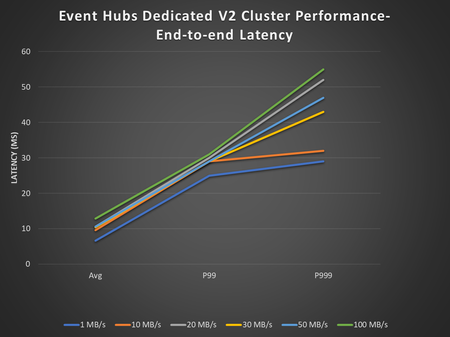
Today, we are announcing the general availability of Azure Event Dedicated Self-Serve clusters which are designed for mission-critical Kafka and AMQP workloads that require low-latency and high-volume data streaming with dynamic scaling.8.7KViews4likes0Comments
Geo-Replication is Here! Now generally available for Event Hubs Premium & Dedicated
Today, we are thrilled to announce the General Availability of the Geo-replication feature for Azure Event Hubs, now available in both Premium and Dedicated tiers. This milestone marks a significant enhancement in our service, providing our customers with robust business continuity and disaster recovery capabilities – ensuring high availability for their mission-critical applications. The Geo-replication feature allows you to replicate your Event Hubs data across multiple regions either synchronously or asynchronously, ensuring that your data remains accessible in the event of maintenance activities, regional degradation, or a regional outage. With Geo-replication, you can seamlessly promote a secondary region to a primary, minimizing downtime and ensuring business continuity. Before failover (promotion of secondary to primary) After failover (promotion of secondary to primary) With general availability, we are excited to announce that the Geo-replication feature now supports all the features that are generally available in the service today. This includes private networking, customer-managed key encryption, Event Hubs Capture, and many more. These enhancements ensure that you can leverage the full capabilities of Event Hubs while benefiting from the added reliability of Geo-replication. We have also increased visibility into the health and metrics of your replicas. This means you can now monitor the status of your replicas more effectively and know exactly when it is appropriate to promote your secondary to primary. This added visibility ensures that you can make informed decisions and maintain the high availability of your applications. Since the announcement of public preview, we’ve had several customers try out the Geo-replication feature and appreciate the enhanced reliability and peace of mind that comes with having a robust disaster recovery solution in place. Learn more Learn more about geo-replication concepts and the pricing model and try out this quickstart to learn how to setup geo-replication for your premium and dedicated tier namespaces. We encourage our customers to try out the Geo-replication feature and experience the benefits of turnkey business continuity and disaster recovery features firsthand. Your feedback is invaluable to us, and we look forward to hearing about your experiences.1.2KViews3likes0CommentsAnnouncing the Event Hubs Data Explorer: a handy tool for getting started and debugging
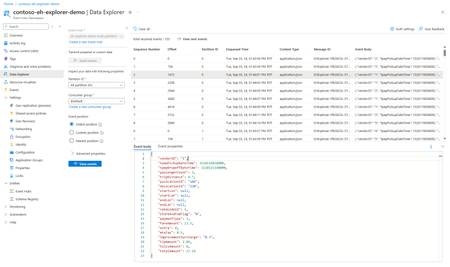
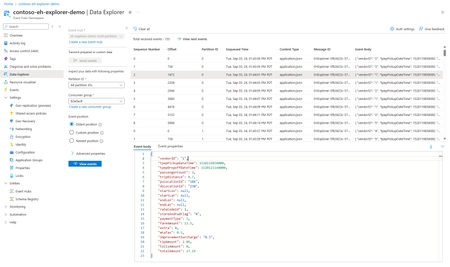
Transform your event-driven architectures with the new Event Hubs Data Explorer! Whether you're debugging, optimizing, or just getting started, this tool offers a unified interface for producing and consuming event data, providing invaluable insights. Explore the endless possibilities with Event Hubs Data Explorer!3KViews3likes3CommentsUpdate WCF Relay applications to use TLS 1.2 or later
WCF Relay listeners that still negotiate TLS 1.0 can stop passing traffic through Azure Relay. The symptom appears on the sender, which connected successfully before and now fails every call with System.ServiceModel.EndpointNotFoundException: None of the connected listeners accepted the connection within the allowed timeout. If you run a WCF Relay listener on the .NET Framework, and especially one built against an older version of the WindowsAzure.ServiceBus package or Microsoft.ServiceBus.dll, it is worth checking how it negotiates TLS. Azure Relay Hybrid Connections are not affected and need no action. They use HTTP and WebSockets through the Microsoft.Azure.Relay package, a different stack from the WCF Relay path described here. What is happening TLS 1.0 and TLS 1.1 are deprecated. We retired them across Azure services, and have since retired them at the operating system level as well. That operating system change is why a listener that had run until now can fail going forward. These failures come from a listener that still asks for TLS 1.0, which older .NET Framework defaults, application configuration, registry settings, or startup code can all cause. Relay requires TLS 1.2 or later and rejects the handshake. Where that rejection lands decides what the sender sees. A listener registers with Relay once, when it opens. Relay then asks that registered listener to open a separate rendezvous connection for each sender that arrives, and each of those is a new connection with its own handshake. In this case the rendezvous connection is the one that fails. Relay tries each registered listener until it runs out, none of them accepts, and the sender gets None of the connected listeners accepted the connection within the allowed timeout. The same failure can also surface as a timeout, when the sender's timeout elapses before Relay has finished trying the registered listeners. A listener whose handshake fails when it opens never registers at all. On a persistent relay the sender then gets There are no listeners connected for the endpoint. On a dynamic relay, which is the default for the WCF Relay bindings, the endpoint exists only while a listener is connected, so the sender gets Endpoint does not exist. All three arrive as EndpointNotFoundException, so the message text is what tells them apart, and all three are what the sender sees when the listener is the side still on TLS 1.0. The side that pins the protocol sees the failure directly instead. The trace below is a sender's, and a listener's differs in its lower frames, so search on the message rather than the frames: Exception Type: System.IO.IOException Authentication failed because the remote party has closed the transport stream. Server stack trace: at System.Net.Security.SslState.InternalEndProcessAuthentication(LazyAsyncResult lazyResult) at System.Net.Security.SslState.EndProcessAuthentication(IAsyncResult result) at Microsoft.ServiceBus.Messaging.IteratorAsyncResult`1.StepCallback(IAsyncResult result) --- End of stack trace from previous location where exception was thrown --- at System.Runtime.ExceptionServices.ExceptionDispatchInfo.Throw() at Microsoft.ServiceBus.Common.AsyncResult.End[TAsyncResult](IAsyncResult result) at Microsoft.ServiceBus.SecureSocketUtil.<>c.<InitiateSecureClientUpgradeIfNeededAsync>b__3_1(IAsyncResult a) at System.Threading.Tasks.TaskFactory`1.FromAsyncCoreLogic(IAsyncResult iar, Func`2 endFunction, Action`1 endAction, Task`1 promise, Boolean requiresSynchronization) Relay closes the connection when the handshake offers only TLS 1.0 or 1.1, so it surfaces as a closed stream rather than a protocol mismatch. A sender that pins the protocol fails on its own connection to Relay, before Relay looks for a listener at all, so this exception is all it gets and none of the three messages appear. Whichever side logs it, the trace points at how that application negotiates TLS. Recommended actions Start with whichever application pinned the protocol, which is usually the listener. That change is scoped to the one application and is normally enough to resolve this. Check whether it sets a TLS or SSL version explicitly in code or configuration, and if it does, remove the explicit setting so the operating system chooses the protocol, or set TLS 1.2 or later. The quickest change is configuration-only. Two AppContext switches in the application configuration file put that application back on a supported protocol, and both go in a single semicolon-delimited value attribute: <configuration> <runtime> <AppContextSwitchOverrides value="Switch.System.Net.DontEnableSchUseStrongCrypto=false;Switch.System.Net.DontEnableSystemDefaultTlsVersions=false" /> </runtime> </configuration> Rebuilding against a current .NET Framework resolves it as well. Where startup code is easier to change than configuration, setting ServiceBusEnvironment.SystemConnectivity.Mode to ConnectivityMode.Https and ServicePointManager.SecurityProtocol to SecurityProtocolType.Tls12 moves the connection to HTTPS and TLS 1.2. Applications that target .NET Framework 3.5 and use TCP transport security are pinned to SSL 3.0 and TLS 1.0, so those need to be retargeted. Where the application cannot be changed, the same behavior can be set for the whole machine through two registry values, SchUseStrongCrypto and SystemDefaultTlsVersions, added as DWORD 1 under HKEY_LOCAL_MACHINE\SOFTWARE\Microsoft\.NETFramework\v4.0.30319 and HKEY_LOCAL_MACHINE\SOFTWARE\WOW6432Node\Microsoft\.NETFramework\v4.0.30319, using v2.0.50727 in place of v4.0.30319 for .NET Framework 3.5. Both values must be created, and they apply to every .NET Framework application on the machine, so treat this as the fallback. The .NET Framework TLS best practices guidance covers both approaches in full. Once the change is in place, restart the application and confirm that the listener and sender both connect. The call that previously failed should complete as soon as the Relay connection negotiates a supported TLS version. For more about the service itself, see the Azure Relay overview, the Azure Relay API overview, and the Azure Relay port settings. Help and support If you have questions, get answers from community experts in Microsoft Q&A or GitHub. If you have a support plan and you need technical help, create a support request.664Views2likes0CommentsIntroducing Local emulator for Azure Service Bus
Azure Service Bus is a fully managed enterprise message broker offering queues and publish-subscribe topics. It decouples applications and services, providing benefits like load-balancing across workers, safe data and control routing, and reliable transactional coordination. In response to your feedback, we are pleased to announce the introduction of a local emulator for Azure Service Bus. This emulator is intended to facilitate local development experience for Service Bus, allowing developers to develop and test their code against Azure Service Bus, in isolation away from cloud interference. Why emulator? Developers across the globe love emulators! While there are numerous compelling reasons to use emulators, here are just a few of those reasons to consider: Optimized development loop: The emulator speeds up dev/testing against Azure Service Bus. Pre-migration trial: Try Azure Service Bus using your existing AMQP applications before migrating to the cloud. Isolated environment: Use the emulator for dev/test setup without network latency or cloud resource constraints. Cost-efficient: The emulator is free and can be run on your local machine for dev/test scenarios. Note: The emulator is intended only for development and testing. It should not be used for production workloads. Official support is not provided, and any issues or suggestions should be reported via GitHub. Get started with Service Bus emulator The emulator is accessible as a Docker image on Microsoft Artifact Registry, and it is platform-independent, capable of running on Windows, macOS, and Linux. You can use our automated scripts from the Installer repository or initiate the emulator container using the docker compose command. The emulator is compatible with the latest service bus client SDKs and supports a wide variety of features within Azure Service Bus. For more details, please visit aka.ms/servicebusemulator Read more about Azure Service Bus: Introduction to Azure Service Bus, an enterprise message broker - Azure Service Bus | Microsoft Learn We appreciate your feedback and encourage you to share it with us. Please provide feedback or report any issues on our GitHub repository. Wishing you a smooth ride with the Service Bus emulator, making all your tests pass! 😊25KViews2likes4CommentsGeneral Availability: Large Message Support in Azure Event Hubs
Azure Event Hubs is a cloud-native service that streams millions of events per second with minimal latency, fully compatible with Apache Kafka and requiring no code changes for existing Kafka workloads. Today, we are excited to announce the general availability of Large Message Support in Azure Event Hubs, enabling you to send and receive messages up to 20 MB in self-serve scalable Dedicated clusters, with enhanced reliability for seamless handling of large messages and greater flexibility for your data streaming solutions. This feature enables fast and reliable processing of larger, indivisible events. Large Message Support works with both AMQP and Apache Kafka protocols, allowing you to send bigger payloads as usual without changing your client code. It is advisable to check your client settings to ensure that timeouts and maximum message size limits are not set too low on the client side. To enable Large Message Support, simply configure your eligible event hubs dedicated clusters using the Azure Portal. For further details and eligibility, please visit aka.ms/largemessagesupportforeh. Your feedback is invaluable to us, and we look forward to hearing about your experiences. Read more: Azure Event Hubs for Apache Kafka - Azure Event Hubs | Microsoft Learn Quickstart: Send and Receive Large Messages with Azure Event Hubs (Preview) - Azure Event Hubs | Microsoft Learn310Views1like0CommentsUpcoming Changes to Azure Relay IP Addresses and DNS Support
Azure Relay is an integral part of modern hybrid cloud architectures, enabling seamless connectivity between on-premises and cloud resources. To ensure continued reliability and security, Microsoft is implementing important updates to the IP addresses and DNS naming conventions used by Azure Relay services. What’s Changing? As detailed in the changes to IP-addresses for Azure Relay and Azure Relay WCF and Hybrid Connections DNS Support reference blogs, customers should be aware of two primary changes: IP and Name Transitions: The IP addresses and corresponding DNS names for Azure Relay endpoints will change during the transition period. For example, g0-prod-bn-vaz0001-sb.servicebus.windows.net can change to gv0-prod-bn-vaz0001-sb.servicebus.windows.net DNS Support Enhancements: Improved DNS support will enhance reliability and future-proof connectivity for both WCF Relay and Hybrid Connections users. Recommended Actions for Customers To minimize disruption, it is crucial for users to update their network configurations and firewall rules to accommodate these new IP addresses and DNS names as soon as possible. These will be made available using the below PS1 script - Update Allow Lists: Ensure that your firewalls and network security groups permit traffic to the new IP ranges and DNS endpoints as specified in the official documentation. Monitor Transition Phases: Be prepared for two rounds of changes. Apply updates promptly during both the initial and final transitions. Automating Namespace Information Retrieval To assist with this transition, Microsoft has updated the PowerShell script for retrieving namespace information, which now reflects the planned changes. You can access the latest script here: GetNamespaceInfo.ps1 (azure-relay-dotnet/tools) (Instructions on how to use the ps1 script is available in the README) This script allows you to efficiently check the current configuration of your Azure Relay namespaces and validate connectivity against the updated endpoints. Sample output PS D:\AzureVMSSEssentials\Tools\GetNamespaceInfoWithIpRanges> .\GetNamespaceInfo.ps1 <your-relay-namespace>.servicebus.windows.net Namespace : <your-relay-namespace>.servicebus.windows.net Deployment : PROD-BN-VAZ0001 ClusterDNS : ns-prod-bn-vaz0001.eastus2.cloudapp.azure.com ClusterRegion : eastus2 ClusterVIP : 40.84.75.3 GatewayDnsFormat : g{0}-bn-vaz0001-sb.servicebus.windows.net or gv{0}-bn-vaz0001-sb.servicebus.windows.net Notes : Entries with 'FUTURE' IPAddress may be added at a later time as needed Current IP Ranges Name IPAddress ---- --------- g0-bn-vaz0001-sb.servicebus.windows.net 20.36.144.8 g1-bn-vaz0001-sb.servicebus.windows.net 20.36.144.1 g2-bn-vaz0001-sb.servicebus.windows.net 20.36.144.2 g3-bn-vaz0001-sb.servicebus.windows.net 20.36.144.11 g4-bn-vaz0001-sb.servicebus.windows.net 20.36.144.3 g5-bn-vaz0001-sb.servicebus.windows.net FUTURE g6-bn-vaz0001-sb.servicebus.windows.net FUTURE ... g98-bn-vaz0001-sb.servicebus.windows.net FUTURE g99-bn-vaz0001-sb.servicebus.windows.net FUTURE Future IP Ranges for Region:eastus2 addressPrefixes --------------- 135.18.130.0/23 135.18.132.0/26 135.18.132.64/27686Views1like1CommentAnnouncing the General Availability of Event Hubs Data Explorer
We are excited to announce the general availability of the Event Hubs Data Explorer in the Azure portal! Ever since our preview announcement in September, we've heard customers rave about how the Event Hubs Data Explorer has already made its way into their daily workflows to onboard, debug and review the data in their Event Hubs with very little effort. Customer-Centric Design We listened to your feedback and designed the Event Hubs Data Explorer to address your needs. We've had a lot of customers try this tool and share feedback on how its saving them significant time and effort when it comes to viewing their Event Hubs in action and performing basic debugging tasks. Simplified Onboarding and Debugging The Event Hubs Data Explorer is perfect for both new and experienced users. It provides a comprehensive view of event data, making it easy to test event producers and consumers. You can quickly validate your setup with custom workloads or predefined datasets, ensuring everything is configured correctly. Debugging is now more straightforward than ever. With the ability to inspect data at specific timestamps or offsets, you can quickly identify and resolve issues, optimizing your event processing workflows. Getting Started To start using the Event Hubs Data Explorer, navigate to your Event Hubs namespace in the Azure portal. From there, you can access the Data Explorer and begin sending and viewing events with just a few clicks. You can also check out the documentation here. We are excited to see how you leverage the Event Hubs Data Explorer to drive innovation and efficiency in your projects. Your feedback has been instrumental in shaping this tool, and we look forward to continuing to improve our offerings based on your insights.486Views1like0Comments