unified operations
51 TopicsNew options for Extended Security Updates enabled by Azure Arc
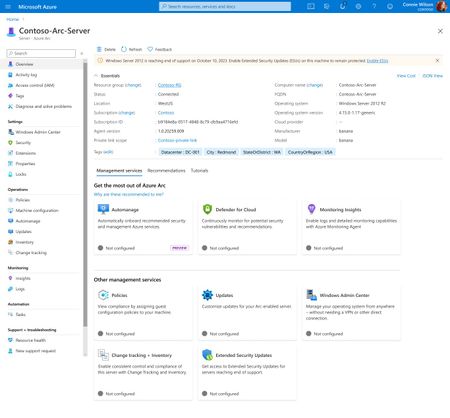
Today, we’re announcing Extended Security Updates enabled by Azure Arc for Windows Server 2012/R2 and SQL Server 2012 (year 2 onwards), a new and enhanced cloud experience alternative to traditional Extended Security Updates (classic). With this new option, security updates will be natively available in the Azure Portal through Azure Arc for resources for up to 3 .42KViews2likes26CommentsAnnouncing General Availability: Windows Server Management enabled by Azure Arc
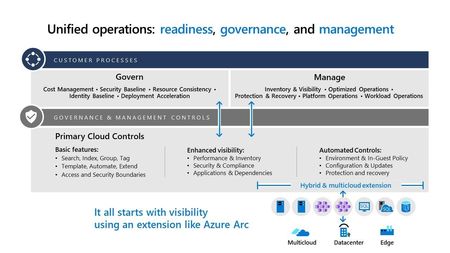
Windows Server Management enabled by Azure Arc offers customers with Windows Server licenses that have active Software Assurances or Windows Server licenses that are active subscription licenses the following key benefits: Azure Update Manager Azure Change Tracking and Inventory Azure Machine Configuration Windows Admin Center in Azure for Arc Remote Support Network HUD Best Practices Assessment Azure Site Recovery (Configuration Only) Upon attestation, customers receive access to the following at no additional cost beyond associated networking, compute, storage, and log ingestion charges. These same capabilities are also available for customers enrolled in Windows Server 2025 Pay as you Go licensing enabled by Azure Arc. Learn more at Windows Server Management enabled by Azure Arc - Azure Arc | Microsoft Learn or watch Video: Free Azure Services for Non-Azure Windows Servers Covered by SA Powered by Azure Arc! To get started, connect your servers to Azure Arc, attest for these benefits, and deploy management services as you modernize to Azure's AI-enabled set of server management capabilities across your hybrid, multi-cloud, and edge infrastructure!20KViews10likes10CommentsAnsible and Azure Arc-enabled servers are better together.
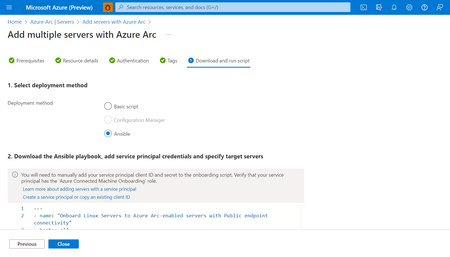
Leverage Ansible and Azure Arc-enabled servers in tandem to blend Ansible automation and governance with Azure security and monitoring. From onboarding to Azure Arc using Ansible playbooks to managing Arc-enabled servers using Ansible Automation platform to delivering key Arc scenarios using Ansible, Azure Arc meets Ansible users in their tool of choice.8.3KViews1like1CommentConsistently upgrade your server TLS protocol using Azure Arc and Automanage Machine Configuration
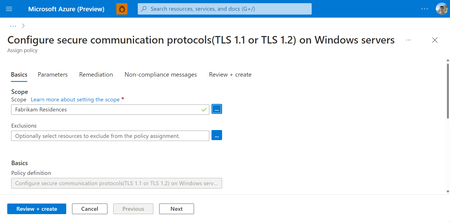
Using Azure Automanage Machine Configuration coupled with Azure Arc-enabled servers, you can consistently and easily configure your secure communications protocol across servers running both within and beyond Azure.7.9KViews3likes0CommentsAnnouncing Preview of Run Command on Arc-enabled servers
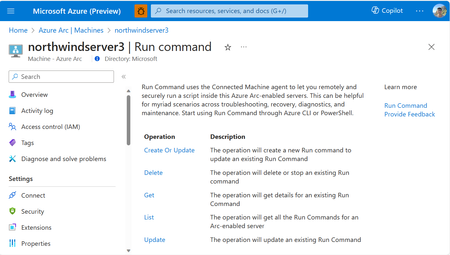
We are excited to announce the Public Preview of Run Command on Azure Arc-enabled servers. This feature is a game-changer for remotely and securely managing your Azure Arc-enabled servers. You can start using Azure CLI or API for Run Command today, without requiring any additional extensions or configurations, and at no additional cost.6.8KViews9likes0CommentsAnnouncing the General Availability of Jumpstart HCIBox
Almost one year ago the Jumpstart team released the public preview of HCIBox, our self-contained sandbox for exploring Azure Stack HCI capabilities without the need for physical hardware. Feedback from the community has been fantastic, with dozens of feature requests and issues submitted and resolved through our open-source community. Today, the Jumpstart team is excited to announce the general availability of HCIBox! 6.7KViews4likes6Comments
Generally Available: Windows Server 2016 Extended Security Updates enabled by Azure Arc
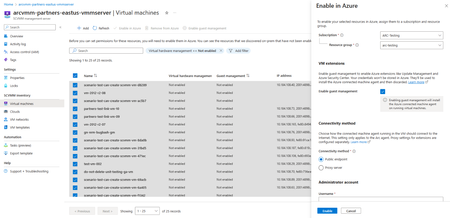
Today, the Azure Arc team is pleased to announce that Extended Security Updates (ESUs) enabled by Azure Arc is now generally available for Windows Server 2016. By connecting your Windows Server 2016 machines to Azure Arc-enabled servers, you can enroll in ESUs and receive security updates. Enroll machines into ESUs through the Azure portal, a streamlined, cloud-connected experience that protects your on-premises and multicloud workloads while you plan your upgrade or migration journey. Extended Security Updates give you access to Critical and Important security updates for Windows Server 2016 for up to three years after end of support, covering January 12, 2027 through January 2030. They provide a supported bridge for business-critical applications that need more time to migrate, without new features or non-security fixes, and without leaving systems exposed while you plan your move. Extended Security Updates enabled by Azure Arc Once your servers are connected to Azure Arc, ESUs enabled by Azure Arc provide flexible pricing and simpler delivery. Key benefits include: Pay-as-you-go billing means a monthly subscription you can stop when a server is migrated or decommissioned, so you only pay for the coverage you use. Azure-billed pricing draws down from your existing Microsoft Azure Consumption Commitment (MACC) and lets you analyze spend with Microsoft Cost Management and Billing. Built-in asset inventory shows the coverage and enrollment status of your machines directly in the Azure portal, highlighting gaps at a glance. Keyless delivery removes the need to acquire, install, or activate keys on each server. Access to Azure management services When you enroll eligible Azure Arc-enabled servers in Windows Server 2016 ESUs or you have Windows Server Software Assurance, you also gain free access to a set of Azure services that help you manage and secure those machines from the Azure portal: Azure Update Manager is a unified service which provides assessing, scheduling, deploying and managing OS updates across Azure and hybrid machines, including visibility into ESU patch compliance for your Windows Server 2016 estate. Change Tracking and Inventory provides a centralized asset inventory and tracks changes to servers hosted in Azure, on-premises, and other public cloud environments. Azure Policy guest configuration helps define, enforce, and audit compliance rules for Azure resources and guest OS settings across hybrid environments. It includes out of the box policy rules to help meet standards like CIS Benchmark. How to get started Everything starts by connecting your servers to Azure Arc, whether they run on-premises or in other public clouds. Getting started takes only a few steps: Connect your Windows Server 2016 machines to Azure Arc by installing the Azure Connected Machine agent. Enroll eligible servers in Extended Security Updates from the Azure portal, or at scale using Azure Policy (no keys required). Check out our click through demo to see how to apply Extended Security Updates using the Azure portal. Deliver ESU patches through Azure Update Manager or your existing patching solution once servers are enrolled. Extended Security Updates support the Standard and Datacenter editions of Windows Server 2016 and generally require Software Assurance through a Volume Licensing program (machines licensed through SPLA or a Server Subscription do not). For larger estates, you can onboard at scale using Configuration Manager, a Group Policy scheduled task, or VMware vCenter and SCVMM integration with Azure Arc. Beyond Extended Security Updates Enrolling in ESUs is often a customer's first step into Azure Arc — and it opens the door to more. Because your Windows Server 2016 machines are now attached to Azure Arc, you can manage, secure, and govern them alongside your wider hybrid and multicloud estate with Azure Policy, Azure Update Manager, and Microsoft Defender for Cloud. That same Arc foundation makes your next step easier when you are ready: upgrading to Windows Server 2025 or migrating to Azure. Learn more To plan for Windows Server 2016 end of support, explore these resources: Extended security updates enabled by Azure Arc guide Planning ahead for Windows Server 2016 end of support Windows Server and SQL Server End of Support | Microsoft Prepare to deliver Extended Security Updates through Azure Arc Join the Azure Arc customer and engineering virtual meetup Fill in this short intake form to join the quarterly Azure Arc and Windows Server customer meetup: https://aka.ms/arcserverforumsignup5.5KViews2likes0Comments