unified operations
49 Topics
Introducing Azure Copilot for Azure Local: AI-powered operations for distributed infrastructure
Managing distributed infrastructure can be complex. When an issue occurs, operators may need to navigate multiple tools, review health signals and diagnostics, interpret logs, and determine the right troubleshooting steps before they can move toward resolution. Azure Copilot for Azure Local helps bring an AI-powered, agentic experience to Azure Local operations, designed to make managing and troubleshooting infrastructure simpler and more intuitive. With Azure Copilot for Azure Local, operators can start with a natural-language question, such as: “Why is my Azure Local cluster disconnected?” “Is this node healthy?” “Why did my deployment fail?” “Is my environment ready for an update?” “Check my network configuration” Azure Copilot for Azure Local translates the operator’s intent into a troubleshooting workflow, bringing together infrastructure context, diagnostics, and relevant troubleshooting knowledge to help operators understand what is happening and determine the appropriate next steps for their infrastructure. Start troubleshooting with natural language Infrastructure problems rarely begin with a clearly identified root cause. An administrator may simply know that an update failed, a node is unhealthy, connectivity was lost, or a deployment cannot continue. Azure Copilot for Azure Local provides a natural language starting point for these investigations. Rather than first determining which command to run, which diagnostic tool to open, or which troubleshooting guide to follow, operators can describe the problem they are trying to understand. Copilot can help gather relevant information, analyze the results, explain findings, and guide the operator toward potential next steps. This provides operators with a more intuitive troubleshooting experience that helps bridge the gap between observing a problem and knowing what to investigate next. Guided, multi-step troubleshooting Azure Copilot for Azure Local is designed to go beyond simply answering questions. For supported scenarios, the experience can orchestrate multiple steps of an investigation, using infrastructure context, diagnostic capabilities, and troubleshooting knowledge to help operators work through a problem. The troubleshooting journey becomes: Ask a question → Gather context → Run diagnostics → Analyse findings → Recommend next steps The operator remains in control while Copilot helps with the investigative work required to understand the issue and identify a path forward. Designed for real Azure Local operational scenarios Azure Copilot for Azure Local can assist operators across common infrastructure management and troubleshooting scenarios, including: Infrastructure health Understand the health of an Azure Local system or individual node and identify areas that may require further investigation. Connectivity troubleshooting Investigate why an Azure Local system or machine is disconnected and surface information that can help narrow down the issue. Network configuration Investigate network-related conditions and help identify configuration issues affecting the environment. Deployment troubleshooting Investigate failed deployments and help operators understand potential blockers and next steps. Update readiness Evaluate the environment before an update and identify conditions that may require attention. Diagnostics and log collection Guide diagnostic collection when deeper troubleshooting or additional evidence is required. Helping operators move from questions to outcomes Troubleshooting infrastructure often involves connecting information spread across configuration, health signals, diagnostics, logs, and troubleshooting documentation. Azure Copilot for Azure Local is evolving toward an operator-focused experience where AI agents can help connect these pieces as part of a guided investigation. The goal is simple: reduce the effort required to understand what is happening and help operators get to the right next step faster. By combining natural-language interaction with agentic troubleshooting workflows, Azure Copilot for Azure Local can help make complex diagnostic information easier to understand and help operators navigate investigations while keeping them in control of applicable actions. Public preview planned for early 2027 Azure Copilot for Azure Local is planned to enter public preview in early 2027. Once available, customers can explore the agentic experience in their Azure Local environments, evaluate real operational scenarios, and provide feedback that helps shape future capabilities. For more details, reach out to us at AzureLocalCopilotTeam@microsoft.com39Views0likes0CommentsEpisode 2: Reduce restarts with Hotpatch for Windows Server 2025 | The Azure Arc Check-In
Once a month, the Azure Arc team releases an episode covering a new hybrid and multicloud management scenario. To request a topic or view additional episodes, visit aka.ms/the-azure-arc-check-in. Scenario: Your infrastructure team needs to apply monthly security updates across hybrid Windows servers, but every restart creates another maintenance window and potential workload interruption. Hotpatch can reduce that restart-driven effort while helping you keep eligible servers protected. Try now in Azure aka.ms/aaci-episode2 Why Hotpatch matters Security updates are essential, but coordinating restarts across a distributed server estate takes time and can disrupt workloads. Hotpatch updates Windows security code in memory, allowing eligible security updates to take effect without requiring a restart. For Azure Arc-enabled Windows Server 2025 machines, enabling and using Hotpatch is available at no additional charge. Hotpatch reduces restart frequency, but it does not eliminate every restart. Baseline updates and updates outside the Hotpatch program can still require one. Confirm that your server is eligible Before enabling Hotpatch, confirm that the machine meets the operating system, Azure Arc, and security prerequisites. The server must: Run Windows Server 2025 Standard or Datacenter, build 26100.1742 or later. Run a generally available release. Preview and Windows Server Insider builds are not supported. Meet the Azure Connected Machine agent prerequisites and be connected to Azure Arc. Support virtualization-based security and Virtual Secure Mode. Use Unified Extensible Firmware Interface (UEFI) with Secure Boot enabled. Be a Generation 2 virtual machine when hosted on Hyper-V. Windows Server 2025 Datacenter: Azure Edition follows a different path because Hotpatch is enabled by default and does not require Azure Arc connectivity. For the latest requirements, see Enable Hotpatch for Azure Arc-enabled servers. Verify Virtual Secure Mode Run the following PowerShell command on the server to check its Virtual Secure Mode status: Get-CimInstance -Namespace 'root/Microsoft/Windows/DeviceGuard' -ClassName 'win32_deviceGuard' | Select-Object -ExpandProperty 'VirtualizationBasedSecurityStatus' A result of 2 means Virtual Secure Mode is configured and running. If the result is not 2, resolve the prerequisite before enrolling the machine in Hotpatch. Enabling Virtual Secure Mode requires a server restart, so make that change during a planned maintenance window. Enable Hotpatch through Azure Arc After confirming the prerequisites, enroll the server from the Azure portal: Open Azure Arc, then select Machines. Select the eligible server. Select Hotpatch. Review the confirmation, then select Confirm. Allow about ten minutes for the changes to apply. Verify that enrollment completes and the status is no longer pending. The portal enrollment is intentionally short. Most of the work is making sure the server meets the prerequisites before you begin. Choose how to manage updates Hotpatch enrollment and update installation are separate. After enrollment, continue to manage available updates according to your organization's patch policy and change-control process. Supported options for Arc-connected machines include: Windows Update Azure Update Manager Group Policy SConfig Supported non-Microsoft patch-management solutions Choose the method that fits your existing operations model. Enrolling a server in Hotpatch does not, by itself, install every available update automatically. Plan for the restart cadence Hotpatch changes the monthly update rhythm, but restart planning still matters. Every three months, Microsoft releases a planned baseline with the latest cumulative update. Installing a baseline requires a restart. Hotpatch releases normally follow during the next two months, allowing eligible security updates to be applied without a restart. An unplanned baseline can replace a scheduled Hotpatch release when necessary and will also require a restart. Updates outside the Hotpatch program can require restarts as well, including: Nonsecurity Windows updates .NET updates Drivers Firmware Other non-Windows updates The practical operating model is fewer restart-driven maintenance windows, not a server that never needs to restart. FAQs 1. Does Hotpatch mean I never need to restart the server? No. Planned baselines arrive every three months and require a restart. Unplanned baselines and updates outside the Hotpatch program can also require restarts. Hotpatch reduces restart frequency for eligible security updates; it does not eliminate restart planning. See Hotpatch for Windows Server. 2. Is Hotpatch an extra-cost service for Azure Arc-enabled Windows Server 2025? Enabling and using Hotpatch on eligible Azure Arc-enabled Windows Server 2025 machines is available at no additional charge. Optional Azure management services may have separate pricing. 3. Does enrolling in Hotpatch install every update automatically? No. Enrollment makes the machine eligible to receive Hotpatch updates. Continue using Windows Update or a supported patch-management tool, such as Azure Update Manager, Group Policy, SConfig, or a non-Microsoft solution, to manage available updates according to your patch policy. 4. Can I use Hotpatch with Windows Server Core? Yes. Both Server Core and Server with Desktop Experience are supported when the machine meets all other Hotpatch prerequisites. 5. What does a Virtual Secure Mode status of 2 mean? For the documented Device Guard PowerShell query, a result of 2 means Virtual Secure Mode is configured and running. If you receive another result, resolve the prerequisite before attempting enrollment. Review the current Hotpatch enablement guidance and Hotpatch concepts and update cadence, then visit The Azure Arc Check-in for more episodes.321Views2likes0Comments
Workload Orchestration in the Azure portal is now available: Deploy in minutes, scale with ease
Edge deployments rarely stay simple for long. What begins as an application running on a single Kubernetes cluster can quickly expand across stores, factories, branches, or other distributed locations, each having different configuration needs. That is exactly where workload orchestration for Azure Arc comes in. Workload orchestration helps teams manage that complexity by providing a centralized approach to consistently define, configure, and deploy applications across distributed cloud, on-premises, and edge environments, all while catering to custom configuration needs of individual sites and deployment targets. See the experience in action Evaluating a new deployment approach often starts slowly: study the documentation, package an application, complete the setup, and only then decide whether it fits. The Azure portal reverses that order with its jumpstart onboarding experience. Bring your Azure Arc-enabled Kubernetes cluster and deploy a pre-packaged application in minutes. Whether you are validating a proof of concept or introducing the product to your broader team, the new portal onboarding experience turns the end-to-end workflow into something you can quickly try on your own cluster. Scale from first deployment to production Once you have validated the first deployment, you can evolve the same approach for production. Onboard your infrastructure into workload orchestration, organize your deployment sites into hierarchies, and define shared configurations for all deployments – all without leaving the portal. This lets you expand from one cluster to a distributed fleet while retaining centralized governance, repeatability, and site-level flexibility. Ready to try it? Try now by deploying your first application with workload orchestration in the Azure portal. Explore the product documentation for the complete set of capabilities.461Views0likes0CommentsEpisode 1: Onboarding Azure Arc at Scale | The Azure Arc Check-In
Once a month the Azure Arc team will release an episode covering a variety of topics. To request a topic or view additional episodes please visit: aka.ms/the-azure-arc-check-in Episode 1: Onboarding Azure Arc at Scale Scenario: Imagine your organization has 1,000 Windows and Linux servers spread across multiple locations. You want them all in Azure Arc, but first you need to deploy the Azure Connected Machine agent at scale. Try now in Azure aka.ms/aaci-episode1 Why onboarding strategy matters Interactive sign-in works well for testing and proof-of-concepts, but it quickly becomes impractical when you’re onboarding large server estates. At scale, organizations need a deployment model that can: Automate onboarding across many machines Align with existing management tooling Apply consistent configuration and governance from day one Minimize manual effort and human error This episode focuses on using non-interactive authentication and automation to onboard large server fleets efficiently. One of the key recommendations is to use a dedicated authentication mechanism designed for scale rather than relying on interactive administrator sign-ins. Onboard a Linux fleet with Ansible The Ansible deployment begins with an Ansible node that is already connected to Azure Arc. The deployment uses the credential on the Ansible node to deploy the Azure Connected Machine agent to the Linux fleet. To enable this, the managed identity of the Ansible node has the Azure Connected Machine Onboarding role in Azure assigned. Below are the steps for role assignment in the Azure portal: Open the resource group where the servers will be deployed. In Access control, add a role assignment. Select the Azure Connected Machine Onboarding role. Choose managed identities, select Machine - Azure Arc, and find the Ansible node. Review and assign the role. Configure the Ansible playbook With the permissions in place, the deployment uses three files: inventory.ini: Represents the machines configured by the playbook. arc-vars.yml: Contains non-secret configuration, including the resource group name, subscription and tenant IDs, location, and tags. arc-onboard.yml: References arc-vars.yml and configures the playbook to use managed identity, or MSI, for authentication. After the playbook runs, Ansible deploys the Azure Connected Machine agent to the Linux fleet. You can return to the resource group, refresh the view, and verify that your Linux machines appear as Azure Arc connected servers. Onboard Windows machines with Group Policy For Windows Server environments joined to Active Directory, Group Policy remains one of the simplest and most scalable deployment mechanisms. The process includes: Creating the required onboarding identity Preparing a shared location for deployment assets Downloading the Azure Arc GPO deployment package Generating a Group Policy Object with the required settings Linking that GPO to the appropriate organizational unit (OU) Allowing targeted servers to automatically onboard during policy refresh cycles For organizations that already manage Windows Server through Active Directory, this approach enables onboarding at scale without introducing additional management infrastructure. FAQs What is the best way to onboard servers to Azure Arc at scale? For large Windows and Linux server environments, use automated deployment with non-interactive authentication rather than signing in interactively on each machine. This approach lets you deploy the Azure Connected Machine agent consistently across many servers while reducing manual effort and human error. Azure Connected Machine Agent Deployment Options - Azure Arc Can I use Ansible to onboard Linux servers to Azure Arc? Yes. You can use an Azure Arc-enabled Ansible node to deploy the Azure Connected Machine agent across a Linux server fleet. In the approach demonstrated here, the Ansible node uses its managed identity, which is assigned the Azure Connected Machine Onboarding role, to authenticate the deployment. Connect machines to Azure Arc at scale using Ansible - Azure Arc Can I use Group Policy to onboard Windows servers to Azure Arc? Yes. Group Policy can automate Azure Arc onboarding for Windows Server machines that are joined to Active Directory. The process uses a Group Policy Object linked to the appropriate organizational unit, allowing targeted servers to onboard automatically during Group Policy refresh cycles. Connect machines at scale using Group Policy with a PowerShell script - Azure Arc What files are needed to onboard Linux servers to Azure Arc with Ansible? The Ansible deployment shown in this episode uses three files: inventory.ini to identify the target machines, arc-vars.yml to store non-secret configuration such as subscription, tenant, resource group, location, and tags, and arc-onboard.yml to run the onboarding playbook using managed identity authentication. Should I use Ansible or Group Policy for Azure Arc onboarding? Use Ansible when onboarding Linux servers in an environment that already uses Ansible playbooks and automation. Use Group Policy when onboarding domain-joined Windows servers managed through Active Directory. Both approaches help organizations automate Azure Connected Machine agent deployment by using tools already present in their server-management environment. Additional options are available for onboarding servers at scale. See Azure Connected Machine Agent deployment options.689Views1like0CommentsGenerally Available: Windows Server 2016 Extended Security Updates enabled by Azure Arc
Today, the Azure Arc team is pleased to announce that Extended Security Updates (ESUs) enabled by Azure Arc is now generally available for Windows Server 2016. By connecting your Windows Server 2016 machines to Azure Arc-enabled servers, you can enroll in ESUs and receive security updates. Enroll machines into ESUs through the Azure portal, a streamlined, cloud-connected experience that protects your on-premises and multicloud workloads while you plan your upgrade or migration journey. Extended Security Updates give you access to Critical and Important security updates for Windows Server 2016 for up to three years after end of support, covering January 12, 2027 through January 2030. They provide a supported bridge for business-critical applications that need more time to migrate, without new features or non-security fixes, and without leaving systems exposed while you plan your move. Extended Security Updates enabled by Azure Arc Once your servers are connected to Azure Arc, ESUs enabled by Azure Arc provide flexible pricing and simpler delivery. Key benefits include: Pay-as-you-go billing means a monthly subscription you can stop when a server is migrated or decommissioned, so you only pay for the coverage you use. Azure-billed pricing draws down from your existing Microsoft Azure Consumption Commitment (MACC) and lets you analyze spend with Microsoft Cost Management and Billing. Built-in asset inventory shows the coverage and enrollment status of your machines directly in the Azure portal, highlighting gaps at a glance. Keyless delivery removes the need to acquire, install, or activate keys on each server. Access to Azure management services When you enroll eligible Azure Arc-enabled servers in Windows Server 2016 ESUs or you have Windows Server Software Assurance, you also gain free access to a set of Azure services that help you manage and secure those machines from the Azure portal: Azure Update Manager is a unified service which provides assessing, scheduling, deploying and managing OS updates across Azure and hybrid machines, including visibility into ESU patch compliance for your Windows Server 2016 estate. Change Tracking and Inventory provides a centralized asset inventory and tracks changes to servers hosted in Azure, on-premises, and other public cloud environments. Azure Policy guest configuration helps define, enforce, and audit compliance rules for Azure resources and guest OS settings across hybrid environments. It includes out of the box policy rules to help meet standards like CIS Benchmark. How to get started Everything starts by connecting your servers to Azure Arc, whether they run on-premises or in other public clouds. Getting started takes only a few steps: Connect your Windows Server 2016 machines to Azure Arc by installing the Azure Connected Machine agent. Enroll eligible servers in Extended Security Updates from the Azure portal, or at scale using Azure Policy (no keys required). Check out our click through demo to see how to apply Extended Security Updates using the Azure portal. Deliver ESU patches through Azure Update Manager or your existing patching solution once servers are enrolled. Extended Security Updates support the Standard and Datacenter editions of Windows Server 2016 and generally require Software Assurance through a Volume Licensing program (machines licensed through SPLA or a Server Subscription do not). For larger estates, you can onboard at scale using Configuration Manager, a Group Policy scheduled task, or VMware vCenter and SCVMM integration with Azure Arc. Beyond Extended Security Updates Enrolling in ESUs is often a customer's first step into Azure Arc — and it opens the door to more. Because your Windows Server 2016 machines are now attached to Azure Arc, you can manage, secure, and govern them alongside your wider hybrid and multicloud estate with Azure Policy, Azure Update Manager, and Microsoft Defender for Cloud. That same Arc foundation makes your next step easier when you are ready: upgrading to Windows Server 2025 or migrating to Azure. Learn more To plan for Windows Server 2016 end of support, explore these resources: Extended security updates enabled by Azure Arc guide Planning ahead for Windows Server 2016 end of support Windows Server and SQL Server End of Support | Microsoft Prepare to deliver Extended Security Updates through Azure Arc Join the Azure Arc customer and engineering virtual meetup Fill in this short intake form to join the quarterly Azure Arc and Windows Server customer meetup: https://aka.ms/arcserverforumsignup5.3KViews2likes0CommentsAnsible + Azure Arc: Use Ansible modules to deploy and manage Azure Arc machine extensions at scale
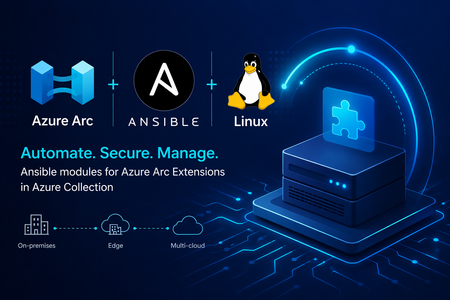
We are making Azure Arc extensible and increasing the flexibility of the tooling you can use to operate your machines using Azure’s control plane. We are excited to announce new modules in Ansible Galaxy that make it easier to manage Azure Arc machine extensions at scale. With the latest updates to the azure.azcollection on Ansible Galaxy, you no longer need to switch between existing tools. You can now deploy and manage Azure Arc extensions using familiar, declarative Ansible workflows. These new modules include: Azure Arc machine extensions module Azure Arc extensions info module Together, they enable infrastructure and platform teams to automate extension lifecycle management across their hybrid estate—bringing consistency, security, and efficiency to Azure Arc-enabled servers. Why this matters Azure Arc machine extensions power critical scenarios such as security, monitoring, update management, configuration and compliance. Until now, managing these Azure Arc extensions across hybrid estates often required Azure CLI scripts, ARM templates, or manual operations. With these new Ansible modules, you can: Integrate Azure Arc extension management into existing Ansible playbooks Enforce consistent configuration across hybrid servers Reduce operational overhead through declarative automation Align extension deployment with broader configuration management workflows What’s included azure_rm_arcmachineextensions This module allows you to manage the full lifecycle of Azure Arc machine extensions, including: Creating and deploying extensions Updating extension settings Removing extensions when no longer needed You can define extension state declaratively, ensuring consistent enforcement across your Azure Arc-enabled servers. azure_rm_arcmachineextensions_info This module provides visibility into extension state by retrieving: Installed extensions on Azure Arc-enabled machines Provisioning status and configuration details Extension metadata for reporting and validation This is useful for compliance validation, auditing, and conditional automation in playbooks. Scenario: Enforcing identity-based SSH access across a hybrid fleet Consider a regulated enterprise that must ensure all Linux servers—whether on-premises or in a multicloud environment—use Microsoft Entra ID for SSH access. The organization wants to: Eliminate local SSH credentials Enforce centralized identity and access controls Audit access consistently across all environments By combining Azure Arc with Ansible, the organization can deploy the Microsoft Entra SSH for Linux extension across all Azure Arc-enabled servers as part of a standardized playbook, ensuring compliance and reducing operational overhead. Example: Deploy Microsoft Entra SSH for Linux extension Below is an example of using Ansible to deploy the Microsoft Entra SSH extension to an Azure Arc-enabled server: - name: Deploy Entra SSH extension to Arc server hosts: localhost connection: local tasks: - name: Install Entra SSH extension for Linux azure_rm_arcmachineextensions: resource_group: myResourceGroup machine_name: myArcServer name: AADSSHLoginForLinux publisher: Microsoft.Azure.ActiveDirectory type: AADSSHLoginForLinux type_handler_version: "1.0" settings: {} state: present Example: Retrieve extension information Below is an example of using Ansible to retrieve details about your Azure Arc extensions: - name: Get Arc machine extension details hosts: localhost connection: local tasks: - name: Fetch extensions azure_rm_arcmachineextensions_info: resource_group: myResourceGroup machine_name: myArcServer Integrating with existing Ansible workflows If you’re already using Ansible for: OS configuration Patch and update management Application deployment You can now extend those workflows to include Azure Arc extension management—without introducing new tools or processes. This allows you to manage on-premises servers, Edge infrastructure and multicloud environments through a unified automation approach powered by Azure Arc and Ansible. Read more at Enable VM Extensions Using Red Hat Ansible - Azure Arc | Microsoft Learn What’s next These modules are part of our continued investment in making Azure Arc a first-class platform for managing Windows and Linux machines in hybrid and multicloud infrastructure. By bringing extension lifecycle management into Ansible, we’re enabling teams to enforce security, compliance, and operational consistency at scale—using the tools they already trust. Stay connected Join the Azure Arc Monthly Forum here: aka.ms/ArcServerForumSignup Let us know what you’d like to see next in the comments!841Views1like0Comments
Announcing Public Preview of Argo CD extension on AKS and Azure Arc enabled Kubernetes clusters
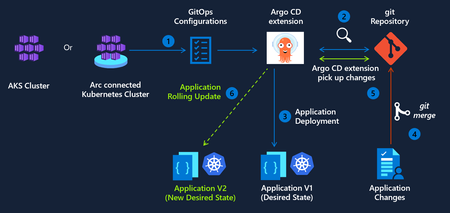
We are excited to announce public preview of the Argo CD extension for Azure Kubernetes Service (AKS) and Azure Arc-enabled Kubernetes clusters. As GitOps becomes the standard for deploying and operating applications at scale, enterprises need a way to implement GitOps while staying compliant with best practices for security and identity management. Argo CD extension delivers on this need across 3 pillars - Trusted Identity and Secure Access The Argo CD extension integrates with Microsoft Entra ID to provide a secure, enterprise-ready experience for: Secure authentication using Workload Identity federation to Azure Container Registry (ACR) and Azure DevOps. This removes the need for long-lived credentials or hard-coded secrets in Git Repos, moving your CD pipelines closer to a true zero-trust architecture. Single Sign-On (SSO) using existing Azure identities. Enterprise-Grade Hardening and Security This preview introduces several enhancements to improve your security posture: To minimize the attack surface, the extension’s images are built on Azure Linux, specifically engineered for reduced CVEs and improved baseline security. Opt-in to automatic patch releases to stay current on security fixes while maintaining full control over your change management processes. Parity with upstream Argo CD Argo CD extension is designed to remain fully aligned with the upstream Argo CD open‑source project, so teams can use Argo CD as they do today with support for Configuring Argo CD extension with High availability (HA) for production‑grade deployments of critical workloads. Using hub‑and‑spoke architecture for multi‑cluster GitOps scenarios. Application and ApplicationSet, enabling automated and scalable application delivery across large fleets of clusters. Getting Started We invite you to explore the Argo CD extension and provide feedback as we continue to evolve GitOps capabilities for Kubernetes. To get started today, you can enable the extension on your clusters using the Azure CLI. Argo CD extension management via the Azure Portal will be available in a few weeks.2.3KViews1like1CommentAnnouncing Private Preview: Deploy Ansible Playbooks using Azure Policy via Machine Configuration
Azure Arc is on a mission to unify security, compliance, and management for Windows and Linux machines—anywhere. By extending Azure’s control plane beyond the cloud, Azure Arc enables organizations to unify governance, compliance, security and management of servers across on‑premises, edge, and multicloud environments using a consistent set of Azure tools and policies. Building on this mission, we’re excited to announce the private preview of deploying Ansible playbooks through Azure Policy using Machine Configuration, bringing Ansible‑driven automation into Azure Arc’s policy‑based governance model for Azure and Arc‑enabled Linux machines. This new capability enables you to orchestrate Ansible playbook execution directly from Azure Policy (via Machine Configuration) without requiring an Ansible control node, while benefiting from built‑in compliance reporting and remediation. Why this matters As organizations manage increasingly diverse server estates, they often rely on different tools for Windows and Linux, cloud, on-premises, or at the edge—creating fragmented security, compliance, and operational workflows. Many organizations rely on Ansible for OS configuration and application setup, but struggle with: Enforcing consistent configuration across distributed environments Detecting and correcting drift over time Integrating Ansible automation with centralized governance and compliance workflows With this private preview, Azure Policy becomes the single control plane for applying and monitoring Ansible‑based configuration, bringing Linux automation into the same governance model already used for Windows. Configuration is treated as policy—declarative, auditable, and continuously enforced—with compliance results surfaced in familiar Azure dashboards. What’s included in the private preview In this preview, you can: Use Azure Policy to trigger Ansible playbook execution on Azure and Azure Arc–enabled Linux machines Execute playbooks locally on each target machine, triggered by policy. Enable drift detection and automatic remediation by default View playbook execution status and compliance results directly in the Azure Policy compliance dashboard, alongside your other policies This provides a unified security, compliance and management experience across Windows and Linux machines—whether they’re running in Azure or connected through Azure Arc—while using your existing Ansible investments. Join the private preview If you’re interested in helping shape the future of Ansible‑based configuration management in Azure Arc, we’d love to partner with you. We’re especially interested in hearing your stories around usability, compliance reporting, and real‑world operational workflows. 👉 Sign up for the private preview and we'll reach out to you. We’ll continue investing in deeper Linux parity, broader scenarios, and tighter integration across Azure Arc’s security, governance and compliance experiences. We look forward to enhancing your unified Azure Arc experience for deploying, governing, and remediating configuration with Ansible—bringing consistent security, compliance, and management to Windows and Linux machines not only in Azure, but also across on‑premises and other public clouds.914Views1like0CommentsSimplify Azure Arc Server Onboarding with Ansible and the New Onboarding Role
If you’re already using Ansible to manage your infrastructure, there’s now a simpler—and more secure—way to bring machines under Azure Arc management. We’ve introduced a new Azure Arc onboarding role designed specifically for automated scenarios like Ansible playbooks. This role follows the principle of least privilege, giving your automation exactly what it needs to onboard servers—nothing more. A better way to onboard at scale Many customers want to standardize Azure Arc onboarding across hybrid and multicloud environments, but run into common challenges: Over‑privileged service principals Manual steps that don’t scale Inconsistent onboarding across environments By combining Ansible with the Azure Arc onboarding role, you can: Automate server onboarding end‑to‑end Reduce permissions risk with a purpose‑built role Scale confidently across thousands of machines Integrate Arc onboarding into existing Ansible workflows Built for automation, designed for security The new onboarding role removes the need to assign broader Azure roles just to connect servers to Azure Arc. Instead, your Ansible automation can authenticate using a tightly scoped identity that’s purpose‑built for Arc onboarding—making security teams happier without slowing down operations. Whether you’re modernizing existing datacenters or managing servers across multiple clouds, this new approach makes Azure Arc onboarding simpler, safer, and repeatable. Get started in minutes Our Microsoft Learn documentation provides guidance to help you get started quickly: Connect machines to Azure Arc at scale with Ansible Check out the Arc onboarding role, part of the Azure collection in Ansible Galaxy: Ansible Galaxy - azure.azcollection - Arc onboarding role Anything else you’d like to see with Azure Arc + Linux? Drop us a comment!516Views0likes0CommentsAzure Arc Server Forum: 2026 Updates
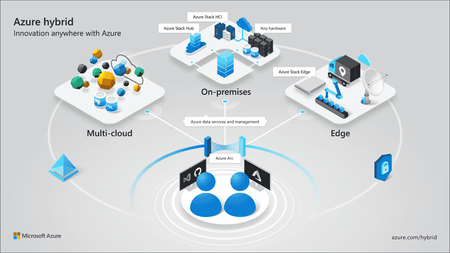
We are excited to announce the fourth calendar year of the Azure Arc Server Forum. We are incredibly thankful to all the customers and community members, who have joined our forum and newsletter from our start back in the Fall of 2023. From January 2026, the monthly Azure Arc Server Forum will be hosted on the third Thursday of each month from 9:30 – 10:15 AM PST. Each Arc Server Forum includes live demos of new capabilities, question and answer sessions with the product group, and feedback opportunities covering Windows, Linux, and SQL Server management, licensing, and connectivity across hybrid, multicloud, and edge environments. Sessions are skipped in July and December for summer and winter holidays respectively. Forum participants also receive a monthly newsletter summarizing updates including: Announcements of General Availability, Public Preview, and Private Previews capabilities including key details and documentation Updates on agent improvements and updates on experience changes Opportunities to provide feedback to and influence the product group’s roadmap or engage in ongoing customer research studies Updates on the invitation and timing of the Arc Server Forum Recordings from the Arc Server Forum are periodically uploaded to the Azure Arc Server Forum YouTube channel: Azure Arc Server Forum - YouTube typically within 2-3 weeks of the Forum. To sign up for the Azure Arc Server Forum and newsletter, please register with contact details at https://aka.ms/arcserverforumsignup/. Thank you!1.8KViews3likes2Comments