unified operations
44 TopicsAnsible + Azure Arc: Use Ansible modules to deploy and manage Azure Arc machine extensions at scale
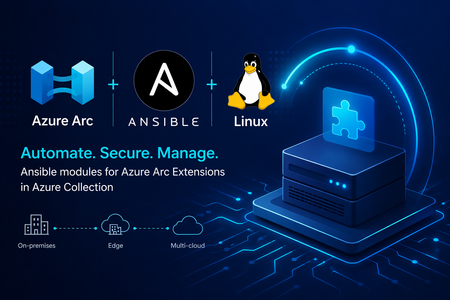
We are making Azure Arc extensible and increasing the flexibility of the tooling you can use to operate your machines using Azure’s control plane. We are excited to announce new modules in Ansible Galaxy that make it easier to manage Azure Arc machine extensions at scale. With the latest updates to the azure.azcollection on Ansible Galaxy, you no longer need to switch between existing tools. You can now deploy and manage Azure Arc extensions using familiar, declarative Ansible workflows. These new modules include: Azure Arc machine extensions module Azure Arc extensions info module Together, they enable infrastructure and platform teams to automate extension lifecycle management across their hybrid estate—bringing consistency, security, and efficiency to Azure Arc-enabled servers. Why this matters Azure Arc machine extensions power critical scenarios such as security, monitoring, update management, configuration and compliance. Until now, managing these Azure Arc extensions across hybrid estates often required Azure CLI scripts, ARM templates, or manual operations. With these new Ansible modules, you can: Integrate Azure Arc extension management into existing Ansible playbooks Enforce consistent configuration across hybrid servers Reduce operational overhead through declarative automation Align extension deployment with broader configuration management workflows What’s included azure_rm_arcmachineextensions This module allows you to manage the full lifecycle of Azure Arc machine extensions, including: Creating and deploying extensions Updating extension settings Removing extensions when no longer needed You can define extension state declaratively, ensuring consistent enforcement across your Azure Arc-enabled servers. azure_rm_arcmachineextensions_info This module provides visibility into extension state by retrieving: Installed extensions on Azure Arc-enabled machines Provisioning status and configuration details Extension metadata for reporting and validation This is useful for compliance validation, auditing, and conditional automation in playbooks. Scenario: Enforcing identity-based SSH access across a hybrid fleet Consider a regulated enterprise that must ensure all Linux servers—whether on-premises or in a multicloud environment—use Microsoft Entra ID for SSH access. The organization wants to: Eliminate local SSH credentials Enforce centralized identity and access controls Audit access consistently across all environments By combining Azure Arc with Ansible, the organization can deploy the Microsoft Entra SSH for Linux extension across all Azure Arc-enabled servers as part of a standardized playbook, ensuring compliance and reducing operational overhead. Example: Deploy Microsoft Entra SSH for Linux extension Below is an example of using Ansible to deploy the Microsoft Entra SSH extension to an Azure Arc-enabled server: - name: Deploy Entra SSH extension to Arc server hosts: localhost connection: local tasks: - name: Install Entra SSH extension for Linux azure_rm_arcmachineextensions: resource_group: myResourceGroup machine_name: myArcServer name: AADSSHLoginForLinux publisher: Microsoft.Azure.ActiveDirectory type: AADSSHLoginForLinux type_handler_version: "1.0" settings: {} state: present Example: Retrieve extension information Below is an example of using Ansible to retrieve details about your Azure Arc extensions: - name: Get Arc machine extension details hosts: localhost connection: local tasks: - name: Fetch extensions azure_rm_arcmachineextensions_info: resource_group: myResourceGroup machine_name: myArcServer Integrating with existing Ansible workflows If you’re already using Ansible for: OS configuration Patch and update management Application deployment You can now extend those workflows to include Azure Arc extension management—without introducing new tools or processes. This allows you to manage on-premises servers, Edge infrastructure and multicloud environments through a unified automation approach powered by Azure Arc and Ansible. Read more at Enable VM Extensions Using Red Hat Ansible - Azure Arc | Microsoft Learn What’s next These modules are part of our continued investment in making Azure Arc a first-class platform for managing Windows and Linux machines in hybrid and multicloud infrastructure. By bringing extension lifecycle management into Ansible, we’re enabling teams to enforce security, compliance, and operational consistency at scale—using the tools they already trust. Stay connected Join the Azure Arc Monthly Forum here: aka.ms/ArcServerForumSignup Let us know what you’d like to see next in the comments!652Views1like0Comments
Announcing Public Preview of Argo CD extension on AKS and Azure Arc enabled Kubernetes clusters
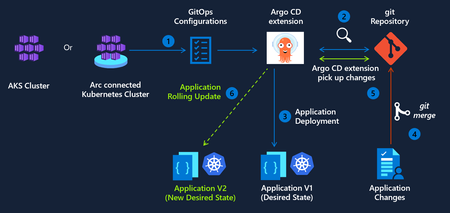
We are excited to announce public preview of the Argo CD extension for Azure Kubernetes Service (AKS) and Azure Arc-enabled Kubernetes clusters. As GitOps becomes the standard for deploying and operating applications at scale, enterprises need a way to implement GitOps while staying compliant with best practices for security and identity management. Argo CD extension delivers on this need across 3 pillars - Trusted Identity and Secure Access The Argo CD extension integrates with Microsoft Entra ID to provide a secure, enterprise-ready experience for: Secure authentication using Workload Identity federation to Azure Container Registry (ACR) and Azure DevOps. This removes the need for long-lived credentials or hard-coded secrets in Git Repos, moving your CD pipelines closer to a true zero-trust architecture. Single Sign-On (SSO) using existing Azure identities. Enterprise-Grade Hardening and Security This preview introduces several enhancements to improve your security posture: To minimize the attack surface, the extension’s images are built on Azure Linux, specifically engineered for reduced CVEs and improved baseline security. Opt-in to automatic patch releases to stay current on security fixes while maintaining full control over your change management processes. Parity with upstream Argo CD Argo CD extension is designed to remain fully aligned with the upstream Argo CD open‑source project, so teams can use Argo CD as they do today with support for Configuring Argo CD extension with High availability (HA) for production‑grade deployments of critical workloads. Using hub‑and‑spoke architecture for multi‑cluster GitOps scenarios. Application and ApplicationSet, enabling automated and scalable application delivery across large fleets of clusters. Getting Started We invite you to explore the Argo CD extension and provide feedback as we continue to evolve GitOps capabilities for Kubernetes. To get started today, you can enable the extension on your clusters using the Azure CLI. Argo CD extension management via the Azure Portal will be available in a few weeks.1.7KViews1like1CommentAnnouncing Private Preview: Deploy Ansible Playbooks using Azure Policy via Machine Configuration
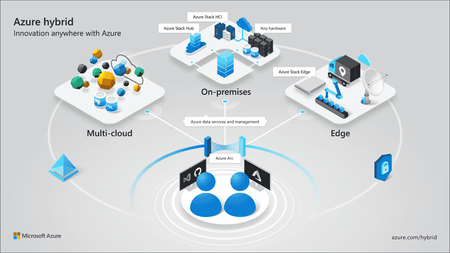
Azure Arc is on a mission to unify security, compliance, and management for Windows and Linux machines—anywhere. By extending Azure’s control plane beyond the cloud, Azure Arc enables organizations to unify governance, compliance, security and management of servers across on‑premises, edge, and multicloud environments using a consistent set of Azure tools and policies. Building on this mission, we’re excited to announce the private preview of deploying Ansible playbooks through Azure Policy using Machine Configuration, bringing Ansible‑driven automation into Azure Arc’s policy‑based governance model for Azure and Arc‑enabled Linux machines. This new capability enables you to orchestrate Ansible playbook execution directly from Azure Policy (via Machine Configuration) without requiring an Ansible control node, while benefiting from built‑in compliance reporting and remediation. Why this matters As organizations manage increasingly diverse server estates, they often rely on different tools for Windows and Linux, cloud, on-premises, or at the edge—creating fragmented security, compliance, and operational workflows. Many organizations rely on Ansible for OS configuration and application setup, but struggle with: Enforcing consistent configuration across distributed environments Detecting and correcting drift over time Integrating Ansible automation with centralized governance and compliance workflows With this private preview, Azure Policy becomes the single control plane for applying and monitoring Ansible‑based configuration, bringing Linux automation into the same governance model already used for Windows. Configuration is treated as policy—declarative, auditable, and continuously enforced—with compliance results surfaced in familiar Azure dashboards. What’s included in the private preview In this preview, you can: Use Azure Policy to trigger Ansible playbook execution on Azure and Azure Arc–enabled Linux machines Execute playbooks locally on each target machine, triggered by policy. Enable drift detection and automatic remediation by default View playbook execution status and compliance results directly in the Azure Policy compliance dashboard, alongside your other policies This provides a unified security, compliance and management experience across Windows and Linux machines—whether they’re running in Azure or connected through Azure Arc—while using your existing Ansible investments. Join the private preview If you’re interested in helping shape the future of Ansible‑based configuration management in Azure Arc, we’d love to partner with you. We’re especially interested in hearing your stories around usability, compliance reporting, and real‑world operational workflows. 👉 Sign up for the private preview and we'll reach out to you. We’ll continue investing in deeper Linux parity, broader scenarios, and tighter integration across Azure Arc’s security, governance and compliance experiences. We look forward to enhancing your unified Azure Arc experience for deploying, governing, and remediating configuration with Ansible—bringing consistent security, compliance, and management to Windows and Linux machines not only in Azure, but also across on‑premises and other public clouds.755Views1like0CommentsSimplify Azure Arc Server Onboarding with Ansible and the New Onboarding Role
If you’re already using Ansible to manage your infrastructure, there’s now a simpler—and more secure—way to bring machines under Azure Arc management. We’ve introduced a new Azure Arc onboarding role designed specifically for automated scenarios like Ansible playbooks. This role follows the principle of least privilege, giving your automation exactly what it needs to onboard servers—nothing more. A better way to onboard at scale Many customers want to standardize Azure Arc onboarding across hybrid and multicloud environments, but run into common challenges: Over‑privileged service principals Manual steps that don’t scale Inconsistent onboarding across environments By combining Ansible with the Azure Arc onboarding role, you can: Automate server onboarding end‑to‑end Reduce permissions risk with a purpose‑built role Scale confidently across thousands of machines Integrate Arc onboarding into existing Ansible workflows Built for automation, designed for security The new onboarding role removes the need to assign broader Azure roles just to connect servers to Azure Arc. Instead, your Ansible automation can authenticate using a tightly scoped identity that’s purpose‑built for Arc onboarding—making security teams happier without slowing down operations. Whether you’re modernizing existing datacenters or managing servers across multiple clouds, this new approach makes Azure Arc onboarding simpler, safer, and repeatable. Get started in minutes Our Microsoft Learn documentation provides guidance to help you get started quickly: Connect machines to Azure Arc at scale with Ansible Check out the Arc onboarding role, part of the Azure collection in Ansible Galaxy: Ansible Galaxy - azure.azcollection - Arc onboarding role Anything else you’d like to see with Azure Arc + Linux? Drop us a comment!440Views0likes0CommentsAzure Arc Server Forum: 2026 Updates
We are excited to announce the fourth calendar year of the Azure Arc Server Forum. We are incredibly thankful to all the customers and community members, who have joined our forum and newsletter from our start back in the Fall of 2023. From January 2026, the monthly Azure Arc Server Forum will be hosted on the third Thursday of each month from 9:30 – 10:15 AM PST. Each Arc Server Forum includes live demos of new capabilities, question and answer sessions with the product group, and feedback opportunities covering Windows, Linux, and SQL Server management, licensing, and connectivity across hybrid, multicloud, and edge environments. Sessions are skipped in July and December for summer and winter holidays respectively. Forum participants also receive a monthly newsletter summarizing updates including: Announcements of General Availability, Public Preview, and Private Previews capabilities including key details and documentation Updates on agent improvements and updates on experience changes Opportunities to provide feedback to and influence the product group’s roadmap or engage in ongoing customer research studies Updates on the invitation and timing of the Arc Server Forum Recordings from the Arc Server Forum are periodically uploaded to the Azure Arc Server Forum YouTube channel: Azure Arc Server Forum - YouTube typically within 2-3 weeks of the Forum. To sign up for the Azure Arc Server Forum and newsletter, please register with contact details at https://aka.ms/arcserverforumsignup/. Thank you!1.5KViews3likes2Comments
A Guide to Adaptive Cloud at Microsoft Ignite 2025
Get ready to supercharge your Ignite experience! This guide is your go‑to playbook for all things Adaptive Cloud. You’ll find clear pointers on where to learn about the latest updates for unifying hybrid, multicloud, and edge environments, with the latest updates from Azure Monitor, Azure Local, Azure Backup, and more. Connect with experts and peers, prioritize sessions, and navigate the event flow with quick links to the session catalog and resources to confirm times and locations throughout the event. We can’t wait to connect!1.2KViews2likes0CommentsOperate everywhere with AI-enhanced management and security
Farzana Rahman and Dushyant Gill from Microsoft discuss new AI-enhanced features in Azure that make it simpler to acquire, connect, and operate with Azure's management offerings across multiple clouds, on-premises, and at the edge. Key updates include enhanced management for Windows servers and virtual machines with Windows Software Assurance, Windows Server 2025 hotpatching support in Azure Update Manager, simplified hybrid environment connectivity with Azure Arc gateway, a multicloud connector for AWS, and Log Analytics Simple Mode. Additionally, Azure Migrate Business Case helps compare the total cost of ownership, and new Copilot in Azure capabilities that simplify cloud management and provide intelligent recommendations.2.4KViews1like1CommentPublic Preview: Audit and Enable Windows Recovery Environment (WinRE) for Azure Arc-enabled Servers
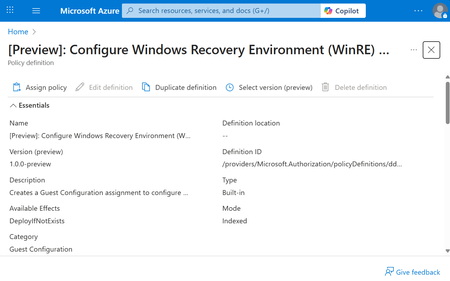
Windows Recovery Environment is a secure, isolated partition that enables diagnostics and repair when a system encounters critical failures – such as a stop error (commonly known as the blue screen of death). WinRE provides a reliable fallback mechanism for mission-critical workloads, allowing IT administrators to recover systems quickly and securely. With this Public Preview, Azure Arc introduces a set of Azure Policies that allow organizations to audit and enable WinRE across their fleet of Arc-enabled Windows Servers. These policies are powered by the Machine Configuration component of the Azure Connected Machine agent, which ensures secure and compliant configuration enforcement. Through the Azure Policy, the Azure Connected Machine agent detects whether WinRE is configured and reports its health status. If WinRE is not configured and the WinRE partition has been provisioned, customers can enable WinRE through the Azure Policy. These Azure Policies are available at no additional cost for servers covered under: Windows Server 2012 Extended Security Updates (ESUs) Microsoft Defender for Servers Plan 2 Windows Server Software Assurance attestation Windows Server Pay-as-you-Go licensing For other servers, these policies will incur charges associated with Azure Machine Configuration. To get started, deploy and assign these Azure Policies to Azure Arc-enabled servers in your existing subscription. [Preview]: Audit Windows machines that do not have Windows Recovery Environment (WinRE) enabled [Preview]: Configure Windows Recovery Environment (WinRE) on Windows machines Auditing and enablement of WinRE through Azure Arc underscores the capability of Azure Arc to increasingly afford resiliency across hybrid, multicloud, and edge workloads.960Views4likes0CommentsPublic Preview: Deploy OSS Large Language Models with KAITO on AKS on Azure Local
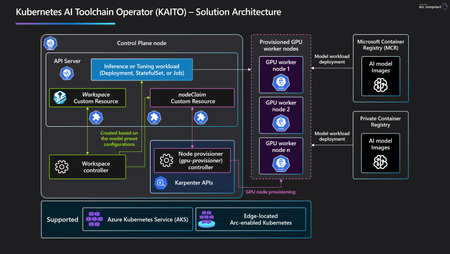
Announcement Along with Kubernetes AI Toolchain Operator (KAITO) on AKS GA release, we are thrilled to announce Public Preview refresh for KAITO on AKS on Azure Local. Customers can now enable KAITO as a cluster extension on AKS enabled by Azure Arc as part of cluster creation or day 2 using Az CLI. The seamless enablement experience makes it easy to get started with LLM deployment and fully consistent with AKS in the cloud. We also invest heavily to reduce frictions in LLM deployment such as recommending the right GPU SKU, validating preset models with GPUs and avoiding Out of Memory errors, etc. KAITO Use Cases Many of our lighthouse customers are exploring exciting opportunities to build, deploy and run AI Apps at the edge. We’ve seen many interesting scenarios like Pipeline Leak detection, Shrinkage detection, Factory line optimization or GenAI Assistant across many industry verticals. All these scenarios need a local AI model with edge data to satisfy low latency or regulatory requirements. With one simple command, customers can quickly get started with LLM in the edge-located Kubernetes cluster, and ready to deploy OSS models with OpenAI-compatible endpoints. Deploy & fine-tune LLM declaratively With KAITO extension, customers can author a simple YAML for inference workspace in Visual Studio Code or any text editor and deploy a variety of preset models ranging from Phi-4, Mistral, to Qwen with kubectl on any supported GPUs. In addition, customers can deploy any vLLM compatible text generation model from Hugging Face or even private weights models by following custom integration instructions. You can also customize base LLMs in the edge Kubernetes with Parameter Efficient Fine Tuning (PEFT) using qLoRA or LoRA method, just like the inference workspace deployment with YAML file. For more details, please visit the product documentation and KAITO Jumpstart Drops for more details. Compare and evaluate LLMs in AI Toolkit Customers can now use AI Toolkit, a popular extension in Visual Studio Code, to compare and evaluate LLMs whether it’s local or remote endpoint. With AI Toolkit playground and Bulk Run features, you can test and compare LLMs side by side and find out which model fits the best for your edge scenario. In addition, there are many built-in LLM Evaluators such as Coherence, Fluency, or Relevance that can be used to analyze model performance and generate numeric scores. For more details, please visit AI Toolkit Overview document. Monitor inference metrics in Managed Grafana The KAITO extension defaults to vLLM inference runtime. With vLLM runtime, customers can now monitor and visualize inference metrics with Azure Managed Prometheus and Azure Managed Grafana. Within a few configuration steps, e.g., enabling the extensions, labeling inference workspace, creating Service Monitor, the vLLM metrics will show up in Azure Monitor Workspace. To visualize them, customers can link the Grafana dashboard to Azure Monitor Workspace and view the metrics using the community dashboard. Please view product document and vLLM metric reference for more details. Get started today The landscape of LLM deployment and application is evolving at lightning speed - especially in the world of Kubernetes. With the KAITO extension, we're aiming to supercharge innovation around LLMs and streamline the journey from ideation to model endpoints to real-world impact. Dive into this blog as well as KAITO Jumpstart Drops to explore how KAITO can help you get up and running quickly on your own edge Kubernetes cluster. We’d love to hear your thoughts - drop your feedback or suggestions in the KAITO OSS Repo!2.2KViews4likes2Comments