troubleshooting
13 TopicsIntroducing kars - an Agent Reference Stack for Kubernetes
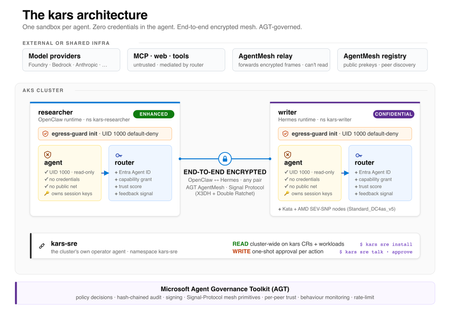
kars is an open-source, Kubernetes-native runtime for AI agents on Azure. It treats every agent as untrusted code - per-pod kernel isolation, zero credentials in the agent process, and an end-to-end encrypted inter-agent mesh - and governs agents on any framework with one set of Kubernetes policies via the Microsoft Agent Governance Toolkit. kars dev runs a governed agent on your laptop in minutes.1.9KViews1like2CommentsFour open source projects to explore at Microsoft Build
Open source is where developers experiment, collaborate, and turn new ideas into tools that others can build on. At Microsoft Build, we’re creating a dedicated space for that energy: the Open Source Zone. This year, the Open Source Zone will bring together maintainers, contributors, and developers working on some of the most interesting open source projects in AI. Whether you’re building agents, experimenting with local models, exploring prompt workflows, or looking for practical ways to bring AI into your development process, this is a place to meet the people behind the projects and see what they’re building. The Open Source Zone is inspired by similar community spaces we’ve hosted at GitHub Universe: hands-on, conversation-driven, and centered on the people and projects moving open source forward. Meet the projects OpenClaw OpenClaw, originally Clawbot, formerly Clawdbot and briefly Moltbot,before landing on its current name (because naming is hard), is a personal AI assistant project built for developers who want more control over how AI agents run across tools, devices, and workflows. Its repository describes it as “your own personal AI assistant” across operating systems and platforms, with support for agent workspaces, skills, and device nodes. It has also become one of the fastest-growing open source projects on GitHub, with over 370,000 stars to date. At the Open Source Zone, attendees can learn how OpenClaw approaches personal agents, extensibility, and local-first experimentation. AutoGPT AutoGPT is one of the best-known open source projects in the autonomous agent space. The project’s mission is to make AI accessible for everyone to use and build on, with tools for building, testing, and delegating work to agents. Visit AutoGPT in the Open Source Zone to learn how the project is evolving agent development, benchmarking, frontend experiences, and practical workflows for building agent-powered applications. Come for the autonomous agents; stay for the very human maintainers. AutoGPT is also a member of GitHub’s Secure Open Source Fund, with a goal of enhancing AI security across the open source ecosystem. Open WebUI Open WebUI is a self-hosted, extensible AI platform for working with large language models. The project supports Ollama and OpenAI-compatible APIs and includes built-in RAG capabilities, making it a strong option for developers and organizations exploring local, private, or provider-flexible AI experiences. At Build, the Open WebUI team will show how developers can run, customize, and extend AI interfaces for their own environments. prompts.chat prompts.chat, formerly Awesome ChatGPT Prompts, is a curated collection of prompt examples for AI chat models. The project is designed to help people discover, share, and build better prompts for modern AI assistants. Created by Fatih Kadir Akın, a GitHub Star from Istanbul, prompts.chat reflects his work at the intersection of open source, developer education, and AI-assisted development. Fatih leads Developer Relations at Teknasyon, has authored books on JavaScript and prompt engineering, and is active in the community as a speaker, organizer, and contributor. Stop by to explore prompt libraries, prompt engineering resources, self-hosting options, and ways the community is making prompting more reusable and collaborative. Register for Microsoft Build Microsoft Build takes place June 2–3, 2026, in San Francisco and online. In-person passes are available, and online registration is free for livestreamed keynote and select session access. Register for Microsoft Build and come visit the Open Source Zone to meet the teams behind OpenClaw, AutoGPT, Open WebUI, and prompts.chat. We’ll see you there. <3672Views0likes0CommentsAfter the Agent Acts: Proving What Happened and Who Authorized It
In part one of this series, we covered AGT's runtime governance: the policy engine, zero-trust identity, execution sandboxing, and the OWASP Agentic AI risk mapping. In part two, we moved earlier in the lifecycle: shift-left governance, CI/CD gates, attestation workflows, and supply chain integrity. Both posts focused on governance that happens around the moment of action, before it, during it, or right after it. That coverage is essential. But after those posts went live, a different pattern emerged in conversations with teams deploying agents in production. The question was more pointed: "An agent executed a financial transfer last Tuesday. A compliance officer is asking us to show who authorized it, through what chain, and exactly what scope it was granted. We have logs. But can we prove they weren't altered?" No policy engine prevents a past action. No CI gate reconstructs a delegation chain after the fact. No shift-left tool tells an auditor whether the cryptographic identity that authorized a trade was legitimately derived from a human principal, or was injected mid-chain. This is the accountability gap. It is the governance question that neither runtime enforcement nor pre-runtime checks were designed to answer. Regulatory frameworks are tightening: the EU AI Act includes high-risk obligations with enforcement timelines in 2026, and the Colorado AI Act introduces requirements for automated decision-making. Courts are beginning to encounter AI agents in the evidentiary record. The accountability infrastructure has not caught up. This post covers what post-hoc accountability means for autonomous agents, what the Agent Governance Toolkit has to help address it, and three value propositions that are real but not yet visible in how governance tooling is typically described. Note: The policy files, workflow configurations, and code samples in this post are illustrative examples designed to show the concepts. For working implementations, see the QUICKSTART.md in the repository. The Accountability Gap in Multi-Agent Systems The accountability problem is architectural. When a single agent takes a single action, accountability is straightforward: you know which model ran, what prompt it received, and what it called. When agents delegate to sub-agents, which delegate further to tool-execution agents, the chain of authorization becomes progressively disconnected from the original human instruction that started it. Consider this delegation topology, common in any production orchestration scenario: Human Principal └── Orchestrator Agent (did:mesh:orchestrator-001) └── Data Analyst Agent (did:mesh:analyst-001) └── File Write Tool (write /reports/q3-summary.csv) By the time file_write fires, three delegation hops have occurred. The file write tool has no reliable way to know whether the human principal actually authorized file writes, what scope they granted to the orchestrator, or whether the analyst agent's instructions arrived through a legitimate delegation or were injected by a prompt injection attack. This gap has three concrete consequences: Consequence Operational Impact Post-hoc audits cannot reconstruct authorization Incident investigations are limited to "the agent did this," not "here is who authorized this, through what chain, at what time, with what scope" Agents cannot distinguish legitimate delegation from injection A prompt injection attack that inserts itself into a delegation chain is indistinguishable from a real orchestrator instruction without cryptographic verification Accountability cannot be attributed to a human authorization event When a regulator asks "who is responsible for this action," the answer is a shrug and a log file AGT already has the technical foundations designed to help close all three. The gap is not capability, it is visibility. What AGT Has: The Cryptographic Accountability Stack AGT's accountability infrastructure spans three components that work together: cryptographic agent identity, delegation chains, and tamper-evident audit logs. 1. Ed25519 Agent Identity with Lifecycle Management Every agent in an AGT-governed system carries a cryptographic identity: a verifiable Ed25519 keypair with a W3C DID Document that can be exported, shared, and verified by any participant in the system. from agentmesh import AgentIdentity, IdentityRegistry # Create a verifiable agent identity identity = AgentIdentity.create( name="data-analyst", sponsor="operator@contoso.com", capabilities=["data.read", "report.write"], organization="data-team", description="Q3 close data analyst agent" ) # Export as W3C DID Document for cross-system verification did_document = identity.to_did_document() # Register in the shared identity registry registry = IdentityRegistry() registry.register(identity) Identity lifecycle states, active, suspended, revoked, are tracked and cascaded. When an orchestrator identity is revoked, every downstream agent delegated from it is also invalidated. This cascade revocation behavior lets you kill a compromised delegation chain from its root rather than hunting sub-agents individually. 2. Delegation Chains with Scope Inheritance When an orchestrator delegates to a sub-agent, AGT records the delegation cryptographically: who delegated, to whom, what capabilities were transferred, and what restrictions were applied. Sub-agents are designed to be unable to exceed the scope of their delegating principal. from agentmesh import ScopeChain, DelegationLink # Create a scope chain rooted in a human sponsor chain, root_link = ScopeChain.create_root( sponsor_email="operator@contoso.com", root_agent_did=str(orchestrator_identity.did), capabilities=["data.read", "report.write", "data.delete"], sponsor_verified=True, ) # Orchestrator delegates narrowed scope to analyst agent link = DelegationLink( link_id="link-analyst-001", depth=1, parent_did=str(orchestrator_identity.did), child_did=str(analyst_identity.did), parent_capabilities=["data.read", "report.write", "data.delete"], delegated_capabilities=["data.read", "report.write"], # narrowed: no delete parent_signature=orchestrator_identity.sign( f"{orchestrator_identity.did}:{analyst_identity.did}:data.read,report.write".encode() ), link_hash="", # computed on add previous_link_hash=root_link.link_hash, ) link.link_hash = link.compute_hash() chain.add_link(link) # Verify the entire chain: scope narrowing + hash integrity + signatures valid, reason = chain.verify() if not valid: raise ValueError(f"Chain verification failed: {reason}") The scope chain carries the human authorization context: the root sponsor email, when the chain was created, and what capabilities were granted at the top. Every downstream agent can trace any capability back through the chain using chain.trace_capability("data.read"). A file write tool executing three hops from the human principal can verify that the original sponsor authorized file writes in this scope. This is the mechanism designed to help close the prompt injection gap: an injected instruction cannot produce a valid signed delegation link from a legitimate orchestrator identity. 3. Tamper-Evident Audit Logs Every policy decision, every delegation event, every tool call, every trust score evaluation: AGT writes a signed, append-only audit record. The signature covers the content hash of the log entry plus the hash of the preceding entry, forming a chain where tampering is designed to be detectable. from agentmesh import PolicyEngine, AuditLog # Create the audit log (with optional external sink for production) audit_log = AuditLog() # Log a governance decision entry = audit_log.log( event_type="policy_decision", agent_did=str(analyst_identity.did), action="report.write", resource="/reports/q3-summary.csv", data={"task_id": "q3-close-2026"}, outcome="success", policy_decision="allow", ) # Verify the audit chain has not been tampered with valid, reason = audit_log.verify_chain() # valid == True: all hashes and chain links are intact # Query audit trail for a specific agent trail = audit_log.get_entries_for_agent(str(analyst_identity.did)) The audit trail for a single task session includes the complete delegation chain, from human authorization event at the top to tool execution at the bottom, with cryptographic signatures at every step. Validating a Compliance Evidence Package The three components above are most powerful when used together. At runtime, AGT's audit chain, identity registry, and delegation system each produce structured records. Assembling these into a single evidence package for compliance submission or incident investigation is a deployment-level concern: your CI pipeline or orchestration layer collects the outputs into a JSON artifact. Once assembled, AGT's agt verify --evidence flag validates the package: checking that signatures are intact, delegation chains are complete, and audit entries have not been tampered with. # Validate a runtime evidence package agt verify --evidence ./agt-evidence.json # Strict mode: fail if evidence is missing, incomplete, or signatures don't verify agt verify --evidence ./agt-evidence.json --strict Future direction: A built-in agt evidence collect command to automate evidence assembly is on the backlog. The evidence package helps answer the audit questions directly: Auditor Question Where It Lives in the Evidence Package Which agent executed this action? identity.agent_id with Ed25519 public key Who authorized it? delegation_chain[0].human_principal with timestamp What scope was granted? delegation_chain[*].granted_capabilities at each hop Was the delegation legitimate? delegation_chain[*].signature, verifiable against issuer's public key Was the audit log altered? audit_trail.chain_valid: true/false with entry-level hash verification What policy governed the action? policy_decision.rule_name with the policy YAML snapshot at decision time This is the difference between "we have logs" and "here is a verifiable chain of custody backed by cryptographic signatures." The Governance Dial: Enabling Autonomy, Not Just Blocking Risk There is a framing problem in how agent governance is typically described. Governance is described almost entirely as a constraint: what agents cannot do, what gets blocked, what violations get caught. This framing is accurate but incomplete. Governance is the mechanism that helps you safely expand what your agents can do. Without governance evidence, every expansion of agent autonomy is a leap of faith. With it, expansions are decisions with a measured risk profile: Scenario Without Governance Evidence With AGT Accountability Stack Expand agent to write to production databases Requires human approval on every write indefinitely Pilot with human-in-loop for 500 writes; audit trail shows 0 violations; graduate to autonomous Deploy agent in a regulated data environment Blocked by legal until "we can prove it" Evidence package helps satisfy audit requirement; deployment proceeds Respond to a security incident involving an agent Manually reconstruct what happened from scattered logs Pull the task session's evidence package; full chain of custody in minutes The governance layer is the dial between supervised and autonomous operation. Audit evidence is what helps justify turning the dial further in the autonomous direction. Blast Radius: The Governance Assurance You're Not Advertising The sandboxing and privilege ring system in AGT is typically described in security terms: isolation, privilege reduction, process-level enforcement. But there is a more concrete operational value: blast radius definition before an incident occurs. The question every operations team needs to answer before deploying an autonomous agent at scale is: *"If this agent goes wrong, not if, when, what is the worst-case outcome?"* Without governance-enforced privilege boundaries, the answer is uncomfortably open-ended. With AGT's capability model and execution rings, the blast radius is a policy configuration: a bounded, declared set of resources the agent can touch, scoped to what the task requires. # policies/financial-agent.yaml apiVersion: governance.toolkit/v1 version: "1.0" name: financial-agent-policy default_action: deny rules: - name: allow-report-write condition: "tool_name == 'report.write' and path.startswith('/data/reports/')" action: allow priority: 10 - name: allow-data-read condition: "tool_name == 'data.read' and path.startswith('/data/processed/')" action: allow priority: 10 With this policy in place, the worst-case outcome for this agent is declared in the policy file, not discovered during a post-incident review. The audit log records not just what the agent did, but also every action that was blocked, giving you a full picture of how close any session came to the declared blast boundary. Regulatory Alignment The OWASP-COMPLIANCE.md in the AGT repository maps the toolkit's controls to each of the 10 OWASP Agentic AI risks. The compliance picture for specific regulatory frameworks: Regulatory Requirement Relevant Framework AGT Control Technical documentation for high-risk AI EU AI Act, Art. 9-11 Evidence package, policy audit trail, OWASP attestation Logging for automated decisions EU AI Act, Art. 12 Tamper-evident audit log with entry-level signatures Human oversight mechanisms EU AI Act, Art. 14 Circuit breakers, privilege rings, delegation scope limits Algorithmic impact assessment Colorado AI Act Policy snapshot at decision time, signed governance evidence Audit trail for automated decisions HIPAA, SOC 2 Type II Immutable audit log with W3C DID-based agent identity Non-repudiation of agent actions Financial services (MiFID II, SEC) Ed25519-signed audit entries, delegation chain with human auth context Note: The Agent Governance Toolkit does not guarantee compliance with any specific regulatory framework. The mappings above show how the toolkit's controls align with common requirements. Consult legal counsel for your specific obligations. Putting It Together The three posts in this series cover three distinct layers of the governance lifecycle: Layer Timing Primary Value Post Shift-left governance Before production Catch policy violations at commit, PR, and CI time Part 2 Runtime governance At the moment of action Deterministic policy enforcement, zero-trust identity, sandboxing Part 1 Post-hoc accountability After the action Cryptographic chain of custody, blast radius evidence, regulatory proof This post None of these layers substitutes for the others. Pre-runtime governance cannot prevent a runtime violation. Runtime enforcement cannot retroactively prove authorization. Post-hoc accountability cannot undo an action that runtime governance should have blocked. They compose. Getting Started If you already have the AGT policy engine in place, the path to full accountability coverage is incremental: Add agent identity - Create identities for each agent and register them. Export DID documents for cross-service verification. Record delegation tokens - At each orchestrator-to-agent delegation boundary, create and sign a delegation link. Pass tokens as context to the policy engine. Configure a tamper-evident audit backend - Configure the audit chain with a signing key and chain verification. For production, use an immutable backend: Azure Blob with WORM retention, S3 Object Lock, or equivalent. Generate your first evidence package: agt verify --evidence ./agt-evidence.json --strict Add evidence generation to your CI/CD release gate: # .github/workflows/release.yml - name: Governance Evidence Gate uses: microsoft/agent-governance-toolkit/action@<sha> #v3.5.0 with: command: governance-verify evidence-path: ./agt-evidence.json strict: true fail-on-missing-chain: true Conclusion Runtime governance and shift-left governance answer the question: did we apply the right controls? Post-hoc accountability answers the question: can we prove it? The Agent Governance Toolkit has the technical infrastructure designed to help answer it: Ed25519 agent identity with cascade revocation, cryptographically signed delegation chains with human authorization context, and tamper-evident audit logs that form a verifiable chain of custody from human principal to terminal tool call. The governance dial analogy is worth keeping. Every autonomous agent deployment exists on a spectrum between fully supervised and fully autonomous. The limiting factor on where you can set that dial is not model capability or framework maturity. It is how much governance evidence you have, and how verifiable that evidence is. Resources GitHub: microsoft/agent-governance-toolkit: AI Agent Governance Toolkit — Policy enforcement, zero-trust identity, execution sandboxing, and reliability engineering for autonomous AI agents. Covers 10/10 OWASP Agentic Top 10. Quickstart: Quick Start - Agent Governance Toolkit OWASP Compliance Mapping: OWASP Compliance - Agent Governance Toolkit PyPI: pip install agent-governance-toolkit[full] npm: npm install microsoft/agent-governance-sdk NuGet: dotnet add package Microsoft.AgentGovernance Have questions about deploying AGT in your environment? Open an issue at aka.ms/agent-governance-toolkit or join the conversation in the comments below.303Views0likes0CommentsInnovations and Strengthening Platforms Reliability Through Open Source
The Linux Systems Group (LSG) at Microsoft is the team building OS innovations in Azure enabling secure and high-performance platforms that power millions of workloads worldwide. From providing the OS for Boost, optimizing Linux kernels for hyperscale environments or contributing to open-source projects like Rust-VMM and Cloud Hypervisor, LSG ensures customers get the best of Linux on Azure. Our work spans performance tuning, security hardening, and feature enablement for new silicon enablement and cutting-edge technologies, such as Confidential Computing, ARM64 and Nvidia Grace Blackwell all while strengthening the global open-source ecosystem. Our philosophy is simple: we develop in the open and upstream first, integrating improvements into our products after they’ve been accepted by the community. At Ignite we like to highlight a few open-source key contributions in 2025 that are the foundations for many product offerings and innovations you will see during the whole week. We helped bring seamless kernel update features (Kexec HandOver) to the Linux kernel, improved networking paths for AI platforms, strengthened container orchestration and security efforts, and shared engineering insights with global communities and conferences. This work reflects Microsoft’s long-standing commitment to open source, grounded in active upstream participation and close collaboration with partners across the ecosystem. Our engineers work side-by-side with maintainers, Linux distro partners, and silicon providers to ensure contributions land where they help the most, from kernel updates to improvements that support new silicon platforms. Linux Kernel Contributions Enabling Seamless Kernel Updates: Persistent uptime for critical services is a top priority. This year, Microsoft engineer Mike Rapoport successfully merged Kexec HandOver (KHO) into Linux 6.16 1 . KHO is a kernel mechanism that preserves memory state across a reboot (kexec), allowing systems to carry over important data when loading a new kernel. In practice, this means Microsoft can apply security patches or kernel updates to Azure platform and customers VMs without rebooting or with significantly reduced downtime. It’s a technical achievement with real impact: cloud providers and enterprises can update Linux on the fly, enhancing security and reliability for services that demand continuous availability. Optimizing Network Drivers for AI Scale: Massive AI models require massive bandwidth. Working closely with our partners deploying large AI workloads on Azure, LSG engineers delivered a breakthrough in Linux networking performance. LSG team rearchitected the receive path of the MANA network driver (used by our smart NICs) to eliminate wasted memory and enable recycling of buffers. 2x higher effective network throughput on 64 KB page systems 35% better memory efficiency for RX buffers 15% higher throughput and roughly half the memory use even on standard x86_64 VMs References MANA RX optimization patch: net: mana: Use page pool fragments for RX buffers LKML Linux Plumbers 2025 talk: Optimizing traffic receive (RX) path in Linux kernel MANA Driver for larger PAGE_SIZE systems Improving Reliability for Cloud Networking: In addition to raw performance, reliability got a boost. One critical fix addressed a race condition in the Hyper-V hv_netvsc driver that sometimes caused packet loss when a VM’s network channel initialized. By patching this upstream, we improved network stability for all Linux guests running on Hyper-V keeping customer VMs running smoothly during dynamic operations like scale-out or live migrations. Our engineers also upstreamed numerous improvements to Hyper-V device drivers (covering storage, memory, and general virtualization).We fixed interrupt handling bugs, eliminated outdated patches, and resolved issues affecting ARM64 architectures. Each of these fixes was contributed to the mainline kernel, ensuring that any Linux distribution running on Hyper-V or Azure benefits from the enhanced stability and performance. References Upstream fix: hv_netvsc race on early receive events: kernel.org commit referenced by Ubuntu bug Launchpad Ubuntu Azure backport write-up: Bug 2127705 – hv_netvsc: fix loss of early receive events from host during channel open Launchpad Older background on hv_netvsc packet-loss issues: kernel.org bug 81061 Strengthening Core Linux Infrastructure: Several of our contributions targeted fundamental kernel subsystems that all Linux users rely on. For example, we led significant enhancements to the Virtual File System (VFS) layer reworking how Linux handles process core dumps and expanding file management capabilities. These changes improve how Linux handles files and memory under the hood, benefiting scenarios from large-scale cloud storage to local development. We also continued upstream efforts to support advanced virtualization features.Our team is actively upstreaming the mshv_vtl driver (for managing secure partitions on Hyper-V) and improving Linux’s compatibility with nested virtualization on Azure’s Microsoft Hypervisor (MSHV). All this low-level work adds up to a more robust and feature-rich kernel for everyone. References Example VFS coredump work: split file coredumping into coredump_file() mshv_vtl driver patchset: Drivers: hv: Introduce new driver – mshv_vtl (v10) and v12 patch series on patchew Bolstering Linux Security in the Cloud: Security has been a major thread across our upstream contributions. One focus area is making container workloads easier to verify and control. Microsoft engineers proposed an approach for code integrity in containers built on containerd’s EROFS snapshotter, shared as an open RFC in the containerd project -GitHub. The idea is to use read-only images plus integrity metadata so that container file systems can be measured and checked against policy before they run. We also engaged deeply with industry partners on kernel vulnerability handling. Through the Cloud-LTS Linux CVE workgroup, cloud providers and vendors collaborate in the open on a shared analysis of Linux CVEs. The group maintains a public repository that records how each CVE affects various kernels and configurations, which helps reduce duplicated triage work and speeds up security responses. On the platform side, our engineers contributed fixes to the OP-TEE secure OS used in trusted execution and secure-boot scenarios, making sure that the cryptographic primitives required by Azure’s Linux boot flows behave correctly across supported devices. These changes help ensure that Linux verified boot chains remain reliable on Azure hardware. References containerd RFC: Code Integrity for OCI/containerd Containers using erofs-snapshotter GitHub Cloud-LTS public CVE analysis repo: cloud-lts/linux-cve-analysis Linux CVE workgroup session at Linux Plumbers 2025: Linux CVE workgroup OP-TEE project docs: OP-TEE documentation Developer Tools & Experience Smoother OS Management with Systemd: Ensuring Linux works seamlessly on Azure scale. The core init system systemd saw important improvements from our team this year. LSG contributed and merged upstream support for disk quota controls in systemd services. With new directives (like StateDirectoryQuota and CacheDirectoryQuota), administrators can easily enforce storage limits for service data, which is especially useful in scenarios like IoT devices with eMMC storage on Azure’s custom SoCs. In addition, Sea-Team added an auto-reload feature to systemd-journald, allowing log configuration changes to apply at runtime without restarting the logging service . These improvements, now part of upstream systemd, help Azure and other Linux environments perform updates or maintenance with minimal disruption to running services. These improvements help Azure and other environments roll out configuration updates with less impact on running workloads. References systemd quota directives: systemd.exec(5) – StateDirectoryQuota and related options systemd journald reload behavior: systemd-journald.service(8) Empowering Linux Quality at Scale: Running Linux on Azure at global scale requires extensive, repeatable testing. Microsoft continues to invest in LISA (Linux Integration Services Automation), an open-source framework that validates Linux kernels and distributions on Azure and other Hyper-V–based environments. Over the past year we expanded LISA with: New stress tests for rapid reboot sequences to catch elusive timing bugs Better failure diagnostics to make complex issues easier to root-cause Extended coverage for ARM64 scenarios and technologies like InfiniBand networking Integration of Azure VM SKU metadata and policy checks so that image validation can automatically confirm conformance to Azure requirements These changes help us qualify new kernels, distributions, and VM SKUs before they are shipped to customers. Because LISA is open source, partners and Linux vendors can run the same tests and share results, which raises quality across the ecosystem. References LISA GitHub repo: microsoft/lisa LISA documentation: Welcome to Linux Integration Services Automation LISA Documentation Community Engagement and Leadership Sharing Knowledge Globally: Open-source contribution is not just about code - it’s about people and knowledge exchange. Our team members took active roles in community events worldwide, reflecting Microsoft’s growing leadership in the Linux community. We were proud to be a Platinum Sponsor of the inaugural Open Source Summit India 2025 in Hyderabad, where LSG engineers served on the program committee and hosted technical sessions. At Linux Security Summit Europe 2025, Microsoft’s security experts shaped the agenda as program committee members, delivered talks (such as “The State of SELinux”), and even led panel discussions alongside colleagues from Intel, Arm, and others. And in Paris at Kernel Recipes 2025, our own SMEs shared kernel insights with fellow developers. By engaging in these events, Microsoft not only contributes code but also helps guide the conversation on the future of Linux. These relationships and public interactions build mutual trust and ensure that we remain closely aligned with community priorities. References Event: Open Source Summit India 2025 – Linux Foundation Paul Moore’s talk archive: LSS-EU 2025 Conference: Kernel Recipes 2025 and Kernel Recipes 2025 schedule Closing Thoughts Microsoft’s long-term commitment to open source remains strong, and the Linux Systems Group will continue contributing upstream, collaborating across the industry, and supporting the upstream communities that shape the technologies we rely on. Our work begins in upstream projects such as the Linux kernel, Kubernetes, and systemd, where improvements are shared openly before they reach Azure. The progress highlighted in this blog was made possible by the wider Linux community whose feedback, reviews, and shared ideas help refine every contribution. As we move ahead, we welcome maintainers, developers, and enterprise teams to engage with our projects, offer input, and collaborate with us. We will continue contributing code, sharing knowledge, and supporting the open-source technologies that power modern computing, working with the community to strengthen the foundation and shape a future that benefits everyone. References & Resources: Microsoft’s Open-Source Journey – Azure Blog https://techcommunity.microsoft.com/t5/linux-and-open-source-blog/linux-and-open-source-on-azure-quarterly-update-february-2025/ba-p/4382722 Cloud Hypervisor Project Rust-VMM Community Microsoft LISA (Linux Integration Services Automation) Repository Cloud-LTS Linux CVE Analysis Project789Views1like0CommentseBPF-Powered Observability Beyond Azure: A Multi-Cloud Perspective with Retina
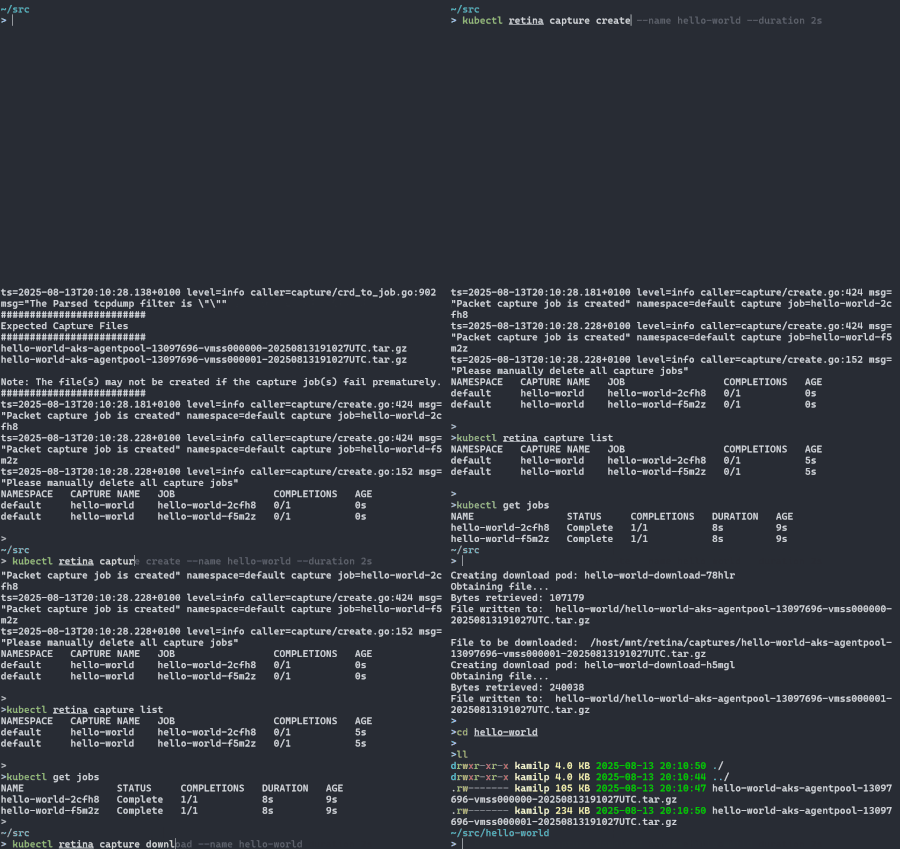
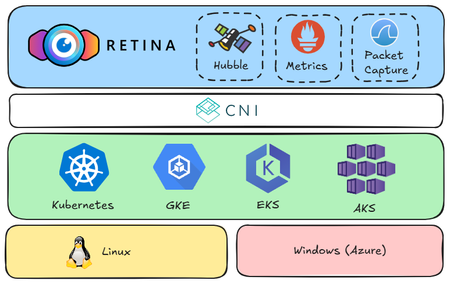
Kubernetes simplifies container orchestration but introduces observability challenges due to dynamic pod lifecycles and complex inter-service communication. eBPF technology addresses these issues by providing deep system insights and efficient monitoring. The open-source Retina project leverages eBPF for comprehensive, cloud-agnostic network observability across AKS, GKE, and EKS, enhancing troubleshooting and optimization through real-world demo scenarios.1.3KViews10likes0CommentsAzure Image Testing for Linux (AITL)
As cloud and AI evolve at an unprecedented pace, the need to deliver high-quality, secure, and reliable Linux VM images has never been more essential. Azure Image Testing for Linux (AITL) is a self-service validation tool designed to help developers, ISVs, and Linux distribution partners ensure their images meet Azure’s standards before deployment. With AITL, partners can streamline testing, reduce engineering overhead, and ensure compliance with Azure’s best practices, all in a scalable and automated manner. Let’s explore how AITL is redefining image validation and why it’s proving to be a valuable asset for both developers and enterprises. Before AITL, image validation was largely a manual and repetitive process, engineers were often required to perform frequent checks, resulting in several key challenges: Time-Consuming: Manual validation processes delayed image releases. Inconsistent Validation: Each distro had different methods for testing, leading to varying quality levels. Limited Scalability: Resource constraints restricted the ability to validate a broad set of images. AITL addresses these challenges by enabling partners to seamlessly integrate image validation into their existing pipelines through APIs. By executing tests within their own Azure subscriptions prior to publishing, partners can ensure that only fully validated, high-quality Linux images are promoted to production in the Azure environment. How AITL Works? AITL is powered by LISA, which is a test framework and a comprehensive opensource tool contains 400+ test cases. AITL provides a simple, yet powerful workflow run LISA test cases: Registration: Partners register their images in AITL’s validation framework. Automated Testing: AITL runs a suite of predefined validation tests using LISA. Detailed Reporting: Developers receive comprehensive results highlighting compliance, performance, and security areas. All test logs are available to access. Self-Service Fixes: Any detected issues can be addressed by the partner before submission, eliminating delays and back-and-forth communication. Final Sign-Off: Once tests pass, partners can confidently publish their images, knowing they meet Azure’s quality standards. Benefits of AITL AITL is a transformative tool that delivers significant benefits across the Linux and cloud ecosystem: Self-Service Capability: Enables developers and ISVs to independently validate their images without requiring direct support from Microsoft. Scalable by Design: Supports concurrent testing of multiple images, driving greater operational efficiency. Consistent and Standardized Testing: Offers a unified validation framework to ensure quality and consistency across all endorsed Linux distributions. Proactive Issue Detection: Identifies potential issues early in the development cycle, helping prevent costly post-deployment fixes. Seamless Pipeline Integration: Easily integrates with existing CI/CD workflows to enable fully automated image validation. Use Cases for AITL AITL designed to support a diverse set of users across the Linux ecosystem: Linux Distribution Partners: Organizations such as Canonical, Red Hat, and SUSE can validate their images prior to publishing on the Azure Marketplace, ensuring they meet Azure’s quality and compliance standards. Independent Software Vendors (ISVs): Companies providing custom Linux Images can verify that their custom Linux-based solutions are optimized for performance and reliability on Azure. Enterprise IT Teams: Businesses managing their own Linux images on Azure can use AITL to validate updates proactively, reducing risk and ensuring smooth production deployments. Current Status and Future Roadmap AITL is currently in private preview, with five major Linux distros and select ISVs actively integrating it into their validation workflows. Microsoft plans to expand AITL’s capabilities by adding: Support for Private Test Cases: Allowing partners to run custom tests within AITL securely. Kernel CI Integration: Enhancing low-level kernel validation for more robust testing and results for community. DPDK and Specialized Validation: Ensuring network and hardware performance for specialized SKU (CVM, HPC) and workloads How to Get Started? For developers and partners interested in AITL, following the steps to onboard. Register for Private Preview AITL is currently hidden behind a preview feature flag. You must first register the AITL preview feature with your subscription so that you can then access the AITL Resource Provider (RP). These are one-time steps done for each subscription. Run the “az feature register” command to register the feature: az feature register --namespace Microsoft.AzureImageTestingForLinux --name JobandJobTemplateCrud Sign Up for Private Preview – Contact Microsoft’s Linux Systems Group to request access. Private Preview Sign Up To confirm that your subscription is registered, run the above command and check that properties.state = “Registered” Register the Resource Provider Once the feature registration has been approved, the AITL Resource Provider can be registered by running the “az provider register” command: az provider register --namespace Microsoft.AzureImageTestingForLinux *If your subscription is not registered to Microsoft.Compute/Network/Storage, please do so. These are also prerequisites to using the service. This can be done for each namespace (Microsoft.Compute, Microsoft.Network, Microsoft.Storage) through this command: az provider register --namespace Microsoft.Compute Setup Permissions The AITL RP requires a permission set to create test resources, such as the VM and storage account. The permissions are provided through a custom role that is assigned to the AITL Service Principal named AzureImageTestingForLinux. We provide a script setup_aitl.py to make it simple. It will create a role and grant to the service principal. Make sure the active subscription is expected and download the script to run in a python environment. https://raw.githubusercontent.com/microsoft/lisa/main/microsoft/utils/setup_aitl.py You can run the below command: python setup_aitl.py -s "/subscriptions/xxxx" Before running this script, you should check if you have the permission to create role definition in your subscription. *Note, it may take up to 20 minutes for the permission to be propagated. Assign an AITL jobs access role If you want to use a service principle or registration application to call AITL APIs. The service principle or App should be assigned a role to access AITL jobs. This role should include the following permissions: az role definition create --role-definition '{ "Name": "AITL Jobs Access Role", "Description": "Delegation role is to read and write AITL jobs and job templates", "Actions": [ "Microsoft.AzureImageTestingForLinux/jobTemplates/read", "Microsoft.AzureImageTestingForLinux/jobTemplates/write", "Microsoft.AzureImageTestingForLinux/jobTemplates/delete", "Microsoft.AzureImageTestingForLinux/jobs/read", "Microsoft.AzureImageTestingForLinux/jobs/write", "Microsoft.AzureImageTestingForLinux/jobs/delete", "Microsoft.AzureImageTestingForLinux/operations/read", "Microsoft.Resources/subscriptions/read", "Microsoft.Resources/subscriptions/operationresults/read", "Microsoft.Resources/subscriptions/resourcegroups/write", "Microsoft.Resources/subscriptions/resourcegroups/read", "Microsoft.Resources/subscriptions/resourcegroups/delete" ], "IsCustom": true, "AssignableScopes": [ "/subscriptions/01d22e3d-ec1d-41a4-930a-f40cd90eaeb2" ] }' You can create a custom role using the above command in the cloud shell, and assign this role to the service principle or the App. All set! Please go through a quick start to try AITL APIs. Download AITL wrapper AITL is served by Azure management API. You can use any REST API tool to access it. We provide a Python wrapper for better experience. The AITL wrapper is composed of a python script and input files. It calls “az login” and “az rest” to provide similar experience like the az CLI. The input files are used for creating test jobs. Make sure az CLI and python 3 are installed. Clone LISA code, or only download files in the folder. lisa/microsoft/utils/aitl at main · microsoft/lisa (github.com). Use the command below to check the help text. python -m aitl job –-help python -m aitl job create --help Create a job Job creation consists of two entities: A job template and an image. The quickest way to get started with the AITL service is to create a Job instance with your job template properties in the request body. Replace placeholders with the real subscription id, resource group, job name to start a test job. This example runs 1 test case with a marketplace image using the tier0.json template. You can create a new json file to customize the test job. The name is optional. If it’s not provided, AITL wrapper will generate one. python -m aitl job create -s {subscription_id} -r {resource_group} -n {job_name} -b ‘@./tier0.json’ The default request body is: { "location": "westus3", "properties": { "jobTemplateInstance": { "selections": [ { "casePriority": [ 0 ] } ] } } } This example runs the P0 test cases with the default image. You can choose to add fields to the request, such as image to test. All possible fields are described in the API Specification – Jobs section. The “location” property is a required field that represents the location where the test job should be created, it doesn’t affect the location of VMs. AITL supports “westus”, “westus2”, or “westus3”. The image object in the request body json is where the image type to be used for testing is detailed, as well as the CPU architecture and VHD Generation. If the image object is not included, LISA will pick a Linux marketplace image that meets the requirements for running the specified tests. When an image type is specified, additional information will be required based on the image type. Supported image types are VHD, Azure Marketplace image, and Shared Image Gallery. - VHD requires the SAS URL. - Marketplace image requires the publisher, offer, SKU, and version. - Shared Image Gallery requires the gallery name, image definition, and version. Example of how to include the image object for shared image gallery. (<> denotes placeholder): { "location": "westus3", “properties: { <...other properties from default request body here>, "image": { "type": "shared_gallery", "architecture": "x64", "vhdGeneration": 2, "gallery": "<Example: myAzureComputeGallery>", "definition": "<Example: myImage1>", "version": "<Example: 1.0.1>" } } } Check Job Status & Test Results A job is an asynchronous operation that is updated throughout the job’s lifecycle with its operation and ongoing tests status. A job has 6 provisioning states – 4 are non-terminal states and 2 are terminal states. Non-terminal states represent ongoing operation stages and terminal states represent the status at completion. The job’s current state is reflected in the `properties.provisioningState` property located in the response body. The states are described below: Operation States State Type Description Accepted Non-Terminal state Initial ARM state describing the resource creation is being initialized. Queued Non-Terminal state The job has been queued by AITL to run LISA using the provided job template parameters. Scheduling Non-Terminal state The job has been taken off the queue and AITL is preparing to launch LISA. Provisioning Non-Terminal state LISA is creating your VM within your subscription using the default or provided image. Running Non-Terminal state LISA is running the specified tests on your image and VM configuration. Succeeded Terminal state LISA completed the job run and has uploaded the final test results to the job. There may be failed test cases. Failed Terminal state There was a failure during the job’s execution. Test results may be present and reflect the latest status for each listed test. Test results are updated in near real-time and can be seen in the ‘properties.results’ property in the response body. Results will begin to get updated during the “Running” state and the final set of result updates will happen prior to reaching a terminal state (“Completed” or “Failed”). For a complete list of possible test result properties, go to the API Specification – Test Results section. Run below command to get detailed test results. python -m aitl job get -s {subscription_id} -r {resource_group} -n {job_name} The query argument can format or filter results by JMESquery. Please refer to help text for more information. For example, List test results and error messages. python -m aitl job get -s {subscription_id} -r {resource_group} -n {job_name} -o table -q 'properties.results[].{name:testName,status:status,message:message}' Summarize test results. python -m aitl job get -s {subscription_id} -r {resource_group} -n {job_name} -q 'properties.results[].status|{TOTAL:length(@),PASSED:length([?@==`"PASSED"`]),FAILED:length([?@==`"FAILED"`]),SKIPPED:length([?@==`"SKIPPED"`]),ATTEMPTED:length([?@==`"ATTEMPTED"`]),RUNNING:length([?@==`"RUNNING"`]),ASSIGNED:length([?@==`"ASSIGNED"`]),QUEUED:length([?@==`"QUEUED"`])}' Access Job Logs To access logs and read from Azure Storage, the AITL user must have “Storage Blob Data Owner” role. You should check if you have the permission to create role definition in your subscription, likely with your administrator. For information on this role and instructions on how to add this permission, see this Azure documentation. To access job logs, send a GET request with the job name and use the logUrl in the response body to retrieve the logs, which are stored in Azure storage container. For more details on interpreting logs, refer to the LISA documentation on troubleshooting test failures. To quickly view logs online (note that file size limitations may apply), select a .log Blob file and click "edit" in the top toolbar of the Blob menu. To download the log, click the download button in the toolbar. Conclusion AITL represents a forward-looking approach to Linux image validation bringing automation, scalability, and consistency to the forefront. By shifting validation earlier in the development cycle, AITL helps reduce risk, accelerate time to market, and ensure a reliable, high-quality Linux experience on Azure. Whether you're a developer, a Linux distribution partner, or an enterprise managing Linux workloads on Azure, AITL offers a powerful way to modernize and streamline your validation workflows. To learn more or get started with AITL or more details and access to AITL, reach out to Microsoft Linux Systems Group1.1KViews0likes0CommentsAutomating the Linux Quality Assurance with LISA on Azure
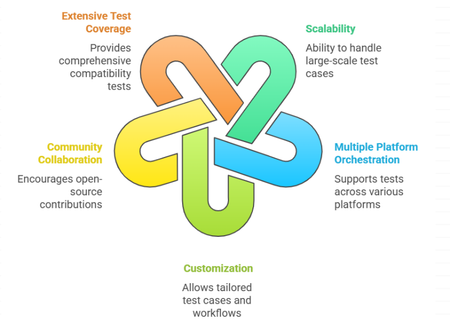
Introduction Building on the insights from our previous blog regarding how MSFT ensures the quality of Linux images, this article aims to elaborate on the open-source tools that are instrumental in securing exceptional performance, reliability, and overall excellence of virtual machines on Azure. While numerous testing tools are available for validating Linux kernels, guest OS images and user space packages across various cloud platforms, finding a comprehensive testing framework that addresses the entire platform stack remains a significant challenge. A robust framework is essential, one that seamlessly integrates with Azure's environment while providing the coverage for major testing tools, such as LTP and kselftest and covers critical areas like networking, storage and specialized workloads, including Confidential VMs, HPC, and GPU scenarios. This unified testing framework is invaluable for developers, Linux distribution providers, and customers who build custom kernels and images. This is where LISA (Linux Integration Services Automation) comes into play. LISA is an open-source tool specifically designed to automate and enhance the testing and validation processes for Linux kernels and guest OS images on Azure. In this blog, we will provide the history of LISA, its key advantages, the wide range of test cases it supports, and why it is an indispensable resource for the open-source community. Moreover, LISA is available under the MIT License, making it free to use, modify, and contribute. History of LISA LISA was initially developed as an internal tool by Microsoft to streamline the testing process of Linux images and kernel validations on Azure. Recognizing the value it could bring to the broader community, Microsoft open-sourced LISA, inviting developers and organizations worldwide to leverage and enhance its capabilities. This move aligned with Microsoft's growing commitment to open-source collaboration, fostering innovation and shared growth within the industry. LISA serves as a robust solution to validate and certify that Linux images meet the stringent requirements of modern cloud environments. By integrating LISA into the development and deployment pipeline, teams can: Enhance Quality Assurance: Catch and resolve issues early in the development cycle. Reduce Time to Market: Accelerate deployment by automating repetitive testing tasks. Build Trust with Users: Deliver stable and secure applications, bolstering user confidence. Collaborate and Innovate: Leverage community-driven improvements and share insights. Benefits of Using LISA Scalability: Designed to run large-scale test cases, from 1 test case to 10k test cases in one command. Multiple platform orchestration: LISA is created with modular design, to support run the same test cases on various platforms including Microsoft Azure, Windows HyperV, BareMetal, and other cloud-based platforms. Customization: Users can customize test cases, workflow, and other components to fit specific needs, allowing for targeted testing strategies. It’s like building kernels on-the-fly, sending results to custom database, etc. Community Collaboration: Being open source under the MIT License, LISA encourages community contributions, fostering continuous improvement and shared expertise. Extensive Test Coverage: It offers a rich suite of test cases covering various aspects of compatibility of Azure and Linux VMs, from kernel, storage, networking to middleware. How it works Infrastructure LISA is designed to be componentized and maximize compatibility with different distros. Test cases can focus only on test logic. Once test requirements (machines, CPU, memory, etc) are defined, just write the test logic without worrying about environment setup or stopping services on different distributions. Orchestration. LISA uses platform APIs to create, modify and delete VMs. For example, LISA uses Azure API to create VMs, run test cases, and delete VMs. During the test case running, LISA uses Azure API to collect serial log and can hot add/remove data disks. If other platforms implement the same serial log and data disk APIs, the test cases can run on the other platforms seamlessly. Ensure distro compatibility by abstracting over 100 commands in test cases, allowing focus on validation logic rather than distro compatibility. Pre-processing workflow assists in building the kernel on-the-fly, installing the kernel from package repositories, or modifying all test environments. Test matrix helps one run to test all. For example, one run can test different vm sizes on Azure, or different images, even different VM sizes and different images together. Anything is parameterizable, can be tested in a matrix. Customizable notifiers enable the saving of test results and files to any type of storage and database. Agentless and low dependency LISA operates test systems via SSH without requiring additional dependencies, ensuring compatibility with any system that supports SSH. Although some test cases require installing extra dependencies, LISA itself does not. This allows LISA to perform tests on systems with limited resources or even different operating systems. For instance, LISA can run on Linux, FreeBSD, Windows, and ESXi. Getting Started with LISA Ready to dive in? Visit the LISA project at aka.ms/lisa to access the documentation. Install: Follow the installation guide provided in the repository to set up LISA in your testing environment. Run: Follow the instructions to run LISA on local machine, Azure or existing systems. Extend: Follow the documents to extend LISA by test cases, data sources, tools, platform, workflow, etc. Join the Community: Engage with other users and contributors through forums and discussions to share experiences and best practices. Contribute: Modify existing test cases or create new ones to suit your needs. Share your contributions with the community to enhance LISA's capabilities. Conclusion LISA offers open-source collaborative testing solutions designed to operate across diverse environments and scenarios, effectively narrowing the gap between enterprise demands and community-led innovation. By leveraging LISA, customers can ensure their Linux deployments are reliable and optimized for performance. Its comprehensive testing capabilities, combined with the flexibility and support of an active community, make LISA an indispensable tool for anyone involved in Linux quality assurance and testing. Your feedback is invaluable, and we would greatly appreciate your insights.712Views1like0CommentsHow Microsoft Ensures the Quality of Linux VM Images and Platform Experiences on Azure?
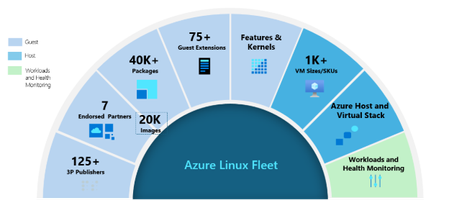
In the continuously evolving landscape of cloud computing and AI, the quality and reliability of virtual machines (VMs) plays vital role for businesses running mission-critical workloads. With over 65% of Azure workloads running Linux our commitment to delivering high-quality Linux VM images and platforms remains unwavering. This involves overcoming unique challenges and implementing rigorous validation processes to ensure that every Linux VM image offered on Azure meets the high standards of quality and reliability. Ensuring the quality of Linux images and the overall platform experience on Azure involves addressing the challenges posed by a unique platform stack and the complexity of managing and validating multiple independent release cycles. High-quality Linux VMs are essential for ensuring consistent performance, minimizing downtime and regressions, and enhancing security by addressing vulnerabilities with timely updates. Figure 1: Complexity of Linux VMs in Azure VM Image Updates: Azure's Marketplace offers a diverse array of Linux distributions, each maintained by its respective publishers. These distributions release updates on their own schedules, independent of Azure's infrastructure updates. Package Updates: Within each Linux distribution, numerous packages are maintained and updated separately, adding another layer of complexity to the update and validation process. Extension and Agent Updates: Azure provides over 75+ guest VM extensions to enhance operating system capabilities, security, recovery etc. These extensions are updated independently, requiring careful validation to ensure compatibility and stability. Azure Infrastructure Updates: Azure regularly updates its underlying infrastructure, including components like Azure Boost, to improve reliability, performance, and security. VM SKUs and Sizes: Azure provides thousands of VM sizes with various combinations of CPU, memory, disk, and network configurations to meet diverse customer needs. Managing concurrent updates across all VMs poses significant QA challenges. To address this, Azure uses rigorous testing, gating and validation processes to ensure all components function reliably and meet customer expectations. Azure’s Approach to Overcoming Challenges To address these challenges, we have implemented a comprehensive validation strategy that involves testing at every stage of the image and kernel lifecycle. By adopting a shift-left approach, we execute Linux VM-specific test cases as early as possible. This strategy helps us catch failures close to the source of changes before they are deployed to Azure fleet. Our validation gates integrate with various entry points and provide coverage for a wide variety of scenarios on Azure. Upstream Kernel Validation: As a founding member of Kernel CI, Microsoft validates commits from Linux next and stable trees using Linux VMs in Azure and shares results with the community via Kernel CI DB. This enables us to detect regressions at early stages. Azure-Tuned Kernel Validation: Azure-Tuned Kernels provided by our endorsed distribution partners are thoroughly validated and signed off by Microsoft before it is released to the Azure fleet. Linux Guest Image Validation: The quality team works with endorsed distribution partners for major releases to conduct thorough validation. Each refreshed image, including those from third-party publishers, is validated and certified before being added to the marketplace. Automated pipelines are in place to validate the images once they are available in the Marketplace. Package Validation: Unattended Update: We conduct validation of packages updates with target distro to prevent regression and ensure that only tested snapshots are utilized for updating Linux VM in Azure. Guest Extension Validation: Every Azure-provided extensions undergoes Basic Validation Testing (BVT) across all images and kernel versions to ensure compatibility and functionality amidst any changes. Additionally, comprehensive release testing is conducted for major releases to maintain reliability and compatibility. New VM SKU Validation: Any new VM SKU undergoes validation to confirm it supports Linux before its release to the Azure fleet. This process includes functionality, performance and stress testing across various Linux distributions, and compatibility tests with existing Linux images in the fleet. Azure HostOS & Host Agent Validation: Updates to the Azure Host OS & Agents are thoroughly tested from the Linux guest OS perspective to confirm that changes in the Azure host environment do not result in regressions in compatibility, performance, or stability for Linux VMs. At any stage where regressions or bugs are identified, we block those releases to ensure they never reach customers. All issues are resolved and rigorously retested before images, kernels, or extension updates are made available. Through these robust validation processes, Azure ensures that Linux VMs consistently deliver to customer expectations, delivering a reliable, secure, and high-performance environment for mission-critical workloads. Validation Tools for VM Guest Images and Kernel To ensure the quality and reliability of Linux VM images and kernels on Azure, we leverage open-source kernel testing frameworks like LTP, kselftest, and fstest, along with extensive Azure-specific test cases available in LISA, to comprehensively validate all aspects of the platforms. LISA (Linux Integration Services Automation): Microsoft is committed to open source and that is no different with our testing framework LISA. LISA is an open-source core testing framework designed to meet all Linux validation needs. It includes over 400 tests covering performance, features and security, ensuring comprehensive validation of Linux images on Azure. By automating diverse test scenarios, LISA enables early detection and resolution of issues, enhancing the stability and performance of Linux VMs. Conclusion At Azure, Linux quality is a fundamental aspect of our commitment to delivering reliable VM images and platforms. Through comprehensive testing and strong collaboration with Linux distribution partners, we ensure quality and reliability of VMs while proactively identifying and resolving potential issues. This approach allows us to continually refine our processes and maintain the quality that customers expect from Azure. Quality is a core focus, and we remain dedicated to continuous improvement, delivering world-class Linux environments to businesses and customers. For us, quality is not just a priority—it’s our standard. Your feedback is invaluable, and we would greatly appreciate your insights.927Views0likes0Comments
Enhancing Observability with Inspektor Gadget
Thorough observability is essential to a pain free cloud experience. Azure provides many general-purpose observability tools, but you may want to create custom tooling . Inspektor Gadget is an open-source framework that makes customizable data collection easy. Microsoft recently contributed new features to Inspektor Gadget that further enhance its modular framework, making it even easier to meet your specific systems inspection needs. Of course, we also made it easy for Azure Kubernetes Service (AKS) users to use.1.2KViews0likes0Comments