tools
32 Topics
Whiteboard migration
Hi! Before MS Whiteboard for personal accounts shuts down, I want to say a huge thank you to the developers for the wonderful product I’ve been using constantly since 2020. It became my primary tool—especially due to remote learning in our region since 2022—and it worked reliably even with a very poor internet connection. It is a real shame that support for it is ending. Best regards.63Views0likes0CommentsHow do you structure a Power BI learning path for beginners?
I would structure a beginner Power BI learning path around the complete reporting workflow, starting with the data and gradually moving toward analysis and sharing. 1. Start with Power BI fundamentals Understand the difference between Power BI Desktop and the Power BI service, along with reports, visuals, semantic models, filters, and dashboards. 2. Learn how to connect to data Start with simple sources such as Excel and CSV files. Then explore other commonly used data sources as your confidence improves. 3. Build Power Query skills Learn how to clean and transform data before creating reports. Important topics include changing data types, removing duplicates, handling missing values, splitting columns, merging queries, and appending data. 4. Understand data modeling Learn how tables relate to each other and why a well-designed model matters. Focus on relationships, primary and foreign keys, fact and dimension tables, and basic model design. 5. Create basic reports Practice using charts, tables, cards, slicers, filters, and drill-through. Rather than concentrating only on visual design, try to build reports that answer specific business questions. 6. Introduce DAX gradually Once the data model is understood, start with simple measures using functions such as SUM, COUNT, DISTINCTCOUNT, and CALCULATE. More advanced DAX can be introduced after the fundamentals are comfortable. 7. Publish and manage reports Finally, learn how to publish reports to the Power BI service, work with workspaces, configure data refresh, and understand appropriate sharing and access options. A useful beginner project is a simple sales dashboard. Take an Excel dataset, clean it with Power Query, create a basic data model, write a few measures, build the report, and publish it. This gives beginners practical experience with the entire Power BI workflow. The main idea is to learn in the below order data preparation data modeling visualization DAX publishing This provides a stronger foundation than trying to learn advanced Power BI features immediately. From my perspective as a career and learning professional associated with Edoxi Kuwait, I find that beginners usually make better progress when they understand how each Power BI skill connects to an actual reporting task, rather than trying to learn all the available features at once.117Views0likes0CommentsStep-by-Step: How to Setup Copilot Chat in VS Code
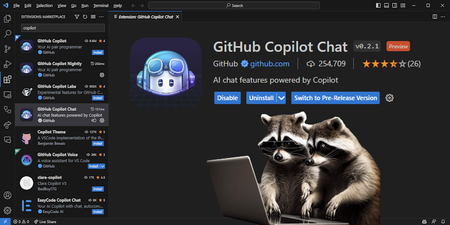
Copilot Chat is an AI-powered chatbot leveraging OpenAI's GPT-4, designed to enhance your coding workflow. Learn how to set up Copilot Chat step by step in Visual Studio Code (VS Code). Benefit from personalized and flexible coding environments, code analysis, automated unit test generation, and bug fixes. Prerequisites include an active GitHub account and the latest version of VS Code. Elevate your coding efficiency to new heights with Copilot Chat.116KViews7likes8Comments
1000 Free Udemy Coupons on Microsoft Power Automate With AI Builder
<<BAKRI ID(Id-ul-Ad'ha) -- 1000 FREE UDEMY COUPONS ON RPA>> On the Occasion of BAKRI ID(Id-ul-Ad'ha), I am very happy to share 1000 Free udemy coupons on Microsoft Power Automate With AI Builder Title : Advanced RPA - Microsoft Power Automate With AI Builder https://www.udemy.com/course/microsoft-power-automate-with-ai-builder/?couponCode=LT-BAKRID <<Our other courses on Udemy and Udemy Business>> Title : PL-500 Microsoft Power Automate RPA Developer BootCamp Link: https://www.udemy.com/course/pl-500-microsoft-power-automate-rpa-developer-bootcamp/?referralCode=891491BAB7F20B865EE6 Title 1: Become RPA Master in MS Power Automate Desktop https://www.udemy.com/course/microsoft-power-automate-desktop-tutorials-for-beginners/?referralCode=03D49B549EE2193E79EE Title 2: RPA : Microsoft Power Automate Desktop - Zero to Expert : 2 https://www.udemy.com/course/microsoft-power-automate-desktop-course-zero-to-expert-2/?referralCode=783F39A1D0CDB4A70A7C Title 3: RPA:Microsoft Power Automate Desktop:Intelligent Automation https://www.udemy.com/course/power-automate-desktop-course-intelligent-automation/?referralCode=E8C51F3C27EA98FE100C Connect with me on LinkedIn : https://www.linkedin.com/in/ameer-basha-p-b44880262/ Youtube Channel : www.youtube.com/learningtechnologies761Views2likes1CommentAI Agents: Mastering the Tool Use Design Pattern - Part 4
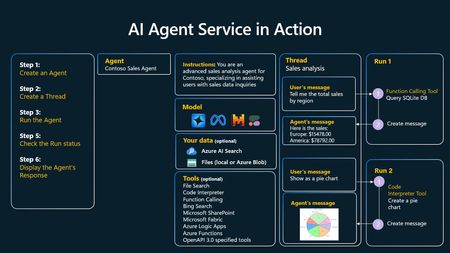
This blog post, Part 4 of a series on AI agents, delves into the Tool Use Design Pattern, a key concept in enabling agents to interact with external systems and perform a wider range of tasks. The post explains how tools, ranging from simple functions to complex API calls, are invoked by AI agents through model-generated function calls. Several use cases are presented, highlighting the versatility of this pattern, from dynamic information retrieval and code execution to workflow automation and customer support. The post further details the implementation of function/tool calling, including choosing a suitable LLM, defining a function schema, and writing the function code. Examples using Semantic Kernel and Azure AI Agent Service illustrate how agentic frameworks simplify tool integration. Finally, the post addresses security considerations and provides links to valuable resources, including the "AI Agents for Beginners" GitHub repository and related workshops, for further learning.2.6KViews1like0CommentsJoin the GitHub Challenge - Microsoft Build Edition!
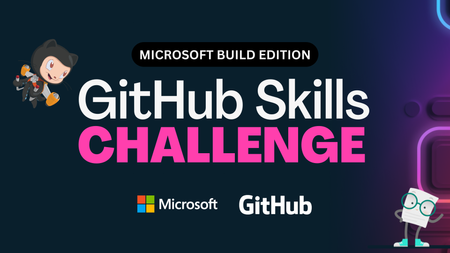
Immerse yourself in cutting-edge AI technology, build new skills, and earn a special badge by completing our GitHub Challenge! This challenge offers a variety of resources to help you succeed, including interactive Microsoft Learn community events, live and recorded learning sessions delivered by experts, and training assets. The challenge ends until June 21, 2024. Take this unique time opportunity! Register here now: aka.ms/GitHubChallengeBuild16KViews4likes4Comments