together mode
6 Topics
Together mode with 2 people
Hi, Two questions. When I turn on together mode now it says "preview" next to the mode. Does it mean I need to install something to use it? Is it possible for me to do an interview with a colleague and record it using together mode? Meaning it will look like I'm interviewing him in personal. //Lisa2.9KViews0likes6Comments
Error Uploading custom scene as app for together mode
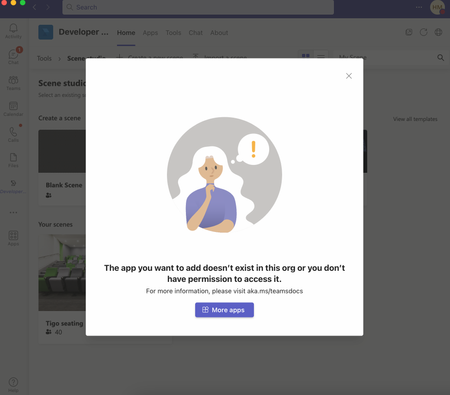
Hi, I have been trying to upload a custom scene to my teams to act as a background for together mode. I keep being met with error messages such as a parsing error and not validating but not showing where the error is. Any suggestions?1.4KViews1like5Comments
Unable to test custom scene in Teams Together Mode
I have created a new custom scene in teams and have shared the app using the link generated. But the scene cannot be added/activated. It gives me an error "Unable to add scene. Please try again." over and over again. Do you have any idea what is causing this?Solved2.4KViews0likes1Comment
Teams Together Mode License Requirements
Hi Community! I have been looking for the license requirements for Teams Together Mode feature but I did not see any article. May I know what license is needed? And what will happen if guest users join the Teams Meeting? Will they their video show in the together mode? Any help will be highly appreciated. Thank you!1.9KViews0likes2Comments
Teams Meeting Large gallery shows your image mirrored and other image inconstancies
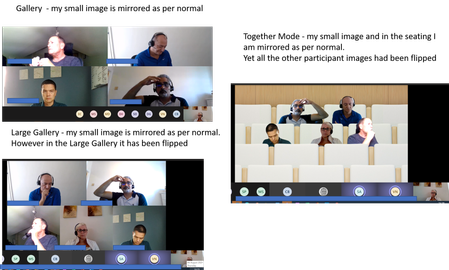
I have have been trying out the new Teams meeting experience at all my meetings over the last few days getting all the participants to set it up. There is an inconsistency in the way the images are portrayed. In the standard Gallery mode and the Together mode my own image is mirrored which is fine as that is how we are all used to seeing ourselves when looking in a mirror. However in the Large Gallery mode my image was not mirrored so when looking at my video every movement I made seemed backwards at it was opposite. This was vey disconcerting to me every time I moved it seemed alien so I had to switch this view off. I also noticed that for the other participant that the Gallery and Large Gallery showed their images one way around yet the Together mode had flipped their images. It seems very illogical not to have a standard way of displaying images, See screenshots below. Anyone know if this is a bug or just inconsistent coding?15KViews1like6Commentswhen will together mode be available in teams?
Microsoft Teams has a few announced features with the Office 365 platform. Does anyone have the scheduled release dates for these features? together mode video filters meeting live reactions powerpoint live meetings meeting transcripts Live whiteboard in meetings planner/todo/tasks integration thanks684Views0likes0Comments