threat protection
394 TopicsThe Microsoft Cloud App Security (MCAS) Ninja Training (March 2021 Update)
We’ve updated the MCAS Ninja Training since this post was published. For the latest version of the training, visit Microsoft Cloud App Security (MCAS) Ninja Training | September 2021 - Microsoft Tech Community.226KViews24likes25Comments
Microsoft Defender for Cloud - strategy and plan towards Log Analytics Agent (MMA) deprecation
Log Analytics agent (also known as MMA) is on a deprecation path and will be retired in Aug 2024. The purpose of this blogpost is to clarify how Microsoft Defender for Cloud will align with this plan and what is the impact on customers.107KViews2likes28CommentsUpdating best practices for Domain Controllers
Customers are on a journey and hybrid identity environments will be an important state for many customers for a long time. Domain Controllers still act as a pivotal piece of infrastructure for many organizations, and the identities that Active Directory holds are often the target for attackers.Azure Defender for IoT is now in public preview
Azure Defender for IoT is now available in public preview for on-premises deployments, with the option of connecting securely to Azure Sentinel to eliminate IT/OT silos and provide a unified view of threats across both IT and OT environments. It also integrates out-of-the box with third-party tools like Splunk, IBM QRadar, and ServiceNow.
Deploying and Onboarding 2008 R2
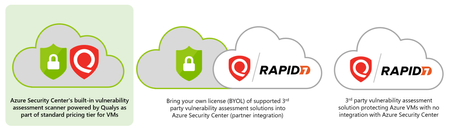
Hi all, We purchased Defender for Business Servers, and i need to install it on some 2008 R2 servers. There is no Defender for Endpoint software, so following the guides, i only have to install the MMA, but then how i know my server is protected? i need to enroll it at azure? Our servers are on-premise, and i don't know if i need to use Azure Arc (i need to pay?), anyone is using Defender for Windows Servers (On-Premise) with 2008 R2 version? Thanks in advanceSolved49KViews0likes7Comments
New Blog Post | Enhancements to Azure WAF for Application Gateway now in General Availability
Enhancements to Azure WAF for Application Gateway now in General Availability - Microsoft Community Hub Azure Web Application Firewall (WAF) on Azure Application Gateway provides centralized protection for your web applications against common vulnerabilities and exploits. Web applications are increasingly targeted by malicious attacks that vulnerabilities. SQL Injection (SQLi) and Cross-Site Scripting (XSS) are examples of some well-known attacks. Preventing such attacks in application code can be challenging and may require rigorous maintenance, patching, and monitoring at many layers of the application topology. A centralized web application firewall helps make security management much simpler and gives better assurance to application developers and security teams against threats or intrusions. The Azure Web Application Firewall (WAF) engine is the component that inspects traffic and determines whether a web-request represents a potential attack, then takes appropriate action depending on the configuration. Previously, when you used the Azure WAF with Application Gateway, there were certain limitations in the way you could configure and monitor your WAF deployments. We are happy to announce several enhancements to the configurations and monitoring capabilities of Azure WAF when used with Azure Application Gateway going forward. Original Post: New Blog Post | Enhancements to Azure WAF for Application Gateway now in General Availability - Microsoft Community HubPlanning your move to Microsoft Defender portal for all Microsoft Sentinel customers
In November 2023, Microsoft announced our strategy to unify security operations by bringing the best of XDR and SIEM together. Our first step was bringing Microsoft Sentinel into the Microsoft Defender portal, giving teams a single, comprehensive view of incidents, reducing queue management, enriching threat intel, streamlining response and enabling SOC teams to take advantage of Gen AI in their day-to-day workflow. Since then, considerable progress has been made with thousands of customers using this new unified experience; to enhance the value customers gain when using Sentinel in the Defender portal, multi-tenancy and multi-workspace support was added to help customers with more sophisticated deployments. Our mission is to unify security operations by bringing all your data, workflows, and people together to unlock new capabilities and drive better security outcomes. As a strong example of this, last year we added extended posture management, delivering powerful posture insights to the SOC team. This integration helps build a closed-loop feedback system between your pre- and post-breach efforts. Exposure Management is just one example. By bringing everything together, we can take full advantage of AI and automation to shift from a reactive to predictive SOC that anticipates threats and proactively takes action to defend against them. Beyond Exposure Management, Microsoft has been constantly innovating in the Defender experience, adding not just SIEM but also Security Copilot. The Sentinel experience within the Defender portal is the focus of our innovation energy and where we will continue to add advanced Sentinel capabilities going forward. Onboarding to the new unified experience is easy and doesn’t require a typical migration. Just a few clicks and permissions. Customers can continue to use Sentinel in the Azure portal while it is available even after choosing to transition. Today, we’re announcing that we are moving to the next phase of the transition with a target to retire the Azure portal for Microsoft Sentinel by July 1, 2026. Customers not yet using the Defender portal should plan their transition accordingly. “Really amazing to see that coming, because cross querying with tables in one UI is really cool! Amazing, big step forward to the unified [Defender] portal.” Glueckkanja AG “The biggest benefit of a unified security operations solution (Microsoft Sentinel + Microsoft Defender XDR) has been the ability to combine data in Defender XDR with logs from third party security tools. Another advantage developed has been to eliminate the need to switch between Defender XDR and Microsoft Sentinel portals, now having a single pane of glass, which the team has been wanting for some years.” Robel Kidane, Group Information Security Manager, Renishaw PLC Delivering the SOC of the future Unifying threat protection, exposure management and security analytics capabilities in one pane of glass not only streamlines the user experience, but also enables Sentinel customers to realize security outcomes more efficiently: Analyst efficiency: A single portal reduces context switching, simplifies workflows, reduces training overhead, and improves team agility. Integrated insights: SOC-focused case management, threat intelligence, incident correlation, advanced hunting, exposure management, and a prioritized incident queue enriched with business and sensitivity context—enabling faster, more informed detection and response across all products. SOC optimization: Security controls that can be adjusted as threats and business priorities change to control costs and provide better coverage and utilization of data, thus maximizing ROI from the SIEM. Accelerated response: AI-driven detection and response which reduces mean time to respond (MTTR) by 30%, increases security response efficiency by 60%, and enables embedded Gen AI and agentic workflows. What’s next: Preparing for the retirement of the Sentinel Experience in the Azure Portal Microsoft is committed to supporting every single customer in making that transition over the next 12 months. Beginning July 1, 2026, Sentinel users will be automatically redirected to the Defender portal. After helping thousands of customers smoothly make the transition, we recommend that security teams begin planning their migration and change management now to ensure continuity and avoid disruption. While the technical process is very straightforward, we have found that early preparation allows time for workflow validation, training, and process alignment to take full advantage of the new capabilities and experience. Tips for a Successful Migration to Microsoft Defender 1. Leverage Microsoft’s help: Leverage Microsoft documentation, instructional videos, guidance, and in-product support to help you be successful. A good starting point is the documentation on Microsoft Learn. 2. Plan early: Engage stakeholders early including SOC and IT Security leads, MSSPs, and compliance teams to align on timing, training and organizational needs. Make sure you have an actionable timeline and agreement in the organization around when you can prioritize this transition to ensure access to the full potential of the new experience. 3. Prepare your environment: Plan and design your environment thoroughly. This includes understanding the prerequisites for onboarding Microsoft Sentinel workspaces, reviewing and deciding on access controls, and planning the architecture of your tenant and workspace. Proper planning will ensure a smooth transition and help avoid any disruptions to your security operations. 4. Leverage Advanced Threat Detection: The Defender portal offers enhanced threat detection capabilities with advanced AI and machine learning for Microsoft Sentinel. Make sure to leverage these features for faster and more accurate threat detection and response. This will help you identify and address critical threats promptly, improving your overall security posture. 5. Utilize Unified Hunting and Incident Management: Take advantage of the enhanced hunting, incident, and investigation capabilities in Microsoft Defender. This provides a comprehensive view for more efficient threat detection and response. By consolidating all security incidents, alerts, and investigations into a single unified interface, you can streamline your operations and improve efficiency. 6. Optimize Cost and Data Management The Defender portal offers cost and data optimization features, such as SOC Optimization and Summary Rules. Make sure to utilize these features to optimize your data management, reduce costs, and increase coverage and SIEM ROI. This will help you manage your security operations more effectively and efficiently. Unleash the full potential of your Security team The unified SecOps experience available in the Defender portal is designed to support the evolving needs of modern SOCs. The Defender portal is not just a new home for Microsoft Sentinel - it’s a foundation for integrated, AI-driven security operations. We’re committed to helping you make this transition smoothly and confidently. If you haven’t already joined the thousands of security organizations that have done so, now is the time to begin. Resources AI-Powered Security Operations Platform | Microsoft Security Microsoft Sentinel in the Microsoft Defender portal | Microsoft Learn Shifting your Microsoft Sentinel Environment to the Defender Portal | Microsoft Learn Microsoft Sentinel is now in Defender | YouTube47KViews9likes21CommentsNew Blog Post | Data Connectors for Azure Log Analytics and Data Explorer Now in Public Preview
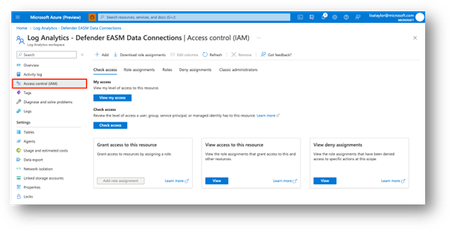
Data Connectors for Azure Log Analytics and Data Explorer Now in Public Preview - Microsoft Community Hub The Microsoft Defender EASM (Defender EASM) team is excited to share that new Data Connectors for Azure Log Analytics and Azure Data Explorer are now available in public preview. Defender EASM continuously discovers an incredible amount of up-to-the-minute Attack Surface Data, so connecting and automating this data flow to all our customers’ mission-critical systems that keep their organizations secure is essential. The new Data Connectors for Log Analytics and Azure Data Explorer can easily augment existing workflows by automating recurring exports of all asset inventory data and the set of potential security issues flagged as insights to specified destinations to keep other tools continually updated with the latest findings from Defender EASM. Original Post: New Blog Post | Data Connectors for Azure Log Analytics and Data Explorer Now in Public Preview - Microsoft Community Hub