threat intelligence
237 Topics
Make system-generated LogARepublisher Threat Intelligence updates non-billable (_IsBillable = false)
Problem Statement: Currently, Microsoft Sentinel regularly reruns an internal background process called LogARepublisher. This process periodically republishes existing Threat Intelligence data into the ThreatIntelIndicators table on an ongoing 7-to-10 day cycle to maintain freshness. Because these system-generated updates write new records into the workspace, they are flagged as _IsBillable = true. This results in organizations paying multiple times for the exact same threat indicators over their lifecycle. In general, this is a small amount of data but can form a larger percentage of ingest/analytic cost for customers with low ingestion volumes, and becomes noticeable at scale when managing many Azure tenants. Why This Matters: Unintended Cost Allocation: Customers are being billed for automated, backend data-maintenance cycles triggered by Microsoft, rather than true new log ingestion or external feed consumption. Artificial Volume Inflation: Large TI datasets can exponentially inflate monthly data volume metrics solely due to repeating republication, making budget forecasting unpredictable. No Added Analytical Value: Rerunning the exact same indicators does not offer new security value or unique logs; it simply updates the timestamp metadata on a new row. Proposed Solution: Modify the backend pipeline so that when a record is ingested via LastUpdateMethod == "LogARepublisher", the system-generated metadata property _IsBillable is automatically set to false. Customers should only be billed for the initial ingestion of a threat indicator, not for the automated system maintenance required to keep it fresh within the Sentinel ecosystem.106Views0likes1Comment
Graph API Endpoint for the Vulnerability Profile
I can use this endpoint to get threat reports via the graph api GET https://graph.microsoft.com/beta/security/threatIntelligence/article but threat Analytics reports that come in from defender that are category: vulnerability, aren't in there However they are written up in an article style. What endpoint do I need to hit to get these types of reports.132Views0likes1Comment
Microsoft Defender Incident – Handling incident severity change
There's no dedicated history/audit endpoint for field-level transitions (like "this incident went from Low → High at timestamp X") in the /security/incidents Graph API — the incident object only exposes the current severity plus a lastUpdateDateTime, not a change log. So this isn't something you're missing; it genuinely doesn't exist as a queryable history today. Also worth knowing before you build around it: Graph change notifications (webhooks) are not documented as supported for /security/incidents — subscription/webhook support is only documented for the legacy /security/alerts resource, and that resource is deprecated with removal expected around April 2026. So polling is currently the only supported pattern for incidents specifically, not a limitation of your approach — there's no webhook alternative to fall back to yet. Given that, the fix is in your polling strategy, not in finding a hidden feature: instead of filtering once at creation time and then ignoring the incident, poll using $filter=lastUpdateDateTime gt {last_poll_timestamp}. Since lastUpdateDateTime bumps on any property change — including a severity escalation — this catches incidents that started as Low/Informational and later got escalated, without re-fetching everything. A pattern that works well in practice: GET /security/incidents?$filter=lastUpdateDateTime gt {last_poll_time}&$orderby=lastUpdateDateTime asc Then in your own store, diff the incoming severity against what you last recorded for that id to detect the transition yourself — you're effectively reconstructing the history client-side since the API won't give it to you natively. Store (incidentId, severity, lastUpdateDateTime) on each poll and compare. One gotcha: this still won't tell you the exact moment the severity changed if multiple fields changed between polls — only that it changed sometime between your last two poll timestamps. If you need second-level precision on transition timing, you'd need to poll more frequently (your 5-minute interval is probably fine for SOC triage purposes, but not for precise SLA timestamping).187Views0likes0Comments
Pending Approval/Provisioning for Microsoft Defender XDR Lab/Trial Environment
Hello Microsoft Community Team, On June 26, 2026, our organization applied for a Microsoft 365 Developer Environment / Free Trial to support evaluation of the Microsoft Defender XDR Lab environment. To date, the environment has not been provisioned, and we have not received any status updates or confirmation. Impact: Current Status: We are currently utilizing our production environment to test project capabilities, which poses risks and limitations. Future Intent: Our organization plans to transition to a full, paid Business/Enterprise purchase immediately upon proving the platform’s benefits. Urgency: This delay is stalling our evaluation phase. We urgently need this environment onboarded and activated so we can proceed with deployment tests and subsequent procurement. Request: Please review the status of our registration and expedite the onboarding/provisioning of this developer environment. Thank you for your prompt assistance.262Views0likes1CommentOperational Notes on Microsoft Security Copilot Agents in Defender XDR and Microsoft Entra ID
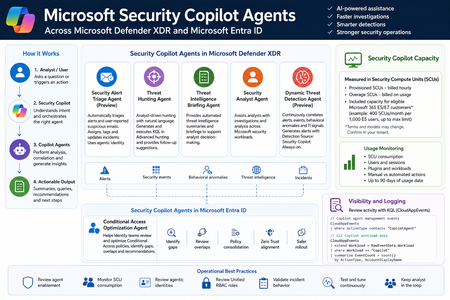
Microsoft Security Copilot is now becoming more visible inside day-to-day security operations, especially through embedded experiences and agent-based workflows across Microsoft Defender XDR, Microsoft Entra ID, Microsoft Intune, and Microsoft Purview. Instead of looking at Security Copilot only as a standalone prompt interface, SOC and identity teams should also understand how Security Copilot agents are deployed, how they consume Security Compute Units, how they appear in operational workflows, and where activity can be monitored. This post summarizes practical observations from a security operations perspective, with a focus on Microsoft Defender XDR, Microsoft Entra ID, usage monitoring, and KQL-based activity review. Licensing & Capacity Units Requirements Requires eligible Microsoft security licensing, typically: Microsoft 365 E5 Microsoft 365 E7 Security Compute Units (SCUs) Security Copilot capacity is measured using Security Compute Units (SCUs). SCUs are billed based on provisioned capacity. Indicative pricing: $4 per Provisionied SCU/hour $6 per Overage SCU/hour Billing is calculated hourly, based on the amount of SCUs provisioned. Included Capacity Organizations with: 1,000 Microsoft 365 E5 licenses Receive: 400 included SCUs Included SCUs are shared across the tenant within a common capacity pool. Scaling SCU capacity can be scaled dynamically based on operational requirements and workload demand. Data Retention Security Copilot session and interaction data without active SCU-backed retention is typically retained for: 90 days Security Copilot Agents - Microsoft Defender This section outlines the Microsoft Security Copilot agents currently available in the Microsoft Defender portal. NameKey characteristics Security Alert Triage Agent (Preview) Manual setup from Defender portal Automatically creates Unified RBAC custom role Runs automatically when a user reports a suspicious email or when a new supported alert is generated, supported alert sources: MDI, MDC, MDO If an alert tuning rule is enabled, it will be automatically disabled when the agent is deployed. Creates and connects with agentic user account: Phishing Triage Agent (Security Copilot) Automatic alert assignment to SecurityCopilotAgentUser-db16fec3-f1fb-4632-843e-46d07408c584@<tenant-domain>Alert was assigned to Phishing Triage Agent (Security Copilot). Adds Tag Agent to the created Incidents Threat Hunting Agent Manual setup from Defender portal Automatically creates Unified RBAC custom role This agent runs manually. There isn't an automatic trigger. Creates and connects with agentic user account: Threat Hunting Agent (Security Copilot) Analyst Questions in natural language Generates and executed KQL queries in Advanced hunting Provides charts, dynamic follow-up questions and remediation actions recommendations No activity is identified from agent's identity during agent execution Threat Intelligence Briefing Agent Manual setup from Defender portal Provides automated TI briefing summary Configured from https://security.microsoft.com/securitysettings/defender/agent_configuration-threatintelligencebriefingagent Security Analyst Agent Manual setup from Defender portal Dynamic Threat Detection Agent (Preview) Automatically enabled always-on, runs continuously in the background Correlates: Alerts, Security events, Behavioral anomalies, TI signals Generates Alerts with Detection Source: Security Copilot The Alerts can be correlated with existing Multi-Stage Incidents No agentic user account identity is used by this agent Available free of charge during public preview, will begin consuming Security Compute Units (SCUs) once generally available (GA) Incidents handled by Security Alert Triage Agent: Alerts created by Dynamic Threat Detection Agent: Execution of Threat Hunting Agent: View agents in use: https://security.microsoft.com/security-copilot/agents View Unified RBAC custom roles: https://security.microsoft.com/mtp_roles View Security Copilot user identities in Microsoft Entra ID: Notes: CloudAppEvents activity logs only from the following agents: Phishing Triage Agent Conditional Access Optimization Agent Security Copilot Agents - Microsoft Entra ID Conditional Access Optimization Agent Usage Monitoring Sign-in to Security Copilot portal using Global Admin account and navigate to the following location: https://securitycopilot.microsoft.com/usage-monitoring Reference: https://learn.microsoft.com/en-us/copilot/security/manage-usage Logging Activity Copilot Agents Management: CloudAppEvents | where ActionType contains "CopilotAgent" | extend AgentName = RawEventData.AgentName | extend Workload = RawEventData.Workload | extend ResultStatus = RawEventData.ResultStatus | project TimeGenerated, ActionType, ResultStatus, AgentName, Application, Workload All Copilot Workload data: CloudAppEvents | extend Workload = RawEventData.Workload | where Workload == "Copilot" | summarize EventCount = count() by ActionType, AccountDisplayName519Views3likes1CommentWhat’s new in Microsoft Sentinel: May 2026
Welcome to the May edition of What's new in Microsoft Sentinel. This month’s updates focus on unified role-based access control (RBAC), ecosystem breadth, AI-agent security, and high-assurance identity. RBAC and row-level scoping are now generally available, giving security teams a single, granular permissions model across Sentinel and the Microsoft Defender portal and enabling multi-team SOC collaboration. The Sentinel connector catalog has passed 400 connectors, expanding coverage across Microsoft and third-party data sources and helping customers and partners onboard new data faster with the Codeless Connector Framework (CCF). The Agent 365 connector, now in public preview, brings AI agent telemetry into Sentinel data lake as first-class standardized signals so you can monitor agent behavior alongside identity, endpoint, and cloud activity. Finally, Entra Verified ID partner integrations in Microsoft Security Store are now generally available, delivering high‑assurance identity verification that makes account recovery after compromise far safer and significantly reduces the risk of re‑compromise. Read on for the full list of updates across Sentinel in May. Sentinel innovations: Sentinel SIEM Sentinel data lake Microsoft Security Store Sentinel SIEM Unified role-based access controls and row level scoping [Generally available] Sentinel now delivers general availability of two powerful access management capabilities: Unified RBAC and row-level data scoping. Together, these innovations provide a consistent, end-to-end model for controlling who can access data and what actions they can take — extending unified permissions management across the Defender portal while enabling granular, row-level visibility within a single Sentinel workspace. With Unified RBAC, organizations can simplify and centralize permissions across security workloads, reducing operational overhead, while row-level scoping enables secure collaboration across multiple teams by ensuring users only see data aligned to their role or scope. This milestone unlocks more scalable, multi-team SOC operations without the need for workspace segmentation, helping us to advance toward fully unified, granular access control across Microsoft Security. Tenant groups [Public preview] Managing security across multiple tenants just got simpler. Tenant Groups in the Microsoft Defender multi-tenant portal (MTO) give managed security service providers (MSSPs), cloud service partners (CSPs), and multi-tenant security teams a flexible way to organize tenants into logical groupings such as customer segment, geography, or operational priority, and instantly switch views with a single click. This streamlined experience reduces noise, improves investigation focus, and aligns to how teams actually work, all while respecting existing permissions and access controls. Learn more. Out-of-the-box integrations for Sentinel automation [Public preview] Out-of-the-box (OOTB) integrations for Sentinel automation brings a centralized catalog to easily discover, configure, and manage both Microsoft and third-party integrations. With simple, authentication-based setup, users can quickly add integrations and seamlessly incorporate them into playbooks. The experience places OOTB and custom integrations side by side, with enhanced with smart search, recommendations, and duplicate prevention to streamline automation workflows end to end. Learn more. UEBA enhancements [Public preview] Microsoft Sentinel UEBA continues to evolve with improvements that simplify management and expand detection coverage. A dedicated UEBA tab view in the Sentinel settings page consolidates UEBA and behaviors settings, making configuration easier to find and manage. Learn more. UEBA insights and anomalies now support the OktaV2_CL table alongside the existing Okta_CL table, extending anomalous activity and anomalous MFA failures detections to customers using the newer Okta connector format, without requiring new anomaly types. Learn more. UEBA extends GCP Audit Logs coverage with five anomaly detections for login activity, privileged actions, resource deployments, secret/KMS key access, and infrastructure usage. Learn more. Together, these updates make UEBA easier to operate while extending its visibility into identity and behavior signals from additional cloud and identity providers. Read the latest blog from the Microsoft Defender Research Team to learn more about Microsoft Sentinel UEBA and binary feature stacking, which uses clear binary signals to help establish behavioral context and inform investigation and detection decisions. Threat Intelligence – TAXII Export connector [Generally available] Sentinel supports threat intelligence export through the built-in Threat Intelligence – Trusted Automated Exchange of Intelligence Information (TAXII) Export connector, giving customers a standards-based way to share curated Structured Threat Information Expression (STIX) objects with supported TAXII 2.1 platforms. Configured from the Defender portal, the connector handles destination setup and intelligence delivery to external platforms. The capability supports cross-organization intelligence sharing for collective defense and centralized management in multi-tenant environments, with use cases across government, critical infrastructure, and large distributed organizations. Additional enhancements are planned, including more export options and expanded destination support. Learn more. Decision-stage resources for SIEM migration to Sentinel The AI-powered SIEM migration experience helps teams analyze detections, identify required data sources and connectors, and plan a phased move to Sentinel. But, customers still need help turning that analysis into a clear decision. To support that step, we’re introducing two new customer-facing resources: the Sentinel SIEM Migration Decision and Planning Guide, which explains the migration journey, outputs, and decision checkpoints before execution, and the Decision-Stage Customer FAQ, which answers common questions around disruption, cost, dual running, detection coverage, and delivery support. Together, these resources help make migration conversations more concrete and move teams more quickly from evaluation to a clearer, lower-risk next step. Learn more: Read the blog: AI-powered SIEM migration experience announcement Download the guide: Decision and planning guide Download the FAQ: Decision-stage customer FAQ Learn more: SIEM migration experience documentation Register for live AMA (Jun 23 at 9am PT): Live Microsoft Tech Community AMA on SIEM migration Sentinel data lake 400+ Sentinel data connectors The Sentinel connector catalog now includes 400+ connectors, providing broad, ready-to-deploy coverage across Microsoft and third-party data sources. Customers can flexibly ingest security data into Microsoft Sentinel analytics tier or the data lake tier. The Codeless Connector Framework (CCF) and VS code-based connector builder agent enables partners and customers to onboard new data sources faster and scale the catalog. Discover connectors in the Sentinel Content hub within the Defender portal or build custom connectors when needed. Learn more. Agent 365 connector [Public preview] Agent 365 connector streams AI agent telemetry from Agent 365 into Sentinel data lake, giving SOC teams visibility into agent behavior alongside identity, endpoint, and cloud signals. With the Agent 365 connector in place, Sentinel data lake becomes the system of record for agent security, turning activity such as data exposure or access drift into first-class security signals that analysts can correlate, hunt across, and investigate. Telemetry is normalized and to mapped to standard Advanced Security Information Model (ASIM) schemas, ready for analytics and detections, and end-to-end investigations can run through KQL, graph, and MCP-powered workflows. Install the connector with a single click from Sentinel Content Hub in the Defender portal. Learn more. CCF support for Azure Blob Storage [Public preview] Sentinel Codeless Connector Framework (CCF) supports Azure Blob Storage as a data source, providing an ingestion pattern designed for high-volume security data. Partners and customers can build CCF connectors that read from Blob Storage through a durable architecture that buffers spikes, handles backpressure, and reduces data loss risk during outages or throttling, making ingestion more reliable for variable or distributed pipelines. The pattern broadens compatibility with partners already streaming logs to Azure as part of their audit data delivery, with Cloudflare and Netskope as early adopters. App Assure further provides engineering-backed support for designing, validating, and remediating the Azure Blob Storage CCF connector integration. Learn more. Data filtering and splitting [Generally available] At RSAC, we announced built‑in filtering and splitting capabilities in Microsoft Sentinel, which is now generally available. As security teams ingest more data, it is important to optimize security data pipeline by controlling what data is ingested and in which tier. With filtering and splitting natively integrated into the Defender portal, security teams can shape data before it reaches Sentinel, without switching tools or managing custom JSON files. Using simple KQL‑based transformations directly in the UI, you can filter low‑value events and intelligently route data, making ingestion optimization faster, more intuitive, and easier to manage at scale. Filtering at ingest time allows you to remove low‑value or benign events to reduce noise, lower unnecessary processing, and ensure high‑signal data drives detections and investigations. Splitting enables intelligent routing of data between the analytics tier and the data lake tier based on relevance and usage. Together, these capabilities help you balance cost and performance while scaling data ingestion sustainably as your digital estate grows. Learn more. Transition your Sentinel connectors to the Codeless Connector Framework (CCF) [Action required] Azure has announced that the legacy Azure Data Collection API will be deprecated on September 14, 2026. Sentinel recommends customers review existing connectors and upgrade to the latest Codeless Connector Framework (CCF) versions to ensure continued access to the newest Sentinel capabilities. CCF delivers a fully managed SaaS experience with built-in health monitoring, centralized credential management, and improved performance. This enables partners and customers to onboard new data sources faster and at scale. Microsoft Security Store Entra Verified ID partner integrations via Security Store [Generally available] Security Store helps organizations secure one of the most critical steps in incident response: safe account recovery after compromise. Once a SOC team detects and contains a potential account takeover (ATO), restoring access requires high confidence that the user is legitimate. Through partner integrations with IDEMIA, AU10TIX, CLEAR, 1Kosmos, and WhoAmI, customers can extend Entra Verified ID with high-assurance identity verification (such as document and biometric checks) to validate users during recovery, onboarding, or helpdesk workflows. This helps replace weaker fallback methods that attackers often exploit, enabling SOC and IT teams to safely restore access while reducing risk of re-compromise. Learn more. Purview Data Security Triage Agent in Defender [Public preview] Security Store powers how customers discover and activate data security agents across Defender and Microsoft Purview, starting with the Data Security Triage Agent. This capability delivers AI-generated summaries and prioritization of Data Loss Prevention (DLP) alerts directly into Defender XDR, helping security teams reduce noise and focus on the incidents that matter most. By unifying discovery and activation through Security Store, customers can deploy data security agents in fewer steps and enable more integrated workflows across threat and data protection surfaces. Learn more. Additional resources Blogs and documentation: From idea to production: Building Security Store Advisor with an agentic SDLC Upcoming webinars: June 4: End-to-End Security in the Age of Agentic AI June 10: Deploy, optimize, and implement threat protection with Sentinel June 10: Security Foundations for AI Adoption June 24: Modern Security Made Simple: Stay Ahead of Threats with Sentinel Upcoming events: June 2–3: Microsoft Build, San Francisco (and free online) CEO Satya Nadella Day 1 keynote 90+ sessions, Microsoft Security experts onsite Register: build.microsoft.com Stay connected Check back each month for the latest innovations, updates, and events to ensure you’re getting the most out of Microsoft Sentinel. We’ll see you in the next edition!1.5KViews3likes0CommentsIdentity Attack Graph in Microsoft Sentinel
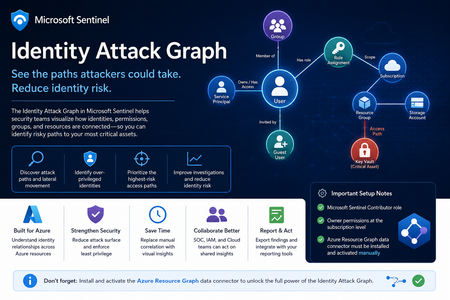
Identity is now one of the most important attack surfaces in cloud security. In many real-world incidents, attackers do not rely only on malware or network movement. Instead, they abuse identities, permissions, role assignments, group memberships, service principals, and misconfigured access paths to move from an initial compromise to high-value resources. This is why the new Identity Attack Graph in Microsoft Sentinel is an important capability. It helps security teams visualize how identities are connected to Azure resources and how an attacker could potentially move from one identity to another resource through permissions and relationships. What is the Identity Attack Graph? The Identity Attack Graph in Microsoft Sentinel provides a visual way to understand how identities, permissions, groups, and Azure resources are connected. Instead of manually checking multiple portals, logs, and role assignments, the graph helps analysts understand relationships such as: Which identities have access to specific Azure resources Which users or service principals are over-privileged Which groups provide indirect access to sensitive resources Which identities may have a path to critical assets What the potential blast radius of a compromised identity could be How attackers could move laterally through identity and permission relationships This is especially useful because identity risk is often not obvious when looking at a single user, group, or role assignment in isolation. The real risk usually appears when these relationships are connected together. A user may not directly have access to a sensitive resource, but the user may be a member of a group that has access to another resource, which then has permissions that create a path toward a high-value asset. The Identity Attack Graph helps expose these hidden relationships. Why this matters In many Azure environments, permissions grow over time. Users change roles, groups are reused, emergency access is granted, service principals are created, and temporary permissions are not always removed. As a result, organizations often end up with: Too many privileged identities Unused or stale permissions Service principals with excessive access Guest users with unnecessary permissions Groups that provide indirect access to sensitive resources Subscription-level roles that are broader than required Lack of visibility into who can reach critical assets Traditional investigation usually requires analysts to move between several places, including Microsoft Entra ID, Azure RBAC, Azure Activity logs, Sentinel queries, Defender XDR, and Azure Resource Graph. The Identity Attack Graph reduces this complexity by presenting identity relationships as a connected graph. This makes it easier to answer practical security questions such as: “What can this identity access?” “What happens if this user is compromised?” “Which identities have a path to critical resources?” “Which access path should we remediate first?” “Which permissions create the highest risk?” “Why does this identity have access to this asset?” Key use cases The feature can support several important identity security and cloud security scenarios. 1. Attack path discovery Security teams can use the graph to identify how an attacker could move from a compromised identity to a sensitive Azure resource. This is useful during both proactive assessments and active incident response. For example, if a user account is suspected to be compromised, the graph can help identify which resources may be reachable through that identity’s direct or indirect permissions. 2. Blast-radius analysis When an identity is compromised, one of the first questions is: What could the attacker access with this identity? The Identity Attack Graph can help analysts understand the potential impact of a compromised user, group, service principal, or managed identity. This can help with containment, prioritization, and communication with stakeholders. 3. Over-privileged identity detection The graph can help identify identities that have more permissions than they need. Include: Users with Owner or Contributor access at subscription level Service principals with broad permissions Guest users with privileged access Groups that grant access to sensitive resources Identities that have access to multiple critical assets This is useful for enforcing least privilege and reducing identity attack surface. 4. Privileged access review IAM and cloud security teams can use the graph to support access reviews. Instead of only reviewing a list of role assignments, teams can understand the real impact of those permissions. This helps answer: Is this role assignment still required? Does this group create unnecessary risk? Does this identity have access to critical resources? Is this access direct or inherited? Is this path expected or suspicious? 5. Incident response and threat hunting For SOC teams, the graph can support investigations involving: Suspicious sign-ins Compromised users Privilege escalation Suspicious role assignments Lateral movement Service principal abuse Unusual access to sensitive resources The graph does not replace logs or hunting queries, but it gives analysts a faster way to understand relationships and prioritize what to investigate next. Important prerequisites and setup notes During my evaluation, there were a few important setup requirements that should be clearly highlighted. Microsoft Sentinel permissions The environment must already be onboarded to Microsoft Sentinel, and the user testing or configuring the feature must have the appropriate Microsoft Sentinel permissions. The documented role requirement includes Microsoft Sentinel Contributor. However, in my experience, this is not always enough for the full onboarding and validation experience. Subscription-level Owner permission One important prerequisite that should be clearly mentioned is that Owner permissions at the Azure subscription level may be required. This is especially important during onboarding and activation, because the graph depends on access to Azure resource and permission relationships. If the user does not have sufficient subscription-level permissions, some setup steps or visibility into resources and relationships may not work as expected. Recommended permission note: In addition to Microsoft Sentinel permissions, ensure that the user configuring the preview has Owner permissions at the subscription level for the subscriptions that should be represented in the graph. This should be made very clear in the onboarding documentation to avoid confusion during deployment. Required data connector: Azure Resource Graph Another very important setup step is the Azure Resource Graph data connector. The Azure Resource Graph connector must be: Installed manually Activated manually Connected to the relevant Sentinel workspace This is a key point. The connector is not automatically enabled just because the Identity Attack Graph feature is available. Without this connector, Sentinel may not have the required Azure resource relationship data needed to build a useful graph. Why Azure Resource Graph is important Azure Resource Graph provides visibility across Azure resources, subscriptions, and relationships. For an identity attack graph, this data is essential. The graph needs to understand not only identities, but also the resources those identities can reach. This may include: Subscriptions Resource groups Storage accounts Key Vaults Virtual machines Managed identities Role assignments Resource relationships Resource hierarchy Critical assets Without Azure Resource Graph data, the attack graph may not provide the full picture of how identities connect to Azure resources. For this reason, I believe the onboarding instructions should explicitly state: The Azure Resource Graph data connector must be manually installed and activated before using the Identity Attack Graph. Recommended onboarding checklist Before using the Identity Attack Graph, I would recommend validating the following: Requirement Recommendation Microsoft Sentinel workspace Ensure the workspace is active and accessible Sentinel role Microsoft Sentinel Contributor or equivalent access Subscription permissions Owner permissions at subscription level Azure Resource Graph connector Manually install and activate the connector Azure RBAC visibility Ensure access to relevant role assignments Microsoft Entra ID visibility Ensure identity and group data is available Resource visibility Validate that relevant subscriptions and resources are visible Data freshness Allow enough time for data collection and graph population This checklist can help avoid issues where the feature appears available but does not show the expected relationships. How the Identity Attack Graph improves investigation Before using a graph-based approach, an analyst often needs to manually collect and correlate data from multiple sources. A typical investigation may include: Checking the user in Microsoft Entra ID Reviewing group memberships Reviewing Azure RBAC assignments Checking subscription-level access Looking at resource-level permissions Reviewing PIM activations Searching Sentinel logs Running KQL queries Checking Azure Activity logs Validating access with cloud or IAM teams This process can be time-consuming. The Identity Attack Graph helps reduce this effort by showing relationships visually. This allows the analyst to understand the possible path faster and decide where to focus. For example, instead of manually asking: “Does this user have access to this resource through any group, role, or inherited permission?” The graph can help show the relationship directly. This is valuable because many risky permissions are indirect. The user may not have direct access, but may inherit access through a group, role assignment, nested relationship, or service principal path. Where validation is still needed Although the graph provides strong visibility, I would still validate findings before taking remediation action. This is especially important because removing access can affect business operations or production systems. I would still validate with: Microsoft Sentinel KQL queries Microsoft Entra sign-in logs Microsoft Entra audit logs Azure Activity logs Azure RBAC role assignments PIM activation history Defender XDR signals Defender for Cloud recommendations Azure Resource Graph queries IAM team input Cloud platform team input Application owner confirmation The graph is very useful for discovery and prioritization, but final remediation decisions should still be validated. GQL and graph-based investigation One of the interesting aspects of this feature is the use of graph-based thinking. Security teams are already familiar with query languages such as KQL for log analytics. However, graph investigation is different. KQL is excellent for searching and analyzing events over time, such as sign-ins, alerts, audit logs, and activity logs. Graph Query Language, or GQL, is designed for querying connected data. Instead of only asking what happened at a specific time, graph queries help answer how entities are connected. In identity security, this is very powerful because the risk often exists in the relationship between objects. Graph entities include: Users Groups Service principals Managed identities Roles Subscriptions Resource groups Azure resources Permissions Sessions Attack paths Graph relationships include: User is member of group Group has role assignment Identity has access to resource Service principal owns application Managed identity can access Key Vault User can escalate privilege Identity can reach critical asset This allows analysts to ask more relationship-focused questions, such as: Which identities can reach this resource? What is the shortest path from this user to a critical asset? Which groups create privileged access? Which service principals have paths to sensitive resources? Which identities have indirect access through nested relationships? Which attack paths include subscription Owner or Contributor permissions? KQL vs GQL: why both are useful KQL and GQL serve different but complementary purposes. Area KQL GQL / Graph Querying Main purpose Analyze logs and events Analyze relationships and paths Best for Time-based investigation Connected identity/resource investigation question “Did this user sign in from a risky location?” “What resources can this user reach?” Data model Tables Nodes and edges Common use Detection, hunting, analytics Attack path discovery, relationship mapping Strength Event correlation Path discovery In practice, security teams need both. KQL can identify a suspicious sign-in. The Identity Attack Graph can show what the compromised identity could access. KQL can then be used again to validate whether the attacker interacted with those resources. This creates a strong workflow between event-based detection and relationship-based investigation. Graph investigation scenarios The following are conceptual are the types of graph questions that would be useful in identity attack path analysis. Find paths from a user to critical resources A useful graph query would help answer: Show me all paths from this user to critical Azure resources. This could help determine whether a compromised identity has a direct or indirect route to sensitive assets. Find identities with paths to Key Vaults Key Vaults often contain secrets, certificates, and keys. A graph query could help identify: Which users, groups, service principals, or managed identities have a path to Key Vault resources? This would be useful for prioritizing access review and remediation. Find subscription-level privileged identities Subscription-level roles are high-impact because they can provide broad access. A graph query could help find: Which identities have Owner or Contributor access at subscription level? This is especially important because subscription-level permissions can create wide attack paths. Find indirect access through groups Many access paths are created through group membership. A graph query could help answer: Which users have access to this resource through group membership? This can help IAM teams clean up excessive or unnecessary group-based access. Find service principals with broad access Service principals are often used for automation and applications, but they can become high-risk if over-privileged. A useful query would identify: Which service principals have broad access to subscriptions or critical resources? This is important because service principal compromise can lead to significant impact. How GQL can improve analyst workflows Adding strong GQL support to the graph explorer would make the feature more powerful for advanced users. You could use graph queries to: Search for specific paths Filter by identity type Filter by role Filter by resource type Find shortest paths Find high-risk paths Exclude known approved paths Focus on critical assets Query only privileged relationships Identify unexpected permission chains This would help both SOC analysts and cloud security engineers move from visual exploration to repeatable analysis. A SOC analyst may want a quick visual graph during an incident, while a cloud security engineer383Views3likes0CommentsSentinel Foundry - MCP Server (Github Community Release)
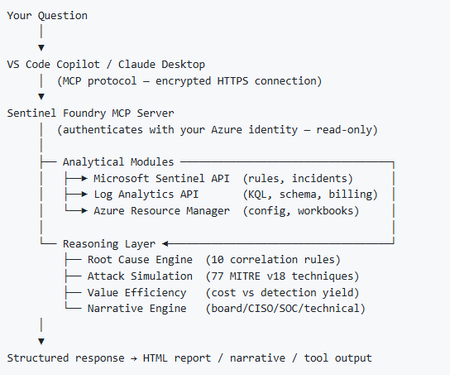
I’ve been cooking something that a lot of people in SOC have been struggling with — especially on the engineering side of Microsoft Sentinel. Thanks to the Microsoft Security team for shaping the capabilities of Sentinel even better with Sentinel Data Lake & Modern SecOps. Today’s the day I can finally share it. Note: This is not an official Microsoft product, but it is designed to make the Sentinel Build even better (complement) with much more intelligence. 🚀 Sentinel Foundry is now in public preview with 43 tools. (Sentinel Foundry - MCP Server) It’s an MCP server built to act like the brain of a strong Sentinel engineer — helping make building, improving, and operating Sentinel far more practical, faster, and honestly more enjoyable. For a lot of teams, the challenge is not understanding what Sentinel can do. The hard part is the engineering work around it: -> Deciding what data should actually be ingested -> Building a clean, scalable Sentinel foundation -> Writing useful detections instead of noisy ones -> Balancing security value with cost -> Turning ideas into deployable engineering outputs That is exactly why I built Sentinel Foundry to help communities grow stronger. It helps with the real engineering tasks behind Sentinel — from architecture thinking to detection design, deployment planning, ingestion strategy, automation ideas, and many of the workflows outlined in the GitHub project. How does it work? Here’s one of the flagship prompts I ran with it: “Give me a complete security posture report for our workspace. Score each pillar and tell me what to prioritise.” And within seconds, it produced a structured engineering blueprint that would normally take a lot longer to pull together manually. You can see the example prompts here in what it can do: https://github.com/prabhukiranveesam/Sentinel-Foundry#what-can-it-do I want building Sentinel to feel less like repetitive engineering overhead — and more like real security engineering that is fast, creative, and enjoyable. If you work with Sentinel as a SOC L2 analyst, engineer, detection engineer, consultant, or architect, I’d genuinely love for you to try it and tell me what you think. 🔗 Public Preview: https://github.com/prabhukiranveesam/Sentinel-Foundry This is just the start of an AI era — and I’m excited to keep shaping it with more powerful features over the coming days. This is very easy to set up and will be available to all of you at no cost during this month as part of the public preview, and your feedback is extremely valuable to shape this as a powerful solution.994Views0likes2CommentsExtending Sentinel Data Integration: Azure Blob Storage Support for CCF Connectors
As organizations scale their security operations, the ability to ingest, process, and analyze high volumes of data reliably becomes increasingly critical. Microsoft Sentinel continues to expand its ecosystem through the Codeless Connector Framework (CCF), enabling ISVs to build and deliver integrations with Sentinel faster while simplifying deployment for customers. Today, CCF extends even further with support for Azure Blob Storage, introducing a new pattern for how data can be delivered into Sentinel. Expanding Connector Patterns with Azure Blob Storage CCF has traditionally enabled connectors that integrate directly with partner APIs and data sources. With this latest enhancement, ISVs can now build connectors that read data from Azure Blob Storage—unlocking new flexibility in how security data is collected and delivered. In this model, an ISV writes data to an Azure Blob Storage account. The Sentinel connector then reads from that storage layer, using Azure-native components such as Event Grid and storage queues to process events and forward them through data collection rules (DCR) into Log Analytics workspace. This approach introduces a durable data layer between the data source and Sentinel, enabling more resilient and scalable ingestion scenarios. Why a durable data layer matters By leveraging Azure Blob Storage as part of the ingestion pipeline, CCF connectors gain important operational advantages. This architecture allows data to be buffered and processed asynchronously, helping manage fluctuations in data volume and ensuring consistent delivery. Key benefits include: Resilience: Buffers spikes and handles backpressure to maintain steady ingestion Improved Compatibility: Supports widely adopted Azure Blob-based log streaming, enabling seamless integration with partners that already use Azure for audit data delivery Data protection: Reduces risk of data loss during outages or throttling Scalability: Supports high-volume ingestion scenarios across tenants Flexibility: Enables architectures that can support multiple SIEMs or data consumers Together, these capabilities make CCF Azure Blob Storage based connectors a strong fit for partners managing large, variable, or distributed data pipelines. Partner adoption Early partners are already taking advantage of this capability to modernize their integrations and support evolving customer needs. Cloudflare Cloudflare integrates with Microsoft Sentinel using the Codeless Connector Framework (CCF) to bring Cloudflare log data into centralized security operations workflows. The connector ingests Cloudflare logs—delivered via Logpush to Azure Blob Storage—into Sentinel for analysis, enabling security teams to correlate web, network, and application activity with other security signals. By combining Cloudflare’s global threat visibility with Sentinel analytics and automation, this integration supports more effective threat detection, investigation, and incident response across Cloudflare‑protected environments. Netskope Web Transaction Events Netskope integrates with Microsoft Sentinel to provide detailed visibility into web and cloud activity across users, applications, and SaaS services. The connector ingests Netskope web transaction logs into Sentinel—leveraging Azure Blob Storage as a staging layer for log streaming and ingestion—to enable near real‑time analysis of user behavior, policy violations, and potential threats. By combining Netskope’s inline web inspection with Sentinel’s analytics and correlation capabilities, this integration helps security teams detect risky activity, investigate incidents, and strengthen monitoring across modern cloud environments. These integrations demonstrate how Azure Blob Storage support can simplify ingestion architectures while improving reliability and scalability for customers. Here is what our partners say about the functionality. Cloudflare: Netskope: Get started Developers can begin building CCF Azure Blob Storage -enabled connectors today using the guidance on Microsoft Learn. This documentation provides step-by-step instructions for configuring storage, processing events, and connecting data to Sentinel. In the unlikely event that you encounter any issues in building or updating your connector, App Assure is here to help. We are an engineering-backed team committed to supporting customers and software development companies throughout their journey with Sentinel to streamline integration and accelerate time to market. Reach out to us via our intake form for assistance.1.1KViews0likes0CommentsWhat’s new in Microsoft Sentinel: April 2026
Welcome to the April 2026 edition of What's new in Microsoft Sentinel. April brings a broad set of updates, with RSAC 2026 announcements rolling out alongside new features. Highlights include cost limit enforcement to prevent runaway query costs, curated open-source intelligence in Threat Analytics, and new data connectors for CrowdStrike, Imperva, AWS, and Logstash. Together, these innovations help security teams control costs, stay ahead of emerging threats, and broaden visibility without added complexity. Read on to learn what's new with Sentinel. What's new OSINT reports in Threat Analytics [Preview] Customers can now consume curated OSINT articles alongside Microsoft-authored Threat Analytics reports, all in one place. (OSINT, or open-source intelligence, is any information readily available to the public.) These OSINT articles come enriched, as detailed in the following list, to help security teams move quickly from awareness to action. What’s included: Curated OSINT articles derived from trusted open-source research Clear summaries with links back to original sources Extracted indicators of compromise (IOCs) Mapped MITRE ATT&CK tactics and techniques Microsoft enrichment, analysis, and recommended actions (when available) By bringing OSINT directly into Threat Analytics, we’re reducing context switching, improving analyst efficiency, and helping customers operationalize open-source intelligence faster within their Defender workflows. Learn more. Cost limit enforcement for KQL queries and notebooks [Preview] Sentinel data lake cost policies do more than just send an alert when usage gets too high. You can set hard limits for KQL queries, jobs, and notebook sessions that block new work once a threshold is exceeded, eliminating surprise bills from runaway queries or heavy workloads. For example, instead of finding out about cost spikes after you run large queries against the data lake tier, enforcement stops further queries before the damage is done. Anything already running still finishes normally, and you get clear messaging about what happened and what to do next. You can lift guardrails temporarily, adjust thresholds, or disable enforcement on the fly. Learn more. Sentinel data connectors With 380 Sentinel data connectors, customers achieve broad visibility into complex digital environments and can expand their security operations effectively. Below are the latest updates. CrowdStrike API Connector [Generally Available] The CrowdStrike API Connector ingests logs from CrowdStrike APIs into Sentinel, fetching details on hosts, detections, incidents, alerts, and vulnerabilities from your CrowdStrike environment. Imperva Cloud WAF [Preview] The Imperva Cloud WAF data connector ingests Imperva logs into Sentinel through AWS S3 buckets, giving you visibility into web application traffic and threats detected by your Imperva deployment for monitoring, investigation, and threat hunting in Sentinel. AWS Elastic Load Balancer (ELB) [Preview] This connector allows you to ingest AWS Elastic Load Balancer (ALB, NLB, and GLB) logs into Sentinel. These logs contain detailed records for requests handled by your load balancers, including client IPs, latencies, request paths, and status codes. These logs are useful for monitoring traffic patterns, investigating anomalies, and ensuring security compliance. Logstash Output Plugin [Preview] For organizations that rely on Logstash to collect from on-premises, legacy, or air-gapped environments, the Sentinel Logstash Output Plugin has been rebuilt in Java to align with Microsoft's Secure Future Initiative (SFI) and provide improved security and long-term maintainability. The plugin uses the Azure Monitor Logs Ingestion API with Data Collection Rules (DCRs), giving you full schema control and the ability to ingest directly into Sentinel data lake as well as standard Sentinel tables. Learn more. Sentinel data federation [Preview] Sentinel data federation enables unified visibility and security analytics across federated and ingested data, without compromising data governance. Security teams can quickly query data in Microsoft Fabric, Azure Data Lake Storage (ADLS) Gen2, and Azure Databricks directly from Sentinel, no data movement required. This approach allows teams to explore data broadly through federation, then selectively ingest what matters most into Sentinel to unlock advanced detections, automation, and AI‑powered analytics. Learn more. Sentinel cost estimation tool [Preview] Customers and partners can confidently estimate Sentinel costs using the cost estimation tool. With meter-level guidance, you can model ingestion across analytics and data lake tiers, compare retention options, and estimate compute costs. Built‑in projections of up to three years offer transparency into spend, making it easier to plan, optimize, and share estimates. Try the Sentinel Cost Estimator. Microsoft Entra and Azure Resource Graph (ARG) connector enhancements [Preview] Enable new Entra assets (EntraDevices, EntraOrgContacts) and ARG assets (ARGRoleDefinitions) in existing asset connectors, expanding inventory coverage and powering richer, built‑in graph experiences for greater visibility. Create workbook reports directly from the data lake [Preview] Sentinel workbooks can directly run on the data lake using KQL, enabling you to visualize and monitor security data straight from the data lake. By selecting the data lake as the workbook data source, you can create trend analysis and executive reporting. Custom graphs [Preview] Custom graphs let you model relationships unique to your organization using data from Sentinel data lake, non-Microsoft sources, and federated data sources, all powered by Fabric. Instead of stitching together dozens of tables manually, you can build graphs that surface blast radius, trace attack paths, map privilege chains, and spot structural outliers like unusually broad access or anomalous email exfiltration. You can generate custom graphs using AI-assisted coding in the Microsoft Sentinel VS Code extension, persist them via a schedule job, and access them in the graphs experience in the Defender portal. Run Graph Query Language (GQL) queries, visualize results, and interactively traverse the graph to the next hop with a single click. These graphs also provide the knowledge context that enables AI-powered agent experiences to work more effectively, speeding investigations and helping you move from disconnected alerts to confident decisions at scale. Custom graph API usage for creating and querying graphs is billed according to the Sentinel graph meter. Learn more. MCP entity analyzer [General availability] Entity analyzer provides reasoned, out-of-the-box risk assessments that help you quickly understand whether a URL or user identity represents potential malicious activity. It analyzes data across threat intelligence, prevalence, and organizational context to generate clear, explainable verdicts you can trust. Entity analyzer integrates with your agents through Sentinel MCP server connections to first-party and third-party AI runtime platforms, or with your SOAR workflows through Logic Apps. It also serves as a trusted foundation for the Defender Triage Agent, delivering more accurate alert classifications and deeper investigative reasoning. Entity analyzer is billed based on Security Compute Units (SCU) consumption. Learn more about entity analyzer and MCP billing. Claude MCP connector [Preview] Anthropic Claude can connect to Sentinel through a custom MCP connector, giving you AI-assisted analysis across your Sentinel environment. Microsoft provides step-by-step guidance for configuring a custom connector in Claude that securely connects to a Sentinel MCP server. With this connection you can summarize incidents, investigate alerts, and reason over security signals while keeping data inside Microsoft's security boundary. Access to large language models (LLMs) is managed through Microsoft authentication and role-based controls, supporting faster triage and investigation workflows while maintaining compliance and visibility. CVEs of interest in the Threat Intelligence Briefing Agent [Preview] The Threat Intelligence Briefing Agent delivers curated intelligence based on your organization’s configuration, preferences, and unique industry and geographic needs. The agent surfaces Common Vulnerabilities and Exposures (CVEs) of interest, highlighting vulnerabilities actively discussed across the security landscape and assessing their potential impact on your environment for more timely threat intelligence insights. The agent automatically incorporates internet exposure data powered by the Sentinel platform to surface threats targeting technologies exposed in your organization. Together, these enhancements help you focus faster on the threats that matter most, without manual investigation. Additional resources Blogs and documentation: Featured blog: App Assure launches its Sentinel Advisory Service Agentic use cases for developers on Microsoft Sentinel The Unified SecOps Transition: Why It Is a Security Architecture Decision, Not Just a Portal Change What's new in Microsoft Defender – April 2026 Webinars and training: Featured webinar: Powering the Agentic SOC with Scott Woodgate, General Manager, Microsoft Threat Protection Featured training: Introducing the Microsoft Sentinel Training Lab. Hands-On Security Operations in Minutes Beyond KQL – Unlocking SOC Insights with Sentinel data lake Jupyter Notebooks Hyper scale your SOC: Manage delegated access and role-based scoping in Microsoft Defender Stay connected Check back each month for the latest innovations, updates, and events to ensure you’re getting the most out of Microsoft Sentinel. We’ll see you in the next edition!1.7KViews2likes0Comments