threat intelligence
238 Topics
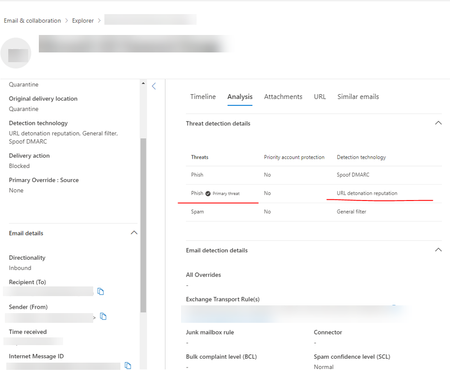
email quarantine and reason "high confidence phish"
Hi I started testing a phishing email campaign from an external vendor KnowBe4. The emails keep going to quarantine reason "high confidence phish" What is the best way to fix this? I tried excluded the URL from Safe Links and added their sender IPs to O365 Tenant allow/block list. Thank you in advanced.Protect your organizations against QR code phishing with Defender for Office 365
QR code phishing campaigns have most recently become the fastest growing type of email-based attack. These types of attacks are growing and embed QR code images linked to malicious content directly into the email body, to evade detection. They often entice unwitting users with seemingly genuine prompts, like a password reset or a two-factor authentication request. Microsoft Defender for Office 365 is continuously adapting as threat actors evolve their methodologies. In this blog post we’ll share more details on how we’re helping defenders address this threat and keeping end-users safe.Ninja Cat Giveaway: Episode 4 | Defender Experts for Hunting Overview
For this episode , your opportunity to win a plush ninja cat is the following - Reply to this thread with: - How would YOU explain/describe Defender Experts for Hunting to someone? - Also in your own words: what is Threat hunting? This offer is non-transferable and cannot be combined with any other offer. This offer ends on April 14 th , 2023, or until supplies are exhausted and is not redeemable for cash. Taxes, if there are any, are the sole responsibility of the recipient. Any gift returned as non-deliverable will not be re-sent. Please allow 6-8 weeks for shipment of your gift. Microsoft reserves the right to cancel, change, or suspend this offer at any time without notice. Offer void in Cuba, Iran, North Korea, Sudan, Syria, Region of Crimea, Russia, and where prohibited.Solved53KViews2likes24CommentsResources for Automatic attack disruption
Hi all, because this topic is really HOT, I thought I am sharing a collection of resources with you. Recordings: Microsoft Secure (free registration required): - How XDR defends against ransomware across the entire kill chain with Corina Feuerstein - Ask the Experts: How XDR defends against ransomware across the entire kill chain Ninja Show episode Attack disruption, with Hadar Feldman Ignite announcement: What’s new in SIEM and XDR: Attack disruption and SOC empowerment - Events | Microsoft Learn Blogs: Automatic disruption of Ransomware and BEC attacks with Microsoft 365 Defender XDR attack disruption in action – Defending against a recent BEC attack Documentation: Configure automatic attack disruption capabilities in Microsoft 365 Defender | Microsoft Learn What do you think about this new and exciting capability? Do you have any questions on how it works that we didn't refer to? If so feel free to start a conversation here! 🙂 Oh and if I missed another resource, let me know too! Heike51KViews0likes1CommentNinja Cat Giveaway: Episode 9 | Attack disruption
For this episode, your opportunity to win a plush ninja cat is the following – Explain what attack disruption means and one reason why it is critical to any organization. This offer is non-transferable and cannot be combined with any other offer. This offer ends on April 14 th , 2023, or until supplies are exhausted and is not redeemable for cash. Taxes, if there are any, are the sole responsibility of the recipient. Any gift returned as non-deliverable will not be re-sent. Please allow 6-8 weeks for shipment of your gift. Microsoft reserves the right to cancel, change, or suspend this offer at any time without notice. Offer void in Cuba, Iran, North Korea, Sudan, Syria, Region of Crimea, Russia, and where prohibited.49KViews1like9CommentsPlanning your move to Microsoft Defender portal for all Microsoft Sentinel customers
In November 2023, Microsoft announced our strategy to unify security operations by bringing the best of XDR and SIEM together. Our first step was bringing Microsoft Sentinel into the Microsoft Defender portal, giving teams a single, comprehensive view of incidents, reducing queue management, enriching threat intel, streamlining response and enabling SOC teams to take advantage of Gen AI in their day-to-day workflow. Since then, considerable progress has been made with thousands of customers using this new unified experience; to enhance the value customers gain when using Sentinel in the Defender portal, multi-tenancy and multi-workspace support was added to help customers with more sophisticated deployments. Our mission is to unify security operations by bringing all your data, workflows, and people together to unlock new capabilities and drive better security outcomes. As a strong example of this, last year we added extended posture management, delivering powerful posture insights to the SOC team. This integration helps build a closed-loop feedback system between your pre- and post-breach efforts. Exposure Management is just one example. By bringing everything together, we can take full advantage of AI and automation to shift from a reactive to predictive SOC that anticipates threats and proactively takes action to defend against them. Beyond Exposure Management, Microsoft has been constantly innovating in the Defender experience, adding not just SIEM but also Security Copilot. The Sentinel experience within the Defender portal is the focus of our innovation energy and where we will continue to add advanced Sentinel capabilities going forward. Onboarding to the new unified experience is easy and doesn’t require a typical migration. Just a few clicks and permissions. Customers can continue to use Sentinel in the Azure portal while it is available even after choosing to transition. Today, we’re announcing that we are moving to the next phase of the transition with a target to retire the Azure portal for Microsoft Sentinel by July 1, 2026. Customers not yet using the Defender portal should plan their transition accordingly. “Really amazing to see that coming, because cross querying with tables in one UI is really cool! Amazing, big step forward to the unified [Defender] portal.” Glueckkanja AG “The biggest benefit of a unified security operations solution (Microsoft Sentinel + Microsoft Defender XDR) has been the ability to combine data in Defender XDR with logs from third party security tools. Another advantage developed has been to eliminate the need to switch between Defender XDR and Microsoft Sentinel portals, now having a single pane of glass, which the team has been wanting for some years.” Robel Kidane, Group Information Security Manager, Renishaw PLC Delivering the SOC of the future Unifying threat protection, exposure management and security analytics capabilities in one pane of glass not only streamlines the user experience, but also enables Sentinel customers to realize security outcomes more efficiently: Analyst efficiency: A single portal reduces context switching, simplifies workflows, reduces training overhead, and improves team agility. Integrated insights: SOC-focused case management, threat intelligence, incident correlation, advanced hunting, exposure management, and a prioritized incident queue enriched with business and sensitivity context—enabling faster, more informed detection and response across all products. SOC optimization: Security controls that can be adjusted as threats and business priorities change to control costs and provide better coverage and utilization of data, thus maximizing ROI from the SIEM. Accelerated response: AI-driven detection and response which reduces mean time to respond (MTTR) by 30%, increases security response efficiency by 60%, and enables embedded Gen AI and agentic workflows. What’s next: Preparing for the retirement of the Sentinel Experience in the Azure Portal Microsoft is committed to supporting every single customer in making that transition over the next 12 months. Beginning July 1, 2026, Sentinel users will be automatically redirected to the Defender portal. After helping thousands of customers smoothly make the transition, we recommend that security teams begin planning their migration and change management now to ensure continuity and avoid disruption. While the technical process is very straightforward, we have found that early preparation allows time for workflow validation, training, and process alignment to take full advantage of the new capabilities and experience. Tips for a Successful Migration to Microsoft Defender 1. Leverage Microsoft’s help: Leverage Microsoft documentation, instructional videos, guidance, and in-product support to help you be successful. A good starting point is the documentation on Microsoft Learn. 2. Plan early: Engage stakeholders early including SOC and IT Security leads, MSSPs, and compliance teams to align on timing, training and organizational needs. Make sure you have an actionable timeline and agreement in the organization around when you can prioritize this transition to ensure access to the full potential of the new experience. 3. Prepare your environment: Plan and design your environment thoroughly. This includes understanding the prerequisites for onboarding Microsoft Sentinel workspaces, reviewing and deciding on access controls, and planning the architecture of your tenant and workspace. Proper planning will ensure a smooth transition and help avoid any disruptions to your security operations. 4. Leverage Advanced Threat Detection: The Defender portal offers enhanced threat detection capabilities with advanced AI and machine learning for Microsoft Sentinel. Make sure to leverage these features for faster and more accurate threat detection and response. This will help you identify and address critical threats promptly, improving your overall security posture. 5. Utilize Unified Hunting and Incident Management: Take advantage of the enhanced hunting, incident, and investigation capabilities in Microsoft Defender. This provides a comprehensive view for more efficient threat detection and response. By consolidating all security incidents, alerts, and investigations into a single unified interface, you can streamline your operations and improve efficiency. 6. Optimize Cost and Data Management The Defender portal offers cost and data optimization features, such as SOC Optimization and Summary Rules. Make sure to utilize these features to optimize your data management, reduce costs, and increase coverage and SIEM ROI. This will help you manage your security operations more effectively and efficiently. Unleash the full potential of your Security team The unified SecOps experience available in the Defender portal is designed to support the evolving needs of modern SOCs. The Defender portal is not just a new home for Microsoft Sentinel - it’s a foundation for integrated, AI-driven security operations. We’re committed to helping you make this transition smoothly and confidently. If you haven’t already joined the thousands of security organizations that have done so, now is the time to begin. Resources AI-Powered Security Operations Platform | Microsoft Security Microsoft Sentinel in the Microsoft Defender portal | Microsoft Learn Shifting your Microsoft Sentinel Environment to the Defender Portal | Microsoft Learn Microsoft Sentinel is now in Defender | YouTube48KViews9likes21CommentsNew blog post | Part 2: Uncovering Trackers Using the Defender EASM API
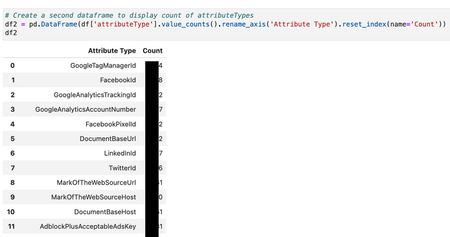
Thanks for joining me for the second installment on leveraging Trackers in Microsoft Defender External Attack Surface Management (Defender EASM) to find and manage risk in your organization. This blog post is part two of this series, building on the concepts introduced in part one about discovering your attack surface and applying this valuable inventory data to inform your security efforts at scale. As a quick refresher, in part one, we defined Trackers in Defender EASM and learned how to search for them in the User Interface (UI). This blog post will closely examine the Defender EASM Application Program Interface (API). Part 2: Uncovering Trackers Using the Defender EASM API - Microsoft Community Hub47KViews0likes0CommentsJoin our Attack Disruption in Microsoft 365 Defender AMA on May 3rd!
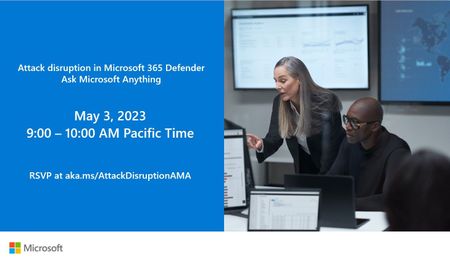
Join us on Wednesday 5/3 at 9:00AM PST for an AMA (Ask Microsoft Anything) with the Attack Disruption team! This will be a text-based live hour of answering all your questions relating to the product. This January we announced the public preview of automatic attack disruption in Microsoft 365 Defender. The built-in attack disruption capabilities in Microsoft 365 Defender help stop the progression of advanced attacks like ransomware and business email campaigns (BEC) with advanced AI capabilities that automatically isolate compromised devices and user accounts. If you have any questions about this, come ask us! Note: If you are unable to attend the live hour, you can ask your question at any time on the event page below and the team will get to it during the event. Join here: aka.ms/AttackDisruptionAMA47KViews1like0Comments