terraform
52 TopicsAzure Verified Modules (AVM) is now owned by Azure engineering
Azure Verified Modules (AVM) has moved into the Azure Deployments team, inside Microsoft’s Azure engineering organization. That is the headline, and it is a big one for us. AVM started as a community-led project inside Microsoft, built and maintained largely by people who cared about it alongside their day jobs in various roles and teams across Microsoft. It is now owned by an engineering team, with dedicated engineers working on it every day; as well as those who helped make AVM what it is today. I want to be clear about what that does and does not mean, because I know the questions this raises. AVM is still open source. The repositories, specifications, the contribution model and the way you consume modules from the public registries are all unchanged. What has changed is the level of investment behind it, and how sustainable we can make it. In short: Microsoft has increased its investment in AVM. It has moved from a community-led project into Azure engineering, with dedicated engineering resources behind it. It stays open-source. On the back of that, we are updating the support statement and introducing a three-tier module ownership model at the start of 2027 (more on these below). This blog post has a lot of content, please take the time to read it all but feel free to use the table of contents below to help you navigate it. If AVM is new to you AVM is the Microsoft standard for Infrastructure as Code (IaC) modules for Azure, in both Bicep and Terraform. Every module is built to the same published specification, passes the same continuous integration (CI) tests, and is published to the official public Bicep and Terraform registries. The idea is simple: you should not have to write the same Azure IaC code again, and you should be able to trust what you pick up. There is a lot more detail at aka.ms/AVM. And if you would rather watch than read, Jared Holgate and I covered AVM in our recent Azure Infra Summit session: watch the recording on YouTube. What the move lets us fix: our support statement Today, the AVM support statement includes day-based targets for responses and fixes. We have not met them consistently, and that does not give you clear or reliable expectations. We are removing those targets and aligning with the support model used by Azure CLI, Azure PowerShell, Bicep, AzAPI, and the AzureRM Terraform provider. The move into Azure engineering is the important part. Dedicated engineers will maintain modules directly and improve the tooling, automation, and framework used by all module owners. That is a stronger commitment than any fixed target we cannot reliably meet. It also lets us be clearer about who maintains each module. Right now, every AVM module is treated identically, and that is not sustainable. So, we are introducing module tiering. Introducing module tiering Right now, every AVM module is treated identically. That is not sustainable. A resource group module needs almost no attention. A storage account or virtual machine module needs constant work as the underlying service evolves. So, today we are introducing two tiers (and thinking about a third) based on who owns and maintains a module: Tier Owned by What it means Tier 1 (Core) The AVM engineering team Modules are owned directly by the AVM team inside Azure engineering. These are the ones we maintain as our day job alongside the AVM specifications and framework Tier 2 (Maintained) Any Microsoft employee (FTE) Modules are owned by any Microsoft full-time employee or team/s. It also includes other Azure engineering teams owning the modules for their own services. This is the model we have today, and it is not going away. Tier 3 (Open-Source) * being considered for future * Vetted external owners (future) An idea, not a commitment. It would let trusted external parties such as Microsoft MVPs and accredited partners own modules. We will not look at this until the 2nd half of calendar year 2027. One thing that will not change: the bar. Every module in every tier is built to the same AVM specification and passes the same CI checks. Tiering describes who is behind a module, not its quality. Ownership also stays aligned across languages if in Tier 1. If we own a module in Tier 1, we own it in both Bicep and Terraform. Why we are not publishing the module tiering list yet We want to know our real maintenance capacity before we commit. We are spending the rest of 2026 reducing toil and clearing the backlog. This work will show how many modules we can maintain. We would rather publish a list that we can sustain than change it soon after publication. Publishing a list will also focus attention on excluded modules. We want clear evidence before those discussions start. For context, our draft puts about 50 resource modules in Tier 1, across Bicep and Terraform. Current telemetry suggests these modules represent about 85 percent of AVM module deployments. Usage is one input. Critical services and other factors also matter. We will validate the draft before making a public commitment. Distributed ownership is still the point AVM has always run on decentralized ownership and moving into engineering does not change that. If anything, it should help. Being inside Azure engineering puts us much closer to the product teams who build the services, and getting more of those teams to own the modules for their own service has been a goal from day one. That is already happening. With the recent transition of Azure Landing Zones (ALZ), the Azure Migrate team now maintain the ALZ modules and the subscription vending modules in AVM. Those sit in Tier 2, but they are maintained by a dedicated engineering team. Tier 2 is not a lesser tier, it is a broader one. However, if they currently own a resource module that will be included in Tier 1, they are still welcome to be involved in its ownership alongside the AVM engineering team, but we would also encourage them to own a module outside of Tier 1 so we have an owner on as many modules as possible. But all of this will be dealt with when we implement the tiering structure in early 2027. Tier 2 ownership remains open to Microsoft employees and teams. The AVM engineering team will support those owners through improved tooling, automation, and the AVM framework. We will confirm ownership changes when we implement module tiering in early 2027. Come and meet the team (AVM Community Call) Rather than list names on a page, we would rather you meet the people. Join our next AVM community call, where the new engineering team looking after AVM will introduce themselves and take your questions. If you want to know who is behind AVM now, or discuss anything in this post, this will be the place to do it, and we can’t wait to see you all there! Next community call: Monday 26th October 2026 @ 16:00 UK | 12:00 EDT | 09:00 PDT | 21:30 IST | 03:00 AEDT This call will be streamed to YouTube live so use the "Set reminder" / "Notify Me" options on YouTube and also put an entry in your calendar to remind you. This means it will automatically be recorded and published live once finished as well 👍 YouTube Live Link: aka.ms/AVM/CommunityCall GitHub Issue Link: AVM Community Call - October 2026 · Issue #3079 · Azure/Azure-Verified-Modules - please add a comment for any topics or discussions you'd like covered Everyone is welcome whether you contribute to AVM or just use it. We want to welcome you for an insight into our roadmap over the next 6 months as well as an open discussion with you all. What happens next We update the published module support statement and remove the day-based response targets. The team keeps burning down issues and pull requests and keeps reducing the manual toil in our CI. We validate our maintenance run rate through the end of calendar year 2026. We publish the initial tier classifications once we can stand behind them. We revisit Tier 3, including the legal and intellectual property questions, in 2027. AVM got here because customers, partners and contributors backed it and used it in anger. That has not changed, and neither has our need for your input. If you think we are getting this wrong, tell us in GitHub Discussions. Candidly, the feedback we get on this will shape how we land it. And finally, thank you to everyone who built this AVM exists because many people put real work into it, often alongside their day jobs. Matt White, Charlie Grabiaud, Mate Barabas, Pankaj Meshram, were some of AVM’s key founders and helped shape the project during its early days that are no longer involved in AVM day-to-day. Jared Holgate, Alexander Sehr, Erika Gressi, Kris Baranek, Sebastian Graf, Rene Hezser and Chris Sidebotham remain involved today helping develop and maintain the AVM framework and specifications with the engineering team. Some contributors have moved to other roles, teams, or companies. Many continue through issues, pull requests, community calls, and module ownership and contributions. Every contribution helped AVM reach this point and continue to drive it forward today. The move into Azure engineering adds dedicated investment. It does not replace the community that built and sustained AVM. To every past and present contributor and module owner: thank you for your time, commitment, and belief in AVM. Thanks, Jack and the AVM team.976Views2likes0Comments
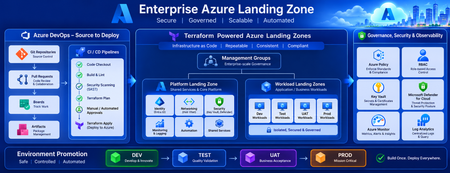
Building a Fully Automated Azure Landing Zone Deployment Using Azure DevOps and Terraform
Discover how to build a fully automated Azure Landing Zone using Azure DevOps and Terraform. This article walks through real-world Git workflows, CI/CD automation, environment promotion strategies, and governance integration to create secure, scalable, and enterprise-ready Azure environments.1.4KViews1like0Comments
Building Production-Ready Pipelines in Azure DevOps: Beyond the Documentation Examples
Hi everyone, When moving from basic Azure DevOps tutorials to enterprise production environments, we all quickly realize that documentation examples don't always cover real-world complexities. Handling multi-stage dependencies, keeping Terraform state secure, and managing secrets across environments requires a highly strategic approach. To help DevOps engineers bridge this gap, I recently put together a deep-dive architecture breakdown detailing how to build a resilient, multi-stage YAML pipeline from scratch. Here is a quick look at the core enterprise architecture I focus on: - Multi-Stage Lifecycle: Safe progression flows through Build, Dev, QA, UAT, and Production stages. - Infrastructure Automation: Clean integration with Terraform, including state and secrets management using Azure Key Vault. - Security Gates: Implementation of SAST scanning, Workload Identity, and automated approval policies. - Team Alignment: Connecting Azure DevOps with project tools like Asana to streamline cross-platform tracking. I wanted to share this pattern here to get some community feedback on the YAML structure. Before I post the full configuration snippets, I would love to hear how your teams handle environment gates and approvals. What are the biggest bottlenecks you run into with multi-stage YAML pipelines? Let's discuss in the comments below! Best regards, Abdullah Shahid138Views0likes0CommentsUnderstanding Azure SQL Long-Term Retention Immutability Configuration with Terraform and AzAPI
Executive Summary Organizations using Azure SQL Database Long-Term Retention (LTR) backup policies may encounter failures when attempting to disable backup immutability while also specifying an immutability mode in the same request. In the investigated scenario, the customer observed that the operation succeeded when performed through ARM templates but failed when executed through Terraform using AzAPI-based resources. The investigation determined that the Azure SQL resource provider enforces validation rules that prevent TimeBasedImmutabilityMode from being specified when TimeBasedImmutability is set to Disabled. The issue was not caused by the Azure SQL service itself, but rather by how configuration values were being submitted through Terraform and AzAPI resource updates. The recommended mitigation is to ensure that immutability mode is omitted or explicitly set to null when disabling time-based immutability. This allows the request to comply with the resource provider's validation requirements. Introduction Azure SQL Database supports immutable Long-Term Retention (LTR) backups to help organizations meet compliance, governance, and data protection requirements. These policies allow administrators to control whether retained backups can be modified or deleted. During an investigation involving Terraform and AzAPI deployments, a customer reported inconsistent behavior when attempting to disable backup immutability. While equivalent ARM template operations completed successfully, Terraform-based deployments generated validation errors. This article explains the observed behavior, the investigation findings, the confirmed root cause, and the recommended mitigation. Issue Description Reported Symptoms The customer reported the following behavior: Enabling and managing Long-Term Retention backup immutability worked successfully. Configurations involving immutability mode settings could be applied successfully under certain conditions. Attempts to disable immutability through Terraform resulted in failures. Similar operations appeared to succeed when performed using ARM templates. Technical Environment The discussion confirmed the following components: Azure SQL Database Long-Term Retention (LTR) backup policies Backup immutability configuration Terraform deployments AzAPI resources and AzAPI resource updates ARM template deployments Azure SQL Resource Provider validation logic Expected Behavior When administrators disable backup immutability, the configuration update should be accepted and the policy should transition to a disabled state. Actual Behavior Requests submitted through Terraform/AzAPI included both: TimeBasedImmutability = Disabled TimeBasedImmutabilityMode = Unlocked The Azure SQL resource provider rejected this configuration, returning an error indicating that an immutability policy mode cannot be specified when backup immutability is not enabled. Investigation and Troubleshooting 1. Initial Customer Question The customer sought clarification on whether enabling, disabling, locking, and unlocking backup immutability should all be possible through AzAPI resources and whether a product issue existed. 2. Review of Azure SQL Resource Provider Behavior The support team reviewed requests submitted to the Azure SQL resource provider and compared successful and unsuccessful operations. The investigation focused on configuration differences between ARM template deployments and Terraform-driven updates. Confirmed Finding When ARM templates disabled immutability, the request contained: TimeBasedImmutability = Disabled and did not include an immutability mode parameter. Confirmed Finding When Terraform attempted to disable immutability, the request included both: TimeBasedImmutability = Disabled TimeBasedImmutabilityMode = Unlocked This resulted in a validation failure from the Azure SQL resource provider. 3. Validation of Error Behavior The team verified that the error was generated by the Azure SQL resource provider and was reproducible outside Terraform, including equivalent testing through ARM deployments when the conflicting parameter combination was supplied. Confirmed Error The resource provider returned an error equivalent to: Cannot set immutability policy mode when backup immutability is not enabled. 4. Assessment of Terraform and AzAPI Behavior The investigation identified an important behavioral difference. Terraform itself did not yet expose dedicated Time-Based Immutability parameters in its SQL modules. As a result, the customer was using AzAPI resources to perform direct REST-based operations. The team discovered that: azapi_resource behaved as expected. azapi_resource_update could retrieve and reuse an existing property value when no value was explicitly provided. This behavior caused the immutability mode value to persist unexpectedly during updates. 5. Reproduction and Verification The engineering discussion included review and validation of the reported behavior. Testing confirmed that requests containing immutability mode while immutability was disabled were expected to fail due to platform validation. Root Cause Confirmed Root Cause The failure occurred because the update request attempted to disable backup immutability while simultaneously providing a value for TimeBasedImmutabilityMode. Azure SQL validation rules require immutability mode to be associated only with an enabled immutability configuration. When immutability is disabled, an immutability mode must not be supplied. An additional contributing factor was the behavior of azapi_resource_update, which could retain a previously configured immutability mode value when no new value was explicitly provided. Consequently, requests unintentionally included an immutability mode even though the intent was to disable immutability entirely. The available evidence supports this conclusion through: Comparison of successful ARM template requests and failing Terraform requests. Reproduction of the same validation behavior by the Azure SQL resource provider. Validation of the AzAPI update behavior involving retained values. Mitigation and Resolution Recommended Mitigation When disabling backup immutability: Set TimeBasedImmutability to Disabled. Do not provide TimeBasedImmutabilityMode. Terraform/AzAPI Workaround The investigation determined that explicitly setting: TimeBasedImmutabilityMode = null prevents the previous value from being reused and allows the request to be processed correctly. Configuration Matrix Discussed The support team identified the following expected behavior: Operation Immutability Mode Requirement Locking backups Mode should be set to Locked Unlocking while remaining enabled Mode may be supplied and is recommended for clarity Disabling immutability Mode should not be supplied This guidance was explicitly discussed during the investigation. Validation After applying the mitigation: The disable operation should complete without the immutability mode conflict. Requests should no longer trigger the Azure SQL validation error related to immutability mode usage. Recommendations and Best Practices Recommendations Supported by the Investigation Ensure that immutability mode is not included when disabling backup immutability. Review Terraform templates for dynamically generated properties that may continue to emit previously populated values. When using AzAPI update resources, explicitly manage nullable properties where supported to avoid unintended value persistence. Important Considerations Behavior may vary depending on: Azure SQL API version Terraform provider version AzAPI provider implementation details Existing Long-Term Retention backup state Whether previously locked backups exist Always validate deployment behavior in a non-production environment before applying configuration changes broadly. Conclusion This investigation demonstrated that the inability to disable Azure SQL Long-Term Retention backup immutability was not caused by a platform defect in Azure SQL. Instead, the failure occurred because requests attempted to specify an immutability mode while immutability itself was being disabled. The issue was further influenced by AzAPI update behavior that could preserve previously configured values unless explicitly cleared. Setting the immutability mode to null, or removing it entirely when disabling immutability, resolved the problem. The key technical takeaway is that TimeBasedImmutabilityMode and TimeBasedImmutability must be configured consistently with Azure SQL resource provider validation rules, particularly during infrastructure-as-code deployments. Public Documentation Azure SQL Database Long-Term Retention documentation Azure SQL Backup Immutability documentation ARM/Bicep resource documentation for backup Long-Term Retention policies Terraform provider documentation for Azure SQL Database321Views0likes0CommentsTerraform AzureRM provider 5.0 now generally available
The Terraform AzureRM provider serves as the bridge between Terraform configurations and Azure, giving teams a consistent, scalable, and secure way to define and manage Azure infrastructure as code. Today we're announcing general availability of Terraform AzureRM Provider 5.0. This major release gives users more control over how the provider interacts with Azure subscriptions, introduces opt-in Azure preflight validation, and removes resources and properties deprecated across previous releases. With AzureRM 5.0, we continue to evolve the provider around how customers use Azure today, with clearer provider behavior, earlier feedback during infrastructure workflows, and a cleaner foundation for future Azure services and features. Highlights in AzureRM 5.0 AzureRM 5.0 includes a broad set of breaking changes and behavioral updates. Here are some of the most important changes for existing users. More control over Resource Provider registration: Previous versions of the provider automatically checked and attempted to register a legacy set of approximately 60 Azure Resource Providers during initialization. This could add startup time, create permission errors in restricted environments, and register services a team did not intend to use. In version 5.0, no Resource Providers are registered by default. Users can register only the Resource Providers required by their configuration, retain the legacy behavior, or manage registration outside the provider. This gives platform teams more control over Azure subscription configuration and the permissions assigned to Terraform. Optional Azure preflight validation: AzureRM 5.0 adds opt-in support for the Azure Preflight Validation API. For supported resources, the provider can make a live API call to Azure during terraform plan and surface certain policy violations, quota breaches, and invalid property values before an apply begins. Preflight validation currently supports a subset of AzureRM resources and requires valid Azure credentials and access to Azure services during planning. Values that Terraform does not know until apply cannot be included in the validation request, so this is an additional checkpoint rather than a replacement for apply-time validation. Still, it is generally preferable to detect Azure configuration issues before an apply operation begins, rather than during deployment. Updated validation defaults: Validation of Azure locations and Azure Resource Provider names through the Azure Metadata Service is now disabled by default. Users who want these checks during planning can enable them through the enhanced_validation feature block. Removal of deprecated provider surfaces: As expected with a major release, AzureRM 5.0 removes resources, data sources, and properties that have already completed the provider’s deprecation cycle. This includes the older App Service and Function App resources, which have been superseded by the Linux and Windows-specific resources, along with resources for retired or replaced Azure services. The release also continues the move toward using Azure resource IDs instead of separate resource names across several schemas. Some configurations previously embedded inside larger resources have moved to dedicated resources, including Storage Account queue properties and static website configuration. Migrating to AzureRM 5.0 AzureRM 5.0 is a major release, so users should review their configurations carefully before upgrading. The complete AzureRM 5.0 upgrade guide documents the provider-level changes, removed resources and data sources, and breaking schema changes included in the release. When planning the upgrade, we recommend that users: Review the resources and properties used by their configurations and modules. Decide how Azure Resource Provider registration should be managed in their environment. Decide whether to enable location, Azure Resource Provider, or preflight validation. Test the upgrade in a non-production environment and review the resulting terraform plan. Pin the provider version while validating and rolling out the upgrade. The amount of migration work will depend on which resources, data sources, and properties your configurations and modules use. The upgrade guide includes the detailed mappings and examples needed to identify and plan those changes. Getting started The Terraform AzureRM provider 5.0 is now available in the Terraform Registry. For the complete list of updates in version 5.0, refer to the AzureRM 5.0 changelog. To learn the basics of using Terraform with Azure, explore the Terraform on Azure tutorials on our developer education platform. This release would not have been possible without the work of the HashiCorp AzureRM maintainers, Azure Terraform engineering team, community contributors, and users who continue to provide feedback through GitHub issues and pull requests. If you'd like to join a community of Terraform on Azure practitioners, join our community calls! This is a cross-post of HashiCorp's blog post.3.6KViews3likes0CommentsFrom Prompt to Production: Open in VS Code for Terraform in Azure Copilot
We’re excited to introduce a new step in the Terraform on Azure experience: Open in VS Code, now available directly from Azure Copilot in the Azure Portal. This capability helps you move seamlessly from AI‑generated Terraform code to real Azure deployments - within a connected, guided workflow designed for enterprise scenarios. Why This Matters Infrastructure as Code with Terraform is powerful, but moving from generated configuration to a deployed environment typically involves multiple tools and handoffs. Teams need to understand Terraform state, work with remote backends, and integrate their code into version‑controlled CI/CD pipelines - often backed by Terraform Cloud or Azure‑native backends in enterprise environments. Open in VS Code brings these steps together. It bridges the gap between AI‑assisted authoring in the Azure Portal and the real‑world workflows required to validate, manage state, and deploy infrastructure with confidence. Continue Your Workflow in VS Code With Azure Copilot, you can describe your infrastructure in natural language and generate Terraform configurations in seconds. For example: “Create an Azure Container App using Terraform with a managed environment, Log Analytics enabled, and a system‑assigned managed identity to securely pull images from Azure Container Registry.” Copilot generates the Terraform configuration for you. From there, you can select Open full view to enter a full‑screen Terraform editor, and then choose Open in VS Code to launch the configuration in an Azure‑hosted VS Code environment. There’s no need to download files or set up a local development environment. VS Code for the web opens with Azure authentication already configured, along with commonly used extensions, so you can immediately focus on refining, validating, and preparing your infrastructure for deployment. Built‑in Guidance for Real Deployments Beyond editing, the VS Code experience includes built‑in, step‑by‑step guidance to help you deploy your Terraform configuration into your own Azure environment - whether you’re experimenting or preparing for production. Because Terraform relies on state management, the workflow starts by helping you choose and configure a backend. Backend Options Option 1: Azure Storage Account as a remote backend A natural fit for Azure‑native and enterprise environments. The experience guides you through creating or selecting a storage account and configuring Terraform to store state securely in Azure. Option 2: HCP Terraform (Terraform Cloud) as a remote backend Ideal for teams already using Terraform Cloud. The guided flow helps you authenticate, connect to an existing organization and workspace, and generate the required backend configuration directly into your Terraform files. Option 3: Temporary workspace for quick validation Designed for learning and experimentation. You can run terraform plan and terraform apply directly in the Azure workspace with temporary state, without committing to a long‑term backend - ideal for quick validation, but not intended for production use. Each option includes an end‑to‑end walkthrough, so you can complete backend setup and run Terraform commands without leaving the VS Code environment or searching through external documentation. Connecting Code, State, and Deployment This experience connects three essential parts of the Terraform workflow: AI‑assisted code generation in Azure Portal Copilot Interactive editing and guided execution in VS Code for the web Flexible backend options for managing Terraform state Together, these pieces make it easier to move from idea to infrastructure in a structured, supported way—whether you’re new to Terraform or managing production workloads with established CI/CD pipelines. Available Now - and What’s Next The Open in VS Code experience for Terraform is now public preview in Azure Portal Copilot. We’re continuing to invest in this workflow, including clearer deployment guidance, future integration with GitHub Actions and other CI/CD pipelines, and deeper enhancements to the full‑screen Terraform editor experience. If you haven’t tried it yet, generate a Terraform configuration with Azure Copilot and open it in VS Code to go from prompt to production end to end in one connected workflow.1.4KViews0likes0CommentsFebruary 2026 Recap: Azure Database for PostgreSQL
Hello Azure Community, We’re excited to share the February 2026 recap for Azure Database for PostgreSQL, featuring a set of updates focused on speed, simplicity, and better visibility. From Terraform support for Elastic Clusters and a refreshed VM SKU selection experience in the Azure portal to built‑in Grafana dashboards, these improvements make it easier to build, operate, and scale PostgreSQL on Azure. This recap also includes practical GIN index tuning guidance, enhancements to the PostgreSQL VS Code extension, and improved connectivity for azure_pg_admin users. Features Terraform support for Elastic Clusters - Generally Available Dashboards with Grafana - Generally Available Easier way to choose VM SKUs on portal – Generally Available What’s New in the PostgreSQL VS Code Extension Priority Connectivity to azure_pg_admin users Guide on 'gin_pending_list_limit' indexes Terraform support for Elastic Clusters Terraform now supports provisioning and managing Azure Database for PostgreSQL Elastic Clusters, enabling customers to define and operate elastic clusters using infrastructure‑as‑code workflows. With this support, it is now easier to create, scale, and manage multi‑node PostgreSQL clusters through Terraform, making it easier to automate deployments, replicate environments, and integrate elastic clusters into CI/CD pipelines. This improves operational consistency and simplifies management for horizontally scalable PostgreSQL workloads. Learn more about building and scaling with Azure Database for PostgreSQL elastic clusters. Dashboards with Grafana — Now Built-In Grafana dashboards are now natively integrated into the Azure Portal for Azure Database for PostgreSQL. This removes the need to deploy or manage a separate Grafana instance. With just a few clicks, you can visualize key metrics and logs side by side, correlate events by timestamp, and gain deep insights into performance, availability, and query behavior all in one place. Whether you're troubleshooting a spike, monitoring trends, or sharing insights with your team, this built-in experience simplifies day-to-day observability with no added cost or complexity. Try it under Azure Portal > Dashboards with Grafana in your PostgreSQL server view. For more details, see the blog post: Dashboards with Grafana — Now in Azure Portal for PostgreSQL. Easier way to choose VM SKUs on portal We’ve improved the VM SKU selection experience in the Azure portal to make it easier to find and compare the right compute options for your PostgreSQL workload. The updated experience organizes SKUs in a clearer, more scannable view, helping you quickly compare key attributes like vCores and memory without extra clicks. This streamlined approach reduces guesswork and makes selecting the right SKU faster and more intuitive. What’s New in the PostgreSQL VS Code Extension The VS Code extension for PostgreSQL helps developers and database administrators work with PostgreSQL directly from VS Code. It provides capabilities for querying, schema exploration, diagnostics, and Azure PostgreSQL management allowing users to stay within their editor while building and troubleshooting. This release focuses on improving developer productivity and diagnostics. It introduces new visualization capabilities, Copilot-powered experiences, enhanced schema navigation, and deeper Azure PostgreSQL management directly from VS Code. New Features & Enhancements Query Plan Visualization: Graphical execution plans can now be viewed directly in the editor, making it easier to diagnose slow queries without leaving VS Code. AGE Graph Rendering: Support is now available for automatically rendering graph visualizations from Cypher queries, improving the experience of working with graph data in PostgreSQL. Object Explorer Search: A new graphical search experience in Object Explorer allows users to quickly find tables, views, functions, and other objects across large schemas, addressing one of the highest-rated user feedback requests. Azure PostgreSQL Backup Management: Users can now manage Azure Database for PostgreSQL backups directly from the Server Dashboard, including listing backups and configuring retention policies. Server Logs Dashboard: A new Server Dashboard view surfaces Azure Database for PostgreSQL server logs and retention settings for faster diagnostics. Logs can be opened directly in VS Code and analyzed using the built-in GitHub Copilot integration. This release also includes several reliability improvements and bug fixes, including resolving connection pool exhaustion issues, fixing Docker container creation failures when no password is provided, and improving stability around connection profiles and schema-related operations. Priority Connectivity to azure_pg_admin Users Members of the azure_pg_admin role can now use connections from the pg_use_reserved_connections pool. This ensures that an admin always has at least one available connection, even if all standard client connections from the server connection pool are in use. By making sure admin users can log in when the client connection pool is full, this change prevents lockout situations and lets admins handle emergencies without competing for available open connection slots. Guide on 'gin_pending_list_limit' indexes Struggling with slow GIN index inserts in PostgreSQL? This post dives into the often-overlooked gin_pending_list_limit parameter and how it directly impacts insert performance. Learn how GIN’s pending list works, why the right limit matters, and practical guidance on tuning it to strike the perfect balance between write performance and index maintenance overhead. For a deeper dive into gin_pending_list_limit and tuning guidance, see the full blog here. Learning Bytes Create Azure Database for PostgreSQL elastic clusters with terraform: Elastic clusters in Azure Database for PostgreSQL let you scale PostgreSQL horizontally using a managed, multi‑node architecture. With Elastic cluster now generally available, you can provision and manage elastic clusters using infrastructure‑as‑code, making it easier to automate deployments, standardize environments, and integrate PostgreSQL into CI/CD workflows. Elastic clusters are a good fit when you need: Horizontal scale for large or fast‑growing PostgreSQL workloads Multi‑tenant applications or sharded data models Repeatable and automated deployments across environments The following example shows a basic Terraform configuration to create an Azure Database for PostgreSQL flexible server configured as an elastic cluster. resource "azurerm_postgresql_flexible_server" "elastic_cluster" { name = "pg-elastic-cluster" resource_group_name = <rg-name> location = <region> administrator_login = var.admin_username administrator_password = var.admin_password version = "17" sku_name = "GP_Standard_D4ds_v5" storage_mb = 131072 cluster { size = 3 } } Conclusion That’s a wrap for the February 2026 Azure Database for PostgreSQL recap. We’re continuing to focus on making PostgreSQL on Azure easier to build, operate, and scale whether that’s through better automation with Terraform, improved observability, or a smoother day‑to‑day developer and admin experience. Your feedback is important to us, have suggestions, ideas, or questions? We’d love to hear from you: https://aka.ms/pgfeedback.784Views2likes1CommentJanuary 2026 Recap: Azure Database for PostgreSQL
Hello Azure Community, We’re kicking off the year with important updates for Azure Database for PostgreSQL. From Premium SSD v2 features now available in public preview to REST API feature updates across developer tools, this blog highlights what’s new and what’s coming. Terraform Adds Support for PostgreSQL 18 – Generally Available Ansible module update - Generally Available Achieving Zonal Resiliency with Azure CLI - Generally Available SDKs Released : Go, Java, JavaScript, .NET and Python – Generally Available What’s New in Premium SSD v2 - Public Preview Latest PostgreSQL minor versions January 2026 Maintenance Release Notes Terraform Adds Support for PostgreSQL 18 Azure Database for PostgreSQL now provides support for PostgreSQL 18 which allows customers to create new servers with PostgreSQL 18 version and upgrade existing ones using Terraform. This update makes it easier to adopt PostgreSQL 18 on Azure while managing both provisioning and upgrades through consistent Terraform workflows. Learn more about using the new terraform resource Ansible Module Update A new Ansible module is now available with support for the latest GA REST API features, enabling customers to automate provisioning and management of Azure Database for PostgreSQL resources. This includes support for Elastic Clusters provisioning, deployment of PostgreSQL instances with PostgreSQL 18, and broader adoption of newly released Azure Database for PostgreSQL capabilities through Ansible. Learn more about using Ansible module with latest REST API features Achieve zonal resiliency with Azure CLI We have released updates to the Azure CLI that allow users to enable zone‑redundant high availability (HA) by default using a new --zonal-resiliency parameter. This parameter can be set to enabled or disabled. When --zonal-resiliency is enabled, the service provisions a standby server in a different availability zone than the primary, providing protection against zonal failures. If zonal capacity is not available in the selected region, you can use the --allow-same-zone flag to provision the standby in the same zone as the primary. Azure CLI commands: az postgres flexible-server update --resource-group <resource_group> --name <server> --zonal-resiliency enabled --allow-same-zone</server></resource_group> az postgres flexible-server update --resource-group <resource_group> --name <server> --zonal-resiliency Disabled</server></resource_group> az postgres flexible-server create --resource-group <resource_group> --name <server> --zonal-resiliency enabled --allow-same-zone</server></resource_group> Learn more about how to configure high availability on Azure Database for PostgreSQL. SDKs Released : Go, Java, JavaScript, .NET and Python We have released updated SDKs for Go, Java, JavaScript, .NET, and Python, built on the latest GA REST API (2025‑08‑01). These SDKs enable developers to programmatically provision, configure, and manage Azure Database for PostgreSQL resources using stable, production‑ready APIs. It also adds the ability to set a default database name for Elastic Clusters, simplifying cluster provisioning workflows, support for PostgreSQL 18. To improve developer experience and reliability, operation IDs have been renamed for clearer navigation, and HTTP response codes have been corrected so automation scripts and retries behave as expected. Learn More about .NET SDK Learn more about Go SDK Learn more about Java SDK Learn more about Javascript SDK Learn more about Python SDK What’s New in Premium SSD v2: Public Preview Azure Database for PostgreSQL Flexible Server now supports a broader set of resiliency and lifecycle management capabilities on Premium SSD v2, enabling production‑grade PostgreSQL deployments with improved durability, availability, and operational flexibility. In this preview, customers can use High Availability (same‑zone and zone‑redundant), geo‑redundant backups, in‑region and geo read replicas, geo‑disaster recovery (Geo‑DR), and Major Version Upgrades on SSDv2‑backed servers, providing both zonal and regional resiliency options for mission‑critical PostgreSQL workloads. These capabilities help protect data across availability zones and regions, support compliance and disaster‑recovery requirements, and simplify database lifecycle operations. Premium SSD v2 enhances these resiliency workflows with higher and independently scalable IOPS and throughput, predictable low latency, and decoupled scaling of performance and capacity. Customers can provision and adjust storage performance without over‑allocating disk size, enabling more efficient capacity planning while sustaining high‑throughput, low‑latency workloads. When combined with zone‑resilient HA and cross‑region data protection, SSDv2 provides a consistent storage foundation for PostgreSQL upgrades, failover, backup, and recovery scenarios. These capabilities are being expanded incrementally across regions as the service progresses toward general availability For more details, see Premium SSDv2 Latest Postgres minor versions: 18.1, 17.7, 16.11, 15.15, 14.20, 13.23 Azure Database for PostgreSQL now supports the latest PostgreSQL minor versions: 18.1, 17.7, 16.11, 15.15, 14.20, and 13.23. These updates are applied automatically during planned maintenance windows, ensuring your databases stay up to date with critical security fixes and reliability improvements no manual action required. This release includes two security fixes and over 50 bug fixes across indexing, replication, partitioning, memory handling, and more. PostgreSQL 13.23 is the final community release for version 13, which has now reached end-of-life (EOL). Customers still using PostgreSQL 13 on Azure should review their upgrade options and refer to Azure’s Extended Support policy for more details. For details about the minor release, see PostgreSQL community announcement. January 2026 Maintenance Release Notes We’re excited to announce the January 2026 version of Azure Database for PostgreSQL maintenance updates. This new version delivers major engine updates, new extensions, Elastic clusters enhancements, performance improvements, and critical reliability fixes. This release introduces expands migration and Fabric mirroring support, and adds powerful analytics, security, and observability capabilities across the service. Customers also benefit from improved Query Store performance, new WAL metrics, enhanced networking flexibility, and multiple Elastic clusters enhancements. All new servers are automatically onboarded beginning January 20, 2026, with existing servers upgraded during their next scheduled maintenance. For a complete list of features, improvements, and resolved issues, see the full release notes here. Azure Postgres Learning Bytes Managing Replication Lag with Debezium Change Data Capture (CDC) enables real‑time integrations by streaming row‑level changes from OLTP systems like PostgreSQL into event streams, data lakes, caches, and microservices. In a typical CDC pipeline, Debezium captures changes from PostgreSQL and streams them into Kafka with minimal latency. However, during large bulk updates that affect millions of rows, replication lag can spike significantly, impacting replication lag. This learning byte walks through how to detect and mitigate replication lag in Azure Database for PostgreSQL when using Debezium. Detect Replication Lag: Start by identifying where lag is building up in the system. Monitor replication slots and lag: Use the following query to inspect active replication slots and measure how far behind they are relative to the current WAL position: SELECT slot_name, active_pid, confirmed_flush_lsn, restart_lsn, pg_current_wal_lsn(), pg_size_pretty( ( pg_current_wal_lsn() - confirmed_flush_lsn ) ) AS lsn_distance FROM pg_replication_slots; Check WAL sender backend status: Verify whether WAL sender processes are stalled due to decoding or I/O waits: SELECT pid, backend_type, application_name, wait_event FROM pg_stat_activity WHERE backend_type = 'walsender' ORDER BY backend_start; Inspect spill activity : High spill activity indicates memory pressure during logical decoding and may contribute to lag. Large values for spill_bytes or spill_count suggest the need to increase logical_decoding_work_mem, reduce transaction sizes, or tune Debezium connector throughput. SELECT slot_name, spill_txns, spill_count, pg_size_pretty(spill_bytes) AS spill_bytes, total_txns, pg_size_pretty(total_bytes) AS total_bytes, stats_reset FROM pg_stat_replication_slots; Fix Replication Lag: Database and infrastructure tuning Reduce unnecessary overhead and ensure compute, memory, and storage resources are appropriately scaled to handle peak workloads. Connector level tuning Adjust Debezium configuration to keep pace with PostgreSQL WAL generation and Kafka throughput. This includes tuning batch sizes, poll intervals, and throughput settings to balance latency and stability. To learn more about diagnosing and resolving CDC performance issues, read the full blog: Performance Tuning for CDC: Managing Replication Lag in Azure Database for PostgreSQL with Debezium914Views2likes1CommentAccelerating Infrastructure as Code: Introducing Game-Changing Terraform Features for Azure
We're thrilled to announce a suite of powerful new features from the Terraform on Azure Team that will revolutionize how you build, manage, and deploy infrastructure. These enhancements deliver an unprecedented end-to-end experience that makes Terraform on Azure more accessible, intelligent, and comprehensive than ever before. Seamless Code Generation to Deployment Experience Public Preview: October 2025 Say goodbye to starting from scratch. Our new integrated workflow transforms how you create and deploy Terraform configurations through a streamlined journey that begins right in the Azure portal. With Copilot in Azure, you can now describe your infrastructure requirements in natural language and watch as production-ready Terraform code materializes before your eyes. This AI-powered assistant understands your intent and generates optimized HCL code that follows best practices—no more hunting through documentation or wrestling with syntax. The experience seamlessly transitions to VS Code for the web, where you can view, refine, and iterate on your generated code in a familiar development environment. Make adjustments, test configurations, and collaborate with your team—all without leaving your browser. When you're satisfied with your infrastructure definition, deploy with confidence using either HCP Terraform or Azure for state management, ensuring your infrastructure remains consistent and trackable. Unified VS Code Extension: Your Complete Terraform Toolkit Public Preview: Available Now We've consolidated the Terraform development experience into a single, powerful VS Code extension from Microsoft that serves as your command center for all things Terraform from Microsoft. IntelliSense support for all Microsoft providers brings intelligent code completion, parameter hints, and inline documentation directly to your fingertips, dramatically reducing errors and accelerating development. No more context switching to check resource schemas or argument names—everything you need appears as you type. Jump-start your projects with Code Samples that provide fully functional, production-ready templates for common Azure architectures. Whether you're building a microservices platform, data pipeline, or enterprise network, these samples give you a solid foundation to build upon. The game-changing Export Terraform feature allows you to reverse-engineer your existing Azure infrastructure into clean HCL code directly from VS Code. This bridges the gap between manually created resources and Infrastructure as Code, making it easier than ever to adopt Terraform for existing environments. Perhaps most importantly, the Policy/Preflight validation capability goes beyond traditional terraform plan by leveraging Azure's preflight system. This advanced validation catches configuration issues, policy violations, and potential deployment problems before they impact your environment. Validate against organizational policies, compliance requirements, and Azure best practices—all before a single resource is created. MS Graph Provider: Extending Terraform Beyond Infrastructure Public Preview: Available Now Infrastructure doesn't exist in isolation, and neither should your Terraform configurations. The new MS Graph provider brings the same declarative power you love about the Azure provider to the entire Microsoft ecosystem. Built with an AzAPI-like architecture for day-zero support of new features, this provider enables you to manage resources across the Microsoft platform including Microsoft 365 configurations, Windows settings, Enterprise Mobility + Security policies, and Dynamics 365 customizations. Manage users, groups, applications, and security policies alongside your Azure infrastructure—all in the same Terraform configuration. This unified approach means you can now define your entire organizational IT landscape as code, from the Azure resources powering your applications to the Microsoft 365 settings governing user productivity and security policies protecting your data. Ready to Transform Your Infrastructure Journey? These features represent our commitment to making Terraform a first class tool for managing Azure and Microsoft resources. Whether you're new to Infrastructure as Code or a seasoned practitioner, these enhancements will accelerate your workflow and expand what's possible with Terraform. Get started today by updating your VS Code extension and exploring the new Copilot experience in the Azure portal. The future of infrastructure automation on Azure is here—and it's more powerful than ever. Visit our documentation to learn more and join our community to share feedback and connect with other Terraform on Azure users. Together, we're building the future of cloud infrastructure. Terraform on Azure Product Group2.5KViews5likes2CommentsAnnouncing MSGraph Provider Public Preview and the Microsoft Terraform VSCode Extension
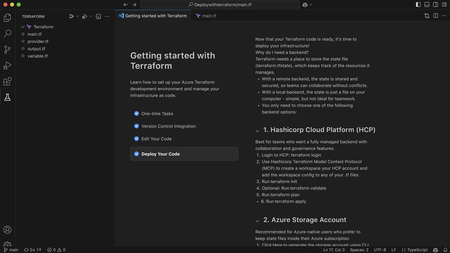
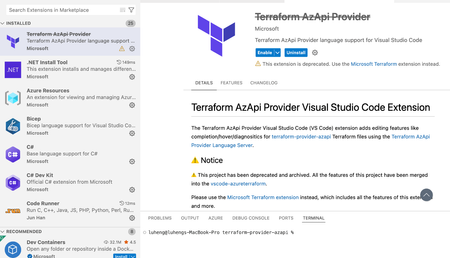
We are thrilled to announce two exciting developments in the Microsoft ecosystem for Terraform infrastructure-as-code (IaC) practitioners: the public preview of the Terraform Microsoft Graph (MSGraph) provider and the release of the Microsoft Terraform Visual Studio Code (VSCode) extension. These innovations are designed to streamline your workflow, empower your automation, and make managing Microsoft cloud resources easier than ever. Public Preview: Terraform Microsoft Graph (MSGraph) Provider The Terraform MSGraph provider empowers you to manage Entra APIs like privileged identity management as well as M365 Graph APIs like SharePoint sites from day 0 by leveraging the power and flexibility of HashiCorp Configuration Language (HCL) in Terraform. resource "msgraph_resource" "application" { url = "applications" body = { displayName = "My Application" } response_export_values = { all = "@" app_id = "appId" } } output "app_id" { value = msgraph_resource.application.output.app_id } output "all" { // it will output the whole response value = msgraph_resource.application.output.all } Historically, Terraform users could utilize the `azuread` provider to manage Entra features like users, groups, service principals, and applications. The new `msgraph` provider also supports these features and extends functionality to all beta and v1 Microsoft Graph endpoints. Querying role assignments for a service principal The below example shows how to use the `msgraph` provider to grant app permissions to a service principal: locals { MicrosoftGraphAppId = "00000003-0000-0000-c000-000000000000" # AppRoleAssignment userReadAllAppRoleId = one([for role in data.msgraph_resource.servicePrincipal_msgraph.output.all.value[0].appRoles : role.id if role.value == "User.Read.All"]) userReadWriteRoleId = one([for role in data.msgraph_resource.servicePrincipal_msgraph.output.all.value[0].oauth2PermissionScopes : role.id if role.value == "User.ReadWrite"]) # ServicePrincipal MSGraphServicePrincipalId = data.msgraph_resource.servicePrincipal_msgraph.output.all.value[0].id TestApplicationServicePrincipalId = msgraph_resource.servicePrincipal_application.output.all.id } data "msgraph_resource" "servicePrincipal_msgraph" { url = "servicePrincipals" query_parameters = { "$filter" = ["appId eq '${local.MicrosoftGraphAppId}'"] } response_export_values = { all = "@" } } resource "msgraph_resource" "application" { url = "applications" body = { displayName = "My Application" requiredResourceAccess = [ { resourceAppId = local.MicrosoftGraphAppId resourceAccess = [ { id = local.userReadAllAppRoleId type = "Scope" }, { id = local.userReadWriteRoleId type = "Scope" } ] } ] } response_export_values = { appId = "appId" } } resource "msgraph_resource" "servicePrincipal_application" { url = "servicePrincipals" body = { appId = msgraph_resource.application.output.appId } response_export_values = { all = "@" } } resource "msgraph_resource" "appRoleAssignment" { url = "servicePrincipals/${local.MSGraphServicePrincipalId}/appRoleAssignments" body = { appRoleId = local.userReadAllAppRoleId principalId = local.TestApplicationServicePrincipalId resourceId = local.MSGraphServicePrincipalId } } SharePoint & Outlook Notifications With your service principals properly configured, you can set up M365 endpoint workflows such an outlook notification template list as shown below. The actual service principal setup has been omitted from this code sample for the sake of brevity, but you will need Sites.Manage.All, Sites.ReadWrite.All, User.Read, and User.Read.All permissions for this example to work: data "msgraph_resource" "sharepoint_site_by_path" { url = "sites/microsoft.sharepoint.com:/sites/msgraphtest:" response_export_values = { full_response = "@" site_id = "id || ''" } } resource "msgraph_resource" "notification_templates_list" { url = "sites/${msgraph_resource.sharepoint_site_by_path.output.site_id}/lists" body = { displayName = "DevOps Notification Templates" description = "Centrally managed email templates for DevOps automation" template = "genericList" columns = [ { name = "TemplateName" text = { allowMultipleLines = false appendChangesToExistingText = false linesForEditing = 1 maxLength = 255 } }, { name = "Subject" text = { allowMultipleLines = false appendChangesToExistingText = false linesForEditing = 1 maxLength = 500 } }, { name = "HtmlBody" text = { allowMultipleLines = true appendChangesToExistingText = false linesForEditing = 10 maxLength = 10000 } }, { name = "Recipients" text = { allowMultipleLines = true appendChangesToExistingText = false linesForEditing = 3 maxLength = 1000 } }, { name = "TriggerConditions" text = { allowMultipleLines = true appendChangesToExistingText = false linesForEditing = 5 maxLength = 2000 } } ] } response_export_values = { list_id = "id" list_name = "displayName" web_url = "webUrl" } } The MSGraph provider is to AzureAD as the AzAPI provider is to AzureRM. Since support for resource types is automatic, you can access the latest features and functionality as soon as they're released via the provider. AzureAD will continue to serve as the convenience layer implementation of a subset of Entra APIs. We invite you to try the new provider today: - Deploy your first msgraph resources - Check out the registry page - Visit the provider GitHub Introducing the Microsoft Terraform VSCode Extension The new official Microsoft Terraform extension for Visual Studio Code consolidates AzureRM, AzAPI, and MSGraph VSCode support into a single powerful extension. The extension supports exporting Azure resources as Terraform code, as well as IntelliSense, syntax highlighting, and code sample generation. It replaces the Azure Terraform and AzAPI VSCode extensions and adds some new features. Installation & Migration New users can install the extension by searching “Microsoft Terraform” within Visual Studio Marketplace or their “Extensions” tab. Users can also click this link to the Visual Studio marketplace. Users of the “Azure Terraform” extension can navigate to “Extensions” tab and selecting the old extension. Select the “Migrate” button to move to the new extension. Users of the “Terraform AzAPI Provider” extension will be directed to the new extension: New Features Export Azure Resources As Terraform This feature allows you to export existing Azure resources as Terraform configuration blocks using Azure Export for Terraform. This helps you migrate existing Azure resources to Terraform-managed infrastructure. Open the Command Palette (Command+Shift+P on macOS and Ctrl+Shift+P on Windows/Linux). Search for and select the command Microsoft Terraform: Export Azure Resource as Terraform. Follow the prompts to select the Azure subscription and resource group containing the resources you want to export. Select the azurerm provider or the azapi provider to export the resources. The extension will generate the Terraform configuration blocks for the selected resources and display them in a new editor tab. Support for MSGraph The new extension comes fully equipped with intellisense, code completion, and code samples just like the AzAPI provider. See the next section for recorded examples of these features within the AzureRM & AzAPI providers. Preexisting Features Intelligent Code Completion: Benefit from context-aware suggestions, like property names or resource types. Code Samples: Quickly insert code samples for your resources: Paste as AzAPI: Copy your existing resource JSON or ARM Templates into VSCode with the Microsoft Terraform extension, and it will automatically convert your code into AzAPI. The below example takes a resource JSON from the Azure Portal and pastes it into VSCode as AzAPI: Migrate AzureRM to AzAPI: Move existing AzureRM code to the AzAPI provider whenever you wish to. Read more in the Guide to migrate AzureRM resources to AzAPI Feedback We value your feedback! You can share your experience with the Microsoft Terraform extension by running the command Microsoft Terraform: Show Survey from the Command Palette. Your input helps us improve the extension and better serve your needs. Conclusion Whether you are managing traditional Azure resources, modern Microsoft Graph environments, or a combination of both, the new MSGraph provider and Microsoft Terraform VS Code extension are designed to help you deliver robust, reliable infrastructure—faster and with greater confidence. Stay tuned for further updates, workshops, and community events as we continue to evolve these offerings. Your feedback and participation are invaluable as we build the next generation of infrastructure automation together.5.4KViews5likes2Comments