tech question or issue
109 TopicsRepost: Make quick assist run as admin
Question: We need to be able to use Quick Assist in Windows 10 to do some administrative tasks, but if the end user initiates the Quick Assist session then the remote admin is limited to only what the end user has access to. Is there any way we can start Quick Assist as an administrator or elevate it to admin level during the Quick Assist session? Response: Quick Assist is my preferred application to resolve all technical issues remotely. It also allow me to Run as Administrator to install and configure hardware/software but there are few steps required as mentioned below: Run CMD at end-user's computer Type the below command: runas /user:domain\administrator cmd *domain will be any domain of your organization *administrator can be any administrator login. If domain is not available type the below command in cmd. runas /user:local_user cmd Put the admin password. Now you have successfully launched cmd in administrator mode, you can run the below tasks. x:\MicrosoftEdgeSetup.exe (for software installation, where x is any drive letter from your computer). appwiz.cpl for installing or uninstalling program. services.msc (Run or Stop a service) devmgmt.msc (Device Manager, to install/uninstall or upgrade the device driver) diskmgmt.msc (Disk Management) compmgmt.msc (Computer Management) regedit (Registry Editor) Above mentioned are just example, you can use the number of commands as per your requirement.Repost: Authenticator app isn't receiving notifications to approve log in on my laptop
Question: I have been trying to log in to my Microsoft account on my new laptop. I have previously used the 2-factor identification method on my old laptop, however, it doesn't seem to be working for my new laptop. When it says it has sent a notification to approve on the authenticator mobile app, nothing is coming up to approve on my mobile so i am making no progress. I also cannot find a code to enter on my laptop from the app. There is no QR code to scan on my laptop using the authenticator app. I don't know what to do and it is extremely frustrating because I cannot access anything, emails etc. Would be very grateful for some help. Response string: This sounds rather like a problem of the Authenticator app on the mobile it is not the laptop which stores any MFA information, the account setting at account.microsoft.com (or the security settings for the Microsoft Accounts set in there) triggers MFA, regardless from which machine you access those. Generally, when the message appears that a notification was send to the mobile device, there should be an option to use different verification method, which allows to also choose to enter a 6 digit token that is displayed for this account in the MS Authenticator app. Also it might show options to use another email address or phone number. Doing a new MFA registration in the authenticator app (showing the AR code) is only possible when you can access account.microsoft.com and log in using MFA - if you can't the dialogue usually also shows an option reset MFA, then you have to enter additional information to verify your identity. This does not sound like a problem specific to CSP Partners where this community is set up for, but more like a problem with a personal Microsoft Account outside of the scope of this forum. You can review guidance on how to set up MFA for personal accounts here: Microsoft account security info & verification codes - and at the end of the article you find links to the correct community and support options. Finally there is also an option to reset password and security information all together: Recover your account (live.com) Response: My MS Authenticator app does not show any 6 digit one-time-tokens. It shows 8 digit one time passwords. Also, my MS Authenticator does not receive any notifications. There is no help available anywhere, and there seems to be no way to "reset" this security information. Response: 8 digit one-time passwords are for personal Microsoft accounts, not work accounts, so you confirmed that your issue is not reg. CSP Partner security requirements where this community is meant for. I would suggest you contact Microsoft support directly - Contact Us - Microsoft Support - if you can't get access to a browser where you can log in to account.microsoft.com and use the available options to reset your authentication methods. Response: Have personal and work Authenticator use. Azure side(work) never sends notification to authenticator. Therefor cannot use any of my work related phone apps which is literally essential to my job. Personal use works every time. Cant text myself the verification code because the phone number is wrong and I have no idea how to change it. I have my new number on Microsoft account for 2 years now and my work have my new number saved in their system for the same period of time so I have no idea why my old number is in there. I guess i've never noticed this as the notifications have just stopped working recently. Any help would be great here also. Response: If you want to change setting for MFA for a work/school account, go to https://aka.ms/mfasetup and log in with your work account. There is both a setting on if a notification will be send or if the 6-digit code should be used (given the admin of the tenant did not disable certain methods) and an option to change the phone number.REPOST from Old community | OAuth Refresh token has expired after 90 days
PROBLEM: We have encountered an issue on our live environment: The Multi Factor Authentication does not work anymore. We try to authenticate using an OAuth Refresh Token (this authentication mechanism has been recommended by the Yammer group "Partner Center Security Guidance", which now has been closed). But since today, this authentication does not work anymore, but we get the following error message: invalid_grant: AADSTS700082: The refresh token has expired due to inactivity. The token was issued on 2019-01-02T09:19:53.5422744Z and was inactive for 90.00:00:00.: But I am absolutely sure that this refresh token has been successfully used yesterday. The Microsoft documentation https://docs.microsoft.com/en-us/graph/auth-overview says that an OAuth Refresh token should only expired if it has been inactive for 90 days. But our tokens were used. Therefore the tokens should not expire! Why do we now have a live incident? What went wrong? Please not that we are selling in 12 different markets, and therefore have 12 different partner accounts, and therefore 24 different OAuth refresh tokens (one for the live environment and one for the sandbox). Therefore it is not this easy to update the 24 OAuth refresh tokens. What can we do to avoid similar production incidents in the future? We are regularily using the refresh tokens to get new access tokens. We do this using the call "POST /{tenant}/oauth2/token grant_type=refresh_token&refresh_token=..." (see https://docs.microsoft.com/en-us/azure/active-directory/develop/v1-protocols-oauth-code). The response of this call not only contains the access token, but also a new refresh token. At the moment, we ignore the new refresh token that is returned. Should we store and use the new refresh token that is returned by this call, or would the new refresh token also expire at the same time? Does Microsoft offer a way to find out the expiry time or the issued-at-date of a refresh token? RESPONSE TO USER: Please check that you store your token(cache) also after AquireTokenSilent. You will get a new refresh token which you schould use in sequential requests. In my case I did not (correctly) store it, so I used the refresh token which I aquired the first time when I used AquireTokenInteractive. That token will expire after 90 days. There are two authentication flows: a confidentialclient which authenticates the application. The application has access to the resources of your organisation, but you have little control over who uses the software. This is, even for background processes, not workable when you develop your own software for multiple customers (you cannot guarantee that customer 1 might never access data from customer 2). In that case you develop a Public Client where you get access via a user's account via AquireTokenInteractive (that method also supports multifactor authentication and it shows any consentscreen necessary). Once you have access you can use AquireTokenSilent to renew the token. Note that AcquireTokenSilent DOES return a refresh token (valid for 90 days), and you should make sure you store this after every request. The refreshtoken is not visible if you look in the debugger, but it is visible if you use Fiddler to view the raw data (and decode the token). That was in hindside my problem: I created a daemon process for which the interactive flow does not seem logical, and since I had token issues I went for the confidential flow. But there you do not get the consent screens and it does not work with multifactor authentication. My conclusion: if you are developing 3rd party software then even for background (daemon) processes you could (should) use the publicclient flow. There is no problem with the token process: it will continue to work forever once you aquire a token. Only when your software is 'down' for more than 90 days you will need to log in again (and when access for your app is changed from the client's azure account) Relevant links: https://docs.microsoft.com/nl-nl/azure/active-directory/develop/msal-client-applications https://docs.microsoft.com/nl-nl/azure/active-directory/develop/msal-net-acquire-token-silentlyRepost: change region and language settings using group policy
Question: Please share the steps for configuring "region and language settings" using group policy. Response: Something here may help. http://dennisspan.com/configuring-regional-settings-and-windows-locales-with-group-policy/ Response: To set up the Regional settings for multiple users, use the group policy and to the following steps: Launch Group Policy Management, create a new GPO or configure the one you have. See the screenshots. Make all needed settings, and use F6 to confirm the configuration from red to green. Consider having a trustworthy Microsoft office 365 backup software from NAKIVO, as you can never predict a ransomware attack or other issues.
New MCPP Subscription in Azure
Hi, Apologies if this is the wrong forum. Earlier this year I renewed my Action Pack subscription and had to link my billing profile at the same time. Once that had gone through, I noticed that I had a new Azure subscription called 'MCPP Subscription' I still also have my Microsoft Partner Network subscription which has all my resource groups etc in. My query is what is this new subscription? Should I start using it? My credits are linked to the old MPN subscription. I've not been able to find anything so far about it either on general internet searches or this community. many thanks25KViews2likes19Comments
715-xxxxxx code when assigning SPD Developer and Azure benefits
Hi all! We recently renewed our Solutions Partner Designation which includes some cloud licenses, developer (visual studio) licenses and azure credits. From the partner center we did not have any issues adding the cloud licenses. However, both the developer and azure benefits are giving us the following error when attempting to assign them. Some users, entities, and locations are restricted from using certain Microsoft services. For this reason, leveraging anonymizing or location hiding technologies (such as VPN, virtual machine, Internet tracking blocking, etc.) when connecting to these services is not allowed. If you are using one of these technologies, you'll need to disable/change your settings to gain access. If you believe you encountered this problem without one of those causes, please wait 24 hours and try again. If the issue persists, contact our support team and reference the below message code and transaction ID. We will engage a team of ex-perts that will help verify your account. Code: 715-123160 NOTE: Hyphen added because that phrase is not permitted in the forum I opened a support ticket and after about 24h I received the following response from partner support as my ticket was closed: I am writing to formally inform you that, following the escalation of your case and a comprehensive review conducted by a higher‑tier security team, a final determination has been issued. The official statement is as follows: “Thank you for your interest in the Microsoft partner program. We are committed to ethical and responsible business practices, as noted in the Partner Code of Conduct. Following an in-depth review of your case, we are unable to unblock your account” This resolution is definite and irrevocable. Accordingly, no further actions, reviews or exceptions are available in relation to this case. We understand that this determination may have operational or business implications, and we sincerely acknowledge the impact this may have. Please note that the decision was made in full adherence to established security policies and applicable procedures. At this stage, our role is to keep you informed of the results of the investigation. Based on the final determination, no additional actions can be taken, so this case will now be closed. If you re-open the case it will give you the same answer. We truly appreciate your understanding and cooperation throughout this process. I reached out to another member of the Partner Support team and learned it is normal for this canned response to be sent out, and a few days later for the block to be removed. I also got the impression that opening another ticket and requesting re-escalation could be helpful to us... The response we received does not provide us with any details on how Microsoft determined our accounts are not permitted to activate these benefits or how to correct the issue. It suggests we are in violation of... something. But we aren't permitted to know what we did wrong and there is no way to clear up the misunderstanding. This is not the kind of language I would expect to receive from Microsoft as a valued partner. Especially not when they are looking for my understanding and cooperation through this process. I'm sure it's all a big misunderstanding and we could find a mutually satisfactory resolution if given a chance! While I felt bad giving the partner support ticket a 1 star survey response, because I know they have no control over how the security team handles this type of issue. On the other hand, the ticket survey is intended to collect feedback about my experience, and that experience had a lot of room for improvement! Does anyone know what may have caused our partner accounts to be blocked by the partner security team? We work all over the US and we also use cloud PCs to login to various Microsoft platforms. We don't use any VPNs or location blocking features, so my best guess the azure VMs might be the underlying issue.SolvedResolved - CDX / demos.microsoft.com "Not Authorized" error #CDX
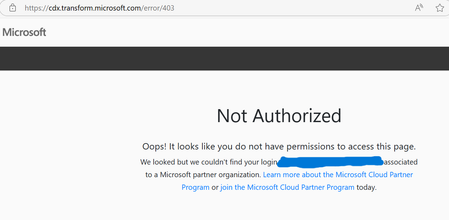
Just wanted to put it out there a recent issue I faced while accessing CDX tool (https://demos.microsoft.com). When logged in using my work account it errored out with below error: This message is quite misleading, as I do have a Partner account. Thankfully, I found an article: https://answers.microsoft.com/en-us/msoffice/forum/all/cant-access-cdxtransformmicrosoftcom-not/e9d79c49-1285-447d-8346-3c10a704e6b1 I had to: i. Launch https://mysignins.microsoft.com/security-info in incognito mode and Sign in with your work account to re-enforce MFA-based login. ii. Then launch https://cdx.transform.microsoft.com and enable third party cookies for this website. Then it gives the below Login Failed page which makes more sense (as it turns out, it was CDX who was missing some permissions required and not the other way around, lol. Ideally, if it pointed out the below error message by default without requiring above steps, it would have been a lot easier to get to the resolution): In my case, MFA was enforced and Cookies were already allowed. The last step was to click on the "by clicking on this link" hyperlink to allow Consent to the user permissions required by CDX tool. This can by done by the end user itself. Once consent is provided using the link, the tool is accessible in normal Browser mode. Note: If all users in the tenant are not able to access CDX, then Global Admin needs to follow the "by clicking on this link" to provide consent to CDX permissions. In this case you might get a "Consent" page upfront instead of above errors to request for consent from Global admin to "transform.microsoft.com". #CDXUsers section missing from the new M365 admin center?
Hi all, Microsoft recently started redirecting admin.microsoft.com to admin.cloud.microsoft. People with the correct GDAP roles are able to access the Users section from the admin.microsoft.com admin center, but that section is missing on the new admin.cloud.microsoft admin center. The issue does not appear to be impacting everyone with the appropriate GDAP roles. Has anyone else run into this issue? Support tells me that we are the only partner reporting this issue. Thanks! -jonSolved1.6KViews0likes15Comments
Controlling an Application’s Throughput Consumption in Cosmos DB with ThroughputControlGroup
Hi Azure Cosmos Db Team, Was referring to the below document link to limit the throughput consumption per requests. https://the9090rule.medium.com/controlling-an-applications-throughput-consumption-in-cosmos-db-with-throughputcontrolgroup-247cc0eafa92 How will the application behave in case the operations in the group exceed the set throughput? Will it get throttled? With Regards, Nitin Rahim1.5KViews2likes9CommentsPartner payment error
The Partner Payment Center payment page does not properly process cards. The error I am receiving does not seem to be a valid error for credit cards: Payment failed due to insufficient balance. Please check with your bank or try again with a different card. My Card is in good standing. In the MS store I have no problem, just in the Partner payment page. I've cleared the browser cache and still get the same error.