teams
5 Topics
Timeline view in Microsoft Planner
In our organization (same Microsoft 365 tenant), I can see the "Trial active" (or Free Trial) button in the top-right corner of Microsoft Planner, allowing access to premium features (e.g., Timeline view). However, a colleague in the same organization cannot see the trial button at all in their Planner interface, preventing them from activating or requesting the trial. The trial activation and Timeline button is completely missing for the affected user, even though both accounts belong to the same tenant and share similar roles. Troubleshooting efforts we have tried the following steps, but the issue persists: Cleared Microsoft Teams cache and restarted the application. Signed out and relogged into the account. Verified that "Self-service purchase and request" is enabled (set to "Allow") in the admin portal. Tested accessing Planner via Microsoft Teams Web version (same outcome—button is missing). Here is what it looks like for a user with the trial option vs. one without: How can we enable or show the missing 'Trial Active' and 'Timeline' button in the Planner app in Microsoft Teams for the affected user?14Views0likes0Comments
New Planner UI - What problem is actually being resolved?
This new UI is a step backwards. I get that people naturally resist change at first, but Microsoft keeps making interfaces more spaced out and less information-dense, which is frustrating in a business environment where efficiency matters. I can now only see about half of what fit on screen before. Even my Planner board headers are cut off because the font sizes and spacing have been increased unnecessarily. Microsoft has a bad habit of redesigning UIs without solving an actual problem. A lot of these changes feel like they’re being made by people who don’t actively use the tools day to day in real working environments.529Views7likes1Comment
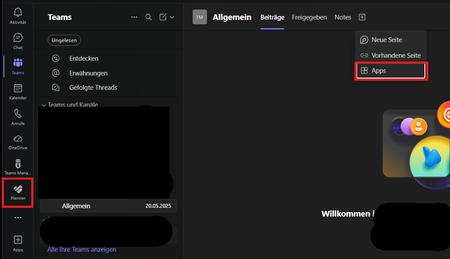
Planner tab missing from Teams channel only shows as separate app
Our users can no longer open the Planner in the Teams channel; they can only access it via the app. This has been the case for a short while now. Does anyone know of a fix for this, or is this how it’s supposed to work? It cannot be selected via apps.277Views0likes0CommentsPersonal Planner: Only Bucket View?
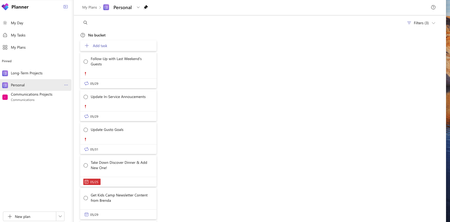
I use my Personal Planner to keep track of everything I have to do. I always use it in list/grid view sorted by due date, with only those Not Started or In Progress visible. However, Grid view is gone this morning. Bucket view is my only option, even though there aren't any buckets in this list. Instead of a condensed list that's easy to see with everything I have to get done today, I'm scrolling through an out-of-order list trying to find everything on my own or filtering by due date is "This Week", but it's still out of order. None of the items in this planner are listed in "My Tasks" or "My Day". There's no ability to assign them to myself, since they did that by default. I can't rename the bucket or move any of the items to another bucket or to my "to do" list. How do I get back the condensed view, so this list is manageable without redoing the entire list somewhere else? I keep everything here from the steps to do our annual database clean up to our annual grade promotions. It's a an entire year of tasks. This is the only Plan having this issue, but it's the most important and it's making getting stuff done today so much more complicated.383Views1like2Comments