teams meetings
25 TopicsTeams calls disconnects / dropped / terminated when users are logged into multiple devices
Hi everyone, [Edit : see my response below, we don't think this is due to different versions, but due to a user being logged into teams on multiple devices] What I think we're seeing is a difference in teams desktop client versions causing calls to be dropped or terminated. The scenario Bob has Teams desktop app version 1.3.00.9267 Sally has Teams desktop app version 1.3.00.8663 When Sally calls Bob (8663 to 9267) then Bob answers the call and the call connects, and they can talk. BUT When Bob calls Sally (9267 to 8663) then Sally answers the call immediately drops Bob sees "sally ended the call" and Sally sees "Bob ended the call" , and they can't connect. Meeting invites work for both parties, and in some cases trying several times seems to allow the call to connect (still investigating this). Is anyone else seeing this ? The AppData\Roaming\Microsoft\Teams\logs.txt exists but I don't know how to interpretSolved271KViews2likes24CommentsMeeting Agendas for Upcoming Teams meetings showing in Outlook for the web but not desktop
Hoping someone can shed some light on this as I can't find any documentation. For upcoming Teams meetings where we have added an agenda (loop component in Teams), we can view and edit that Loop component from the event in Outlook on the web, but not from Outlook desktop app. The desktop app only shows the agenda/loop component for meetings in the past. Does anyone have any links to documentation or information on when we might see upcoming meeting agendas in Outlook desktop? I know there are workarounds for this, but we have some folks not interested in workarounds. Thank you!490Views0likes1CommentNew Teams App - February Update
The February GCCH M365 webinar was chock full of important information on the new Teams app courtesy of Dave Jennings. Please find the presentation attached and the recording here: https://www.microsoft.com/en-us/videoplayer/embed/RW1iwd5 Important Message Center posts to be aware of: MC718238 - New Teams rollout schedule for GCC and GCC High customers MC718252 - Microsoft Virtual Desktop Infrastructure: New Microsoft Teams rollout schedules4.4KViews1like0CommentsNew Teams App Update and Office Hours
Thanks to Dave Jennings for providing a GCCH community update on the new Teams app on Tuesday, January 30. Many thanks to the attendees for their questions and feedback. Recording: https://www.microsoft.com/en-us/videoplayer/embed/RW1hei3 New Teams Technical Readiness for GCCH (Mac/Web/Windows/VDI) Migration Approaches Known Limitations Recent Service Updates Q&A3.1KViews1like0CommentsDecember '23 Monthly M365 Webinar - Microsoft Collaboration Framework
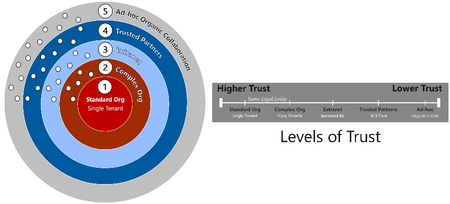
Dan Carroll and Richard Wakeman supported a great discussion around the Microsoft Collaboration Framework and explored the current state of collaboration capabilities across your partner ecosystem. Recording here: https://www.microsoft.com/en-us/videoplayer/embed/RW1g6Zt2.2KViews0likes0CommentsOctober '23 Monthly M365 Webinar
In October, we covered the New Channels Experience coming to GCCH Teams, the new webhook connector in Teams, and overviewed new and coming features and functionality. Presentation attached and recording here: https://www.microsoft.com/en-us/videoplayer/embed/RW1dYng (start at 16:45 mark)3.2KViews0likes0CommentsDIB Secure Communications and Employee Experience Showcase - Dec 5
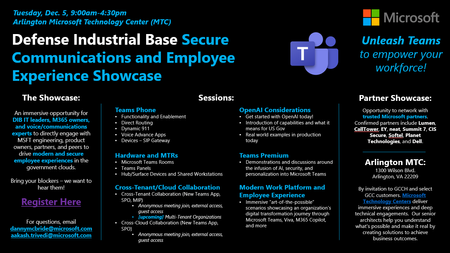
We are pleased to GCCH and select GCC customers to the first DIB Secure Communications and Employee Experience Showcase at the Microsoft Technology Center (MTC) on Tuesday, December 5, from 9am-4:30pm. This showcase is a one-day, immersive opportunity for DIB IT leaders, M365 owners, and voice/communications experts to directly engage with MSFT engineering, product owners, partners, and peers in the defense space to drive modern and secure employee experiences in the government clouds. We will be hosting interactive sessions around Teams Phone, Cross-Tenant Collaboration, Open AI, Microsoft Teams Rooms (MTRs), Devices and frontline worker solutions, Teams Premium, and the art-of-the-possible M365 employee experience. Leadership and facilitators will be announced in the coming weeks. In addition, there will be a strong partner presence at the event, providing opportunities to network and learn more about their enablement and support for our offerings. Thus far, the following partners have been confirmed: Lumen, Call Tower, Summit 7, CIS Secure, Planet Technologies, Softel Communications, and EY. Light breakfast and lunch will be provided. To register, please complete the form here: DIB Secure Communications and Employee Experience Showcase. Updates, resources, and calendar invites will be sent to the email address provided. Reach out to Danny McBride at dannymcbride@microsoft.com for more information or questions.3.9KViews0likes0Comments