tco
5 TopicsCut Your Azure Blob Storage Bill in Half: A Practical Walkthrough of Object Storage TCO
Hello Folks! If you have ever opened your monthly Azure invoice, stared at the object storage line, and quietly wondered how it grew so much, this one is for you. At the Microsoft Azure Infra Summit 2026, Benedict Berger and George Trossell from the Azure Storage Engineering team walked through a real customer scenario and showed how to bring that bill down without touching a single application. 📺 Watch the session: Why IT Pros Should Care Storage is one of those services we configure once at account creation, then never revisit. Redundancy, default tier, lifecycle rules. All decided on day one, then forgotten. Meanwhile, applications get built on top, dashboards get wired up, and the bill keeps climbing in a department nobody really audits. Here is what you get when you make storage TCO a first-class part of your operating model: A defensible understanding of capacity, transactions, and data retrieval charges (the three real cost drivers). Fewer surprise spikes when a cool tier read pattern runs hotter than expected. Cost optimization that runs on its own, instead of a quarterly cleanup project nobody volunteers for. Storage standards baked into your Infrastructure as Code, so cost-efficient defaults travel with every new account. In short, this is one of the highest-leverage cost levers you have in Azure. And unlike compute right-sizing, you can act on most of it from the portal in an afternoon. What Storage TCO Actually Means on Object Storage, a Technical Overview When Benedict and George talk about Total Cost of Ownership on Azure Blob Storage, they mean four moving parts: Capacity. The per-gigabyte cost of the data you store, which varies by access tier and by redundancy. Transactions. Every read, write, list, and metadata call against the storage account. Priced in packages of 10,000 operations. Data retrieval. A per-gigabyte fee that applies when you read from cool or cold tiers. It is free on hot. Network egress. The charge for moving data out of an Azure region. The trap most teams fall into is looking only at the per-gigabyte capacity column and picking the cheapest tier they see. That ignores the fact that as data gets cooler, transaction and retrieval costs climb sharply, and cold has a 90-day early deletion penalty that can erase your savings outright. Microsoft Learn documents this trade-off clearly in the access tiers overview, where you can see the minimum retention windows and the relationship between storage cost and access cost across hot, cool, cold, and archive. Redundancy is the other dial. LRS keeps three copies in a single zone. ZRS spreads three copies across three zones in the region. GRS adds an asynchronous secondary in a paired region. The honest tradeoff George highlighted: redundancy protects your data, not your application. If your app is not zone-aware, ZRS alone will not keep you running through a zone outage. And GRS failover is a manual operation in most cases, with the secondary in read-only mode until you stand up new accounts to write into. How It Works, Under the Hood The session walked through a worked transaction example that finally made the math click for me. Picture a Spark job uploading 1,000 parquet files of 5 GB each into the hot tier, using an 8 MB block size. Each 5 GB file is roughly 5,120 MB, divided by 8 MB blocks, which gives 640 put block operations. One additional put block list call commits the upload, so each object costs 641 write operations. Times 1,000 files, that is 641,000 operations, which works out to about 3.52 US dollars in that hour just for writes. Now flip it. Read those same 1,000 files from the cool tier. The transaction count is similar, but you also pay a data retrieval fee on every gigabyte you pull back. That retrieval fee is where most teams get blindsided, because it does not show up on the hot tier at all. Block size matters too. Larger blocks mean fewer transactions per upload. And for small objects (under 128 KB), there is a new wrinkle to plan for: starting July 2026 for existing accounts and already in effect for new accounts created from July 2025, cooler tiers bill a 128 KB minimum object size. That means a 4 KB log file moved to cool gets charged as if it were 128 KB. The fix is either to leave small objects in hot, or bin-pack them into larger objects (a TAR or ZIP, for example) before tiering them down. The Microsoft Learn page on access tier best practices covers packing strategies in detail. Real-World Value, Use Cases, and ROI The customer in the session went from roughly 65,000 US dollars a month to around 25,000. That is not a marketing number, it is what happens when you apply the levers in order: Right-size redundancy. Move non-production and easily reproducible data off LRS in production. Reserve GRS for the workloads where a compliance regulation actually requires a second region. Match tiers to access patterns. Use premium for bursty, latency-sensitive workloads. Hot for active reads and writes. Cool and cold only when you genuinely access the data infrequently and have budgeted for the retrieval fees. Buy reserved capacity for the steady-state portion of your footprint. A one or three year commitment unlocks a discount on block blob capacity. See reserved capacity for Blob storage for terms and tier coverage. Kill wasteful transactions. Replace polling-for-changes with change feed. Replace recurring list-blob loops with a daily or weekly blob inventory report. Use conditional request headers (If-Modified-Since and friends) so reads skip unchanged objects. Pack small objects, or leave them in hot. Either is fine; tiering them down without packing is not. In short, the same scenario, with the same applications, runs at less than half the cost once you actually look at it. Getting Started Here is the order of operations I would follow tomorrow morning: Pull a blob inventory report on your largest storage accounts to see what is actually there: tier mix, object sizes, last modified dates, snapshots, versions. Open the Azure pricing calculator and model your scenario with realistic transaction counts and retrieval volumes. Do not just compare per-GB prices. Audit your redundancy choices against the workload. If an account is LRS in production with no easy way to rebuild the data, change it. Enable Smart Tier on your zone-redundant accounts. New objects start in hot, get demoted to cool after 30 days of inactivity, and to cold after 90, with no charges for tier transitions, early deletions, or data retrieval. Anything accessed gets instantly promoted back to hot. For accounts that cannot use Smart Tier, write a lifecycle management policy. Keep the rules simple at first: tier down after 30 days, archive after 180, expire snapshots and versions on a schedule. Convert one of your existing lifecycle policies to ARM or Bicep, then commit it to source control. Add an Azure Policy that flags any new storage account that does not match your standard. That last step is the one that sticks. As Benedict put it, cost optimization must become part of your system, not an afterthought. Resources Access tiers for blob data, Microsoft Learn Best practices for using blob access tiers, Microsoft Learn Azure Blob Storage lifecycle management overview, Microsoft Learn Optimize costs for Blob storage with reserved capacity, Microsoft Learn Enable Azure Storage blob inventory reports, Microsoft Learn Azure pricing calculator Keep Learning at the Summit Catch the full Microsoft Azure Infra Summit 2026 session playlist here Cheers! Pierre Roman446Views0likes0CommentsNew ESG study validates how fully managed PostgreSQL on Azure delivers economic wins
Migrating your PostgreSQL databases to Azure delivers cost, performance and productivity benefits, while laying a strong foundation for innovation. But don’t just take our word for it. We’ve worked with the Enterprise Strategy Group (ESG), now a part of Omdia, to validate how organizations benefit economically from moving their PostgreSQL databases to Azure. Whether you’re modernizing your mission-critical applications or developing the next groundbreaking feature, migrating to Azure gives you the freedom, flexibility and continuous improvements of open source backed by the reliability, security and efficiency of Azure. Read the full PostgreSQL report PostgreSQL is the preferred choice of developers building the next generation of intelligent applications, according to the 2025 Stack Overflow survey. However, many teams are finding that managing these open-source databases on-premises is increasingly challenging, especially as their innovation initiatives demand more and more resources. Because of this, organizations are rapidly modernizing their database infrastructure to better support these next-gen initiatives. At a glance – benefits of migrating to Azure Database for PostgreSQL Increasing complexity is nothing new to today’s IT and developer teams. Some of the key drivers contributing to this complexity include integrating emerging tech like AI and managing cybersecurity concerns—two things that the fully managed Azure Database for PostgreSQL service handles very well. Built-in GenAI capabilities, performance recommendations, and enterprise-grade security, scalability, compliance and availability make PostgreSQL on Azure a natural fit for teams looking to build intelligent enterprise applications. The ESG report highlights: 58% lower total cost of ownership 65% improvement in database performance $770K in savings from avoiding downtime “We have seen wins on both sides of the financial equation. Our costs are down across the board, and we have increased our revenue specifically because of the capabilities that moving our Azure Database for PostgreSQL.” Review the Azure Database for PostgreSQL Economic Validation Infographic A closer look – how fully managed PostgreSQL on Azure delivers economic wins for the enterprise Lower total cost of ownership Migration dramatically lowers the total cost of ownership of enterprise databases. By shifting from on-premises infrastructure to Azure’s managed service, enterprises eliminate many capital and operational expenses. Elimination of hardware and maintenance costs: On-premises PostgreSQL deployments require investing in servers, storage, networking hardware, as well as ongoing power, cooling, and data center space. Migrating to Azure removes these needs entirely. Companies no longer have to purchase or refresh hardware or pay for associated facilities and utilities, directly cutting capex and support costs. Reduced licensing and support expenses: Azure’s model also eliminates traditional database licensing fees, third-party support contracts, and expensive monitoring tools for on-premises systems. Organizations reported saving thousands on separate support agreements or software licenses for their PostgreSQL instances. Pay-as-you-go flexibility: Azure Database for PostgreSQL offers pay-as-you-go and reserved pricing models, so enterprises only pay for the compute and storage they actually use. There’s no more overprovisioning resources to handle peak loads, and dynamic scaling ensures capacity matches demand. Operational efficiency: By offloading database management to Microsoft, organizations also reduce administrative overhead, which indirectly lowers labor costs. In ESG’s study, moving to Azure cut the monthly DBA hours per database from 2.1 hours to just 0.6 hours, a ~70% decrease in effort, effectively saving payroll expenditure on routine upkeep. Improved performance and scalability Enterprises see substantial improvements in database performance and scalability after migrating to Azure. Because Azure Database for PostgreSQL runs on high-end cloud infrastructure with intelligent optimizations, applications can achieve faster response times and handle greater workloads. Higher throughput and lower latency: ESG’s interviews found average database performance improved by ~65%, and in one case a customer saw a 9× increase in throughput for its primary application after migration. Such gains come from Azure’s optimized compute, premium SSD storage options, and features like automatic performance tuning that are difficult to replicate on-premises. Elastic scaling on demand: In on-premises environments, supporting peak workloads often meant overprovisioning. Azure Database for PostgreSQL completely changes this paradigm with cloud elasticity. The ability to instantly right-size resources means applications always have the performance they need, and users experience responsive, low-latency service. Handling growth with ease: As an enterprise’s data and user base grows, Azure’s global infrastructure can seamlessly accommodate that expansion. This cloud scalability gives enterprises headroom to innovate and onboard more customers without performance bottlenecks. In contrast, scaling an on-premises PostgreSQL often requires complex sharding or hardware upgrades. Accelerated time to value: Improved performance and scalability directly impact business agility. Batch processes complete faster, reports generate sooner, and websites or applications can serve more customers per second. ESG noted that by removing infrastructure constraints, Azure empowered businesses to accelerate their time-to-value and respond faster to market demands. Operational agility and developer productivity By migrating to a fully managed service, enterprises gain agility and allow their IT/development teams to focus on innovation. Offloading database management to Azure not only saves costs but also frees up technical staff from mundane maintenance. This shift translates into faster project delivery and greater productivity: Less time spent “keeping the lights on”: ESG found that after migration, companies saw a major reduction in the effort required to manage databases. Administrators went from spending 2+ hours per database per month on upkeep to less than one hour. This over 70% drop in DBA workload means IT teams are no longer bogged down by routine chores. Faster development and release cycles: ESG observed that organizations enjoyed increased development velocity after migrating, since their engineers could devote time to coding and testing new features instead of managing database infrastructure. For example, one company in the study was able to increase its software release frequency significantly. Improved business agility: The combination of easier scaling, better performance, and less ops overhead means the organization can respond to opportunities faster. Some enterprises even credited the move to Azure with helping increase their revenue, because it allowed them to deliver new capabilities to market sooner. Focus on core competencies: After migration, organizations can let Azure handle the heavy lifting of database administration and instead concentrate on work that differentiates them in the marketplace. Developers spend more time building applications and analyzing areas that drive business value rather than performing software updates or fixing replication issues. Enhanced security, compliance, and reliability Azure Database for PostgreSQL provides enterprise-grade security and reliability features that far exceed what most companies can achieve on-premises. This results in a stronger risk posture, reducing the likelihood of breaches or downtime while also easing compliance burdens. Built-in high availability and disaster recovery: ESG’s modeled scenario saw annual PostgreSQL downtime drop from 10 hours on-premises to just 5 hours on Azure. With a 99.99% availability SLA for Azure Database for PostgreSQL, unplanned outages that used to disrupt business are largely a thing of the past. One ESG case study estimated about $770K in costs were avoided thanks to preventing downtime and the associated business disruptions. Strong security and data protection: PostgreSQL instances on Azure benefit from Microsoft’s massive investments in cybersecurity and compliance. One customer highlighted, “We are much more secure since we moved to Azure Database for PostgreSQL. We use Azure AI to set our security standards and get constant recommendations on how to increase our security even more.” Automated updates and governance: Azure takes care of updating PostgreSQL with the latest security fixes and can even upgrade the database engine version with minimal downtime. Furthermore, features like audit logging, advanced threat protection, and integration with Azure Security Center provide continuous oversight of database activity. Geo-redundancy and backup management: For disaster recovery, Azure allows geo-redundant backups and read replicas in different regions, improving an enterprise’s resilience to regional outages or disasters. Should data restoration be needed, it’s as simple as clicking a button. Azure Database for PostgreSQL offers enterprises a frictionless path to greater efficiency, innovation, and growth. By lowering costs and management burdens, it lets you redirect resources to strategic projects. By boosting performance and scalability, it ensures your applications can keep up with business demands. And by enhancing security and reliability, it safeguards one of your most precious assets—your data—while meeting the strict requirements of enterprise IT. The benefits outlined in the ESG study make a strong business case: migrating on-premises databases to Azure’s managed PostgreSQL can transform your IT operations and deliver tangible business value from day one. Tested, approved, trusted Migrating to a fully managed PostgreSQL service supports digital transformation. It allows enterprises to modernize their data estate without abandoning the familiarity of PostgreSQL. Developers can continue using the open-source tools and skills they know, but now with cloud-powered capabilities at their fingertips. Azure integrations (with AI services, analytics tools, etc.) further enable organizations to do more with their data. For example, companies can readily infuse AI or machine learning into their applications or take advantage of advanced analytics on their PostgreSQL data, since that data is easily accessible in the cloud. Read the full report for more details about the quantified benefits and customer testimonials. If you’re ready to start your journey, check out our migration guides. With Azure’s fully managed PostgreSQL, you can supercharge your data strategy, empower your developers, and ultimately accelerate your path to an AI-driven future.582Views4likes0CommentsPre-Sales Funded Engagement - Business Apps - CRM Vision & Value - Eligibilty
Hi community we are studying the delivery guide for funded engagement CRM Vision & Value. We have some customer eligibility related questions, so I appreciate some clarification from Microsoft. Thanks! Ralf The provided TCO calculator and the Delivery Guide gives the impression that funding is ONLY available if our prospect migrates from Salesforce to D365 CRM. What if our prospect is ..... 1. ... using Excel sheets to manage support tickets - not eligible for funding? 2. ... using Monday.com, or hubspot to manage sales - not eligible for funding? 3. ... using a self-made application to manage campaigns - not eligible for funding?Solved1.3KViews0likes6CommentsSAP on Azure NetApp Files Sizing Best Practices
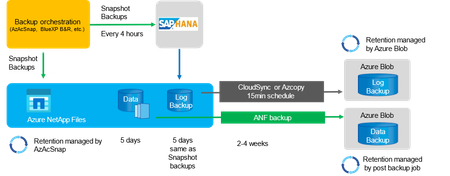
This article provides guidelines for properly sizing SAP deployments on Azure NetApp Files (ANF) to achieve optimal performance and cost-effectiveness. It emphasizes the importance of accurate capacity and performance estimation to avoid overprovisioning or underutilization of resources. The article introduces the "SAP on Azure NetApp Files Sizing Estimator" tool, which automates the sizing process and helps customers and partners to make informed decisions. By following these sizing guidelines and leveraging the tool, customers and partners can optimize their SAP landscapes on ANF for improved efficiency, reliability, and cost-effectiveness.Optimize ROI by migrating to Azure Database for MySQL
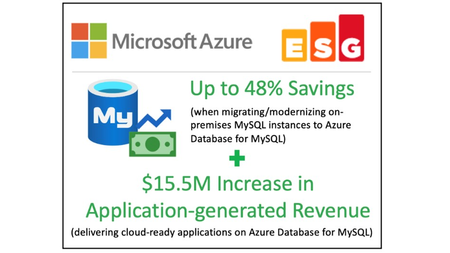
Microsoft commissioned the Enterprise Strategy Group (ESG) to conduct an economic value study to examine the potential cost savings and business benefits that enterprises can achieve from migrating on-premises workloads to Azure Database for MySQL.3.6KViews3likes0Comments