tabs
15 Topics
MS Teams Tabs - Web embedding drawbacks
Hello, I am about to start working on a project and would like to know the drawbacks of embedding a website in MS Teams tabs, and would like to know what the best solution for my problem is. I am working on a web application that will allow users to search for files within the GUI I create. I also want to directly integrate this into teams so users can access this GUI directly in teams. I have noticed I am able to embed a website directly into a tab by providing a URL to the site. I would like to know the limitations for this. If I develop a web app and host it on https://www.test.com/ and link it directly to a tab in Teams, what limitations will users encounter? Should I be developing this as a MS Team embedded web experience (using MS Teams JavaScript SDK)? Or is it fine to develop it as a standalone web application and then have a tab in ms teams direct to it? One limitation I have already noticed within embedded websites in teams tabs is that when I leave the tab and come back, it does not save my session. (Ex: I have a tab directing to https://www.google.com and when I search for something then leave the tab and come back my session is not saved and I am starting off from google.com again). Is there anything else I should know about? Thanks1.8KViews0likes1CommentView SharePoint page on mobile devices.
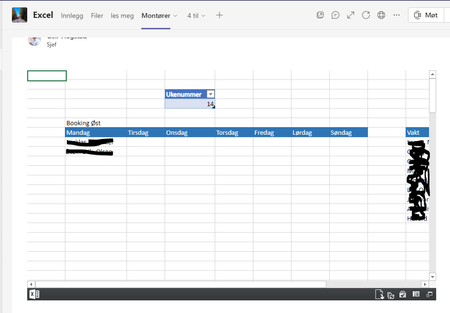
Hi, The goal is to show only one tab in a Excel document. I followed these instructions and it worked perfect, on a PC. But users on other devices, like mobile phone is asked to open the page, and the all the tabs in the original work sheet is shown. Is there any settings for mobile users? Best Regards - Geir1.2KViews0likes0Comments
MS Teams File Tab
Hi Experts, This is my first post to this community as I am a very new user to Teams. I was hoping someone could help me understand the difference/benefits/drawbacks between adding a file (MS Project as an example) to the Files tab of a Team vs. adding the MS Project app as a separate tab. My understanding is that if I add a file to Files, it is stored on the Sharepoint site that is created when the MS Team is created. So, a couple of questions... 1. Does the Team have the same access rights to the MS Project file, whether it resides under Files or as its own tab? 2. Are the licensing requirements the same for the MS Project file, whether it resides under Files or as its own tab? 3. Why would I choose using the Files tab as opposed to the app (MS Project in this case) as a separate tab? I hope my question is clear. Thanks in advance. TMc1.5KViews0likes2Comments
Teams shows edge tabs, not the window when trying to share, and it does not work
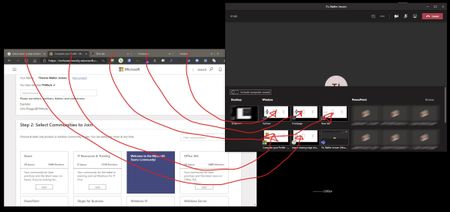
When i am trying to share a Edge Chromium window with Teams, I get all the tabs in the browser shown to share and not just one window. See screen shot. I can select a tab and share but it does not work. Anyone that knows how to fix this. Google Chrome just shows up as one window and works fine no matter how many tabs are open.Solved9.9KViews2likes13Comments
Can not find a list when adding as a tab: Issue with Managed Metadata Field in that tab
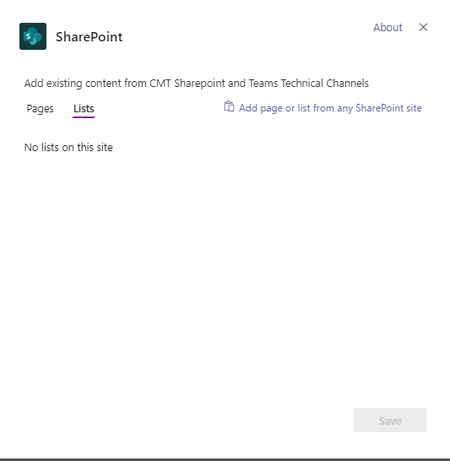
Hi, For a team's Sharepoint site, I created an issues log (create -> app -> issues log) and customized it a bit, including adding a managed metadata field). Back in Teams - if I try to add the sharepoint list as a tab - it does not show up in the interface as an available list: However, if I go to Site Contents for this team: and there is that list (Issue Log). I am able to add the list using either the "Add page or list from any SharePoint site" button, or as a web page tab. However that creates a different problem: When adding it this way - if I edit a record and click on the button to open the term store for that field - it flashes for a second the loading of the term store, and quickly switches to a request/reproting dialog for the term owner (me) and the buttons/fields in that form are disabled. Clearly some kind of embedded access issue. If I open the same form directly in a browser tab - it works perfectly so this is not about the site's access to the term store Here's what it looks like - a recording of the tab with the embedded sharepoint list page: Here's the same list - open directly in a browser window:848Views0likes0Comments