systems integration
19 Topics
Expose REST APIs as MCP servers with Azure API Management and API Center (now in preview)
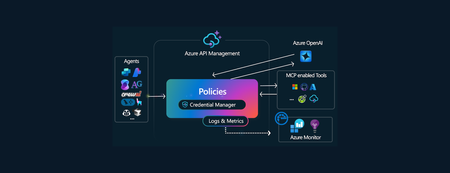
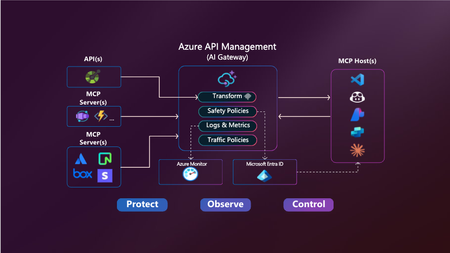
As AI-powered agents and large language models (LLMs) become central to modern application experiences, developers and enterprises need seamless, secure ways to connect these models to real-world data and capabilities. Today, we’re excited to introduce two powerful preview capabilities in the Azure API Management Platform: Expose REST APIs in Azure API Management as remote Model Context Protocol (MCP) servers Discover and manage MCP servers using API Center as a centralized enterprise registry Together, these updates help customers securely operationalize APIs for AI workloads and improve how APIs are managed and shared across organizations. Unlocking the value of AI through secure API integration While LLMs are incredibly capable, they are stateless and isolated unless connected to external tools and systems. Model Context Protocol (MCP) is an open standard designed to bridge this gap by allowing agents to invoke tools—such as APIs—via a standardized, JSON-RPC-based interface. With this release, Azure empowers you to operationalize your APIs for AI integration—securely, observably, and at scale. 1. Expose REST APIs as MCP servers with Azure API Management An MCP server exposes selected API operations to AI clients over JSON-RPC via HTTP or Server-Sent Events (SSE). These operations, referred to as “tools,” can be invoked by AI agents through natural language prompts. With this new capability, you can expose your existing REST APIs in Azure API Management as MCP servers—without rebuilding or rehosting them. Addressing common challenges Before this capability, customers faced several challenges when implementing MCP support: Duplicating development efforts: Building MCP servers from scratch often led to unnecessary work when existing REST APIs already provided much of the needed functionality. Security concerns: Server trust: Malicious servers could impersonate trusted ones. Credential management: Self-hosted MCP implementations often had to manage sensitive credentials like OAuth tokens. Registry and discovery: Without a centralized registry, discovering and managing MCP tools was manual and fragmented, making it hard to scale securely across teams. API Management now addresses these concerns by serving as a managed, policy-enforced hosting surface for MCP tools—offering centralized control, observability, and security. Benefits of using Azure API Management with MCP By exposing MCP servers through Azure API Management, customers gain: Centralized governance for API access, authentication, and usage policies Secure connectivity using OAuth 2.0 and subscription keys Granular control over which API operations are exposed to AI agents as tools Built-in observability through APIM’s monitoring and diagnostics features How it works MCP servers: In your API Management instance navigate to MCP servers Choose an API: + Create a new MCP Server and select the REST API you wish to expose. Configure the MCP Server: Select the API operations you want to expose as tools. These can be all or a subset of your API’s methods. Test and Integrate: Use tools like MCP Inspector or Visual Studio Code (in agent mode) to connect, test, and invoke the tools from your AI host. Getting started and availability This feature is now in public preview and being gradually rolled out to early access customers. To use the MCP server capability in Azure API Management: Prerequisites Your APIM instance must be on a SKUv1 tier: Premium, Standard, or Basic Your service must be enrolled in the AI Gateway early update group (activation may take up to 2 hours) Use the Azure Portal with feature flag: ➤ Append ?Microsoft_Azure_ApiManagement=mcp to your portal URL to access the MCP server configuration experience Note: Support for SKUv2 and broader availability will follow in upcoming updates. Full setup instructions and test guidance can be found via aka.ms/apimdocs/exportmcp. 2. Centralized MCP registry and discovery with Azure API Center As enterprises adopt MCP servers at scale, the need for a centralized, governed registry becomes critical. Azure API Center now provides this capability—serving as a single, enterprise-grade system of record for managing MCP endpoints. With API Center, teams can: Maintain a comprehensive inventory of MCP servers. Track version history, ownership, and metadata. Enforce governance policies across environments. Simplify compliance and reduce operational overhead. API Center also addresses enterprise-grade security by allowing administrators to define who can discover, access, and consume specific MCP servers—ensuring only authorized users can interact with sensitive tools. To support developer adoption, API Center includes: Semantic search and a modern discovery UI. Easy filtering based on capabilities, metadata, and usage context. Tight integration with Copilot Studio and GitHub Copilot, enabling developers to use MCP tools directly within their coding workflows. These capabilities reduce duplication, streamline workflows, and help teams securely scale MCP usage across the organization. Getting started This feature is now in preview and accessible to customers: https://aka.ms/apicenter/docs/mcp AI Gateway Lab | MCP Registry 3. What’s next These new previews are just the beginning. We're already working on: Azure API Management (APIM) Passthrough MCP server support We’re enabling APIM to act as a transparent proxy between your APIs and AI agents—no custom server logic needed. This will simplify onboarding and reduce operational overhead. Azure API Center (APIC) Deeper integration with Copilot Studio and VS Code Today, developers must perform manual steps to surface API Center data in Copilot workflows. We’re working to make this experience more visual and seamless, allowing developers to discover and consume MCP servers directly from familiar tools like VS Code and Copilot Studio. For questions or feedback, reach out to your Microsoft account team or visit: Azure API Management documentation Azure API Center documentation — The Azure API Management & API Center Teams8.4KViews5likes7CommentsThe Rising Significance of APIs - Azure API Management & API Center
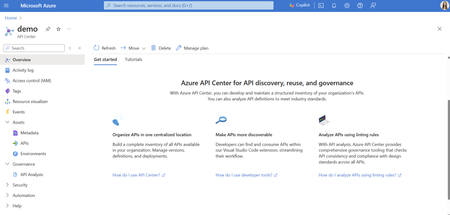
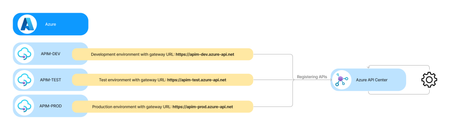
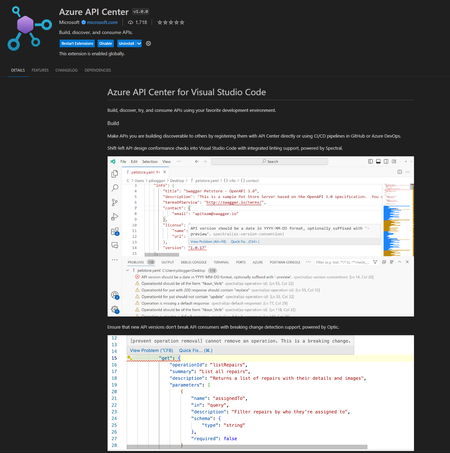
As we venture deeper into the digital era, APIs (Application Programming Interfaces) have become the cornerstone of modern software development and digital communication. APIs continue to be pivotal, acting as the conduits through which different systems, applications, and devices interact and exchange data. This growing reliance on APIs is reflected in the investment trends, with a significant 92% of global respondents indicating that investments in APIs will either remain steady or increase over the next year (2023 State of the API Report, Postman, 2023). Recognizing the critical role that APIs play in modern software architecture, Microsoft has been consistently investing in and expanding its API suite to fulfill diverse needs. Managing APIs is not a one-size-fits-all solution with different API ecosystems requiring different API management approaches and tools. Azure API Center, a new API Azure service, was recently announced General Availability (GA). Azure API Center is engineered to function independently, yet it seamlessly integrates with Azure API Management, providing customers options to manage various aspects of their API ecosystem. In the following sections, we will dive into the specifics of Azure API Management and Azure API Center, highlighting their differences, use cases, and guiding you on when to use each product to best manage and leverage your API ecosystem. Azure API Management: Your Gateway to Digital Transformation Azure API Management (APIM) is a managed cloud service designed to streamline and secure the use of APIs. API Management acts as a secure front door to facilitate, manage, and analyze the interactions between an organization’s APIs and their users with some of their core functionalities listed below: API gateway - operational management: API Management acts as a gateway, managing API exposure, security, and analytics during runtime. Traffic routing: Acts as a facade to backend services by accepting API calls and routing them to appropriate backends. API access: Verifies API keys and other credentials such as JWT tokens and certificates presented with requests to access APIs published through an API Management instance. Operational stability: API Management allows you to enforce usage quotas and rate limits to manage the flow of requests to your APIs effectively to prevent API overuse. It also validates requests and responses in compliance with the specification - e.g., JSON and XML validation, validation of headers and query params. Request transformation: The rich policy engine of API Management allows you to modify incoming and outgoing requests to your needs with more than 60 built-in policies and the option to build your own custom policies. API logging: API Management provides the capability to emit logs, metrics, and traces, which are essential for monitoring, reporting, and troubleshooting your APIs. Self-hosted gateway: API Management also offers self-hosted gateway capabilities, a containerized version of the default managed gateway to place your gateways in the same environments where you host your APIs. Developer Portal: API Management features a developer portal, which can be generated automatically and is a fully customizable website with the documentation of your APIs. It facilitates API discovery, testing, and consumption by internal and external developers. Azure API Center: Your Inventory for API Lifecycle Management Azure API Center is the newest addition to the Azure API suite, focusing on the design-time aspects of API governance and centralizing your API inventory for tracking reasons. It acts as a repository and governance tool for all APIs within an organization, regardless of where they are in their lifecycle or where they are deployed. API inventory management: API Center allows you to register all your organization’s APIs in a centralized inventory, regardless of their type, lifecycle stage, or deployment location, for better tracking and accessibility. Tackling API sprawl: APIs' runtime might be managed in multiple different API Management services, multiple different API gateways from different vendors, or are unmanaged at all. Azure API Center allows you to develop and maintain a structured API inventory. Holistic API view: While API Management excels in runtime API mediation, its inventory management capabilities are limited to the types of APIs that are supported at runtime and to the versions that are actively managed in runtime. Azure API Center supports any kind of API types, such as AsyncAPIs, and you can easily track APIs across different deployment environments. Real-world API representation: You can add detailed information about each API, including versions, definitions, custom metadata, and associate them with deployment environments (e.g. Dev, Test, Production). API governance: Azure API Center provides tools to organize and filter APIs using metadata, set up linting and analysis to check API design consistency for better conformance on API style guidelines. Additionally, shift-left API compliance to API teams to ensure that developers can more productively and efficiently create compliant APIs. API discovery and reuse: It enables internal developers and API program managers to discover APIs through the Azure portal, an API Center portal, and developer tools, including a Visual Studio Code extension. Navigating Your API Ecosystem - Example Scenarios for Azure API Center and API Management While both services are integral to the API ecosystem, they serve distinct purposes: Azure API Management is geared towards runtime API governance and observability, focusing on the operational aspects of API management, such as securing, publishing, and analyzing APIs in use. Azure API Center, in contrast, is tailored for design-time API governance, helping organizations to maintain a structured inventory of all APIs for better discovery and governance. API Management and API Center are complementary services that, when used together, provide a comprehensive API management solution from design to deployment. API Mangement excels in the operational phase, while API Center, as your organizational API inventory, shines in the design and governance stages, ensuring that APIs are not only functional but also adhere to organizational standards and best practices. Note: The following scenarios are not mutually exclusive. They have been separated for better display and clarity. Scenario 1: Azure API Center serves as an API design governance tool for analyzing API definitions based on linting rules to check on API design consistency and quality: Scenario 2: Azure API Center serves as a centralized inventory solution for managing APIs across different API lifecycle stages (e.g. development, testing, production): Scenario 3: Azure API Center serves as a centralized inventory solution for managing APIs across different regional or organizational deployments (e.g. Asia, Europe, America): Scenario 4: Azure API Center serves as a centralized inventory solution for managing APIs across different cloud platforms (e.g. Azure, AWS, and Google Cloud): Azure API Center and API Management Workspaces Note: Azure API Management workspaces currently only apply to the Premium API Management tier (see Workspaces in Azure API Management for further details). API management workspaces are a feature within Azure API Management that allows decentralized API development teams to manage and productize their own APIs. Workspaces enable aggregation of multiple teams with proper isolation in a single APIM service. For Azure API Center, all previously mentioned scenarios still apply, regardless of whether APIM services use workspaces. Azure API Center will continue to improve the management of APIs across different API Managment services, as organizations... have APIM services across environments, for example, dev, test, and prod. have more than one production APIM service in their company. have APIm platforms from multiple vendors. Conclusion In conclusion, the launch of Azure API Center and the continued evolution of Azure API Management underscore Microsoft’s commitment to empowering organizations in their API first journey. By leveraging Azure API Management for runtime efficiency and Azure API Center for inventory and governance, organizations can navigate their API ecosystems with confidence, knowing they have the tools to foster innovation, efficiency, and growth. Share Your Thoughts! Your insights are invaluable to us. We're eager to hear what you think about Azure API Center and API Management, and to understand your needs. Is there something specific that would make you and your organization even more successful? Your feedback is the key to our continuous improvement. If you prefer a more personal touch, feel free to reach out via LinkedIn to Julia Kasper, Pierce Boggan and Mike Budzynski. Thank you for being a part of our journey!6.3KViews1like0CommentsIntroducing Azure API Management Policy Toolkit
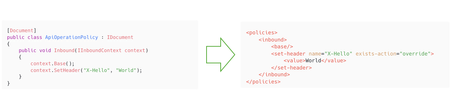
We’re excited to announce the early release of the Azure API Management Policy Toolkit, a set of libraries and tools designed to change how developers work with API Management policies, making policy management more approachable, testable, and efficient for developers. Empowering developers with Azure API Management Policy Toolkit Policies have always been at the core of Azure API Management, offering powerful capabilities to secure, change behavior, and transform requests and responses to the APIs. Recently, we've made the policies easier to understand and manage by adding Copilot for Azure features for Azure API Management. This allows you to create and explain policies with AI help directly within the Azure portal. This powerful tool lets developers create policies using simple prompts or get detailed explanations of existing policies. This makes it much easier for new users to write policies and makes all users more productive. Now, with the Policy Toolkit, we’re taking another significant step forward. This toolkit brings policy management even closer to the developer experience you know. Elevating policy development experience Azure API Management policies are written in Razor format, which for those unfamiliar with it can be difficult to read and understand, especially when dealing with large policy documents that include expressions. Testing and debugging policy changes requires deployment to a live Azure API Management instance, which slows down feedback loop even for small edits. The Policy Toolkit addresses these challenges. You can now author your policies in C#, a language that feels natural and familiar to many developers and write tests against them. This shift improves the policy writing experience for developers, makes policies more readable, and shortens the feedback loop for policy changes. Key toolkit features to transform your workflow: Consistent policy authoring. Write policies in C#. No more learning Razor syntax and mixing XML and C# in the same document. Syntax checking: Compile your policy documents to catch syntax errors and generate Razor-based equivalents. Unit testing: Write unit tests alongside your policies using your favorite unit testing framework. CI/CD integration: Integrate Policy Toolkit into automation pipelines for testing and compilation into Razor syntax for deployment. Current Limitations While we’re excited about the capabilities of the Policy Toolkit, we want to be transparent about its current limitation: Not all policies are supported yet, but we’re actively working on expanding the coverage. We are working on making the Policy Toolkit available as a NuGet package. In the meantime, you’ll need to build the solution on your own. Unit testing is limited to policy expressions and is not supported for entire policy documents yet. Get Started Today! We want you to try the Azure API Management Policy Toolkit and to see if it helps streamlining your policy management workflow. Check out documentation to get started. We’re eager to hear your feedback! By bringing policy management closer to the developer, we’re opening new possibilities to efficiently manage your API Management policies. Whether you’re using the AI-assisted approach with Copilot for Azure or diving deep into C# with the Policy Toolkit, we’re committed to making policy management more approachable and powerful.4.2KViews10likes2CommentsPublish, Protect and Validate OData APIs in API Management
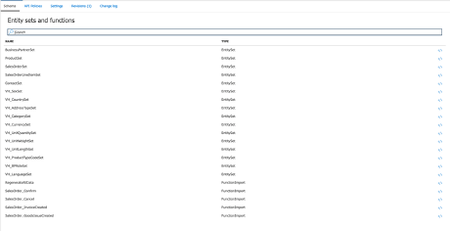
We are excited to announce the public preview of the OData API type in Azure API Management (API Management). OData (Open Data Protocol) is a standard that defines a set of best practices for building and consuming RESTful APIs. OData gained popularity as an industry standard for data integration and interoperability and has been widely adopted by large companies such as SAP, Oracle, Microsoft, and others. This new capability extends the benefits and capabilities of API Management to OData APIs, including the ability to secure them with standard API protections, such as authentication, authorization, and rate limiting, in combination with OData-specific policies for request validation. First-class support for OData makes it easier for customers to publish OData APIs in API Management eliminating the need to first convert OData metadata to OpenAPI. The rest of the blog will show how simple and quick it is to onboard to and protect an OData API with API Management. An example: Importing and protecting an OData API from SAP I will be using the publicly available SAP Gateway Demo system ES5 which provides a practical, working OData service with a dataset containing a list of items of a sales order from the Enterprise Procurement demo data. It contains EntitySets such as: BusinessPartnerSet ProductSet SalesOrderSet SalesOrderLineItemSet Export an OData metadata file and create an OData API from the update-enabled SAP Gateway Demo API “GWSAMPLE_BASIC” and now I can import this as an OData API into API . To create an OData API within the Azure API Management service: Open the Azure Portal in your browser Select your Azure API Management service or create a new one Select the APIs blade Select +Add API Fill in the form: Choose a Display name (sap-odata-test) The name field will auto-fill with a suitable name Select the file that contains the metadata for an API Choose an API URL suffix (sap-odata-test) Select Create to create the API After the API is created, the entity sets and functions appear on the API’s schema tab. Add policy for an OData request validation With the introduction of OData API type into Azure API Management we added the new `validate-odata-request` policy which validates the request URL, headers, and parameters of a request to an OData API to ensure conformance with the OData specification. Now I can add an OData request validation policy to the imported SAP Gateway Demo API: Select API Policies tab Select </> in the Inbound processing section to edit the policy Add a <validate-odata-request> to the policy definition <policies> <inbound> <validate-odata-request default-odata-version="4.01" min-odata-version="4.0" max-odata-version="4.01" /> <base /> </inbound> … </policies> Resulting policy should look the following Select Save to apply changes to the policy If I try to request an EntitySet with a non-existing property, API Management will validate this request and return an error. I will send a request for ProductSet with a property ‘Name1’ using Postman: The request was validated by Azure API Management, and I received a response stating that property could not be found. { "statusCode": 400, "message": "Could not find a property named 'Name1' on type 'GWSAMPLE_BASIC.Product'." } In combination with the large set of policies available in API Management, such as authorization, authentication, rate limiting and more, you can further enhance the security of your OData APIs For instance, you can exchange Microsoft Entra ID (formerly Azure Active Directory) issued tokens for an SAP issued Bearer token and forward it to backend with caching support for both tokens. Policy snippet available here. Next steps Kickstart your SAP app integration project on Azure leveraging OData and the SAP Cloud SDK from here. To hit the ground running, find publicly available SAP OData APIs or mock services here. OData API type in Azure API Management is in public preview, give it a try and let us know what you think in the comments below!4KViews0likes0Comments🚀 New in Azure API Management: MCP in v2 SKUs + external MCP-compliant server support
Your APIs are becoming tools. Your users are becoming agents. Your platform needs to adapt. Azure API Management is becoming the secure, scalable control plane for connecting agents, tools, and APIs — with governance built in. -------------------------------------------------------------------------------------------------------------------------------------------------------------------- Today, we’re announcing two major updates to bring the power of the Model Context Protocol (MCP) in Azure API Management to more environments and scenarios: MCP support in v2 SKUs — now in public preview Expose existing MCP-compliant servers through API Management These features make it easier than ever to connect APIs and agents with enterprise-grade control—without rewriting your backends. Why MCP? MCP is an open protocol that enables AI agents—like GitHub Copilot, ChatGPT, and Azure OpenAI—to discover and invoke APIs as tools. It turns traditional REST APIs into structured, secure tools that agents can call during execution — powering real-time, context-aware workflows. Why API Management for MCP? Azure API Management is the single, secure control plane for exposing and governing MCP capabilities — whether from your REST APIs, Azure-hosted services, or external MCP-compliant runtimes. With built-in support for: Security using OAuth 2.1, Microsoft Entra ID, API keys, IP filtering, and rate limiting. Outbound token injection via Credential Manager with policy-based routing. Monitoring and diagnostics using Azure Monitor, Logs, and Application Insights. Discovery and reuse with Azure API Center integration. Comprehensive policy engine for request/response transformation, caching, validation, header manipulation, throttling, and more. …you get end-to-end governance for both inbound and outbound agent interactions — with no new infrastructure or code rewrites. ✅ What’s New? 1. MCP support in v2 SKUs Previously available only in classic tiers (Basic, Standard, Premium), MCP support is now in public preview for v2 SKUs — Basic v2, Standard v2, and Premium v2 — with no pre-requisites or manual enablement required. You can now: Expose any REST API as an MCP server in v2 SKUs Protect it with Microsoft Entra ID, keys or tokens Register tools in Azure API Center 2. Expose existing MCP-compliant servers (pass-through scenario) Already using tools hosted in Logic Apps, Azure Functions, LangChain or custom runtimes? Now you can govern those external tool servers by exposing them through API Management. Use API Management to: Secure external MCP servers with OAuth, rate limits, and Credential Manager Monitor and log usage with Azure Monitor and Application Insights Unify discovery with internal tools via Azure API Center 🔗 You bring the tools. API Management brings the governance. 🧭 What’s Next We’re actively expanding MCP capabilities in API Management: Tool-level access policies for granular governance Support for MCP resources and prompts to expand beyond tools 📚 Get Started 📘 Expose APIs as MCP servers 🌐 Connect external MCP servers 🔐 Secure access to MCP servers 🔎 Discover tools in API Center Summary Azure API Management is your single control plane for agents, tools and APIs — whether you're building internal copilots or connecting external toolchains. This preview unlocks more flexibility, less friction, and a secure foundation for the next wave of agent-powered applications. No new infrastructure. Secure by default. Built for the future.3.2KViews2likes3CommentsAnnouncing the Microsoft Automation and Integration day in Toronto!
On April 25th, 2024 we will be hosting an IN-PERSON ONLY Microsoft Automation and Integration day at the Microsoft Canada Office in Toronto. We will have Microsoft speakers, partners and customers sharing their perspectives.2.6KViews0likes0CommentsMicrosoft BizTalk Server Product Lifecycle Update
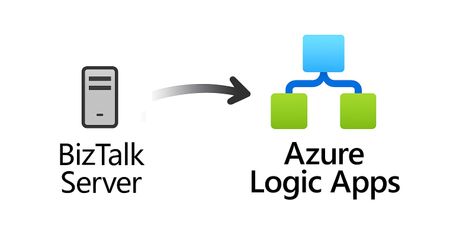
For more than 25 years, Microsoft BizTalk Server has supported mission-critical integration workloads for organizations around the world. From business process automation and B2B messaging to connectivity across industries such as financial services, healthcare, manufacturing, and government, BizTalk Server has played a foundational role in enterprise integration strategies. To help customers plan confidently for the future, Microsoft is sharing an update to the BizTalk Server product lifecycle and long-term support timelines. BizTalk Server 2020 will be the final version of BizTalk Server. Guidance to support long-term planning for mission-critical workloads This announcement does not change existing support commitments. Customers can continue to rely on BizTalk Server for many years ahead, with a clear and predictable runway to plan modernization at a pace that aligns with their business and regulatory needs. Lifecycle Phase End Date What’s Included Mainstream Support April 11, 2028 Security + non-security updates and Customer Service & Support (CSS) support Extended Support April 9, 2030 CSS support, Security updates, and paid support for fixes (*) End of Support April 10, 2030 No further updates or support (*) Paid Extended Support will be available for BizTalk Server 2020 between April 2028 and April 2030 for customers requiring hotfixes for non-security updates. CSS will continue providing their typical support. BizTalk Server 2016 is already out of mainstream support, and we recommend those customers evaluate a direct modernization path to Azure Logic Apps. Continued Commitment to Enterprise Integration Microsoft remains fully committed to supporting mission-critical integration, including hybrid connectivity, future-ready orchestration, and B2B/EDI modernization. Azure Logic Apps, part of Azure Integration Services — which includes API Management, Service Bus, and Event Grid — delivers the comprehensive integration platform for the next decade of enterprise connectivity. Host Integration Server: Continued Support for Mainframe Workloads Host Integration Server (HIS) has long provided essential connectivity for organizations with mainframe and midrange systems. To ensure continued support for those workloads, Host Integration Server 2028 will ship as a standalone product with its own lifecycle, decoupled from BizTalk Server. This provides customers with more flexibility and a longer planning horizon. Recognizing Mainframe modernization customers might be looking to integrate with their mainframes from Azure, Microsoft provides Logic Apps connectors for mainframe and midrange systems, and we are keen on adding more connectors in this space. Let us know about your HIS plans, and if you require specific features for Mainframe and midranges integration from Logic Apps at: https://aka.ms/lamainframe Azure Logic Apps: The Successor to BizTalk Server Azure Logic Apps, part of Azure Integration Services, is the modern integration platform that carries forward what customers value in BizTalk while unlocking new innovation, scale, and intelligence. With 1,400+ out-of-box connectors supporting enterprise, SaaS, legacy, and mainframe systems, organizations can reuse existing BizTalk maps, schemas, rules, and custom code to accelerate modernization while preserving prior investments including B2B/EDI and healthcare transactions. Logic Apps delivers elastic scalability, enterprise-grade security and compliance, and built-in cost efficiency without the overhead of managing infrastructure. Modern DevOps tooling, Visual Studio Code support, and infrastructure-as-code (ARM/Bicep) ensure consistent, governed deployments with end-to-end observability using Azure Monitor and OpenTelemetry. Modernizing Logic Apps also unlocks agentic business processes, enabling AI-driven routing, predictive insights, and context-aware automation without redesigning existing integrations. Logic Apps adapts to business and regulatory needs, running fully managed in Azure, hybrid via Arc-enabled Kubernetes, or evaluated for air-gapped environments. Throughout this lifecycle transition, customers can continue to rely on the BizTalk investments they have made while moving toward a platform ready for the next decade of integration and AI-driven business. Charting Your Modernization Path Microsoft remains fully committed to supporting customers through this transition. We recognize that BizTalk systems support highly customized and mission-critical business operations. Modernization requires time, planning, and precision. We hope to provide: Proven guidance and recommended design patterns A growing ecosystem of tooling supporting artifact reuse Unified Support engagements for deep migration assistance A strong partner ecosystem specializing in BizTalk modernization Potential incentive programs to help facilitate migration for eligible customers (details forthcoming) Customers can take a phased approach — starting with new workloads while incrementally modernizing existing BizTalk deployments. We’re Here to Help Migration resources are available today: Overview: https://aka.ms/btmig Best practices: https://aka.ms/BizTalkServerMigrationResources Video series: https://aka.ms/btmigvideo Feature request survey: https://aka.ms/logicappsneeds Reactor session: Modernizing BizTalk: Accelerate Migration with Logic Apps - YouTube We encourage customers to engage their Microsoft accounts team early to assess readiness, identify modernization opportunities, and explore assistance programs. Your Modernization Journey Starts Now BizTalk Server has played a foundational role in enterprise integration success for more than two decades. As you plan ahead, Microsoft is here to partner with you every step of the way, ensuring operational continuity today while unlocking innovation tomorrow. To begin your transition, please contact your Microsoft account team or visit our migration hub. Thank you for your continued trust in Microsoft and BizTalk Server. We look forward to partnering closely with you as you plan the future of your integration platforms. Frequently Asked Questions Do I need to migrate now? No. BizTalk Server 2020 is fully supported through April 11, 2028, with paid Extended Support available through April 9, 2030, for non-security hotfixes. CSS will continue providing their typical support. You have a long and predictable runway to plan your transition. Will there be a new BizTalk Server version? No. BizTalk Server 2020 is the final version of the product. What happens after April 9, 2030? BizTalk Server will reach End of Support, and security updates or technical assistance will no longer be provided. Workloads will continue running but without Microsoft servicing. Is paid support available past 2028? Yes. Paid extended support will be available through April 2030 for BizTalk Server 2020 customers looking for non-security hotfixes. CSS will continue to provide the typical support. What about BizTalk Server 2016 or earlier versions? Those versions are already out of mainstream support. We strongly encourage moving directly to Logic Apps rather than upgrading to BizTalk Server 2020. Will Host Integration Server continue? Yes. Host Integration Server (HIS) 2028 will be released as a standalone product with its own lifecycle and support commitments. Can I reuse BizTalk Server artifacts in Logic Apps? Yes. Most of BizTalk maps, schemas, rules, assemblies, and custom code can be reused with minimal effort using Microsoft and partner migration tooling. We welcome feature requests here: https://aka.ms/logicappsneeds Does modernization require moving fully to the cloud? No. Logic Apps supports hybrid deployments for scenarios requiring local processing or regulatory compliance, and fully disconnected environments are under evaluation. More information of the Hybrid deployment model here: https://aka.ms/lahybrid. Does modernization unlock AI capabilities? Yes. Logic Apps enables AI-driven automations through Agent Loop, improving routing, decisioning, and operational intelligence. Where do I get planning support? Your Microsoft account team can assist with assessment and planning. Migration resources are also linked in this announcement to help you get started. Microsoft Corporation2.4KViews3likes1CommentGPT-4o Support and New Token Management Feature in Azure API Management
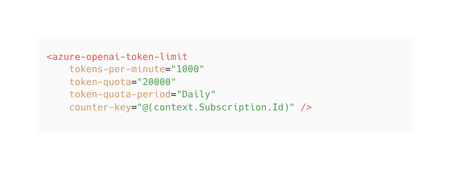
We’re happy to announce new features coming to Azure API Management enhancing your experience with GenAI APIs. Our latest release brings expanded support for GPT-4 models, including text and image-based input, across all GenAI Gateway capabilities. Additionally, we’re expanding our token limit policy with a token quota capability to give you even more control over your token consumption. Token quota This extension of the token limit policy is designed to help you manage token consumption more effectively when working with large language models (LLMs). Key benefits of token quota: Flexible quotas: In addition to rate limiting, set token quotas on an hourly, daily, weekly, or monthly basis to manage token consumption across clients, departments or projects. Cost management: Protect your organization from unexpected token usage costs by aligning quotas with your budget and resource allocation. Enhanced visibility: In combination with emit-token-metric policy, track and analyze token usage patterns to make informed adjustments based on real usage trends. With this new capability, you can empower your developers to innovate while maintaining control over consumption and costs. It’s the perfect balance of flexibility and responsible consumption for your AI projects. Learn more about token quota in our documentation. GPT4o support GPT-4o integrates text and images in a single model, enabling it to handle multiple content types simultaneously. Our latest release enables you take advantage of the full power of GPT-4o with expanded support across all GenAI Gateway capabilities in Azure API Management. Key benefits: Cost efficiency: Control and attribute costs with token monitoring, limits, and quotas. Return cached responses for semantically similar prompts. High reliability: Enable geo-redundancy and automatic failovers with load balancing and circuit breakers. Developer enablement: Replace custom backend code with built-in policies. Publish AI APIs for consumption. Enhanced governance and monitoring: Centralize monitoring and logs for your AI APIs. Phased rollout and availability We’re excited about these new features and want to ensure you have the most up-to-date information about their availability. As with any major update, we’re implementing a phased rollout strategy to ensure safe deployment across our global infrastructure. Because of that some of your services may not have these updates until the deployment is complete. These new features will be available first in the new SKUv2 of Azure API Management followed by SKUv1 rollout towards the end of 2024. Conclusion These new features in Azure API Management represent our step forward in managing and governing your use of GPT4o and other LLMs. By providing greater control, visibility and traffic management capabilities, we’re helping you unlock the full potential of Generative AI while keeping resource usage in check. We’re excited about the possibilities these new features bring and are committed to expanding their availability. As we continue our phased rollout, we appreciate your patience and encourage you to keep an eye out for the updates.2.1KViews1like0Comments