systems integration
19 TopicsIntroducing Azure API Management Policy Toolkit
We’re excited to announce the early release of the Azure API Management Policy Toolkit, a set of libraries and tools designed to change how developers work with API Management policies, making policy management more approachable, testable, and efficient for developers. Empowering developers with Azure API Management Policy Toolkit Policies have always been at the core of Azure API Management, offering powerful capabilities to secure, change behavior, and transform requests and responses to the APIs. Recently, we've made the policies easier to understand and manage by adding Copilot for Azure features for Azure API Management. This allows you to create and explain policies with AI help directly within the Azure portal. This powerful tool lets developers create policies using simple prompts or get detailed explanations of existing policies. This makes it much easier for new users to write policies and makes all users more productive. Now, with the Policy Toolkit, we’re taking another significant step forward. This toolkit brings policy management even closer to the developer experience you know. Elevating policy development experience Azure API Management policies are written in Razor format, which for those unfamiliar with it can be difficult to read and understand, especially when dealing with large policy documents that include expressions. Testing and debugging policy changes requires deployment to a live Azure API Management instance, which slows down feedback loop even for small edits. The Policy Toolkit addresses these challenges. You can now author your policies in C#, a language that feels natural and familiar to many developers and write tests against them. This shift improves the policy writing experience for developers, makes policies more readable, and shortens the feedback loop for policy changes. Key toolkit features to transform your workflow: Consistent policy authoring. Write policies in C#. No more learning Razor syntax and mixing XML and C# in the same document. Syntax checking: Compile your policy documents to catch syntax errors and generate Razor-based equivalents. Unit testing: Write unit tests alongside your policies using your favorite unit testing framework. CI/CD integration: Integrate Policy Toolkit into automation pipelines for testing and compilation into Razor syntax for deployment. Current Limitations While we’re excited about the capabilities of the Policy Toolkit, we want to be transparent about its current limitation: Not all policies are supported yet, but we’re actively working on expanding the coverage. We are working on making the Policy Toolkit available as a NuGet package. In the meantime, you’ll need to build the solution on your own. Unit testing is limited to policy expressions and is not supported for entire policy documents yet. Get Started Today! We want you to try the Azure API Management Policy Toolkit and to see if it helps streamlining your policy management workflow. Check out documentation to get started. We’re eager to hear your feedback! By bringing policy management closer to the developer, we’re opening new possibilities to efficiently manage your API Management policies. Whether you’re using the AI-assisted approach with Copilot for Azure or diving deep into C# with the Policy Toolkit, we’re committed to making policy management more approachable and powerful.4.2KViews10likes2Comments
Expose REST APIs as MCP servers with Azure API Management and API Center (now in preview)
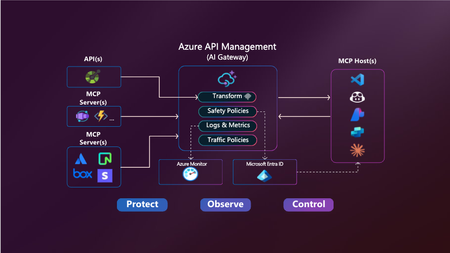
As AI-powered agents and large language models (LLMs) become central to modern application experiences, developers and enterprises need seamless, secure ways to connect these models to real-world data and capabilities. Today, we’re excited to introduce two powerful preview capabilities in the Azure API Management Platform: Expose REST APIs in Azure API Management as remote Model Context Protocol (MCP) servers Discover and manage MCP servers using API Center as a centralized enterprise registry Together, these updates help customers securely operationalize APIs for AI workloads and improve how APIs are managed and shared across organizations. Unlocking the value of AI through secure API integration While LLMs are incredibly capable, they are stateless and isolated unless connected to external tools and systems. Model Context Protocol (MCP) is an open standard designed to bridge this gap by allowing agents to invoke tools—such as APIs—via a standardized, JSON-RPC-based interface. With this release, Azure empowers you to operationalize your APIs for AI integration—securely, observably, and at scale. 1. Expose REST APIs as MCP servers with Azure API Management An MCP server exposes selected API operations to AI clients over JSON-RPC via HTTP or Server-Sent Events (SSE). These operations, referred to as “tools,” can be invoked by AI agents through natural language prompts. With this new capability, you can expose your existing REST APIs in Azure API Management as MCP servers—without rebuilding or rehosting them. Addressing common challenges Before this capability, customers faced several challenges when implementing MCP support: Duplicating development efforts: Building MCP servers from scratch often led to unnecessary work when existing REST APIs already provided much of the needed functionality. Security concerns: Server trust: Malicious servers could impersonate trusted ones. Credential management: Self-hosted MCP implementations often had to manage sensitive credentials like OAuth tokens. Registry and discovery: Without a centralized registry, discovering and managing MCP tools was manual and fragmented, making it hard to scale securely across teams. API Management now addresses these concerns by serving as a managed, policy-enforced hosting surface for MCP tools—offering centralized control, observability, and security. Benefits of using Azure API Management with MCP By exposing MCP servers through Azure API Management, customers gain: Centralized governance for API access, authentication, and usage policies Secure connectivity using OAuth 2.0 and subscription keys Granular control over which API operations are exposed to AI agents as tools Built-in observability through APIM’s monitoring and diagnostics features How it works MCP servers: In your API Management instance navigate to MCP servers Choose an API: + Create a new MCP Server and select the REST API you wish to expose. Configure the MCP Server: Select the API operations you want to expose as tools. These can be all or a subset of your API’s methods. Test and Integrate: Use tools like MCP Inspector or Visual Studio Code (in agent mode) to connect, test, and invoke the tools from your AI host. Getting started and availability This feature is now in public preview and being gradually rolled out to early access customers. To use the MCP server capability in Azure API Management: Prerequisites Your APIM instance must be on a SKUv1 tier: Premium, Standard, or Basic Your service must be enrolled in the AI Gateway early update group (activation may take up to 2 hours) Use the Azure Portal with feature flag: ➤ Append ?Microsoft_Azure_ApiManagement=mcp to your portal URL to access the MCP server configuration experience Note: Support for SKUv2 and broader availability will follow in upcoming updates. Full setup instructions and test guidance can be found via aka.ms/apimdocs/exportmcp. 2. Centralized MCP registry and discovery with Azure API Center As enterprises adopt MCP servers at scale, the need for a centralized, governed registry becomes critical. Azure API Center now provides this capability—serving as a single, enterprise-grade system of record for managing MCP endpoints. With API Center, teams can: Maintain a comprehensive inventory of MCP servers. Track version history, ownership, and metadata. Enforce governance policies across environments. Simplify compliance and reduce operational overhead. API Center also addresses enterprise-grade security by allowing administrators to define who can discover, access, and consume specific MCP servers—ensuring only authorized users can interact with sensitive tools. To support developer adoption, API Center includes: Semantic search and a modern discovery UI. Easy filtering based on capabilities, metadata, and usage context. Tight integration with Copilot Studio and GitHub Copilot, enabling developers to use MCP tools directly within their coding workflows. These capabilities reduce duplication, streamline workflows, and help teams securely scale MCP usage across the organization. Getting started This feature is now in preview and accessible to customers: https://aka.ms/apicenter/docs/mcp AI Gateway Lab | MCP Registry 3. What’s next These new previews are just the beginning. We're already working on: Azure API Management (APIM) Passthrough MCP server support We’re enabling APIM to act as a transparent proxy between your APIs and AI agents—no custom server logic needed. This will simplify onboarding and reduce operational overhead. Azure API Center (APIC) Deeper integration with Copilot Studio and VS Code Today, developers must perform manual steps to surface API Center data in Copilot workflows. We’re working to make this experience more visual and seamless, allowing developers to discover and consume MCP servers directly from familiar tools like VS Code and Copilot Studio. For questions or feedback, reach out to your Microsoft account team or visit: Azure API Management documentation Azure API Center documentation — The Azure API Management & API Center Teams8.4KViews5likes7CommentsMicrosoft BizTalk Server Product Lifecycle Update
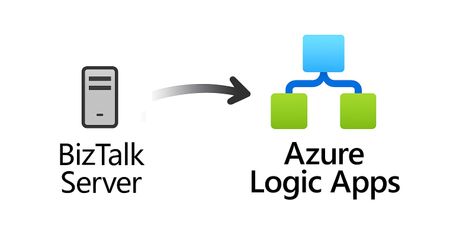
For more than 25 years, Microsoft BizTalk Server has supported mission-critical integration workloads for organizations around the world. From business process automation and B2B messaging to connectivity across industries such as financial services, healthcare, manufacturing, and government, BizTalk Server has played a foundational role in enterprise integration strategies. To help customers plan confidently for the future, Microsoft is sharing an update to the BizTalk Server product lifecycle and long-term support timelines. BizTalk Server 2020 will be the final version of BizTalk Server. Guidance to support long-term planning for mission-critical workloads This announcement does not change existing support commitments. Customers can continue to rely on BizTalk Server for many years ahead, with a clear and predictable runway to plan modernization at a pace that aligns with their business and regulatory needs. Lifecycle Phase End Date What’s Included Mainstream Support April 11, 2028 Security + non-security updates and Customer Service & Support (CSS) support Extended Support April 9, 2030 CSS support, Security updates, and paid support for fixes (*) End of Support April 10, 2030 No further updates or support (*) Paid Extended Support will be available for BizTalk Server 2020 between April 2028 and April 2030 for customers requiring hotfixes for non-security updates. CSS will continue providing their typical support. BizTalk Server 2016 is already out of mainstream support, and we recommend those customers evaluate a direct modernization path to Azure Logic Apps. Continued Commitment to Enterprise Integration Microsoft remains fully committed to supporting mission-critical integration, including hybrid connectivity, future-ready orchestration, and B2B/EDI modernization. Azure Logic Apps, part of Azure Integration Services — which includes API Management, Service Bus, and Event Grid — delivers the comprehensive integration platform for the next decade of enterprise connectivity. Host Integration Server: Continued Support for Mainframe Workloads Host Integration Server (HIS) has long provided essential connectivity for organizations with mainframe and midrange systems. To ensure continued support for those workloads, Host Integration Server 2028 will ship as a standalone product with its own lifecycle, decoupled from BizTalk Server. This provides customers with more flexibility and a longer planning horizon. Recognizing Mainframe modernization customers might be looking to integrate with their mainframes from Azure, Microsoft provides Logic Apps connectors for mainframe and midrange systems, and we are keen on adding more connectors in this space. Let us know about your HIS plans, and if you require specific features for Mainframe and midranges integration from Logic Apps at: https://aka.ms/lamainframe Azure Logic Apps: The Successor to BizTalk Server Azure Logic Apps, part of Azure Integration Services, is the modern integration platform that carries forward what customers value in BizTalk while unlocking new innovation, scale, and intelligence. With 1,400+ out-of-box connectors supporting enterprise, SaaS, legacy, and mainframe systems, organizations can reuse existing BizTalk maps, schemas, rules, and custom code to accelerate modernization while preserving prior investments including B2B/EDI and healthcare transactions. Logic Apps delivers elastic scalability, enterprise-grade security and compliance, and built-in cost efficiency without the overhead of managing infrastructure. Modern DevOps tooling, Visual Studio Code support, and infrastructure-as-code (ARM/Bicep) ensure consistent, governed deployments with end-to-end observability using Azure Monitor and OpenTelemetry. Modernizing Logic Apps also unlocks agentic business processes, enabling AI-driven routing, predictive insights, and context-aware automation without redesigning existing integrations. Logic Apps adapts to business and regulatory needs, running fully managed in Azure, hybrid via Arc-enabled Kubernetes, or evaluated for air-gapped environments. Throughout this lifecycle transition, customers can continue to rely on the BizTalk investments they have made while moving toward a platform ready for the next decade of integration and AI-driven business. Charting Your Modernization Path Microsoft remains fully committed to supporting customers through this transition. We recognize that BizTalk systems support highly customized and mission-critical business operations. Modernization requires time, planning, and precision. We hope to provide: Proven guidance and recommended design patterns A growing ecosystem of tooling supporting artifact reuse Unified Support engagements for deep migration assistance A strong partner ecosystem specializing in BizTalk modernization Potential incentive programs to help facilitate migration for eligible customers (details forthcoming) Customers can take a phased approach — starting with new workloads while incrementally modernizing existing BizTalk deployments. We’re Here to Help Migration resources are available today: Overview: https://aka.ms/btmig Best practices: https://aka.ms/BizTalkServerMigrationResources Video series: https://aka.ms/btmigvideo Feature request survey: https://aka.ms/logicappsneeds Reactor session: Modernizing BizTalk: Accelerate Migration with Logic Apps - YouTube We encourage customers to engage their Microsoft accounts team early to assess readiness, identify modernization opportunities, and explore assistance programs. Your Modernization Journey Starts Now BizTalk Server has played a foundational role in enterprise integration success for more than two decades. As you plan ahead, Microsoft is here to partner with you every step of the way, ensuring operational continuity today while unlocking innovation tomorrow. To begin your transition, please contact your Microsoft account team or visit our migration hub. Thank you for your continued trust in Microsoft and BizTalk Server. We look forward to partnering closely with you as you plan the future of your integration platforms. Frequently Asked Questions Do I need to migrate now? No. BizTalk Server 2020 is fully supported through April 11, 2028, with paid Extended Support available through April 9, 2030, for non-security hotfixes. CSS will continue providing their typical support. You have a long and predictable runway to plan your transition. Will there be a new BizTalk Server version? No. BizTalk Server 2020 is the final version of the product. What happens after April 9, 2030? BizTalk Server will reach End of Support, and security updates or technical assistance will no longer be provided. Workloads will continue running but without Microsoft servicing. Is paid support available past 2028? Yes. Paid extended support will be available through April 2030 for BizTalk Server 2020 customers looking for non-security hotfixes. CSS will continue to provide the typical support. What about BizTalk Server 2016 or earlier versions? Those versions are already out of mainstream support. We strongly encourage moving directly to Logic Apps rather than upgrading to BizTalk Server 2020. Will Host Integration Server continue? Yes. Host Integration Server (HIS) 2028 will be released as a standalone product with its own lifecycle and support commitments. Can I reuse BizTalk Server artifacts in Logic Apps? Yes. Most of BizTalk maps, schemas, rules, assemblies, and custom code can be reused with minimal effort using Microsoft and partner migration tooling. We welcome feature requests here: https://aka.ms/logicappsneeds Does modernization require moving fully to the cloud? No. Logic Apps supports hybrid deployments for scenarios requiring local processing or regulatory compliance, and fully disconnected environments are under evaluation. More information of the Hybrid deployment model here: https://aka.ms/lahybrid. Does modernization unlock AI capabilities? Yes. Logic Apps enables AI-driven automations through Agent Loop, improving routing, decisioning, and operational intelligence. Where do I get planning support? Your Microsoft account team can assist with assessment and planning. Migration resources are also linked in this announcement to help you get started. Microsoft Corporation2.8KViews3likes1Comment🚀 New in Azure API Management: MCP in v2 SKUs + external MCP-compliant server support
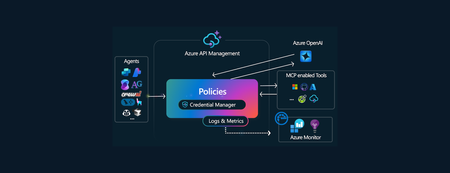
Your APIs are becoming tools. Your users are becoming agents. Your platform needs to adapt. Azure API Management is becoming the secure, scalable control plane for connecting agents, tools, and APIs — with governance built in. -------------------------------------------------------------------------------------------------------------------------------------------------------------------- Today, we’re announcing two major updates to bring the power of the Model Context Protocol (MCP) in Azure API Management to more environments and scenarios: MCP support in v2 SKUs — now in public preview Expose existing MCP-compliant servers through API Management These features make it easier than ever to connect APIs and agents with enterprise-grade control—without rewriting your backends. Why MCP? MCP is an open protocol that enables AI agents—like GitHub Copilot, ChatGPT, and Azure OpenAI—to discover and invoke APIs as tools. It turns traditional REST APIs into structured, secure tools that agents can call during execution — powering real-time, context-aware workflows. Why API Management for MCP? Azure API Management is the single, secure control plane for exposing and governing MCP capabilities — whether from your REST APIs, Azure-hosted services, or external MCP-compliant runtimes. With built-in support for: Security using OAuth 2.1, Microsoft Entra ID, API keys, IP filtering, and rate limiting. Outbound token injection via Credential Manager with policy-based routing. Monitoring and diagnostics using Azure Monitor, Logs, and Application Insights. Discovery and reuse with Azure API Center integration. Comprehensive policy engine for request/response transformation, caching, validation, header manipulation, throttling, and more. …you get end-to-end governance for both inbound and outbound agent interactions — with no new infrastructure or code rewrites. ✅ What’s New? 1. MCP support in v2 SKUs Previously available only in classic tiers (Basic, Standard, Premium), MCP support is now in public preview for v2 SKUs — Basic v2, Standard v2, and Premium v2 — with no pre-requisites or manual enablement required. You can now: Expose any REST API as an MCP server in v2 SKUs Protect it with Microsoft Entra ID, keys or tokens Register tools in Azure API Center 2. Expose existing MCP-compliant servers (pass-through scenario) Already using tools hosted in Logic Apps, Azure Functions, LangChain or custom runtimes? Now you can govern those external tool servers by exposing them through API Management. Use API Management to: Secure external MCP servers with OAuth, rate limits, and Credential Manager Monitor and log usage with Azure Monitor and Application Insights Unify discovery with internal tools via Azure API Center 🔗 You bring the tools. API Management brings the governance. 🧭 What’s Next We’re actively expanding MCP capabilities in API Management: Tool-level access policies for granular governance Support for MCP resources and prompts to expand beyond tools 📚 Get Started 📘 Expose APIs as MCP servers 🌐 Connect external MCP servers 🔐 Secure access to MCP servers 🔎 Discover tools in API Center Summary Azure API Management is your single control plane for agents, tools and APIs — whether you're building internal copilots or connecting external toolchains. This preview unlocks more flexibility, less friction, and a secure foundation for the next wave of agent-powered applications. No new infrastructure. Secure by default. Built for the future.3.2KViews2likes3CommentsLogic Apps Aviators Newsletter - July 25
In this issue: Ace Aviator of the Month News from our product group News from our community Ace Aviator of the Month July’s Ace Aviator: Şahin Özdemir What's your role and title? What are your responsibilities? I currently work for Rubicon Cloud Advisor, a Dutch company specialized in digital transformations, cloud adoption and AI implementation. At Rubicon I fulfil the role of Application and Integration architect, while also being a Professional Scrum Trainer at Scrum.org. Even though this sounds like two completely different roles, in practice both go closely hand in hand. I firmly believe that good architecture, a strong development process, and application of best practices are key pillars for delivering high-quality solutions to my clients. Therefore, both roles come in handy in my day-to-day job (combined with my strong background in software development).\ I work closely with companies and their teams in making their journey to Azure - especially Azure Integration Services - successful. Most of the time this journey starts with a business need or challenge, and I work with my clients to get a deeper understanding of their needs. This results in further analysis, capturing requirements, defining architecture, solution design, setting the stage for development (ALM) and being involved in quality assurance. At the same time, I think it’s important to stay relevant from a technical perspective. That’s why I also like being involved with implementing the solution. This way, I hear the technical struggles teams face and I can help them to find the right solution. Can you give us some insights into your day-to-day activities and what a typical day in your role looks like? Not a single day is the same, although there are some recurring activities. Specific parts of my day (or sprint) are dedicated to Scrum-related activities - whether it's participating in the daily scrum, having sprint reviews with stakeholders, planning the next sprint, or refining the backlog with the team or just aligning with the PO or stakeholders. I’m frequently involved in cross-organizational meetings focused on projects at scale. I contribute from the perspective of architecture, technical expertise, and integration strategy. In my role as a solution architect, I'm engaged in designing and implementing a critical integration platform for my client. This platform connects and exchanges data between many internal departments and external vendors - an effort that requires frequent alignment and collaboration. I’m always looking for opportunities to expand our Hybrid Integration Platform itself. Exploring how Azure resources may add value to our platform and working closely with the team to realize such improvements to the platform’s capabilities is something I enjoy. Outside of the regular meetings, I often focus on designing new integrations. Having working sessions with stakeholders to understand what they want. Based on these discussions, I assess the technical and architectural aspects of the solution. Every integration that lands on the platform is measured against both architectural and development principles and guidelines. I contribute to reviewing the solutions that have been developed. Ensuring that each integration is high-quality, consistent, easy to understand, and maintainable. I support the platform team with, and whenever possible. And if time permits, I develop parts of the solution myself – I see this as a great way to stay relevant from a technological perspective. All the spare time I have, I spend on writing technical articles that may help others. What motivates and inspires you to be an active member of the Aviators/Microsoft community? Because I enjoy helping others. Every day I work with a team of smart professionals on integration solutions and custom code within the Azure platform. Along the way, we regularly encounter challenges, limitations, or issues. In those moments, it's incredibly helpful to find solutions online or to have a community that can think along with you. Over the past few years, there have been many occasions where I just couldn’t find a solution online for a technical problem with Logic Apps. In these cases, we either came up with a creative solution ourselves or received support from Microsoft. When the integration community faces a similar challenge, it’s pretty much wasteful to tackle the same hurdles again. By documenting an approach or solution, others may be saving their invaluable time looking for a solution. Looking back, what advice do you wish you had been given earlier that you'd now share with those looking to get into STEM/technology? It is ok that you don’t know everything. Just start doing, experiment, stay curious, challenge yourself, don’t be afraid to ask questions, fail, learn and keep going! What has helped you grow professionally? I have spent a fair amount of my career at a big consulting firm. I started off as a software engineer all the way up to senior manager and architect. A long journey like that gives great and well-dosed opportunities and learning experiences to focus on your technical (in-depth) skillset first, continued by working on you soft skills like consulting, guiding and leading teams, solutioning and architecture. If I had not followed this path at that company, I would not be the person I am now professionally. Be ok with the fact that growth doesn’t happen overnight -no shortcuts, no magic pills. It's like a good red wine that needs time to mature. So do many challenging projects, become all-round and then choose a specialization, ask for constructive feedback, fail many times and take your time to reflect and learn. And don’t forget to have a strong work ethic and ongoing curiosity to learn new things. In the end I found that - from a technological perspective-, quality attributes (the “-illities”), enterprise application integration and scrum made my heart skip a beat. So my advice is to always pursue what brings you joy! If you had a magic wand that could create a feature in Logic Apps, what would it be and why? Overall, I must say that I’m happy with the current state of Logic Apps. Nevertheless, if I had a magic wand: I would like to see that the service plans for Logic App standard would be in line with Function Apps. The plans for Function apps have way better tiers from both memory, cores and pricing perspective. And being able to scale out and in based on specific metrics is more flexible than Logic App Standard currently offers. Having more CPU/memory available in the plans would also improve the overall performance of Logic Apps in general, even though performance optimizations of many actions would also be more than welcome. What I currently really miss in the HTTP connector (and possibly others) is the ability to have better control over the request timeouts. Even though the setting is there, it is capped to 4 minutes max. In practice, we need to deliver data to external APIs that work synchronously and take more time to complete. Giving better control on these timeouts would make the usability of workflows even better! Even though some nice additions to the initialization of variables have been made recently, I would like to see the ability to initialize variables at any point in the workflow. E.g. the foreach loop can be executed in parallel, and therefore the current global variables are not thread-safe, which leads to unexpected behavior. News from our product group Logic Apps Live June 2025 Missed Logic Apps Live in June? You can watch it here. We focused on the Logic Apps big announcements from Integrate 2025. There are a lot of great things to check! Feedback Opportunity: SRE Agent + Logic Apps Discover the new Applications feature in Azure API Management, enabling OAuth-based access to APIs and products. Streamline secure API access with built-in OAuth 2.0 application-based authorization. Configure SQL Storage for Standard Logic Apps Azure Logic Apps traditionally rely on Azure Storage to manage workflow states and runtime data. However, with the introduction of SQL as a storage provider (currently in preview), developers now have a compelling alternative that offers greater control, flexibility, and integration with existing SQL infrastructure. This post explores the benefits, configuration steps, and considerations for using SQL storage with Standard Logic Apps. Announcing General Availability: Azure Logic Apps Standard Automated Test Framework We’re excited to announce the General Availability (GA) of the Azure Logic Apps Standard Automated Test Framework—a major step forward in enabling developers to build, test, and maintain enterprise-grade workflows with confidence and agility. Announcing General Availability: Azure Logic Apps Standard Custom Code with .NET 8 We’re excited to announce the General Availability (GA) of Custom Code support in Azure Logic Apps Standard with .NET 8. This release marks a significant step forward in enabling developers to build more powerful, flexible, and maintainable integration workflows using familiar .NET tools and practices. With this capability, developers can now embed custom .NET 8 code directly within their Logic Apps Standard workflows. This unlocks advanced logic scenarios, promotes code reuse, and allows seamless integration with existing .NET libraries and services—making it easier than ever to build enterprise-grade solutions on Azure. Business Process Tracking Reaches General Availability Business Process Tracking provides key insights to business stakeholders from your Logic Apps (Standard) implementation in an efficient and timely manner. Today, we are pleased to announce the General Availability of this capability, allowing customers to leverage in their production workloads. Announcement: General Availability of Logic Apps Hybrid Deployment Model We’re excited to announce the Public Preview of two major integrations that bring the power of Azure Logic Apps to AI Agents in Foundry – Logic Apps as Tools and AI Agent Service Connector. Learn more on our announcement post! Announcing Public Preview: Organizational Templates in Azure Logic Apps We’re excited to announce the Public Preview of Organizational Templates in Azure Logic Apps— empowering teams to author, share, and reuse automation patterns across their organization. With this release, we’re also rolling out a brand-new UI experience to easily create templates directly from your workflows—no manual packaging required! OpenTelemetry in Azure Logic Apps (Standard and Hybrid) OpenTelemetry provides a unified, vendor-agnostic framework for collecting telemetry data—logs, metrics, and traces—across different services and infrastructure layers. It simplifies monitoring and makes it easier to integrate with a variety of observability backends such as Azure Monitor, Grafana Tempo, Jaeger, and others. For Logic Apps—especially when deployed in hybrid or on-premises scenarios—OpenTelemetry is a powerful addition that elevates diagnostic capabilities beyond the default Application Insights telemetry. Logic App Standard - When High Memory / CPU usage strikes and what to do Monitoring your applications is essential, as it ensures that you know what's happening and you are not caught by surprise when something happens. One possible event is the performance of your application starting to decrease and processing becomes slower than usual. This may happen due to various reasons, and in this blog post, we will be discussing the High Memory and CPU usage and why it affects your Logic App. We will also observe some possibilities that we've seen that have been deemed as the root cause for some customers. Introducing Agent in a Day Agent in a Day represents a fantastic opportunity for customers to participate in hackathon-style contests where attendees learn how to build agents and then can apply them to their unique business use cases. For Partners, Agent in a Day represents a great way to engage your customers by building agents with them and uncovering new use cases. Introducing Confluent Kafka Connector (Public Preview) We are pleased to announce the introduction of the Confluent Kafka Connector in Logic Apps (Standard) which allows you to both send and receive messages between Logic Apps and Confluent Kafka. Confluent Kafka is a distributed streaming platform for building real-time data pipelines and streaming applications. It is used across many industries including financial services, Omnichannel retail, autonomous cars, fraud detection services, microservices and IoT deployments. Our current connector offering supports both triggers (receive) and sending (publish) within Logic Apps. News from our community Logic App Standard: Throw exceptions like a pro! Post by Şahin Özdemir Learn how to throw exceptions in Logic App Standard using a simple Compose action—no code needed, just clever workflow design. Azure Logic Apps: are you handling large blobs? Keep memory usage under control. Post by Stefano Demiliani Struggling with large blob files in Logic Apps? Learn how to keep memory usage under control and avoid out-of-memory errors with smart workflow design and a few performance-boosting tricks De SOAPing Services SOAP to REST using Azure API Management Video by Stephen W Thomas Struggling with legacy SOAP integrations from BizTalk to Azure? Check out this video on simplifying SOAP-to-REST conversions using Azure API Management and learn how easily you can manage SOAP envelopes and streamline your Logic Apps integrations! Integrating Entra ID and AI Agent workflows in Azure Logic Apps Post by Brian Veldman Discover how to build AI-powered workflows in Azure Logic Apps that interact with Entra ID, automate tasks, and adapt dynamically using agentic tools and OpenAI models. Advanced KQL Queries for Logic Apps in Application Insights: A Practical Guide Post by Dieter Gobeyn Boost Logic App performance with advanced KQL queries in Application Insights—spot bottlenecks, analyze slow actions, and optimize workflows without upgrading your hosting plan. How to Build an AI Agent with Azure Logic Apps Post by Cameron McKay Learn how to build your first AI Agent in Azure Logic Apps using Agent Loop—connect to OpenAI, design smart prompts, and automate tasks like weather reporting with low-code workflows. You Can Now Initialize All Your Variables In One Single Action Post by Luis Rigueira You can now initialize multiple variables in Logic Apps with a single action—making your workflows cleaner, faster, and easier to manage. It is a Friday Fact, brought to you by Luis Rigueira! Integration Insights Podcast: The Future of Integration Video by Sagar Sharma and Jochen Toelen In this two-part episode of the Integration Insights podcast, Sagar, Joechen and Kent dive into how integration is evolving in a cloud-first world. From BizTalk migrations to hybrid deployments with Azure Arc, they share practical insights and best practices to future-proof your integration strategy. A must-listen! You can watch part 2 here. Event Grid vs Service Bus vs Event Hubs vs Storage Queues: Choosing the Right Messaging Backbone in Azure Post by Prashant Singh Confused by Azure’s messaging options? This guide breaks down Event Grid, Service Bus, Event Hubs, and Storage Queues—helping you choose the right tool for real-time events, telemetry, enterprise workflows, or lightweight tasks. IntelliSense in Logic Apps Just Got Smarter – Matching Brackets in the Expression Editor! Post by Sandro Pereira Logic Apps just got a lot friendlier—bracket matching in the expression editor now highlights pairs as you type, making it easier to write and debug complex expressions.A Friday Fact from Sandro Pereira. How to Build Resilient Integrations for Mission-Critical Systems Post by Lilan Sameera Learn how to build resilient integrations for mission-critical systems using Logic Apps, Service Bus, and Event Hub—ensuring reliable data delivery, smart retries, and clean outputs even under pressure.711Views2likes0CommentsLogic Apps Aviators Newsletter - January 2026
In this issue: Ace Aviator of the Month News from our product group Community Playbook News from our community Ace Aviator of the Month January's Ace Aviator: Sagar Sharma What's your role and title? What are your responsibilities? I’m a cross-domain Business Solution Architect specializing in delivering new business capabilities to customers. I design end-to-end architectures specially on Azure platforms and also in the Integration domain using azure integration services. My role involves marking architectural decisions, defining standards, ensuring platform reliability, guiding teams, and helping organizations transition from legacy integration systems to modern cloud-native patterns. Can you give us some insights into your day-to-day activities and what a typical day in your role looks like? My day usually blends architecture work with hands-on collaboration. I review integration designs, refine patterns, help teams troubleshoot integration flows, and ensure deployments run smoothly through DevOps pipelines. A good part of my time is spent translating business needs into integration patterns and making sure the overall platform stays secure, scalable, and maintainable. What motivates and inspires you to be an active member of the Aviators/Microsoft community? The community has shaped a big part of my career. Many of my early breakthroughs came from blogs, samples, and talks shared by others. Contributing back feels like closing the loop. I enjoy sharing real-world lessons, learning from peers, and helping others adopt integration patterns with confidence. The energy of the community and the conversations it creates keep me inspired. Looking back, what advice do you wish you had been given earlier that you'd now share with those looking to get into STEM/technology? Focus on core concepts—messaging, APIs, security, and distributed systems—because tools evolve, but fundamentals stay relevant. Share your learning early, even if it feels small. Be curious about the “why” behind patterns. Build side projects, not just follow tutorials. And don’t fear a nonlinear career path—diverse experience is an asset in technology. What has helped you grow professionally? Hands-on customer work, strong mentors, and consistent learning habits have been key. Community involvement—writing, speaking, and collaborating—has pushed me to structure my knowledge and stay current. And working in environments that encourage experimentation has helped me develop faster and with more confidence. If you had a magic wand that could create a feature in Logic Apps, what would it be and why? I’d love to see a unified, out-of-the-box business transaction tracing experience across Logic Apps, Service Bus, APIM, Functions, and downstream services. Something that automatically correlates events, visualizes the full journey of a transaction, and simplifies root-cause analysis. This would make operational troubleshooting dramatically easier in enterprise environments. News from our product group Microsoft BizTalk Server Product Lifecycle Update BizTalk Server 2020 will be the final release, with support extending through 2030. Microsoft encourages a gradual transition to Azure Logic Apps, offering migration tooling, hybrid deployment options, and reuse of existing BizTalk artifacts. Customers can modernize at their own pace while maintaining operational continuity. Data Mapper Test Executor: A New Addition to Logic Apps Standard Test Framework The Data Mapper Test Executor adds native support for testing XSLT and Data Mapper transformations directly within the Logic Apps Standard test framework. It streamlines validation, improves feedback cycles, and integrates with the latest SDK to enable reliable, automated testing of map generation and execution. Announcing General Availability of AI & RAG Connectors in Logic Apps (Standard) Logic Apps Standard AI and RAG connectors are now GA333, enabling native document processing, semantic search, embeddings, and agentic workflows. These capabilities let teams build intelligent, context‑aware automations using their own data, reducing complexity and enhancing decisioning across enterprise integrations. Logic Apps Labs The Logic Apps Labs, which introduces Azure Logic Apps agentic workflows learning path, offering guided modules on building conversational and autonomous agents, extending capabilities with MCP tools, and orchestrating multi‑agent workflows. It serves as a starting point for hands‑on labs covering design, deployment, and advanced patterns for intelligent automation. News from our community Handling Empty SQL Query Results in Azure Logic Apps Post by Anitha Eswaran If a SQL stored procedure returns no rows, you can detect the empty result set in Logic Apps by checking whether the output’s ResultSets object is {}. When empty, the workflow can be cleanly terminated or used to trigger alerts, ensuring predictable behavior and more resilient integrations. Azure Logic Apps MCP Server Post by Laveesh Bansal Our own Laveesh Bansal spent some time creating an Azure Logic Apps MCP Server that enables natural‑language debugging, workflow inspection, and updates without using the portal. It supports both Standard and Consumption apps, integrates with AI clients like Copilot and Claude, and offers tools for local or cloud‑hosted setups, testing, and workflow lifecycle operations. Azure Logic Apps: Change Detection in JSON Objects and Arrays Post by Suraj Somani Logic Apps offers native functions to detect changes in JSON objects and arrays without worrying about field or item order. Using equals() for objects and intersection() for arrays, you can determine when data has truly changed and trigger workflows only when updates occur, improving efficiency and reducing unnecessary processing. Logic Apps Standard: A clever hack to use JSON schemas in your Artifacts folder for JSON message validation (Part 1) Post by Şahin Özdemir Şahin outlines a workaround for using JSON schemas stored in the Artifacts folder to validate messages in Logic Apps Standard. It revisits integration needs from BizTalk migrations and shows how to bring structured validation into modern workflows without relying on Integration Accounts. This is a two part series and you can find part two here. Let's integrate SAP with Microsoft Video by Sebastian Meyer Sebastian has a new video out, and in this episode he and Martin Pankraz break down SAP GROW and RISE for Microsoft integration developers, covering key differences and integration options across IDoc, RFC, BAPI, SOAP, HTTPS, and OData, giving a concise overview of today’s SAP landscape and what it means for building integrations on Azure. Logic Apps Initialize variables action has a max limit of 20 variables Post by Sandro Pereira Logic Apps allows only 20 variables per Initialize variables action, and exceeding it triggers a validation error. This limit applies per action, not per workflow. Using objects, parameters, or Compose actions often reduces the need for many scalars and leads to cleaner, more maintainable workflows. Did you know that? It is a Friday Fact!Autoscaling Now Available in Azure API Management v2 Tiers
Gateway-Level Metrics: Deep Insight into Performance Azure API Management now exposes fine-grained metrics for each Azure API management v2 gateway instance, giving you more control and observability. These enhancements give you deeper visibility into your infrastructure and the ability to scale automatically based on real-time usage—without manual effort. Key Gateway Metrics CPU Percentage of Gateway – Available in Basic v2, Standard v2, and Premium v2 Memory Percentage of Gateway – Available in Basic v2 and Standard v2 These metrics are essential for performance monitoring, diagnostics, and intelligent scaling. Native Autoscaling: Adaptive, Metric-Driven Scaling With gateway-level metrics in place, Azure Monitor autoscale rules can now drive automatic scaling of Azure API Management v2 gateways. How It Works You define scaling rules that automatically increase or decrease gateway instances based on: CPU percentage Memory percentage (for Basic v2 and Standard v2) Autoscale evaluates these metrics against your thresholds and acts accordingly, eliminating the need for manual scaling or complex scripts. Benefits of Autoscaling in Azure API management v2 tiers Autoscaling in Azure API Management brings several critical benefits for operational resilience, efficiency, and cost control: Reliability Maintain consistent performance by automatically scaling out during periods of high traffic. Your APIs stay responsive and available—even under sudden load spikes. Operational Efficiency Automated scaling eliminates manual, error-prone intervention. This allows teams to focus on innovation, not infrastructure management. Cost Optimization When traffic drops, auto scale automatically scales in to reduce the number of gateway instances—helping you save on infrastructure costs without sacrificing performance. Use Case Highlights Autoscaling is ideal for: APIs with unpredictable or seasonal traffic Enterprise systems needing automated resiliency Teams seeking cost control and governance Premium environments that demand always-on performance Get Started Today Enabling autoscaling is easy via the Azure Portal: Open your API Management instance Go to Settings > Scale out (Autoscale) Enable autoscaling and define rules using gateway metrics Monitor performance in real time via Azure Monitor Configuration walkthrough: Autoscale your Azure API Management v2 instanceGPT-4o Support and New Token Management Feature in Azure API Management
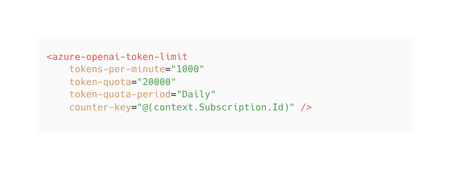
We’re happy to announce new features coming to Azure API Management enhancing your experience with GenAI APIs. Our latest release brings expanded support for GPT-4 models, including text and image-based input, across all GenAI Gateway capabilities. Additionally, we’re expanding our token limit policy with a token quota capability to give you even more control over your token consumption. Token quota This extension of the token limit policy is designed to help you manage token consumption more effectively when working with large language models (LLMs). Key benefits of token quota: Flexible quotas: In addition to rate limiting, set token quotas on an hourly, daily, weekly, or monthly basis to manage token consumption across clients, departments or projects. Cost management: Protect your organization from unexpected token usage costs by aligning quotas with your budget and resource allocation. Enhanced visibility: In combination with emit-token-metric policy, track and analyze token usage patterns to make informed adjustments based on real usage trends. With this new capability, you can empower your developers to innovate while maintaining control over consumption and costs. It’s the perfect balance of flexibility and responsible consumption for your AI projects. Learn more about token quota in our documentation. GPT4o support GPT-4o integrates text and images in a single model, enabling it to handle multiple content types simultaneously. Our latest release enables you take advantage of the full power of GPT-4o with expanded support across all GenAI Gateway capabilities in Azure API Management. Key benefits: Cost efficiency: Control and attribute costs with token monitoring, limits, and quotas. Return cached responses for semantically similar prompts. High reliability: Enable geo-redundancy and automatic failovers with load balancing and circuit breakers. Developer enablement: Replace custom backend code with built-in policies. Publish AI APIs for consumption. Enhanced governance and monitoring: Centralize monitoring and logs for your AI APIs. Phased rollout and availability We’re excited about these new features and want to ensure you have the most up-to-date information about their availability. As with any major update, we’re implementing a phased rollout strategy to ensure safe deployment across our global infrastructure. Because of that some of your services may not have these updates until the deployment is complete. These new features will be available first in the new SKUv2 of Azure API Management followed by SKUv1 rollout towards the end of 2024. Conclusion These new features in Azure API Management represent our step forward in managing and governing your use of GPT4o and other LLMs. By providing greater control, visibility and traffic management capabilities, we’re helping you unlock the full potential of Generative AI while keeping resource usage in check. We’re excited about the possibilities these new features bring and are committed to expanding their availability. As we continue our phased rollout, we appreciate your patience and encourage you to keep an eye out for the updates.2.1KViews1like0Comments