system center
251 Topicsdeployment script fails with division through zero when deploying
I created an installation script with this batch line: setup.exe -s -l1031 -f1".\Provi75inst.iss" This is put into a install.bat file that gets deployed with the software package. I tested it with admin-rights and the software installs fine. When I depoloy it through system center and run it in my softwarecenter, I get this error: 0xC0000094 (-1073741676) I researched that it is a "division through zero" error. What the heck. Does anyone know what is going on here? Is there a difference running the installation in SYSTEM context? Due to company restrictions I can't use PSEXEC to verify this. Any idea?96Views0likes0Comments
Unable to patch Windows Server 2025/24H2
Windows updates will not display in software center for 2025/24H2 clients. Currently running SCCM version 2503 hotfix rollup KB32851084. SCCM client version on test server is 5.00.9135.1013. Test server OS is 24H2 build 2600.2894. I have verified that the 24H2 product is enabled in the software update point configuration and within the ADR. ADR preview shows the 24H2 update (KB5068861). I see KB5068861 under the deployments tab of the test server device. I have a daily maintenance window on the collection, and this shows on the test client within "installation status -->upcoming" tab in software center. I do realize that this hotfix rollup included a fix for 2025 OS. Windows Server 2025 updates use the incorrect Maximum run time value in the properties for the software update component. The value can lead to update installations being incorrectly canceled. I did change the maximum run time for KB5068861 from 10 minutes to 60 minutes. Could this be a metadata related issue with the existing KB that is currently downloaded to SCCM (via WSUS)? I hope I'm not missing something obvious but do welcome an easy resolution if that's the case. Thanks for any suggestions or troubleshooting suggestions.895Views0likes0Commentsneed help with a problem related to the system center
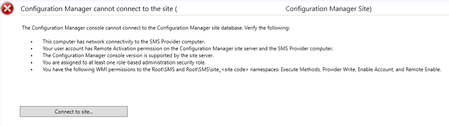
This problem started after the September database server update. I can't access the system center interface to view reports, see devices, check updates, track device status, etc. When I try to open it, I see the attached image. Has anyone else experienced this problem and resolved it? What is the solution for this issue?114Views0likes0Comments
Cannot update to Update Rollup 3 for System Center 2022
Hi, I tried update my DPM 2022 to the latest version. I tried also via Windows Update and manually but both method is unsuccessful. When I tried windows update method I got the following error message: There were some problems installing updates, but we'll try again later. If you keep seeing this and want to search the web or contact support for information, this may help: (0x80070643) For manually update I run this package but the setup wizard didn't show up: dataprotectionmanager-kb5059073_ce4e4e4b8dd358bd0b79e77235e9945dc96131fa.exe I restarted the server as recommended by Microsoft and tried again but not helped for me. My dpm setup: Virtual Machine Windows Server 2022 Standard Language: English Region: Hungarian728Views2likes3Comments
Orchestrator 2025 Security Credentials Problem
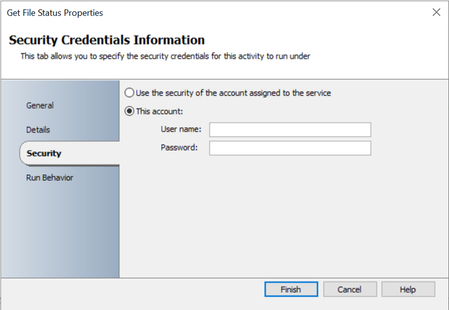
Hi, I’m experiencing an issue in SCO 2025 that has occurred across three different installations. In the Text File Management and File Management IPs, I’m unable to save the security credentials information for the activities. In other activities, such as Get Service Status, it works as expected. If I enter the account information, click Finish, and then reopen the properties, the fields are empty. As a result, the activity runs using the service account specified for the Orchestrator Runbook Service. Has anyone else experienced the same issue, or could there be something wrong with my installations? Get file status: Get service status:123Views0likes0CommentsAll Clients Showing with Question Mark in MECM Console - ResourceID Issue
All of a sudden (2 weeks ago) all my MECM Clients (~ 4000) in MECM 2409 are showing with a question mark (?) in the console and no values in Last Online Time, Last Activity or HeartBeatDDR. Upon investigation in the statesy.log file on our single site server we see the following message for all clients: SQL MESSAGE: dbo.spProcessStateReport - The record for machine MYCLIENT (GUID:CF5413C8-1DA7-450D-9243-33DB539DE8FF) was not found in the database. SMS_STATE_SYSTEM 24/09/2025 10:36:45 15356 (0x3BFC) We then ran MS SQL profiler and see that this external CLR stored proceedure checks for the existince of the client in the SQL view vLocalSystemIDXRef. This view is defined as follows: create view [dbo].[vLocalSystemIDXRef] as select MachineID, GUID from MachineIdGroupXRef where ArchitectureKey=5 and MachineID between dbo.fnGetSiteRangeStart() and dbo.fnGetSiteRangeEnd() The issue is that all clients are actually in the underlying table MachineIdGroupXRef but due to the filter dbo.fnGetSiteRangeStart() and dbo.fnGetSiteRangeEnd() they are not part of the view. The reason is their ResourceID is only 4 digits and the value returend from fnGetSiteRangeStart is 16777216. Q: How could the clients be getting this 4-digit resourceID all of a sudden? We have made no chnagesto MECM (no upgrades, DB restores etc. ).114Views0likes0CommentsSystem Center 2022 Update Rollup 3
We’re pleased to announce Update Rollup 3 (UR3) for System Center 2022. This release continues our commitment to stability, security, and platform currency across on‑premises datacenter operations, with targeted fixes and compatibility improvements for Operations Manager, Service Manager, Virtual Machine Manager, and Orchestrator. Details below. Virtual Machine Manager Support for additional Guest OSes & UX improvements Added Windows Server 2025 guest OS support Expanded Linux guest OS coverage: Ubuntu 24.04, RHEL 9, Debian 12, Rocky Linux 8 & 9. Availability Sets are now listed alphabetically to streamline selection. Storage provider security hardening Secure‑by‑default: Adding new storage providers now uses HTTPS by default. Learn more: Update Rollup 3 for System Center 2022 Virtual Machine Manager. Operations Manager Operations & Web Console are more stable since multiple issues are fixed such as console crashes, dashboard performance, favorite report issue. Addressed failures in workflows that use WMIProbe, ensuring the probe correctly falls back and executes. Restored Microsoft Teams notification functionality for environments impacted after UR2. Learn more: Update Rollup 3 for System Center 2022 Operations Manager. Service Manager Platform Stability on New CPUs/OS Builds Eliminated MonitoringHost instability observed on newer processors/OS builds and addressed a GroupCalc‑related crash scenario. Multiple Bug fixes on Self‑Service Portal & Knowledge Article Rendering Note: UR3 can be applied even where UR2 installation had failed, and it includes the bug fixes and enhancements that shipped with UR2. Learn more: Update Rollup 3 for System Center 2022 Service Manager. Orchestrator Platform Updates .NET 8 (LTSC) is now supported. Group Managed Service Accounts (gMSA) are supported. Security improvements Support for TLS 1.3 protocol is enabled. Learn more about bugs fixes: Update Rollup 3 for System Center 2022 Orchestrator We are committed to delivering new features and quality updates with UR releases at regular cadence. For any feedback and queries, you can reach us at systemcenterfeedback@microsoft.com.1.1KViews1like4Comments
Fetch Email of Login User In System Context
Dear Team, We are working on retrieving email address of the user joined to Entra ID from Entra-joined Windows devices, specifically while running in a system context.The whoami /upn command successfully returns the joined user’s email address in a user context, but it does not work in a system context, particularly when using an elevated terminal via the psexec utility.We also tested the dsregcmd /status command; however, in a system context, the User Identity tab in the SSO State section only appears when there is an error in AzureAdPrt. Under normal, healthy operating conditions, this command does not provide the user identity or the full domain username. We would greatly appreciate guidance on how to retrieve the Entra ID joined user’s email address in a system context, especially from those with prior experience in this area. Thank you for your support.Solved472Views0likes3Comments