synchronization
2 Topics
Outlook on Windows 11: when local sync re‑contaminates global settings
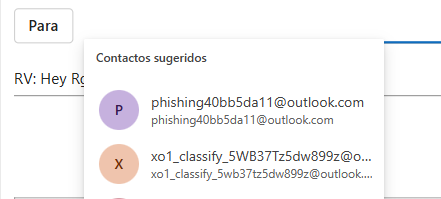
Introduction I want to share a finding that I believe is concerning: the Outlook client on Windows 11 can act as a vector of “re‑contamination” of local data, reactivating settings that were already disabled in the cloud. While this is not malware in the strict sense, the behavior is contradictory enough that it undermines privacy and user trust. Context of the issue To avoid any doubt, I disabled the Expanded People Suggestions option in all three possible places: Outlook client on Windows 11. Outlook Web. Global Privacy settings in my Microsoft Account. In every case, the option was disabled and the exported configuration file appeared empty, confirming that the deletion had been applied correctly. Cross‑account contamination → when another account was added to the Outlook client, the contaminated suggestions were transferred and appeared in that account as well, even though those addresses had never been used there. Evidence observed Empty file in the cloud → confirms that the deletion was effective. Desktop client re‑sync → uploads obsolete local data and reactivates the option. Result → the global configuration once again shows suggestions that had already been disabled. Injected email addresses → the suggestions included addresses that I have never used or contacted. These appear to have been introduced by third parties or internal contamination, not by my own activity. Cross‑account contamination → when another account was added to the Outlook client, the contaminated suggestions were transferred and appeared there too. Implications The Outlook client does not respect privacy preferences set in the cloud. Local data takes precedence over global settings, which contradicts modern synchronization logic. The presence of never‑used, injected email addresses raises serious concerns about data integrity and possible external contamination. This may affect many users, not just an isolated case. Reflection This behavior creates the perception that the client acts like intrusive software: even if the user deletes data in the cloud, the client “resurrects” it from its local cache. In practical terms, it is a form of re‑contamination that compromises confidence in synchronization between client and server. The fact that injected addresses appear in suggestions makes the issue even more problematic, as it suggests external influence beyond the user’s own history. Conclusion The cloud should be the source of truth. If a user disables data in Outlook Web and in the global Microsoft Account settings, no local client should have the ability to reactivate it. This finding deserves attention because it directly affects privacy, data integrity, and the coherence of the Microsoft ecosystem. Invitation Has anyone else observed this behavior in Outlook for Windows 11? Have you seen deleted cloud settings reappear after reinstalling or re‑synchronizing the client, or injected email addresses that were never used showing up in suggestions?302Views0likes1Comment
New Outlook for Mac – Persistent IMAP Sync, Search & Attachment Failures (MS Support Unresolved)
I am reporting a persistent, reproducible issue with New Outlook for Mac that remains unresolved despite extensive troubleshooting, including two Microsoft Support cases. I am seeking a technical investigation and a permanent solution, not another repetition of basic troubleshooting steps. 1. System configuration Application: Microsoft Outlook for Mac (New Outlook) Current version: 16.114.4 (tel:26110224); previously 16.114.3 Operating system: macOS Tahoe 26.7.2 (up to date) Email provider: https://mailbox.org/ Account type: IMAP (not Microsoft Exchange / Microsoft 365) VPN: Not in use 2. Problems experienced The following issues occur repeatedly: Email search fails: Search results remain stuck on grey loading placeholders indefinitely. Attachments cannot be downloaded: Both old and newly received attachments fail, displaying either “Downloading attachments from server…” indefinitely or the message: “Attachments need to be downloaded again from the server. Please try again later.” Extremely slow mailbox loading and synchronization, affecting normal email use. Delays when sending emails, also documented during Microsoft Support troubleshooting. The problems are intermittent but recurring, making Outlook unreliable for everyday use. Important: The https://mailbox.org/ webmail interface works correctly, including searching emails and downloading attachments. Microsoft Support also reviewed comparisons with Apple Mail and Legacy Outlook and concluded that the issue appears specific to New Outlook for Mac. 3. Troubleshooting already performed The following measures have already been attempted, without a lasting resolution: Created two new Outlook profiles. Removed and re-added the affected IMAP account. Performed Outlook account remapping. Reset the Outlook account and rebuilt local synchronization data. Re-synchronized the mailbox and allowed sufficient time for completion. Completely uninstalled and reinstalled Outlook, followed by fresh account configuration. Verified internet connectivity and basic account functionality. Compared New Outlook with Legacy Outlook, webmail and Apple Mail, as documented in Microsoft Support’s case notes. Verified Outlook and macOS versions and checked for updates. Retested after account resets, reinstallation and reconfiguration. Result: The account reset temporarily restored email search, but attachments continued to fail. Shortly afterward, search stopped working again. Both problems persist even with newly received messages. A separate macOS user profile was additionally suggested by Microsoft Support, but I have no confirmed result from that test. 4. Microsoft Support involvement I have contacted Microsoft Support repeatedly under different case numbers During the latest interaction on November 6, 2026, Microsoft Support: Reviewed the previous case history and confirmed that extensive troubleshooting had already been performed. Acknowledged that the problem appears isolated to New Outlook for Mac. Confirmed that available troubleshooting at their support level had been exhausted. Could not offer a permanent resolution or a specific software fix. Recommended posting the issue in the Microsoft Tech Community and submitting feedback through the Microsoft Feedback Portal. Similar IMAP-related problems have also been discussed publicly since at least April 2026, without an identified resolution applicable to my case. 5. Request to Microsoft Outlook engineering / product specialists Given the extensive unsuccessful troubleshooting, I would appreciate specific answers to the following: Is this a known bug affecting IMAP accounts in New Outlook for Mac? Is there an identified issue with IMAP synchronization, attachment retrieval or the search backend? Are there diagnostic logs, error codes or targeted tests that would help engineering identify the root cause? Is there a confirmed fix, reliable workaround or planned software update addressing these symptoms? Can this issue be escalated to the Outlook for Mac engineering team, rather than restarting standard first-level troubleshooting? This issue has already consumed considerable time across multiple troubleshooting attempts and Microsoft Support interactions, while essential Outlook functionality remains unavailable. I would greatly appreciate a technically substantiated response, a concrete escalation path and, ideally, a permanent resolution. Thank you.180Views2likes2Comments