surface hub 3
5 TopicsMay 2026 Status – HDMI & Miracast Screen Share
Hello Microsoft team, After moving to Surface 3 with MTR, honestly, the experience hasn’t been as good as what we had with Surface Hub. Screen sharing is one of the main things we rely on daily, and right now HDMI and Miracast are not working the way we expected. It’s quite a step back for us. We really hope you can help bring back these functions. If it can’t be done directly in the MTR interface, at least allow it through the Windows side. This is important for our daily usage, so please don’t ignore this. We’d really appreciate your support on this.714Views0likes1Comment
Miracast not working on Surface Hub 3 (Windows 11 IoT mode)
Hi everyone, we’re currently experiencing issues with Miracast on our Surface Hub 3 devices when running in Windows 11 (IoT) mode. As far as we recall, Miracast used to work correctly in Windows 11 mode without any issues. We are also aware of the planned rollout for this functionality in MTR mode around May 2026. However, since this was already working for us in W11 mode, we’re wondering if something has recently changed that could have impacted this behavior. So far, we’ve tried all the usual troubleshooting steps, including: - Device reboots - Policy/configuration checks and changes - Full device reinstallation Unfortunately, none of these actions resolved the issue. Has anyone experienced something similar or is aware of recent changes that might explain this? Thanks in advance, Andrea400Views0likes0Comments
Provisioning does not add to MDM - Surface hub
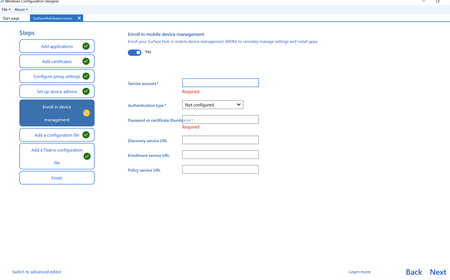
When using the Windows Configuration Designer to create a provisioning package I'm unsure what to add for the MDM devices. Some devices seem to enter the MDM and some don't. Unsure if it's the build on these devices. I've looked for documentation and can't find any for what credentials to use for the following on the Enrol in device management I need to know what to enter for the following fields please. So that I can insure these devices populate into Intune. I don't know why MS make it so hard for this as the setup of the older 2s devices was much easier. Thanks Michael206Views0likes0Comments
Safe to delete the Surface Hub 3 "admin" account?
We manage our Surface Hubs with Teams Rooms Pro (and Intune where needed). The Windows default local administrator account is disabled during enrollment by the Deployment policy. Intune is configured to add an Entra group to the Local Administrators group, whose membership we manage with an Identity Governance policy. We are all set for administration. And if we were ever to be locked out of a Surface Hub, we would re-image it and begin again. During the Out-of-box experience, a new administrator account named ".\admin", with a well-known simple three letter password, is added to Surface Hub 3 devices. Presumably, the account is added a "convenience". All my testing and research has shown that this account is not needed or used. Is it safe to delete ".\admin" account? Or later, will I find Microsoft expected to use that account in some way? Thanks, in advance.349Views0likes0CommentsHelp Surface Hub 3 Smart Cam Auto-frame
Hi Everyone, I am new to the Tech Community and I'm reaching out to seek some insights regarding an issue we've encountered with the Surface Hub 3 Smart Cam. We've noticed that when using the camera in MTR mode, the auto-focus feature seems to be disabled. This has been somewhat puzzling as it works as intended in W11 mode. We've already tried rebooting and resetting the Hub but the issue persists. Thank you in advance for your help.Solved2.9KViews0likes8Comments