suggestions
109 Topics
Verbose Status Improvement
Hi, I had a idea where for verbose status, you should make it so if its set to 2, it will display the verbose messages under shutdown or restart, example: Restarting (Stopping service: Windows Modules Installer) or make it next to it like Restarting (Stopping Service: Windows Modules Installer)221Views0likes3CommentsSuggestions For Edge From My Experience (Microsoft, Please Listen 🤞
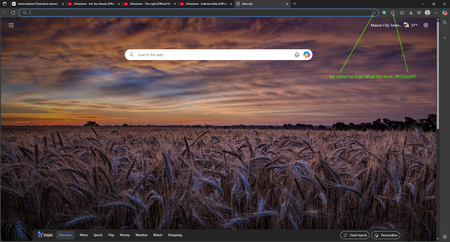
What's up, Microsoft Community! 👋 I literally don't remember how long ago it was when I posted asking on how to join the Edge Insider Program, but things have changed for me a little since then, & but my love for tech, & innovation remains, as it always will. So, without further ado, let's jump right into this post, since I have some suggested upgrades & changes I would like to see be made for the pc version of Edge, based on my experience with it in the last several years... And also, the post itself will be divided into 2 categories: Privacy, & Improvements. Instead of typing out the longest novel in recorded history about my relationship with Edge, I will simply sum it up: It's a great browser, & it most certainly rivals Chrome in a number of ways, & despite some of its current flaws, I do enjoy using it. But, there are some things I would like to see changed, which I will lay out for y'all. 👇 PRIVACY: Compared to the likes of Google Chrome, even though Microsoft still does collect a certain amount of data, in order to provide the Microsoft-based services to it's users, I personally tend to consider the privacy situation to be slightly better than Chrome, just not as invasive. Especially, given that there are literally settings you can actually toggle on or off in order to enhance your privacy. And I could have laid out some of the privacy enhancements I would like to see improved within, in a great amount of detail, but I'm not always the best at coming up with the right words to say at the right times. 🙄🤦♂️😂 So, I instead got the opinion of an AI chatbot I use more often, in order to brainstorm ideas for improving Edge's privacy. And you can see my full chat interaction in this recording, courtesy of this publicly accessible Google Drive link: https://drive.google.com/file/d/1HtPXsMtOv8l3GyiNMS1Wg_pnWdXPnN6U/view?usp=sharing (By the way, if any of you tend to agree with these improvements, be sure to like the post, or upvote, if that's even possible. 😉👍) IMPROVEMENTS: 1. In my own personal opinion, having a translator baked right into your browser is WAY better than nothing at all, even if it sucks. But, that leads me to an area where I feel like Microsoft might want to re-think their strategy: The Microsoft Translator is quite frankly, not that good at all compared to Google Translate, or even DeepL Translate- the latter of which I consider to be an "underdog" type of company compared to the bigger players out there, & they pride themselves on their quality translations, even though their list of supported languages is still expanding, as is their business, as we speak. (And I even confirmed this myself by testing the Microsoft Translator out on a few foreign websites I know of, & also by consulting with four different AI chatbots, & they all said that compared to its competition out there, it just isn't cutting the mustard, which is quite embarrassing.) However, I would like to pitch a wild idea to Microsoft: Why not just scrap the built-in translation, for DeepL, while showing them some love & support for their hard work, & commitment? 🤷♂️😏 2. For this part, I decided to combine two of the complaints I have into one, since they BOTH have to do with the appearance within the browser. And I know that this may or may not align with some people out there, but the point I'm highlighting is that this isn't what I prefer. These two complaints I have include: Not having the ability to hide the "Add this page to favorites", AND the "Extensions" buttons from the toolbar, which is right next to the address bar. (And you can see what I mean by viewing the included screenshot.) I do happen to recall that Microsoft used to have the option to hide the extension button itself from the toolbar, but for whatever reason(s), that isn't really a thing as of right now, & I even checked this within the settings, & by making sure that I have the latest browser version, which I do. Still, to say that I'm disappointed would be a gross understatement, to say the least, but I REALLY hope that Microsoft listens to this bit of feedback, & takes the right course of action, here... 🫤🥺🤞🙏 3. By now, I'm sure a good number of you, who happen to be tech-savvy, probably know that Microsoft Edge IS considered to be faster, & more resource efficient compared to Opera, or even Google Chrome, for instance. But, there is 1 browser which I use, & that I genuinely think Microsoft could take some serious inspiration from, & it's Brave. From what I have observed myself, & also going by other data online, there is no doubt about it that Brave is markedly more efficient compared to Edge. And it comes down to how Brave handles privacy within their browser, as a whole, but also from some architectural tweaks to the underlying Chromium code itself that makes Brave, quite frankly, noticeably better than Edge, in this case. (Now, before any of you bother to take up your lighted torches, pitchforks, & prepare to roast me, just hear me out that I'm not actually playing favorites, here. But, I do think there is room for improvement, on this front.) 4. One incredibly useful feature that I absolutely LOVE in modern day web browsers is being able to hover over my tabs, when needed, or in case I ever feel the need to get a quick check while I am multitasking. But, while the functionality within Edge is pretty decent, the accuracy isn't NEARLY as good as compared to what Opera uses, which in my opinion, somehow has the best implementation of this technology, however they pulled this off. (Seriously, folks. I'm not even joshing you, here. Try doing it within with Opera, Opera Air, or even Opera GX, for that matter, & I'm sure you will totally see what I mean.) Now, while I would never in my life, ask for one company to copy another's, or steal a patent, or whatever, this is another area where I think Edge can be improved in, so, I will keep my eyes & ears pealed for future releases down the line, or even if Microsoft DOES end up seeing my post, here. 5. And onto my final complaint- earlier on, I noticed that Edge did have the Secure Network in preview/beta, & while accessing foreign websites, or even watching movies online, it really came in handy for me. But now, it has been removed from the toolbar, & only the toggle for it exists in the settings. So, Microsoft, I hope you guys are working on refining this particular feature, & I hope you plan to bring it back soon. 🤞 Well, with all that being said, I hope this post gets noticed by y'all in the community, & that perhaps, it aligns with what others hope to see in future releases of Edge. If any of you happen to have any questions for me, or need additional details, feel free to drop me a line, or even comment on this post, & I will be happy to get back with you, & fill any of you in. Thanks in advance, everyone! 🙏🙇♂️😊339Views0likes0Comments[MS Edge Android] UI Glitch: Suggestions Misaligned in Bottom Search Bar Mode
Hi everyone! I'm experiencing a strange issue with the search suggestions when using bottom bar mode. In Microsoft Edge, there's a blank space between the input bar and the suggestions above it, as shown in the attached image (see the red line). Is anyone else seeing this bug? Any idea how to fix it? Thanks in advance383Views0likes1Commentoptional suggestion: new menu bar app for mac
i wish i could launch one of my edge profile (no matter from which edge) directly in the menu bar. so you create a profile launcher.app and then i can search a profile installed on my 4 browser, without need to launch a browser. at the moment we can do similar things once the browser is launched using the dock icon or using the sync icon or using the menu bar option inside edge. but there is still the limit that we can do it for one browser. we cannot search profiles installed on all 4 browser. plus every time you launch the browser, you open the last used profile. so we first need to close and then switch (which requires time). profile switching is slower in edge compared to google. now with this new app you would simply launch a profile inside an edge app, without launching the previous profile.5.1KViews2likes10CommentsUnicorn/Quiling Framework Implementation
I'm suggesting an Unicorn/Quiling Framework Implementation into future versions of Windows since this could allow all type of machines and their architectures (different architectures that are usually not compatible with for example arm architectures) to test, for example ARM64 versions of Windows on Intel/AMD machines and vise versa It could also allow Windows OS future development to add cross-architecture support of all architectures on any CPU (both Intel/AMDs and ARM CPUs) and any 64-bit versions of Windows 11/12 and so on. It would be nice if Microsoft would consider to think, add and allow us insiders to test this cross-architecture functionality in Windows. That is my kind suggestion for Microsoft that I think it would make Windows even more cool and architecture-universal and optimal for any 64-bit machine. It could increase performances and flexibility and much more stuff - and more and more users will happily pay to move to Windows to experience this cool feature built-in Windows core itself. My opinion is that it have big potential to become a big thing that will attract so much people and make Windows more and more capable of taking so much tasks and apps compiled on any architecture without needing to slow down PCs and taking so much free space since Windows doesn't need to run any VM to be able to execute softwares and libraries that are compiled for another architecture. It runs simply from the core level and it's more natively and faster than any Virtual Machines.416Views0likes0CommentsSeamless Android App Integration for Windows: A Game-Changer
I propose a game-changing feature: Seamless integration of Android apps into the Windows ecosystem. Here’s the vision: One-Click Conversion: - Developers import Android projects into Visual Studio. With a single click, their apps transform into the Appx Windows Store format. Google Play APIs Bridge: - Microsoft reimagines Google Play APIs in C# or .NET, making them accessible within Windows development tools. Cross-Platform Harmony: - Android apps run natively on Windows, leveraging Windows Runtime Environment. Direct Publishing: - Developers publish Android-converted apps directly to the Windows Store. **Challenges** API Translation: - Rewriting Google Play APIs for Windows. Runtime Adaptation: - Bridging Android’s runtime with Windows’ .NET. User Interface: - Adapting layouts and interactions. User Demand: - Many developers and users crave this integration. - It’s a win-win for both ecosystems. Let’s collaborate to turn this vision into reality! 🌟623Views1like0CommentsSS48: don't remove MacOS Mojave support on Edge, even if Google now announced to us that they will
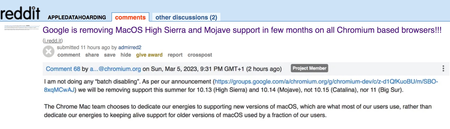
Suggestion (SS): 48 Classification: Browser Compatibility PRIORITY IN MY OPINION: 10 on a scale from 1 (low) to 10 (high) Few hours ago Senior Dev reported us the no interest of keeping MacOS Mojave support on Chrome. In 2 years they are removing the 2 best MacOS ever released, before Apple started to downgrade features in MacOS (and obviously adding some other too), especially related to all backup workflows, that now are more complex, but even to permissions and multiple other things. We reported the new downgrade for external drives implemented in MacOS 12/13 https://old.reddit.com/r/appledatahoarding/comments/11ikj38/next_macos_downgrade_available_with_monterey/, but this is not the point now. We explained already https://bugs.chromium.org/p/chromium/issues/detail?id=1413784&q=sierra%20chrome&can=1 why they should keep support for such MacOS, and later again https://bugs.chromium.org/p/chromium/issues/detail?id=1322548#c68 Now the point is: we are trying our best to revert such decision, like we wrote https://old.reddit.com/r/appledatahoarding/comments/11jufgo/google_chrome_support_will_end_in_few_months_for/, but it's important that other chromium based devs know about such problematic and evaluate to continue support, if this is technically possible. Remember that MacOS 10.14 is not like all other MacOS released by Apple, so removing such MacOS is not like removing Catalina, High Sierra etc. If there are question why MacOS Mojave support is so important, just write directly to us. We already experienced the direct consequence of removing MacOS on Chromium on all browsers and apps few months ago with Sierra. Please keep in mind that this is not just related to Chrome, but even Chromium based browsers, Mac Apps using Electron, and all other Mac Apps too (because if one is starting to remove support, especially big brands, the other will follow much easier*). So be open with your mind and don't write "i'm not using Chrome or Mojave, doesn't matter for me". There is the possibility that Google maybe know about some changes with Xcode, like we wrote https://old.reddit.com/r/appledatahoarding/comments/11jho7y/meanwhile_the_batch_deletion_of_other_2_macos_by/ but probably is not the case. If this is true, then the situation would be much worse, if now Apple really decides to remove multiple MacOS, like we previously reported with out https://old.reddit.com/r/appledatahoarding/comments/114o7zt/remember_2023_will_be_the_most_crucial_year_of/ *Keep in mind that almost 70%+ of all browsers available for MacOS (80+) are Chromium based. ------------ In case you will not doing that and Google will not keep support for Mojave, please provide directly link to download a browser version compatible with up to MacOS Sierra and one up to MacOS Mojave, instead of just download last version. Avoid auto update of the app too. So don't install new incompatible app automatically, which make no sense at all.2.3KViews0likes0CommentsGitHub Copilot Update: New AI Model That Also Filters Out Security Vulnerabilities
GitHub Copilot has announced major updates to its AI model, resulting in significant improvements to the quality and responsiveness of code suggestions. The updated Codex model has led to a large-scale improvement in the quality of code suggestions and a reduction in the time it takes to serve those suggestions to users. In addition, the new vulnerability filtering system uses advanced AI models to detect insecure coding patterns in real-time, making suggestions more secure. These updates are available to all users of GitHub Copilot and are free to students with the GitHub Students Developer Pack.23KViews2likes0CommentsAdding a Translator Widget to the Tools Section of the Sidebar
Feature Request The Tools section of the Sidebar has almost every widget one would need, even including a handy dictionary. However, it is missing at least one additional tool: the translator! It seems that the widgets inside the Tools section are the same ones displayed when you search for them with Bing, so adding the translator should be easy. The translator is a powerful tool and having it alongside these other tools is necessary! An Additional Thought (it may be related, but is really a separate idea) Depending on how the dictionary widget works, it might be a cool idea to be able to select a lookup language. If I have a word in another language and I want the definition, it would be convenient to just ask the dictionary for the definition of that word (and be able to tell the dictionary the language to which it belongs); as opposed to having to use the translator (which isn't included in the Tools section) to get the word in English, then going back to the dictionary to get the definition.2.4KViews0likes0Comments
Add tab/page to group on other page
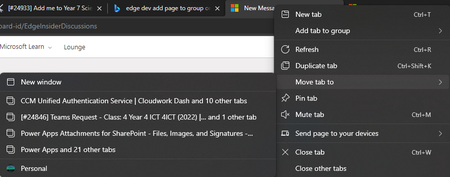
Classification: TABS PRIORITY IN MY OPINION: 5 on a scale from 1 (low) to 10 (high) At the moment, it is great that tabs can be moved to a new window, other windows in profile and other profiles. There is also an option to add tabs to groups. However, this only applies within the current window. It would be ideal to be able to move tabs to another group on a different window (but in the same profile).864Views0likes0Comments