storage
2 TopicsPremium SSD v2 Is Now Generally Available for Azure Database for PostgreSQL
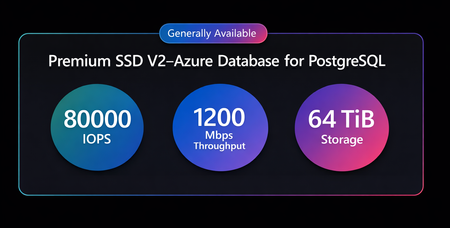
We are excited to announce the General Availability (GA) of Premium SSD v2 for Azure Database for PostgreSQL flexible server. With Premium SSD v2, you can achieve up to 4× higher IOPS, significantly lower latency, and better price-performance for I/O-intensive PostgreSQL workloads. With independent scaling of storage and performance, you can now eliminate overprovisioning and unlock predictable, high-performance PostgreSQL at scale. This release is especially impactful for OLTP, SaaS, and high‑concurrency applications that require consistent performance and reliable scaling under load. In this post, we will cover: Why Premium SSD v2: Core capabilities such as flexible disk sizing, higher performance, and independent scaling of capacity and I/O. Premium SSD v2 vs. Premium SSD: A side‑by‑side overview of what’s new and what’s improved. Pricing: Pricing estimates. Performance: Benchmarking results across two workload scenarios. Migration options: How to move from Premium SSD to Premium SSD v2 using restore and read‑replica approaches. Availability and support: Regional availability, supported features, current limitations, and how to get started. Why Premium SSD v2? Flexible Disk Size - Storage can be provisioned from 32 GiB to 64 TiB in 1 GiB increments, allowing you to pay only for required capacity without scaling disk size for performance. High Performance -Achieve up to 80,000 IOPS and 1,200 MiB/s throughput on a single disk, enabling high-throughput OLTP and mixed workloads. Adapt instantly to workload changes: With Premium SSD v2, performance is no longer tied to disk size. Independently tune IOPS and throughput without downtime, ensuring your database keeps up with real-time demand. Free baseline performance: Premium SSD v2 includes built-in baseline performance at no additional cost. Disks up to 399 GiB automatically include 3,000 IOPS and 125 MiB/s, while disks sized 400 GiB and larger include up to 12,000 IOPS and 500 MiB/s. Premium SSD v2 vs. Premium SSD: What’s new? Pricing Pricing for Premium SSD v2 is similar to Premium SSD, but will vary depending on the storage, IOPS, and bandwidth configuration set for a Premium SSD v2 disk. Pricing information is available on the pricing page or pricing calculator. Performance Premium SSD v2 is designed for IO‑intensive workloads that require sub‑millisecond disk latencies, high IOPS, and high throughput at a lower cost. To demonstrate the performance impact, we ran pgbench on Azure Database for PostgreSQL using the test profile below. Test Setup To minimize external variability and ensure a fair comparison: Client virtual machines and the database server were deployed in the same availability zone in the East US region. Compute, region, and availability zones were kept identical. The only variable changed was the storage tier. TPC-B benchmark using pgbench with a database size of 350 GiB. Test Scenario 1: Breaking the IOPS Ceiling with Premium SSD v2 Premium SSD v2 eliminates the traditional storage bottleneck by scaling linearly up to 80,000 IOPS, while Premium SSD plateaus early due to fixed performance limits. To demonstrate this, we configured each storage tier with its maximum supported IOPS and throughput while keeping all other variables constant. Premium SSD v2 achieves up to 4x higher IOPS at nearly half the cost, without requiring large disk sizes. Note: Premium SSD requires a 32 TiB disk to reach 20K IOPS, while SSD v2 achieves 80K IOPS even on a 160 GiB disk though we used 1 TiB disk in this test for a bigger scaling factor for pgbench test. We ran pgbench across five workload profiles, ranging from 32 to 256 concurrent clients, with each test running for 20 minutes. The results go beyond incremental improvements and highlight a material shift in how applications scale with Premium SSD v2. Throughput Scaling As concurrency increases, Premium SSD quickly reaches its IOPS limits while Premium SSD v2 continues to scale. At 32 clients: Premium SSD v2 achieved 10,562 TPS vs 4,123 TPS on Premium SSD representing a 156% performance improvement. At 256 clients: At higher load, Premium SSD v2 achieved over 43,000 TPS representing a 279% improvement compared to the 11,465 TPS observed on Premium SSD. Latency Stability Throughput is an indication of how much work is done while latency reflects how quickly users experience it. Premium SSD v2 maintains consistently low latency even as workload increases. Reduced Wait Times: 61–74% lower latency across all test phases. Consistency under Load: Premium SSD latency increased to 22.3 ms, while Premium SSD v2 maintained a latency of 5.8 ms, remaining stable even under peak load. IOPS Behavior The table below illustrates the IOPS behavior observed during benchmarking for both storage tiers. Dimension Premium SSD Premium SSD v2 IOPS Lower baseline performance, Hits limits early ~2× higher IOPS at low concurrency, Up to 4× higher IOPS at peak load IOPS Plateau Throughput stalls at ~20k IOPS for 64 clients -256 clients Scales from ~29k IOPS (32 clients) to ~80k IOPS (256 clients) Additional Clients Adding clients does not increase throughput Additional clients continue to drive higher throughput Primary Bottleneck Storage becomes the bottleneck early No single bottleneck observed Scaling Behavior Stops scaling early True linear scaling with workload demand Resource Utilization Disk saturation leaves CPU and memory underutilized Balanced utilization across IOPS, CPU, and memory Key Takeaway Storage limits performance before compute is fully used Unlocks higher throughput and lower latency by fully utilizing compute resources Test Scenario 2: Better Performance at same price At the same price point, Premium SSD v2 delivers higher throughput and lower latency than Premium SSD without requiring any application changes. To demonstrate this, we ran multiple pgbench tests using two workload configurations 8 clients / 8 threads and 32 clients / 32 threads with each run lasting 20 minutes. Results were consistent across all runs, with Premium SSD v2 consistently outperforming Premium SSD. Both configurations cost $578/month, the only difference is storage performance. Results: Moderate concurrency (8 clients) Premium SSD v2 delivered approximately 154% higher throughput (Transactions Per Second) than Premium SSD (1,813 TPS vs. 715 TPS), while average latency decreased by about 60% (from ~11.1 ms to ~4.4 ms). High concurrency (32 clients) The performance gap increases as concurrency grows, Premium SSD v2 delivered about 169% higher throughput than Premium SSD (3,643 TPS vs. ~1,352 TPS) and reduced average latency by around 67% (from ~26.3 ms to ~8.7 ms). IOPS Behavior In the 8‑client, 8‑thread test, Premium SSD reached its IOPS ceiling early, operating at 100% utilization, while Premium SSD v2 retained approximately 30% headroom under the same workload delivering 8,037 IOPS vs 3,761 IOPS with Premium SSD. When the workload increased to 32 clients and 32 threads, both tiers approached their IOPS limits however, Premium SSD v2 sustained a significantly higher performance ceiling, delivering approximately 2.75x higher IOPS (13,620 vs. 4,968) under load. Key Takeaway: With Premium SSD v2, you do not need to choose between cost and performance you get both. At the same price, applications run faster, scale further, and maintain lower latency without any code changes. Migrate from Premium SSD to Premium SSD v2 Migrating is simple and fast. You can migrate from Premium SSD to Premium SSD v2 using the two strategies below with minimal downtime. These methods are generally quicker than logical migration strategies, such as exporting and restoring data using pg_dump and pg_restore. Restore from Premium SSD to Premium SSD v2 Migrate using Read Replicas When migrating from Premium SSD to Premium SSD v2, using a virtual endpoint helps keep downtime to a minimum and allows applications to continue operating without requiring configuration changes after the migration. After the migration completes, you can stop the original server until your backup requirements are met. Once the required backup retention period has elapsed and all new backups are available on the new server, the original server can be safely deleted. Region Availability & Features Supported Premium SSD v2 is available in 48 regions worldwide for Azure Database for PostgreSQL – Flexible Server. For the most up‑to‑date information on regional availability, supported features, and current limitations, refer to the official Premium SSD v2 documentation. Getting Started: To learn more, review the official documentation for storage configuration available with Azure Database for PostgreSQL. Your feedback is important to us, have suggestions, ideas, or questions? We would love to hear from you: https://aka.ms/pgfeedback.338Views2likes0CommentsApril 2025 Recap: Azure Database for PostgreSQL Flexible Server
Hello Azure Community, April has brought powerful capabilities to Azure Database for PostgreSQL flexible server, On-Demand backups are now Generally Available, a new Terraform version for our latest REST API has been released, the Public Preview of the MCP Server is now live, and there are also a few other updates that we are excited to share in this blog. Stay tuned as we dive into the details of these new features and how they can benefit you! Feature Highlights General Availability of On-Demand Backups Public Preview of Model Context Protocol (MCP) Server Additional Tuning Parameters in PG 17 Terraform resource released for latest REST API version General Availability of pg_cron extension in PG 17 General Availability of On-Demand Backups We are excited to announce General Availability of On-Demand backups for Azure Database for PostgreSQL flexible server. With this it becomes easier to streamline the process of backup management, including automated, scheduled storage volume snapshots encompassing the entire database instance and all associated transaction logs. On-demand backups provide you with the flexibility to initiate backups at any time, supplementing the existing scheduled backups. This capability is useful for scenarios such as application upgrades, schema modifications, or major version upgrades. For instance, before making schema changes, you can take a database backup, in an unlikely case, if you run into any issues, you can quickly restore (PITR) database back to a point before the schema changes were initiated. Similarly, during major version upgrades, on-demand backups provide a safety net, allowing you to revert to a previous state if anything goes wrong. In the absence of on-demand backup, the PITR could take much longer as it would need to take the last snapshot which could be 24 hours earlier and then replay the WAL. Azure Database for PostgreSQL flexible server already does on-demand backup behind the scenes for you and then deletes it when the upgrade is successful. Key Benefits: Immediate Backup Creation: Trigger full backups instantly. Cost Control: Delete on-demand backups when no longer needed. Improved Safety: Safeguard data before major changes or refreshes. Easy Access: Use via Azure Portal, CLI, ARM templates, or REST APIs. For more details and on how to get started, check out this announcement blog post. Create your first on-demand backup using the Azure portal or Azure CLI. Public Preview of Model Context Protocol (MCP) Server Model Context Protocol (MCP) is a new and emerging open protocol designed to integrate AI models with the environments where your data and tools reside in a scalable, standardized, and secure manner. We are excited to introduce the Public Preview of MCP Server for Azure Database for PostgreSQL flexible server which enables your AI applications and models to talk to your data hosted in Azure Database for PostgreSQL flexible servers according to the MCP standard. The MCP Server exposes a suite of tools including listing databases, tables, and schema information, reading and writing data, creating and dropping tables, listing Azure Database for PostgreSQL configurations, retrieving server parameter values, and more. You can either build custom AI apps and agents with MCP clients to invoke these capabilities or use AI tools like Claude Desktop and GitHub Copilot in Visual Studio Code to interact with your Azure PostgreSQL data simply by asking questions in plain English. For more details and demos on how to get started, check out this announcement blog post. Additional Tuning Parameters in PG17 We have now provided an expanded set of configuration parameters in Azure Database for PostgreSQL flexible server (V17) that allows you to modify and have greater control to optimize your database performance for unique workloads. You can now tune internal buffer settings like commit timestamp, multixact member and offset, notify, serializable, subtransaction, and transaction buffers, allowing you to better manage memory and concurrency in high-throughput environments. Additionally, you can also configure parallel append, plan cache mode, and event triggers that opens powerful optimization and automation opportunities for analytical workloads and custom logic execution. This gives you more control for memory intensive and high-concurrency applications, increased control over execution plans and allowing parallel execution of queries. To get started, all newly modifiable parameters are available now through the Azure portal, Azure CLI, and ARM templates, just like any other server configuration setting. To learn more, visit our Server Parameter Documentation. Terraform resource released for latest REST API version A new version of the Terraform resource for Azure Databases for PostgreSQL flexible server is now available, this brings several key improvements including the ability to easily revive dropped databases with geo-redundancy and customer-managed keys (Geo + CMK - Revive Dropped), seamless switchover of read replicas to a new site (Read Replicas - Switchover), improved connectivity through virtual endpoints for read replicas, and using on-demand backups for your servers. To get started with Terraform support, please follow this link: Deploy Azure Database for PostgreSQL flexible server with Terraform General Availability of pg_cron extension in PG 17 We’re excited to announce that the pg_cron extension is now supported in Azure Database for PostgreSQL flexible server major versions including PostgreSQL 17. This extension enables simple, time-based job scheduling directly within your database, making maintenance and automation tasks easier than ever. You can get started today by enabling the extension through the Azure portal or CLI. To learn more, please refer Azure Database for PostgreSQL flexible server list of extensions. Azure Postgres Learning Bytes 🎓 Setting up alerts for Azure Database PostgreSQL flexible server using Terraform Monitoring metrics and setting up alerts for your Azure Database for PostgreSQL flexible server instance is crucial for maintaining optimal performance and troubleshooting workload issues. By configuring alerts, you can track key metrics like CPU usage and storage etc. and receive notifications by creating an action group for your alert metrics. This guide will walk you through the process of setting up alerts using Terraform. First, create an instance of Azure Database for PostgreSQL flexible server (if not already created) Next, create a Terraform File and add these resources 'azurerm_monitor_action_group', 'azurerm_monitor_metric_alert' as shown below. resource "azurerm_monitor_action_group" "example" { name = "<action-group-name>" resource_group_name = "<rg-name>" short_name = "<short-name>" email_receiver { name = "sendalerts" email_address = "<youremail>" use_common_alert_schema = true } } resource "azurerm_monitor_metric_alert" "example" { name = "<alert-name>" resource_group_name = "<rg-name>" scopes = [data.azurerm_postgresql_flexible_server.demo.id] description = "Alert when CPU usage is high" severity = 3 frequency = "PT5M" window_size = "PT5M" enabled = true criteria { metric_namespace = "Microsoft.DBforPostgreSQL/flexibleServers" metric_name = "cpu_percent" aggregation = "Average" operator = "GreaterThan" threshold = 80 } action { action_group_id = azurerm_monitor_action_group.example.id } } 3. Run the terraform initialize, plan and apply commands to create an action group and attach a metric to the Azure Database for PostgreSQL flexible server instance. terraform init -upgrade terraform plan -out <file-name> terraform apply <file-name>.tfplan Note: This script assumes you have already created an Azure Database for PostgreSQL flexible server instance. To verify your alert, check the Azure portal under Monitoring -> Alerts -> Alert Rules tab. Conclusion That's a wrap for the April 2025 feature updates! Stay tuned for our Build announcements, as we have a lot of exciting updates and enhancements for Azure Database for PostgreSQL flexible server coming up this month. We’ve also published our Yearly Recap Blog, highlighting many improvements and announcements we’ve delivered over the past year. Take a look at our yearly recap blog here: What's new with Postgres at Microsoft, 2025 edition We are always dedicated to improving our service with new array of features, if you have any feedback or suggestions we would love to hear from you. 📢 Share your thoughts here: aka.ms/pgfeedback Thanks for being part of our growing Azure Postgres community.899Views3likes0Comments