storage account
9 Topics
What would be the expected behavior for an NSP?
I'm using a network security perimeter in Azure. In the perimeter there are two resources assigned: A storage Account and An Azure SQL Databse. I'm using the BULK INSERT dbo.YourTable FROM 'sample_data.csv' getting data from the storage account. The NSP is enforced for both resources, so the public connectivity is denied for resources outside the perimeter I have experienced this behavior: the azure SQL CANNOT access the storage account when I run the command. I resolved using: I need to add an outbound rule in the NSP to reach the storage fqdn I need to add an inbound rule in the NSP to allow the public IP of the SQL Azure When I do 1 and 2, azure SQL is able to pump data from the storage. IMHO this is not the expected behavior for two resources in the NSP. I expect that, as they are in the same NSP, they can communicate to each other. I have experienced a different behavior when using keyvault in the same NSP. I'm using the keyvault to get the keys for encryption for the same storage. For the key vault, i didn't have to create any rule to make it able to communicate to the storage, as they are in the same NSP. I know, Azure SQL is in preview for the NSP and the keyvault in GA, but I want to ask if the experienced behavior (the SQL CANNOT connect to the storage even if in the same NSP) is due to a unstable or unimplemented feature, or I'm missing something? What is the expected behavior? Thank you community!!372Views0likes2CommentsStorage Accounts - Networking
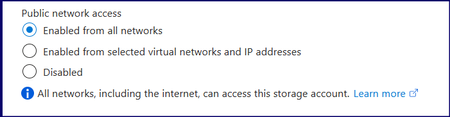
Hi All, Seems like a basic issue, however, I cannot seem to resolve the issue. In a nutshell, a number of storage accounts (and other resources) were created with the Public Network Access set as below: I would like to change them all to them all to Enabled from selected virtual networks and IP addresses or even Disabled. However, when I change to Enabled from selected virtual networks and IP addresses, connectivity from, for example, Power Bi to the Storage Account fails. I have added the VPN IP's my local IP etc. But all continue to fail connection or authentication. Once it is changed back to Enabled for All networks everything works, i.e. Power Bi can access the Azure Blob Storage and refresh successfully. I have also enabled 'Allow Azure services on the trusted services list to access this storage account'. But PBI fails to have access to the data. data Source Credentials error, whether using Key, Service Principal etc, it fails. As soon as I switch it back to Enable From All Networks, it authenticates straight away. One more idea I had was to add ALL of the Resource Instances, as this would white list more Azure services, although PBI should be covered by enabling 'Allow Azure services on the trusted services list to access this storage account'. I thought I might give it a try. Also, I created an NSG and used the ServiceTags file to create an inbound rule to allow Power BI from UK South. Also, I have created a Private Endpoint. This should all have worked but still can’t set it to restricted networks. I must be missing something fundamental or there is something fundamentally off with this tenant. When any of the two restrictive options are selected, do they also block various Microsoft services? Any help would be gratefully appreciated.734Views1like3Comments
Data archiving of delta table in Azure Databricks
Hi all, Currently I am researching on data archiving for delta table data on Azure platform as there is data retention policy within the company. I have studied the documentation from Databricks official (https://docs.databricks.com/en/optimizations/archive-delta.html) which is about archival support in Databricks. It said "If you enable this setting without having lifecycle policies set for your cloud object storage, Databricks still ignores files based on this specified threshold, but no data is archived." Therefore, I am thinking how to configure the lifecycle policy in azure storage account. I have read the documentation on Microsoft official (https://learn.microsoft.com/en-us/azure/storage/blobs/lifecycle-management-overview) Let say the delta table data are stored in "test-container/sales" and there are lots of "part-xxxx.snappy.parquet" data file stored in that folder. Should I simply specify "tierToArchive", "daysAfterCreationGreaterThan: 1825", "prefixMatch: ["test-container/sales"]? However, I am worried that will this archive mechanism impact on normal delta table operation? Besides, I am worried that what if the parquet data file moved to archive tier contains both data created before 5 years and after 5 years, it is possible? Will it by chance move data earlier to archive tier before 5 years? Highly appreciate if someone could help me out with the questions above. Thanks in advance.683Views0likes1Comment
Facing CORS issue in Azure Storage account
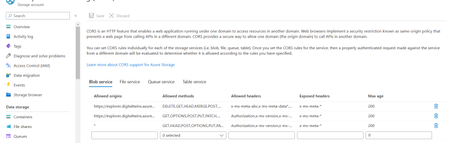
After configuring the CORS configuration as per the Microsoft guide, but I can't get the .glb 3D file to Azure Digital twin explorer. Getting 403 error, as CORS not enabled, or no matching rule found for this request. Even though I have the data owner role in Azure digital twin and storage account...879Views0likes0CommentsAzure runbook is failing to execute due to Authentication issue with azure storage account
Iam facing one issue with authentication of storage account for automation runbook in azure. Scene:- Runbook will runasaccount and its based on service principle. This runbook will get the azurevm status and triggers to store that to storage account every two days. Issue: Runbook execution is successful if I put networking as publicly accessible Runbook is failing to store vm data in storage account if changed networking to selected network. In selected networking, I added resource instance of runbook and allowed trusted azure service, But still it is showing authentication issues. I provided contributor and storage blob data contributor role to the service principle also,still authentication issue. Any idea how to resolve this. Note:I don't want to make storage account publicly accessible.1.7KViews0likes2Comments
Access Firewall Protected (Select Vnet) Azure Storage from Azure SQL Database
I have a storage account which is firewall protected and Azure SQL. Both are in same tenant /subscription/resource group. I am unable to access the Blob from Azure SQL(Bulk import). I have tried "Resource instances" feature. But its not working. Can you anyone guide me how to solve this?618Views0likes0CommentsAccess Firewall Protected (Select Vnet) Azure Storage from Azure SQL Database
i have a storage account which is firewall protected and Azure SQL. Both are in same tenant /subscription/resource group. I am unable to access the Blob from Azure SQL(Bulk import). I have tried "Resource instances" feature. But its not working. Can you anyone guide me how to solve this?1.3KViews1like1Comment
Access denied on FileShare using access keys
Hi Hi! I created and Azure Storage account and a Fileshare in it. I have 2 VM's running Windows Server 2016 and both are in the same Region. On VM1 i can connect to the fileshare using the Storage account username and access keys with the New-PSDrive command without any problems On VM2 i get "access denied" when trying to connect to the fileshare the same way with the storage account username and access keys, anyone know why this would happen? i execute the exact same New-PSDrive on both servers. Error from PowerShell: PS C:\temp> .\MountBackup.ps1 CMDKEY: Credential added successfully. New-PSDrive : Access is denied At C:\temp\MountBackup.ps1:6 char:5 + New-PSDrive -Name Z -PSProvider FileSystem -Root "\\europrod.f ... + ~~~~~~~~~~~~~~~~~~~~~~~~~~~~~~~~~~~~~~~~~~~~~~~~~~~~~~~~~~~~~~~~~ + CategoryInfo : InvalidOperation: (Z:PSDriveInfo) [New-PSDrive], Win32Exception + FullyQualifiedErrorId : CouldNotMapNetworkDrive,Microsoft.PowerShell.Commands.NewPSDriveCommand28KViews0likes3Comments