stable
32 TopicsMica issues again (title bar + context menus)
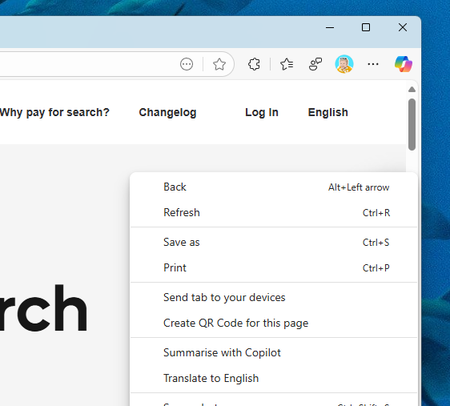
Weird bug again - in both Stable/Dev the title bar mica effects are not working, but the dropdown & context menu (three dot settings) is. In Canary, the title bar mica effect *is* working, but the dropdown/context menu is not (solid white). I reported via feedback as well. Canary: Dev/Stable:812Views2likes6Comments
Downloads not completing
similar to this one but on an enterprise estate using edge stable as opposed to being an insider https://techcommunity.microsoft.com/t5/discussions/edge-downloads-are-not-completing/m-p/4005963 I have replicated this on edge stable beta and dev i've also restarted / refreshed the browser - same issue exists afterwards and no new policies have been rolled out.4.2KViews1like18Comments
header styles not properly displayed in collections notes
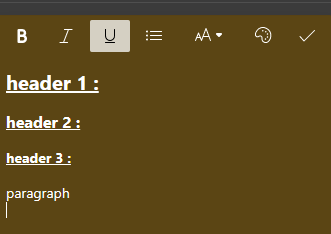
Hi, While editing a note, if you choose some header styles ( either "header 1" or "header 2" or "header 3" or "paragraph" ) , they are properly displayed in the note , until the note is saved ( through the "check" icon in the note toolbar ) ; then , all header formatting is lost ; however , the bold , italic , underline and bullet list styles seem to be saved ) . It is a regression that appears both in the "dev" channel ( 93.0.933.1 ) and in the stable channel ( 91.0.864.67 ) whereas it worked before ( even if I don't precisely remember since when it stopped working ) . Am I the only one to see this ? Thank you for reading ( and also fixing it ) p.s. : I already filled a bug report in the feedback menu item590Views0likes0CommentsHow Can I Update Microsoft Edge for Mac without Microsoft AutoUpdate
Hi, I'm running Microsoft Edge (stable) on MacOS, and recently I found Microsoft AutoUpdate costed too much resources, and caused the fan worked crazily. As a result, I uninstalled Microsoft AutoUpdate. After that, when I open edge://settings/help, it shows check failed, and then it keeps "checking for update", for more than 48 hours already. How can I keep Edge updated without Microsoft AutoUpdate on MacOS? Thank you.Solved11KViews0likes5CommentsEdge Developers, why do you run experiments in Edge Stable channel?
I need an Edge channel that is Free from all the experiments and is stable. but Edge stable channel is not stable anymore. I read the Official change log in Microsoft Docs, it says there is vertical tabs, okay, then i open up my Edge, check everywhere, there is no sign of these features. after that I turn on a VPN, then I get vertical tabs after a browser restart. did you mention in the change log that user need to use flags? nope, it says these features are added to Edge, mentions no flags, mentions no group policy. mentions no need for special VPN. these are activated based on user location and region, easily proved by simple VPNs. but why do you do this? it's really not acceptable to run experiments in Edge stable. there are 3 insider channels for experiments already. I need a channel that is stable and the experience of all users on it, regardless of their location, is the same, that's the actual meaning of stable. I've sent lots of feedbacks through browser and other places, but this is still going on. https://docs.microsoft.com/en-us/deployedge/microsoft-edge-relnote-stable-channel there is also no mention of the new favorites flyout menu that was added to Edge stable. it was a controlled feature rollout too.5.3KViews3likes29CommentsWhat is going on? Edge Stable has Sidebar now, and the Official Change log says nothing about it !?
Just updated Edge Stable last night and now It's got Sidebar! Version 87.0.664.55 => to => 87.0.664.57 (Official build) (64-bit) the Official change log says the update was only: "Fixed various bugs and performance issues." https://docs.microsoft.com/en-us/deployedge/microsoft-edge-relnote-stable-channel but apparently not! Is this controlled feature rollout in Stable channel? why is Sidebar Not mentioned in the Official change log in Microsoft Docs? this is Super confusing. not only for home users but also for businesses. Deleted1.2KViews1like1CommentThis old issue with Global Media Controls button hasn't been fixed yet
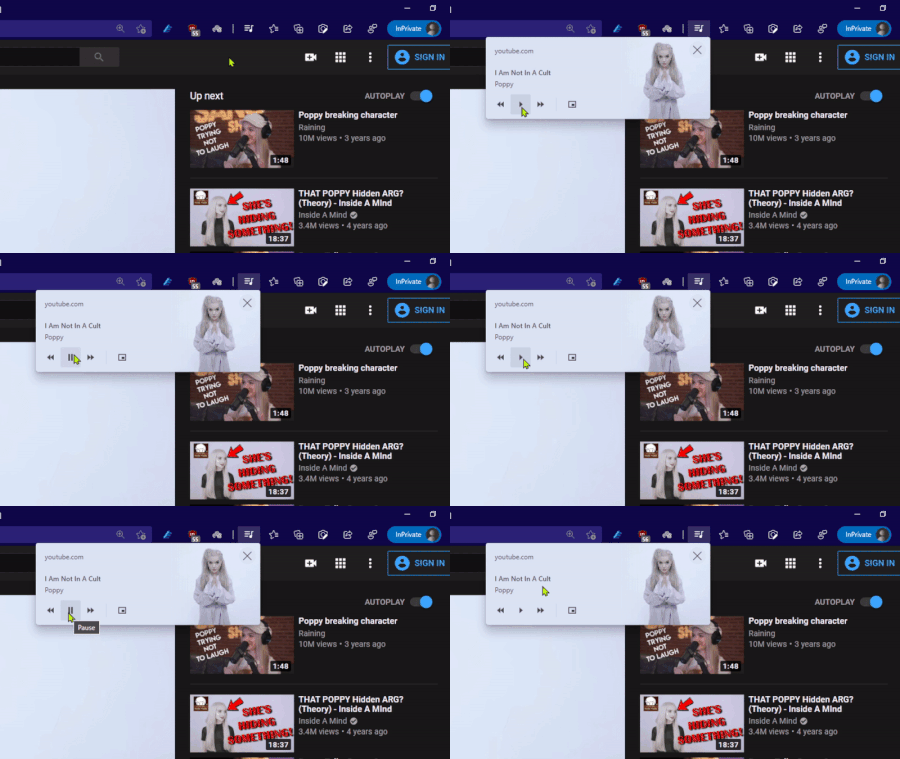
me and other people sent feedback about it, even posts made in this forum around 10 months, but it's still the same. problem: as you can see in the gif above, when you press the pause/play button, its state doesn't change until you move the mouse cursor away from it. expected result: pause/play button's state should change whether or not mouse cursor is over it. this is the normal behavior of UI, but Edge is not doing it correctly. Global media controls also exist in Chrome browser and they work correctly. i.e. the button's state changes no matter the mouse cursor is still over it or not.1.3KViews3likes1CommentWhy is Edge 87 Stable channel running experiments and Controlled Feature Rollouts !?
the element that is a controlled feature rollout is the new favorites experience on toolbar and sidebar in the Edge stable change log, there is no mention of this new feature at all, no word about favorites. the reason I can tell it's controlled feature rollout is because I can switch between old and new favorite experience by connecting to different VPNs and thus having different IP locations. something that I've read shouldn't be happening in Edge stable channel, since it's not insider. it's annoying to see this because the stable channel is no longer stable if a simple IP change can make features come and go.1.8KViews4likes5CommentsWhats the point of downloading different policy files when they are applied to all channels of Edge?
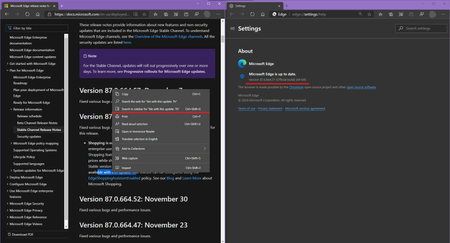
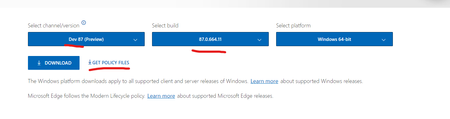
I have Edge 86 stable and Edge 87 Dev installed on latest Windows 10. Downloaded policy files for Edge Dev 87 using configurations shown above, installed it, set a couple of policies from Windows group policy and then I see that they are being applied not only to Edge dev 87 but also to Edge stable 86! Why is this happening exactly? am I missing something that would let me target a specific Edge channel/version using group policy configurations? From my (non-Edge-developer) standpoint, when this website https://www.microsoft.com/en-us/edge/business/download offers to download different group policy files for each version/channel, it's expected for those policies to only be applied to that specific Edge channel, not to every installed Edge instance.2.5KViews0likes5Comments