stable
33 Topics
Edge sync failing on desktop
Hi! Edge sync on my PC (Edge 156.0.4314.56, Windows, personal Microsoft account) gets stuck in "Initializing" every time I restart the browser. Signing out and back in fixes it, but only until I restart again. In edge://sync-internals, the encryption key downloads fine after signing in, but after a restart "Has Keystore Key" goes back to false and Edge never requests the key again, so sync never starts, and it's actually very annoying. I noticed it on October 29 and have already sent feedback through Alt+Shift+I. Is anyone else seeing this, or is there a fix that doesn't require signing out every time?263Views0likes3CommentsMica issues again (title bar + context menus)
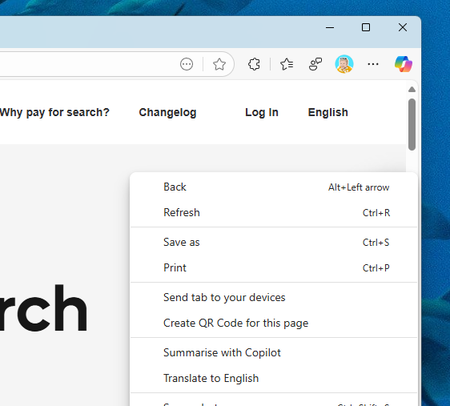
Weird bug again - in both Stable/Dev the title bar mica effects are not working, but the dropdown & context menu (three dot settings) is. In Canary, the title bar mica effect *is* working, but the dropdown/context menu is not (solid white). I reported via feedback as well. Canary: Dev/Stable:948Views2likes6Comments
Downloads not completing
similar to this one but on an enterprise estate using edge stable as opposed to being an insider https://techcommunity.microsoft.com/t5/discussions/edge-downloads-are-not-completing/m-p/4005963 I have replicated this on edge stable beta and dev i've also restarted / refreshed the browser - same issue exists afterwards and no new policies have been rolled out.4.4KViews1like18CommentsOfficial Download links for Microsoft Edge Stable Enterprise
I'm not 100% sure it's final but anyone who wishes/wants can test it. Microsoft Edge Stable Enterprise X64.msi http://go.microsoft.com/fwlink/?LinkID=2093437 X86.msi http://go.microsoft.com/fwlink/?LinkID=2093505 MicrosoftEdgePolicyTemplates.cab http://go.microsoft.com/fwlink/?LinkID=2099616 MicrosoftEdgeIntunePolicyTemplate.cab http://go.microsoft.com/fwlink/?LinkID=2099617 macOS.pkg http://go.microsoft.com/fwlink/?LinkID=2093438 Blocker Toolkit to disable automatic delivery of Microsoft Edge https://docs.microsoft.com/en-us/deployedge/microsoft-edge-blocker-toolkit95KViews3likes20CommentsAn error occurred while checking for updates: Failed to cache the downloaded installer
An error occurred while checking for updates: Failed to cache the downloaded installer. Error: 0x800b0001. (error code 7: 0xA043050D -- system level).Learn moreVersion 85.0.564.41 (Official build) (64-bit) Windows 10 (up to date) Edge stable is preinstalled so I can't uninstall it. tried to download the offline installer last time I got this error, Edge got updated, but now that there is a new update available, it's giving me this error again. also tried to run Edge as admin, no luck.4.6KViews1like6CommentsHow to refresh all tabs or some tabs at the same time and do other bulk actions
How to refresh all tabs or some tabs at the same time how to select multiple tabs or all tabs and do bulk actions on them (refresh, add to group, add to favorites, mute, duplicate etc) watch this video: (recorded in 1080p, 60FPS, MKV): https://streamable.com/qdb1s you can select multiple tabs by holding CTRL and click on tabs to select them individually. another easier way is this: for example you have 10 tabs open and you want to select all of them at once, move your mouse pointer to the right most tab, hold CTRL + SHIFT and then click on it, you will see all of the tabs, from left to right, are selected. last example: you have 10 tabs open, you want to only select tabs from #3 to #8. you move your mouse cursor to tab #3, hold CTRL and then click on it, next you move your mouse cursor to tab #8, hold CTRL + SHIFT and click on it, you'll see now you've selected only tabs from #3 to #8 (i.e tabs #1, #2, #9, #10 are Not selected).41KViews5likes3Comments
STATUS_ACCESS_VIOLATION after Edge 84 Update
Hi, I'm receiving the error STATUS_ACCESS_VIOLATION when browsing after update to Edge 84. I'm trying to repro the issue, but it seems to happen randomly. If I hit "Refresh", the web returns to work without any problem. I'm not using any third party antivirus software, just Windows Security.63KViews4likes32Commentsheader styles not properly displayed in collections notes
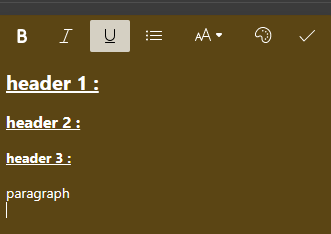
Hi, While editing a note, if you choose some header styles ( either "header 1" or "header 2" or "header 3" or "paragraph" ) , they are properly displayed in the note , until the note is saved ( through the "check" icon in the note toolbar ) ; then , all header formatting is lost ; however , the bold , italic , underline and bullet list styles seem to be saved ) . It is a regression that appears both in the "dev" channel ( 93.0.933.1 ) and in the stable channel ( 91.0.864.67 ) whereas it worked before ( even if I don't precisely remember since when it stopped working ) . Am I the only one to see this ? Thank you for reading ( and also fixing it ) p.s. : I already filled a bug report in the feedback menu item611Views0likes0CommentsHow Can I Update Microsoft Edge for Mac without Microsoft AutoUpdate
Hi, I'm running Microsoft Edge (stable) on MacOS, and recently I found Microsoft AutoUpdate costed too much resources, and caused the fan worked crazily. As a result, I uninstalled Microsoft AutoUpdate. After that, when I open edge://settings/help, it shows check failed, and then it keeps "checking for update", for more than 48 hours already. How can I keep Edge updated without Microsoft AutoUpdate on MacOS? Thank you.Solved12KViews0likes5Comments