sso
97 Topics
Entra ID 53003: How to identify primary authentication when Authentication Details are empty?
We are investigating repeated interactive Microsoft Entra ID sign-ins with the following pattern: - ErrorCode: 53003 (BlockedByConditionalAccess) - isInteractive: true - AppDisplayName: OfficeHome - Authentication requirement: Multifactor authentication Conditional Access correctly blocks these requests because they originate outside our trusted locations. We have already confirmed through controlled testing that the authentication flow can reach 53003 after the correct credentials are provided. Our current problem is different: We need to determine what mechanism satisfied the primary/first authentication factor for the observed 53003 events. For these events, Authentication Details are empty: - Authentication method: empty - Authentication method detail: empty - Result detail: empty Therefore, we cannot determine whether primary authentication was performed using a password, an existing token/session claim, PHS, PTA, federation, Seamless SSO, or another mechanism. Our questions are: 1. Is there any tenant-visible telemetry that can identify the primary authentication mechanism when AuthenticationDetails is empty? 2. Can fields such as AuthenticationProcessingDetails, AuthenticationProtocol, IncomingTokenType, OriginalTransferMethod, or AuthenticationMethodsUsed reliably distinguish between password validation and reuse of an existing authentication/token? 3. If additional authentication infrastructure is used: - can PTA Authentication Agent logs be correlated using RequestId or CorrelationId? - should Seamless SSO generate a corresponding Kerberos 4769 event for AZUREADSSOACC$? - should federated authentication be traceable in AD FS logs? 4. For Password Hash Synchronization, is there any tenant-visible telemetry confirming that Entra ID actually validated the password for a specific sign-in request? 5. If this information is not exposed to the tenant, can Microsoft Support retrieve backend authentication telemetry for a specific Sign-in ID / RequestId / CorrelationId and determine how primary authentication was satisfied? Our goal is not to determine why Conditional Access generated 53003 — that part is already understood. We specifically need to identify what satisfied primary authentication before the Conditional Access evaluation.128Views0likes0CommentsUnexpected button behaviour when using the prompt=create parameter in Entra External ID user flows
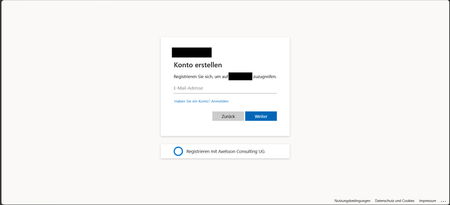
Hi, In a recent workload, I'm assisting a client to implement Entra External ID for streamlined authorization as well as single sign-on for associated registered external facing third-party applications for external customer users through their Entra External ID identity, as well as assisting the client with auth branding and other UI customizations, and preparing Entra ID federation custom OIDC providers and configuration for enabling SSO with organizational internal and remote work- and school accounts etc. The sign-up / create account experience is of importance to the client, as a rather substantial amount of users are expected to sign-up via self-service sign-up following having received an invite via another app. To ensure that the user lands on the create account view, in order to minimize the number of steps and actions the users need to take to get there, the prompt=create parameter is used to pre-select the sign-up/register experience in the user flows UI. Having stress-tested the user flows and experience recently, we noticed that in a specific scenario, some UI elements behave in a manner that could be described as unexpected, and even though a workaround has mitigated it to some extent, the behaviour of some elements could probably be improved a bit to ensure an even more consistent user experience in the built-in user flows. Specifically, if the user flow is invoked with the prompt parameter set, the user lands on the create account screen as expected, however, unless custom CSS modification is applied, the Back button that would typically be there, as if having arrived there from the initial sign-in screen where it’s also displayed. If pressing the Back button displayed on the Create account view when having navigated there with the prompt=create set in the /authorize request, pressing the button seemingly doesn’t have any impact or result in any action, one can click it, but nothing happens. I'd suspect it's perhaps a "remnant" from if the flow is invoked without any prompt parameter set, or with prompt=login set, but when prompt=create is set, there is no state/page history in the UI to navigate back to, as no previous page has been displayed or rendered yet and added to the history, and the Back button click thus doesn’t have any effect. In general, I think buttons that don't have any tangible action should not be displayed, also, if prompt=login is set, the Back button isn't shown then either on the very initial user flow view shown then, so it would seem the built-in user flows actually already follow such approach in fact, but not when the prompt=create has been set, thus causing some inconsistency in the UI that users could notice unless custom CSS styling is applied. The expected behaviour for our business case would be that if prompt=create is set, then, similar to the prompt=login, no Back button should be displayed, or, if shown, it should result in some navigation (perhaps something like javascript.go(-1), but that could/would be dependent on from where the user arrived, e.g., going back a step in the browser history won't work if the user clicked a link from an invite email ) and preferably not be non-actionable. Furthermore, on the topic of the Back button and its behaviour when the prompt=create parameter is set, there is another case at which we observed some unexpected button behaviour as well, that could probably benefit from some attention. At a specific second scenario, it seems that the Continue button is displayed without providing any action, and when clicking the Back button then, clicking it seemingly resets the "create account", state likely set by the prompt=create initially, and instead switches the flow back to the sign-in state, which can at least affect the display text of some subsequent buttons shown in later steps in the UI. The user arrives at a built-in Entra External ID user flow /authorize endpoint, with the prompt=create query parameter set The user triggers the OTP challenge by entering an email address to verify the email address The user receives the OTP code but enters it incorrectly, i.e., doesn't copy the full code length of eight digits, and instead enters/pastes six of the eight code digits. The UI then shows an error message that the code could not be used/validated, and the email address field is displayed again with the email address that was used for the verification attempt prefilled. If the user clicks the Continue button at this stage, nothing happens. If the user clicks the Back button instead (given that it’s not hidden), it shows the same view one more time, with the Back and Continue buttons at the bottom. However, if the user clicks the Continue button this time, it works and a new code is sent. On the next screen, where the newly sent code can be entered, instead of a button named "Continue", it will now instead show a button with the text "Sign-in" (it would seem like the create account state has gotten lost somewhere along the way at this point, perhaps when the back button in the step 5 above was pressed). If one omits the prompt=create parameter, or when using prompt=login, things seem to work fine, the above occurs when the prompt=create is set. The reason why is the prompt=create is used is due to a business requirement to try to minimize the steps, especially in conjunction with the registration/sign-up, as far a possible when signing up. We have opted for the built-in user flows, not the self-hosted native authentication UI pages, for this project, and then as I understand it, it is the prompt=create parameter that can/should be used to enable the user to land directly on the registration page without having to navigate there manually via the sign-up link, that is otherwise shown on the initial sign-in page. It would thus be great if the prompt=create parameter could have some attention (or perhaps if a dedicated sign-up user flow type could be added potentially, even though that would perhaps warrant some update to the user flow app linking as well, as my understanding is that one user flow can be linked to one app registration at a time currently) to avoid that some buttons become unresponsive when the parameter is used, or falls back to sign-in, to improve the built-in user flows further, as the prompt=create fulfils the business requirement well otherwise. If there would be any further/follow-up questions on the above, e.g., to clarify the requirement, or further explain the reproduction steps and behaviour observed, or anything else, please tell, and I'll ensure to get back as soon as possible. Also, would someone have some input on potential other/additional ways to pre-select the create account/sign-up experience, that would naturally be much appreciated as well, thanks! Regards Kristoffer293Views0likes0CommentsIs system-preferred first factor overriding Single Sign-On?
My colleagues and I have noticed that we've started being prompted to perform a Windows Hello for Business authentication when we use Edge to access web resources that are authenticated with Entra. Previously, this authentication occurred silently through Single Sign-On with the PRT, per Understanding Primary Refresh Token (PRT) in Microsoft Entra ID - Microsoft Entra ID | Microsoft Learn. While investigating what might have caused this change in behavior, I found MC1411574 in the M365 Message Center, which talks about a change to system-preferred authentication that started rolling out in late June 2026, whereby it now applies to the first factor as well as multi-factor authentication. I excluded myself from system-preferred authentication and sure enough, that seems to have restored the previous behavior. Is it intended that this change to system-preferred authentication will disable SSO, or do we have something misconfigured?Solved332Views0likes3Comments
Can External ID (CIAM) federate to an Azure AD/Entra ID tenant using SAML?
What I'm trying to achieve I'm setting up SAML federation FROM my External ID tenant (CIAM) TO a partner's Entra ID tenant (regular organizational tenant) for a hybrid CIAM/B2B setup where: Business users authenticate via their corporate accounts (OIDC or SAML) Individual customers use username/password or social providers (OIDC) Tenant details / Terminology: CIAM tenant: External ID tenant for customer-facing applications IdP tenant: Example Partner's organizational Entra ID tenant with business accounts Custom domain: mycustomdomain.com (example domain for the IdP tenant) Configuration steps taken Step 1: IdP Tenant (Entra ID) - Created SAML App Set up Enterprise App with SAML SSO Entity ID: https://login.microsoftonline.com/<CIAM_TENANT_ID>/ Reply URL: https://<CIAM_TENANT_ID>.ciamlogin.com/login.srf NameID: Persistent format Claim mapping: emailaddress → user.mail Step 2: CIAM Tenant (External ID) - Added SAML IdP (Initially imported from the SAML metadata URL from the above setup) Federating domain: mycustomdomain.com Issuer URI: https://sts.windows.net/<IDP_TENANT_ID>/ Passive endpoint: https://login.microsoftonline.com/mycustomdomain.com/saml2 DNS TXT record added: DirectFedAuthUrl=https://login.microsoftonline.com/mycustomdomain.com/saml2 Step 3: Attached to User Flow Added SAML IdP to user flow under "Other identity providers" Saved configuration and waited for propagation The problem It doesn't work. When testing via "Run user flow": No SAML button appears (should display "Sign in with mycustomdomain") Entering email address removed for privacy reasons doesn't trigger federation The SAML provider appears configured but never shows up in the actual flow Also tried using the tenant GUID in the passive endpoint instead of the domain - same result My question Is SAML federation from External ID to regular Entra ID tenants actually possible? I know OIDC federation to Microsoft tenants is (currently, august 2025) explicitly blocked (microsoftonline.com domains are rejected). Is SAML similarly restricted? The portal lets me configure everything without throwing any errors, but it never actually works. Am I missing something in my configuration? The documentation for this use case is limited and I've had to piece together the setup from various sources. Or is this a fundamental limitation where External ID simply can't federate to ANY Microsoft tenant regardless of the protocol used?948Views1like4CommentsDoes Rights Management Service currently support MFA claims from EAM?
We've been testing EAM (external authentication methods) for a few months now as we try to move our Duo configuration away from CA custom controls. I noticed today that when my Outlook (classic) client would not correctly authenticate to Rights Management Service to decrypt OME-protected emails from another org. It tries to open the message, fails to connect to RMS, and opens a copy of the email with the "click here to read the message" spiel. It then throws a "something is wrong with your account" warning in the Outlook client's top right corner. If I try to manually authenticate & let it redirect to Duo's EAM endpoint, it simply fails with an HTTP 400 error. When you close that error, it then presents another error of "No Network Connection. Please check your network settings and try again. [2603]". I can close/reopen Outlook and that warning message in the top right stays suppresses unless I attempt signing into RMS all over again. However.. If I do the same thing and instead use an alternate MFA method (MS Authenticator, for example), it signs in perfectly fine and will decrypt those OME-protected emails on the fly in the Outlook client, as expected. I verified that we excluded "aadrm.com" from SSL inspection and that we're not breaking certificate pinning. So all I can assume at the moment is that Rights Management Service isn't honoring MFA claims from EAM. Any experience/thoughts on this? Thanks in advance!317Views0likes1CommentCan the built-in "No account? Create one" link redirect to a custom sign-up page?
I'm using Microsoft Entra External ID with a built-in sign-in/sign-up user flow. On the Microsoft-hosted sign-in page, the "No account? Create one" link always redirects users to the default Entra sign-up page. I already have a custom registration page and would like this built-in link to redirect to my custom URL instead. Is there any supported way to customize the destination of this link in a built-in user flow? If not, could someone confirm whether this behavior is fixed by design? Thanks!448Views0likes2Comments
AADSTS50105 error message is unreadable for end users — UX improvement suggestion
1. What’s wrong with the current error message a. It’s written for administrators, not users The message exposes: Internal system names (AADSTS50105) GUIDs (aaaabbbb-cccc-dddd-eeee-ffff01234567) Identity provider jargon (“direct member of a group with access”) None of this helps the person who sees the error decide what to do next. b. The actual problem is buried in a wall of text The real issue is simply: You don’t have permission to access this app. Instead, the message forces users to: Read a long paragraph Decode domain-specific language Guess which part matters Cognitively, this is high effort for low payoff. c. “Contact your administrator” is vague and unhelpful Users ask: Which administrator? IT? Security? App owner? Their manager? What should they say? Without context, users either: Ignore the error Forward screenshots randomly Open the wrong support ticket d. Error codes without guidance increase support load AADSTS50105 may be meaningful internally, but: Users don’t know whether to Google it Support teams receive unclear tickets (“it doesn’t work”) This paradoxically raises support cost instead of lowering it. 2. What a better error message should do A good error message answers four questions in order: What happened? Why did it happen (in plain language)? What can the user do next? Who specifically can help? And it does so in under 30 seconds of reading time. 3. Example of a much better error message You don’t have access to [APPLICATION] Your account (email address removed for privacy reasons) isn’t currently authorized to use [APPLICATION]. This usually means: You haven’t been added to the required security group, or Access hasn’t been requested or approved yet. What to do next If you believe you should have access, contact IT Service Desk or your [APPLICATION] owner and request access. Helpful details to include in your request Application name: [APPLICATION] Your email: email address removed for privacy reasons Error reference: Access not assigned (Error ID: AADSTS50105 — for IT use) 4. Optional but high-impact improvement: Add a “Request Access” button or link One-click takes users to: ServiceNow / Jira / internal form Auto-populates app name and user email Administrators configure support link when configuring the application669Views0likes1Comment
macOS: SSO no longer fully functional on AVD (Win11 25H2)
Hello everyone, Since updating our Test Azure Virtual Desktop Session Hosts from Windows 11 23h2 to 25H2 (26200.7462) , we've been experiencing an SSO issue that exclusively affects macOS clients. Symptoms For macOS users (Windows App), the following issues occur: Example Teams Teams shows the user as "Unknown User" Chat and collaboration features fail to load Error message: "You need to sign in again. This may be a requirement from your IT department or Teams, or the result of a password update. - Sign in" After clicking "Sign in," only a window appears with "Continue with sign-in" (no PW/MFA prompt) After this, all other applications work without further authentication Technical Details macOS Device: AppleM4 Pro macOS Tahoe 26.2 Installed WindowsApp version: 11.3.2 (2848) dsregcmd /status: No errors detected PRT is active and was updated for sign-in Entra Sign-In Logs: Error code: 9002341 EventLog on Session Host (AAD-Operational): Event ID: 1098 Error: 0xCAA2000C The request requires user interaction. Code: interaction_required Description: AADSTS9002341: User is required to permit SSO. Event ID: 1097 Error: 0xCAA90056 Renew token by the primary refresh token failed. Logged at RefreshTokenRequest.cpp, line: 148, method: RefreshTokenRequest::AcquireToken. Observations Affects: Both managed (internal) and unmanaged (external) macOS devices Does NOT affect: Windows clients connecting via Windows App Interesting: If a macOS user starts the session (with the error) and then reconnects on a Windows device, authentication works automatically there Workaround The issue can be resolved for macOS clients by removing the "DE" flag from "Automatic app sign-in" in the following file: C:\Windows\System32\IntegratedServicesRegionPolicySet.json Questions Is this a known issue? Has anyone experienced similar issues with macOS clients after the 25H2 update? Why does this issue only occur with macOS clients? Why does SSO only work after removing the "DE" flag for macOS devices, and why are Windows devices not affected? I would appreciate any insights or confirmation of this issue! Thank you and greetings FT_1579Views0likes2Comments
Microsoft Teams Bot OAuth login shows blank screen and closes without signing in
I’m building a Microsoft Teams bot using Azure AD OAuth (SSO) with Bot Framework. When I click Sign in, the OAuth popup in Teams shows a blank screen for a moment, then closes automatically without signing me in. What I’ve Done Added redirect URI in Azure App Registration: https://token.botframework.com/.auth/web/redirect Enabled Access tokens and ID tokens in App Registration → Authentication. Configured OAuth connection in Bot Channels Registration (ConnectionName matches my bot code). Verified client ID, client secret, and tenant ID are correct. Code bot.js require("dotenv").config(); const { TeamsActivityHandler } = require("botbuilder"); const { Client } = require("@microsoft/microsoft-graph-client"); const { DialogSet, DialogTurnStatus, OAuthPrompt, WaterfallDialog } = require("botbuilder-dialogs"); require("isomorphic-fetch"); const OAUTH_PROMPT = "OAuthPrompt"; const MAIN_DIALOG = "MainDialog"; class BotActivityHandler extends TeamsActivityHandler { constructor(conversationState, userState) { super(); this.conversationState = conversationState; this.userState = userState; this.dialogState = this.conversationState.createProperty("DialogState"); this.dialogs = new DialogSet(this.dialogState); // OAuthPrompt for Teams SSO this.dialogs.add( new OAuthPrompt(OAUTH_PROMPT, { connectionName: process.env.CONNECTION_NAME, text: "Please sign in to continue", title: "Sign In", timeout: 300000, }) ); this.dialogs.add( new WaterfallDialog(MAIN_DIALOG, [ this.promptStep.bind(this), this.handleFileStep.bind(this), ]) ); this.onMessage(async (context, next) => { const text = (context.activity.text || "").trim().toLowerCase(); const dialogCtx = await this.dialogs.createContext(context); if (text.startsWith("/")) { // ...handle commands... } else { const results = await dialogCtx.continueDialog(); if (results.status === DialogTurnStatus.empty) { if (context.activity.attachments?.length > 0) { await dialogCtx.beginDialog(MAIN_DIALOG, { file: context.activity.attachments[0], }); } else { await context.sendActivity("Upload a file or type /help."); } } } await next(); }); } async promptStep(stepContext) { return await stepContext.beginDialog(OAUTH_PROMPT); } async handleFileStep(stepContext) { const tokenResponse = stepContext.result; if (!tokenResponse?.token) { await stepContext.context.sendActivity("Please sign in to access files."); return await stepContext.endDialog(); } const token = tokenResponse.token; // Use token with Microsoft Graph API // ... return await stepContext.endDialog(); } } module.exports.BotActivityHandler = BotActivityHandler; Problem OAuth popup appears, then closes without completing login. No token is returned to the bot. Questions Why does the OAuth popup in Teams close immediately without signing in? Where can I see detailed error logs for OAuth failures? Azure AD sign-in logs? Application Insights (do I need to configure Instrumentation Key in Bot Service)? Environment Bot Framework v4 (Node.js) Azure Bot Service Microsoft Teams channel Azure AD v2 OAuth338Views0likes2CommentsEntra App Gallery required for Excel AddIn
Hi, We have an Excel Addin published to Microsoft AppSource: https://appsource.microsoft.com/en-us/product/office/WA200009029?tab=Overview The Excel Addin uses Entra ID to obtain an OIDC token to securely / seamlessly access MS 365 SharePoint on behalf of the user. In order to achive this the Entra ID subscription needs the TR4E application registered as an Enterprise Application / App Registration. My question is whether I need to submit the TR4E application separately to the Entra App Gallery, so it can be installed by the Entra ID admin - or will the registration in Entra ID happen automatically when a new user first tries using TR4E? I note that MS has suspended new application submissions for Entra App Gallery, which means our customers would need to manually create the Entra ID Enterprise Application (which is not a great experience). Cheers, Andrew244Views0likes1Comment