ssms
48 Topics
How does GitHub Copilot in SSMS 22 handle database context collection before generating a response?
Hello, I am trying to better understand the internal workflow of GitHub Copilot in SSMS 22, especially for database-specific questions. From the product descriptions, it seems that Copilot can use the context of the currently connected database, such as schema, tables, columns, and possibly other metadata, when answering questions or generating T-SQL. However, I could not find clear official documentation about the actual sequence of operations. My main questions are: Before generating a response, does Copilot first collect database context/metadata from the active connection and then send that context to the LLM as grounding information? Or does it first use the LLM to interpret the user’s request, decide what information is needed, and then retrieve database metadata before generating the final answer? In some explanations, I have seen the phrase "Core SQL Copilot Infrastructure", but I cannot find any official documentation for that term. Is this an official component name? If so, what does it specifically refer to in the SSMS Copilot architecture? When Copilot answers schema-related or data-related questions, what information is retrieved automatically from the connected database, and is any SQL executed as part of that process? Is there any official architectural documentation that explains: context collection, prompt grounding, LLM invocation order, and whether query execution can occur before the final response is generated? I am asking because I want to understand the feature from both an architecture and data governance/security perspective. Any clarification from the product team or documentation links would be greatly appreciated. Thank you.388Views2likes2CommentsAssess and upgrade to SQL Server 2025 with SSMS Migration Component
Upgrade to SQL Server 2025 with confidence. Starting with SSMS 22, the Hybrid & Migration component now includes upgrade assessment for SQL Server 2025. This feature enables you to quickly evaluate readiness for upgrade. SSMS also provides a streamlined migration path to the instance of higher version if in-place upgrade is not preferred.3.5KViews2likes0Comments
SSMS "Intellisense" behaviour is driving me demented
This behaviour is doing my head in and I'm hoping that there is a simple way to change it?Just to give you an example, I am starting to write a little query to check the status of FullText Indexes on database objects. This is for illustration purposes only so don't tell me what "better" alternatives there are for doing this, I just want to illustrate the behaviour that's bugging me.So the query I would like to run is:SELECT [SO].[name], [FI].[is_enabled] FROM sys.objects [SO] inner join sys.fulltext_indexes [FI] on [FI].object_id = [SO].object_idThe behaviour that annoys me can be illustrated as follows. In SSMS, type this:SELECT * FROM sys.objects [SO] inner join sys.fulltext_indexes [FI] on [FI].object_id = [SO].object_idThen go back to the *, remove it and start typing [SO] in order to get intellisense to show you column names you can choose from. So you have typed [SO] and your cursor is right behind the closing bracket:SELECT [SO]<cursor here> FROM sys.objects [SO] inner join sys.fulltext_indexes [FI] on [FI].object_id = [SO].object_id Type the dot The statement changes to:SELECT [SOUNDEX]. FROM sys.objects [SO] inner join sys.fulltext_indexes [FI] on [FI].object_id = [SO].object_idI didn't want "soundex". I wanted intellisense to show me a list of column names in sys.objects, aliased to "[SO]" by me. It does that once I hit Ctrl+Z which removes the auto-inserted [SOUNDEX] and then when I hit the dot again it shows me the list of columns. So I pick [name] and start adding the next column by typing , [FI]. And here it goes again:SELECT [SO].[name], [FILE_ID]. FROM sys.objects [SO] inner join sys.fulltext_indexes [FI] on [FI].object_id = [SO].object_idI didn't want [FILE_ID]. I wanted [FI]. and a popup showing the the column names in sys.fulltext_indexes I can choose from.Sure, this is one heck of a "first world problem" but as a touch typist this is driving me around the bend. If there's a way to change this behaviour (without losing Intellisense altogether), please tell me how.1.6KViews2likes3CommentsHelpful SQL Tools and Tips for Test Engineers - Part 1
Today we will review a tool he created to make the life easier for anyone who spends a lot of time working on SQL Server Management Studio (SSMS). This tool will allow you a quicker and more efficient way to connect to several SQL Servers through SSMS.6.5KViews2likes0Comments
SSMS 22 - Not seeing the Database name information in the Status Bar and Title bar is gone.
I installed SSMS 22 yesterday and am trying to get used to the features. I am not a fan of the new layout. I might be in the future, but at the moment, not so much. Status Bar settings are all set to [True] But nothing is showing in the Status Bar. There is no Title Bar anymore. WHY Would they take away the Title Bar? That is insane. So, my question to the Forum is this. How do we get the Database Name information in the Status Bar? As stated, everything is set to TRUE in settings. Also, will the Status Bar show the title of the Editor file you are working on? (I miss the old design, to be honest. )335Views1like3CommentsAzure Database creation using T-SQL or SSMS currently allows Unsupported characters in it's name.
If a Database created using SSMS or T-SQL has unsupported characters in it's name, then any Powershell/Azure CLI/Portal operation on it can fail. You may experience a few other kinds of unexpected behavior as well, with this specific database.3.2KViews1like0CommentsWhat will happen with CATALOG_COLLATION and Case Sensitive vs Case Insensitive
First published on MSDN on Feb 15, 2018 One of the options available when creating a database is the CATALOG_COLLATION, by default this is going to be SQL_Latin1_General_CP1_CI_AS , even if you take the trouble of specifying a database collation , the catalog collation will be SQL_Latin1_General_CP1_CI_AS unless you say otherwise.Lesson Learned #21: There is not enough space on the disk exporting BacPac using SSMS
First published on MSDN on Feb 02, 2017 Depending on the size of your database when you export/import the data to/from a bacpac using SQL SERVER Management Studio you could see an error like this one: There is not enough space on the disk, however, the destination/source of the data file has a lot of free space.8.7KViews1like0Comments
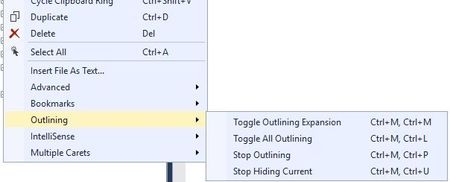
Keyboard-shortcuts in SSMS for Outlining doesn't work
E.g. Ctrl+M, Ctrl+L doesn't work at all. It seem it instead exectue "Excutino plan" (?) I checked the shortcut settings, made a reset and also tried to make custom outlining shortcut, but nothing works. SSMS version 18.9.12.3KViews1like2Comments