sqltools
66 TopicsIntroducing sqlsimtools
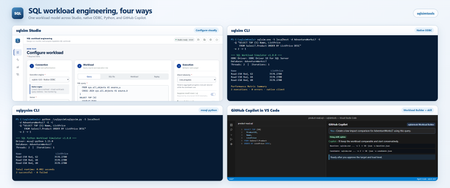
Years ago, in a galaxy far, far away, my colleagues in support, Keith Elmore and Robert Dorr, built a tool called ostress.exe. For decades it transformed the way we reproduced customer issues for SQL Server. The engineering team used it, and up until now I've used it for demonstrations, books, and examples. Its magic was simple: ostress could simulate many concurrent users running SQL queries or scripts. I decided to rethink ostress for today's SQL world, and the result is sqlsimtools, now in public preview at https://aka.ms/sqlsimtools. It's a free, open-source suite of workload simulation tools for SQL Server 2019, 2022, and 2025, Azure SQL Database, Azure SQL Managed Instance, and SQL database in Microsoft Fabric. I've been building it for some time and using it at events and in demonstrations. Now I want everyone to have it. The public preview includes: sqlsim: a native, ODBC-based command-line tool for Windows (x64 and ARM64) and Ubuntu Linux. sqlpysim: a Python version of sqlsim built on Microsoft's mssql-python driver, for Windows and Ubuntu Linux. sqlsim Studio: a self-contained local browser app that configures, runs, monitors, replays, and compares workloads using sqlsim or sqlpysim. It's available today on Windows x64. I'm also looking for Private Preview testers for macOS, and for sqlsim Studio on Linux and Windows ARM64. If you'd like to help, request Private Preview access. I'll be writing more posts on different parts of the tools, but here are my top 10 cool things you can do with sqlsimtools: Run any SQL query, script, or mixed workload Create your own benchmarks, load tests, and stress tests Configure, run, monitor, and compare workloads visually with sqlsim Studio Replay captured SQL Server activity Monitor workload performance live or after execution Run before-and-after experiments with detailed performance comparisons Test SQL Server, Azure SQL, and SQL database in Microsoft Fabric with flexible authentication Use native or Python tools on Windows, Linux, and macOS (Private Preview) Automate testing with JSON results and live event streams Build and run workloads with AI agents such as GitHub Copilot, Claude Code, Codex CLI, and Cursor Get started today at https://aka.ms/sqlsimtools . The easiest way to start is the all-in-one sqlsimtools package, which includes sqlsim Studio and both command-line tools. You can also download just the tool for your platform, or clone the repo and build it yourself. On Windows, unblock the ZIP before you extract it, because the tools aren't code signed. sqlsimtools is an open-source project, not an official Microsoft product, and isn't covered by Microsoft support. For questions and ideas, join the conversation in GitHub Discussions (microsoft/sqlsimtools · Discussions · GitHub), and report bugs in GitHub Issues (Issues · microsoft/sqlsimtools). During Public Preview I'm not taking Pull Requests yet but file issues and as the project progresses, we will incorporate the PR process. Bob Ward Microsoft932Views6likes0CommentsAnnouncing SQL Server Management Studio (SSMS) 22.9.0
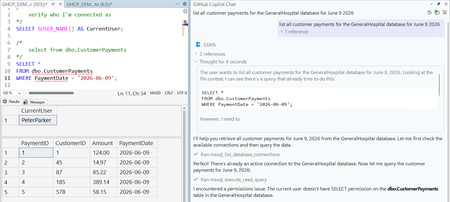
Today we released SQL Server Management Studio (SSMS) 22.9.0, with updates to GitHub Copilot, the connection experience, Database DevOps, SQL formatting, and more. As always, we recommend that users update to the latest release when it’s available, as it’s the generally available and supported release. You can view the release notes for more details about the new features and fixes. We continue to monitor customer feedback and add functionality with each release, so if you’re using GitHub Copilot, Database DevOps, or SQL formatting, we appreciate you trying out what’s new and reporting any issues or requests on our feedback site. GitHub Copilot in SSMS: Changes to Ask Mode We've made an important behavior change to Ask Mode in GitHub Copilot in SSMS. Ask Mode is intended to be a read-only experience for getting guidance and script help, and we've heard clear feedback that users expect that experience to stay read-only regardless of credential scope. To align with that expectation, Ask Mode no longer executes arbitrary queries, whether generated by the model or provided in chat. Instead, Ask Mode now returns T-SQL scripts in its responses for you to review and run yourself. For most Ask Mode scenarios (like writing, refining, and understanding scripts) this should feel familiar. Copilot can still explore schema context to provide useful guidance, but it will not execute scripts to retrieve user data. This creates a clearer separation between advisory and execution experiences, keeps you in control, and sets a more intuitive boundary as we continue toward broader Agent Mode availability. GitHub Copilot in SSMS: Agent Mode Progress Agent Mode continues to evolve in preview. In 22.9, we've added a set of tools that allows GitHub Copilot to interact with connected objects in Object Explorer. This gives Agent Mode more awareness of the objects you're working with and lets it participate more naturally in workflows that start from Object Explorer. Updates to the Connection Dialog This release brings a whole bunch of updates and improvements to the Modern Connection Dialog! These changes aim to make the connection dialog more flexible and accessible: Azure and Fabric browsing now supports subscription search and filtering. This applies when browsing Azure resources and workspaces as well as Fabric resources. The Browse tab now includes search and filtering. You can now browse Azure SQL Managed Instances. The server name field is now an editable drop-down menu, improving keyboard accessibility. The dialog now supports a horizontal layout. Hostname in certificate is available in the default connection properties view. Connection import and export is now supported. The maximum number of recent and favorite connections has increased to 60. Available SSMS themes are supported more consistently throughout the connection experience. These changes make it easier to find resources, preserve connection setups, and work with the connection dialog in the way that best fits your screen and workflow. Database DevOps (preview) Database DevOps in SSMS continues to evolve. In 22.9, the Add Database Reference dialog has a refreshed UI with improved theme support and additional reference types. You can now choose among four reference types: dacpac database project NuGet package system database We've also updated SqlProj document tab names to remove the confusing - not connected suffix. See Document tab names in SSMS sqlproj are not good. SQL Formatter (preview) The SQL Formatter preview now gives you more control over formatting and a clearer way to understand the result before applying it: Choose whether indentation uses tabs or spaces. Configure trailing comma style. Choose whether column aliases use the AS keyword, an equals sign, or preserve the original style. Insert a new line before the ON keyword. Preview before-and-after T-SQL in the SQL Formatter settings dialog. The Include Semicolons setting has also been removed. These options are a starting point for making formatting work better across different SQL styles, and we welcome your feedback as the preview continues to improve. Lots of Bug Fixes! As always, the full list is in the release notes, but a few fixes that are worth calling out include: Connection dialog — You can now save multiple connection strings with different application intent values. See Unable to save 2 connection strings with different application intents using the new connect screen. Object Explorer — Some users could not view SQL Server Agent details despite having the proper permissions. That issue is fixed. Schema Compare — Fixed several issues involving comment-only differences, schemas that incorrectly showed no differences, the Ignore Comments setting, stored procedure formatting, and whitespace highlighting in the diff viewer. See Schema Compare Preview fails to display comment-only differences in front of create views, Schema compare shows no differences between different database schemas, Compare Schemas ignores comment differences regardless of Ignore Comments setting, When comparing stored procedures in Schema Compare, they are reformatted, and Schema Compare incorrectly flags differences in whitespace in table comparison. SQL Agent — Users no longer need EXECUTE permission on xp_instance_regread just to view or run SQL Server Agent jobs. See SQL Agent blocks AD groups from viewing jobs without xp_instance_regread access. SQL Formatter — Fixed an issue that merged CONSTRAINT lines into the preceding commented line. See SQL Formatter merges CONSTRAINT line into preceding -- comment. Results Grid — Toolstrip labels no longer truncate in some languages. See Visibility counts completed rows. Theme — The SSMS theme no longer reverts to Cool Breeze after restarting. See SSMS theme setting reverts from Dark to Cool Breeze after restart. Toolbar — Fixed an issue that caused several toolbar icons to disappear. See SSMS toolbar icons missing for query controls and execution plan buttons.4.9KViews4likes4CommentsA Programmatic Interface to the Query Hint Recommendation Tool
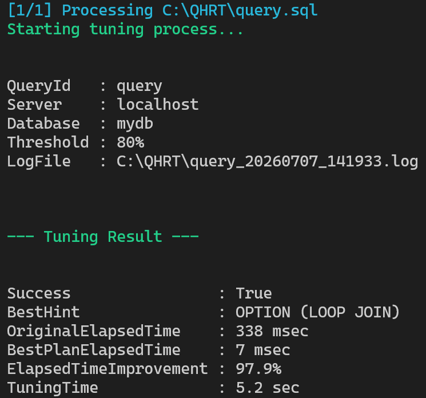
Extend automated hint identification even further using a PowerShell script that exposes the capabilities of the Query Hint Recommendation Tool, allowing you to efficiently tune a set of queries programmatically without manual trial and error.1KViews0likes3CommentsAnnouncing the Release of SSMS 22.7.0 - and many previews!
Today we shipped SQL Server Management Studio (SSMS) 22.7.0, and this is one of the bigger releases we've had in a while. The headline items are we’ve introduced a “What’s New” page, SQL formatting (preview), schema compare (preview), Agent Mode for GitHub Copilot in SSMS (preview), and a new execution context for GitHub Copilot. There's also continued investment in Database DevOps and a solid round of bug fixes. Thank you, as always, for taking the time to log issues and upvote what matters. It really does shape what we work on. Let's dig in. Introducing the "What's New" page When you update to 22.7, you’ll see something new: an in-product “What’s New” page that showcases our top features and fixes in the release. It’s a short, abbreviated summary that gives you the chance to quickly skim and understand the highlights of the release. This page automatically appears the first time you open SSMS after updating. Once you close it, it won’t show again the next time you launch SSMS. You’ll only see it again after a future update. If, at any time, you want to see the What’s New page again, you can go to Help > What’s New. Let us know what you think about it – I’ve created a suggestion ticket on Developer Community for folks to leave thoughts. If you encounter a bug with the page itself (something not loading, broken links, etc.) please open a separate Developer Community ticket so our engineering team can triage and investigate it properly. T-SQL formatting in the query editor (preview) If you’re one of the hundreds of SSMS users who has been asking (and patiently waiting) for T-SQL formatting capabilities, I am very happy to report that as of today, this feature is available in preview! This functionality has been built into the core SSMS experience, no workloads or components required. To get started, simply right-click any query editor window and find the Format SQL menu item. The formatter supports a range of options that let you control how your SQL is styled. You can configure keyword casing (uppercase, lowercase, or PascalCase), indentation size, semicolons after statements, and how clauses like FROM, WHERE, and JOIN are broken across lines. Alignment options let you line up clause bodies, column definitions, and SET clause items for a clean, readable layout. Multi-line list options control whether SELECT columns, WHERE predicates, and INSERT values each get their own line. We're continuing to expand the available options, and we encourage you to file feedback if there's a formatting behavior you'd like to see. The SQL formatting functionality in SSMS is built on top of the open-source .NET library for T-SQL parsing, ScriptDOM, also known as SqlScriptDOM. Get to know ScriptDOM in its GitHub repository, where the GitHub issues system can be used to discuss ideas and challenges encountered. Pull requests are welcome! Learn more in the SQL formatter documentation. GitHub Copilot in SSMS Agent mode (preview) GitHub Copilot capabilities have expanded significantly in this release with the introduction of Agent mode. Currently in preview, Agent mode allows you to offload complex, multi-step tasks to Copilot. Where Ask mode helps with quick answers, Agent mode helps you solve problems. Agent mode acts, with your approval, reducing your operational effort. Agent mode is available in the mode picker, in the bottom left of the chat window. In the bottom right of the chat window you’ll find options for tools and skills, and you can use the plus icon to add a specific skill (listed under MCP resources) to the chat as context. Agent mode doesn’t inherit connection context from Object Explorer or the active editor, so it’s recommended to specify your database and/or server in the prompt to reduce ambiguity (e.g., the WideWorldImporters database on the SQL 2025 instance is slow, can you help me figure out what's going on?). With your prompt submitted, you remain in control through tool approvals – giving you the opportunity to review and approve (or reject) any queries executed on your behalf. Further, Agent mode operates as READ_ONLY by default to give you the opportunity to get comfortable with how it works in a database environment. Use Agent mode for investigation, analysis, and assessment, and extend its capabilities by creating your own skills. Check out the documentation and our YouTube playlist for examples and scenarios. Copilot execution context Perhaps more important than making Agent mode available, we introduced the ability to configure the execution context for GitHub Copilot - a feature that has been requested every session and in feedback items. We’ll have more details in tomorrow’s blog post, but for those of you that want to restrict what GitHub Copilot can access, this is your solution. The execution context is configured per database, using the CONSTITUTION.md for the database (as an extended property). Within the frontmatter (a metadata block at the top of a Markdown file) of the CONSTITUTION.md, you specify a database user or SQL login as the agentExecuteAsUser. When GitHub Copilot connects to your database, it reads the CONSTITUTION.md for the database, and if it sees the agentExecuteAsUser specified, all queries are executed under the context of the user or login. This configuration applies to both Ask and Agent mode. Database DevOps (preview) updates, including schema compare (preview) Earlier this year we introduced SQL projects in SSMS via the Database DevOps workload. This release, we’re expanding the available capabilities with graphical schema compare (preview) and SQLCMD variable support in the publish dialog. I won’t say too much more, because Drew has an entire blog post dedicated to these features, but I hope these features supercharge your experience in SSMS and give you back some time. Other improvements and bug fixes The full list is in the release notes, but a few that I expect folks will be happy to see: Azure SQL Managed Instance — Added support for creating a new login using your Windows domain account directly from SSMS. Small change, frequently requested, and it removes a workflow that previously required dropping into scripts. Command Line — Fixed an issue where the Connect to Server dialog still appeared even when both -S and -d were provided alongside a filename. See Unable to skip the Connect dialog, even with -S and -d parameters, if you pass as filename. Connection — Selecting Activity Monitor (Ctrl+Alt+A) from the toolbar no longer opens the legacy connection dialog when no Object Explorer connection is active. See If there is no open connection on object explorer and I click Activity Monitor (Ctrl+alt+A) from toolbar, it opens the old connect to server dialog. Object Explorer — Pressing F2 on a schema-qualified object and then clicking away no longer warns about unsaved name changes when nothing actually changed. See Object Explorer rename on Schema Database objects – warns on out of focus after F2 with no name change. Results Grid — The Save Results As dialog no longer filters All files as *.txt. See Results Grid "Save Results As" dialog filters "All files" as *.txt. Settings — Debug-only settings errors are no longer displayed in the Output window. See SQL Server Management Studio 22 versions later than 22.2.1. Query Hint Recommendation Tool — The Do not consider combinations of hints label is now theme-compliant. In summary As always, thank you for using SSMS, for the feedback items, the upvotes, the comments, and the patience as we keep iterating. With Agent mode, the new execution context for Copilot, schema compare, and SQL formatting all landing in the same release, there's a lot to try in 22.7 - please tell us how it goes.7KViews3likes13Commentsmssql-python 1.9.0: Row-friendly Bulk Copy, smarter NULL parameters, and a more portable wheel
We just shipped mssql-python 1.9.0, the official Microsoft SQL driver for Python. This release focuses on day-to-day ergonomics for data loading, a long-standing correctness gap around NULL parameter binding, and a build change that makes the published wheels work on clean macOS and Linux machines. pip install --upgrade mssql-python Highlights Bulk Copy now accepts Row objects (and lists) Bulk Copy previously required tuples. In 1.9.0 you can hand it Row objects straight from a SELECT, or plain lists, and the driver converts each row to a tuple internally before passing data to the Rust backend. rows = source_cursor.execute( "SELECT id, display_name, created_at FROM users" ).fetchall() target_cursor.bulkcopy("staging.users", rows) The common "fetch from one table, bulk-insert into another" pattern just works, with no manual row reshaping and no type errors on the boundary. NULL parameters now resolve to the right SQL type When you bound None to a parameter, the driver used to fall back to SQL_VARCHAR. That was fine for character columns and quietly wrong for everything else, especially VARBINARY and all-NULL columns where the server had no other type signal to lean on. 1.9.0 adds a thread-safe per-statement cache for SQLDescribeParam results, so NULL parameters resolve to the parameter's actual declared type. The cache is invalidated when a new statement is prepared, which also cuts redundant round-trips to the server during repeated executions of the same prepared statement. simdutf is now statically linked into the extension The published wheels (especially the macOS universal2 wheel) previously dynamically linked simdutf against a path that only existed on the CI build machine. On a clean install, import mssql_python could fail with missing-symbol or dlopen errors. The build no longer calls find_package(simdutf). FetchContent is used unconditionally, simdutf is built as a static library, and its symbols are embedded directly in the extension. There is nothing for end users to do; reinstall the wheel and the import works on a clean machine. Thanks to @edgarrmondragon for the contribution. Bug fixes worth calling out executemany with large Decimal values. Batch inserts of Decimal values larger than the SQL Server MONEY range raised an SQL_C_NUMERIC type-mismatch at runtime. executemany now binds DECIMAL / NUMERIC parameters as SQL_C_CHAR and sizes the column to fit the longest string representation, so large-decimal batches (including NULLs and multi-column inserts) succeed. Exception pickle round-trips. ConnectionStringParseError and the DB-API exception subclasses now implement __reduce__, so driver exceptions survive pickle / copy.deepcopy with every attribute intact. multiprocessing, distributed task queues, and anything that ships exceptions across process boundaries no longer lose context on the way through. nextset() and PRINT output. nextset() now collects diagnostic messages whenever SQL returns SQL_SUCCESS_WITH_INFO. Previously, PRINT output from secondary result sets in multi-statement batches and stored procedures was silently dropped after the first set. executemany data-at-execution path with Row objects. The DAE fallback used by large columns such as varchar(max) only recognized primitive types, so passing Row objects in that path failed. The fallback now converts Row to a tuple before mapping types. Fetch methods now type-check under ty. Catalog and metadata result-set handling no longer monkey-patches fetchone, fetchmany, and fetchall as instance attributes. A cached _column_map is built instead, so the fetch APIs stay proper class methods and static type checkers like ty stop tripping on cursor fetch calls. Upgrading For most users, pip install --upgrade mssql-python is all you need. If you had any workarounds for NULL parameter typing (manually setting inputsizes, casting in SQL, or sending sentinel values), you can drop it. If you were converting fetched rows to tuples before handing them to bulkcopy or executemany, that's no longer required either. Thanks Thanks to everyone who filed issues, sent repros, and reviewed PRs in this cycle. The NULL parameter fix, the Row handling in Bulk Copy and executemany, and the simdutf linking change all came directly from user-reported scenarios, and the simdutf change was a community contribution from @edgarrmondragon. Full changelog and PR list: microsoft/mssql-python releases.362Views0likes0CommentsAnnouncing SQL Server Management Studio 22.6.0
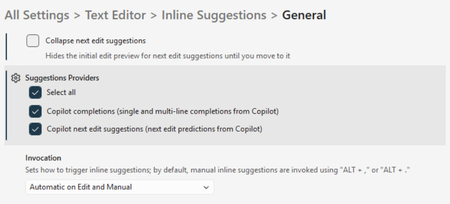
It's been a minute since I've posted here - but rest assured that the SSMS team has been working hard to bring you lots of exciting features and fixes! Today we shipped SQL Server Management Studio (SSMS) 22.6.0, and it's a really nice mix of work: continued investment in Database DevOps (preview), a security-related update to how we authenticate against Azure Storage, a handful of quality-of-life improvements in the editor and tools, and a solid roundup of bug fixes (many of which came directly from items filed on the feedback site!). Thank you, as always, for taking the time to log issues and upvote what matters to you. It really does shape what we work on. Let's dig into what's new! Database DevOps (preview) SQL projects support in SSMS continues to evolve with incremental changes, including an adjustment to the Solution Explorer icon for solutions to match the '.slnx' icon found in Visual Studio. This release also introduces the ability to create a SQL project directly from an existing database. Once a project is created, you can check it into source control and work with it in VS Code or vice versa, enabling a flexible experience across different tools and teams. If a database changes over time, you can use the SQL projects "Import From Database..." menu item in Solution explorer to update your project with the latest schema changes. This allows you to keep your project in sync with the database and maintain a single source of truth for your database schema. Once your database definition is captured in a SQL project, CI/CD pipelines and the SqlPackage CLI can be used to automate deployments and manage the quality of database changes. Documentation is available at aka.ms/sqlprojects-docs, and our public roadmap at aka.ms/sqlprojects-roadmap shows what's coming next. Unified Settings We're continuing to migrate settings from the classic Tools > Options dialog into the new Unified Settings experience. In 22.6, Transact-SQL IntelliSense and Keyboard Query Shortcuts are now available in Unified Settings. If you haven't opened Unified Settings yet, give it a try. The search and filtering experience is significantly better than what we had before, and we'd love your feedback as we keep moving more settings over. I also recorded a Data Exposed episode with Anna Hoffman where I talk about a few ways you can customize your SSMS 22 installation to work for you. Storage Account access - now with Entra authentication This one is worth calling out for anyone who connects to Azure Storage accounts from SSMS. The Storage Browser, DACPAC import/export, and Merge Audit File dialogs have all been updated to support Microsoft Entra-based authentication instead of shared key access. Shared keys have been a long-standing concern from a security perspective, and moving these flows to Entra brings them in line with modern authentication guidance. Quality-of-life improvements A few smaller changes that I think are worth highlighting: Registered Servers: Multi-server connection attempts can now be cancelled. If you've ever kicked off a connection to a large group and immediately realized you picked the wrong one, you no longer have to wait it out. There's now a Cancel button. Results Grid: Hovering over a column header in the results grid now shows the column's data type in the tooltip. Small, but handy, this comes straight from a feedback item. Query Designer: In the Show Criteria pane, there's a new right-click option to Change Column Width for an individual column. GitHub Copilot in SSMS On the GitHub Copilot side, this release is primarily about stability and cleanup rather than new capabilities. We fixed a crash that some of you ran into when using Copilot Edit, and we removed the GPT-5* models from Ask mode. They may return down the road; for now, the remaining models should give you a more consistent experience. If you missed Erin's blog post about 22.5.2, code completions are still disabled by default. You can opt back in under Tools > Options > Text Editor > Inline Suggestions. Fixes worth highlighting The full list is in the release notes, but a few that I expect folks will be happy to see: Connection Dialog: Passwords are no longer displayed in plain text when viewing a connection string. This came in as a feedback item for SQL Lakehouse connections specifically, but the fix applies broadly. Object Explorer: Fixed the "object reference not set to an instance of an object" error that some of you saw when deleting multiple items at once and addressed an issue where newly created objects sometimes didn't appear in Object Explorer until you disconnected and reconnected. Migration Landing Page: the Migration page we introduced in 22.5 now supports dark theme! Query Editor: Editor tooltips are no longer unreadable when you're using a dark theme with a light editor appearance. A reminder on rolling back We say this from time to time, but it's worth repeating: if a release ever creates trouble for you, you can roll back to a previous version of SSMS 22 from the Visual Studio Installer. From the SSMS 22 entry, select More > Rollback to previous version. And if you're ever in a spot where you need a specific older build, the Release History page lists them. Summary You can find the complete release notes here. As always, thank you for using SSMS, for the feedback items, the upvotes, the comments, and the patience as we keep iterating. Please keep them coming, the feedback site is the best way to influence what shows up in the next release.6.1KViews0likes2Commentsmssql-python 1.6: Unblocking Your Threads
The last two mssql-python releases shipped big features: Bulk Copy in 1.4 for high-throughput data loading, and Apache Arrow in 1.5 for zero-copy analytics. Version 1.6 is about what happens next: you take those features into production, scale up your thread pool, and find out where the driver was quietly holding you back. This release unblocks your threads during connection setup, fixes crashes and incorrect results in common cursor patterns, and hardens security for passwords with special characters and log file paths. pip install --upgrade mssql-python Your threads can run while connections are opening If you're running mssql-python behind Flask, FastAPI, Django, or any WSGI/ASGI server with thread-based workers, this one matters. Opening a database connection is slow. There's DNS resolution, a TCP handshake, TLS negotiation, and SQL Server authentication. In previous versions, every other Python thread in your process was frozen while that happened, because the driver held the Global Interpreter Lock (GIL) during the entire operation. One thread opening a connection meant no other thread could serve requests, process data, or do anything at all. Version 1.6 releases the GIL during connect and disconnect. Your other threads keep running while the network round-trip completes. If you have a multi-threaded web server handling concurrent requests, this removes a serialization bottleneck you may not have realized you had. The connection pool was also reworked to stay safe under this change. Previously, the pool held an internal lock while calling connect, which would have created a deadlock now that connect releases the GIL. The pool now reserves a slot first, connects outside the lock, and rolls back the reservation if the connection fails. Decimal parameters work with setinputsizes If you use cursor.setinputsizes() to declare parameter types for performance-sensitive batch inserts, you may have hit a crash when specifying SQL_DECIMAL or SQL_NUMERIC. This is fixed. Decimal values now bind correctly whether you're using execute() or executemany(): cursor.setinputsizes([ (mssql_python.SQL_WVARCHAR, 100, 0), (mssql_python.SQL_INTEGER, 0, 0), (mssql_python.SQL_DECIMAL, 18, 2), ]) cursor.executemany( "INSERT INTO Products (Name, CategoryID, Price) VALUES (?, ?, ?)", [ ("Widget", 1, Decimal("19.99")), ("Gadget", 2, Decimal("29.99")), ], ) Iterating catalog results with fetchone() If you've used cursor.tables(), cursor.columns(), or other catalog methods and tried to walk the results with fetchone(), you may have gotten incorrect data. Row tracking was broken for catalog result sets. This now works the way you'd expect: cursor.tables(tableType="TABLE") while True: row = cursor.fetchone() if row is None: break print(row.table_name) This also applies to primaryKeys(), foreignKeys(), statistics(), procedures(), and getTypeInfo(). Reusing prepared statements without reset If you call cursor.execute() with reset_cursor=False to reuse a prepared statement across calls, this no longer raises an "Invalid cursor state" error. Passwords with special characters stay masked in logs If your SQL Server password contains semicolons, braces, or other ODBC-special characters (e.g., PWD={Top;Secret}), previous versions could accidentally leak part of it in sanitized log output. The password masking logic has been rewritten to correctly handle all ODBC connection string formats. If the connection string can't be parsed at all, the entire string is now redacted rather than partially exposed. The logging system also now rejects log file paths that attempt directory traversal, preventing setup_logging(log_file_path="../../somewhere/else.log") from writing outside the intended directory. Better type checker support for executemany If your type checker flagged executemany() when you passed dictionaries as parameter rows, that warning is gone. The type annotations now correctly accept Mapping types, matching the DB API 2.0 spec for named parameters. Get started pip install --upgrade mssql-python For questions or issues, file them on GitHub or email mssql-python@microsoft.com.388Views0likes0Commentsmssql-django 1.7.1: Microsoft Fabric Support and Migration Fixes
We just shipped mssql-django 1.7.1 with two fixes that matter if you're running Django on Microsoft Fabric or using descending indexes in your migrations. JSONField Now Works on Microsoft Fabric SQL Database in Microsoft Fabric reports itself as EngineEdition 12, which our backend didn't previously recognize. The result: JSONField queries, hash functions, collation introspection, and test teardown all broke on Fabric because the backend couldn't correctly identify the server capabilities. In 1.7.1, we added full detection for Fabric's engine edition. The backend now correctly treats Fabric as an Azure SQL-class database, which means JSONField, MD5, SHA1, SHA224, SHA256, SHA384, SHA512, and collation-dependent lookups all work as expected. We also combined the ProductVersion and EngineEdition queries into a single round trip, so connection setup is faster too. If you've been waiting to use Django with SQL Database in Microsoft Fabric, this is the release that makes it work. Descending Index Migrations No Longer Crash If you had a model with a descending index and ran an AlterField migration on one of the indexed columns, Django would crash with FieldDoesNotExist. The issue was in how our schema editor looked up fields during index reconstruction: it was reading index.fields (which only contains field names for simple indexes) instead of index.fields_orders (which correctly handles the (field_name, order) tuples that descending indexes use). This was a one-line fix, but it blocked anyone whose migrations touched fields covered by descending indexes. If you've been working around this, upgrade and your migrations will run cleanly. SQL Server 2025 in CI We upgraded our Windows CI pipeline to run against SQL Server 2025, so every commit is now tested against the latest version. Combined with our existing coverage across SQL Server 2016-2022, Azure SQL Database, Azure SQL Managed Instance, and now Microsoft Fabric, you can be confident the backend works across the full Microsoft data platform. Upgrade pip install --upgrade mssql-django Full compatibility: Component Supported Django 3.2, 4.0, 4.1, 4.2, 5.0, 5.1, 5.2, 6.0 Python 3.8 - 3.14 (Django 6.0 requires 3.12+) SQL Server 2016, 2017, 2019, 2022, 2025 Azure SQL Database, Managed Instance, SQL Database in Fabric ODBC Driver Microsoft ODBC Driver 17 or 18 Questions, bugs, or contributions? Find us on GitHub. mssql-django is open source under the BSD license. Built and maintained by Microsoft.155Views0likes0Comments