sqlserverprotocols
68 TopicsIntroducing Pacemaker HA Agent v2 for SQL Server on Linux (In Preview)
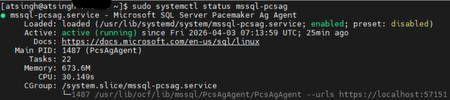
We are excited to introduce the next generation of high availability (HA) Agent for SQL Server on Linux: Pacemaker HA Agent v2. This release is a major step forward, designed to reduce planned and unplanned failover times, compared to the previous agent, based on internal engineering improvements. Why Pacemaker Is Required for SQL Server HA on Linux For users new to Linux, it’s important to understand how high availability works on this platform. On Windows Server, Always On availability groups use an underlying Windows Server Failover Cluster (WSFC) to: Monitor node health Detect failures Orchestrate automatic failovers Always On availability groups on Linux rely on an external cluster orchestrator for health monitoring and failover coordination, with Pacemaker HA Agent being one of the cluster orchestrators, responsible for: Monitoring node and application health Coordinating failover decisions Helping mitigate split‑brain scenarios through improved write‑lease evaluation Managing resources such as availability groups and listeners The Pacemaker HA Agent is the integration layer that allows Pacemaker to understand SQL Server health and manage availability groups safely. Evolution of the SQL Server Pacemaker HA Agent With SQL Server 2025 CU3 and later, Pacemaker HA Agent v2 is available in preview for Red Hat Enterprise Linux and Ubuntu through the mssql-server-ha package. Pacemaker HA agent v2 uses a service‑based architecture. The agent runs as a dedicated system service named mssql-pcsag, which is responsible for handling SQL Server–specific high availability operations and communication with Pacemaker. You can manage mssql-pcsag service by using standard system service controls to start, restart, status and stop this service by using the operating system's service manager (for example, systemctl). # Start the mssql-pcsag service sudo systemctl start mssql-pcsag # Restart the mssql-pcsag service sudo systemctl restart mssql-pcsag # Check the status of the mssql-pcsag service sudo systemctl status mssql-pcsag # Stop the mssql-pcsag service sudo systemctl stop mssql-pcsag Limitations of Pacemaker HA Agent v1 While the original agent enabled SQL Server HA on Linux, customers running production workloads encountered several challenges: Failover delays of 30 seconds to 2 minutes during planned or unplanned events Limited health detection, missing conditions such as I/O stalls and memory pressure Rigid failover behavior, unlike the flexible policies available on Windows (WSFC) Incomplete write‑lease handling, requiring custom logic No support for TLS1.3 for Pacemaker and SQL Server communications How Pacemaker HA Agent v2 Addresses These Gaps Pacemaker HA Agent v2 is a ground‑up improvement, designed to improve the reliability characteristics of SQL Server HA on Linux. 1. Faster & Smarter Failover Decisions The new agent introduces a service‑based health monitoring architecture, moving beyond basic polling. This allows SQL Server to report detailed diagnostic signals - improving detection speed and helping reduce failover delays in supported configurations. 2. Flexible Automatic Failover Policies inspired by the WSFC health model Pacemaker HA Agent v2 supports failure‑condition levels (1–5) and health‑check timeout model aligned with those available in Always On availability groups on Windows. This provides: Fine‑grained control over failover sensitivity, allowing administrators to tune when failover should occur. Improved detection of internal SQL Server conditions, such as memory pressure, internal deadlocks, orphaned spinlocks, and other engine‑level failures. Failover decisions are now driven by detailed diagnostics from sp_server_diagnostics, enabling faster and more accurate response to unhealthy states and providing enhanced resiliency capabilities for SQL Server AG on Linux. You can configure the failure condition level and health check timeout using the following commands: -- Setting failure condition level ALTER AVAILABILITY GROUP pacemakerag SET (FAILURE_CONDITION_LEVEL = 2); -- Setting health check timeout ALTER AVAILABILITY GROUP pacemakerag SET (HEALTH_CHECK_TIMEOUT = 60000); After applying the configuration, validate the setting using the sys.availability_groups DMV: 3. Robust Write Lease Validity Handling To prevent split‑brain scenarios, SQL Server on Linux uses an external write‑lease mechanism. In v1, lease information was not fully integrated into failover decisions. In v2, the agent actively evaluates the write-lease validity, before initiating transitions. This supports controlled role changes and improved data consistency behavior during failover events, depending on cluster configuration. 4. TLS 1.3 Support Pacemaker HA agent v2 includes design updates to support TLS 1.3–based communication for health checks and failover operations, when TLS 1.3 is enabled. Supported Versions & Distributions Pacemaker HA Agent v2 supports: SQL Server 2025 CU3 or later RHEL 9 or later Ubuntu 22.04 or higher. Preview upgrade & migration guidance for non-production environments New or existing non-prod deployments running SQL Server 2025 (17.x) can migrate from Pacemaker HA Agent v1 to v2 using following approach: Drop the existing AG resource sudo pcs resource delete <NameForAGResource> This temporarily pauses AG synchronization but does not delete the availability group (AG). After the resource is recreated, Pacemaker resumes management and AG synchronization automatically. Create a new AG resource using the v2 agent (ocf:mssql:agv2) sudo pcs resource create <NameForAGResource> ocf:mssql:agv2 ag_name=<AGName> meta failure-timeout=30s promotable notify=true Validate cluster health sudo pcs status Resume normal operations References Create and Configure an Availability Group for SQL Server on Linux - SQL Server | Microsoft Learn Thank You, Engineering: David Liao Attinder Pal Singh639Views2likes3CommentsMicrosoft.Data.SqlClient 7.0 Is Here: A Leaner, More Modular Driver for SQL Server
Today we're shipping the general availability release of Microsoft.Data.SqlClient 7.0, a major milestone for the .NET data provider for SQL Server. This release tackles the single most requested change in the repository's history, introduces powerful new extensibility points for authentication, and adds protocol-level features for Azure SQL Hyperscale, all while laying the groundwork for a more modular driver architecture. If you take away one thing from this post: the core SqlClient package is dramatically lighter now. Azure dependencies have been extracted into a separate package, and you only pull them in if you need them. dotnet add package Microsoft.Data.SqlClient --version 7.0.0 The #1 Request: A Lighter Package For years, the most upvoted issue in the SqlClient repository asked the same question: "Why does my console app that just talks to SQL Server pull in Azure.Identity, MSAL, and WebView2?" With 7.0, it doesn't anymore. We've extracted all Azure / Microsoft Entra authentication functionality into a new Microsoft.Data.SqlClient.Extensions.Azure package. The core driver no longer carries Azure.Core, Azure.Identity, Microsoft.Identity.Client, or any of their transitive dependencies. If you connect with SQL authentication or Windows integrated auth, your bin folder just got dramatically smaller. For teams that do use Entra authentication, the migration is straightforward. Add one package reference and you're done: dotnet add package Microsoft.Data.SqlClient.Extensions.Azure No code changes. No configuration changes. You can also now update Azure dependency versions on your own schedule, independent of driver releases. This is something library authors and enterprise teams have been asking for. Pluggable Authentication with SspiContextProvider Integrated authentication in containers and cross-domain environments has always been a pain point. Kerberos ticket management, sidecar processes, domain trust configuration: the workarounds were never simple. Version 7.0 introduces a new public SspiContextProvider API on SqlConnection that lets you take control of the authentication handshake. You provide the token exchange logic; the driver handles everything else. var connection = new SqlConnection(connectionString); connection.SspiContextProvider = new MyKerberosProvider(); connection.Open(); This opens the door to scenarios the driver never natively supported: authenticating across untrusted domains, using NTLM with explicit credentials, or implementing custom Kerberos negotiation in Kubernetes pods. A sample implementation is available in the repository. Async Read Performance: Packet Multiplexing (Preview) One of the most community-driven features in 7.0 is packet multiplexing, a change to how the driver processes TDS packets during asynchronous reads. Originally contributed by community member Wraith2, this work delivers a significant leap in async read performance for large result sets. Packet multiplexing was first introduced in 6.1 and has been refined across the 7.0 preview cycle with additional bug fixes and stability improvements. In 7.0, it ships behind two opt-in feature switches so we can gather broader real-world feedback before making it the default: AppContext.SetSwitch("Switch.Microsoft.Data.SqlClient.UseCompatibilityAsyncBehaviour", false); AppContext.SetSwitch("Switch.Microsoft.Data.SqlClient.UseCompatibilityProcessSni", false); Setting both switches to false enables the new async processing path. By default, the driver uses the existing (compatible) behavior. We need your help. If your application performs large async reads (ExecuteReaderAsync with big result sets, streaming scenarios, or bulk data retrieval), please try enabling these switches and let us know how it performs in your environment. File your results on GitHub Issues to help us move this toward on-by-default in a future release. Enhanced Routing for Azure SQL Azure SQL environments with named read replicas and gateway-based load balancing can now take advantage of enhanced routing, a TDS protocol feature that lets the server redirect connections to a specific server and database during login. This is entirely transparent to your application. No connection string changes, no code changes. The driver negotiates the capability automatically when the server supports it. .NET 10 Ready SqlClient 7.0 compiles and tests against the .NET 10 SDK, so you're ready for the next major .NET release on day one. Combined with continued support for .NET 8, .NET 9, .NET Framework 4.6.2+, and .NET Standard 2.0 (restored in 6.1), the driver covers the full spectrum of active .NET runtimes. ActiveDirectoryPassword Is Deprecated: Plan Your Migration As Microsoft moves toward mandatory multifactor authentication across its services, we've deprecated SqlAuthenticationMethod.ActiveDirectoryPassword (the ROPC flow). The method still works in 7.0, but it's marked [Obsolete] and will generate compiler warnings. Now is the time to move to a stronger alternative: Scenario Recommended Authentication Interactive / desktop apps Active Directory Interactive Service-to-service Active Directory Service Principal Azure-hosted workloads Active Directory Managed Identity Developer / CI environments Active Directory Default Quality of Life Improvements Beyond the headline features, 7.0 includes a collection of improvements that make the driver more reliable and easier to work with in production. Better retry logic. The new SqlConfigurableRetryFactory.BaselineTransientErrors property exposes the built-in transient error codes, so you can extend the default list with your own application-specific codes instead of copy-pasting error numbers from source. More app context switches. You can now set MultiSubnetFailover=true globally, ignore server-provided failover partners in Basic Availability Groups, and control async multi-packet behavior, all without modifying connection strings. Better diagnostics on .NET Framework. SqlClientDiagnosticListener is now enabled for SqlCommand on .NET Framework, closing a long-standing observability gap. Connection performance fix. A regression where SPN generation was unnecessarily triggered for SQL authentication connections on the native SNI path has been resolved. Performance improvements. Allocation reductions across Always Encrypted scenarios, SqlStatistics timing, and key store providers. Upgrading from 6.x For most applications, upgrading is a package version bump: dotnet add package Microsoft.Data.SqlClient --version 7.0.0 If you use Microsoft Entra authentication, also add: dotnet add package Microsoft.Data.SqlClient.Extensions.Azure If you use ActiveDirectoryPassword, you'll see a compiler warning. Start planning your migration to a supported auth method. Review the full release notes in release-notes/7.0 for the complete list of changes across all preview releases. Thank You to Our Contributors Open-source contributions are central to SqlClient's development. We'd like to recognize the community members who contributed to the 7.0 release: edwardneal · ErikEJ · MatthiasHuygelen · ShreyaLaxminarayan · tetolv · twsouthwick · Wraith2 What's Next We're continuing to invest in performance, modularity, and modern .NET alignment. Stay tuned for updates on the roadmap, and keep the feedback coming. Your issues and discussions directly shape what we build. NuGet: Microsoft.Data.SqlClient 7.0.0 GitHub: dotnet/SqlClient Issues & Feedback: github.com/dotnet/SqlClient/issues Docs: Microsoft.Data.SqlClient on Microsoft Learn4.5KViews2likes5CommentsIntroducing adutil - A tool to ease configuration of AD authentication for SQL on Linux/Containers
We are excited to introduce adutil in public preview, this is a CLI based utility developed to ease the AD authentication configuration for both SQL Server on Linux and SQL Server Linux containers. AD authentication enables domain-joined clients on either Windows or Linux to authenticate to SQL Server using their domain credentials and the Kerberos protocol. Until today, when configuring the AD authentication for SQL on Linux, for creation of "AD user for SQL Server and setting SPNs" you needed to switch from Linux to Windows machine and then switch back to Linux machine to continue with the rest of steps. With adutil released we aim to make this experience seamless, where from the Linux machine itself you can interact and manage the Active Directory domains through the CLI. Overall adutil is a utility for interacting with and managing Active Directory domains through the CLI. adutil is designed as a series of commands and subcommands, with additional flags that can be specified for further input. Each top-level command represents a category of administrative functions. Each subcommand is an operation within that category. Using adutil you can manage with users, SPNs, keytabs, groups etc. To start using adutil please see adutil installation for the install steps For details on how you can configure AD authentication with adutil for SQL on Linux and containers please refer below: Configure Active Directory authentication for SQL Server on Linux using adutil Configure Active Directory authentication for SQL Server on Linux containers using adutil Thanks, Engineering lead: Mike Habben Engineering: Dylan Gray; Dyllon (Owen) Gagnier; Ethan Moffat; Madeline MacDonald Amit Khandelwal Senior Program Manager14KViews2likes12Comments
Understanding “Data Source=(local)” in SQL Server Connection Strings
First published on MSDN on Sep 19, 2008 Lately we have noticed many misunderstandings surrounding the usage of the Data Source keyword in connection strings, caused by people generalizing from an example demonstrating a connection string for local connectivity and creating their own connection string for a remote connection.14KViews1like0CommentsUnderstanding Kerberos and NTLM authentication in SQL Server Connections
First published on MSDN on Dec 02, 2006 In this post, I focus on how NTLM and Kerberos are applied when connecting to SQL Server 2005 and try to explain the design behavor behind several common issues that customers frequently hit.40KViews1like0Comments