sqlservermachinelearning
102 Topics
Step by Step Guide to Setup LDAPS on Windows Server
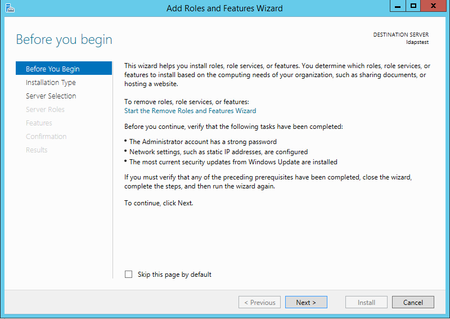
First published on MSDN on Apr 10, 2017 Step-by-step guide for setting up LDAPS (LDAP over SSL)The guide is split into 3 sections : Create a Windows Server VM in Azure Setup LDAP using AD LDS (Active Directory Lightweight Directory Services) Setup LDAPS (LDAP over SSL)NOTE : The following steps are similar for Windows Server 2008, 2012, 2012 R2 , 2016.787KViews5likes15Commentsmssql-python 1.4: Bulk Copy Arrives - Load Millions of Rows at Native Speed
We're excited to announce the release of mssql-python 1.4.0, the latest version of Microsoft's official Python driver for SQL Server, Azure SQL Database, and SQL databases in Fabric. This release delivers one of our most-requested features, Bulk Copy (BCP), alongside spatial type support, important bug fixes, and developer experience improvements. pip install --upgrade mssql-python The headline: Bulk Copy is here If you're moving large volumes of data into SQL Server, whether you're building ETL pipelines, loading data warehouse staging tables, ingesting IoT telemetry, or seeding databases for testing, the new bulkcopy() API is purpose-built for you. It provides the same high-throughput data loading capability that tools like bcp.exe and SqlBulkCopy in .NET have offered for years, now available natively from Python. Why bulk copy matters Traditional row-by-row inserts, even batched with executemany(), carry per-statement overhead: parsing, plan compilation, and individual round-trips for each row or batch. Bulk copy uses SQL Server's native bulk insert protocol (TDS bulk load), which: Streams rows directly into the target table with minimal protocol overhead Bypasses query parsing - there's no SQL statement to compile Batches intelligently - you control the batch size, or let the server optimize it Supports server-side options like table locks, constraint checking, trigger firing, and identity preservation For large datasets, the performance difference can be dramatic. How it works The API lives on the cursor object, so it fits naturally into the DB API 2.0 workflow you already know: import mssql_python conn = mssql_python.connect( "SERVER=myserver.database.windows.net,1433;" "DATABASE=mydb;" "UID=myuser;PWD=mypassword;" "Encrypt=yes;" ) cursor = conn.cursor() # Your data - any iterable of tuples or lists rows = [ (1, "Alice", "alice@example.com"), (2, "Bob", "bob@example.com"), (3, "Carol", "carol@example.com"), # ... millions more ] result = cursor.bulkcopy("dbo.Users", rows) print(f"Loaded {result['rows_copied']} rows " f"in {result['batch_count']} batches " f"({result['elapsed_time']:.2f}s)") That's it. Three lines of code to bulk-load your data. Full control when you need it The bulkcopy() method exposes the full range of SQL Server bulk copy options: result = cursor.bulkcopy( table_name="dbo.Users", data=rows, batch_size=10000, # 10k rows per batch (0 = server optimal) timeout=120, # Configurable timeout for large loads allows you to avoid premature cancellations while still failing due to blocking and other issues column_mappings=["UserID", "FirstName", "Email"], # Explicit column targeting keep_identity=True, # Preserve identity values from source check_constraints=True, # Enforce constraints during load table_lock=True, # Table-level lock for maximum throughput keep_nulls=True, # Preserve NULLs instead of column defaults fire_triggers=True, # Execute INSERT triggers use_internal_transaction=True, # Transaction per batch for recoverability ) Column mappings support two formats. The simple format maps columns by position: # Position in list = source column index column_mappings=["UserID", "FirstName", "Email"] The advanced format uses explicit index-to-column tuples, which lets you skip or reorder source columns: # (source_index, target_column_name) - skip index 2, reorder freely column_mappings=[(0, "UserID"), (1, "FirstName"), (3, "Email")] Powered by Rust under the hood The bulk copy engine is implemented in mssql-py-core, a companion Rust library that handles the TDS bulk load protocol. When you call bulkcopy(), the driver: Parses your existing connection string and translates it for the Rust layer Opens a dedicated connection through mssql-py-core (separate from your DDBC query connection) Acquires an Entra ID token if needed Streams your data iterator directly to the Rust bulk copy engine Returns a result dictionary with rows_copied, batch_count, and elapsed_time The Python logging integration is performance-aware: the logger is only passed to the Rust layer when debug logging is active, so there's zero overhead in production. Security is built-in: credentials are scrubbed from memory in the finally block, and error messages are sanitized to prevent credential leakage in stack traces. Spatial type support: geography, geometry, and hierarchyid Version 1.4 adds support for SQL Server's spatial and hierarchical types: geography, geometry, and hierarchyid. These CLR user-defined types are now handled natively by the driver. Reading spatial data Spatial columns are returned as bytes (the raw CLR binary representation). To get human-readable output, use SQL Server's built-in conversion methods: # Insert a geography point (WGS 84) cursor.execute( "INSERT INTO Locations (point) VALUES (geography::STGeomFromText(?, 4326))", "POINT(-122.349 47.651)" ) # Read as WKT text cursor.execute("SELECT point.STAsText() FROM Locations") row = cursor.fetchone() # row[0] = "POINT (-122.349 47.651)" # Use spatial methods server-side cursor.execute(""" SELECT a.point.STDistance(b.point) AS distance_meters FROM Locations a CROSS JOIN Locations b WHERE a.id = 1 AND b.id = 2 """) Writing spatial data The driver auto-detects WKT (Well-Known Text) geometry strings. If a parameter value starts with POINT, LINESTRING, or POLYGON, it's automatically mapped to the correct SQL type: # All standard WKT types are supported cursor.execute( "INSERT INTO Routes (path) VALUES (geography::STGeomFromText(?, 4326))", "LINESTRING(-122.349 47.651, -122.340 47.660, -122.330 47.670)" ) cursor.execute( "INSERT INTO Zones (boundary) VALUES (geometry::STGeomFromText(?, 0))", "POLYGON((0 0, 100 0, 100 100, 0 100, 0 0))" ) HierarchyId for tree structures hierarchyid is SQL Server's built-in type for representing tree/graph hierarchies: org charts, file systems, bill-of-materials structures: # Insert a node cursor.execute( "INSERT INTO OrgChart (node, name) VALUES (hierarchyid::Parse(?), ?)", "/1/2/3/", "Engineering Lead" ) # Query the hierarchy cursor.execute("SELECT node.ToString(), node.GetLevel(), name FROM OrgChart") # ("/1/2/3/", 3, "Engineering Lead") # Find ancestors cursor.execute("SELECT node.GetAncestor(1).ToString() FROM OrgChart WHERE name = 'Engineering Lead'") # "/1/2/" Output converters For advanced use cases, you can register custom converters to automatically transform the raw binary representation: def parse_geography(value): """Convert CLR binary to a shapely geometry (example).""" if value is None: return None # Your deserialization logic here return shapely.wkb.loads(value) conn.add_output_converter(bytes, parse_geography) # Now all bytes columns are automatically converted cursor.execute("SELECT point FROM Locations") row = cursor.fetchone() # row[0] is now a shapely geometry object Bug fixes VARCHAR encoding fix VARCHAR columns would fail to fetch when the data length exactly equaled the column size and the data contained non-ASCII characters in the CP1252 code page. This was a subtle edge case that could surface with European-language text (accented characters, currency symbols, etc.) in fixed-length string columns. Segmentation fault fix Resolved a segfault that occurred when interleaving fetchmany() and fetchone() calls on the same cursor. This affected patterns like: batch = cursor.fetchmany(100) # ... process batch ... next_row = cursor.fetchone() # Previously could segfault This is now safe to use in all combinations. Date/time type code alignment Aligned date/time type code mappings with the ODBC 18 driver source, correctly mapping SQL_SS_TIME2 (-154) and SQL_SS_DATETIMEOFFSET (-155). This improves compatibility with tools and frameworks that inspect cursor.description type codes. Developer experience improvements PEP 561 type checking support The driver now ships with a py.typed marker file, enabling full static type checking in tools like mypy, Pyright, and IDE type inspectors. Combined with the existing .pyi stub file, you get accurate autocompletion and type validation for the entire mssql-python API. Devcontainer for contributors A new devcontainer configuration makes it easy to spin up a fully configured development environment for contributing to the driver. Just open the repo in VS Code or GitHub Codespaces and you're ready to go. Azure SQL Database in CI The PR validation pipeline now tests against Azure SQL Database in addition to on-premises SQL Server, ensuring that every change is validated against the Azure SQL service before merge. The road to 1.4 For context, here's how the driver has evolved over its GA releases: Release Date Highlights 1.0.0 November 2025 GA release - DDBC architecture, Entra ID auth, connection pooling, DB API 2.0 compliance 1.1.0 December 2025 Parameter dictionaries, Connection.closed property, Copilot prompts 1.2.0 January 2026 Param-as-dict, non-ASCII path handling, fetchmany fixes 1.3.0 January 2026 Initial BCP implementation (internal), SQLFreeHandle segfault fix 1.4.0 February 2026 BCP public API, spatial types, Rust core upgrade, encoding & stability fixes BCP was introduced as an internal implementation in 1.3 and has been hardened, expanded, and promoted to a fully public API in 1.4, with Entra ID support, explicit parameters, column mappings, logging integration, and comprehensive validation. What's next Looking ahead, the roadmap includes: Asynchronous query execution with asyncio support Vector datatype support for SQL Server's native vector type Table-Valued Parameters (TVPs) for passing tabular data to stored procedures Get started pip install --upgrade mssql-python Documentation: github.com/microsoft/mssql-python/wiki Release notes: github.com/microsoft/mssql-python/releases Roadmap: github.com/microsoft/mssql-python/blob/main/ROADMAP.md Report issues: github.com/microsoft/mssql-python/issues Contact: mssql-python@microsoft.com We'd love your feedback. Try the new bulk copy API, let us know how it performs on your workloads, and file issues for anything you run into. This driver is built for the Python data community, and your input directly shapes what comes next.1.1KViews1like0CommentsSQL Saturday 613: Building 1 million predictions per second with R-services and SQL Server 2016
First published on MSDN on Apr 12, 2017 SQL Saturday is round the corner again! SQL Saturday is a great event to meet the community, gather feedback and meet some great friends that we made during our last few SQL Saturdays.544Views1like0Comments