sqlserver2025
83 Topics
BULKADMIN role support for SQL Server on Linux is now Generally Available
Starting with SQL Server 2025 CU9 and SQL Server 2022 CU27, SQL Server on Linux supports the bulkadmin fixed server role and the ADMINISTER BULK OPERATIONS permission for performing bulk data import operations without requiring users to be members of the sysadmin fixed server role. This capability enables you to use operations such as BULK INSERT and OPENROWSET(BULK...) while following a least-privilege security model. Previously on SQL Server on Linux, these operations required sysadmin membership. With this GA (Generally Available) release, organizations running SQL Server on Linux can provide users with the permissions required for bulk data loading without granting broader sysadmin privileges, improving alignment with the principle of least privilege. The feature applies to SQL Server on Linux, including on-premises, SQL Server on Azure VMs and container deployments. Learn more: BULK INSERT (Transact-SQL) - SQL Server | Microsoft Learn Announcing Preview of bulkadmin role support for SQL Server on Linux | Microsoft Community Hub98Views0likes0CommentsAnnouncing flexible provisioning for SQL Server on Linux Azure VMs (Public Preview)
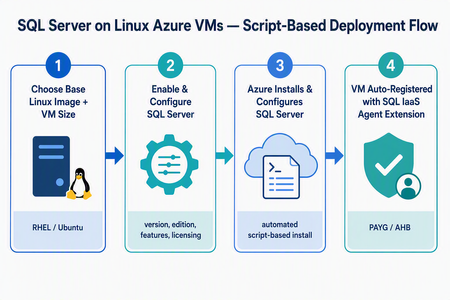
What’s changing We’re introducing a new script-based deployment experience for provisioning SQL Server on Linux Azure Virtual Machines (VMs). This experience replaces the earlier model that relied on pre-created SQL Server on Linux Marketplace images, which have been deprecated. Pre-created SQL Server on Linux Marketplace images are no longer available for new provisioning through the Azure portal, the Azure SQL hub, Azure CLI, or PowerShell. Instead, SQL Server is now installed and configured during VM provisioning using a flexible, automated, script-based workflow. The result is a more adaptable and supportable deployment model that keeps SQL Server on Linux Azure VMs fully supported, reduces image-maintenance overhead, and makes it easier to adopt the latest Linux distributions, VM families, and configuration options - all while giving you more control over your SQL Server setup. Why the new model matters Greater flexibility and control — choose your Linux distribution, SQL Server version, edition, and even bring your own mssql.conf to tailor the configuration. Faster access to innovation — new Linux versions and Azure capabilities are picked up automatically, without waiting for a new baked image to be published. Automatic registration built in — every VM is registered with the SQL IaaS Agent extension by default, unlocking licensing flexibility, compliance, and richer visibility. A dynamic, guided UI — the portal enables or disables options based on supported operating system, SQL Server, and licensing combinations, so you only see valid choices. Supported Linux distributions The script-based deployment experience supports the following distributions, and future versions are picked up automatically as they become supported — no manual intervention required: Distribution Supported versions Red Hat Enterprise Linux (RHEL) RHEL 9, RHEL 10 (and future versions) Ubuntu Ubuntu 22.04, Ubuntu 24.04, Ubuntu 26.04 (and future versions) Automatic registration applies to both Red Hat Enterprise Linux and Ubuntu, across all their supported versions. Automatic registration with the SQL IaaS Agent extension SQL Server on Linux VMs deployed through this experience are automatically registered with the SQL Server IaaS Agent extension. Registration creates a SQL virtual machine resource in Azure (separate from the VM resource) and unlocks: Licensing flexibility — choose Pay-As-You-Go (PAYG) or Azure Hybrid Benefit (AHB), and switch between them anytime with no downtime. Compliance — a simplified way to meet Azure Hybrid Benefit product-term requirements without per-resource registration forms. Visibility and telemetry — clear license-type visibility, subscription-level tracking, and better operational insight from the Azure portal, CLI, or PowerShell. Note: Automatic registration is enabled by default during deployment. You can unregister or re-register a VM after deployment through the Azure portal, Azure CLI, or PowerShell. The end-to-end flow at a glance Experience: The “Create a virtual machine” tab Use this flow if you’re starting from the familiar VM creation experience in the Azure portal. In the Azure portal, go to Virtual machines (or Create a resource → Virtual machine) and select Create. On the Basics tab, select your project details (subscription, resource group), instance details, and a supported Linux base image — RHEL 9, RHEL 10, Ubuntu 22.04, or Ubuntu 24.04. Choose your VM size, authentication, and inbound ports as usual. Go to the Advanced tab and select the Install SQL Server checkbox. This enables SQL Server provisioning on the VM. A new SQL Server settings tab becomes available. Open it to configure your SQL Server deployment: SQL Server version — e.g., SQL Server 2025 or SQL Server 2022. Edition — Enterprise, Standard, Developer, Express, and Evaluation editions (options adjust to the selected version). Licensing model — Pay-As-You-Go (PAYG, default) or Azure Hybrid Benefit (AHB). Advanced configuration — Upload a custom mssql.conf file to set SQL connectivity, Azure Key Vault integration, and the tuned performance profile. Select Review + create, review the configuration summary, and select Create. Azure provisions the VM, then automatically installs and configures SQL Server and registers the VM with the SQL IaaS Agent extension. Managing licensing after deployment Because your VM is registered with the SQL IaaS Agent extension, you can change the licensing model anytime — with no downtime and no restart of the VM or SQL Server service. Azure portal: Go to the SQL virtual machine resource → Settings → SQL Server configuration → Manage. Azure CLI az sql vm update -n <VM_NAME> -g <RESOURCE_GROUP> --license-type AHUB Azure PowerShell: Set-AzSqlVM -Name <VM_NAME> -ResourceGroupName <RESOURCE_GROUP> -LicenseType AHUB Note: Switching between PAYG and AHB is immediate, incurs no additional cost, and does not restart the VM or the SQL Server service. Wrapping up The move to script-based deployment modernizes how you provision SQL Server on Linux Azure VMs. By replacing deprecated pre-created Marketplace images with a flexible, automated, script-based flow — and by registering every VM with the SQL IaaS Agent extension automatically — you get more choice, faster access to new Linux and SQL Server versions, and a cleaner path to licensing flexibility, compliance, and visibility. Whether you start from the Create a virtual machine tab or the Azure SQL hub, you get the same guided experience across RHEL 9, RHEL 10, Ubuntu 22.04, Ubuntu 24.04, and future versions. Ready to try it? Head to a Create a virtual machine option in the Azure portal. We’d love your feedback — let us know how the new experience works for your workloads in the comments.168Views1like0Commentsmssql-django 2.0: Now with mssql-python
mssql-django 2.0 is on PyPI. This release adds Microsoft's new mssql-python driver as a second way to connect, moves the supported Python, Django, and SQL Server versions forward, and fixes several connection and query bugs that production teams hit. pip install --upgrade mssql-django Pick your driver, one database at a time Until now, mssql-django spoke to SQL Server through pyodbc and an ODBC driver you installed yourself. That still works, and it's still the default. Version 2.0 adds a second path: mssql-python, Microsoft's Python driver for SQL Server. You choose per database alias. Add one option to the alias you want to move: DATABASES = { "default": { "ENGINE": "mssql", "NAME": "appdb", "HOST": "contoso.database.windows.net", "PORT": "1433", "OPTIONS": { "python_driver": "mssql_python", "extra_params": "Encrypt=yes", }, }, "reporting": { # No python_driver, so this alias stays on pyodbc. "ENGINE": "mssql", "NAME": "reportdb", "HOST": "contoso.database.windows.net", "PORT": "1433", "OPTIONS": { "driver": "ODBC Driver 18 for SQL Server", }, }, } ENGINE doesn't change. Remove the option and the alias is back on pyodbc. That's the whole rollback plan, which is the point: you can try the new driver on one database, run your test suite, and leave everything else alone. The mssql-python path covers the day-to-day work: connections, pooling, retries, transactions and savepoints, datetimeoffset values, introspection, and Microsoft Entra ID authentication. One practical difference worth calling out. On the mssql-python path, pip also installs the mssql-python-odbc companion package, which supplies Microsoft ODBC Driver 18 for SQL Server. There's no separate driver install, which takes a step out of container images and App Service deployments. Know what changes before you switch The two drivers aren't identical, and the differences are the reason we made this per alias instead of a global switch. The mssql-python path ignores driver, dsn, host_is_server, and unicode_results. There's no ODBC Driver 17 fallback. It validates extra_params against an allowlist and rejects pyodbc-only keywords such as ColumnEncryption, APP, and Connect Timeout, so use the connection_timeout option instead of the last one. It also doesn't enable MARS, which means QuerySet.iterator() reads the full result into memory before yielding rows so a nested query can reuse the connection. On a large queryset, that memory is real. Budget for it. Stay on pyodbc if you depend on a named DSN, FreeTDS, MARS, Always Encrypted through ColumnEncryption, or an ODBC driver version you manage yourself. We cleaned up the version matrix This is something we've wanted to get to for a while. mssql-django 2.0 supports Python 3.10 through 3.14, Django 5.2 through 6.1, and SQL Server 2017 through 2025, plus Azure SQL Database, Azure SQL Managed Instance, and SQL database in Microsoft Fabric. Django 6.0 and 6.1 need Python 3.12 or later. Python 3.8 and 3.9 and Django 3.2 through 5.1 are no longer supported. The compatibility code is still in the tree, so nothing breaks the moment you upgrade, but those combinations aren't tested or listed. Fixes MARS settings are honored. If you set MARS_Connection=no in extra_params, the backend used to overwrite it with the Windows default and the connection failed. That's the bug frederiksoftware reported when connecting an on-premises Django app to a Microsoft Fabric Warehouse. The explicit value now wins, case-insensitively, so those connections work. To be clear about scope: this fixes the connection, it doesn't add full Warehouse support for migrations or other SQL Server features. Bracket wildcards are escaped in F() expression lookups. A pattern lookup comparing two fields, such as filter(name__contains=F("code")), didn't escape the SQL Server [ wildcard, so bracket characters in your data were treated as wildcard syntax and matched the wrong rows. Thanks to @Khan3K for the fix. Quotes are escaped in inspectdb schema names. inspectdb --schema produced malformed T-SQL for a schema name containing a single quote. An empty HOST connects to localhost on the mssql-python path. Omitting HOST in Django settings leaves it as an empty string, which mssql-python rejected. It now resolves to localhost, matching the pyodbc behavior for local instances. pytz is gone Time zone handling moved to the standard library zoneinfo module, with the tzdata package supplying the IANA database where the operating system doesn't ship one: Windows, and minimal container images. This fixes offsets for zones with negative daylight saving offsets, and it drops a dependency. Before you upgrade mssql-python is a required dependency in 2.0 even when every alias uses pyodbc. That means mssql-django 2.0 installs only on platforms that have a compatible mssql-python distribution: Windows x64, Windows ARM64 with Python 3.11 and later, macOS 15 and later on Intel or Apple silicon, and Linux x64 or ARM64 with glibc 2.28 or later or musl 1.2 or later. SUSE Linux on ARM64 isn't supported. If you're outside that list, stay on 1.8.0. Upgrade now pip install --upgrade mssql-django Release notes Documentation Report an issue Thanks to @Khan3K and @frederiksoftware for the contributions in this release.238Views0likes0CommentsMove to Modern SQL Server Licensing with Confidence
Why eligible customers should move to pay-as-you-go licensing (PAYG) For eligible SQL Server workloads, PAYG should be the preferred licensing approach when moving away from licenses and Software Assurance. It aligns billing with measured usage, adapts as the estate changes, and reduces the operational burden of managing fixed license quantities. The transition requires deliberate resource-configuration updates, but the result is a more flexible and manageable licensing model. Align cost with measured usage: Adopt consumption-based billing for eligible SQL Server resources instead of maintaining fixed license allocations. Scale without repeated license true-ups: Let billing adjust as workloads are added, removed, migrated, resized, or used intermittently. Manage licensing through Azure: Use Azure-based controls to review resource-level licensing and improve visibility across the estate. Reduce license administration: Spend less time tracking fixed quantities and aligning individual resources with license inventory. Optimize committed consumption: After establishing stable PAYG usage, evaluate applicable Azure savings plans or reservations to help reduce costs. Guidance for transitioning your resource settings Once your organization decides to adopt PAYG for eligible SQL Server workloads, update the license configuration on each resource so billing reflects that decision. A commercial or licensing change alone does not update resource-level settings. Plan this configuration work as part of the transition rather than treating it as a follow-up. Starting early gives teams time to validate security, networking, Azure Arc connectivity, billing, and operational processes before switching the broader estate. Automate the transition to pay-as-you-go SQL licensing at scale Choose the transition approach that fits your estate PowerShell for a controlled bulk change Use PowerShell when you need a targeted transition across a defined tenant, subscription, resource group, or resource scope. Discover and review resources before making changes. Test the transition with a limited scope. Update eligible resources in bulk when the organization is ready. Validate the resulting license configuration and billing signals. Azure Policy for ongoing governance Use Azure Policy to transition existing SQL resources to PAYG and continuously enforce the desired licensing configuration. Azure Policy helps identify configuration drift, maintain compliance, and automatically remediate non-compliant resources at scale. Define the approved license configuration for eligible resources. Assign policy at the appropriate subscription or resource group scope. Monitor compliance through centralized Azure views. Remediate resources that drift from the approved configuration. Recommended path to PAYG Commit to the PAYG target. Confirm which eligible workloads will move and identify the teams responsible for licensing, Azure, security, networking, and SQL operations. Prepare the estate. For SQL Server running outside of Azure, connect to Azure Arc. Inventory eligible SQL resources and confirm that Azure Arc connectivity and required organizational approvals are in place. Prove the transition. Test resource updates and billing behavior in a limited resource group or subscription. Move at scale. Use PowerShell for a controlled bulk transition, then apply Azure Policy for ongoing governance where appropriate. Verify and operate. Review the resulting configuration, monitor compliance, and reassess as the SQL estate grows or changes. Evaluate commitment-based savings. After establishing a stable PAYG usage pattern, assess whether an applicable Azure savings plan or reservation could reduce costs. Review eligibility, coverage, and commitment terms with your Microsoft representative. Learn more Automate the transition to pay-as-you-go SQL licensing at scale Manage licensing and billing of SQL Server enabled by Azure Arc Pricing guidance for SQL Server on Azure VMs Azure SQL Database pricing Eligibility, billing treatment, prerequisites, and available licensing options vary by resource and licensing arrangement. Review the applicable Microsoft terms and product guidance, and consult your Microsoft representative or licensing specialist as needed.780Views0likes2Comments
Cumulative Update #9 for SQL Server 2025 RTM
The 9th cumulative update release for SQL Server 2025 RTM is now available for download at the Microsoft Downloads site. Please note that registration is no longer required to download Cumulative updates. To learn more about the release or servicing model, please visit: CU9 KB Article: https://support.microsoft.com/help/5122048 Starting with SQL Server 2017, we adopted a new modern servicing model. Please refer to our blog for more details on Modern Servicing Model for SQL Server Microsoft® SQL Server® 2025 RTM Latest Cumulative Update: https://www.microsoft.com/download/details.aspx?familyid=10a21237-8b59-4fcd-b878-bfe8fcabdc7a Update Center for Microsoft SQL Server: https://learn.microsoft.com/en-us/troubleshoot/sql/releases/download-and-install-latest-updates395Views0likes0CommentsSecurity Update for SQL Server 2025 RTM CU8
The Security Update for SQL Server 2025 RTM CU8 is now available for download at the Microsoft Download Center and Microsoft Update Catalog sites. This package cumulatively includes all previous security fixes for SQL Server 2025 RTM CUs, plus it includes the new security fixes detailed in the KB Article. Security Bulletins: CVE-2026-67378 - Security Update Guide - Microsoft - Microsoft SQL Server Denial of Service Vulnerability Security Update of SQL Server 2025 RTM CU8 KB Article: KB5122769 Microsoft Download Center: https://www.microsoft.com/download/details.aspx?familyid=65b5f47b-53bf-4b54-89e7-6aefaad8dc51 Microsoft Update Catalog: https://www.catalog.update.microsoft.com/Search.aspx?q=5122769 Latest Updates for Microsoft SQL Server: https://learn.microsoft.com/en-us/troubleshoot/sql/releases/download-and-install-latest-updates332Views0likes0CommentsSecurity Update for SQL Server 2025 RTM
The Security Update for SQL Server 2025 RTM GDR is now available for download at the Microsoft Download Center and Microsoft Update Catalog sites. This package cumulatively includes all previous security fixes for SQL Server 2025 RTM, plus it includes the new security fixes detailed in the KB Article. Security Bulletins: CVE-2026-67378 - Security Update Guide - Microsoft - Microsoft SQL Server Denial of Service Vulnerability Security Update of SQL Server 2025 RTM GDR KB Article: KB5122770 Microsoft Download Center: https://www.microsoft.com/download/details.aspx?familyid=0d644af6-717c-45d7-bf71-ce7e309d2ad7 Microsoft Update Catalog: https://www.catalog.update.microsoft.com/Search.aspx?q=5122770 Latest Updates for Microsoft SQL Server: https://learn.microsoft.com/en-us/troubleshoot/sql/releases/download-and-install-latest-updates236Views1like0CommentsCumulative Update #8 for SQL Server 2025 RTM
The 8th cumulative update release for SQL Server 2025 RTM is now available for download at the Microsoft Downloads site. Please note that registration is no longer required to download Cumulative updates. To learn more about the release or servicing model, please visit: CU8 KB Article: https://support.microsoft.com/help/5104822 Starting with SQL Server 2017, we adopted a new modern servicing model. Please refer to our blog for more details on Modern Servicing Model for SQL Server Microsoft® SQL Server® 2025 RTM Latest Cumulative Update: https://www.microsoft.com/download/details.aspx?familyid=10a21237-8b59-4fcd-b878-bfe8fcabdc7a Update Center for Microsoft SQL Server: https://learn.microsoft.com/en-us/troubleshoot/sql/releases/download-and-install-latest-updates613Views0likes1CommentMicrosoft Drivers for PHP for SQL Server 5.13.3: PIE support on every platform
Version 5.13.3 of the Microsoft Drivers for PHP for SQL Server is now available on PIE, the PHP Installer for Extensions, the official replacement for the deprecated PECL installer. You can now install SQLSRV and PDO_SQLSRV on Linux, macOS, and Windows through the same Composer-style tooling you already use for your PHP dependencies. This release completes the PIE rollout that started in 5.13.2. That release also carried two PDO_SQLSRV security fixes, so we recommend upgrading regardless of how you install. Install with PIE After installing PIE, install either or both drivers with their Packagist package names: pie install microsoft/sqlsrv pie install microsoft/pdo_sqlsrv The drivers require PHP 8.3 or later and the Microsoft ODBC Driver 17 or 18 for SQL Server. PDO_SQLSRV also requires the PDO extension, which is included with PHP by default. PIE itself needs PHP 8.1 or later to run, and it can target any other PHP version you have installed. On Linux and macOS, PIE builds the extension from source and will offer to install any missing build tools first. On Windows, PIE downloads a prebuilt DLL matching your PHP version, thread-safety mode, and architecture, so no build toolchain is needed. Windows support arrived in 5.13.3. If you tried pie install on Windows with 5.13.2 and hit This extension does not support the "windows" operating system family, upgrading resolves it. PECL still works You don't have to switch today. Version 5.13.3 is published to PECL as usual, alongside the downloadable release archives, so pecl install sqlsrv and pecl install pdo_sqlsrv continue to work. PIE is where we recommend new installations start. Security updates Version 5.13.2 included two PDO_SQLSRV security fixes, both carried forward in 5.13.3: PDO::lastInsertId($name) now uses a parameterized query when looking up a sequence name. This prevents the supplied name from changing the query and also fixes lookups for sequence names containing non-ASCII characters. Binary parameters containing embedded NUL (0x00) bytes are no longer silently truncated when PDO emulated prepares are used with PDO::SQLSRV_ENCODING_BINARY. If your application uses PDO_SQLSRV and you are on 5.13.1 or earlier, upgrade. Additional fixes 5.13.2 also: Fixes a Windows thread-safe shared-build linker failure. Clears stale unixODBC INI cache data when the module shuts down on Linux and macOS. Fixes an AddressSanitizer One Definition Rule violation when SQLSRV and PDO_SQLSRV are loaded together. Addresses CodeQL static-analysis findings. Get version 5.13.3 Install SQLSRV from Packagist with PIE. Install PDO_SQLSRV from Packagist with PIE. Download the 5.13.3 release packages. Review the full changelog. Read the Microsoft Drivers for PHP for SQL Server documentation. Please report issues and share feedback in the msphpsql GitHub repository.221Views0likes0Commentsmssql-python 1.13.0: Arrow Bulk Copy, Smarter Tokens, Slimmer Wheels
mssql-python 1.13.0 is now available on PyPI. This release adds an Apache Arrow fast path for bulk copy, first-class support for azure-identity credential objects, identity-aware connection pooling, and it completes the move of the ODBC driver binaries into the standalone mssql-python-odbc package. pip install --upgrade mssql-python Highlights Apache Arrow bulk copy Loading data that already lives in Arrow no longer has to round-trip through Python tuples. The new Cursor.bulkcopy_arrow() reads each batch's typed Arrow buffers directly in the Rust TDS core and streams them into the bulk-load packets, releasing the GIL for the duration of the transfer. import pyarrow as pa from mssql_python import connect conn = connect("Server=<server>.database.windows.net;Database=<database>;Encrypt=yes") cursor = conn.cursor() table = pa.table({"id": [1, 2, 3], "name": ["a", "b", "c"]}) result = cursor.bulkcopy_arrow("dbo.MyTable", table) print(result["rows_copied"], result["rows_per_second"]) Source accepts any of the following: pyarrow.Table, pyarrow.RecordBatch, or pyarrow.RecordBatchReader Any object exposing the Arrow C Data Interface (__arrow_c_stream__ or __arrow_c_array__), which covers polars, pandas 2.2+, DuckDB, and ADBC results Any iterable of record batches A polars DataFrame, a pandas 2.2+ DataFrame, or a DuckDB relation can be passed straight to bulkcopy_arrow() with no explicit conversion step. Everything else carries over from the classic bulkcopy(): same schema handling, same column mappings, same options, same statistics dictionary in return. Bulkcopy() now raises TypeError when passed an Arrow object, with a message pointing at bulkcopy_arrow(), so there is no silent slow path. token_provider= for Microsoft Entra ID credentials connect() accepts a token_provider argument: any object with a .get_token(scope) method that returns an object with a .token attribute. Every azure-identity credential qualifies. from azure.identity import AzureCliCredential from mssql_python import connect conn = connect( "Server=<server>.database.windows.net;Database=<database>", token_provider=AzureCliCredential(), ) Use this when you need explicit control over token acquisition, such as excluding specific providers, using a credential that is not in the built-in map, or passing custom options to the credential constructor. For environment-portable code, Authentication=ActiveDirectoryDefault in the connection string remains the simpler choice. token_provider= is mutually exclusive with Authentication= and with a raw token in attrs_before[SQL_COPT_SS_ACCESS_TOKEN]. The token scope is fixed to the Azure commercial cloud. For sovereign clouds, acquire the token yourself and pass it through attrs_before. Identity-aware connection pooling The connection pool now keys on the security context of a connection, not just the connection string. Two consequences: Connections established under different identities (access tokens, integrated auth) can no longer be handed to the wrong caller. Token acquisition is deferred until a pool miss, so a pool hit no longer pays for a round trip to the identity provider on every connect(). Pooled connections whose token is close to expiry are refreshed automatically rather than being reused until the server rejects them. ODBC driver ships exclusively via mssql-python-odbc v1.12.0 introduced the standalone mssql-python-odbc package while keeping the bundled libs/ tree as a fallback. That fallback is now removed. mssql-python hard-depends on mssql-python-odbc==18.6.2.1, so pip install mssql-python continues to pull the driver transparently, with no extra step for users. Why it matters: Smaller mssql-python wheels. ODBC binary updates ship on their own cadence, independent of mssql-python releases. If your environment installs packages from a private index or an offline mirror, make sure mssql-python-odbc is mirrored alongside mssql-python before upgrading. Bug fixes executemany() could silently insert zero rows. Numeric array parameter binding (TINYINT, SMALLINT, INT, FLOAT) left indicator slots uninitialized when a NULL appeared partway through a batch, which could drop the batch without raising. SQL_WVARCHAR output converters no longer act as a catch-all. The fallback is now gated on columns whose mapped type is str or bytes, so a converter registered for wide strings stops intercepting numeric and date columns. Integer-keyed output converters now fire. add_output_converter(SQL_DECIMAL, ...) and other integer ODBC SQL type codes dispatch correctly, matching pyodbc behavior. RecordBatchReader.close() works for Arrow result sets. Cursor.arrow_reader() returns a wrapper whose close() cancels any in-flight fetch, releases the server-side cursor and its locks, drains diagnostics into cursor.messages, and leaves the parent cursor usable. Teardown also runs on normal exhaustion, on with-block exit, and on garbage collection. No more AttributeError from Cursor.__del__. Cursor.__init__ sets closed and hstmt before anything can raise, and __del__ uses sys.is_finalizing() as its interpreter-shutdown guard. Upgrading For most users, pip install --upgrade mssql-python is all that is needed. Two things to check: Offline or private-index installs need mssql-python-odbc==18.6.2.1 available alongside mssql-python. bulkcopy() now rejects Arrow-shaped input. Anything exposing __arrow_c_stream__ or __arrow_c_array__, which includes pandas 2.2+ and polars DataFrames as well as pyarrow containers, raises TypeError pointing at bulkcopy_arrow(). Those inputs never loaded correctly through bulkcopy(), so this replaces a confusing failure with a clear one. Any code that was catching the old error will see an actionable message. Feedback Full release notes are on the releases page. File issues and feature requests at github.com/microsoft/mssql-python/issues, or email us at mssql-python@microsoft.com.347Views0likes0Comments