sql server
6 TopicsGenerally Available: SQL Migration to SQL Server on Azure Virtual Machines in Azure Architecture
One Migration Experience, More Flexibility Modernizing SQL Server estates is rarely a single-step journey. Organizations often operate across on-premises, hybrid, and cloud environments while balancing application dependencies, operational requirements, and modernization goals. SQL Server migration enabled by Azure Arc simplifies this process by bringing migration activities into a single experience in the Azure portal. With the July 2026 release, we are announcing General Availability of SQL Server on Azure Virtual Machines as a migration target in Azure Arc, allowing customers to have a greater flexibility to choose Azure destination that best aligns with to your needs without introducing additional tools or migration processes. Whether migrating to the fully managed Azure SQL Managed Instance service or to SQL Server running on Azure VMs, the experience remains consistent and familiar. Unified Migration Workflow A key benefit of SQL Server migration enabled by Azure Arc is that the entire migration lifecycle is managed from a single tool in Azure portal. After a SQL Server instance is enabled by Azure Arc, customers can: Assess migration readiness Select a migration target Configure migration settings Monitor migration progress Validate results Perform final cutover All of these activities are performed directly from the Azure portal using a guided workflow designed to simplify migration planning and execution. The prerequisite remains unchanged: source SQL Server instances must be enabled by Azure Arc before migration can begin. The result is a flexible, scalable, and consistent migration experience that supports hybrid realities, reduces operational overhead, and helps customers modernize SQL Server estates at their own pace. Consistent Experience Across Azure SQL Targets Migration to SQL Server on Azure Virtual Machines follows the same operational model already available for Azure SQL Managed Instance migration scenarios. Customers use the same migration dashboard, monitoring experience, and guided workflow regardless of the destination. This consistency reduces learning curves, simplifies operational processes, and enables teams to select the most appropriate Azure SQL platform without changing migration methodology. Online Migration Using Backup and Log Shipping Migration to SQL Server on Azure Virtual Machines uses backup and restore with log shipping to support online migration scenarios while minimizing downtime. The process begins with a full database backup that is restored to the target SQL Server instance running on an Azure Virtual Machine. Transaction log backups that are uploaded continuously by your workflows to Azure Blob Storage are continuously applied to the target database, keeping it closely synchronized with the source environment. Azure Blob Storage serves as the intermediary staging location between source and target systems. To support efficient data movement and restore operations, both the Azure Blob Storage account and the target SQL Server on Azure Virtual Machines must reside in the same Azure region. Within the Azure Arc migration experience, customers select the Azure Blob Storage container that stores the backup files. Azure Arc automatically restores the full backup and continuously applies transaction log backups as they become available. Customers are responsible for configuring and maintaining the continuous upload of transaction log backups to Azure Blob Storage. Customer-Controlled Cutover When the customer is ready to complete migration, upon customer initiated cutover, Azure Arc performs the final synchronization by applying the last uploaded backup and bringing the target database online. This approach gives organizations full control over the migration timeline and cutover window, allowing downtime to be planned according to business requirements while reducing operational complexity. Learn More To learn more about SQL Server migration enabled by Azure Arc, see: Migration Overview For information about migrating to SQL Server in Azure VM, see: Migrate to SQL Server in Azure VM903Views0likes1CommentExpanding Azure Arc SQL Migration with a New Target: SQL Server on Azure Virtual Machines
Modernizing a SQL Server estate is rarely a single-step effort. It typically involves multiple phases, from discovery and assessment to migration and optimization, often spanning on-premises, hybrid, and cloud environments. SQL Server enabled by Azure Arc simplifies this process by bringing all migration steps into a single, cohesive experience in the Azure portal. With the March 2026 release, this integrated experience is extended by adding SQL Server on Azure Virtual Machines as a new migration target in Azure Arc. Arc-enabled SQL Server instances can now be migrated not only to Azure SQL Managed Instance, but also to SQL Server running on Azure infrastructure, using the same unified workflow. Expanding Choice Without Adding Complexity By introducing SQL Server on Azure Virtual Machines as a migration target, Azure Arc now supports a broader range of migration strategies while preserving a single operational model. It becomes possible to choose between Azure SQL Managed Instance and SQL Server on Azure VMs without fragmenting migration tooling or processes. The result is a flexible, scalable, and consistent migration experience that supports hybrid environments, reduces operational overhead, and enables modernization at a controlled and predictable pace. One Integrated Migration Journey A core value of SQL Server migration in Azure Arc is that the entire migration lifecycle is managed from one place. Once a SQL Server instance is enabled by Azure Arc, readiness can be assessed, a migration target selected, a migration method chosen, progress monitored, and cutover completed directly in the Azure portal. This approach removes the need for disconnected tools or custom orchestration. The only prerequisite remains unchanged: the source SQL Server needs to be enabled by Azure Arc. From there, migration is fully integrated into the Azure Arc SQL experience. A Consistent Experience Across Migration Targets The migration experience for SQL Server on Azure Virtual Machines follows the same model already available for Azure SQL Managed Instance migrations in Azure Arc. The same guided workflow, migration dashboard, and monitoring capabilities are used regardless of the selected target. This consistency is intentional. It allows teams to choose the destination that best fits their technical, operational, or regulatory requirements without having to learn a new migration process. Whether migrating to a fully managed PaaS service or to SQL Server on Azure infrastructure, the experience remains predictable and familiar. Backup Log Shipping Migration to SQL Server in Azure VM Migration to SQL Server on Azure Virtual Machines is based on backup and restore, specifically using log shipping mechanism. This is a well-established approach for online migrations that minimizes downtime while maintaining control over the cutover window. In this model, database backups need to be uploaded from the source SQL Server to Azure Blob Storage. The migration engine will restore the initial full backup followed by ongoing transaction log and diff. backups. Azure Blob Storage acts as the intermediary staging location between the source and the target. The Azure Blob Storage account and the target SQL Server running on an Azure Virtual Machine must be co-located in the same Azure region. This regional alignment is required to ensure efficient data transfer, reliable restore operations, and predictable migration performance. Within the Azure Arc migration experience, a simple and guided UX is used to select the Azure Blob Storage container that holds the backup files. Both the selected storage account and the Azure VM hosting SQL Server must reside in the same Azure region. Once the migration job is started, Azure Arc automatically restores the backup files to SQL Server on the Azure VM. As new log backups are uploaded to Blob Storage, they are continuously detected and applied to the target database, keeping it closely synchronized with the source. Controlled Cutover on Your Terms This automated restore process continues until the final cutover is initiated. When the cutover command is issued, Azure Arc applies the final backup to the target SQL Server on the Azure Virtual Machine and completes the migration. The target database is then brought online, and applications can be redirected to the new environment. This controlled cutover model allows downtime to be planned precisely, rather than being dictated by long-running restore operations. Getting started To get started, Arc enable you SQL Server. Then, in the Azure portal, navigate to your Arc enabled SQL Server and select Database migration under the Migration menu on the left. For more information, see the SQL Server migration in Azure Arc documentation.1.2KViews5likes0CommentsNew database migration experience for SQL Server enabled by Azure Arc – Public Preview
We’re excited to announce a new database migration experience for SQL Server enabled by Azure Arc - now in public preview. This experience is designed to simplify and accelerate SQL Server migration journey to Azure SQL Managed Instance offering a unified, end-to-end workflow directly within the Azure portal. 🚀 What Is It? This new migration experience integrates existing Azure Database Migration Service capabilities into Azure Arc by enabling the entire end to end migration journey with the following capabilities: Continuous database migration assessments with Azure SQL target recommendations and cost estimates. Seamless provisioning of Azure SQL Managed Instance as destination target, also with an option of free instance evaluation. Option to choose between two built-in migration methods: real-time database replication using Distributed Availability Groups (powered by the MI link feature), or log shipping via backup and restore (powered by the Log Replay Service feature). Unified interface that eliminates the need to use multiple tools or to jump between various places in Azure portal. Microsoft Copilot is integrated to assist you at select points during the migration journey. 💡 Why It Matters Traditionally, migrating SQL Server workloads to Azure required juggling between multiple tools, various places in portal, and some manual steps. This new experience changes that by: Providing a single pane of glass in the Azure portal for the entire migration journey. Reducing migration timelines from months to days. Offering real-time replication and minimal downtime migration Enabling validation of target environments using read-only replicas before cutover. Automatically capturing application client connection data to simplify mapping between applications and databases. With built-in support for both MI link and Log Replay Service (LRS), customers can choose the migration method that best fits their SQL Server version and business needs. Optional failback for SQL Server 2022 and above with external tooling. Providing intelligent step-by-step guidance with Microsoft Copilot at select points of the migration journey, helping users make informed decisions. 🧭 Start Your Migration Journey Today In case your SQL Server is Arc enabled, you could proceed right away to Azure portal. If you need to enable it, then onboard your SQL Server to Azure Arc today. In the portal, navigate to Arc enabled SQL Server resource, and on the left-hand side select Migration, then Database Migration (preview). This is where you will navigate to the new database migration experience. ▶️ Demo Video Included below is a short YouTube video demonstrating the database migration experience you can expect. From the main screen, you can navigate through each stage of the migration journey - starting with the database migration readiness assessment, followed by selecting or provisioning an Azure SQL Managed Instance as the target destination, choosing the appropriate migration method, monitoring progress, and performing the final cutover. By selecting the Azure SQL Benefits tab, you’ll gain insights into the advantages of Azure SQL - helping you make well-informed decisions about your migration. You can consult the integrated Microsoft Copilot at select points in the journey for guidance and support to ensure confident and informed decision-making. ➡️ Next steps To get started with the new database migration experience for SQL Server enabled by Azure Arc, visit Microsoft Learn: Learn more about new migration experience in Azure Arc on Microsoft Learn We love hearing from our customers! Any feedback or suggestions for the product group, use the following online form to let us know: Provide feedback on database migrations for SQL Server enabled by Azure Arc to the product group We hope that you will enjoy our solution, and we look forward to your feedback as you embark on your migration journey!2.1KViews2likes0CommentsEnhanced SQL Migration Tracking & Bringing SQL Server Arc Assessments to Azure Data Studio
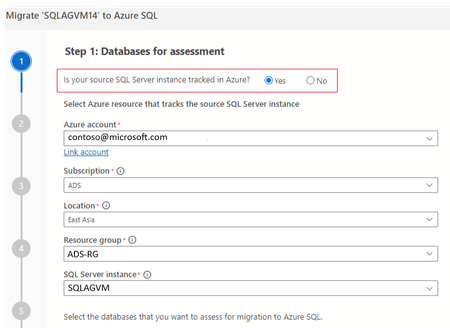
In the ever-evolving landscape of data management, ensuring seamless and efficient migrations is crucial for businesses. Migration is a multi-step process and typically requires multiple tools to complete the migration. To enhance the migration experience, we are bringing a new feature that enhances the migration tracking experience across tools. In this blog post we delve into the benefits this feature offers to streamline the migration tracking process. This feature is available for Azure Data studio users via the latest Azure SQL Migration extension v1.5.8 The Azure SQL migration extension now offers 2 new features in ADS to help users in their migration journey. Ability to view Arc assessments, SKU recommendation in Azure Data Studio Ability to track the migration via SQL Server instance (At no additional cost!) Viewing Arc assessments in Azure Data Studio for SQL Server enabled by Azure Arc If you are planning to migrate SQL Server instances that are Arc-enabled, The Azure Data studio now helps you jump start the migration by providing the ability to view the pre-computed Arc assessments. ADS now provides a link to the pre-computed assessments in the Arc experience Azure portal, which provides migration readiness assessment, SKU recommendation and pricing information (coming soon). Users can continue with rest of their migration journey in the Arc experience. To view the pre-computed assessments computed by Arc, users have to select Yes to the ‘Is your SQL Server instance tracked in Azure? ‘and fill in the Azure resource details of the SQL Server Instance enabled by Azure Arc. The pre-computed assessments and SKU recommendations will be generated as a navigation link to users like below: Ability to streamline the migration tracking process For SQL Server instances which are not Arc-enabled, this feature provides an ability to track the migration by creating an Azure resource with no additional cost associated. Once this resource has been created, users can select this migration resource which is created for their successive migrations that take place for the same source & avail the assessment and readiness benefits. This migration tracking ability is available for both Azure Data Studio and Database migration service portal. Below images show the experience for this ability in Azure DMS portal: