specification
2 Topics
Mind the Specs: Grading formal specifications and KPIs as artefacts for LLM-driven code generation
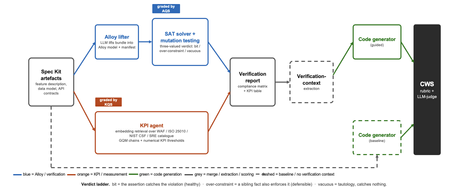
Large language models now write code straight from a prompt, but the specification in between is never checked, and a model asked to judge its own work brings the same blind spots to the review. We built a pipeline that lifts a plain-language requirements bundle into two graded specifications (a formal Alloy model and a set of numerical KPI targets), scores both before a single line of code is written, and hands the graded result to the code generator. It starts from GitHub Spec Kit and the Azure Well-Architected Framework. Here is what we built, and what we learned from running it at scale. The problem Writing software used to be four separate activities: gathering requirements, writing a specification, verifying it, and implementing it. A language model collapses all four into a single step. Two of those activities used to give us a quality signal before any code existed: a formal specification you could inspect, and measurable targets an implementation had to hit. The prompt-to-code loop inherits neither. There is no externally observable signal, before a line of code is written, that the requirements a model received are even well-formed enough to drive a correct implementation. You might think the model could just check its own work. It cannot do so reliably. Ask a language model to check the logic it just wrote: not only will it bring the same blind spot to the review, but its stochastic nature will make it produce different answers on each run. A SAT solver does not behave this way. Its verdict is deterministic: the same specification produces the same verdict every time. The thing that historically kept formal specification out of everyday development was never its rigour, it was the cost of writing the specification by hand. And that is exactly the step a language model can now do. What we built We built an agentic pipeline that sits between the requirements and the generated code. In plain terms it takes the requirements once, turns them into two things that can be checked by a machine: a precise description of rules that the system must obey, and a set of measurable targets that the system must hit. These artefacts are both graded, and are handed to the code generator. We split the work in two and gave each half to the tool that is good at it. The language model does the creative part, turning messy prose into formal structure. Deterministic checks, not the model's own opinion, grade what it produces. From a single Spec Kit artefacts bundle the pipeline builds two graded specifications before any code exists, and then carries both into code generation. Since these grades are computed deterministically rather than just generated, you can actually trust them. The input is a GitHub Spec Kit bundle. Spec Kit is an open-source, specification-first toolkit: instead of prompting for code directly, you describe what you want to build, and it produces a set of structured artefacts, a feature specification, a data model, and a set of API contracts. Our pipeline reads that bundle and turns it into the two graded specifications in parallel. overview. Spec Kit artefacts on the left. The Alloy lifter (with SAT solver and the attack step) and the KPI agent run in parallel. Their graded outputs are merged into a verification report that feeds the guided code generator. A dashed baseline path feeds the goal alone to the generator for comparison. Lift the requirements into a formal model The first half is structural. An Alloy lifter translates the requirements into a formal model written in Alloy, a specification language whose rules a SAT solver can check exhaustively, and whose verdict is deterministic, so the grade never depends on asking an LLM what it thinks. A banking requirement like "zero balance discrepancies" becomes a precise, checkable rule: the money leaving one account and the money arriving in another must always add up to the balances you started with, so a transfer can never quietly create or destroy money. The solver searches for any scenario that would break the rule. We modified Spec Kit's templates to force the model to output functional requirements and their corresponding Alloy code blocks in a structured format. Against the stock templates, that change alone nearly doubled the Alloy code compilation rate, jumping from 40 to 74 percent. A machine-written specification cannot be trusted, though, so the lifter does more than write it: it attacks it. Each load-bearing rule is deliberately broken by clearing its body and injecting a clause that forces a violation and the solver is re-run on the broken model. If the solver fails after this mutation, the original rule genuinely caught the violation it was meant to catch. If it still passes, the rule never really constrained anything on its own. Mutation testing usually grades a test suite against a specification that is assumed correct; here the roles are reversed, and the specification itself is on trial. Turn the requirements into measurable targets The second half is measurable. A KPI agent takes the same Spec Kit bundle, retrieves the most relevant principles from the Azure Well-Architected Framework, and derives numerical targets in the Goal-Question-Metric style. Each target carries an explicit threshold, a direction, and a measurement method, the kind of target a monitoring tool could actually track. Where earlier automated approaches stopped at describing quality in words, this half emits the actual numbers an implementation has to satisfy. And the knowledge base is a setting, not a fixture: swapping the Well-Architected Framework for ISO 25010, the NIST Cybersecurity Framework, or Google's SRE workbook requires zero changes to the underlying code. Review the report before any code Both graded halves merge into one human-readable verification report: the patterns the model applied, which rules passed, the counterexamples the solver found, the attack results, and the KPI threshold table. A developer reads it first and can see exactly where the specification is weak: a rule that passed for the wrong reason, or a requirement that nothing covers. After revising the specification, they re-run the lifting phase. Because the process is cached, re-runs are cheap, allowing the developer to loop until the report looks perfect, all before any code exists. The work shifts from reviewing generated code after the fact to curating a specification and reading a report before anything is built. Carry the graded context into code generation Only then does the report do its real job. In the guided pipeline, the merged report becomes the context handed to a code generator, which is asked to implement each rule, requirement, and KPI threshold and to leave markers tracing the code back to them. A baseline generator gets only the plain-language goal. Same generator, same settings; the only difference is whether it can see the graded specification. Feeding graded artefacts, rather than raw prose, into code generation is the piece that ties the whole pipeline together. So three choices separate this from simply asking a model for a spec: the specification is attacked rather than trusted, the targets are numbers rather than prose, and what reaches the code generator is graded evidence rather than raw text. How we tested it We ran the pipeline at scale: 270 Alloy lifts and 1,930 KPI records, across three application domains chosen to differ sharply (banking, software-as-a-service, and healthcare), three levels of requirement detail, four knowledge bases, and three model tiers, with ten runs of each combination so a real effect could be told apart from noise. For the code-generation half, we generated two codes for each case, once with the graded report as context and once from the plain-language goal alone, and compared the two. What we found First, the foundation: the specifications proved gradeable. The rubric cleanly separated sound specifications from degenerate ones. Because it returned the same verdict run after run, the grades are reliable enough to act on. The three key observations are as follows: The model matters more than the prompt Of the two knobs a practitioner controls, the model you choose and the amount of detail you write, the model dominated by roughly nine to one. A weak model could not be rescued by richer requirements. But you do not need the most expensive one: a mid-tier model delivered about 98 percent of the best model's quality at under a third of the cost and about half the time. The cheapest tier was a false economy, producing a model the analyser could even load only 23 percent of the time. More detail can backfire More requirements are not always better. Sparse and standard requirements scored the same, but over-specified requirements collapsed: KPI quality fell from about 0.89 to about 0.73, and the effect held across all four knowledge bases. Pile in too much numerical detail and the pipeline starts echoing the numbers it was handed instead of deriving sound ones, which is the opposite of what more detail is supposed to buy. Graded context produces far better code This is the payoff, and it is the point of the whole pipeline. Across all nine combinations of domain and detail, code generated with the graded verification context scored about 8 out of 10, against about 1 out of 10 for the same generator given only the plain-language goal. The guided code carried the traceability back to each requirement, the named rules, and the structural patterns that a bare prompt gives us no way to know about. This part of the study is a single run per combination, so we report the size and the consistency of the gap rather than a precise average, but the gap was large and it held in every case. What this means for you Four things to take from our study into your own work: Write requirements at a standard, middle level of detail. Not sparse, and not exhaustively numerical. The middle is the sweet spot on both halves of the specification. Reach for a capable mid-tier model before you invest in heavy prompt engineering. Model choice moves quality more than requirement detail does, and the mid tier is the value leader. Give the code generator externally graded context instead of letting it specify for itself. That is where most of the quality gain came from. Treat the knowledge base as a setting worth tuning, not a fixed ingredient. Each is a recommendation that data supports under the conditions we tested, not a universal law. The limit Every grade measures structure, not meaning. A high score says the specification is well-formed, discriminating, and stable. It does not say whether the invariants are the right ones, or the thresholds are the right ones for your deployment. A specification can be perfectly well-formed and still describe the wrong system. That judgement stays with a human, which is where we think it belongs. The pipeline is built to make that judgement efficient by moving it earlier, to curating the specification and reading the report, rather than to remove it. Generated code should not be shipped end to end without human validation. Try it The full pipeline, every input, and the artefacts behind every figure are in the project repository. If you want the Microsoft tools it builds on, start here: Project repository: https://github.com/RadaanMadhan/Specification-Led-Development GitHub Spec Kit: https://github.com/github/spec-kit Azure Well-Architected Framework: https://learn.microsoft.com/en-us/azure/well-architected/ If you'd like to explore the work in more detail, we've included the full technical report in the project repository, covering the related work, methodology, pipeline design, experimental setup, and extended results. About the team This project was carried out by six students at Imperial College London: Leon Hausmann, Charlotte Maxwell, Radaan Madhan, Keshav Das, Anson Huang, and Ander Cobo, in collaboration with Microsoft and supervised by Lee Stott (Microsoft) and Max Cattafi (Imperial College London)120Views1like0CommentsSpec-Driven Development for AI-Enabled Enterprise Systems
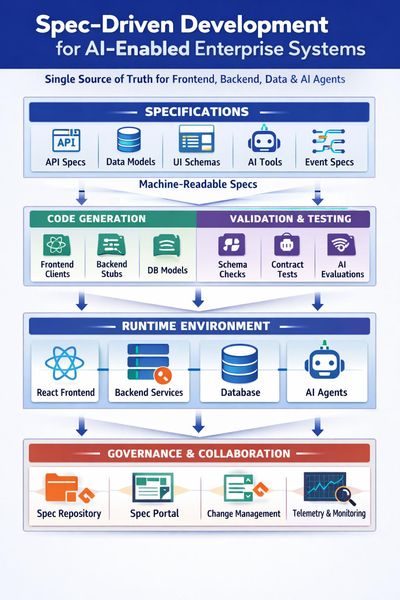
Spec-Driven Development for AI-Enabled Enterprise Systems How to make specs the single source of truth for your React frontends, backend services, data, and AI agents. If you are building an enterprise system with a React frontend, backend APIs and services, a database layer, and shared libraries, moving to Spec-Driven Development (SDD) can feel like a big cultural shift. For AI developers and engineers, though, it is a gift: structured, machine-readable specifications are exactly what both humans and AI coding agents need to stay aligned and productive. This post walks through how to structure specs, version contracts, design workflows, and integrate AI agents in a way that scales. Along the way, it references Microsoft’s public guidance on microservices, APIs, DevOps, and architecture so you can go deeper where needed. 1. Structuring specifications for an enterprise system For a serious enterprise system, treat specs as layered and modular rather than a single monolithic document. A good mental model is Domain-Driven Design (DDD) and bounded contexts (see https://learn.microsoft.com/azure/architecture/microservices/model/domain-analysis Business and domain layer This layer is technology-agnostic and captures: Business capabilities and problem statements Domain language and key entities Business rules and workflows Non-functional requirements (performance, security, compliance, SLAs) Solution and architecture layer Here you define how the system is shaped: System context and C4-style diagrams Service boundaries and ownership Integration patterns and event flows Data ownership and high-level models Microsoft’s microservices guidance is a solid reference: https://learn.microsoft.com/azure/architecture/microservices/. Implementation-oriented specs per component For each concrete component, keep a focused spec: Frontend / UI (React): screen catalogue, UX flows, state contracts, API dependencies, validation rules, accessibility and performance requirements. APIs / services: OpenAPI or AsyncAPI contracts, error models, authentication and authorisation, rate limits, SLAs, observability requirements. Database / schema: logical data model, ownership per service, migration strategy, retention, indexing, partitioning. Shared libraries: responsibilities, versioning policy, supported runtimes, compatibility matrix. Integrations: protocols, payloads, sequencing, idempotency, retry and backoff, SLAs, failure modes. In practice, this usually means: One “master” business and architecture spec per domain or product Separate specs per service or module (frontend app, each backend service, shared library, integration) Everything linked via IDs (for example REQ-123, SVC-ORDER-001) so you can trace from requirement to spec, implementation, and tests 2. Templates and standards that scale To keep things consistent across teams, use a base template that all components share, then extend it with technology-specific sections. This works well for both human readers and AI agents consuming the specs. Base specification template Every spec, regardless of component type, should include: Purpose and scope Stakeholders and dependencies Requirements mapping (list of requirement IDs covered) Architecture and interaction overview Contracts (APIs, events, data) Non-functional requirements Risks and open questions Test and acceptance criteria Extended templates per component Frontend: UX flows, wireframes or Figma links, accessibility, performance budgets, offline behaviour, error states. API / service: OpenAPI or AsyncAPI link, auth and authorisation, throttling, logging and metrics, health endpoints. See logging and monitoring guidance at https://learn.microsoft.com/azure/architecture/microservices/logging-monitoring Database: schema definition, migration plan, backup and restore, data lifecycle, multi-tenant strategy. Integration: sequence diagrams, error handling, retry and idempotency, message contracts, security. 3. Contracts, versioning, and change management API contracts For SDD, API contracts are first-class citizens. Define them via OpenAPI or AsyncAPI and treat the spec as the source of truth. Use contract testing to keep providers and consumers aligned, and version APIs explicitly (for example v1, v2) rather than breaking changes in place. Microsoft’s API design guidance is a good starting point: https://learn.microsoft.com/azure/architecture/best-practices/api-design and Azure API Management at https://learn.microsoft.com/azure/api-management/. Database migrations Any spec change that affects data should include a migration plan. Use migration tooling such as EF Core migrations, Flyway, or Liquibase, and treat migration scripts as code. Document backward-compatibility windows so APIs can support both old and new fields for a defined period. Shared DTOs and models Prefer sharing contracts (OpenAPI, JSON Schema) over large shared code libraries. If you must share code, version the shared library independently and document compatibility (for example, “Service A supports SharedLib 2.x”). Keep DTOs at the edges and map to internal domain models inside each service. Cross-service dependencies Capture dependencies explicitly in specs, such as “Order Service depends on Customer v1.3+ for endpoint /customers/{id}”. Use consumer-driven contracts and CI checks to prevent breaking changes. For event-driven systems, document event contracts and evolution rules. See event-driven architecture guidance at https://learn.microsoft.com/azure/architecture/reference-architectures/event-driven/event-driven-architecture-overview. Spec versioning and change management Version specs semantically (for example OrderServiceSpec v1.2.0) and record what changed, why, impact, and migration steps. Link spec versions to releases or tags in Git and to work items in Azure DevOps or GitHub Issues. Azure Boards is useful here: https://learn.microsoft.com/azure/devops/boards/?view=azure-devops. 4. A mature Spec-Driven Development workflow A realistic SDD workflow for AI-enabled teams might look like this: Discovery and domain analysis: capture business capabilities, domain language, and high-level workflows. Business and architecture specs: define bounded contexts, service boundaries, integration patterns, and NFRs. Contract design: design API specs (OpenAPI or AsyncAPI), event schemas, data models, and validation rules. Task generation: derive work items from specs, such as “Implement endpoint X”, “Add migration Y”, “Add UI flow Z”. This is a great place to use AI agents to read specs and generate tasks. Implementation: code is generated or written to satisfy the spec; the spec remains the reference, not the code. Validation and testing: contract tests, unit tests, integration tests, and end-to-end tests all trace back to spec IDs. Use quality gates in CI and CD, as described in Https://learn.microsoft.com/azure/architecture/framework/devops/devops-quality Review and sign-off: architecture and product review against the spec; update the spec if reality diverges. Release and observability: dashboards and alerts tied to specified SLIs and SLOs. 5. Governance, traceability, and avoiding drift Traceability across the lifecycle Use IDs everywhere: requirements, spec sections, tasks, tests, and deployment artefacts. In Azure DevOps or GitHub, link: Requirement (for example Azure DevOps Feature) Spec (stored in the repo) User stories and tasks Pull requests Tests Releases For key decisions, adopt Architecture Decision Records (ADRs). Microsoft’s guidance on ADRs is here: Https://learn.microsoft.com/azure/architecture/framework/devops/adrs Keeping humans and AI agents aligned To avoid implementation drift: Make specs as machine-readable as possible (OpenAPI, JSON Schema, YAML, BPMN). Enforce spec checks in CI: API implementation must match OpenAPI, DB schema must match migration plan, generated clients must be up to date. For AI coding agents, always provide the relevant spec files as context and constrain them to files linked to specific spec IDs. Add automated checks that compare generated code to contracts and fail builds when they diverge. 6. Enterprise best practices for repos and governance Example repository structure /docs /business /architecture /decisions (ADRs) /specs /frontend /services /orders /customers /integrations /data /src /frontend /services /shared /tests /ops /pipelines /infra-as-code Governance practices An architecture review group that reviews spec changes, not just code changes. Definition of Done includes: spec updated, tests linked, contracts validated. Regular “spec health” reviews to identify what is out of date or drifting. For broader architectural guidance, see: Azure microservices and DDD: https://learn.microsoft.com/azure/architecture/microservices/ Cloud design patterns: https://learn.microsoft.com/azure/architecture/patterns/ Azure Well-Architected Framework: https://learn.microsoft.com/azure/well-architected/ 7. Integrating AI and agentic workflows into SDD Spec-Driven Development is a natural fit for AI and multi-agent systems because specs provide structured, reliable context. Here are some practical patterns. LangGraph and multi-agent orchestration using Microsoft Agent Framework You can design a graph where: A “spec agent” reads and validates specs. An “implementation agent” writes or updates code based on those specs. A “test agent” generates tests from contracts and acceptance criteria. The graph flow can mirror your SDD workflow: Spec → Contract → Code → Tests → Review, with each agent responsible for a stage. MCP (Model Context Protocol) Expose your spec repository, OpenAPI definitions, and ADRs as MCP tools so agents can query the true source of truth instead of hallucinating. For example, provide a tool that returns the OpenAPI for a given service and version, or a tool that returns the ADRs relevant to a particular domain. Learn more about MCP at https://aka.ms/mcp-for-beginners BPMN and process flows Store BPMN diagrams as part of the spec. Agents can read them to generate workflow code, state machines, or tests. For process-oriented integrations, see Azure Logic Apps guidance at https://learn.microsoft.com/azure/logic-apps/. CI/CD pipelines on Azure In your pipelines, validate that implementation matches the spec: Contract tests for APIs and events Schema checks for databases Linting and static analysis for spec conformance Use pipeline gates to block deployments if contracts or migrations are out of sync. Azure Pipelines https://learn.microsoft.com/azure/devops/pipelines/?view=azure-devops GitHub Agentic Workflow Patterns https://github.github.com/gh-aw/ Where to start The key is not to boil the ocean. Pick one domain, such as “Orders”, and design a thin but end-to-end SDD flow: spec → contract → tasks → code → tests. Run it with your AI agents in the loop, learn where the friction is, and iterate. Once that feels natural, you can roll the patterns out across the rest of your system. For AI developers and engineers, SDD is more than process hygiene. It is how you give your agents high-quality, unambiguous context so they can generate code, tests, and documentation that actually match what the business needs. `819Views1like0Comments