solutions
97 Topics
Azure Sentinel how to clear Threat Intelligence Indicator table
Is there a way to do a bulk delete of all indicators? I have the DShieldScanningIPs source with over 100 thousand IP and I'd like to delete them all but it appears I can only delete 100 of them at a time. This will take a while.5.7KViews0likes4Comments
Send Alert When File in SharePoint is Being Accessed
Hi all, Is there a way to get the list of files which users are accessing or trying to access if they don't have permission inside a specific SharePoint site? And in addition to that is there a way for Sentinel to send alerts only for those users that don't have permission to access files? At the moment I am able to generate a list of users with number of accessed files on that specific SharePoint site: // Users accessing files // Users sorted by number of OneDrive and SharePoint files they accessed. OfficeActivity | where OfficeWorkload in ("OneDrive", "SharePoint") and Operation in ("FileDownloaded", "FileAccessed") | summarize AccessedFilesCount = dcount(OfficeObjectId) by UserId, _ResourceId | sort by AccessedFilesCount desc nulls last4.2KViews0likes4Comments
Cloudflare to Sentinel
We use the MS Cloudflare connector (Function) and Cloudflare Logpush to Azure to onboard Cloudflare logs into Sentinel. Logs are being ingested into the storage account container without any issues. We restricted the storage account to Cloudflare IPs to make the storage account secure and meet compliance requirements. Immediately after the restriction was added, the function app stopped talking to the storage account and started throwing authentication errors. Whitelisting function IPs didn't make any difference. In our opinion, scaling the function app plan from consumer to premium and enabling Vnet integration will resolve the issue. By default, the function is deployed via an arm template in a consumer plan. I would greatly appreciate any suggestions or thoughts you might have.Solved3.7KViews0likes2Comments
KQL query to detect the disablement and deletion of Automation Rules
Hi Community, We want to create a KQL-query that detects whether an automation rule has been disabled. The only way to partially do that at the moment is the AzureActivity table. The problem with that table is that is does not specify whether a rule has been ENABLED or DISABLED. As far as we can see, it does not have a unique identifier for disable or enable. Both log outputs are the same: Does anyone of you have a solution for this problem? Thanks in advance 🙂 Greetings, Kevin3.7KViews0likes6CommentsUnderstand New Sentinel Pricing Model with Sentinel Data Lake Tier
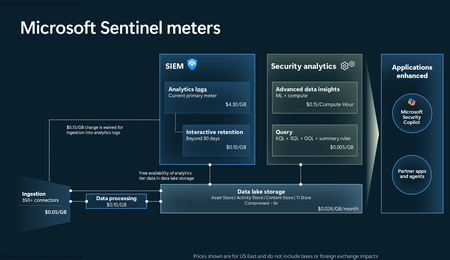
Introduction on Sentinel and its New Pricing Model Microsoft Sentinel is a cloud-native Security Information and Event Management (SIEM) and Security Orchestration, Automation, and Response (SOAR) platform that collects, analyzes, and correlates security data from across your environment to detect threats and automate response. Traditionally, Sentinel stored all ingested data in the Analytics tier (Log Analytics workspace), which is powerful but expensive for high-volume logs. To reduce cost and enable customers to retain all security data without compromise, Microsoft introduced a new dual-tier pricing model consisting of the Analytics tier and the Data Lake tier. The Analytics tier continues to support fast, real-time querying and analytics for core security scenarios, while the new Data Lake tier provides very low-cost storage for long-term retention and high-volume datasets. Customers can now choose where each data type lands—analytics for high-value detections and investigations, and data lake for large or archival types—allowing organizations to significantly lower cost while still retaining all their security data for analytics, compliance, and hunting. Please flow diagram depicts new sentinel pricing model: Now let's understand this new pricing model with below scenarios: Scenario 1A (PAY GO) Scenario 1B (Usage Commitment) Scenario 2 (Data Lake Tier Only) Scenario 1A (PAY GO) Requirement Suppose you need to ingest 10 GB of data per day, and you must retain that data for 2 years. However, you will only frequently use, query, and analyze the data for the first 6 months. Solution To optimize cost, you can ingest the data into the Analytics tier and retain it there for the first 6 months, where active querying and investigation happen. After that period, the remaining 18 months of retention can be shifted to the Data Lake tier, which provides low-cost storage for compliance and auditing needs. But you will be charged separately for data lake tier querying and analytics which depicted as Compute (D) in pricing flow diagram. Pricing Flow / Notes The first 10 GB/day ingested into the Analytics tier is free for 31 days under the Analytics logs plan. All data ingested into the Analytics tier is automatically mirrored to the Data Lake tier at no additional ingestion or retention cost. For the first 6 months, you pay only for Analytics tier ingestion and retention, excluding any free capacity. For the next 18 months, you pay only for Data Lake tier retention, which is significantly cheaper. Azure Pricing Calculator Equivalent Assuming no data is queried or analyzed during the 18-month Data Lake tier retention period: Although the Analytics tier retention is set to 6 months, the first 3 months of retention fall under the free retention limit, so retention charges apply only for the remaining 3 months of the analytics retention window. Azure pricing calculator will adjust accordingly. Scenario 1B (Usage Commitment) Now, suppose you are ingesting 100 GB per day. If you follow the same pay-as-you-go pricing model described above, your estimated cost would be approximately $15,204 per month. However, you can reduce this cost by choosing a Commitment Tier, where Analytics tier ingestion is billed at a discounted rate. Note that the discount applies only to Analytics tier ingestion—it does not apply to Analytics tier retention costs or to any Data Lake tier–related charges. Please refer to the pricing flow and the equivalent pricing calculator results shown below. Monthly cost savings: $15,204 – $11,184 = $4,020 per month Now the question is: What happens if your usage reaches 150 GB per day? Will the additional 50 GB be billed at the Pay-As-You-Go rate? No. The entire 150 GB/day will still be billed at the discounted rate associated with the 100 GB/day commitment tier bucket. Azure Pricing Calculator Equivalent (100 GB/ Day) Azure Pricing Calculator Equivalent (150 GB/ Day) Scenario 2 (Data Lake Tier Only) Requirement Suppose you need to store certain audit or compliance logs amounting to 10 GB per day. These logs are not used for querying, analytics, or investigations on a regular basis, but must be retained for 2 years as per your organization’s compliance or forensic policies. Solution Since these logs are not actively analyzed, you should avoid ingesting them into the Analytics tier, which is more expensive and optimized for active querying. Instead, send them directly to the Data Lake tier, where they can be retained cost-effectively for future audit, compliance, or forensic needs. Pricing Flow Because the data is ingested directly into the Data Lake tier, you pay both ingestion and retention costs there for the entire 2-year period. If, at any point in the future, you need to perform advanced analytics, querying, or search, you will incur additional compute charges, based on actual usage. Even with occasional compute charges, the cost remains significantly lower than storing the same data in the Analytics tier. Realized Savings Scenario Cost per Month Scenario 1: 10 GB/day in Analytics tier $1,520.40 Scenario 2: 10 GB/day directly into Data Lake tier $202.20 (without compute) $257.20 (with sample compute price) Savings with no compute activity: $1,520.40 – $202.20 = $1,318.20 per month Savings with some compute activity (sample value): $1,520.40 – $257.20 = $1,263.20 per month Azure calculator equivalent without compute Azure calculator equivalent with Sample Compute Conclusion The combination of the Analytics tier and the Data Lake tier in Microsoft Sentinel enables organizations to optimize cost based on how their security data is used. High-value logs that require frequent querying, real-time analytics, and investigation can be stored in the Analytics tier, which provides powerful search performance and built-in detection capabilities. At the same time, large-volume or infrequently accessed logs—such as audit, compliance, or long-term retention data—can be directed to the Data Lake tier, which offers dramatically lower storage and ingestion costs. Because all Analytics tier data is automatically mirrored to the Data Lake tier at no extra cost, customers can use the Analytics tier only for the period they actively query data, and rely on the Data Lake tier for the remaining retention. This tiered model allows different scenarios—active investigation, archival storage, compliance retention, or large-scale telemetry ingestion—to be handled at the most cost-effective layer, ultimately delivering substantial savings without sacrificing visibility, retention, or future analytical capabilities.Solved3.7KViews2likes6Comments
Send logs from one workspace to another workspace in different subscriptions
Hi team , We are looking for solution to send logs from one sentinel workspace to another workspace which is in different subscriptions under one directory. How can we do that, I think one option will be to use event hubs but how we will do that. Also how will be the pricing for it. Any other approaches to cater to the requirements will be helpful Thanks3.3KViews0likes5Comments
log via syslog server agent to Azure Sentinel (list of IPs?) & dual agent to two Log Analytics space
Hi, I am currently looking at setting up something like this: Security devices > syslog server > Microsoft Sentinel In order to tie down/restrict somewhat the access this syslog server has, is there a list of known IPs for Microsoft Sentinel? Another bonus question please 😄 For one of the firewalls (one of the security devices mentioned above) we are looking to send a full set to Sentinel via this syslog server, PLUS a smaller subset of the SAME log (but with only selected columns/fields) to another Log Analytics workspace. This might be outside of scope of the syslog server agent but is there a guide on how to get this setup please? Many thanks. JT3.1KViews0likes2CommentsSome Sentinel Incident from Microsoft Defender 365 are not retrieving Alerts & Entities
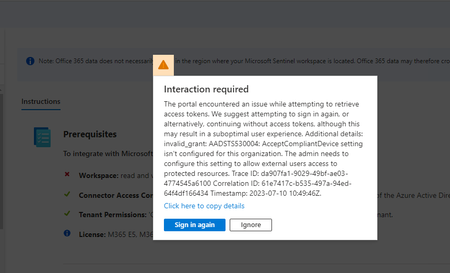
Hello, For some incidents (From Microsoft Defender 365 connector Product name : Microsoft Defender for Office 365), in Sentinel we face an error "There was an error retrieving some of the alert information. Please try again later. If the problem persist, contact Microsoft support." Alert is not show in logs when search using AlertID and No Entities found. Thanks2.5KViews0likes3Comments
Zscaler Private Access Solution not receiving data
EDIT: Solved by switching to a default Ubuntu VM. No idea what exactly it is about default Ubuntu that makes it work. We have been trying to get the logs from Zscaler Private Access connected to our Sentinel instance, with 0 success so far. We've followed the instructions on the data connector page perfectly, but there simply isn't any data from Zscaler coming into Sentinel and we cannot figure out why - We've installed the Log Analytics (OMS) agent successfully. We can see a Heartbeat coming in and even the syslog of the machine. This should prove the connection between the VM and Sentinel is working - We've placed the VM in the same subnet as the ZPA log receivers, opened the correct ports and firewall rules and we can see traffic on our VM coming from the log receivers via tcpdump. This should prove the connection between Zscaler and the VM working - We can't find any errors in the OMS agent logs. It seems to load the provided zpa.conf file correctly. - We triple checked all the steps, every step is taken correctly But there are no ZPA logs in Sentinel I've searched around and there seem to be multiple people (even in the reviews section of the solutions) running into issues with this, but there are no solutions posted anywhere Did anyone have any luck with getting this solution to work? And can you share how you did it?2.5KViews0likes3Comments