solutions
139 TopicsMicrosoft Ignite 2026: New Sentinel Connectors Announcement
Microsoft Sentinel helps organizations detect, investigate, and respond to threats across increasingly complex environments. As AI transforms security operations, bringing together the right data and context is more important than ever, giving human defenders and AI agents a more complete view of the environment to reason over and act on. These integrations bring signals from Microsoft and third-party technologies together across the security environment, unlocking richer context for investigations and helping power the new Integrated Security Operations Center (ISOC) in Microsoft Defender, where human defenders and AI agents can reason across the environment with shared context. The connector ecosystem isn’t the only area seeing rapid growth. Microsoft Sentinel continues to add new capabilities, including Nested API support, Azure Blob support, and multi-account support, while AI-powered tools like the connector builder agent are making it easier than ever for developers to build integrations and bring more of their security data into Sentinel. At the same time, Unified Data Management, now in public preview, makes it easier for customers to manage their Microsoft Sentinel data, connectors, tables, and ingestion health in one place. For Microsoft Ignite 2026, we’re excited to showcase recent additions to this growing ecosystem and the partners making them possible. These new and enhanced connectors continue to broaden the security data available to customers, helping human defenders and AI agents gain the context they need across the technology estate. Airlock Digital for Microsoft Sentinel Airlock Digital helps prevent malware, ransomware, and unauthorized software with deny by default application control, allowing only trusted applications, scripts, and processes to run. Its Microsoft Sentinel push integration ingests execution history, browser extension control events, server administrative activity, and policy changes for monitoring and investigation. Included parsers map execution and audit events to Microsoft’s ASIM for analysis alongside other security signals. A customizable workbook supports investigation and monitoring, and teams can create analytics rules using the ingested data. NC Protect Data Connector for Microsoft Sentinel NC Protect Data Connector for Microsoft Sentinel from archTIS brings user activity and protection logs from NC Protect into Sentinel for centralized security analysis. The connector captures user activities and access-related events, while built-in workbooks support investigation and visualization of user behavior. By correlating NC Protect audit data with other security telemetry, the integration helps teams identify suspicious user activity, trigger alerts and response workflows, strengthen auditing, and monitor guest activity across SharePoint and Teams. blacklens.io for Microsoft Sentinel blacklens.io for Microsoft Sentinel brings external and internal attack-surface data, risk-prioritized vulnerabilities, darknet intelligence, and supply-chain risks into Microsoft Sentinel. The connector ingests exposed assets, compromised identities, stolen credentials and session cookies, typosquatting domains, and supplier activity on ransomware leak sites. The solution includes a data connector and analytics rule for creating Sentinel incidents, with configurable notification rules for alert severity and type. Findings are available in Log Analytics for correlation with existing Sentinel signals and can support custom analytics rules, workbooks, automation, and threat investigations. BloodHound Enterprise BloodHound Enterprise (BHE) helps organizations protect critical assets across modern hybrid environments by continuously uncovering identity attack paths and providing actionable remediation guidance. By integrating with Microsoft Sentinel, BHE delivers attack path data and identity security posture insights directly into Sentinel workflows. This helps security teams prioritize remediation efforts based on exposure to critical assets while enriching investigations into identity-based threats, including lateral movement and privilege escalation. Together, BHE and Microsoft Sentinel help security teams connect threat detection to underlying identity risk, speed investigations, and reduce opportunities for attackers. BlueVoyant Anthropic Claude Compliance BlueVoyant Anthropic Claude Compliance brings compliance activity from the Anthropic Claude Compliance API into Microsoft Sentinel using the Codeless Connector Framework (CCF). The connector ingests Claude compliance events into Sentinel, giving security, risk, and audit teams centralized visibility into AI usage and related activity. By correlating these compliance signals with identity, endpoint, and other security telemetry, the integration supports threat hunting, investigation of policy violations and anomalous behavior, compliance monitoring, and repeatable audit workflows. Cato Networks for Microsoft Sentinel Cato Networks for Microsoft Sentinel brings security and network events from the Cato SASE Platform into Microsoft Sentinel using the Codeless Connector Framework (CCF) Push pattern. The connector pushes events into a dedicated Log Analytics table, making Cato activity available alongside other Sentinel data. By centralizing this telemetry in Sentinel, the integration enables security teams to incorporate Cato events into threat hunting, detection, and visualization workflows alongside broader security signals. Check Point EM ThreatCloud Intelligence Feed Connector for Microsoft Sentinel The Check Point EM ThreatCloud Intelligence Feed Connector brings threat intelligence from Check Point Exposure Management into Microsoft Sentinel. The connector ingests indicators of compromise (IoCs), including malicious IP addresses, domains, URLs, and file hashes, enriched with threat context such as confidence, severity, kill-chain stage, and campaign associations. An included playbook further enriches incident IoCs through ThreatCloud, helping security teams correlate intelligence with existing telemetry, accelerate triage and investigation, and reduce the manual effort required to maintain threat intelligence. Check Point Exposure Management Threat Intelligence IoC for Microsoft Sentinel Check Point Exposure Management Threat Intelligence IoC for Microsoft Sentinel brings threat intelligence from Check Point Infinity External Risk Management into Sentinel. The connector ingests malicious IP addresses, domains, URLs, and file hashes, enriched with context such as severity, confidence, and detected activity. By correlating these indicators of compromise (IoCs) with existing logs through analytics rules, hunting queries, and watchlists, the integration helps security teams reduce manual intelligence management, identify matches with external threats, and accelerate threat detection and investigation. Citrix SPA Sentinel App Citrix SPA Sentinel App brings Citrix Secure Private Access and Device Posture service events into Microsoft Sentinel using the Codeless Connector Framework (CCF). The connector imports critical logs, policy outcomes, and user activity data, giving security teams greater visibility into application access and device posture activity. An included workbook supports visualization and analysis of Citrix data, helping SOC teams correlate activity with broader security telemetry, investigate security risks, support compliance monitoring, and strengthen threat hunting across their environment. ContraForce Events for Microsoft Sentinel ContraForce Events for Microsoft Sentinel brings security delivery and administrative activity from ContraForce workspaces into Microsoft Sentinel using the Codeless Connector Framework (CCF). ContraForce is an Agentic Security Delivery Platform for service providers and security teams running triage, investigation, and response across Microsoft Defender XDR and Sentinel. The connector ingests incidents, privileged access changes, service account credential activity, and high-impact workspace actions. Three included analytics rules detect privileged access, credential, and high-impact workspace activity, helping teams monitor and investigate the platform supporting their security operations. Corelight for Microsoft Sentinel By transforming all network traffic into rich, comprehensive evidence, Corelight gives security teams using Microsoft Sentinel the visibility to understand exactly what is happening across their enterprise networks. In addition to native integration with Microsoft Sentinel, Corelight integrates with Microsoft Defender for Endpoint, Defender Vulnerability Management, and Entra ID to streamline investigations, accelerate responses, and remediate incidents quickly and easily. The Corelight App for Microsoft Sentinel includes intuitive dashboards, pre-defined workbooks , sample queries, and analytics rules that help make SOC teams more efficient and effective. CTM360 CTM360 brings external threat visibility into Microsoft Sentinel. The integration connects the CTM360 HackerView and CyberBlindspot platforms to Sentinel through REST APIs, so external attack surface and digital risk events flow straight into security operations workflows. HackerView surfaces externally exposed assets and security issues across your attack surface. CyberBlindspot adds organization-specific threat intelligence from surface, deep, and dark web monitoring. With these signals centralized in Sentinel, security teams can analyze external exposures alongside their broader telemetry and speed up detection, investigation, and response. Cyren CrowdStrike IOC Automation Cyren CrowdStrike IOC Automation connects Cyren IP reputation threat intelligence with Microsoft Sentinel and CrowdStrike Falcon to operationalize malicious IP indicators. An included Logic App playbook automatically retrieves known malicious IP addresses from Cyren and submits them to CrowdStrike Falcon as custom indicators of compromise (IOCs) for blocking and detection. Scheduled execution keeps the intelligence updated and automates the flow of Cyren IP reputation data into CrowdStrike Falcon for blocking and detection. Vaikora AI Agent Signals for Microsoft Sentinel Vaikora AI Agent Signals for Microsoft Sentinel brings behavioral security signals from AI agents into Sentinel for centralized monitoring and response. The connector ingests risk scores, anomaly and threat classifications, policy enforcement decisions, and audit data, including signals for prompt injection attempts and suspicious tool usage. Included analytics rules and a workbook help security teams detect behavioral anomalies, investigate policy violations, and incorporate AI agent risks into existing Sentinel incident workflows. Vaikora AI Agent Signals for SentinelOne Vaikora AI Agent Signals for SentinelOne brings high-risk behavioral security signals from Vaikora into SentinelOne as threat intelligence indicators of compromise (IOCs). The integration filters high-severity and anomalous AI agent activity and maps Vaikora risk scores to SentinelOne severity levels. The resulting IOCs are submitted to SentinelOne and expire after 90 days, enabling Vaikora security signals to be incorporated into SentinelOne endpoint protection workflows. DataBahn Agentic Data Control Plane for Microsoft Sentinel DataBahn’s agentic data control plane integrates with Microsoft Sentinel to provide our shared customers an AI-native data pipeline and orchestration platform that allows them to accelerate enterprise deployments. DataBahn’s pipeline standardizes onboarding and shaping across all data sources while providing operational visibility into data flow and health. Together, the collaboration focuses on reducing onboarding friction, improving normalization consistency, and enabling intentional routing, which helps security teams improve visibility, support threat detection, and streamline investigation and incident response workflows. Delinea Platform for Microsoft Sentinel Delinea Platform Sentinel Solution brings privileged access activity into Sentinel natively through the Content Hub, as a complete SOC package. The connector pulls audit events covering secrets access, authentication, session activity and configuration changes directly into Sentinel. Ready-made workbooks, analytics rules with baseline-driven detection, hunting queries and an automated response playbook let security teams detect bulk secret access, failed sign-in bursts and privilege escalation sooner, investigate without leaving Sentinel and answer auditors with a record of what happened and why it was allowed. Dynatrace Software Intelligence Platform with Microsoft Sentinel Dynatrace integrates bidirectionally with Microsoft Sentinel, bringing application attacks, runtime vulnerabilities, Dynatrace Intelligence problems, and audit logs into Sentinel, where analytics rules, workbooks, and playbooks support detection, triage, and response. Sentinel can also send alerts to Dynatrace and enrich detected attacks with Sentinel and Microsoft Defender XDR insights. Bindplane by Dynatrace complements the integration by collecting and routing logs into Sentinel, including normalization to ASIM tables, giving SOC teams runtime and topology context for investigations. ExtraHop RevealX for Microsoft Sentinel ExtraHop RevealX for Microsoft Sentinel brings network detection and response (NDR) into Sentinel, giving your SOC visibility into threats that endpoint and log tools miss, including lateral movement and credential abuse hiding in encrypted east-west traffic. RevealX decrypts and analyzes network traffic at line rate, out of band with no impact on the network. The connector sends ExtraHop detections into Sentinel for dashboards, custom alerts, and investigation, so network context enriches your existing SOC workflows instead of sitting in a separate console. Fire Compass FireCompass Risks for Microsoft Sentinel brings validated external risk findings from the FireCompass platform into Microsoft Sentinel through the Codeless Connector Framework. The connector ingests risk data including severity, affected assets, assessment context, impact, and remediation guidance. By making validated exposures available in Sentinel, security teams can correlate external risks with endpoint and network telemetry, track remediation progress, and build analytics rules, workbooks, and hunting queries on top of FireCompass findings. Gambit Security Sentinel Solution Gambit brings resilience context into Microsoft Sentinel. It finds the resilience issues in your environment and syncs them to your Sentinel workspace daily, to help analysts see recovery risk before anything goes wrong. Sentinel correlates those issues with its detections. Your team can then prioritize the attacks most likely to disrupt critical operations: the ones hitting resources that aren’t ready to recover. Sentinel tells you what’s happening. Gambit tells you whether you can recover from it. Holm Security for Microsoft Sentinel Holm Security for Microsoft Sentinel brings asset data from the Holm Security platform into Sentinel via the Holm Security REST API. The connector ingests web and network assets into Microsoft Sentinel, including metadata such as IP addresses, hostnames, operating systems, tags, and vulnerability counts per asset. By incorporating this asset inventory alongside other security telemetry, the integration enables security teams to build dashboards, create custom alerts, and correlate asset information with other data in Microsoft Sentinel. Idira Endpoint Privilege Manager for Microsoft Sentinel The Idira® Endpoint Privilege Manager by Palo Alto Networks integration for Microsoft Sentinel pulls application events and policy audit activity into Microsoft Sentinel using the Codeless Connector Framework and the Idira Endpoint Privilege Manager REST API. Events land in a dedicated Log Analytics table, so security teams can analyze privilege activity alongside their other telemetry and build detections. IPinfo: IP geolocation & intelligence database IPinfo: IP geolocation & intelligence database brings contextual IP intelligence into Microsoft Sentinel to enrich security logs and investigations. The solution provides data such as IP geolocation, network ownership and routing, proxy and residential proxy detection, ASN information, and other IP classifications. By adding this context to IP addresses observed in Sentinel, the integration helps security teams better understand indicators of compromise, prioritize security events, strengthen threat detection and investigation, and inform network and access management decisions. Island Solution for Microsoft Sentinel Island Solution for Microsoft Sentinel brings user activity and administrative audit events from the Island Enterprise Browser into Microsoft Sentinel for centralized security monitoring. The solution automatically shares events from the Island Management Console with Sentinel and includes data connectors and workbooks for user activity and admin audit logs. By adding browser activity context to existing security telemetry, the integration helps security teams monitor and analyze user and administrative activity and investigate potential security issues. NetApp Ransomware Resilience for Microsoft Sentinel NetApp Ransomware Resilience detects and contains ransomware attacks on NetApp ONTAP workloads in real time, then enables fast, clean recovery. Its Microsoft Sentinel integration enriches alerts with data-layer context, including attack type, severity, user and IP, and affected cluster, volume, and SVM. The NetApp SOAR playbook can take actions on ONTAP such as trigger immutable snapshots, block suspicious users or IPs, and take compromised volumes offline. Together, these integrations extend the NetApp Platform’s ability to help security teams triage and respond to ransomware attacks, limit data loss, protect recovery points, and coordinate response across storage and security teams. NordStellar for Microsoft Sentinel NordLayer Intelligence by NordStellar for Microsoft Sentinel brings external threat and exposure findings into Sentinel through the Azure Monitor Logs Ingestion API. The integration provides findings including leaked credentials, breach exposures, malware and info-stealer infections, dark web activity, domain impersonation risks, and external attack surface vulnerabilities. By correlating these findings with other security telemetry in Sentinel, the solution helps teams investigate external threats, identify exposures affecting their organization, and automate triage and response through analytics rules and SOAR playbooks. Panorays for Microsoft Sentinel Panorays for Microsoft Sentinel brings third-party security findings from the Panorays platform into Sentinel through the Panorays API. The connector provides security teams with visibility into the security posture of vendors and supply-chain organizations, making third-party risk and vulnerability findings available alongside other security telemetry. By incorporating Panorays findings into Sentinel workflows, the integration helps SOC teams centrally monitor and investigate third-party risks and correlate them with internal security signals. USTA Account Takeover Prevention Sentinel Connector USTA Account Takeover Prevention Sentinel Connector brings compromised credential intelligence from the PRODAFT USTA Threat Intelligence platform into Microsoft Sentinel. The connector ingests alerts for exposed corporate credentials, enabling security teams to investigate potential account takeover risks within existing Sentinel workflows. Included analytics can identify newly compromised credentials and successful Microsoft Entra ID sign-ins involving known-compromised accounts, helping SOC teams operationalize external credential intelligence and prioritize investigation and response. USTA IoC Threat Stream for Sentinel USTA IoC Threat Stream for Sentinel brings curated indicators of compromise (IoCs) from the PRODAFT USTA Threat Stream into Microsoft Sentinel Threat Intelligence. The integration provides indicators including malicious URLs, phishing sites, and malware hashes derived from PRODAFT investigations. By making these indicators available for correlation with existing telemetry, hunting queries, and detection rules, the solution helps security teams identify connections to malicious infrastructure, investigate phishing and malware activity, and incorporate external threat intelligence into existing triage and response workflows. USTA Payment Card Fraud Intelligence Sentinel Connector USTA Payment Card Fraud Intelligence Sentinel Connector brings compromised payment card intelligence from the PRODAFT USTA Threat Intelligence platform into Microsoft Sentinel. The connector retrieves alerts associated with an organization’s payment card BIN ranges and makes them available within Sentinel for investigation. Included analytics identify newly exposed and non-expired compromised cards, helping security teams centralize payment fraud intelligence, prioritize potentially actionable exposures, and incorporate them into existing investigation and response workflows. Pulumi Cloud Audit Logs for Microsoft Sentinel Pulumi Cloud Audit Logs for Microsoft Sentinel brings audit logs from Pulumi, the infrastructure platform for humans and agents, into Microsoft Sentinel through the Codeless Connector Framework (CCF). The connector ingests authentication events, organization membership changes, stack lifecycle operations, policy changes, and access token usage. It also includes three analytics rules that detect failed login attempts, stack deletions, and organization membership changes. Your security team can see what a human or agent did, when, and where across infrastructure as code, secrets, configuration, and policies, which helps speed up security and governance investigations. QCrypton PQC Scanner for Microsoft Sentinel QCrypton PQC Scanner for Microsoft Sentinel brings post-quantum cryptography readiness findings from Azure environments into Sentinel using the Codeless Connector Framework (CCF). The connector provides visibility into cryptographic assets including Key Vault keys, TLS certificates and configurations, and Entra ID app registration certificates, with quantum posture ratings and risk scores. Included are six analytics rules, a workbook, and a notification playbook to help security teams identify vulnerable cryptographic assets and prioritize post-quantum migration planning. SailPoint for Microsoft Sentinel SailPoint for Microsoft Sentinel brings identity security telemetry from SailPoint Identity Security Cloud into Sentinel using the Codeless Connector Framework (CCF). The solution streams audit and search events into Sentinel tables, where analysts can correlate identity activity with other security signals and query SailPoint APIs for additional identity and account context during incident triage. Automated playbooks can also remediate threats by revoking access or disabling compromised accounts, helping teams connect identity insight with investigation and response. SAP LogServ (RISE), S/4HANA Cloud private edition SAP LogServ (RISE), S/4HANA Cloud private edition extends Microsoft Sentinel security monitoring for SAP RISE environments with infrastructure, database, operating system, and network security logs managed by SAP Enterprise Cloud Services. Deployed alongside the Microsoft Sentinel Solution for SAP applications, it complements application-layer monitoring to provide visibility across the SAP stack and enable cross-layer threat detection and correlation. The solution supports near real-time log collection, built-in analytics and workbooks, ASIM-based security content, and correlation with signals from endpoints, Microsoft Entra ID, and other sources in Microsoft Sentinel. MailRisk data connector for Microsoft Sentinel MailRisk data connector for Microsoft Sentinel brings suspicious email data analyzed by users through Secure Practice MailRisk into Sentinel. The connector ingests enriched email metadata and risk assessment updates from the Secure Practice API, providing potential indicators of compromise identified from reported emails. By incorporating MailRisk data alongside other security telemetry, the integration helps security teams correlate suspicious email activity, search and investigate potential threats, and incorporate user-reported email intelligence into alerting and incident response workflows. SecurityScorecard Ratings for Microsoft Sentinel SecurityScorecard Ratings for Microsoft Sentinel provides cybersecurity posture ratings based on continuously monitored risk factors and threat intelligence. SecurityScorecard evaluates organizations using an A-F rating, helping security teams identify and track cybersecurity risks. The solution supports use cases including enterprise cyber risk management, third-party risk monitoring, executive reporting, and cyber due diligence. SIGNL4 - Mobile Alerting & Response for Microsoft Sentinel and Defender for Cloud SIGNL4 bridges the gap between security detection and human response with mobile-first alerting and incident management for Microsoft Sentinel and Defender for Cloud. Its two-way integrations allow security teams to acknowledge, escalate, and resolve incidents directly from their mobile devices, with updates automatically synchronized back to Sentinel. Critical Defender for Cloud findings trigger actionable response workflows, while persistent mobile notifications, automated escalations, and on-call scheduling ensure the right people are reached when it matters most. The result is faster incident response, clear accountability, and a fully auditable process - wherever responders are. SOC Prime Audit CCP SOC Prime Audit CCP brings SOC Prime Platform audit logs into Microsoft Sentinel for centralized security monitoring and analysis. The connector ingests platform activity including user actions, API calls, and administrative events, providing an audit trail across detection engineering processes. By correlating SOC Prime activity with other security signals in Sentinel, the integration helps security teams investigate platform activity, support compliance monitoring, and incorporate audit telemetry into broader threat detection and response workflows. SOCRadar Alerts Azure Sentinel Directional Solution SOCRadar Threat Intelligence for Microsoft Sentinel enriches security operations by bringing prioritized, context-rich alerts directly into Microsoft Sentinel. Covering SOCRadar’s Extended Threat Intelligence capabilities, including Brand Protection, External Attack Surface Management (ASM), Third-Party Findings, and other security modules, the integration helps organizations monitor external threats and manage investigations within their existing SOC workflows. Bidirectional synchronization also helps keep incident status, severity, and comments aligned between Microsoft Sentinel and SOCRadar. SpyCloud Enterprise Protection for Microsoft Sentinel SpyCloud Enterprise Protection for Microsoft Sentinel brings stolen identity data from infostealer malware, phishing attacks, and third-party breaches into Microsoft Sentinel, helping security teams uncover compromised identities, prioritize high-risk exposures, and accelerate remediation to prevent session hijacking and other targeted identity-based attacks. The solution includes a custom API connector, a Logic Apps playbook for ingesting data into Log Analytics, analytic rules that generate Sentinel incidents from breach and malware data, and additional Logic Apps playbooks for incident automation and enrichment. Tenable App for Microsoft Sentinel Tenable App for Microsoft Sentinel brings asset and vulnerability data from Tenable One Vulnerability Management into Sentinel for centralized security analysis. The integration combines Tenable cyber exposure insights with Sentinel’s collection, detection, and investigation capabilities, making vulnerability context available alongside other security telemetry. By incorporating asset and vulnerability findings into Sentinel workflows, the solution helps security teams correlate exposure data with security signals, investigate risks affecting vulnerable assets, and better prioritize remediation efforts. Uniqkey Security Events for Microsoft Sentinel Uniqkey Security Events for Microsoft Sentinel brings authentication, credential access and management, sharing, administrative activity, and platform threat detections into Microsoft Sentinel using the Codeless Connector Framework (CCF). Included analytics rules identify scenarios such as sign-ins from unfamiliar IP addresses, excessive credential access, data exports, and security policy or privilege changes. A workbook visualizes activity and threat detections, helping security teams monitor password-management activity, investigate potential credential risks, and correlate findings with broader security telemetry. Utimaco Enterprise Secure Key Manager Utimaco Enterprise Secure Key Manager (ESKM) integrates with Microsoft Sentinel to provide centralized security monitoring and visibility into cryptographic key management activities through KMIP server logs. The solution enables organizations to monitor key operations, KMIP client activity, and authentication events, helping security teams identify suspicious behavior and investigate potential threats. Built-in analytics rules help detect brute-force authentication attempts, repeated permission-denied events, and key-destruction activity, while hunting queries and a dedicated workbook support deeper investigation of unusual users, source IPs, key retrieval patterns, and after-hours activity. valimail-sentinel-enforce Valimail enables organizations to see who sends email using your domain, protects against domain impersonation, and displays a verified logo in inboxes to increase brand trust. Our Microsoft Sentinel Connector brings Valimail Enforce event data directly into Sentinel, allowing security teams to incorporate our telemetry into unified SIEM workflows, monitor authentication and enforcement trends in real time, and build custom alerts and visualizations based on DMARC events. Once configured, Sentinel continuously ingests Valimail event logs, enriching your broader security intelligence and helping to improve your ability to detect and respond to threats across your environment. Varonis for Sentinel Solutions Varonis for Sentinel Solutions brings enriched, data-centric Varonis alerts into Microsoft Sentinel for triage, investigation, and remediation. Varonis insights are contextualized alongside other security events to provide a unified view of data risk. This allows security teams to view and close Varonis alerts directly within Sentinel, reducing the need to switch interfaces and supporting incident resolution with less manual effort Whisper for Sentinel Whisper for Sentinel enriches Microsoft Sentinel incidents and alerts with threat and infrastructure intelligence for IPs, domains, ASNs, and networks. The solution provides threat scores, supporting evidence, infrastructure relationships, and historical context directly within Sentinel. Included enrichment playbooks, analytics rules, hunting queries, and workbooks support investigation of threats including C2 communications, malicious infrastructure, suspicious domains, and BGP anomalies, while retained enrichment data can be queried and correlated with existing logs. WhoisFreaks Threat Intelligence for Microsoft Sentinel The WhoisFreaks solution for Microsoft Sentinel brings domain threat intelligence and newly registered domain (NRD) data into Sentinel using the Codeless Connector Framework (CCF). Customers can connect malware, phishing, and spam threat feeds, along with gTLD and ccTLD NRD feeds with or without WHOIS data. Included analytics rule templates help identify high-confidence malicious domains, newly registered domains appearing in threat feeds, threat-listed parked domains, and unusual NRD volumes that may indicate bulk registration activity. Wiz for Microsoft Sentinel Wiz for Microsoft Sentinel brings Wiz Issues, Vulnerability Findings, and Audit logs into Microsoft Sentinel. Wiz identifies and prioritizes cloud security risks across areas including vulnerabilities, malware, internet exposure, identity, and data security in AWS, Azure, Google Cloud, OCI, Alibaba, and Kubernetes environments. In addition to the solutions from our third-party partners, we are also excited to announce the following connectors published by the Microsoft Sentinel team: Agari Solution Akamai DDOS Protection Alibaba Cloud Networking Atlassian Organization Audit AWS Elastic Kubernetes Service AWS Elastic Load Balancing Cisco Cloud Security Cisco Meraki Events via REST API Crowdstrike Falcon Endpoint Protection Elastic Agent Solution Imperva WAF Cloud Solution Microsoft Copilot Microsoft Dragon Copilot Mulesoft CloudHub Alerts OpenAI Qualys VM Knowledgebase Rapid7 InsightVM CloudAPI SentinelOne TheHive Solution Trellix Enpoint Security Trend Micro Cloud App Security VMware Workspace ONE Zoom Reports Building a more connected foundation for security operations The strength of the connector ecosystem reflects the work of Microsoft and our technology partners to support our shared customers. Together, we are helping organizations connect the technologies they rely on and bring more of their security data into a unified operational experience. For customers If you are a Microsoft Sentinel or ISOC customer, or considering adopting it, we want you to have the security connectors and integrations you need to get value from the platform. If an integration with an independent software vendor (ISV) is not yet available, or you have an issue with an existing solution, we have a dedicated team that may be able to assist by working with ISVs to build new or update existing connectors. For software companies If you are a software development partner, the Microsoft Sentinel Codeless Connector Framework (CCF) provides a streamlined way to bring your product into the Microsoft Security ecosystem. Partners can also work directly with Microsoft for engineering guidance and support to build or improve a connector. Building a more connected foundation for security operations Our goal is simple: help customers protect their digital environments by giving human defenders and AI agents a more complete picture of risk. We’ll continue investing in connectors, partnerships, and integrated security experiences to help customers defend their organizations with greater visibility, context, and confidence. Learn More Microsoft Sentinel What is Microsoft Sentinel Empower Real-Time Security with Microsoft Sentinel’s CCF Push Feature | Microsoft Community Hub Growing our connector ecosystem with 500+ Microsoft Sentinel connectors Microsoft Defender ISOC in Microsoft Defender Microsoft Sentinel connector hands-on labs Building Microsoft Sentinel Connectors in Minutes with the Sentinel Connector Builder Agent Building a CCF Nested API Pull Connector: A Technical Lab Walkthrough Microsoft Sentinel features in public preview Accelerate connectors development using AI agent in Microsoft Sentinel | Microsoft Community Hub Extending Sentinel Data Integration: Azure Blob Storage Support for CCF Connectors | Microsoft Community Hub Public Preview: Nested API Support Comes to Microsoft Sentinel CCF | Microsoft Community Hub Public Preview: Multi-Account Support for Microsoft Sentinel Codeless Connectors | Microsoft Community Hub Manage all your Microsoft Sentinel data in one place with Unified Data Management (Public Preview) | Microsoft Community Hub1.8KViews0likes1CommentProtecting Microsoft's SAP workload with Microsoft Sentinel for SAP: the RISE with SAP chapter
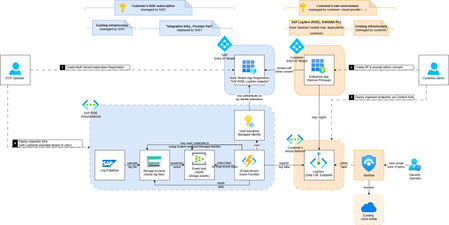
Inside Track | Microsoft Digital When infrastructure operations shift, security visibility must evolve with the operating model Four years ago, we told the story of how Microsoft became Customer Zero for using Microsoft Sentinel as the SIEM for its own SAP estate, pairing a then-new product “Sentinel Solution for SAP” with our existing SOAR platform and proving out cross-correlation between SAP and the rest of the enterprise. The ambition was stated plainly at the time: an internally managed and configured SIEM that could baseline user behaviors and detect anomalies across SAP, spanning the OS and network layer, the database layer, and the application and business logic layers. Then we moved to RISE with SAP on Azure. With that move, responsibility for instrumenting one of those layers transitioned to SAP under the RISE operating model. The visibility challenge shared responsibility creates In RISE with SAP, SAP operates the underlying infrastructure, operating system, and database as part of the managed service. This changes how customers obtain security telemetry from those layers and raises an important shared-responsibility question: how can the customer SOC maintain end-to-end visibility while SAP operates the platform? The layers remain relevant to security monitoring, so visibility must extend across both SAP-managed and customer-managed parts of the landscape. What changed: SAP LogServ meets Sentinel for SAP SAP LogServ is SAP's centralized log service for RISE-managed landscapes, carrying the security-relevant telemetry from the layers SAP now operates. Microsoft Sentinel for SAP ingests it directly, authenticated with managed identity for Azure. There is no stored secret, no rotation calendar and no bespoke connector for a future engineer to inherit and maintain. The integration is a configuration, not a project. “RISE with SAP introduces a shared operating model in which SAP manages the infrastructure while customers remain responsible for maintaining end-to-end security oversight. The integration of SAP LogServ with Microsoft Sentinel for SAP, secured through managed identity for Azure, brings telemetry from SAP-managed layers together with application-layer signals and the wider enterprise context. Our SOC can continue using familiar detections and workflows without a separate integration or credential-management process. At Microsoft, we believe in being Customer Zero, so we are putting this approach to work in our own RISE with SAP on Azure environment.” — Narasa Reddy Pekety, Principal Platform Lead, Microsoft Commerce Financial Platforms (CFP) For our SOC, the practical effect is that almost nothing about the working day changed. Events from SAP-managed layers land in the same tables queried by existing analytics rules based on Microsoft’s Advanced Security Information Model (ASIM), so detections tuned before the move can continue operating after it. Analysts remain in one console rather than managing a separate SAP queue and specialist on-call rotation. Cross-correlation – the ability to examine the points where SAP meets Dynamics 365 and the rest of our IT estate – remains especially important because it preserves the context that could otherwise be lost when telemetry is distributed across operating boundaries. “What I appreciate most is that we did not have to create a parallel operating model for SAP. We can reuse the analytics, investigation workflows, and response processes our SOC already knows, while adding the signals we were missing.” — Satya Veera Phaneendra Bonda, Platform Engineer, Microsoft Digital Who runs what, and where the signal comes from. An opinionated excerpt: Layer Operated by Signal path into our ISOC in Microsoft Defender Application and business logic Microsoft Microsoft Sentinel for SAP, as before the move Database SAP, Global Cloud Operations SAP LogServ Operating system and infrastructure SAP, Global Cloud Operations SAP LogServ Identity, endpoint and the wider cloud estate Microsoft Existing Microsoft Defender connectors, correlated with the above Co-engineering, in the open The part that matters most here is not the connector. It is a standing engineering relationship. The SAP LogServ team and the Microsoft Sentinel for SAP team work as one co-engineering group, shipping new security content on a continuous cadence: detections, analytics rules, watchlists and normalization for log sources as SAP exposes them. “By co-engineering SAP LogServ with Microsoft Sentinel for SAP, we turn SAP-managed telemetry into security insights customers can use immediately – and continue improving together as threats and landscapes evolve.” — Lalit Patil, EVP & CTO Global Cloud Operations, SAP That cadence is the direct continuation of the commitment made in the original solution, that the SAP and Sentinel teams would keep expanding threat-detection capabilities and the risk scenarios the product addresses as it evolves. “We built this as a co-engineering relationship rather than a connector handover, and that is what makes the estate legible to our perception agents. A security AI agent is only as good as the signal and the semantics it is handed. An agent reasoning over an unlabeled log stream is guessing; an agent reasoning over normalized, curated, continuously refreshed detection content is making an informed decision about what to escalate, what to correlate and what to close. Every piece of content the two teams ship raises the floor for every AI agent downstream of it.” — Martin Pankraz, Product Manager, SAP Security, Microsoft That work also attacks a problem we named in the first edition and never stopped working on: separating permissible activity from genuine threats, and improving alert fidelity rather than drowning analysts in false positives. Content that arrives already tuned to the layer it describes is the most direct lever we have on that ratio. Find the latest guidance always on the running engineering blog series on the SAP community. The foundation we need for the Agentic SOC This work also lays the groundwork for what comes next. Project Perception, Microsoft Security’s model for multi-agent defense, relies on blue team agents that detect, triage and respond to incidents, and those agents are only as effective as the signals they can reason over. SAP LogServ and Microsoft Sentinel for SAP provide exactly that: normalized, curated telemetry from the SAP-managed layers and the application layer, correlated with the wider enterprise estate in Sentinel. With that foundation in place, blue team agents can handle incidents involving SAP with the same context as any other part of our environment, rather than treating SAP as a black box. What comes next We intend to do what we did in 2022. We will share the challenges and the remedies as the work proceeds, so that customers can accelerate their own implementations with what we learn rather than rediscovering it. RISE with SAP does not have to mean less security visibility, but it does mean visibility has to be designed in rather than assumed, and designed in early enough that the SOC never works a period without it. We are running it ourselves first, as always. Final words We encourage all fellow RISE with SAP customers to verify their own cloud security posture, integrated SIEM practices, and choose to integrate with SAP LogServ as foundational service. Till next time. Related reading The first edition of this story: “Protecting Microsoft's SAP workload with Microsoft Sentinel,” Inside Track, February 4, 2022 — www.microsoft.com/insidetrack/blog/protecting-microsofts-sap-workload-with-microsoft-sentinel/ Microsoft Sentinel solutions for SAP | Microsoft Learn SAP LogServ integration with Microsoft Sentinel Solution for SAP overview | Microsoft Learn Microsoft Ignite 2026 Sentinel Connector announcments | TechCommunity306Views0likes0CommentsHow to maintain and update Azure Function Connector deployed via WEBSITE_RUN_FROM_PACKAGE?
Background We recently completed a migration from the legacy Microsoft Sentinel Box connector to the newer Box Events (CCP) connector. During the migration we discovered that the legacy Box connector was implemented using: Azure Functions JWT authentication WEBSITE_RUN_FROM_PACKAGE The Function App is configured as: WEBSITE_RUN_FROM_PACKAGE=https://aka.ms/sentinel-BoxDataConnector-functionapp and the Azure Function therefore operates in read-only mode because it is running directly from the package referenced by that URL. The migration to the new Box Events (CCP) connector has been successful and is now ingesting data into BoxEventsV2_CL using Client Credentials Grant (CCG) authentication. What prompted the question While reviewing the legacy Azure Function deployment, we noticed that: The Box Solution GitHub repository has received updates over time. The Box Solution itself has been updated (currently v3.16 in our environment). Analytics, parsers, and connector components have evolved. The legacy Azure Function deployment still appears to be tied to the original package referenced by WEBSITE_RUN_FROM_PACKAGE. This raised a broader lifecycle and maintenance question: Questions 1. Is the package referenced by: https://aka.ms/sentinel-BoxDataConnector-functionapp still actively maintained and republished by Microsoft? 2. If updates are made to the Box Solution source code or supporting files in the GitHub repository, are those updates expected to flow automatically to existing Azure Function deployments that use WEBSITE_RUN_FROM_PACKAGE? 3. If updates do not automatically flow to existing deployments, what was the intended maintenance model for customers using the legacy Azure Function connector? For example, were customers expected to: Continue using the Microsoft-hosted package URL indefinitely? Periodically redeploy using updated templates? Download and self-maintain the Function App package? Modify the Function App to stop using WEBSITE_RUN_FROM_PACKAGE? 4. Prior to the introduction of the Box Events (CCP) connector, how were customers expected to apply updates, dependency changes, security fixes, and other improvements to existing Box Azure Function deployments? 5. Is migration to the Box Events (CCP) connector now considered the only supported path for customers wishing to remain current with Microsoft Sentinel Box integrations? Reason for asking The goal is not to troubleshoot the new CCP connector. Rather, we are trying to better understand the support and maintenance lifecycle of the legacy Azure Function-based Box connector and how Microsoft intended customers to remain current when deployments were originally made using a Microsoft-hosted WEBSITE_RUN_FROM_PACKAGE endpoint. Any clarification from the Box Solution maintainers or Microsoft Sentinel team would be appreciated. NB I came across this notice after following some links from the Box Solution listed in Azure. https://github.com/Azure/Azure-Sentinel/blob/master/Solutions/known_issues.md#known-issue-2--solution-re-deployment-or-update That seems to indicate that somehow we are meant to Redeploy the entire package when there is an update and then somehow copy / update all the Custom Analytics Rules and Automations. Is there no way to merge the new modules and updates without basically having to start over with a side-by-side deployment?241Views0likes1Comment
Growing our connector ecosystem with 500+ Microsoft Sentinel connectors
Connecting the modern security environment Having spent years working across Microsoft's cloud, AI, and customer-facing organizations. I have seen that technology delivers the greatest value when it works with the environments customers already operate. That's especially true in cybersecurity. Most organizations rely on a diverse mix of platforms, applications, and security solutions. Security teams need to bring signals from across that environment together so they can understand risk, investigate threats, and respond with confidence. As a Microsoft Security customer experience leader, one of my priorities is ensuring that we're helping connect these technologies and get more value from their existing investments. When security data remains fragmented across disconnected tools, teams can lose valuable context. When that data comes together, defenders gain a more complete view of their environment and can make faster, better-informed decisions. Expanding the connector ecosystem Microsoft recently announced the Integrated Security Operations Center (ISOC) in Microsoft Defender. ISOC brings together security signals, threat intelligence, AI, and protection capabilities into a unified experience. It gives humans defenders and AI agents shared context to reason across the environment, coordinate investigations, and strengthen protection. Today, we are expanding the connector ecosystem to more than 500 connectors that enable customers to bring data from Microsoft and diverse third-party sources into their security operations experience. By connecting more signals across the technology estate, organizations can build a more complete understanding of risk and uncover relationships that might otherwise remain fragmented across separate tools. Combined with Microsoft's threat intelligence, AI, and protection capabilities, those signals become actionable context that helps human defenders and AI agents make better decisions and coordinate protection at the speed of the threat. Growing through partnership The strength of this connector ecosystem reflects the work of Microsoft and our technology partners to support our shared customers. Together, we are helping organizations connect the technologies they rely on and bring more of their security data into a unified operational experience. Below we showcase just a portion of the many partners with solutions available in Microsoft Security Store today. We remain committed to expanding this ecosystem so customers can achieve can gain broader visibility and greater value from their security investments. How to Get Started For Customers If you are a Microsoft Sentinel or ISOC customer, or considering adopting it, we are committed that you have the security connectors and integrations you need to enable your use of the platform. If an integration with an independent software vendor, or ISV solution is not yet available, or you have an issue with a solution already published, we have a dedicated team that may be able to assist by working with ISVs to build new, or update existing, connectors. If you have such a need, submit a request here. For Software Companies If you are a software development partner, the Microsoft Sentinel Codeless Connector Framework, or CCF, provides a streamlined way to bring your product into the Microsoft Security ecosystem. Use our Sentinel connector builder agent now to turn your API documentation into a working connector in just minutes. Partners can also come to us directly for engineering guidance and support in getting a connector built or improved. Reach out to us via our intake form. Building a more connected foundation for security operations Our goal is simple: help customers protect their digital environments by giving human defenders and AI agents a more complete picture of risk. We'll continue investing in connectors, partnerships, and integrated security experiences to help customers defend their organizations with greater visibility, context, and confidence. Learn More Microsoft Sentinel What is Microsoft Sentinel Empower Real-Time Security with Microsoft Sentinel’s CCF Push Feature | Microsoft Community Hub Sentinel connector hands-on labs Building Microsoft Sentinel Connectors in Minutes with the Sentinel Connector Builder Agent Building a CCF Nested API Pull Connector: A Technical Lab Walkthrough Microsoft Sentinel features in public preview Accelerate connectors development using AI agent in Microsoft Sentinel | Microsoft Community Hub Extending Sentinel Data Integration: Azure Blob Storage Support for CCF Connectors | Microsoft Community Hub Public Preview: Nested API Support Comes to Microsoft Sentinel CCF | Microsoft Community Hub Public Preview: Multi-Account Support for Microsoft Sentinel Codeless Connectors | Microsoft Community Hub677Views0likes1Comment
Microsoft Defender XDR / Defender for Endpoint data connectors inconsistent failures
Hello, We are deploying our SOC (Sentinel) environments via Bicep. Now the Defender XDR ( MicrosoftThreatProtection) and Defender for Endpoint ( MicrosoftDefenderAdvancedThreatProtection) data connectors are failing to deploy inconsistantly. It seems to be a known issue due to the following posts: - https://github.com/Azure/SimuLand/issues/23 - https://techcommunity.microsoft.com/t5/microsoft-sentinel/quot-missing-consent-invalid-license-quot-defender-for-endpoint/m-p/3027212 - https://github.com/Azure/Azure-Sentinel/issues/5007 Next to this issue I see almost no development on the data connectors API, is there some news to be spread how to enable data connectors automated in the future, since it seems to be moving to Content Hub. It is hard to find any docs about how to deploy this for example via Bicep!? Also I have a question regarding 'Tenant-based Microsoft Defender for Cloud (Preview)' data connector. We deploy this now via GenericUI data connector kind, but this has no option to enable it via automation. Same as the question in the previous paragraph, how would this be made possible?1.4KViews0likes1CommentSentinel Foundry - MCP Server (Github Community Release)
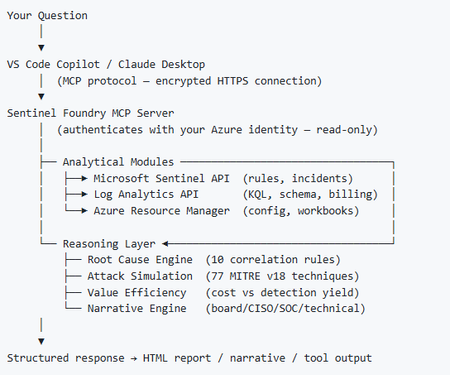
I’ve been cooking something that a lot of people in SOC have been struggling with — especially on the engineering side of Microsoft Sentinel. Thanks to the Microsoft Security team for shaping the capabilities of Sentinel even better with Sentinel Data Lake & Modern SecOps. Today’s the day I can finally share it. Note: This is not an official Microsoft product, but it is designed to make the Sentinel Build even better (complement) with much more intelligence. 🚀 Sentinel Foundry is now in public preview with 43 tools. (Sentinel Foundry - MCP Server) It’s an MCP server built to act like the brain of a strong Sentinel engineer — helping make building, improving, and operating Sentinel far more practical, faster, and honestly more enjoyable. For a lot of teams, the challenge is not understanding what Sentinel can do. The hard part is the engineering work around it: -> Deciding what data should actually be ingested -> Building a clean, scalable Sentinel foundation -> Writing useful detections instead of noisy ones -> Balancing security value with cost -> Turning ideas into deployable engineering outputs That is exactly why I built Sentinel Foundry to help communities grow stronger. It helps with the real engineering tasks behind Sentinel — from architecture thinking to detection design, deployment planning, ingestion strategy, automation ideas, and many of the workflows outlined in the GitHub project. How does it work? Here’s one of the flagship prompts I ran with it: “Give me a complete security posture report for our workspace. Score each pillar and tell me what to prioritise.” And within seconds, it produced a structured engineering blueprint that would normally take a lot longer to pull together manually. You can see the example prompts here in what it can do: https://github.com/prabhukiranveesam/Sentinel-Foundry#what-can-it-do I want building Sentinel to feel less like repetitive engineering overhead — and more like real security engineering that is fast, creative, and enjoyable. If you work with Sentinel as a SOC L2 analyst, engineer, detection engineer, consultant, or architect, I’d genuinely love for you to try it and tell me what you think. 🔗 Public Preview: https://github.com/prabhukiranveesam/Sentinel-Foundry This is just the start of an AI era — and I’m excited to keep shaping it with more powerful features over the coming days. This is very easy to set up and will be available to all of you at no cost during this month as part of the public preview, and your feedback is extremely valuable to shape this as a powerful solution.1.4KViews0likes2Comments
Exciting Announcements: New Data Connectors Released Using the Codeless Connector Framework
Microsoft Sentinel’s Codeless Connector Framework or ‘CCF’ (formerly called Codeless Connector Platform [CCP]) represents a paradigm shift in data ingestion, making it easier than ever for organisations to do more with Microsoft Sentinel by integrating diverse data sources seamlessly. Designed to simplify and expedite the onboarding of data sources, CCF eliminates the need for extensive coding expertise and maintaining additional services to facilitate ingestion, allowing security teams to focus on what truly matters – safeguarding their environment. Advantages of the Codeless Connector Framework The Codeless Connector Framework offers several compelling benefits: Ease of Use: CCF configuration-based templates allows advanced users to create data connectors without writing exhausting code, making the onboarding process quicker and more accessible to a broader audience. Flexibility: Users can customise data streams to meet their specific needs; optimizing efficacy while ensuring more control on the data being ingested. Scalability: The connectors built using CCF follows a true SaaS auto-expansion model making them highly scalable and natively reliable for large data volumes. Efficiency: By reducing the time and effort required to develop and deploy data connectors, CCF accelerates the availability of critical insights for security monitoring and more rapidly expands the value Microsoft Sentinel provides. What are we up to? We recognize that Codeless Connectors offer substantial advantages over Azure Function App based ingestion in Microsoft Sentinel in most cases. That motivates us to continue investing in modernizing our ingestion patterns for out-of-box connectors; one connector at a time. Another goal of modernizing these connectors is to replace the deprecated HTTP Data Collector API with the Log Ingestion API to send data to Microsoft Sentinel. Announcing the General Availability of New Data Connectors We are continually improving the Data Collection experience for our customers and are thrilled to announce that the following data connectors are now Generally Available (GA) on the Codeless Connector Framework. Atlassian Confluence Ingesting Confluence audit logs allows organizations to monitor collaboration activity, detect security risks, and troubleshoot configuration issues using Confluence audit records. Auth0 With the Auth0 Connector, organizations can effortlessly integrate authentication and authorization data from Auth0 into Microsoft Sentinel. This connector provides valuable insights into user activities and access patterns, bolstering identity security and compliance efforts. Azure DevOps Audit logs from Azure DevOps, allows security teams to monitor user activities, detect anomalous behavior, and investigate potential threats across DevOps environments. Box The Box Connector facilitates the ingestion of file storage and sharing data from Box into Microsoft Sentinel. By leveraging this connector, security teams can monitor file access and sharing activities, ensuring data integrity, and preventing unauthorized access. Google Cloud Platform Load Balancer With GCP Load Balancer and Web Application Firewall (Cloud Armor) logs, security teams can monitor inbound network activity, enforce security policies, and detect threats across GCP environments. Proofpoint POD The ingestion of email security logs allows organizations to monitor message traceability, detect threats, and investigate data exfiltration attempts by attackers and malicious insiders. Proofpoint TAP Email threat intelligence logs, including message and click events, provides visibility into malware and phishing activity to support custom alerts, dashboards, and threat investigation. SentinelOne The SentinelOne Connector enables seamless ingestion of threat intelligence and endpoint security data from SentinelOne into Microsoft Sentinel. This integration empowers security teams to enhance their threat detection capabilities and respond swiftly to potential threats. New Connectors in Public Preview CrowdStrike Falcon Data Replicator (S3 based Polling) Google Cloud Platform VPC Flow Google Cloud Platform DNS Google IAM These new additions are not new out-of-box sources in Microsoft Sentinel, but they do improve how data is collected. The previously Azure Function App based polling has now been upgraded to the Codeless Connector Framework for these products to ensure data collection adheres to the more scalable; advantageous pattern with CCF. As noted previously, the newer version of these connectors replaces the deprecated HTTP Data Collector API with the Log Ingestion API to send data to Microsoft Sentinel. Call to Action! Microsoft Sentinel customers collecting data from any of the mentioned sources using Azure Function Apps are advised to migrate their ingestion streams to newer versions to utilize the Codeless Connector Framework. While we continue to improve the data collection experience across all connectors, we encourage our customers and partners to join the Microsoft Security Communities to benefit from early insights about the latest and greatest with Microsoft Security. Call to Action for ISV Partners We invite our ISV partners to migrate their Azure Function App-based data connectors to the Codeless Connector Framework. By leveraging CCF for data ingestion, we can ensure that our mutual customers benefit from streamlined data integration and enhanced security monitoring in Microsoft Sentinel. We are committed to ensuring partners have all the support needed in this transformation. For any support, please reach out to us at Microsoft Sentinel Partners. Join us in this transformative journey to empower our customers by unlocking the full potential of their security investments with Microsoft Sentinel’s Codeless Connector Framework. References Create a codeless connector for Microsoft Sentinel Migrate from the HTTP Data Collector API to the Log Ingestion API to send data to Azure Monitor Logs2.8KViews0likes2Comments
Data Connectors Storage Account and Function App
Several data connectors downloaded via Content Hub has ARM deployment templates which is default OOB experience. If we need to customize we could however I wanted to ask community how do you go about addressing some of the infrastructure issues where these connectors deploy storage accounts with insecure configurations like infrastructure key requirement, vnet intergration, cmk, front door etc... Storage and Function Apps. It appears default configuration basically provisions all required services to get streams going but posture configuration seems to be dismissing security standards around hardening these services.435Views0likes1CommentMicrosoft Sentinel data lake FAQ
Microsoft Sentinel data lake (generally available) is a purpose‑built, cloud‑native security data lake. It centralizes all security data in an open format, serving as the foundation for agentic defense, enhanced security insights, and graph-based enrichment. It offers cost‑effective ingestion, long‑term retention, and advanced analytics. In this blog we offer answers to many of the questions we’ve heard from our customers and partners. General questions What is the Microsoft Sentinel data lake? Microsoft has expanded its industry-leading SIEM solution, Microsoft Sentinel, to include a unified, security data lake, designed to help optimize costs, simplify data management, and accelerate the adoption of AI in security operations. This modern data lake serves as the foundation for the Microsoft Sentinel platform. It has a cloud-native architecture and is purpose-built for security—bringing together all security data for greater visibility, deeper security analysis, contextual awareness and agentic defense. It provides affordable, long-term retention, allowing organizations to maintain robust security while effectively managing budgetary requirements. What are the benefits of Sentinel data lake? Microsoft Sentinel data lake is purpose built for security offering flexible analytics, cost management, and deeper security insights. Sentinel data lake: Centralizes security data delta parquet and open format for easy access. This unified data foundation accelerates threat detection, investigation, and response across hybrid and multi-cloud environments. Enables data federation by allowing customers to access data in external sources like Microsoft Fabric, ADLS and Databricks from the data lake. Federated data appears alongside native Sentinel data, enabling correlated hunting, investigation, and custom graph analysis across a broader digital estate. Offers a disaggregated storage and compute pricing model, allowing customers to store massive volumes of security data at a fraction of the cost compared to traditional SIEM solutions. Allows multiple analytics engines like Kusto, Spark, and ML to run on a single data copy, simplifying management, reducing costs, and supporting deeper security analysis. Integrates with GitHub Copilot and VS Code empowering SOC teams to automate enrichment, anomaly detection, and forensic analysis. Supports AI agents via the MCP server, allowing tools like GitHub Copilot to query and automate security tasks. The MCP Server layer brings intelligence to the data, offering Semantic Search, Query Tools, and Custom Analysis capabilities that make it easier to extract insights and automate workflows. Provides streamlined onboarding, intuitive table management, and scalable multi-tenant support, making it ideal for MSSPs and large enterprises. The Sentinel data lake is designed for security workloads, ensuring that processes from ingestion to analytics meet evolving cybersecurity requirements. Is Microsoft Sentinel SIEM going away? No. Microsoft is expanding Sentinel into an AI powered end-to-end security platform that includes SIEM and new platform capabilities - Security data lake, graph-powered analytics and MCP Server. SIEM remains a core component and will be actively developed and supported. Getting started What are the prerequisites for Sentinel data lake? To get started: Connect your Sentinel workspace to Microsoft Defender prior to onboarding to Sentinel data lake. Once in the Defender experience see data lake onboarding documentation for next steps. Note: Sentinel is moving to the Microsoft Defender portal and the Sentinel Azure portal will be retired by March 31, 2027. I am a Sentinel-only customer, and not a Defender customer. Can I use the Sentinel data lake? Yes. You must connect Sentinel to the Defender experience before onboarding to the Sentinel data lake. Microsoft Sentinel is generally available in the Microsoft Defender portal, with or without Microsoft Defender XDR or an E5 license. If you have created a log analytics workspace, enabled it for Sentinel and have the right Microsoft Entra roles (e.g. Global Administrator + Subscription Owner, Security Administrator + Sentinel Contributor), you can enable Sentinel in the Defender portal. For more details on how to connect Sentinel to Defender review these sources: Microsoft Sentinel in the Microsoft Defender portal In what regions is Sentinel data lake available? For supported regions see: Geographical availability and data residency in Microsoft Sentinel | Azure Docs. Is there an expected release date for Microsoft Sentinel data lake in GCC, GCC-H, and DoD? While the exact date is not yet finalized, we plan to expand Sentinel data lake to the US Government environments. . How will URBAC and Entra RBAC work together to manage the data lake given there is no centralized model? Entra RBAC will provide broad access to the data lake (URBAC maps the right permissions to specific Entra role holders: GA/SA/SO/GR/SR). URBAC will become a centralized pane for configuring non-global delegated access to the data lake. For today, you will use this for the “default data lake” workspace. In the future, this will be enabled for non-default Sentinel workspaces as well – meaning all workspaces in the data lake can be managed here for data lake RBAC requirements. Azure RBAC on the Log Analytics (LA) workspace in the data lake is respected through URBAC as well today. If you already hold a built-in role like log analytics reader, you will be able to run interactive queries over the tables in that workspace. Or, if you hold log analytics contributor, you can read and manage table data. For more details see: Roles and permissions in the Microsoft Sentinel platform | Microsoft Learn Data ingestion and storage How do I ingest data into the Sentinel data lake? To ingest data into the Sentinel data lake, you can use existing Sentinel data connectors or custom connectors to bring data from Microsoft and third-party sources. Data can be ingested into the analytics tier or the data lake tier. Data ingested into the analytics tier is automatically mirrored to the lake (at no additional cost). Alternatively, data that is not needed in the analytics tier can be ingested directly into the data lake. Data retention is configured directly in table management, for both analytics retention and data lake storage. Note: Certain tables do not support data lake-only ingestion via either API or data connector UI. See here for more information: Custom log tables. What is Microsoft’s guidance on when to use analytics tier vs. the data lake tier? Sentinel data lake offers flexible, built-in data tiering (analytics and data lake tiers) to effectively meet diverse business use cases and achieve cost optimization goals. Analytics tier: Is ideal for high-performance, real-time, end-to-end detections, enrichments, investigation and interactive dashboards. Typically, high-fidelity data from EDRs, email gateways, identity, SaaS and cloud logs, threat intelligence (TI) should be ingested into the analytics tier. Data in the analytics tier is best monitored proactively with scheduled alerts and scheduled analytics to enable security detections Data in this tier is retained at no cost for up to 90 days by default, extendable to 2 years. A copy of the data in this tier is automatically available in the data lake tier at no extra cost, ensuring a unified copy of security data for both tiers. Data lake tier: Is designed for cost-effective, long-term storage. High-volume logs like NetFlow logs, TLS/SSL certificate logs, firewall logs and proxy logs are best suited for data lake tier. Customers can use these logs for historical analysis, compliance and auditing, incident response (IR), forensics over historical data, build tenant baselines, TI matching and then promote resulting insights into the analytics tier. Customers can run full Kusto queries, Spark Notebooks and scheduled jobs over a single copy of their data in the data lake. Customers can also search, enrich and promote data from the data lake tier to the analytics tier for full analytics. For more details see documentation. What does it mean that a copy of all new analytics tier data will be available in the data lake? When Sentinel data lake is enabled, a copy of all new data ingested into the analytics tier is automatically duplicated into the data lake tier. This means customers don’t need to manually configure or manage this process, every new log or telemetry added to the analytics tier becomes instantly available in the data lake. This allows security teams to run advanced analytics, historical investigations, and machine learning models on a single, unified copy of data in the lake, while still using the analytics tier for real-time SOC workflows. It’s a seamless way to support both operational and long-term use cases—without duplicating effort or cost. What is the guidance for customers using data federation capability in Sentinel data lake? Starting April 1, 2026, federate data from Microsoft Fabric, ADLS, and Azure Databricks into Sentinel data lake. Use data federation when data is exploratory, infrequently accessed, or must remain at source due to governance, compliance, sovereignty, or contractual requirements. Ingest data directly into Sentinel to unlock full SIEM capabilities, always-on detections, advanced automation, and AI‑driven defense at scale. This approach lets security teams start where their data already lives — preserving governance, then progressively ingest data into Sentinel for full security value. Is there any cost for retention in the analytics tier? Analytics ingestion includes 90 days of interactive retention, at no additional cost. Simply set analytics retention to 90 days or less. Analytics retention beyond 90 days will incur a retention cost. Data can be retained longer within the data lake by using the “total retention” setting. This allows you to extend retention within the data lake for up to 12 years. While data is retained within the analytics tier, there is no charge for the mirrored data within the lake. Retaining data in the lake beyond the analytics retention period incurs additional storage costs. See documentation for more details: Manage data tiers and retention in Microsoft Sentinel | Microsoft Learn What is the guidance for Microsoft Sentinel Basic and Auxiliary Logs customers? If you previously enabled Basic or Auxiliary Logs plan in Sentinel: You can view Basic Logs in the Defender portal but manage it from the Log Analytics workspace. To manage it in the Defender portal, you must change the plan from Basic to Analytics. Once the table is transitioned to the analytics tier, if desired, it can then be transitioned to the data lake. Existing Auxiliary Log tables will be available in the data lake tier for use once the Sentinel data lake is enabled. Billing for these tables will automatically switch to the Sentinel data lake meters. Microsoft Sentinel customers are recommended to start planning their data management strategy with the data lake. While Basic and Auxiliary Logs are still available, they are not being enhanced further. Sentinel data lake offers more capabilities at a lower price point. Please plan on onboarding your security data to the Sentinel data lake. Azure Monitor customers can continue to use Basic and Auxiliary Logs for observability scenarios. What happens to customers that already have Archive logs enabled? If a customer has already configured tables for Archive retention, existing retention settings will not change and will be automatically inherited by the Sentinel data lake. All data, including existing data in archive retention will be billed using the data lake storage meter, benefiting from 6x data compression. However, the data itself will not move. Existing data in archive will continue to be accessible through Sentinel search and restore experiences: o Data will not be backfilled into the data lake. o Data will be billed using the data lake storage meter. New data ingested after enabling the data lake: o Will be automatically mirrored to the data lake and accessible through data lake explorer. o Data will be billed using the data lake storage meter. Example: If a customer has 12 months of total retention enabled on a table, 2 months after enabling ingestion into the Sentinel data lake, the customer will still have access to 10 months of archived data (through Sentinel search and restore experiences), but access to only 2 months of data in the data lake (since the data lake was enabled). Key considerations for customers that currently have Archive logs enabled: The existing archive will remain, with new data ingested into the data lake going forward; previously stored archive data will not be backfilled into the lake. Archive logs will continue to be accessible via the Search and Restore tab under Sentinel. If analytics and data lake mode are enabled on table, which is the default setting for analytics tables when Sentinel data lake is enabled, all new data will be ingested into the Sentinel data lake. There will only be one storage meter (which is data lake storage) going forward. Archive will continue to be accessible via Search and Restore. If Sentinel data lake-only mode is enabled on table, new data will be ingested only into the data lake; any data that’s not already in the Sentinel data lake won’t be migrated/backfilled. Only data that was previously ingested under the archive plan will be accessible via Search and Restore. What is the guidance for customers using Azure Data Explorer (ADX) alongside Microsoft Sentinel? Some customers might have set up ADX cluster for their DIY lake setup. Customers can choose to continue using that setup and gradually migrate to Sentinel data lake for new data that they want to manage. The lake explorer will support federation with ADX to enable the customers to migrate gradually and simplify their deployment. What happens to the Defender XDR data after enabling Sentinel data lake? By default, Defender XDR tables are available for querying in advanced hunting, with 30 days of analytics tier retention included with the XDR license. To retain data beyond this period, an explicit change to the retention setting is required, either by extending the analytics tier retention or the total retention period. You can extend the retention period of supported Defender XDR tables beyond 30 days and ingest the data into the analytics tier. For more information see Manage XDR data in Microsoft Sentinel. You can also ingest XDR data directly into the data lake tier. See here for more information. A list of XDR advanced hunting tables supported by Sentinel are documented here: Connect Microsoft Defender XDR data to Microsoft Sentinel | Microsoft Learn. KQL queries and jobs Is KQL and Notebook supported over the Sentinel data lake? Yes, via the data lake KQL query experience along with a fully managed Notebook experience which enables spark-based big data analytics over a single copy of all your security data. Customers can run queries across any time range of data in their Sentinel data lake. In the future, this will be extended to enable SQL query over lake as well. Note: Triggering a KQL job directly via an API or Logic App is not yet supported but is on the roadmap. Why are there two different places to run KQL queries in Sentinel experience? Advanced hunting queries both XDR and analytics tables, with compute cost included. Data lake explorer only queries data in the lake and incurs a separate compute cost. Consolidating advanced hunting and KQL explorer user interfaces is on the roadmap. This will provide security analysts a unified query experience across both analytics and data lake tiers. Where is the output from KQL jobs stored? KQL jobs are written into existing or new custom tables in the analytics tier. Is it possible to run KQL queries on multiple data lake tables? Yes, you can run KQL interactive queries and jobs using operators like join or union. Can KQL queries (either interactive or via KQL jobs) join data across multiple workspaces? Security teams can run multi-workspace KQL queries for broader threat correlation Pricing and billing How does a customer pay for Sentinel data lake? Billing is automatically enabled at the time of onboarding based on Azure Subscription and Resource Group selections. Customers are then charged based on the volume of data ingested, retained, and analyzed (e.g. KQL Queries and Jobs). See Sentinel pricing page for more details. 2. What are the pricing components for Sentinel data lake? Sentinel data lake offers a flexible pricing model designed to optimize security coverage and costs. At a high level, pricing is based on the volume of data ingested/processed, the volume of data retained, and the volume of data processed. For specific meter definitions, see documentation. 3. How does the business model for Sentinel SIEM change with the introduction of the data lake? There is no change to existing Sentinel analytics tier ingestion business model. Sentinel data lake has separate meters for ingestion, storage and analytics. 4. What happens to the existing Sentinel SIEM and related Azure Monitor billing meters when a customer onboards to Sentinel data lake? When a customer onboards to the Sentinel data lake, nothing changes with analytic ingestion or retention. Customers using data archive and Auxiliary Logs will automatically transition to the new data lake meters. How does data lake storage affect cost efficiency for high volume data retention? Sentinel data lake offers cost-effective, long-term storage with uniform data compression of 6:1 across all data sources, applicable only to data lake storage. Example: For 600GB of data stored, you are only billed for 100GB compressed data. This approach allows organizations to retain greater volumes of security data over extended periods cost-effectively, thereby reducing security risks without compromising their overall security posture. here How “Data Processing” billed? To support the ingestion and standardization of diverse data sources, the Data Processing feature applies a $0.10 per GB (US East) charge for all data ingested into the data lake. This feature enables a broad array of transformations like redaction, splitting, filtering and normalization. The data processing charge is applied per GB of uncompressed data Note: For regional pricing, please refer to the “Data processing” meter within the Microsoft Sentinel Pricing official documentation. Does “Data processing” meter apply to analytics tier data mirrored in the data lake? No. Data processing charge will not be applied to mirrored data. Data mirrored from the analytic tier is not subject to either data ingestion or processing charges. How is retention billed for tables that use data lake-only ingestion & retention? Sentinel data lake decouples ingestion, storage, and analytics meters. Customers have the flexibility to pay based on how data is retained and used. For tables that use data lake‑only ingestion, there is no included free retention—unlike the analytics tier, which includes 90 days of analytics retention. Retention charges begin immediately once data is stored in the data lake. Data lake storage billing is based on compressed data size rather than raw ingested volume, which significantly reduces storage costs and delivers lower overall retention spend for customers. Does data federation incur charges? Data federation does not generate any ingestion or storage fees in Sentinel data lake. Customers are billed only when they run analytics or queries on federated data, with charges based on Sentinel data lake compute and analytics meters. This means customers pay solely for actual data usage, not mere connectivity. How do I understand Sentinel data lake costs? Sentinel data lake costs driven by three primary factors: how much data is ingested, how long that data is retained, and how the data is used. Customers can flexibly choose to ingest data into the analytics tier or data lake tier, and these architectural choices directly impact cost. For example, data can be ingested into the analytics tier—where commitment tiers help optimize costs for high data volumes—or ingested data directly into the Sentinel data lake for lower‑cost ingestion, storage, and on‑demand analysis. Customers are encouraged to work with their Microsoft account team to obtain an accurate cost estimate tailored to their environment. See Sentinel pricing page to understand Sentinel pricing. How do I manage Sentinel data lake costs? Built-in cost management experiences help customers with cost predictability, billing transparency, and operational efficiency. Reports provide customers with insights into usage trends over time, enabling them to identify cost drivers and optimize data retention and processing strategies. Set usage-based alerts on specific meters to monitor and control costs. For example, receive alerts when query or notebook usage passes set limits, helping avoid unexpected expenses and manage budgets. See our Sentinel cost management documentation to learn more. If I’m an Auxiliary Logs customer, how will onboarding to the Sentinel data lake affect my billing? Once a workspace is onboarded to Sentinel data lake, all Auxiliary Logs meters will be replaced by new data lake meters. Do we charge for data lake ingestion and storage for graph experiences? Microsoft Sentinel graph-based experiences are included as part of the existing Defender and Purview licenses. However, Sentinel graph requires Sentinel data lake and specific data sources to build the underlying graph. Enabling these data sources will incur ingestion and data lake storage costs. Note: For Sentinel SIEM customers, most required data sources are free for analytics ingestion. Non-entitled sources such as Microsoft Entra ID logs will incur ingestion and data lake storage costs. How is Entra asset data and ARG data billed? Data lake ingestion charges of $0.05 per GB (US EAST) will apply to Entra asset data and ARG data. Note: This was previously not billed during public preview and is billed since data lake GA. To learn more, see: https://learn.microsoft.com/azure/sentinel/datalake/enable-data-connectors When a customer activates Sentinel data lake, what happens to tables with archive logs enabled? To simplify billing, once the data lake is enabled, all archive data will be billed using the data lake storage meter. This provides consistent long-term retention billing and includes automatic 6x data compression. For most customers, this change results in lower long‑term retention costs. However, customers who previously had discounted archive retention pricing will not automatically receive the same discounts on the new data lake storage meters. In these cases, customers should engage their Microsoft account team to review pricing implications before enabling the Sentinel data lake. Thank you Thank you to our customers and partners for your continued trust and collaboration. Your feedback drives our innovation, and we’re excited to keep evolving Microsoft Sentinel to meet your security needs. If you have any questions, please don’t hesitate to reach out—we’re here to support you every step of the way. Learn more: Get started with Sentinel data lake today: https://aka.ms/Get_started/Sentinel_datalake Microsoft Sentinel AI-ready platform: https://aka.ms/Microsoft_Sentinel Sentinel data lake videos: https://aka.ms/Sentineldatalake_videos Latest innovations and updates on Sentinel: https://aka.ms/msftsentinelblog Sentinel pricing page: https://aka.ms/MicrosoftSentinel_Pricing8.2KViews1like9CommentsThe Microsoft Copilot Data Connector for Microsoft Sentinel is Now in Public Preview
*Please note that this connector is now in GA status as of March, 2026* We are happy to announce a new data connector that is available to the public: the Microsoft Copilot data connector for Microsoft Sentinel. The new Microsoft Copilot data connector will allow for audit logs and activities generated by different offerings of Copilot to be ingested into Microsoft Sentinel and Microsoft Sentinel data lake. This allows for Copilot activities to be leveraged within Microsoft Sentinel features such as analytic rules/custom detections, Workbooks, automation, and more. This also allows for Copilot data to be sent to Sentinel data lake, which opens the possibilities for integrations with custom graphs, MCP server, and more while offering lower cost ingestion and longer retention as needed. Eligibility for the Connector The connector is available for all customers within Microsoft Sentinel, but will only ingest data for environments that have access to Copilot licenses and SCUs as the activities rely on Copilot being used. These logs are available via the Purview Unified Audit Log (UAL) feed, which is available and enabled for all users by default. A big value of this new connector is that it eliminates the need for users to go to the Purview Portal in order to see these activities, as they are proactively brought into the workspace, enabling SOCs to generate detections and proactively threat hunt on this information. Note: This data connector is a single-tenant connector, meaning that it will ingest the data for the entire tenant that it resides in. This connector is not designed to handle multi-tenant configurations. What’s Included in the Connector The following are record types from Office 365 Management API that will be supported as part of this connector: 261 CopilotInteraction 310 CreateCopilotPlugin 311 UpdateCopilotPlugin 312 DeleteCopilotPlugin 313 EnableCopilotPlugin 314 DisableCopilotPlugin 315 CreateCopilotWorkspace 316 UpdateCopilotWorkspace 317 DeleteCopilotWorkspace 318 EnableCopilotWorkspace 319 DisableCopilotWorkspace 320 CreateCopilotPromptBook 321 UpdateCopilotPromptBook 322 DeleteCopilotPromptBook 323 EnableCopilotPromptBook 324 DisableCopilotPromptBook 325 UpdateCopilotSettings 334 TeamCopilotInteraction 363 Microsoft365CopilotScheduledPrompt 371 OutlookCopilotAutomation 389 CopilotForSecurityTrigger 390 CopilotAgentManagement These are great options for monitoring users who have permission to make changes to Copilot across the environment. This data can assist with identifying if there are anomalous interactions taking place between users and Copilot, unauthorized attempts of access, or malicious prompt usage. How to Deploy the Connector The connector is available via the Microsoft Sentinel Content Hub and can be installed today. To find the connector: Within the Defender Portal, expand the Microsoft Sentinel navigation in the left menu. Expand Configuration and select Content Hub. Within the search bar, search for “Copilot”. Click on the solution that appears and click Install. Once the solution is installed, the connector can be configured by clicking on the connector within the solution and selecting Open Connector Page. To enable the connector, the user will need either Global Administrator or Security Administrator on the tenant. Once the connector is enabled, the data will be sent to the table named CopilotActivity. Note: Data ingestion costs apply when using this data connector. Pricing will be based on the settings for the Microsoft Sentinel workspace or at the Microsoft Sentinel data lake tier pricing. As this data connector is in Public Preview, users can start deploying this connector right now! As always, let us know what you think in the comments so that we may continue to build what is most valuable to you. We hope that this new data connector continues to assist your SOC with high valuable insights that best empowers your security. Resources: Office Management API Event Number List: https://learn.microsoft.com/en-us/office/office-365-management-api/office-365-management-activity-api-schema#auditlogrecordtype Purview Unified Audit Log Library: Audit log activities | Microsoft Learn Copilot Inclusion in the Microsoft E5 Subscription: Learn about Security Copilot inclusion in Microsoft 365 E5 subscription | Microsoft Learn Microsoft Sentinel: What is Microsoft Sentinel SIEM? | Microsoft Learn Microsoft Sentinel Platform: Microsoft Sentinel data lake overview - Microsoft Security | Microsoft Learn11KViews0likes1Comment