solutions
159 TopicsSentinel Foundry - MCP Server (Github Community Release)
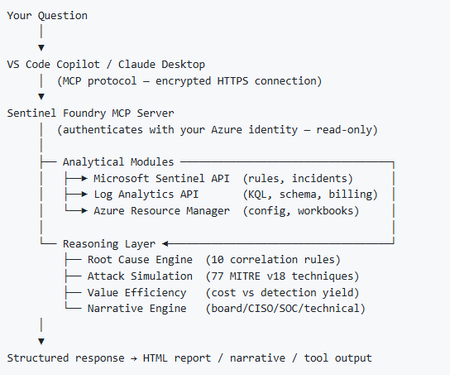
I’ve been cooking something that a lot of people in SOC have been struggling with — especially on the engineering side of Microsoft Sentinel. Thanks to the Microsoft Security team for shaping the capabilities of Sentinel even better with Sentinel Data Lake & Modern SecOps. Today’s the day I can finally share it. Note: This is not an official Microsoft product, but it is designed to make the Sentinel Build even better (complement) with much more intelligence. 🚀 Sentinel Foundry is now in public preview with 43 tools. (Sentinel Foundry - MCP Server) It’s an MCP server built to act like the brain of a strong Sentinel engineer — helping make building, improving, and operating Sentinel far more practical, faster, and honestly more enjoyable. For a lot of teams, the challenge is not understanding what Sentinel can do. The hard part is the engineering work around it: -> Deciding what data should actually be ingested -> Building a clean, scalable Sentinel foundation -> Writing useful detections instead of noisy ones -> Balancing security value with cost -> Turning ideas into deployable engineering outputs That is exactly why I built Sentinel Foundry to help communities grow stronger. It helps with the real engineering tasks behind Sentinel — from architecture thinking to detection design, deployment planning, ingestion strategy, automation ideas, and many of the workflows outlined in the GitHub project. How does it work? Here’s one of the flagship prompts I ran with it: “Give me a complete security posture report for our workspace. Score each pillar and tell me what to prioritise.” And within seconds, it produced a structured engineering blueprint that would normally take a lot longer to pull together manually. You can see the example prompts here in what it can do: https://github.com/prabhukiranveesam/Sentinel-Foundry#what-can-it-do I want building Sentinel to feel less like repetitive engineering overhead — and more like real security engineering that is fast, creative, and enjoyable. If you work with Sentinel as a SOC L2 analyst, engineer, detection engineer, consultant, or architect, I’d genuinely love for you to try it and tell me what you think. 🔗 Public Preview: https://github.com/prabhukiranveesam/Sentinel-Foundry This is just the start of an AI era — and I’m excited to keep shaping it with more powerful features over the coming days. This is very easy to set up and will be available to all of you at no cost during this month as part of the public preview, and your feedback is extremely valuable to shape this as a powerful solution.995Views0likes2Comments
Exciting Announcements: New Data Connectors Released Using the Codeless Connector Framework
Microsoft Sentinel’s Codeless Connector Framework or ‘CCF’ (formerly called Codeless Connector Platform [CCP]) represents a paradigm shift in data ingestion, making it easier than ever for organisations to do more with Microsoft Sentinel by integrating diverse data sources seamlessly. Designed to simplify and expedite the onboarding of data sources, CCF eliminates the need for extensive coding expertise and maintaining additional services to facilitate ingestion, allowing security teams to focus on what truly matters – safeguarding their environment. Advantages of the Codeless Connector Framework The Codeless Connector Framework offers several compelling benefits: Ease of Use: CCF configuration-based templates allows advanced users to create data connectors without writing exhausting code, making the onboarding process quicker and more accessible to a broader audience. Flexibility: Users can customise data streams to meet their specific needs; optimizing efficacy while ensuring more control on the data being ingested. Scalability: The connectors built using CCF follows a true SaaS auto-expansion model making them highly scalable and natively reliable for large data volumes. Efficiency: By reducing the time and effort required to develop and deploy data connectors, CCF accelerates the availability of critical insights for security monitoring and more rapidly expands the value Microsoft Sentinel provides. What are we up to? We recognize that Codeless Connectors offer substantial advantages over Azure Function App based ingestion in Microsoft Sentinel in most cases. That motivates us to continue investing in modernizing our ingestion patterns for out-of-box connectors; one connector at a time. Another goal of modernizing these connectors is to replace the deprecated HTTP Data Collector API with the Log Ingestion API to send data to Microsoft Sentinel. Announcing the General Availability of New Data Connectors We are continually improving the Data Collection experience for our customers and are thrilled to announce that the following data connectors are now Generally Available (GA) on the Codeless Connector Framework. Atlassian Confluence Ingesting Confluence audit logs allows organizations to monitor collaboration activity, detect security risks, and troubleshoot configuration issues using Confluence audit records. Auth0 With the Auth0 Connector, organizations can effortlessly integrate authentication and authorization data from Auth0 into Microsoft Sentinel. This connector provides valuable insights into user activities and access patterns, bolstering identity security and compliance efforts. Azure DevOps Audit logs from Azure DevOps, allows security teams to monitor user activities, detect anomalous behavior, and investigate potential threats across DevOps environments. Box The Box Connector facilitates the ingestion of file storage and sharing data from Box into Microsoft Sentinel. By leveraging this connector, security teams can monitor file access and sharing activities, ensuring data integrity, and preventing unauthorized access. Google Cloud Platform Load Balancer With GCP Load Balancer and Web Application Firewall (Cloud Armor) logs, security teams can monitor inbound network activity, enforce security policies, and detect threats across GCP environments. Proofpoint POD The ingestion of email security logs allows organizations to monitor message traceability, detect threats, and investigate data exfiltration attempts by attackers and malicious insiders. Proofpoint TAP Email threat intelligence logs, including message and click events, provides visibility into malware and phishing activity to support custom alerts, dashboards, and threat investigation. SentinelOne The SentinelOne Connector enables seamless ingestion of threat intelligence and endpoint security data from SentinelOne into Microsoft Sentinel. This integration empowers security teams to enhance their threat detection capabilities and respond swiftly to potential threats. New Connectors in Public Preview CrowdStrike Falcon Data Replicator (S3 based Polling) Google Cloud Platform VPC Flow Google Cloud Platform DNS Google IAM These new additions are not new out-of-box sources in Microsoft Sentinel, but they do improve how data is collected. The previously Azure Function App based polling has now been upgraded to the Codeless Connector Framework for these products to ensure data collection adheres to the more scalable; advantageous pattern with CCF. As noted previously, the newer version of these connectors replaces the deprecated HTTP Data Collector API with the Log Ingestion API to send data to Microsoft Sentinel. Call to Action! Microsoft Sentinel customers collecting data from any of the mentioned sources using Azure Function Apps are advised to migrate their ingestion streams to newer versions to utilize the Codeless Connector Framework. While we continue to improve the data collection experience across all connectors, we encourage our customers and partners to join the Microsoft Security Communities to benefit from early insights about the latest and greatest with Microsoft Security. Call to Action for ISV Partners We invite our ISV partners to migrate their Azure Function App-based data connectors to the Codeless Connector Framework. By leveraging CCF for data ingestion, we can ensure that our mutual customers benefit from streamlined data integration and enhanced security monitoring in Microsoft Sentinel. We are committed to ensuring partners have all the support needed in this transformation. For any support, please reach out to us at Microsoft Sentinel Partners. Join us in this transformative journey to empower our customers by unlocking the full potential of their security investments with Microsoft Sentinel’s Codeless Connector Framework. References Create a codeless connector for Microsoft Sentinel Migrate from the HTTP Data Collector API to the Log Ingestion API to send data to Azure Monitor Logs2.6KViews0likes2Comments
Data Connectors Storage Account and Function App
Several data connectors downloaded via Content Hub has ARM deployment templates which is default OOB experience. If we need to customize we could however I wanted to ask community how do you go about addressing some of the infrastructure issues where these connectors deploy storage accounts with insecure configurations like infrastructure key requirement, vnet intergration, cmk, front door etc... Storage and Function Apps. It appears default configuration basically provisions all required services to get streams going but posture configuration seems to be dismissing security standards around hardening these services.300Views0likes1CommentMicrosoft Sentinel data lake FAQ
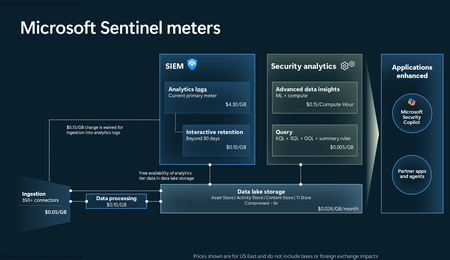
Microsoft Sentinel data lake (generally available) is a purpose‑built, cloud‑native security data lake. It centralizes all security data in an open format, serving as the foundation for agentic defense, enhanced security insights, and graph-based enrichment. It offers cost‑effective ingestion, long‑term retention, and advanced analytics. In this blog we offer answers to many of the questions we’ve heard from our customers and partners. General questions What is the Microsoft Sentinel data lake? Microsoft has expanded its industry-leading SIEM solution, Microsoft Sentinel, to include a unified, security data lake, designed to help optimize costs, simplify data management, and accelerate the adoption of AI in security operations. This modern data lake serves as the foundation for the Microsoft Sentinel platform. It has a cloud-native architecture and is purpose-built for security—bringing together all security data for greater visibility, deeper security analysis, contextual awareness and agentic defense. It provides affordable, long-term retention, allowing organizations to maintain robust security while effectively managing budgetary requirements. What are the benefits of Sentinel data lake? Microsoft Sentinel data lake is purpose built for security offering flexible analytics, cost management, and deeper security insights. Sentinel data lake: Centralizes security data delta parquet and open format for easy access. This unified data foundation accelerates threat detection, investigation, and response across hybrid and multi-cloud environments. Enables data federation by allowing customers to access data in external sources like Microsoft Fabric, ADLS and Databricks from the data lake. Federated data appears alongside native Sentinel data, enabling correlated hunting, investigation, and custom graph analysis across a broader digital estate. Offers a disaggregated storage and compute pricing model, allowing customers to store massive volumes of security data at a fraction of the cost compared to traditional SIEM solutions. Allows multiple analytics engines like Kusto, Spark, and ML to run on a single data copy, simplifying management, reducing costs, and supporting deeper security analysis. Integrates with GitHub Copilot and VS Code empowering SOC teams to automate enrichment, anomaly detection, and forensic analysis. Supports AI agents via the MCP server, allowing tools like GitHub Copilot to query and automate security tasks. The MCP Server layer brings intelligence to the data, offering Semantic Search, Query Tools, and Custom Analysis capabilities that make it easier to extract insights and automate workflows. Provides streamlined onboarding, intuitive table management, and scalable multi-tenant support, making it ideal for MSSPs and large enterprises. The Sentinel data lake is designed for security workloads, ensuring that processes from ingestion to analytics meet evolving cybersecurity requirements. Is Microsoft Sentinel SIEM going away? No. Microsoft is expanding Sentinel into an AI powered end-to-end security platform that includes SIEM and new platform capabilities - Security data lake, graph-powered analytics and MCP Server. SIEM remains a core component and will be actively developed and supported. Getting started What are the prerequisites for Sentinel data lake? To get started: Connect your Sentinel workspace to Microsoft Defender prior to onboarding to Sentinel data lake. Once in the Defender experience see data lake onboarding documentation for next steps. Note: Sentinel is moving to the Microsoft Defender portal and the Sentinel Azure portal will be retired by March 31, 2027. I am a Sentinel-only customer, and not a Defender customer. Can I use the Sentinel data lake? Yes. You must connect Sentinel to the Defender experience before onboarding to the Sentinel data lake. Microsoft Sentinel is generally available in the Microsoft Defender portal, with or without Microsoft Defender XDR or an E5 license. If you have created a log analytics workspace, enabled it for Sentinel and have the right Microsoft Entra roles (e.g. Global Administrator + Subscription Owner, Security Administrator + Sentinel Contributor), you can enable Sentinel in the Defender portal. For more details on how to connect Sentinel to Defender review these sources: Microsoft Sentinel in the Microsoft Defender portal In what regions is Sentinel data lake available? For supported regions see: Geographical availability and data residency in Microsoft Sentinel | Azure Docs. Is there an expected release date for Microsoft Sentinel data lake in GCC, GCC-H, and DoD? While the exact date is not yet finalized, we plan to expand Sentinel data lake to the US Government environments. . How will URBAC and Entra RBAC work together to manage the data lake given there is no centralized model? Entra RBAC will provide broad access to the data lake (URBAC maps the right permissions to specific Entra role holders: GA/SA/SO/GR/SR). URBAC will become a centralized pane for configuring non-global delegated access to the data lake. For today, you will use this for the “default data lake” workspace. In the future, this will be enabled for non-default Sentinel workspaces as well – meaning all workspaces in the data lake can be managed here for data lake RBAC requirements. Azure RBAC on the Log Analytics (LA) workspace in the data lake is respected through URBAC as well today. If you already hold a built-in role like log analytics reader, you will be able to run interactive queries over the tables in that workspace. Or, if you hold log analytics contributor, you can read and manage table data. For more details see: Roles and permissions in the Microsoft Sentinel platform | Microsoft Learn Data ingestion and storage How do I ingest data into the Sentinel data lake? To ingest data into the Sentinel data lake, you can use existing Sentinel data connectors or custom connectors to bring data from Microsoft and third-party sources. Data can be ingested into the analytics tier or the data lake tier. Data ingested into the analytics tier is automatically mirrored to the lake (at no additional cost). Alternatively, data that is not needed in the analytics tier can be ingested directly into the data lake. Data retention is configured directly in table management, for both analytics retention and data lake storage. Note: Certain tables do not support data lake-only ingestion via either API or data connector UI. See here for more information: Custom log tables. What is Microsoft’s guidance on when to use analytics tier vs. the data lake tier? Sentinel data lake offers flexible, built-in data tiering (analytics and data lake tiers) to effectively meet diverse business use cases and achieve cost optimization goals. Analytics tier: Is ideal for high-performance, real-time, end-to-end detections, enrichments, investigation and interactive dashboards. Typically, high-fidelity data from EDRs, email gateways, identity, SaaS and cloud logs, threat intelligence (TI) should be ingested into the analytics tier. Data in the analytics tier is best monitored proactively with scheduled alerts and scheduled analytics to enable security detections Data in this tier is retained at no cost for up to 90 days by default, extendable to 2 years. A copy of the data in this tier is automatically available in the data lake tier at no extra cost, ensuring a unified copy of security data for both tiers. Data lake tier: Is designed for cost-effective, long-term storage. High-volume logs like NetFlow logs, TLS/SSL certificate logs, firewall logs and proxy logs are best suited for data lake tier. Customers can use these logs for historical analysis, compliance and auditing, incident response (IR), forensics over historical data, build tenant baselines, TI matching and then promote resulting insights into the analytics tier. Customers can run full Kusto queries, Spark Notebooks and scheduled jobs over a single copy of their data in the data lake. Customers can also search, enrich and promote data from the data lake tier to the analytics tier for full analytics. For more details see documentation. What does it mean that a copy of all new analytics tier data will be available in the data lake? When Sentinel data lake is enabled, a copy of all new data ingested into the analytics tier is automatically duplicated into the data lake tier. This means customers don’t need to manually configure or manage this process, every new log or telemetry added to the analytics tier becomes instantly available in the data lake. This allows security teams to run advanced analytics, historical investigations, and machine learning models on a single, unified copy of data in the lake, while still using the analytics tier for real-time SOC workflows. It’s a seamless way to support both operational and long-term use cases—without duplicating effort or cost. What is the guidance for customers using data federation capability in Sentinel data lake? Starting April 1, 2026, federate data from Microsoft Fabric, ADLS, and Azure Databricks into Sentinel data lake. Use data federation when data is exploratory, infrequently accessed, or must remain at source due to governance, compliance, sovereignty, or contractual requirements. Ingest data directly into Sentinel to unlock full SIEM capabilities, always-on detections, advanced automation, and AI‑driven defense at scale. This approach lets security teams start where their data already lives — preserving governance, then progressively ingest data into Sentinel for full security value. Is there any cost for retention in the analytics tier? Analytics ingestion includes 90 days of interactive retention, at no additional cost. Simply set analytics retention to 90 days or less. Analytics retention beyond 90 days will incur a retention cost. Data can be retained longer within the data lake by using the “total retention” setting. This allows you to extend retention within the data lake for up to 12 years. While data is retained within the analytics tier, there is no charge for the mirrored data within the lake. Retaining data in the lake beyond the analytics retention period incurs additional storage costs. See documentation for more details: Manage data tiers and retention in Microsoft Sentinel | Microsoft Learn What is the guidance for Microsoft Sentinel Basic and Auxiliary Logs customers? If you previously enabled Basic or Auxiliary Logs plan in Sentinel: You can view Basic Logs in the Defender portal but manage it from the Log Analytics workspace. To manage it in the Defender portal, you must change the plan from Basic to Analytics. Once the table is transitioned to the analytics tier, if desired, it can then be transitioned to the data lake. Existing Auxiliary Log tables will be available in the data lake tier for use once the Sentinel data lake is enabled. Billing for these tables will automatically switch to the Sentinel data lake meters. Microsoft Sentinel customers are recommended to start planning their data management strategy with the data lake. While Basic and Auxiliary Logs are still available, they are not being enhanced further. Sentinel data lake offers more capabilities at a lower price point. Please plan on onboarding your security data to the Sentinel data lake. Azure Monitor customers can continue to use Basic and Auxiliary Logs for observability scenarios. What happens to customers that already have Archive logs enabled? If a customer has already configured tables for Archive retention, existing retention settings will not change and will be automatically inherited by the Sentinel data lake. All data, including existing data in archive retention will be billed using the data lake storage meter, benefiting from 6x data compression. However, the data itself will not move. Existing data in archive will continue to be accessible through Sentinel search and restore experiences: o Data will not be backfilled into the data lake. o Data will be billed using the data lake storage meter. New data ingested after enabling the data lake: o Will be automatically mirrored to the data lake and accessible through data lake explorer. o Data will be billed using the data lake storage meter. Example: If a customer has 12 months of total retention enabled on a table, 2 months after enabling ingestion into the Sentinel data lake, the customer will still have access to 10 months of archived data (through Sentinel search and restore experiences), but access to only 2 months of data in the data lake (since the data lake was enabled). Key considerations for customers that currently have Archive logs enabled: The existing archive will remain, with new data ingested into the data lake going forward; previously stored archive data will not be backfilled into the lake. Archive logs will continue to be accessible via the Search and Restore tab under Sentinel. If analytics and data lake mode are enabled on table, which is the default setting for analytics tables when Sentinel data lake is enabled, all new data will be ingested into the Sentinel data lake. There will only be one storage meter (which is data lake storage) going forward. Archive will continue to be accessible via Search and Restore. If Sentinel data lake-only mode is enabled on table, new data will be ingested only into the data lake; any data that’s not already in the Sentinel data lake won’t be migrated/backfilled. Only data that was previously ingested under the archive plan will be accessible via Search and Restore. What is the guidance for customers using Azure Data Explorer (ADX) alongside Microsoft Sentinel? Some customers might have set up ADX cluster for their DIY lake setup. Customers can choose to continue using that setup and gradually migrate to Sentinel data lake for new data that they want to manage. The lake explorer will support federation with ADX to enable the customers to migrate gradually and simplify their deployment. What happens to the Defender XDR data after enabling Sentinel data lake? By default, Defender XDR tables are available for querying in advanced hunting, with 30 days of analytics tier retention included with the XDR license. To retain data beyond this period, an explicit change to the retention setting is required, either by extending the analytics tier retention or the total retention period. You can extend the retention period of supported Defender XDR tables beyond 30 days and ingest the data into the analytics tier. For more information see Manage XDR data in Microsoft Sentinel. You can also ingest XDR data directly into the data lake tier. See here for more information. A list of XDR advanced hunting tables supported by Sentinel are documented here: Connect Microsoft Defender XDR data to Microsoft Sentinel | Microsoft Learn. KQL queries and jobs Is KQL and Notebook supported over the Sentinel data lake? Yes, via the data lake KQL query experience along with a fully managed Notebook experience which enables spark-based big data analytics over a single copy of all your security data. Customers can run queries across any time range of data in their Sentinel data lake. In the future, this will be extended to enable SQL query over lake as well. Note: Triggering a KQL job directly via an API or Logic App is not yet supported but is on the roadmap. Why are there two different places to run KQL queries in Sentinel experience? Advanced hunting queries both XDR and analytics tables, with compute cost included. Data lake explorer only queries data in the lake and incurs a separate compute cost. Consolidating advanced hunting and KQL explorer user interfaces is on the roadmap. This will provide security analysts a unified query experience across both analytics and data lake tiers. Where is the output from KQL jobs stored? KQL jobs are written into existing or new custom tables in the analytics tier. Is it possible to run KQL queries on multiple data lake tables? Yes, you can run KQL interactive queries and jobs using operators like join or union. Can KQL queries (either interactive or via KQL jobs) join data across multiple workspaces? Security teams can run multi-workspace KQL queries for broader threat correlation Pricing and billing How does a customer pay for Sentinel data lake? Billing is automatically enabled at the time of onboarding based on Azure Subscription and Resource Group selections. Customers are then charged based on the volume of data ingested, retained, and analyzed (e.g. KQL Queries and Jobs). See Sentinel pricing page for more details. 2. What are the pricing components for Sentinel data lake? Sentinel data lake offers a flexible pricing model designed to optimize security coverage and costs. At a high level, pricing is based on the volume of data ingested/processed, the volume of data retained, and the volume of data processed. For specific meter definitions, see documentation. 3. How does the business model for Sentinel SIEM change with the introduction of the data lake? There is no change to existing Sentinel analytics tier ingestion business model. Sentinel data lake has separate meters for ingestion, storage and analytics. 4. What happens to the existing Sentinel SIEM and related Azure Monitor billing meters when a customer onboards to Sentinel data lake? When a customer onboards to the Sentinel data lake, nothing changes with analytic ingestion or retention. Customers using data archive and Auxiliary Logs will automatically transition to the new data lake meters. How does data lake storage affect cost efficiency for high volume data retention? Sentinel data lake offers cost-effective, long-term storage with uniform data compression of 6:1 across all data sources, applicable only to data lake storage. Example: For 600GB of data stored, you are only billed for 100GB compressed data. This approach allows organizations to retain greater volumes of security data over extended periods cost-effectively, thereby reducing security risks without compromising their overall security posture. here How “Data Processing” billed? To support the ingestion and standardization of diverse data sources, the Data Processing feature applies a $0.10 per GB (US East) charge for all data ingested into the data lake. This feature enables a broad array of transformations like redaction, splitting, filtering and normalization. The data processing charge is applied per GB of uncompressed data Note: For regional pricing, please refer to the “Data processing” meter within the Microsoft Sentinel Pricing official documentation. Does “Data processing” meter apply to analytics tier data mirrored in the data lake? No. Data processing charge will not be applied to mirrored data. Data mirrored from the analytic tier is not subject to either data ingestion or processing charges. How is retention billed for tables that use data lake-only ingestion & retention? Sentinel data lake decouples ingestion, storage, and analytics meters. Customers have the flexibility to pay based on how data is retained and used. For tables that use data lake‑only ingestion, there is no included free retention—unlike the analytics tier, which includes 90 days of analytics retention. Retention charges begin immediately once data is stored in the data lake. Data lake storage billing is based on compressed data size rather than raw ingested volume, which significantly reduces storage costs and delivers lower overall retention spend for customers. Does data federation incur charges? Data federation does not generate any ingestion or storage fees in Sentinel data lake. Customers are billed only when they run analytics or queries on federated data, with charges based on Sentinel data lake compute and analytics meters. This means customers pay solely for actual data usage, not mere connectivity. How do I understand Sentinel data lake costs? Sentinel data lake costs driven by three primary factors: how much data is ingested, how long that data is retained, and how the data is used. Customers can flexibly choose to ingest data into the analytics tier or data lake tier, and these architectural choices directly impact cost. For example, data can be ingested into the analytics tier—where commitment tiers help optimize costs for high data volumes—or ingested data directly into the Sentinel data lake for lower‑cost ingestion, storage, and on‑demand analysis. Customers are encouraged to work with their Microsoft account team to obtain an accurate cost estimate tailored to their environment. See Sentinel pricing page to understand Sentinel pricing. How do I manage Sentinel data lake costs? Built-in cost management experiences help customers with cost predictability, billing transparency, and operational efficiency. Reports provide customers with insights into usage trends over time, enabling them to identify cost drivers and optimize data retention and processing strategies. Set usage-based alerts on specific meters to monitor and control costs. For example, receive alerts when query or notebook usage passes set limits, helping avoid unexpected expenses and manage budgets. See our Sentinel cost management documentation to learn more. If I’m an Auxiliary Logs customer, how will onboarding to the Sentinel data lake affect my billing? Once a workspace is onboarded to Sentinel data lake, all Auxiliary Logs meters will be replaced by new data lake meters. Do we charge for data lake ingestion and storage for graph experiences? Microsoft Sentinel graph-based experiences are included as part of the existing Defender and Purview licenses. However, Sentinel graph requires Sentinel data lake and specific data sources to build the underlying graph. Enabling these data sources will incur ingestion and data lake storage costs. Note: For Sentinel SIEM customers, most required data sources are free for analytics ingestion. Non-entitled sources such as Microsoft Entra ID logs will incur ingestion and data lake storage costs. How is Entra asset data and ARG data billed? Data lake ingestion charges of $0.05 per GB (US EAST) will apply to Entra asset data and ARG data. Note: This was previously not billed during public preview and is billed since data lake GA. To learn more, see: https://learn.microsoft.com/azure/sentinel/datalake/enable-data-connectors When a customer activates Sentinel data lake, what happens to tables with archive logs enabled? To simplify billing, once the data lake is enabled, all archive data will be billed using the data lake storage meter. This provides consistent long-term retention billing and includes automatic 6x data compression. For most customers, this change results in lower long‑term retention costs. However, customers who previously had discounted archive retention pricing will not automatically receive the same discounts on the new data lake storage meters. In these cases, customers should engage their Microsoft account team to review pricing implications before enabling the Sentinel data lake. Thank you Thank you to our customers and partners for your continued trust and collaboration. Your feedback drives our innovation, and we’re excited to keep evolving Microsoft Sentinel to meet your security needs. If you have any questions, please don’t hesitate to reach out—we’re here to support you every step of the way. Learn more: Get started with Sentinel data lake today: https://aka.ms/Get_started/Sentinel_datalake Microsoft Sentinel AI-ready platform: https://aka.ms/Microsoft_Sentinel Sentinel data lake videos: https://aka.ms/Sentineldatalake_videos Latest innovations and updates on Sentinel: https://aka.ms/msftsentinelblog Sentinel pricing page: https://aka.ms/MicrosoftSentinel_Pricing7.3KViews1like9CommentsThe Microsoft Copilot Data Connector for Microsoft Sentinel is Now in Public Preview
*Please note that this connector is now in GA status as of March, 2026* We are happy to announce a new data connector that is available to the public: the Microsoft Copilot data connector for Microsoft Sentinel. The new Microsoft Copilot data connector will allow for audit logs and activities generated by different offerings of Copilot to be ingested into Microsoft Sentinel and Microsoft Sentinel data lake. This allows for Copilot activities to be leveraged within Microsoft Sentinel features such as analytic rules/custom detections, Workbooks, automation, and more. This also allows for Copilot data to be sent to Sentinel data lake, which opens the possibilities for integrations with custom graphs, MCP server, and more while offering lower cost ingestion and longer retention as needed. Eligibility for the Connector The connector is available for all customers within Microsoft Sentinel, but will only ingest data for environments that have access to Copilot licenses and SCUs as the activities rely on Copilot being used. These logs are available via the Purview Unified Audit Log (UAL) feed, which is available and enabled for all users by default. A big value of this new connector is that it eliminates the need for users to go to the Purview Portal in order to see these activities, as they are proactively brought into the workspace, enabling SOCs to generate detections and proactively threat hunt on this information. Note: This data connector is a single-tenant connector, meaning that it will ingest the data for the entire tenant that it resides in. This connector is not designed to handle multi-tenant configurations. What’s Included in the Connector The following are record types from Office 365 Management API that will be supported as part of this connector: 261 CopilotInteraction 310 CreateCopilotPlugin 311 UpdateCopilotPlugin 312 DeleteCopilotPlugin 313 EnableCopilotPlugin 314 DisableCopilotPlugin 315 CreateCopilotWorkspace 316 UpdateCopilotWorkspace 317 DeleteCopilotWorkspace 318 EnableCopilotWorkspace 319 DisableCopilotWorkspace 320 CreateCopilotPromptBook 321 UpdateCopilotPromptBook 322 DeleteCopilotPromptBook 323 EnableCopilotPromptBook 324 DisableCopilotPromptBook 325 UpdateCopilotSettings 334 TeamCopilotInteraction 363 Microsoft365CopilotScheduledPrompt 371 OutlookCopilotAutomation 389 CopilotForSecurityTrigger 390 CopilotAgentManagement These are great options for monitoring users who have permission to make changes to Copilot across the environment. This data can assist with identifying if there are anomalous interactions taking place between users and Copilot, unauthorized attempts of access, or malicious prompt usage. How to Deploy the Connector The connector is available via the Microsoft Sentinel Content Hub and can be installed today. To find the connector: Within the Defender Portal, expand the Microsoft Sentinel navigation in the left menu. Expand Configuration and select Content Hub. Within the search bar, search for “Copilot”. Click on the solution that appears and click Install. Once the solution is installed, the connector can be configured by clicking on the connector within the solution and selecting Open Connector Page. To enable the connector, the user will need either Global Administrator or Security Administrator on the tenant. Once the connector is enabled, the data will be sent to the table named CopilotActivity. Note: Data ingestion costs apply when using this data connector. Pricing will be based on the settings for the Microsoft Sentinel workspace or at the Microsoft Sentinel data lake tier pricing. As this data connector is in Public Preview, users can start deploying this connector right now! As always, let us know what you think in the comments so that we may continue to build what is most valuable to you. We hope that this new data connector continues to assist your SOC with high valuable insights that best empowers your security. Resources: Office Management API Event Number List: https://learn.microsoft.com/en-us/office/office-365-management-api/office-365-management-activity-api-schema#auditlogrecordtype Purview Unified Audit Log Library: Audit log activities | Microsoft Learn Copilot Inclusion in the Microsoft E5 Subscription: Learn about Security Copilot inclusion in Microsoft 365 E5 subscription | Microsoft Learn Microsoft Sentinel: What is Microsoft Sentinel SIEM? | Microsoft Learn Microsoft Sentinel Platform: Microsoft Sentinel data lake overview - Microsoft Security | Microsoft Learn10KViews0likes1Comment
XdrLogRaider Defender XDR portal telemetry
A Microsoft Sentinel custom data connector that ingests Microsoft Defender XDR portal-only telemetry — configuration, compliance, drift, exposure, governance — that public Microsoft APIs (Graph Security, Microsoft 365 Defender, MDE) don't expose. https://github.com/akefallonitis/xdrlograider— Defender XDR portal telemetry Happy Hunting 🥳 🎉321Views0likes2CommentsUnderstand New Sentinel Pricing Model with Sentinel Data Lake Tier
Introduction on Sentinel and its New Pricing Model Microsoft Sentinel is a cloud-native Security Information and Event Management (SIEM) and Security Orchestration, Automation, and Response (SOAR) platform that collects, analyzes, and correlates security data from across your environment to detect threats and automate response. Traditionally, Sentinel stored all ingested data in the Analytics tier (Log Analytics workspace), which is powerful but expensive for high-volume logs. To reduce cost and enable customers to retain all security data without compromise, Microsoft introduced a new dual-tier pricing model consisting of the Analytics tier and the Data Lake tier. The Analytics tier continues to support fast, real-time querying and analytics for core security scenarios, while the new Data Lake tier provides very low-cost storage for long-term retention and high-volume datasets. Customers can now choose where each data type lands—analytics for high-value detections and investigations, and data lake for large or archival types—allowing organizations to significantly lower cost while still retaining all their security data for analytics, compliance, and hunting. Please flow diagram depicts new sentinel pricing model: Now let's understand this new pricing model with below scenarios: Scenario 1A (PAY GO) Scenario 1B (Usage Commitment) Scenario 2 (Data Lake Tier Only) Scenario 1A (PAY GO) Requirement Suppose you need to ingest 10 GB of data per day, and you must retain that data for 2 years. However, you will only frequently use, query, and analyze the data for the first 6 months. Solution To optimize cost, you can ingest the data into the Analytics tier and retain it there for the first 6 months, where active querying and investigation happen. After that period, the remaining 18 months of retention can be shifted to the Data Lake tier, which provides low-cost storage for compliance and auditing needs. But you will be charged separately for data lake tier querying and analytics which depicted as Compute (D) in pricing flow diagram. Pricing Flow / Notes The first 10 GB/day ingested into the Analytics tier is free for 31 days under the Analytics logs plan. All data ingested into the Analytics tier is automatically mirrored to the Data Lake tier at no additional ingestion or retention cost. For the first 6 months, you pay only for Analytics tier ingestion and retention, excluding any free capacity. For the next 18 months, you pay only for Data Lake tier retention, which is significantly cheaper. Azure Pricing Calculator Equivalent Assuming no data is queried or analyzed during the 18-month Data Lake tier retention period: Although the Analytics tier retention is set to 6 months, the first 3 months of retention fall under the free retention limit, so retention charges apply only for the remaining 3 months of the analytics retention window. Azure pricing calculator will adjust accordingly. Scenario 1B (Usage Commitment) Now, suppose you are ingesting 100 GB per day. If you follow the same pay-as-you-go pricing model described above, your estimated cost would be approximately $15,204 per month. However, you can reduce this cost by choosing a Commitment Tier, where Analytics tier ingestion is billed at a discounted rate. Note that the discount applies only to Analytics tier ingestion—it does not apply to Analytics tier retention costs or to any Data Lake tier–related charges. Please refer to the pricing flow and the equivalent pricing calculator results shown below. Monthly cost savings: $15,204 – $11,184 = $4,020 per month Now the question is: What happens if your usage reaches 150 GB per day? Will the additional 50 GB be billed at the Pay-As-You-Go rate? No. The entire 150 GB/day will still be billed at the discounted rate associated with the 100 GB/day commitment tier bucket. Azure Pricing Calculator Equivalent (100 GB/ Day) Azure Pricing Calculator Equivalent (150 GB/ Day) Scenario 2 (Data Lake Tier Only) Requirement Suppose you need to store certain audit or compliance logs amounting to 10 GB per day. These logs are not used for querying, analytics, or investigations on a regular basis, but must be retained for 2 years as per your organization’s compliance or forensic policies. Solution Since these logs are not actively analyzed, you should avoid ingesting them into the Analytics tier, which is more expensive and optimized for active querying. Instead, send them directly to the Data Lake tier, where they can be retained cost-effectively for future audit, compliance, or forensic needs. Pricing Flow Because the data is ingested directly into the Data Lake tier, you pay both ingestion and retention costs there for the entire 2-year period. If, at any point in the future, you need to perform advanced analytics, querying, or search, you will incur additional compute charges, based on actual usage. Even with occasional compute charges, the cost remains significantly lower than storing the same data in the Analytics tier. Realized Savings Scenario Cost per Month Scenario 1: 10 GB/day in Analytics tier $1,520.40 Scenario 2: 10 GB/day directly into Data Lake tier $202.20 (without compute) $257.20 (with sample compute price) Savings with no compute activity: $1,520.40 – $202.20 = $1,318.20 per month Savings with some compute activity (sample value): $1,520.40 – $257.20 = $1,263.20 per month Azure calculator equivalent without compute Azure calculator equivalent with Sample Compute Conclusion The combination of the Analytics tier and the Data Lake tier in Microsoft Sentinel enables organizations to optimize cost based on how their security data is used. High-value logs that require frequent querying, real-time analytics, and investigation can be stored in the Analytics tier, which provides powerful search performance and built-in detection capabilities. At the same time, large-volume or infrequently accessed logs—such as audit, compliance, or long-term retention data—can be directed to the Data Lake tier, which offers dramatically lower storage and ingestion costs. Because all Analytics tier data is automatically mirrored to the Data Lake tier at no extra cost, customers can use the Analytics tier only for the period they actively query data, and rely on the Data Lake tier for the remaining retention. This tiered model allows different scenarios—active investigation, archival storage, compliance retention, or large-scale telemetry ingestion—to be handled at the most cost-effective layer, ultimately delivering substantial savings without sacrificing visibility, retention, or future analytical capabilities.Solved3.6KViews2likes6CommentsRSAC 2026: What the Sentinel Playbook Generator actually means for SOC automation
RSAC 2026 brought a wave of Sentinel announcements, but the one I keep coming back to is the playbook generator. Not because it's the flashiest, but because it touches something that's been a real operational pain point for years: the gap between what SOC teams need to automate and what they can realistically build and maintain. I want to unpack what this actually changes from an operational perspective, because I think the implications go further than "you can now vibe-code a playbook." The problem it solves If you've built and maintained Logic Apps playbooks in Sentinel at any scale, you know the friction. You need a connector for every integration. If there isn't one, you're writing custom HTTP actions with authentication handling, pagination, error handling - all inside a visual designer that wasn't built for complex branching logic. Debugging is painful. Version control is an afterthought. And when something breaks at 2am, the person on call needs to understand both the Logic Apps runtime AND the security workflow to fix it. The result in most environments I've seen: teams build a handful of playbooks for the obvious use cases (isolate host, disable account, post to Teams) and then stop. The long tail of automation - the enrichment workflows, the cross-tool correlation, the conditional response chains - stays manual because building it is too expensive relative to the time saved. What's actually different now The playbook generator produces Python. Not Logic Apps JSON, not ARM templates - actual Python code with documentation and a visual flowchart. You describe the workflow in natural language, the system proposes a plan, asks clarifying questions, and then generates the code once you approve. The Integration Profile concept is where this gets interesting. Instead of relying on predefined connectors, you define a base URL, auth method, and credentials for any service - and the generator creates dynamic API calls against it. This means you can automate against ServiceNow, Jira, Slack, your internal CMDB, or any REST API without waiting for Microsoft or a partner to ship a connector. The embedded VS Code experience with plan mode and act mode is a deliberate design choice. Plan mode lets you iterate on the workflow before any code is generated. Act mode produces the implementation. You can then validate against real alerts and refine through conversation or direct code edits. This is a meaningful improvement over the "deploy and pray" cycle most of us have with Logic Apps. Where I see the real impact For environments running Sentinel at scale, the playbook generator could unlock the automation long tail I mentioned above. The workflows that were never worth the Logic Apps development effort might now be worth a 15-minute conversation with the generator. Think: enrichment chains that pull context from three different tools before deciding on a response path, or conditional escalation workflows that factor in asset criticality, time of day, and analyst availability. There's also an interesting angle for teams that operate across Microsoft and non-Microsoft tooling. If your SOC uses Sentinel for SIEM but has Palo Alto, CrowdStrike, or other vendors in the stack, the Integration Profile approach means you can build cross-vendor response playbooks without middleware. The questions I'd genuinely like to hear about A few things that aren't clear from the documentation and that I think matter for production use: Security Copilot dependency: The prerequisites require a Security Copilot workspace with EU or US capacity. Someone in the blog comments already flagged this as a potential blocker for organizations that have Sentinel but not Security Copilot. Is this a hard requirement going forward, or will there be a path for Sentinel-only customers? Code lifecycle management: The generated Python runs... where exactly? What's the execution runtime? How do you version control, test, and promote these playbooks across dev/staging/prod? Logic Apps had ARM templates and CI/CD patterns. What's the equivalent here? Integration Profile security: You're storing credentials for potentially every tool in your security stack inside these profiles. What's the credential storage model? Is this backed by Key Vault? How do you rotate credentials without breaking running playbooks? Debugging in production: When a generated playbook fails at 2am, what does the troubleshooting experience look like? Do you get structured logs, execution traces, retry telemetry? Or are you reading Python stack traces? Coexistence with Logic Apps: Most environments won't rip and replace overnight. What's the intended coexistence model between generated Python playbooks and existing Logic Apps automation rules? I'm genuinely optimistic about this direction. Moving from a low-code visual designer to an AI-assisted coding model with transparent, editable output feels like the right architectural bet for where SOC automation needs to go. But the operational details around lifecycle, security, and debugging will determine whether this becomes a production staple or stays a demo-only feature. Would be interested to hear from anyone who's been in the preview - what's the reality like compared to the pitch?Solved300Views0likes1Comment