smb
8 Topics
Teams Customer Connect: Now available globally in 26 languages
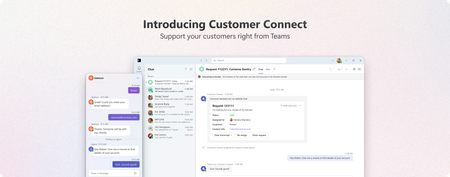
We're excited to announce that Customer Connect web chat in Microsoft Teams (previously called Live Chat) is now available globally, supporting 26 languages and bringing seamless customer engagement to businesses worldwide. For small and medium-sized businesses, every customer interaction matters. Whether someone discovers your business through a Google search, a social media post, or a friend's recommendation, the moment they land on your website is critical. With Customer Connect in Teams, you can now connect with these potential customers instantly no matter where your business is based in the world. A better way to connect with customers Your website is often the first-place potential customers interact with your business. When they have questions, waiting hours or days for an email response isn't ideal – neither for them nor for you. Customer Connect let you respond instantly to website visitors directly within Teams. No more switching tools. What's new with global availability With support for 26 languages, businesses can now provide customer support no matter where you operate. Whether you are based in Tokyo, São Paulo, or Berlin, you can set up Customer Connect to interact with customers in your preferred language. Supported languages Czech, Danish, German, English (Canada), English (United Kingdom), English (United States), Spanish (Chile), Spanish (Spain), Spanish (Mexico), French (Canada), French (France), Hungarian, Indonesian, Italian, Japanese, Korean, Norwegian Bokmål, Dutch, Polish, Portuguese (Brazil), Portuguese (Portugal), Swedish, Thai, Vietnamese, Chinese Simplified (China), Chinese Traditional (Taiwan) Key capabilities Simple setup Add the Customer Connect chat widget to your website in minutes. Configure your welcome message, set your availability, and you're ready to start conversations. Native Teams integration Chats appear alongside your regular Teams conversations. All customer interactions are automatically tracked and organized in Teams channels and Microsoft Lists, giving your team full visibility into every conversation. Customers can also book appointments directly with members of your team, making it easy to schedule follow-ups or provide high touch support. Getting started If you're already using Microsoft 365 Business, Customer Connect is included - no additional licensing required. To enable Customer Connect: Open the Admin app in Teams Configure your Customer Connect chat widget settings Add the chat widget to your website Start receiving and responding to customer chats in Teams Learn more Set up Customer Connect for your business Start a discussion with us Microsoft Teams - Small Business CommunityHelp Shape the Future of Microsoft Teams for Small and Medium Businesses
Have you ever wished Microsoft Teams worked just a little better for the way your business operates? Maybe you've thought: “It would be great if Teams could do this…” “This workflow would be so much simpler if…” “Why isn’t there a feature for…?” Now’s your chance to directly influence what comes next. Microsoft is inviting Small and Medium Business (SMB) customers and partners to join our Customer Advisory Board (CAB) and Partner Advisory Council (PAC) for Microsoft Teams SMB. These groups give you a simple, low-effort way to share real-world feedback with the product team — and help guide the Teams roadmap for SMBs. What are CAB and PAC? Our SMB advisory programs bring together a small group of customers and partners who: Use Teams in their day-to-day business operations Work with SMB customers implementing Teams Have insights into the challenges SMBs face when adopting collaboration tools Want to help improve the products they rely on Through monthly virtual sessions, participants get the opportunity to: ✅ Preview upcoming features and improvements ✅ Provide feedback during early stages of product development ✅ Share what’s working well — and what isn’t ✅ Highlight real-world business scenarios that should be better supported ✅ Influence priorities for SMB-focused innovation in Teams This isn’t a sales call or a support channel — it’s a direct line to the Teams product team. What’s the Commitment? We know SMB leaders, IT decision-makers, and partners are busy. That’s why participation is designed to be: Flexible – Virtual meetings combined with async conversation Low effort – No prep required for most sessions Conversational – Small-group discussions, not presentations Most sessions are informal conversations focused on understanding your business needs and how Teams can better support them. Your input helps us build features that actually reflect how SMBs work — not just how software thinks they should. Why Join? Participants often tell us that one of the biggest benefits of joining CAB or PAC is the opportunity to: Get early visibility into what’s coming next Understand where Teams development is headed Provide feedback that directly reaches the team building the product Help shape experiences that impact SMB customers worldwide Whether you're an SMB customer using Teams internally or a partner working with SMB clients, your perspective matters. Interested in Participating? If you'd like to be considered for the Microsoft Teams SMB Customer Advisory Board or Partner Advisory Council, simply fill out this short interest form: 👉 Express your interest to join the Teams SMB Advisory Board Once submitted, our team will review your response and follow up with more information on next steps.Join us May 6: Learn how Microsoft Teams is helping SMBs thrive
Running a small or medium-sized business means wearing every hat at once — sales lead, customer support, IT admin, and marketing team, often before lunch. The tools you rely on need to keep up without getting in the way. That's exactly the conversation we're hosting next week. On Wednesday, May 6, the Microsoft Teams SMB product team is going live for a focused 40-minute session designed specifically for small and medium businesses. What you'll learn Angela Chin, Principal PM Manager on the Teams SMB team, will walk through the latest updates in Microsoft Teams built with smaller businesses in mind: Get going faster — onboarding improvements that take SMBs from sign-up to collaboration in minutes. Deeper customer connections — features that turn Teams into a front door for your customers. Effortless cross-business collaboration — work with vendors, contractors, and partner businesses as naturally as your own team. Bring your questions Connect directly with the Teams SMB product team, ask questions, and share feedback that shapes the roadmap. Who should attend SMB owners and operators, IT pros supporting smaller businesses, partners and consultants, and anyone evaluating Teams. Save your seat Wednesday, May 6, 2026, 8:05–8:45 AM PT. Free to attend. 👉 Register hereTeams SMB at Microsoft 365 Community Conference
We are looking forward to meeting SMBs and SMB partners attending the Microsoft 365 Community Conference next week. 📅 Learn more about the conference and register today. We have a wonderful lineup of Teams SMB-focused events: 🎤 Teams SMB Breakout Session – Deepening Customer Connections for Your SMB Through Teams Learn about the latest ways Teams is making it easier for SMBs to get started, deeply connect with their customers, and collaborate effectively with other businesses. Thursday, 9:00 AM – 9:45 AM | Oceana Grand 10 (Pacific Resort) ⚡ Teams SMB Lightning Talk – How Teams Helps SMBs Build Real Customer Connections Deep dive into how live chat in Teams is helping SMBs build stronger customer connections. Wednesday, 3:15 PM – 3:35 PM | Microsoft Booth in the Expo Hall 🤝 SMB Meet and Greet Meet other SMBs, SMB partners, and members of the Teams SMB product team. Make a connection, share feedback, and grab some swag stickers made with SMBs in mind. Wednesday, 11:30 AM – 12:30 PM | Caicos 1 🗣️ Teams SMB Roundtables Shape the future of Teams SMB by sharing your feedback and insights. Tuesday, 2:45 PM and Thursday, 10:00 AM | Java Sea 1 (Pacific Resort) 🏢 SMB Office Hours Meet product team members focused on improving Microsoft 365 for SMBs. Share feedback, ask questions, and make connections. Check the conference app for the latest times and venues. Wishing you safe travels to Orlando — see you there!Simplified controls for managing external collaboration in Teams admin center
We know that collaboration with customers, vendors, and partners outside of your small or medium business is critical to your success. We also know that many SMBs have limited IT admin resources, and setup can be a challenge. To make external collaboration setup in Microsoft Teams easier for your SMB, we have introduced a new overview page in Teams admin center that consolidates settings into a single view and have simplified how we describe the settings you can apply. From the new settings, you can select from pre-configured modes that quickly set smart defaults that are right for your business. If your business is open to external collab across chats, calls, meetings, and teams and channels, you can select Open mode to quickly get setup If your business is more conservative, you can select Controlled to align to pre-existing external collab defaults If you want full control of what is enabled and disabled for your business, you can always select Custom as well We're looking forward to hearing your feedback about the new settings experience. Learn more about how you can use these settings, Unified external collab settings managementJoin Us at MVP Summit: Helping SMBs thrive through Teams
The Microsoft MVP Summit is just around the corner, and we’re excited to invite Microsoft MVPs to a Teams SMB–focused conversation designed specifically for you on March 24th at 11 am PDT. The session is exclusive to MVP Summit attendees, and it’s intended for MVPs who work closely with small and medium businesses—or who are passionate about how Microsoft Teams continues to evolve for the SMB audience. Why should MVPs join this session? Engage directly with the Microsoft Teams product team focused on SMB. Share real-world insights and feedback from your customers and partners. Learn how we’re thinking about SMB-specific scenarios and where Teams is heading. Connect with fellow Microsoft MVPs who care deeply about Teams and SMB innovation Attending MVP Summit in person? If you’ll be joining us in Redmond for the MVP Summit, we’d love to meet you face to face. Stop by to say hello, put names to faces, and have an informal, candid conversation with the team. These discussions are invaluable to us—and we’re always eager to hear what’s working well and where we can do better. The MVP Summit is a unique, invitation-only forum for open, two-way dialogue, and this session is all about ensuring that the SMB voice—represented by Microsoft MVPs—continues to shape the future of Teams. We’re looking forward to the conversation and hope to see you there. 👉 summit.microsoft.comAccidental Teams Free deletion email sent out - explanation and FAQs
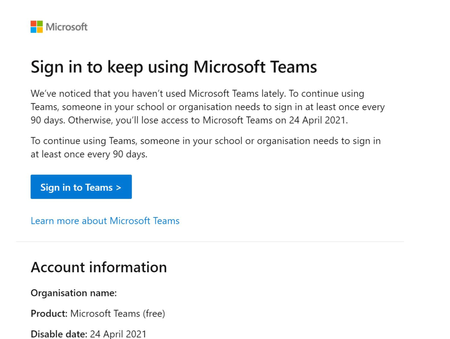
Hi folks - My name is Sam Cosby and I help run the Customer Experience & Obsession side for Teams Free Organizations within the Teams Engineering Team at Microsoft. Thanks for feedback from some Teams Free users on the following thread, as this has helped convey a clear problem that we needed to address. The following post is to explain that particular problem in further detail, with some additional FAQs that should help us understand further for anyone who may have seen this. I'll follow up on this thread once the bug is fully resolved. I received an email stating my trial is ending for Microsoft Teams (Free), but I didn’t sign up for a trial, why did I receive this? Back in January of 2021, there was an implementation of a new method to help reduce the number of Teams Free organizations that go unused over a 90-day period of inactivity by deleting them. Only organizations that did not have any sign-ins during this period and/or the grace period after the 90 days (120 days in total), would eventually become deleted. Unfortunately, there was a bug that sent out notification emails to Teams Free Admins even if their organization was in use during the past 90 days. We’ve since fixed this bug and expect that we shouldn’t see any additional emails be sent out to organizations that have been recently used. Figure 1: Example of accidental email sent out. Will Teams Free still delete in the next few weeks? No, as long as Teams has been in use in the past 90 days. While there are articles out there that have shown Teams Free Admins how to view their license ‘duration’, it’s been confirmed that once the fix goes live that any Teams Free orgs impacted with the above email will be ‘extended’ automatically and won’t have to worry about any data loss. Why does Teams Free have a deleted state? There was a new organization deletion method created back in January of 2021 to help reduce organization clutter by implementing a new deletion policy on organizations that go unused over a 90-day period of inactivity by deleting them. Only Teams Free organizations that did not have any sign-ins during this period and during the 30-day grace period after the 90 days (120 days in total), would eventually become deleted. Will documentation be updated? Yes. We realized that while this new method to help reduce organization clutter was released, the documentation unfortunately did not get updated as expected. We’ll be making changes to this as soon as we can to address the new deletion policies for Teams Free orgs moving forward. What does deleted mean for Teams Free? When the subscription is deleted, customer data is deleted and Azure Active Directory is removed, if not in use by other services. Users can’t access Teams, files/apps/services in this state.Solved9.2KViews4likes6CommentsMicrosoft Teams Engineering Opportunity for Small and Medium Business
Teams Engineering is inviting a limited number of customers to share feedback on Teams applications currently under development to enable high value experiences for small and medium businesses. This program kicked off late 2021 with limited capacity but we are excited to share that we have added a few more spots in the new year. Come join us! Read on to learn more about the opportunity, benefits and next steps if you are interested in participating. Join Teams Engineering to: Explore how Teams capabilities can enable experiences for sales, commerce, customer service, and procurement Directly engage with fun, creative Teams product managers who are passionate about empowering small and medium businesses Connect with other small and medium businesses leveraging Teams Influence Teams product features by sharing your experience and insights Receive Teams stickers and other swag Customers who are accepted into this program will: Participate in live, interactive feedback sessions (estimate two, 60-minute meetings per month) Participate in Teams application validation including potentially testing pre-release code Respond to surveys and other asynchronous feedback methods to provide details on your experiences using the applications Eligible customers: Organization size of 2-300 employees Active Microsoft Teams usage in your production Microsoft 365 tenant Active NDA with Microsoft (don’t worry if you don’t have an NDA in place today – if you are interested in this opportunity, we will help you complete the NDA process as a first step) Next steps: If you are interested in this unique opportunity, and we hope you are, just complete this form to get more information and next steps https://aka.ms/TeamsAppPilot. We have limited space, and participants will be selected on a first come first serve basis.1.2KViews0likes1Comment