skype academy
35 TopicsCall Queues and Auto Attendant trainings updated
Note: Please note that Call Queues and Auto Attendant got another update. For the latest information see http://aka.ms/sa-aacq-blog As announced in last week's blog post What's new for Auto Attendants and Call Queues in July 2017? Call Queues and Auto Attendant got updated with new features and improvements. Korneel Bullens updated the Skype Academy training for Call Queues and Auto Attendant with this latest content. If you have already watched the previous versions of the trainings, you probably want to just review the blog article mentioned above, but if you have not seen the sessions yet, you can leverage them to learn all you need to know about these Cloud PBX features. Please let us know if you have any questions or feedback in the community. Resources: Call queues training Auto Attendant training SOF Auto Attendant and Call Queues training Pptx decks: Attached to this blog (removed outdated content) Looking for more technical training? Please visit Skype Academy This post is brought to you by Skype Academy. Visit Skype Academy for technical trainings and readiness around the Skype Operations Framework.5.9KViews5likes8CommentsRegister now: “What’s new in SOF, July 2017” release webcast
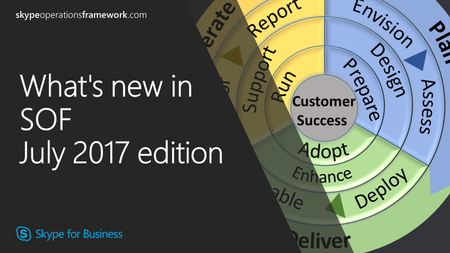
Update: Thank you for your interest in the "What's new in SOF July 2017" session. We have received feedback that this clashes with Inspire so we have taken the decision to act on that feedback and cancel the webcast. Instead we will provide our update via our blog instead, please look out for this update in the week of July 10th. For those of you who are attending the Inspire conference in Washington DC we look forward to meeting you and discussing SOF at the Microsoft booth. The Skype Operations Framework (SOF) team is excited to announce that, in July 2017, we will release the latest update for Skype Operations Framework. In the webcast we will address the changes to SOF since our previous release - register on Skype Academy now! What's new in SOF, July 2017 edition 10 July 2017 from 08:00 AM-09:00 AM PST1.6KViews0likes0CommentsWindows Server 2016 support for Skype for Business Server 2015
We are happy to announce that Skype for Business Server 2015 is supported to run on Windows Server 2016 - if you have the May 2017 update (aka CU5) for Skype for Business Server installed. Please refer to the following resources for more information: Our official support article: Supports to use Windows 2016 as the operating system in Skype for Business Server 2015 The Updated TechNet documentation: Operating systems for Skype for Business Server 2015 Our blog article on CU5: Announcing the release of Skype for Business Server Cumulative Update 5 Any questions or comments? Please let us know in our community! This post is brought to you by Skype Academy. Visit Skype Academy for technical trainings and readiness around the Skype Operations Framework.20KViews12likes19CommentsCall Analytics now in Open Preview
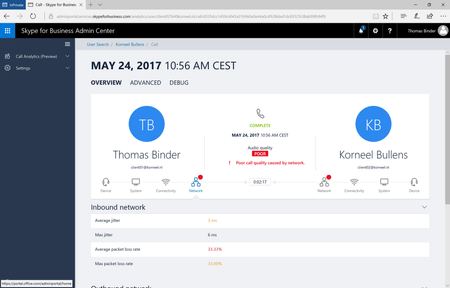
We are happy to share that we moved Call Analytics from "Public Preview" to "Open Preview". This means, while the feature still has preview state, there is no need to sign up for the program - all you need is to go to https://adminportal.services.skypeforbusiness.com/ and sign-in with your administrator account. Call Analytics allows you to look at quality indicators of individual calls. If you want to learn more about please refer to the following resources: Previous blog article: Introducing Call Analytics Official documentation Set up Skype for Business Call Analytics Use Call Analytics to troubleshoot poor Skype for Business call quality What's the difference between Call Analytics and Call Quality Dashboard?15KViews10likes17CommentsSimplified port requirements for Skype for Business Online
Note: This article applies only to Office 365 Worldwide (including Government Community Cloud). For guidance on Office 365 operated by 21 Vianet, Office 365 Germany, Office 365 U.S. Government DoD or Office 365 U.S. Government GCC High click on the respective links. We are happy to announce that the 50,000-59,999 port range (UDP and TCP) is no longer a requirement for Skype for Business endpoints to communicate with Skype for Business Online. Earlier this year we talked about making simplification for network connectivity for Skype for Business Online (see blog article here) and we recently updated our guidance and removed the mentioned port range as a requirement: Office 365 URLs and IP address ranges So which ports are required for clients? All clients need to be able to directly connect to Skype for Business Online on the following destination ports: (the IP addresses and FQDNs can be found in the Office 365 URLs and IP address ranges) TCP 80, 443 UDP 3478, 3479, 3480, 3481 Optional: UDP/TCP 50,000-59,999 Is there a minimum client version required to benefit from the port changes? This change applies to all clients supported against Skype for Business Online. No clients are excluded and there are no specific minimum version required (although we always recommend to run the latest version). Why are these ports not required anymore? To answer this question, it is important to understand first how the 50,000-59,999 ports were used in the first place. (To understand all the details of their purpose, we recommend watching Troubleshoot media flows in Skype for Business across online, server and hybrid.) Let's have the following example: User A wants to call User B For the sake of the example, the direct connection between User A and User B is blocked (e.g. User and User B are at different branch offices behind firewalls), so the media traffic cannot go directly peer to peer and needs to flow via Skype for Business Online There are now the following possible media paths The 50,000-59,999 port range can be leveraged to include only a single Relay Server in the media path Without the 50,000-59,999 port range, the traffic needs to travel via two Relay Server. As you can see, closing the 50,000-59,999 port range will force the traffic to travel via an additional hop. While logic tells us that usually we want to avoid additional hops under all circumstances, the analysis on call quality data has shown us, that this additional hop does not significantly affect call quality - since both these Relay Servers are homed on the Microsoft Network, all traffic between the Relay Servers is sent over a highly reliable pipe designed for real-time communication. Our organization has these ports open, should we close them? Having the 50,000-59,999 port range open can still have (some) benefits when it comes to call setup times and under some circumstances on call quality. However in our data analysis and pilot deployments with some customers these differences did not show significance. If you have the ports open today, it makes sense to leave them open. What does this change for hybrid between Skype for Business Server and Skype for Business Online? This change only applies to users who are homed in Skype for Business Online. If you have an on-premises deployment of Skype for Business, the requirements for your Edge Server to communicate to Skype for Business Online remain unchanged (and also for any Federation scenarios including Skype for Business on-premises). The A/V Edge Server in your environment will need to be configured liked this. Please note that the Source Port is only relevant, if your firewall requires a source port to be specified (and a lot of firewalls do not require this setting): Source IP Destination IP Source Port Destination Port A/V Edge service interface Any UDP 3478 UDP 3478 A/V Edge service interface Any TCP 50,000-59,999 TCP 443 Any A/V Edge service interface Any UDP 3478 Any A/V Edge service interface Any TCP 443 Full requirements for Skype for Business Edge Server can be found here: Edge Server environmental requirements in Skype for Business Server 2015. Does this change anything for Cloud Connector Edition? No, the requirements for Cloud Connector Edition (see Plan for Skype for Business Cloud Connector Edition) remain unchanged. Call to Action Celebrate about the simplified port requirements Update any design templates you might have For future deployments, open only TCP 80, 443 and UDP 3478, 3479, 3480, 3481 per new guideline (and, optionally, 50,000-59,999 UDP and TCP) If you have any questions or comments, please let us know in the community This post is brought to you by Skype Academy. Visit Skype Academy for technical trainings and readiness around the Skype Operations Framework.193KViews18likes63Comments