sharing
17 Topics
Collaborating with Team on Reading Materials
Hi there, We are looking at the best way to collaborate with our group to share books they would recommend to read and then for the rest of the groups to 'like' the recommendation and it to appear in order of most likes. We would share this in a Microsoft Teams Groups - is there anything in teams that could help with this or something we can link outside of teams? Many thanks, Vicky1.2KViews0likes1Comment
Feature request: Share screen window
Hello, I have a large widescreen 35" monitor, and when I share the full-screen other people can't see it all as it shrinks to fit their normal 24" monitor. My request is for a share screen window. This would be like a whiteboard area where I can drag and drop documents for others to see. I know I can switch applications but this become cumbersome when I have different ones to shareSolved1.2KViews2likes2CommentsHide bar at top of teams sharing
Hi all When I share my screen in meetings it involves using a browser i.e. I`m presenting things using google chrome. I get a bar asking me to change my screen size/settings etc on teams. It's frustrating because I have to click away or wait a moment. Is there a way to stop this from appearing?? thanks!Solved456KViews55likes137Comments
File sharing with annonymous during video meeting
Does anyone know if it works below? We disabled Teams option that “annoymous can join the meeting” because it may cause data leakage during Video conference with external resources. Also our Onedrive / Sharepoint file sharing policy is that “Allowing file sharing at the organization level” so we restrict external file sharing. but As far as I know, Teams file sharing is based on Onedrive and Sharepoint policy if we enable “Annoymouse can join the meeting” option,In this case, our employees won't be able to share confidencial files to annoymouses during the video meeting. is this correct? Could you please provide us some clue or simulation result saying that It is true? I would like to have clear evidence it would be great if I can find an official answer from Microsoft. Thank you for your help.Solved1.6KViews0likes4Comments
can not move video files between channels in teams
Good day all, I have an issue with moving video files from one channel in teams to another. The video file size is 258Mb. It acts like it uploads but takes forever and no response in the end. Please any experienced this issue before? Is there a limited file size for moving files on teams? I need an urgent response as It affects productivity in my organization. Thank you.Solved1.8KViews1like3Comments
When screen sharing people see black screen
Hi, I had Thinkpad laptop and was using additional monitor on and off without any issues and suddenly since 2-3 weeks, when I am trying to share my screen, people are just seeing black screen. This is with both option i,e. when using laptop alone and also with additional monitor. Note there were no issues earlier. Last weekend, I got a new laptop which is MS Surface 3, and after installing all MS apps on this machine, I am having the same issue. This is without any additional monitors. This is causing issues for me and my team and would appreciate quick resolution. Thanks and Regards, VirenSolved191KViews4likes53CommentsTeams shows edge tabs, not the window when trying to share, and it does not work
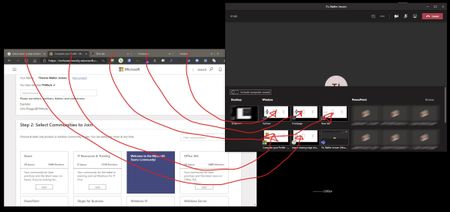
When i am trying to share a Edge Chromium window with Teams, I get all the tabs in the browser shown to share and not just one window. See screen shot. I can select a tab and share but it does not work. Anyone that knows how to fix this. Google Chrome just shows up as one window and works fine no matter how many tabs are open.Solved9.9KViews2likes13Comments
Team freezes when sharing Revit, Indesign and Excel files.
It is a well known issue that Team sometimes freezes when sharing Revit, Indesign and Excel files. A web search gives you an insight. Describes by one of my users " The computer freezes and don’t take commands. “ However, I can hear and see the people on Teams and they can hear me but I can not click on anything or move the mouse. then after maybe a minute the computer dies” Anyone who has a work around or found a way to fix this? Clean install and reinstall dont work, neither does clearing the cache. And it also occurs in the web app. We can always use Zoom in combo with Slack, but it would be nice to have this issue resolved1.9KViews0likes0Comments
My team cannot see the whiteboard
I recently created a new free Teams account and set up my first group, none of whom have a Teams account, so I invited them by creating a browser link. When I tried to share the whiteboard during our first meeting I could open the whiteboard and write on it but nobody could see it. I read that I needed to change some settings in the Teams Admin Center but when I tried to log into it I was told I wasn't allowed because my email address is not a company one. Does this mean that free accounts cannot use file sharing or blackboard?4.1KViews0likes4CommentsBroken-File Sharing across multiple channels via Attach file option- Announcements and Conversations
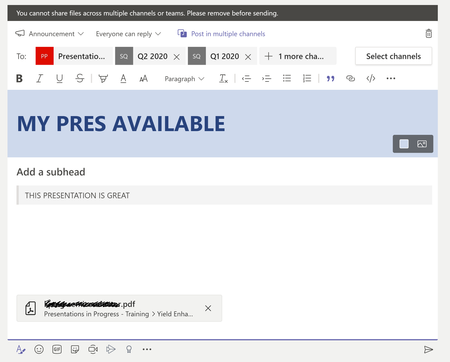
I am trying to create an announcement which includes a file (tried both a link as well as a copy of the file). I tried to post the announcement across multiple teams and channels. This should work according to https://docs.microsoft.com/en-us/microsoftteams/sharing-files-in-teams But it does not. Please see screenshot below, with the error message on top, in the grey bar.Solved1.5KViews0likes2Comments