sharepoint framework (spfx)
14 TopicsMicrosoft 365 & Power Platform product updates call
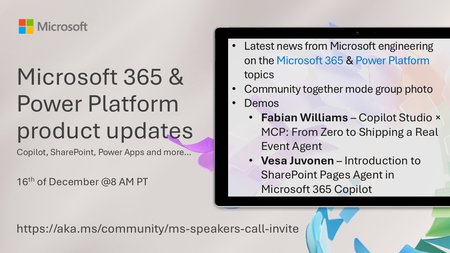
💡Microsoft 365 & Power Platform product updates call concentrates on the different use cases and features within the Microsoft 365 and in Power Platform. Call includes topics like Microsoft 365 Copilot, Copilot Studio, Microsoft Teams, Power Platform, Microsoft Graph, Microsoft Viva, Microsoft Search, Microsoft Lists, SharePoint, Power Automate, Power Apps and more. 👏 Weekly Tuesday call is for all community members to see Microsoft PMs, engineering and Cloud Advocates showcasing the art of possible with Microsoft 365 and Power Platform. 📅 On the 16th of December we'll have following agenda: News and updates from Microsoft Together mode group photo Fabian Williams – Copilot Studio × MCP: From Zero to Shipping a Real Event Agent Vesa Juvonen – Introduction to SharePoint Pages Agent in Microsoft 365 Copilot 📞 & 📺 Join the Microsoft Teams meeting live at https://aka.ms/community/ms-speakers-call-join 👋 See you in the call! 🎅🎄 Notice that this call is on a holiday break after 16th of December call and back on 13th of January 2026. 💡 Building something cool for Microsoft 365 or Power Platform? We are always looking for presenters - Volunteer for a community call demo at https://aka.ms/community/request/demo 📖 Resources: Previous community call recordings and demos from the Microsoft Community Learning YouTube channel at https://aka.ms/community/youtube Microsoft 365 & Power Platform samples from Microsoft and community - https://aka.ms/community/samples Microsoft 365 & Power Platform community details - https://aka.ms/community/home171Views0likes0CommentsMicrosoft 365 & Power Platform Community call - Community demos
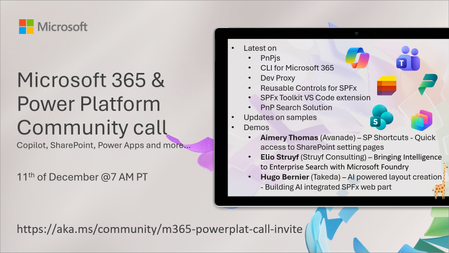
💡 Microsoft 365 & Power Platform Development bi-weekly community call focuses on different use cases and features within the Microsoft 365 and Power Platform - across Microsoft 365 Copilot, Copilot Studio, SharePoint, Power Apps and more. 👏 Looking to catch up on the latest news and updates, including cool community demos, this call is for you! 📅 On 11th of December we'll have following agenda: Copilot prompt of the week SharePoint Framework roadmap update from Microsoft Latest on PnPjs project Latest on CLI for Microsoft 365 Latest on Dev Proxy Latest on reusable controls for SPFx Latest on SPFx Toolkit VS Code extension Latest on PnP Search solution for enterprise search Latest on SPFx samples Picture time with the Together Mode! Aimery Thomas (Avanade) – SP Shortcuts - Quick access to SharePoint setting pages Elio Struyf (Struyf Consulting) – Bringing Intelligence to Enterprise Search with Microsoft Foundry Hugo Bernier (Takeda) – AI powered layout creation - Building AI integrated SPFx web part 📅 Download recurrent invite from https://aka.ms/community/m365-powerplat-dev-call-invite 📞 & 📺 Join the Microsoft Teams meeting live at https://aka.ms/community/m365-powerplat-dev-call-join 👋 See you in the call! 📖 Resources: Previous community call recordings and demos from the Microsoft Community Learning YouTube channel at https://aka.ms/community/youtube Microsoft 365 & Power Platform samples from Microsoft and community - https://aka.ms/community/samples Microsoft 365 & Power Platform community details - https://aka.ms/community/home 🧡 Sharing is caring!264Views0likes0Comments
Unable to configure 'Files tab' in Teams Group
Hi, I would like to provide some custom functionallity to the default document library from the teams sites. But I can't configure the default 'Files Tab': If I use a SPFx extension is not rendered in this application You can't configure it using Teamsfx neither If you try to remove this tab using Graph, It's fordibben If you try to apply a TeamsFilePolicy through MicrosoftTeams, you can't apply the policy scope to just one group team, it applies to the tenant So, I don't really understand how I should handle this: The format view from JSON is limited. The customization of the form using only SP default behavior is limited. If I add one more Tab with the SharePoint Connector It renders as inside SharePoint and I'm able to use the SPFx extensions. But how can I remove the default 'Files tab' from some groups without removing it from all the group sites? I mean, it's a bit exaggerated to apply one tenant-level-policy just to be abe to render a Field customization extension, but there is any option at all? Thanks, Best regards446Views0likes0CommentsBringing Open AI into an Outlook add-in: moving to Azure Open AI
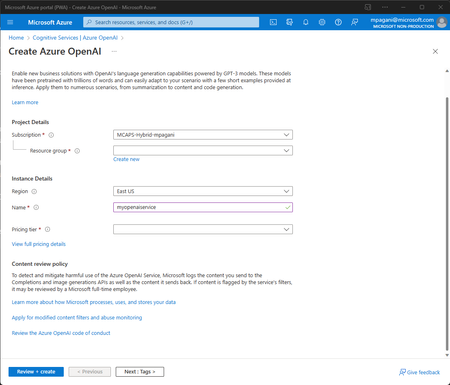
In the previous post we have learned how to use AI to help users write better business mails. We developed an add-in for Outlook that, using the AI models and the APIs provided by Open AI, can generate a business mail starting from one or two sentences and, using the Office SDK, to include it into the body of the mail. For this sample project, we have directly leveraged the APIs provided by Open AI. We created an account on their website and we obtained an API key required to manage the authentication. But what if you're an enterprise customer and you're already using Azure to host many of your applications and services? It would be great if there was a way to use the powerful models of Open AI, but leveraging at the same time the security, privacy and billing provided by Azure. Well, actually, this way exists and it's the Azure Open AI service, which is part of the Cognitive Services family. Thanks to a partnership between Open AI and Microsoft, the same exact models that you can use with the Open AI APIs are available on Azure. The way they work is very similar, but the main difference is that the whole hosting infrastructure will be provided by Azure, with all its benefits around scaling and security. In this post we're going to replace the Open AI API implementation we did the last time with a new one based on Azure Open AI.12KViews2likes1Comment
How to create custom section layout options for SharePoint online modern site pages?
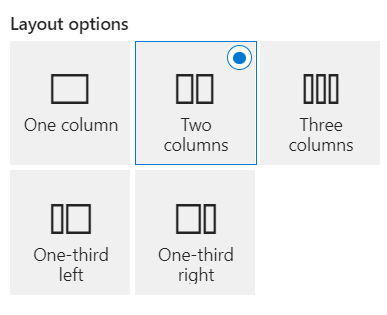
Hello Everyone, SharePoint provides default layout options below as mentioned in the screenshot. How can we create custom section layout options as per our needs? If there are any ways to create custom section layout options then please let me know your thoughts on the same. Can anyone help me with the same? Thanks1.7KViews0likes1CommentSPFx app customizer not loading on using browser back button
Hi, I am having a simple SPFx app customizer to display the site owner information on all modern pages of SP2019 site. There are links on the page that take us to different sites that run on classic mode. Now when we try to click on back button to get back to the modern site page, the app customizer does not get displayed. But after we refresh that page once, it gets displayed. Any idea what would be causing this issue?935Views0likes1CommentMicrosoft Teams tab using SharePoint Framework always interact with SharePoint Online root site
Hello Everyone, I need to create an SPFx web part that supports SharePoint Online as well as Teams So, I have created the SPFx web part to generate the app package, and added that app package to SharePoint online as suggested below links, https://learn.microsoft.com/en-us/samples/officedev/microsoft-teams-samples/officedev-microsoft-teams-samples-tab-channel-group-spfx/ https://siddharthvaghasia.com/2019/06/09/adding-spfx-webpart-to-microsoft-team-tab/ The SPFx Teams Tab deployed successfully in the Team, But the associated lists are created under the root site. Can I change the destination of the list from the root site to another site? Thanks810Views0likes3Comments
SPFx webparts not able to acquire token for Graph API in Teams app (Viva Connections)
Hi all, There is a very strange thing happening to a few webparts that we've build for one of our clients. We haven't seen this problem in other tenants, it seems to be related to this specific tenant. Maybe it's a setting, or maybe it's a bug. Hopefully someone can help us. This is the case: We have created a SharePoint intranet site and made it the root site. We then added the site to the Viva Connections integration in Teams, as an app. On this site we have a couple of custom webparts that we created. One of the webparts have been used in many intranet sites and haven't had these problems so far. The problem also isn't occurring on SharePoint itself. The problem is connecting to the Graph API, the token doesn't seem to be retrieved and thus the API requests are not even send to the Graph API. Environment details: Microsoft Egde version 115.0.1901.183 (Official build) (64-bit) SPFx 1.17.4 Node 16.15.1 NPM 8.11.0 The error I'm getting: Uncaught (in promise) Error: Token request previously failed at new t (chunk.aadTokenProvider_en-us_445a72773ba77a61be93.js:1:1514) at e._getTokenInternal (chunk.aadTokenProvider_en-us_445a72773ba77a61be93.js:1:3567) at e.getToken (chunk.aadTokenProvider_en-us_445a72773ba77a61be93.js:1:2372) at sp-pages-assembly_en-us_c3c628b67d521769ee27f473c0ed9543.js:76:647657 The request that might be the problem: https://tenant.sharepoint.com/_api/Microsoft.SharePoint.Internal.ClientSideComponent.Token.AcquireOBOToken?resource=%27https://graph.microsoft.com%27&clientId=%2775aff87b-45bf-41e7-84f3-552901a72ea0%27 Results in an 500 internal server error with the following message: { "odata.error": { "code": "-1, System.AggregateException", "message": { "lang": "en-US", "value": "One or more errors occurred." } } } I found this issue https://github.com/SharePoint/sp-dev-docs/issues/7884 which seems to be related to mine or at least gives the same error, but the resolution there doesn't apply here sadly. The manifest is already in the right format and with the correct data. Also cross referenced the manifest with other, working tenants At this point I have no clue on what the cause of the issue is, could any of you help me with this problem? Kind regards, ArjenSolved5.2KViews0likes4Comments
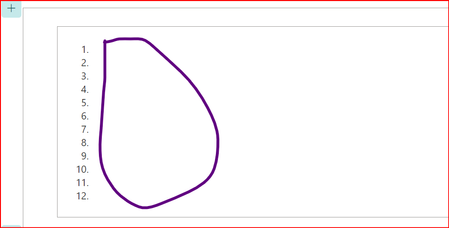
how to get SP site contents list ?but getting blank values from SP in SPFX webpart
Hi Team, I am trying to get SP Site contents list (Get SP lists) using React component framework but getting blank Please find the below code file //this is WebPart Render method File public render(): void { const element: React.ReactElement<IGetSpListsProps> = React.createElement( GetSpLists, { description: this.properties.description, websiteUrl: this.context.pageContext.web.absoluteUrl }); ReactDom.render(element, this.domElement); } //Component Interface file export interface IGetSpListsProps { description: string; websiteUrl: string; } //Component TSX file export interface IGetSpListsState{ sitecontents: [{"Lists":""}] } export default class GetSpLists extends React.Component<IGetSpListsProps, IGetSpListsState> { static siteurl:string =""; //static member variable public constructor (props :IGetSpListsProps, state:IGetSpListsState ){ super(props); this.state={sitecontents: [{"Lists":""}]}; GetSpLists.siteurl=this.props.websiteUrl; } public componentDidMount() { let reactcontexthandiler= this; jquery.ajax({ url: `${GetSpLists.siteurl}/_api/web/lists?select=Title&$filter=Hidden eq true`, type:"GET", headers:{'Accept': 'application/json;odata=verbose;'}, success : function (resultData){ reactcontexthandiler.setState({sitecontents: resultData.d.results}); }, error: function (jqXHR, textStatus, errorthrown){ } }); } public render(): React.ReactElement<IGetSpListsProps> { return ( <div> <ol> { this.state.sitecontents.map(function(mylists,mylistitemkey){ return( <li> <span>{mylists.Lists}</span> </li>); }) } </ol> </div> );}} Please find the output which it shows for the above piece of code please assist me why it shows blank475Views0likes0CommentsBuild a Viva Connections card to display stock prices - Part 3: deployment and security
Welcome to the final post in the series about building a Viva Connections card to display stock prices! After building the backend in the first post and the card in the second post, now it's time to deploy our solution and to take a deeper look at the security of our API.