sharepoint embedded
94 TopicsSharePoint Embedded Brings Microsoft 365 Copilot, Collaboration, Security & Compliance to Your App
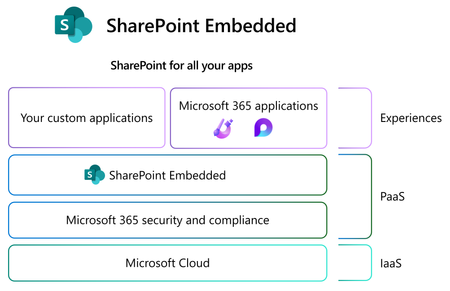
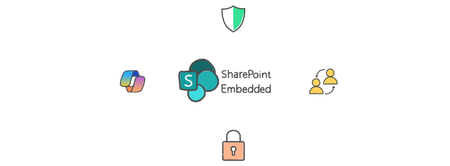
Join this webinar to learn how SharePoint Embedded Brings Microsoft 365 Copilot, Collaboration, Security & Compliance to Your App SharePoint Embedded, is a new way to build custom content apps for enterprises and ISVs. SharePoint Embedded offers a headless, API-only pattern to build content apps that integrate Microsoft 365 capabilities like copilot, collaboration, security, and compliance into any app by storing content inside an enterprise’s existing Microsoft 365 tenant. Please share any questions that you would like our experts to address in the comments below. This will be a live stream video directly on this event page.8.1KViews6likes54CommentsSharePoint Embedded Hello, World: Getting Started
SharePoint Embedded is a new way to deliver Microsoft 365 capabilities like compliance, collaboration, Copilot, and core files and document storage as part of any app. Join us for a free SharePoint Embedded webinar where you’ll learn the basics and refine your SharePoint Embedded skills. This one-hour session will help you get ready to set up your first SharePoint Embedded app and get comfortable with SharePoint Embedded features. Please share any questions that you would like our experts to address in the comments below. This will be a live stream video directly on this event page.5.9KViews7likes21CommentsSharePoint Embedded & M-Files: powering a new wave of industry agents for document management
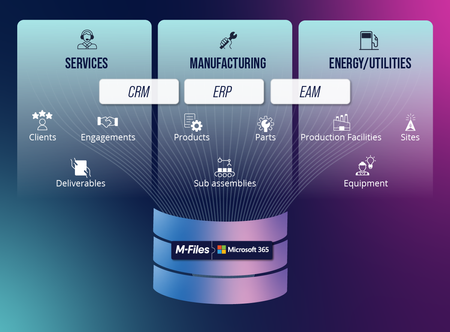
Today, July 1, 2025 marks a new era in the document management industry, and a new chapter for SharePoint as the world's leading document management platform. Today we share the news that M-Files has announced that they are using SharePoint Embedded to natively store their customers' content in Microsoft 365. By natively leveraging SharePoint Embedded, M-Files is enhancing its deep portfolio of solutions with the full richness of Microsoft 365, Purview, and Copilot. We are thrilled to deepen the long-standing partnership between M-Files and Microsoft for the benefit of our mutual customers beyond the existing integrations into Office, Teams, Dynamics, and more that M-Files provides. Let's take a look at what this means for the new era of document management... M-Files has always been known for excelling in high value solutions for accounting, tax & audit, wealth management, consulting, engineering, energy & utilities, scientific research, insurance brokers and manufacturing. With deep integration into line of business systems commonly used in these sectors, and extensive metadata, business objects, and advanced document management capabilities, they have built formidable expertise in these verticals. However, until today, when choosing another document management platform from a competitor, customers had to make the difficult choice to lose the benefits of Microsoft 365 as the content would be stored in a separate repository. Losing features such as fully native co-authoring, the best security and compliance in the industry with Microsoft Purview, and direct support with Copilot and the rest of the features of Microsoft 365 in order to get the deepest industry solutions and line of business system integration, was a painful choice. Starting today, customers no longer have to choose. M-Files now leverages SharePoint Embedded as the storage layer for their platform. This means M-Files customers' content lives within the security boundary of Microsoft 365 with full Purview support. Everyone gets completely native co-authoring and sharing exactly like they do in OneDrive or SharePoint thanks to SharePoint Embedded. Microsoft Search can find and index the content without any connectors. Most importantly, Copilot can reason over the content in M-Files and a whole new generation of agents can be delivered with curated, AI-ready content that customers have long stored in M-Files. Considering the vast amount of industry content that customers already store in M-Files, unlocking that for use with Copilot and being able to build new agents for professional services, manufacturing and energy & utilities and all of the other verticals that M-Files specializes in is an exciting new era for document management. Customers no longer have to choose between the "system of record" and the "system of engagement". The time to securely enable all this high value content for the AI-driven future has arrived. At Microsoft our mission is to empower every person and every organization on the planet to achieve more. We are proud to empower M-Files and all of their customers to achieve more in the era of AI by building on SharePoint Embedded! To learn more about the partnership and capabilities available today from M-Files built on SharePoint Embedded, click here. To learn more about SharePoint Embedded, the best way to store documents and build AI-focused applications, click here.5.4KViews6likes0CommentsAnnouncing SharePoint Embedded Fall Tour Events and Schedule
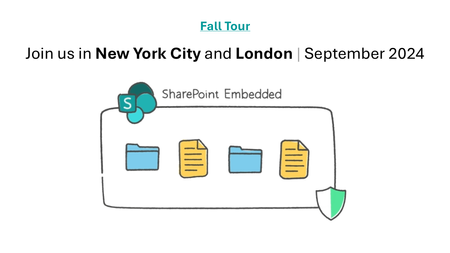
Kick off your journey with SharePoint Embedded. At the SharePoint Embedded for Enterprise Apps events - NYC and London (September 2024), you'll explore best practices for your projects, glimpse the future of SharePoint Embedded, and learn to integrate Copilot into document-centric apps.3.9KViews1like0CommentsNew Sharepoint List form width issue
Hi, I have a Sharepoint list and I have customized the Sharepoint list form header and body with Json code. Recently due to change the Microsoft sharepoint forms it’s showing a small form in the middle without being connected to the page. Any way to go back to large form with width ? Any solution will be highly appreciated.2.7KViews1like4CommentsMGDC for SharePoint and SharePoint Embedded
1. MGDC for SharePoint and SharePoint Embedded In this post, we’ll discuss how to use data from Microsoft Graph Data Connect (MGDC) for SharePoint to understand how SharePoint Embedded is being configured and used in your tenant. If you’re new to MGDC, get an overview at https://aka.ms/SharePointData. If you’re not familiar with SharePoint Embedded, check this Overview of SharePoint Embedded. 2. Introduction SharePoint Embedded is an API-only solution to use the power of the Microsoft 365 file and document storage platform. You can use it to build applications that expose Microsoft 365 features including those from Office, Purview and Copilot. The SharePoint Embedded files are stored in “File Storage Containers”, created by your enterprise applications or a third-party application. 3. MGDC for SharePoint and SharePoint Embedded One important detail is that MGDC for SharePoint sees these containers and files used by SharePoint Embedded. You can see the Containers (under Sites), the permissions granted and even each individual file inside the Containers. 4. Web Template Id To filter sites for SharePoint Embedded containers, just look for SharePoint Sites in MGDC that have the RootWeb.WebTemplateId of 70. This is used to differentiate this scenario, in the same way that OneDrives are sites with the RootWeb.WebTemplateId of 21. You can also check for the RootWeb.Template, which shows as “CSPCONTAINER” for SharePoint Embedded. A typical container for SharePoint Embedded will show in the SharePoint Sites datasets like this: { "ptenant": "00000001-0000-0000-0000-000000000000", "Id": "00000002-0000-0000-0000-000000000000", "Url": "https://tenantname.sharepoint.com/contentstorage/CSP_00000009-0000-0000-0000-000000000000", "ArchiveState": "None", "RootWeb": { "Configuration": 0, "Id": "00000003-0000-0000-0000-000000000000", "Title": "Ideas", "WebTemplate": "CSPCONTAINER", "WebTemplateId": 70, "LastItemModifiedDate": "2025-01-10T22:55:18.000Z" }, "WebCount": 1, "StorageQuota": 27487790694400, "StorageUsed": 149186, "StorageMetrics": { "MetadataSize": 8506, "TotalFileCount": 2, "TotalFileStreamSize": 41924, "TotalSize": 149186 }, "GroupId": "00000000-0000-0000-0000-000000000000", "GeoLocation": "CAN", "IsInRecycleBin": false, "RecycleBinItemCount": 0, "RecycleBinItemSize": 0, "SecondStageRecycleBinStorageUsage": 0, "IsTeamsConnectedSite": false, "IsTeamsChannelSite": false, "TeamsChannelType": "None", "IsCommunicationSite": false, "IsHubSite": false, "HubSiteId": "00000000-0000-0000-0000-000000000000", "IsOneDrive": false, "BlockAccessFromUnmanagedDevices": false, "BlockDownloadOfAllFilesOnUnmanagedDevices": false, "BlockDownloadOfViewableFilesOnUnmanagedDevices": false, "IsExternalSharingEnabled": true, "ShareByEmailEnabled": true, "ShareByLinkEnabled": true, "SensitivityLabelInfo": {}, "IBMode": "Open", "RelatedGroupId": "00000000-0000-0000-0000-000000000000", "Owner": { "Name": "System Account" }, "SecondaryContact": {}, "ReadLocked": false, "ReadOnly": false, "CreatedTime": "2025-01-09T22:54:50Z", "LastSecurityModifiedDate": "2025-01-09T22:57:11Z", "Operation": "Full", "LastUserAccessDate": "2025-01-09T22:54:51Z", "SnapshotDate": "2025-01-11T00:00:00Z" } Note: In all the sample JSON objects shown in this post, ids were redacted with zeros. You can learn more about how SharePoint uses WebTemplateId to identify the type of site at MGDC for SharePoint FAQ: Is OneDrive included? 5. Permissions The SharePoint Permissions dataset includes all the permissions granted for all the several types of SharePoint content, including OneDrive, Teams-connected sites, and SharePoint Embedded containers. Granular permissions by folder and individual files are also included. Here’s a typical object from the SharePoint Permissions dataset: { "ptenant": "00000001-0000-0000-0000-000000000000", "SiteId": "00000002-0000-0000-0000-000000000000", "WebId": "00000003-0000-0000-0000-000000000000", "ListId": "00000004-0000-0000-0000-000000000000", "ItemType": "File", "ItemURL": "contentstorage/CSP_00000009-0000-0000-0000-000000000000/Document Library/LoopAppData/ProjectBlue.loop", "FileExtension": "loop", "RoleDefinition": "Contribute", "LinkId": "00000005-0000-0000-0000-000000000000", "ScopeId": "00000006-0000-0000-0000-000000000000", "LinkScope": "Organization", "SharedWithCount": [], "SharedWith": [], "Operation": "Full", "SnapshotDate": "2025-01-11T00:00:00Z", "ShareCreatedBy": { "Type": "User", "Name": "Test User", "Email": "test@tenantname.onmicrosoft.com", "UPN": "test@tenantname.onmicrosoft.com" }, "ShareCreatedTime": "2025-01-09T22:55:51Z", "ShareLastModifiedBy": { "Type": "User", "Name": "Test User", "Email": "test@tenantname.onmicrosoft.com", "UPN": "test@tenantname.onmicrosoft.com" }, "ShareLastModifiedTime": "2025-01-09T22:55:51Z", "ListItemId": 4, "UniqueId": "00000007-0000-0000-0000-000000000000" } Note: The example above shows a single Contribute permission to a Loop file using a sharing link. Loop uses SharePoint Embedded to store files and it’s something you can easily configure and test in your tenant. MGDC for SharePoint will show all permissions granted in SharePoint Embedded containers, included permissions granted at various levels of the SharePoint hierarchy (site, web, library, folder, or file) and diverse types of security principals (users, SharePoint groups and Entra ID groups, internal or external). You can learn more about it at MGDC for SharePoint FAQ: What is in the Permissions dataset? 6. Files Finally, you can get a complete list of every file inside the SharePoint Embedded containers, including details like file name, size, author, last modifier and more. Here’s a typical object from the SharePoint Files dataset: { "ptenant": "00000001-0000-0000-0000-000000000000", "SiteId": "00000002-0000-0000-0000-000000000000", "Author": { "Name": "Test User", "Email": "test@tenantname.onmicrosoft.com" }, "DirName": "Document Library/LoopAppData", "Extension": "loop", "FileName": "ProjectBlue.loop", "IsLabelEncrypted": false, "ItemId": "00000008-0000-0000-0000-000000000000", "ListId": "00000004-0000-0000-0000-000000000000", "ListServerTemplate": "DocumentLibrary", "MajorVersion": 4, "MinorVersion": 0, "ModifiedBy": { "Name": "Test User", "Email": "test@tenantname.onmicrosoft.com" }, "Operation": "Full", "ScopeId": "00000006-0000-0000-0000-000000000000", "SensitivityLabelInfo": {}, "SiteUrl": "https://tenantname.sharepoint.com/contentstorage/CSP_00000009-0000-0000-0000-000000000000", "SizeInBytes": 24301, "SizeInBytesWithVersions": 57765, "TimeCreated": "2025-01-09T22:55:08Z", "TimeLastModified": "2025-01-09T22:56:13Z", "WebId": "00000003-0000-0000-0000-000000000000", "WebTemplateId": 70, "SnapshotDate": "2025-01-11T00:00:00Z" } Note: SharePoint Embedded does not support minor versions, so the “MinorVersion” column in the Files dataset will always show zero in this scenario. For details, check the schema for the SharePoint Files dataset. 7. Filtering You can easily download entire datasets and use Azure Data Tools to filter for rows where WebTemplateId is 70. For Sites and Files, there is also a mechanism to filter at the source, so you pull from Microsoft Graph Data Connect only the data related to SharePoint Embedded. The same filtering mechanism can be used to pull data just for a specific site, filtered by Id. For details, check this article about Filtering SharePoint dataset at the source. 8. Conclusion I hope this post helped you understand how to use MGDC for SharePoint to gather information about SharePoint Embedded containers and files. For more information, visit https://aka.ms/SharePointData.