shared
3 Topics
OneDrive Shared Files Not Appearing in “Shared” or Windows 11 File Explorer
Hi everyone, I'm experiencing some issues with shared files in my personal OneDrive and was wondering if anyone has encountered a similar problem or knows how to fix it. Here's the situation: I've shared several Excel files with a friend. Whenever I share a file, she receives an email with a link that allows her to open and edit it without any problems. However, despite the sharing process being successful, the files don't appear in her “Shared” or “Shared with you” section, either on the OneDrive website or in the OneDrive folder on her Windows 11 PC. The only way she can access the files is by going back to the original sharing emails and clicking the links each time. I've already checked the permissions, and both read and write access are correctly configured. However, I haven't been able to find a way to make the files appear directly in her OneDrive or have them synced to her PC. Does anyone have any suggestions or know how to resolve this issue? Thanks in advance for your help!119Views0likes1CommentShare a single folder with multiple viewers
Hi, I'm searching what's the right subscription to buy to get this: My requirements: share a single folder (containing 10 million photos) with 100 read-only viewers view photos as gallery different folder password for each viewer not requiring viewers to create an account or log in capability to manually disable the password/access of a user of my choice What package do I need to buy to get this? 365? 365 Family? One Drive Enterprise ? 365 Business Basic ? 365 Business Standard? Other? Thanks218Views0likes1Comment
Shared folder sync not possible anymore?! Workaround?
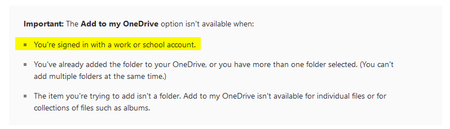
Hi guys We are using the OneDrive for Business. (Work) Around 6 months ago, I made a OD share with my colleague from the same organization. He was able to sync this share on his machine with the local OneDrive client. My colleague had a breake for 6 months, during this time he was not working on that share. Today he starts again with the work. We realized that it's not possible anymore, to sync the shared folder (where Im the owner of the share) with his local OneDrive Client. Accessing to the share over web is no problem. Why is that so? Is there a workaround? If not, this fact would make the cooperation work over OneDrive really useless. After research I did find this information: Source: https://support.office.com/en-us/article/add-and-sync-shared-folders-to-onedrive-8a63cd47-1526-4cd8-bd09-ee3f9bfc1504 Thank you in advance.Solved8.8KViews0likes3Comments